DEV SUMMIT 2017 EXTENDED
Tensorflow Windows Installation
Object Recognition Demo
Marwa Ayad Mohamed
WTM Cairo Leader
DEV SUMMIT 2017 EXTENDED
Agenda
• Software tools requirement
• Python 3.5.x.
• Microsoft Visual C++ 2015 Redistributable.
• Installing python
• Installing TensorFlow on Windows
• Hello, TensorFlow!
• TensorFlow Image Recognition Demo
DEV SUMMIT 2017 EXTENDED
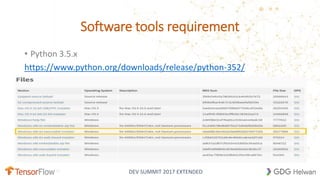
Software tools requirement
• Python 3.5.x
https://www.python.org/downloads/release/python-352/
DEV SUMMIT 2017 EXTENDED
Installing python
DEV SUMMIT 2017 EXTENDED
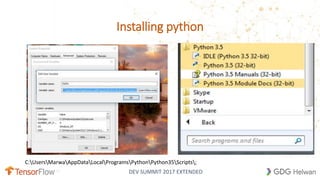
Installing python
C:UsersMarwaAppDataLocalProgramsPythonPython35Scripts;
DEV SUMMIT 2017 EXTENDED
Installing TensorFlow on Windows
• Determine which TensorFlow to install.
• TensorFlow with CPU support only. If your system does not have a NVIDIA® GPU
• TensorFlow with GPU support.
• the mechanism by which you install TensorFlow.
• "native" pip (Recommended )
• Native pip installs TensorFlow directly on your system without going through a virtual environment.
• Anaconda (not officially supported)
• you may use conda to create a virtual environment.
• https://www.tensorflow.org/install/install_windows
DEV SUMMIT 2017 EXTENDED
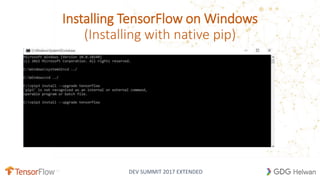
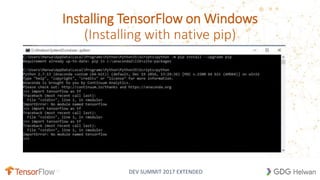
Installing TensorFlow on Windows
(Installing with native pip)
DEV SUMMIT 2017 EXTENDED
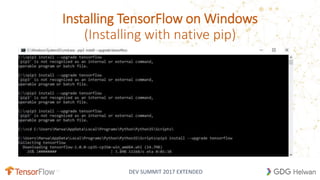
Installing TensorFlow on Windows
(Installing with native pip)
DEV SUMMIT 2017 EXTENDED
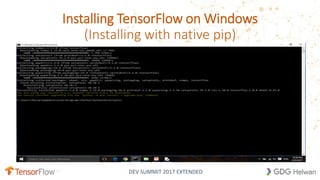
Installing TensorFlow on Windows
(Installing with native pip)
DEV SUMMIT 2017 EXTENDED
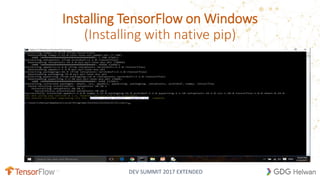
Installing TensorFlow on Windows
(Installing with native pip)
DEV SUMMIT 2017 EXTENDED
Installing TensorFlow on Windows
(Installing with native pip)
DEV SUMMIT 2017 EXTENDED
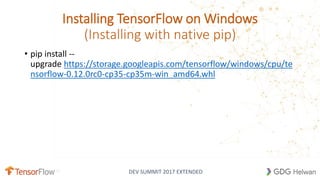
Installing TensorFlow on Windows
(Installing with native pip)
• pip install --
upgrade https://storage.googleapis.com/tensorflow/windows/cpu/te
nsorflow-0.12.0rc0-cp35-cp35m-win_amd64.whl
DEV SUMMIT 2017 EXTENDED
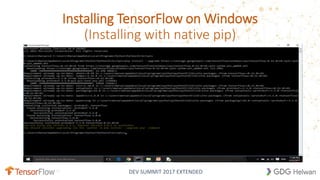
Installing TensorFlow on Windows
(Installing with native pip)
DEV SUMMIT 2017 EXTENDED
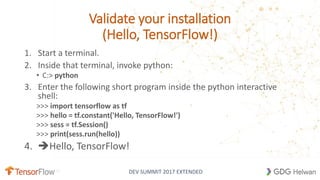
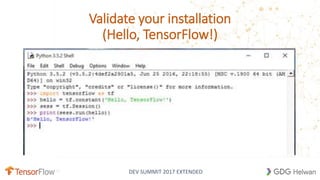
Validate your installation
(Hello, TensorFlow!)
1. Start a terminal.
2. Inside that terminal, invoke python:
• C:> python
3. Enter the following short program inside the python interactive
shell:
>>> import tensorflow as tf
>>> hello = tf.constant('Hello, TensorFlow!')
>>> sess = tf.Session()
>>> print(sess.run(hello))
4. Hello, TensorFlow!
DEV SUMMIT 2017 EXTENDED
Validate your installation
(Hello, TensorFlow!)
DEV SUMMIT 2017 EXTENDED
Image Recognition
DEMO
• We're now taking the next step by releasing code for running image
recognition on our latest model, Inception-v3.
• Inception-v3 is trained for the ImageNet Large Visual Recognition
Challenge using the data from 2012.
• The models try to classify entire images into 1000 classes,
like "Zebra", "Dalmatian", and "Dishwasher".
DEV SUMMIT 2017 EXTENDED
Image Recognition
DEMO
• https://github.com/tensorflow/models
• git clone https://github.com/tensorflow/models
DEV SUMMIT 2017 EXTENDED
Image Recognition
DEMO
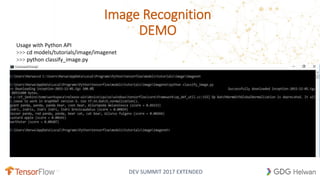
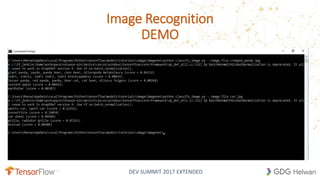
Usage with Python API
>>> cd models/tutorials/image/imagenet
>>> python classify_image.py
DEV SUMMIT 2017 EXTENDED
Image Recognition
DEMO
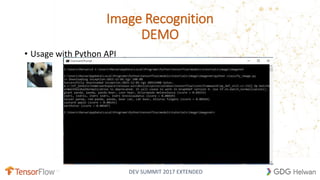
• Usage with Python API
DEV SUMMIT 2017 EXTENDED
Image Recognition
DEMO
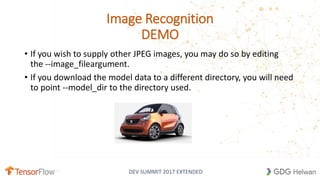
• If you wish to supply other JPEG images, you may do so by editing
the --image_fileargument.
• If you download the model data to a different directory, you will need
to point --model_dir to the directory used.
DEV SUMMIT 2017 EXTENDED
Image Recognition
DEMO
DEV SUMMIT 2017 EXTENDED
https://www.facebook.com/WTM.Cairo/
Engmarwaayad@gmail.com
https://eg.linkedin.com/in/marwa-ayad-mohamed-0a405215
http://www.slideshare.net/marwamarwa3/tensorflow-
72291568

Tensorflow windows installation

  • 1.
    DEV SUMMIT 2017EXTENDED Tensorflow Windows Installation Object Recognition Demo Marwa Ayad Mohamed WTM Cairo Leader
  • 2.
    DEV SUMMIT 2017EXTENDED Agenda • Software tools requirement • Python 3.5.x. • Microsoft Visual C++ 2015 Redistributable. • Installing python • Installing TensorFlow on Windows • Hello, TensorFlow! • TensorFlow Image Recognition Demo
  • 3.
    DEV SUMMIT 2017EXTENDED Software tools requirement • Python 3.5.x https://www.python.org/downloads/release/python-352/
  • 4.
    DEV SUMMIT 2017EXTENDED Installing python
  • 5.
    DEV SUMMIT 2017EXTENDED Installing python C:UsersMarwaAppDataLocalProgramsPythonPython35Scripts;
  • 6.
    DEV SUMMIT 2017EXTENDED Installing TensorFlow on Windows • Determine which TensorFlow to install. • TensorFlow with CPU support only. If your system does not have a NVIDIA® GPU • TensorFlow with GPU support. • the mechanism by which you install TensorFlow. • "native" pip (Recommended ) • Native pip installs TensorFlow directly on your system without going through a virtual environment. • Anaconda (not officially supported) • you may use conda to create a virtual environment. • https://www.tensorflow.org/install/install_windows
  • 7.
    DEV SUMMIT 2017EXTENDED Installing TensorFlow on Windows (Installing with native pip)
  • 8.
    DEV SUMMIT 2017EXTENDED Installing TensorFlow on Windows (Installing with native pip)
  • 9.
    DEV SUMMIT 2017EXTENDED Installing TensorFlow on Windows (Installing with native pip)
  • 10.
    DEV SUMMIT 2017EXTENDED Installing TensorFlow on Windows (Installing with native pip)
  • 11.
    DEV SUMMIT 2017EXTENDED Installing TensorFlow on Windows (Installing with native pip)
  • 12.
    DEV SUMMIT 2017EXTENDED Installing TensorFlow on Windows (Installing with native pip) • pip install -- upgrade https://storage.googleapis.com/tensorflow/windows/cpu/te nsorflow-0.12.0rc0-cp35-cp35m-win_amd64.whl
  • 13.
    DEV SUMMIT 2017EXTENDED Installing TensorFlow on Windows (Installing with native pip)
  • 14.
    DEV SUMMIT 2017EXTENDED Validate your installation (Hello, TensorFlow!) 1. Start a terminal. 2. Inside that terminal, invoke python: • C:> python 3. Enter the following short program inside the python interactive shell: >>> import tensorflow as tf >>> hello = tf.constant('Hello, TensorFlow!') >>> sess = tf.Session() >>> print(sess.run(hello)) 4. Hello, TensorFlow!
  • 15.
    DEV SUMMIT 2017EXTENDED Validate your installation (Hello, TensorFlow!)
  • 16.
    DEV SUMMIT 2017EXTENDED Image Recognition DEMO • We're now taking the next step by releasing code for running image recognition on our latest model, Inception-v3. • Inception-v3 is trained for the ImageNet Large Visual Recognition Challenge using the data from 2012. • The models try to classify entire images into 1000 classes, like "Zebra", "Dalmatian", and "Dishwasher".
  • 17.
    DEV SUMMIT 2017EXTENDED Image Recognition DEMO • https://github.com/tensorflow/models • git clone https://github.com/tensorflow/models
  • 18.
    DEV SUMMIT 2017EXTENDED Image Recognition DEMO Usage with Python API >>> cd models/tutorials/image/imagenet >>> python classify_image.py
  • 19.
    DEV SUMMIT 2017EXTENDED Image Recognition DEMO • Usage with Python API
  • 20.
    DEV SUMMIT 2017EXTENDED Image Recognition DEMO • If you wish to supply other JPEG images, you may do so by editing the --image_fileargument. • If you download the model data to a different directory, you will need to point --model_dir to the directory used.
  • 21.
    DEV SUMMIT 2017EXTENDED Image Recognition DEMO
  • 22.
    DEV SUMMIT 2017EXTENDED https://www.facebook.com/WTM.Cairo/ Engmarwaayad@gmail.com https://eg.linkedin.com/in/marwa-ayad-mohamed-0a405215 http://www.slideshare.net/marwamarwa3/tensorflow- 72291568