Page 1
Scaffolding
Page 2
What is Scaffolding?
ASP.net Scaffolding is a code
generation framework for ASP.net Web
applications.
Visual Studio 2013 includes pre-
installed code generators for MVC and
Web API projects.
Page 3
What is Scaffolding?
Scaffolding involves creating base templates for
code or markup of project items through an
automated method. The basic templates thus
generated can then be customized to meet your
exact requirements.
The Mvc Scaffolding available as a NuGet
package helps you scaffold ASP.NET MVC 3
specific project items such as Controllers and
Views.
The coding language for the resultant classes can
be C# or VB. Similarly, views can be Razor based
or ASPX based.
Page 4
What are the Advantages of
using Scaffolding ?
•Minimal or no code to create a
data-driven Web applications.
•Quick development time.
•Pages that are fully functional
and include display, insert, edit,
delete, sorting, and paging
functionalities(CRUD)
•Built-in data validation that is
based on the database schema.
•Filters that are created for each
foreign key or Boolean fields.
Page 5
Page 6
Step 2 :
Right click your Controllers folder and
Add New Scaffolded Item is as below.
Page 7
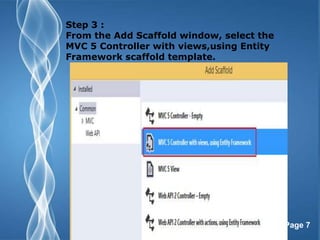
Step 3 :
From the Add Scaffold window, select the
MVC 5 Controller with views,using Entity
Framework scaffold template.
Page 8
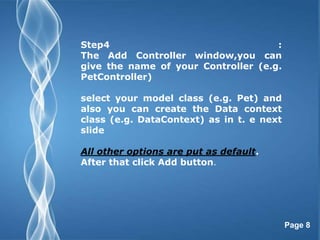
Step4 :
The Add Controller window,you can
give the name of your Controller (e.g.
PetController)
select your model class (e.g. Pet) and
also you can create the Data context
class (e.g. DataContext) as in t. e next
slide
All other options are put as default.
After that click Add button.
Page 9
Page 10
Page 11
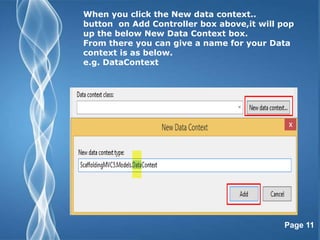
When you click the New data context..
button on Add Controller box above,it will pop
up the below New Data Context box.
From there you can give a name for your Data
context is as below.
e.g. DataContext
Page 12
Step 5 :
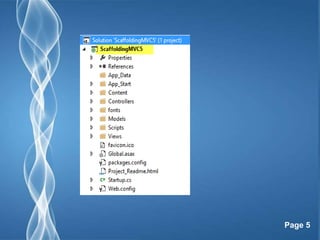
The solution tree shows the relevant classes and pages were
created for above example.
For example, the following image shows the MVC controller (i.e.
PetController) and Views (i.e. Inside the Pet folder) that were
created through scaffolding for a Model class named Pet.
Page 13
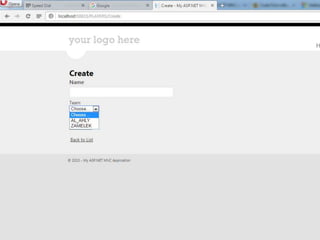
Let's run our sample application.
All the CRUD related auto
generated views are as below.
Page 14
Page 15
Let's run our sample application.
All the CRUD related auto
generated views are as below.
Page 16
Page 17
Page 18
Page 19
Page 20
Page 21
Page 22
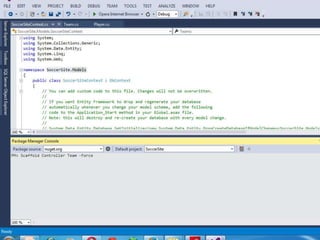
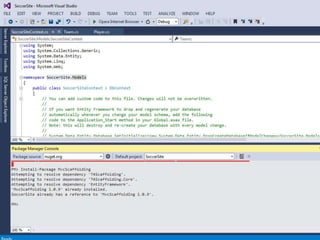
From the Tools menu click NuGet Package Manager
and then click Package Manager Console.
In the Package Manager Console window enter the
following command:-
•Install-Package EntityFramework
•Install-Package MvcScaffolding
•Scaffold Controller Team
• Scaffold Controller Player
•Scaffold Controller Team –Force
• Scaffold Controller Player -Force
•Scaffold Controller Team -Repository -Force
Scaffold Controller Player -Repository -Force
Page 23
Page 24
Page 25
Page 26
Page 27

Scaffolding

  • 1.
  • 2.
    Page 2 What isScaffolding? ASP.net Scaffolding is a code generation framework for ASP.net Web applications. Visual Studio 2013 includes pre- installed code generators for MVC and Web API projects.
  • 3.
    Page 3 What isScaffolding? Scaffolding involves creating base templates for code or markup of project items through an automated method. The basic templates thus generated can then be customized to meet your exact requirements. The Mvc Scaffolding available as a NuGet package helps you scaffold ASP.NET MVC 3 specific project items such as Controllers and Views. The coding language for the resultant classes can be C# or VB. Similarly, views can be Razor based or ASPX based.
  • 4.
    Page 4 What arethe Advantages of using Scaffolding ? •Minimal or no code to create a data-driven Web applications. •Quick development time. •Pages that are fully functional and include display, insert, edit, delete, sorting, and paging functionalities(CRUD) •Built-in data validation that is based on the database schema. •Filters that are created for each foreign key or Boolean fields.
  • 5.
  • 6.
    Page 6 Step 2: Right click your Controllers folder and Add New Scaffolded Item is as below.
  • 7.
    Page 7 Step 3: From the Add Scaffold window, select the MVC 5 Controller with views,using Entity Framework scaffold template.
  • 8.
    Page 8 Step4 : TheAdd Controller window,you can give the name of your Controller (e.g. PetController) select your model class (e.g. Pet) and also you can create the Data context class (e.g. DataContext) as in t. e next slide All other options are put as default. After that click Add button.
  • 9.
  • 10.
  • 11.
    Page 11 When youclick the New data context.. button on Add Controller box above,it will pop up the below New Data Context box. From there you can give a name for your Data context is as below. e.g. DataContext
  • 12.
    Page 12 Step 5: The solution tree shows the relevant classes and pages were created for above example. For example, the following image shows the MVC controller (i.e. PetController) and Views (i.e. Inside the Pet folder) that were created through scaffolding for a Model class named Pet.
  • 13.
    Page 13 Let's runour sample application. All the CRUD related auto generated views are as below.
  • 14.
  • 15.
    Page 15 Let's runour sample application. All the CRUD related auto generated views are as below.
  • 16.
  • 17.
  • 18.
  • 19.
  • 20.
  • 21.
  • 22.
    Page 22 From theTools menu click NuGet Package Manager and then click Package Manager Console. In the Package Manager Console window enter the following command:- •Install-Package EntityFramework •Install-Package MvcScaffolding •Scaffold Controller Team • Scaffold Controller Player •Scaffold Controller Team –Force • Scaffold Controller Player -Force •Scaffold Controller Team -Repository -Force Scaffold Controller Player -Repository -Force
  • 23.
  • 24.
  • 25.
  • 26.
  • 27.