SCADA
SUPERVISORY CONTROLAND DATAACQUISITION SYSTEM
KRISHNENDRA C S (09)
SABARINATH C D (12)
1
WHAT IS SCADA ?
 SCADA (SUPERVISORY CONTROL AND DATA ACQUISITION) is a system that is
used for monitoring, analysing and controlling an industrial process .
 A SCADA system is capable of real time monitoring and management of physical
asset dispersed over very large geographical area.
 it is a purely software package that is positioned on top of hardware to which it is
interfaced, in general via Programmable Logic Controllers (PLCs), or other
commercial hardware modules.
2
3
4
A SCADA system performs four functions:
 Data acquisition
 Networked data communication
 Data presentation
 Control
COMPONENTS OF SCADA
 Programmable logic controller(PLCs) connect to sensors in the process and
converting sensor signals to digital data. PLCs have more embedded control capabilities
than RTUs. PLCs are sometimes used in place of RTUs as field devices because they
are more economical, versatile, flexible, and configurable.
and / or
 Remote terminal units (RTUs) connect to sensors in the process and convert sensor
signals to digital data. They have telemetry hardware capable of sending digital data to
the supervisory system, as well as receiving digital commands from the supervisory
system.
5
6
 A telemetry system is typically used to connect PLCs and RTUs with control
centers , data ware houses, and the enterprise. Examples of wired telemetry
media used in SCADA systems include leased telephone lines and WAN
circuits. Examples of wireless telemetry media used in SCADA systems
include cellular and microwave and other communication medium.
 A data acquisition server is a software service which uses industrial
protocols to connect software services via telemetry with field device such as
RTUs and PLCs. It allows clients to access data from these field devices
using standard protocols.
 A human–machine interface or HMI is the apparatus or device which
presents processed data to a human operator, and through this, the human
operator monitors and interacts with the process. The HMI is a client that
requests data from a data acquisition on server.
SCADA ARCHITECTURE
 First generation: "Monolithic“
 Second generation: "Distributed“
 Third generation: "Networked"
7
MONOLITHIC SCADA SYSTEMS
 Minicomputers are used earlier for computing the SCADA systems. In
earlier times, during the time of first generation, monolithic SCADA
systems were developed wherein the common network services were not
available. Hence, these are independent systems without having any
connectivity to other systems.
8
9
DISTRIBUTED SCADA SYSTEMS
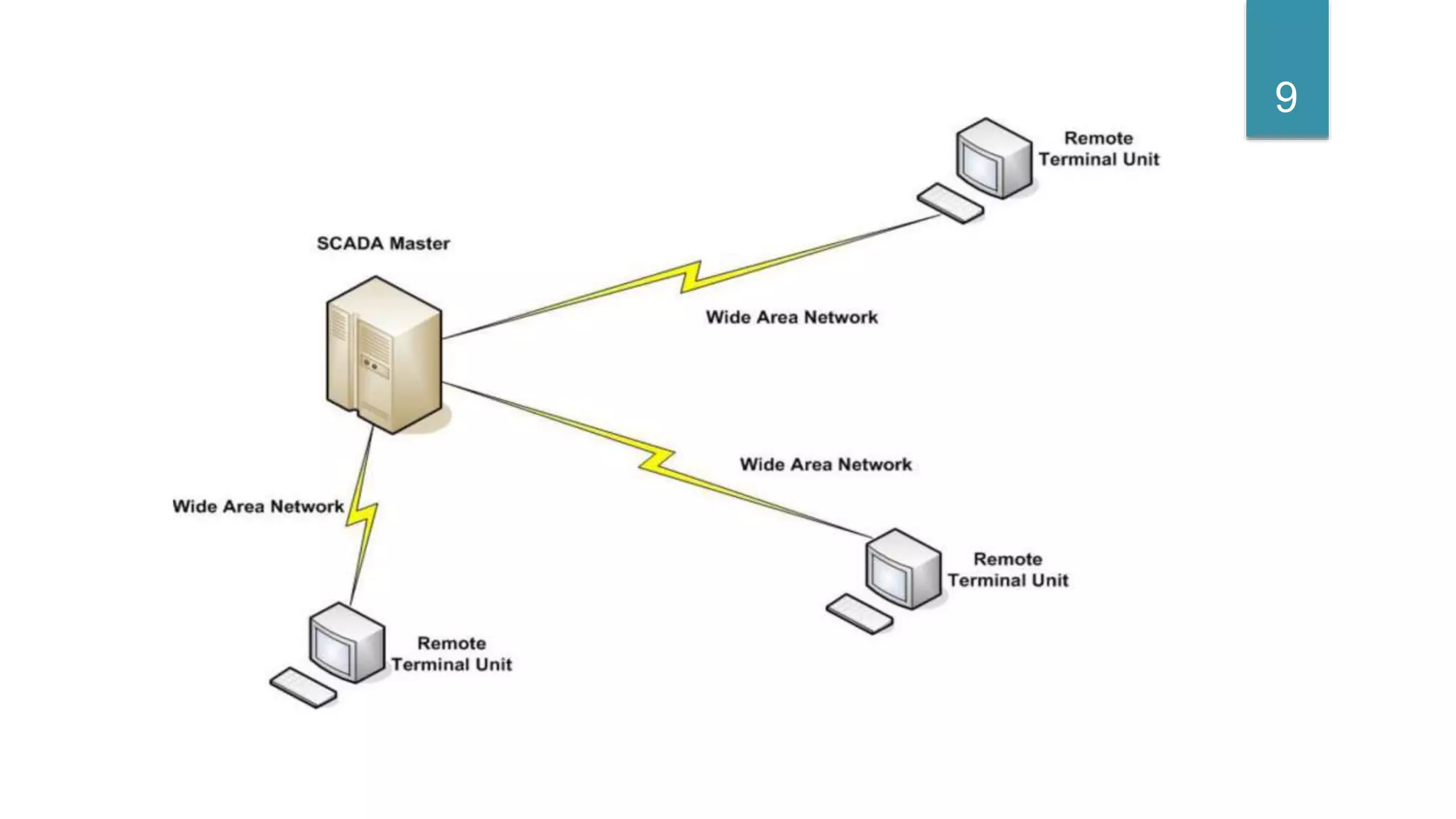
 The processing was distributed across multiple stations which were
connected through a LAN and they shared information in real time.
 Each station was responsible for a particular task thus making the size
and cost of each station less than the one used in First Generation.
10
11
NETWORKED SCADA SYSTEMS
 Open system architecture
 Multiple networked systems, sharing master station functions
 Utilizing open standards and protocols
 Distribute SCADA functionality across a WAN
 Open standards eliminate multiple limitations
 Easier to connect to third party peripheral devices to the system or the network
 Disaster survivability
12
13
FEATURES OF SCADA
 Dynamic representation
 Data base connectivity
 Device connectivity
 Alarms
 Trends
 Scripts
 Security
 Recipe management
 Networking
14
DYNAMIC REPRESENTATION
 It explains about the representation of various symbols of field
instruments which are present in tool library which can be utilised in
SCADA applications.
 SCADA is not dedicated to any specific industry hence its library is so
large that you can use it for any industries
15
DATA BASE CONNECTIVITY
 SCADA does not have its own database just like Microsoft.
 It depends on the database available in the market.
 It can be connected to VB,SQL,EXCEL or SAP.
16
DEVICE CONNECTIVITY
 SCADA is not a100% controller that is it alone can’t run process. It can
be connected to any PLC or DCS.
 Hence any PLC or DCS that are available in the market by using specific
driver software it can be connected.
17
ALARMS
 Alarms are generated for warnings or to keep the process between
certain limits
 The format consists of date ,time, status, priorities, many such elements
which can be used for generation of report.
18
TRENDS
 Also called XY plotters or data loggers
 It represents the values in wave format with reference to time.
 Trend is subdivided into real time and historical trends. That is we can
see the present values of the process as well past values and can be
stored and records can be maintained for the same.
19
SCRIPTS
 It is the combination of logical operators which are written in a statement.
 Used to run the applications made or stimulate before final execution.
 Various types of scripts make project execution simpler for programmer.
20
RECIPE MANAGEMENT
 One of the finest feature of any SCADA
 It explains that we can maintain various recipes of different process and
implement it on the process.
 All the recipes are stored in a single server and it can be fetched by any
client server from any area to run the process.
21
NETWORKING
 It explains we can share SCADA applications on LAN or internet as well
exchange of data is possible.
 Many networking protocols are supported by SCADA software.
 SCADA can be put on networking with other peripherals and processors
with various networking topologies.
22
APPLICATION OF SCADA SYSTEM
 Electric power generation, transmission and distribution
 Water treatment plant
 Oil and Gas Trans & Distributions
 Food processing industry
 Traffic signals
 And many more………
23
BENEFITS OF SCADA
 The benefits one can expect from adopting a SCADA system for
 the control of
 experimental physics facilities can be summarised as follows:
 a rich functionality and extensive development facilities.
 reliability and robustness.
 technical support and maintenance by the vendor.
24
THANK YOU
25

SCADA

  • 1.
    SCADA SUPERVISORY CONTROLAND DATAACQUISITIONSYSTEM KRISHNENDRA C S (09) SABARINATH C D (12) 1
  • 2.
    WHAT IS SCADA?  SCADA (SUPERVISORY CONTROL AND DATA ACQUISITION) is a system that is used for monitoring, analysing and controlling an industrial process .  A SCADA system is capable of real time monitoring and management of physical asset dispersed over very large geographical area.  it is a purely software package that is positioned on top of hardware to which it is interfaced, in general via Programmable Logic Controllers (PLCs), or other commercial hardware modules. 2
  • 3.
  • 4.
    4 A SCADA systemperforms four functions:  Data acquisition  Networked data communication  Data presentation  Control
  • 5.
    COMPONENTS OF SCADA Programmable logic controller(PLCs) connect to sensors in the process and converting sensor signals to digital data. PLCs have more embedded control capabilities than RTUs. PLCs are sometimes used in place of RTUs as field devices because they are more economical, versatile, flexible, and configurable. and / or  Remote terminal units (RTUs) connect to sensors in the process and convert sensor signals to digital data. They have telemetry hardware capable of sending digital data to the supervisory system, as well as receiving digital commands from the supervisory system. 5
  • 6.
    6  A telemetrysystem is typically used to connect PLCs and RTUs with control centers , data ware houses, and the enterprise. Examples of wired telemetry media used in SCADA systems include leased telephone lines and WAN circuits. Examples of wireless telemetry media used in SCADA systems include cellular and microwave and other communication medium.  A data acquisition server is a software service which uses industrial protocols to connect software services via telemetry with field device such as RTUs and PLCs. It allows clients to access data from these field devices using standard protocols.  A human–machine interface or HMI is the apparatus or device which presents processed data to a human operator, and through this, the human operator monitors and interacts with the process. The HMI is a client that requests data from a data acquisition on server.
  • 7.
    SCADA ARCHITECTURE  Firstgeneration: "Monolithic“  Second generation: "Distributed“  Third generation: "Networked" 7
  • 8.
    MONOLITHIC SCADA SYSTEMS Minicomputers are used earlier for computing the SCADA systems. In earlier times, during the time of first generation, monolithic SCADA systems were developed wherein the common network services were not available. Hence, these are independent systems without having any connectivity to other systems. 8
  • 9.
  • 10.
    DISTRIBUTED SCADA SYSTEMS The processing was distributed across multiple stations which were connected through a LAN and they shared information in real time.  Each station was responsible for a particular task thus making the size and cost of each station less than the one used in First Generation. 10
  • 11.
  • 12.
    NETWORKED SCADA SYSTEMS Open system architecture  Multiple networked systems, sharing master station functions  Utilizing open standards and protocols  Distribute SCADA functionality across a WAN  Open standards eliminate multiple limitations  Easier to connect to third party peripheral devices to the system or the network  Disaster survivability 12
  • 13.
  • 14.
    FEATURES OF SCADA Dynamic representation  Data base connectivity  Device connectivity  Alarms  Trends  Scripts  Security  Recipe management  Networking 14
  • 15.
    DYNAMIC REPRESENTATION  Itexplains about the representation of various symbols of field instruments which are present in tool library which can be utilised in SCADA applications.  SCADA is not dedicated to any specific industry hence its library is so large that you can use it for any industries 15
  • 16.
    DATA BASE CONNECTIVITY SCADA does not have its own database just like Microsoft.  It depends on the database available in the market.  It can be connected to VB,SQL,EXCEL or SAP. 16
  • 17.
    DEVICE CONNECTIVITY  SCADAis not a100% controller that is it alone can’t run process. It can be connected to any PLC or DCS.  Hence any PLC or DCS that are available in the market by using specific driver software it can be connected. 17
  • 18.
    ALARMS  Alarms aregenerated for warnings or to keep the process between certain limits  The format consists of date ,time, status, priorities, many such elements which can be used for generation of report. 18
  • 19.
    TRENDS  Also calledXY plotters or data loggers  It represents the values in wave format with reference to time.  Trend is subdivided into real time and historical trends. That is we can see the present values of the process as well past values and can be stored and records can be maintained for the same. 19
  • 20.
    SCRIPTS  It isthe combination of logical operators which are written in a statement.  Used to run the applications made or stimulate before final execution.  Various types of scripts make project execution simpler for programmer. 20
  • 21.
    RECIPE MANAGEMENT  Oneof the finest feature of any SCADA  It explains that we can maintain various recipes of different process and implement it on the process.  All the recipes are stored in a single server and it can be fetched by any client server from any area to run the process. 21
  • 22.
    NETWORKING  It explainswe can share SCADA applications on LAN or internet as well exchange of data is possible.  Many networking protocols are supported by SCADA software.  SCADA can be put on networking with other peripherals and processors with various networking topologies. 22
  • 23.
    APPLICATION OF SCADASYSTEM  Electric power generation, transmission and distribution  Water treatment plant  Oil and Gas Trans & Distributions  Food processing industry  Traffic signals  And many more……… 23
  • 24.
    BENEFITS OF SCADA The benefits one can expect from adopting a SCADA system for  the control of  experimental physics facilities can be summarised as follows:  a rich functionality and extensive development facilities.  reliability and robustness.  technical support and maintenance by the vendor. 24
  • 25.