SAP MM & PP Course Material
December, 2007
Sample Training Lecture Slides
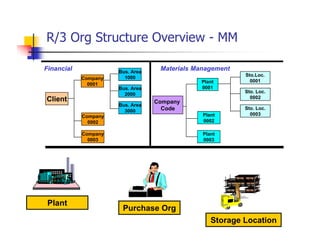
R/3 Org Structure Overview - MM
Client
Bus. Area
2000
Bus. Area
1000
Company
0003
Company
0002
Company
0001
Bus. Area
3000
Company
Code
Sto.Loc.
0001Plant
0001
Sto. Loc.
0002
Plant
0002
Sto. Loc.
0003
Plant
0003
Plant
Purchase Org
Storage Location
Materials ManagementFinancial
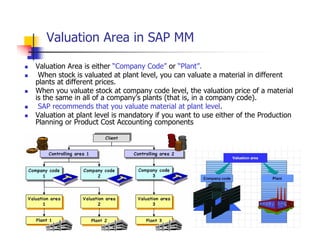
Valuation Area in SAP MM
 Valuation Area is either “Company Code” or “Plant”.
 When stock is valuated at plant level, you can valuate a material in different
plants at different prices.
 When you valuate stock at company code level, the valuation price of a material
is the same in all of a company's plants (that is, in a company code).
 SAP recommends that you valuate material at plant level.
 Valuation at plant level is mandatory if you want to use either of the Production
Planning or Product Cost Accounting components
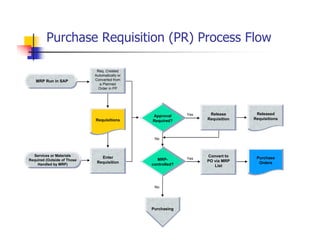
Purchase Requisition (PR) Process Flow
Approval
Required?
Purchasing
No
Yes
MRP-
controlled?
Yes
No
Convert to
PO via MRP
List
Purchase
Orders
Released
Requisitions
Release
Requisition
Req. Created
Automatically or
Converted from
a Planned
Order in PP
Enter
Requisition
Requisitions
MRP Run in SAP
Services or Materials
Required (Outside of Those
Handled by MRP)
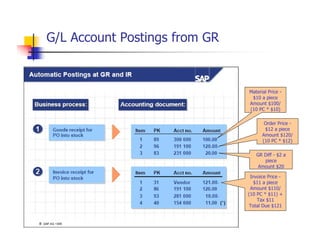
G/L Account Postings from GR
Material Price -
$10 a piece
Amount $100/
(10 PC * $10)
Order Price -
$12 a piece
Amount $120/
(10 PC * $12)
GR Diff - $2 a
piece
Amount $20
Invoice Price -
$11 a piece
Amount $110/
(10 PC * $11) +
Tax $11
Total Due $121
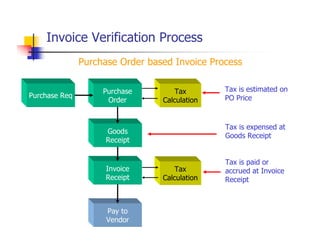
Invoice Verification Process
Purchase
Order
Goods
Receipt
Purchase Req
Tax
Calculation
Tax
Calculation
Invoice
Receipt
Pay to
Vendor
Purchase Order based Invoice Process
Tax is estimated on
PO Price
Tax is expensed at
Goods Receipt
Tax is paid or
accrued at Invoice
Receipt
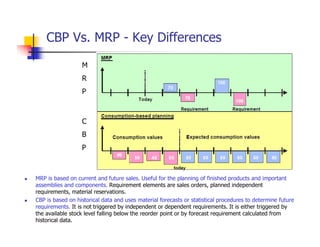
CBP Vs. MRP - Key Differences
 MRP is based on current and future sales. Useful for the planning of finished products and important
assemblies and components. Requirement elements are sales orders, planned independent
requirements, material reservations.
 CBP is based on historical data and uses material forecasts or statistical procedures to determine future
requirements. It is not triggered by independent or dependent requirements. It is either triggered by
the available stock level falling below the reorder point or by forecast requirement calculated from
historical data.
M
R
P
C
B
P
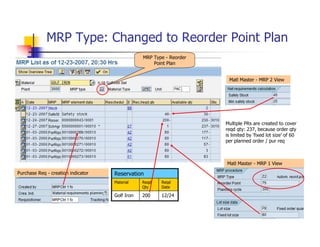
MRP Type: Changed to Reorder Point Plan
Reqd
Date
Reqd
Qty
Material
12/24200Golf Iron
ReservationPurchase Req - creation indicator
Matl Master - MRP 1 View
Matl Master - MRP 2 View
Multiple PRs are created to cover
reqd qty: 237, because order qty
is limited by ‘fixed lot size’ of 60
per planned order / pur req
MRP Type - Reorder
Point Plan
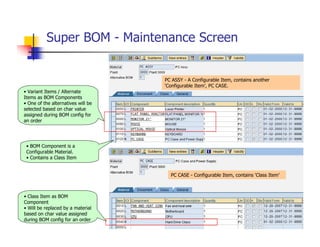
Super BOM - Maintenance Screen
• Class Item as BOM
Component
• Will be replaced by a material
based on char value assigned
during BOM config for an order
• Variant Items / Alternate
Items as BOM Components
• One of the alternatives will be
selected based on char value
assigned during BOM config for
an order
• BOM Component is a
Configurable Material.
• Contains a Class Item
PC CASE - Configurable Item, contains ‘Class Item’
PC ASSY - A Configurable Item, contains another
‘Configurable Item’, PC CASE.
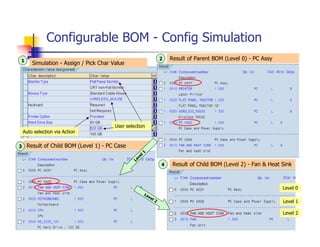
Configurable BOM - Config Simulation
Simulation - Assign / Pick Char Value
Result of Parent BOM (Level 0) - PC Assy
Result of Child BOM (Level 1) - PC Case
Result of Child BOM (Level 2) - Fan & Heat Sink
Level 1
Level 2
1 2
3
4
Level 0
Level 1
Level 2
Auto selection via Action
User selection
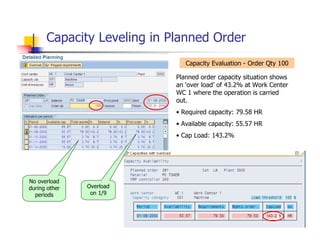
Capacity Leveling in Planned Order
Planned order capacity situation shows
an ‘over load’ of 43.2% at Work Center
WC 1 where the operation is carried
out.
• Required capacity: 79.58 HR
• Available capacity: 55.57 HR
• Cap Load: 143.2%
Overload
on 1/9
No overload
during other
periods
Capacity Evaluation - Order Qty 100
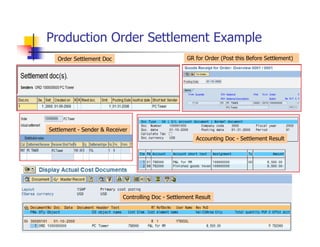
Production Order Settlement Example
Order Settlement Doc GR for Order (Post this Before Settlement)
Accounting Doc - Settlement Result
Controlling Doc - Settlement Result
Settlement - Sender & Receiver
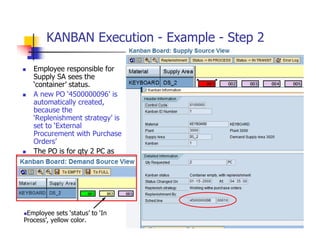
KANBAN Execution - Example - Step 2
 Employee responsible for
Supply SA sees the
‘container’ status.
 A new PO ‘4500000096’ is
automatically created,
because the
‘Replenishment strategy’ is
set to ‘External
Procurement with Purchase
Orders’
 The PO is for qty 2 PC as
‘kanban’ qty is set to 2 in
‘control cycle’. The PO will
be sent to the Vendor
‘3000’
Employee sets ‘status’ to ‘In
Process’, yellow color.

Sample sap mm pp course material

  • 1.
    SAP MM &PP Course Material December, 2007 Sample Training Lecture Slides
  • 2.
    R/3 Org StructureOverview - MM Client Bus. Area 2000 Bus. Area 1000 Company 0003 Company 0002 Company 0001 Bus. Area 3000 Company Code Sto.Loc. 0001Plant 0001 Sto. Loc. 0002 Plant 0002 Sto. Loc. 0003 Plant 0003 Plant Purchase Org Storage Location Materials ManagementFinancial
  • 3.
    Valuation Area inSAP MM  Valuation Area is either “Company Code” or “Plant”.  When stock is valuated at plant level, you can valuate a material in different plants at different prices.  When you valuate stock at company code level, the valuation price of a material is the same in all of a company's plants (that is, in a company code).  SAP recommends that you valuate material at plant level.  Valuation at plant level is mandatory if you want to use either of the Production Planning or Product Cost Accounting components
  • 4.
    Purchase Requisition (PR)Process Flow Approval Required? Purchasing No Yes MRP- controlled? Yes No Convert to PO via MRP List Purchase Orders Released Requisitions Release Requisition Req. Created Automatically or Converted from a Planned Order in PP Enter Requisition Requisitions MRP Run in SAP Services or Materials Required (Outside of Those Handled by MRP)
  • 5.
    G/L Account Postingsfrom GR Material Price - $10 a piece Amount $100/ (10 PC * $10) Order Price - $12 a piece Amount $120/ (10 PC * $12) GR Diff - $2 a piece Amount $20 Invoice Price - $11 a piece Amount $110/ (10 PC * $11) + Tax $11 Total Due $121
  • 6.
    Invoice Verification Process Purchase Order Goods Receipt PurchaseReq Tax Calculation Tax Calculation Invoice Receipt Pay to Vendor Purchase Order based Invoice Process Tax is estimated on PO Price Tax is expensed at Goods Receipt Tax is paid or accrued at Invoice Receipt
  • 7.
    CBP Vs. MRP- Key Differences  MRP is based on current and future sales. Useful for the planning of finished products and important assemblies and components. Requirement elements are sales orders, planned independent requirements, material reservations.  CBP is based on historical data and uses material forecasts or statistical procedures to determine future requirements. It is not triggered by independent or dependent requirements. It is either triggered by the available stock level falling below the reorder point or by forecast requirement calculated from historical data. M R P C B P
  • 8.
    MRP Type: Changedto Reorder Point Plan Reqd Date Reqd Qty Material 12/24200Golf Iron ReservationPurchase Req - creation indicator Matl Master - MRP 1 View Matl Master - MRP 2 View Multiple PRs are created to cover reqd qty: 237, because order qty is limited by ‘fixed lot size’ of 60 per planned order / pur req MRP Type - Reorder Point Plan
  • 9.
    Super BOM -Maintenance Screen • Class Item as BOM Component • Will be replaced by a material based on char value assigned during BOM config for an order • Variant Items / Alternate Items as BOM Components • One of the alternatives will be selected based on char value assigned during BOM config for an order • BOM Component is a Configurable Material. • Contains a Class Item PC CASE - Configurable Item, contains ‘Class Item’ PC ASSY - A Configurable Item, contains another ‘Configurable Item’, PC CASE.
  • 10.
    Configurable BOM -Config Simulation Simulation - Assign / Pick Char Value Result of Parent BOM (Level 0) - PC Assy Result of Child BOM (Level 1) - PC Case Result of Child BOM (Level 2) - Fan & Heat Sink Level 1 Level 2 1 2 3 4 Level 0 Level 1 Level 2 Auto selection via Action User selection
  • 11.
    Capacity Leveling inPlanned Order Planned order capacity situation shows an ‘over load’ of 43.2% at Work Center WC 1 where the operation is carried out. • Required capacity: 79.58 HR • Available capacity: 55.57 HR • Cap Load: 143.2% Overload on 1/9 No overload during other periods Capacity Evaluation - Order Qty 100
  • 12.
    Production Order SettlementExample Order Settlement Doc GR for Order (Post this Before Settlement) Accounting Doc - Settlement Result Controlling Doc - Settlement Result Settlement - Sender & Receiver
  • 13.
    KANBAN Execution -Example - Step 2  Employee responsible for Supply SA sees the ‘container’ status.  A new PO ‘4500000096’ is automatically created, because the ‘Replenishment strategy’ is set to ‘External Procurement with Purchase Orders’  The PO is for qty 2 PC as ‘kanban’ qty is set to 2 in ‘control cycle’. The PO will be sent to the Vendor ‘3000’ Employee sets ‘status’ to ‘In Process’, yellow color.