General Concept ERP
Here are the some list of Generic concept of ERP explained using a
business case.
Prepared by Ishit Mehta
Topics Covered –
• Warehouse Re-Supply.
• Re-ordering rules.
• Make to Order.
• Make to Stock.
• BOM – Bill of Materials.
• Advance Shipping Notice.
• Price List. [Vendor / Customer]
• Returns / Scrap Management.
• Automatic Journal / Voucher entry posting.
• COGS (Cost of Goods Stock Entry).
• Multi Organization.
Prepared by Ishit Mehta
Overview – • Here, I am going to help you with some of the
ERP concept which can be beneficial for your
organization. May be with these concepts you
will find value for the ERP. Why is it required?
These concept can solve your real problems
within your organization.
• Before you implement, any ERP you should be
aware of these ERP concept which will help you
to find the GAP between your business process
& ERP working concepts.
Prepared by Ishit Mehta
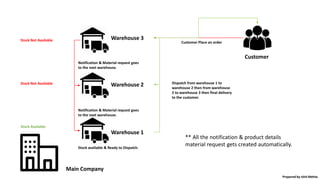
• Let’s consider a business case where you have three
warehouse. Warehouse 1, Warehouse 2, Warehouse 3. Now
your Warehouse 1 only gets the material from warehouse 2
& warehouse 2 only get the material from warehouse 3
which can be your main warehouse. (Just like the concept of
HUB & Locations we have in the real world)
• Now whenever the customer visit the warehouse 1 & stock
is not available, automatically a notification goes to
warehouse 2 as per the system routes set. If the stock is
available in warehouse 2 it will allow you to send the goods
to warehouse 1. But if the stock is not available in
warehouse 2 it will send the material request to warehouse
3. So now lets consider if stock is not available in warehouse
3, it will generate a Purchase order or Manufacturing order
based on the product.
• Let’s see it with the Diagram, that helps us to understand
better.
Warehouse resupply –
Prepared by Ishit Mehta
Main Company
Warehouse 1
Warehouse 2
Warehouse 3
Customer
Customer Place an order
Stock Not Available
Stock Not Available
Stock Available
Notification & Material request goes
to the next warehouse.
Notification & Material request goes
to the next warehouse.
Stock available & Ready to Dispatch.
Dispatch from warehouse 1 to
warehouse 2 then from warehouse
2 to warehouse 3 then final delivery
to the customer.
** All the notification & product details
material request gets created automatically.
Prepared by Ishit Mehta
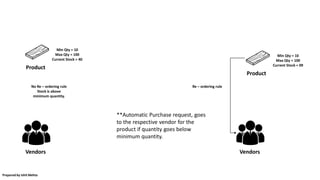
• Generally we use Re-ordering rules with the raw
material products. So if we see a business case, let’s
say you are furniture Manufacturing company and
you would never want that the stock of wood get’s
exhaust into your organization as it is the most
important item for you. But you would also not like
to over buy the material because it has a direct
impact of the cost of the finish product. So here you
can use Re ordering rules where you can set
Minimum & Maximum quantity to buy. So if the
quantity goes below the minimum threshold, it
automatically creates a buying request.
• We will also see it with the help of a Diagram.
Re ordering rules –
Prepared by Ishit Mehta
Vendors
Min Qty = 10
Max Qty = 100
Current Stock = 40
Product
Vendors
Min Qty = 10
Max Qty = 100
Current Stock = 09
Product
Re – ordering ruleNo Re – ordering rule
Stock is above
minimum quantity.
**Automatic Purchase request, goes
to the respective vendor for the
product if quantity goes below
minimum quantity.
Prepared by Ishit Mehta
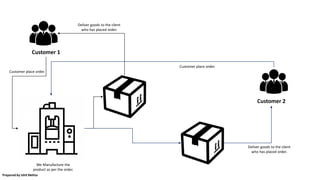
• Generally we use make to order, when we do custom
order fulfilment, MTO (Make to order) can be used in
both the condition, whether you procure / buy
material or you manufacture material. But the system
allows to allocate that material to the only customer
for which the demand is generated.
• So we can take some business case example, let’s say
we manufacture a machine for our customer but only
based on the order. So whenever my customer place
an order for the machine, after the order we will
manufacture it or assemble it for that customer only.
So this machine is allocated to the customer 1, system
will never allow you to allocate it to the customer 2.
• We will also see small example for this with the help
of diagram.
Make to order –
Prepared by Ishit Mehta
Customer 1
Customer 2
Customer place order.
We Manufacture the
product as per the order.
Deliver goods to the client
who has placed order.
Customer place order.
Deliver goods to the client
who has placed order.
Prepared by Ishit Mehta
• Make to Stock concept is generally used when
you maintain stock for your product, whenever
there is a demand it will fulfill the demand.
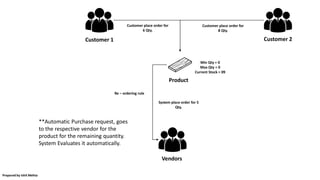
• Let see it with a business case example, so for
example you are manufacturing cycles & you
have current stock available with you as 10
quantity. So now let’s say your customer has
placed an order for 15 quantity of cycle. Now
system will automatically check the stock &
evaluate that it require 5 more quantity to fulfill
the order so it will generate the Manufacturing
order for the 5 quantity. If you buy the material it
will generate the Purchase order respectively.
Make to Stock –
Prepared by Ishit Mehta
Customer 1
Vendors
Min Qty = 0
Max Qty = 0
Current Stock = 09
Product
Re – ordering rule
**Automatic Purchase request, goes
to the respective vendor for the
product for the remaining quantity.
System Evaluates it automatically.
Customer 2
Customer place order for
6 Qty.
Customer place order for
8 Qty.
System place order for 5
Qty.
Prepared by Ishit Mehta
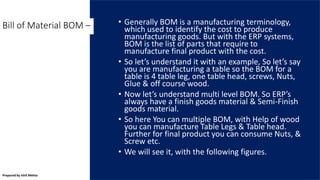
• Generally BOM is a manufacturing terminology,
which used to identify the cost to produce
manufacturing goods. But with the ERP systems,
BOM is the list of parts that require to
manufacture final product with the cost.
• So let’s understand it with an example, So let’s say
you are manufacturing a table so the BOM for a
table is 4 table leg, one table head, screws, Nuts,
Glue & off course wood.
• Now let’s understand multi level BOM. So ERP’s
always have a finish goods material & Semi-Finish
goods material.
• So here You can multiple BOM, with Help of wood
you can manufacture Table Legs & Table head.
Further for final product you can consume Nuts, &
Screw etc.
• We will see it, with the following figures.
Bill of Material BOM –
Prepared by Ishit Mehta
SFG – BOM 1 [Table Head]
Raw Material –
1. Wood = 2 m
SFG – BOM 2 [Table Leg]
Raw Material –
1. Wood = 1 m
SFG – BOM Main [Table]
Raw Material –
1. Table Leg = 4 unit
2. Table Head = 1 unit
3. Glue = 1 unit
4. Screws = 8 units
5. Nut = 8 units
** Here it is a multi level BOM, where if you consider total wood consumed for one table is 6 meter. To
manufacture Table you require two other SFG. Such scenario is also know as Phantom BOM.
Prepared by Ishit Mehta
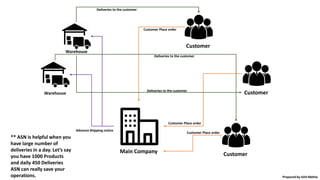
• The Concept of Advance Shipping Notice, you
might not have in your real world business
process, but yes it is really an helpful process.
• Whenever you confirm / complete a sales order or
purchase order, we send a notice or notification to
your warehouse team, that we have some goods
which are going to come with the reference
documents number or we have some products
which needs to be delivered to this customer. So
warehouse / inventory team can start preparing
the dispatch process or incoming goods process.
• We will see it with a diagram, use case for using
ASN.
Advance Shipping Notice –
Prepared by Ishit Mehta
Customer
Main Company
Customer
Customer
Warehouse
Warehouse
Customer Place order
Advance Shipping notice
Deliveries to the customer
** ASN is helpful when you
have large number of
deliveries in a day. Let’s say
you have 1000 Products
and daily 450 Deliveries
ASN can really save your
operations. Prepared by Ishit Mehta
• So we are aware, that sometime prices may change
as per the region or as per the quantity or as per
the client type. So every ERP has a concept of Price
list. While you can set both Purchase price list from
the vendors and you can also set sales price list for
the customers.
• Below are some of the examples, how can we use
ERP price lists –
• For one product you can have multiple price like Dealer /
Distributor price, & you can have customer price. Let’s
Dealer price is 10 USD & Customer price is 15 USD.
• We can also set Margin based Sales Price, for a product
or a Product Category, So for example we have one
product category as LG home appliance where we have
15% of margin for all LG Home appliance product. Once
you set cost price for any product in this category it will
add 15% into CP & will generate SP (Sales Price).
• So there can be many ways you can, setup pricing into
the ERP system.
Price List [Vendors /
Customers] –
Prepared by Ishit Mehta
• Every ERP has a concept of returns or scrap
management, where you can assign Lot / Serial
number on the product based on which you can
track product warranty status. We can understand
it with the help of small example i.e let’s say using
ERP’s Laptop manufacturer or electronics
manufacturer check’s its warranty status.
• There are other advantages also associated with
the Lots / Serial number, like Cost of Finish goods
can be determined using Lots / Serial number.
Returns / Scrap
management –
Prepared by Ishit Mehta
• One of the biggest advantage for ERP is the
accounting. So whenever you place an Invoice
/ vendor bill into the ERP system. It can
automatically post Journal / Voucher entry
according to your set chart of accounts
respectively. As a result there are very less
chances of human errors into your accounting
which is definitely a critical part of any
organization.
• Automatic posting of Debit / Credit can be
done, accordingly you can manage you general
ledger, Party (Customer & Vendor) Ledgers, tax
reports etc.
Automatic Journal Voucher
Entries posting –
Prepared by Ishit Mehta
• It is very famous concept of Cost of Goods, in our real
world we always measure the cost of goods. As Every
ERP helps you with the Cost of Goods Reports &
Entries. Let’s See it with an example that how ERP
manages the Cost of Goods.
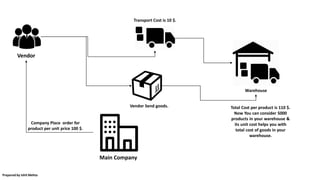
• Let’s say I am purchasing a product with price per unit
of 100 USD, System can post an automatic entry to my
inventories chart of account. Now let’s say we have an
additional Landed cost to bring the goods to our
warehouse which is price per unit is 10 USD, Now
ERP’s have ability to automatic post landed cost and
update the Unit price of the Product as 110 USD, by
posting / adjusting journal entry.
• Same way when you sell material, journal entries can
be posted based on the stock movement. So you can
retrieve reports like your warehouse goods cost.
COG (Cost of Goods Sold /
Purchase) –
Prepared by Ishit Mehta
Main Company
Vendor
Warehouse
Company Place order for
product per unit price 100 $.
Vendor Send goods.
Transport Cost is 10 $.
Total Cost per product is 110 $.
Now You can consider 5000
products in your warehouse &
its unit cost helps you with
total cost of goods in your
warehouse.
Prepared by Ishit Mehta
• Generally ERP’s can handle multiple organization
into one setup. ERP’s can also handle various
inter organization transactions.
• ERP’s Also have capabilities to manage, inter
company invoice & vendor bills & transactions.
With Help of ERP’s You can manage Centralize
purchase & Sales track them across.
Multi Organization –
Prepared by Ishit Mehta
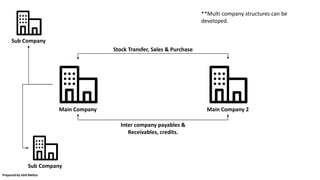
Main Company Main Company 2
Stock Transfer, Sales & Purchase
Inter company payables &
Receivables, credits.
Sub Company
Sub Company
**Multi company structures can be
developed.
Prepared by Ishit Mehta
Thank you.
Prepared by Ishit Mehta

Generic concept of erp

  • 1.
    General Concept ERP Hereare the some list of Generic concept of ERP explained using a business case. Prepared by Ishit Mehta
  • 2.
    Topics Covered – •Warehouse Re-Supply. • Re-ordering rules. • Make to Order. • Make to Stock. • BOM – Bill of Materials. • Advance Shipping Notice. • Price List. [Vendor / Customer] • Returns / Scrap Management. • Automatic Journal / Voucher entry posting. • COGS (Cost of Goods Stock Entry). • Multi Organization. Prepared by Ishit Mehta
  • 3.
    Overview – •Here, I am going to help you with some of the ERP concept which can be beneficial for your organization. May be with these concepts you will find value for the ERP. Why is it required? These concept can solve your real problems within your organization. • Before you implement, any ERP you should be aware of these ERP concept which will help you to find the GAP between your business process & ERP working concepts. Prepared by Ishit Mehta
  • 4.
    • Let’s considera business case where you have three warehouse. Warehouse 1, Warehouse 2, Warehouse 3. Now your Warehouse 1 only gets the material from warehouse 2 & warehouse 2 only get the material from warehouse 3 which can be your main warehouse. (Just like the concept of HUB & Locations we have in the real world) • Now whenever the customer visit the warehouse 1 & stock is not available, automatically a notification goes to warehouse 2 as per the system routes set. If the stock is available in warehouse 2 it will allow you to send the goods to warehouse 1. But if the stock is not available in warehouse 2 it will send the material request to warehouse 3. So now lets consider if stock is not available in warehouse 3, it will generate a Purchase order or Manufacturing order based on the product. • Let’s see it with the Diagram, that helps us to understand better. Warehouse resupply – Prepared by Ishit Mehta
  • 5.
    Main Company Warehouse 1 Warehouse2 Warehouse 3 Customer Customer Place an order Stock Not Available Stock Not Available Stock Available Notification & Material request goes to the next warehouse. Notification & Material request goes to the next warehouse. Stock available & Ready to Dispatch. Dispatch from warehouse 1 to warehouse 2 then from warehouse 2 to warehouse 3 then final delivery to the customer. ** All the notification & product details material request gets created automatically. Prepared by Ishit Mehta
  • 6.
    • Generally weuse Re-ordering rules with the raw material products. So if we see a business case, let’s say you are furniture Manufacturing company and you would never want that the stock of wood get’s exhaust into your organization as it is the most important item for you. But you would also not like to over buy the material because it has a direct impact of the cost of the finish product. So here you can use Re ordering rules where you can set Minimum & Maximum quantity to buy. So if the quantity goes below the minimum threshold, it automatically creates a buying request. • We will also see it with the help of a Diagram. Re ordering rules – Prepared by Ishit Mehta
  • 7.
    Vendors Min Qty =10 Max Qty = 100 Current Stock = 40 Product Vendors Min Qty = 10 Max Qty = 100 Current Stock = 09 Product Re – ordering ruleNo Re – ordering rule Stock is above minimum quantity. **Automatic Purchase request, goes to the respective vendor for the product if quantity goes below minimum quantity. Prepared by Ishit Mehta
  • 8.
    • Generally weuse make to order, when we do custom order fulfilment, MTO (Make to order) can be used in both the condition, whether you procure / buy material or you manufacture material. But the system allows to allocate that material to the only customer for which the demand is generated. • So we can take some business case example, let’s say we manufacture a machine for our customer but only based on the order. So whenever my customer place an order for the machine, after the order we will manufacture it or assemble it for that customer only. So this machine is allocated to the customer 1, system will never allow you to allocate it to the customer 2. • We will also see small example for this with the help of diagram. Make to order – Prepared by Ishit Mehta
  • 9.
    Customer 1 Customer 2 Customerplace order. We Manufacture the product as per the order. Deliver goods to the client who has placed order. Customer place order. Deliver goods to the client who has placed order. Prepared by Ishit Mehta
  • 10.
    • Make toStock concept is generally used when you maintain stock for your product, whenever there is a demand it will fulfill the demand. • Let see it with a business case example, so for example you are manufacturing cycles & you have current stock available with you as 10 quantity. So now let’s say your customer has placed an order for 15 quantity of cycle. Now system will automatically check the stock & evaluate that it require 5 more quantity to fulfill the order so it will generate the Manufacturing order for the 5 quantity. If you buy the material it will generate the Purchase order respectively. Make to Stock – Prepared by Ishit Mehta
  • 11.
    Customer 1 Vendors Min Qty= 0 Max Qty = 0 Current Stock = 09 Product Re – ordering rule **Automatic Purchase request, goes to the respective vendor for the product for the remaining quantity. System Evaluates it automatically. Customer 2 Customer place order for 6 Qty. Customer place order for 8 Qty. System place order for 5 Qty. Prepared by Ishit Mehta
  • 12.
    • Generally BOMis a manufacturing terminology, which used to identify the cost to produce manufacturing goods. But with the ERP systems, BOM is the list of parts that require to manufacture final product with the cost. • So let’s understand it with an example, So let’s say you are manufacturing a table so the BOM for a table is 4 table leg, one table head, screws, Nuts, Glue & off course wood. • Now let’s understand multi level BOM. So ERP’s always have a finish goods material & Semi-Finish goods material. • So here You can multiple BOM, with Help of wood you can manufacture Table Legs & Table head. Further for final product you can consume Nuts, & Screw etc. • We will see it, with the following figures. Bill of Material BOM – Prepared by Ishit Mehta
  • 13.
    SFG – BOM1 [Table Head] Raw Material – 1. Wood = 2 m SFG – BOM 2 [Table Leg] Raw Material – 1. Wood = 1 m SFG – BOM Main [Table] Raw Material – 1. Table Leg = 4 unit 2. Table Head = 1 unit 3. Glue = 1 unit 4. Screws = 8 units 5. Nut = 8 units ** Here it is a multi level BOM, where if you consider total wood consumed for one table is 6 meter. To manufacture Table you require two other SFG. Such scenario is also know as Phantom BOM. Prepared by Ishit Mehta
  • 14.
    • The Conceptof Advance Shipping Notice, you might not have in your real world business process, but yes it is really an helpful process. • Whenever you confirm / complete a sales order or purchase order, we send a notice or notification to your warehouse team, that we have some goods which are going to come with the reference documents number or we have some products which needs to be delivered to this customer. So warehouse / inventory team can start preparing the dispatch process or incoming goods process. • We will see it with a diagram, use case for using ASN. Advance Shipping Notice – Prepared by Ishit Mehta
  • 15.
    Customer Main Company Customer Customer Warehouse Warehouse Customer Placeorder Customer Place order Customer Place order Advance Shipping notice Deliveries to the customer Deliveries to the customer Deliveries to the customer ** ASN is helpful when you have large number of deliveries in a day. Let’s say you have 1000 Products and daily 450 Deliveries ASN can really save your operations. Prepared by Ishit Mehta
  • 16.
    • So weare aware, that sometime prices may change as per the region or as per the quantity or as per the client type. So every ERP has a concept of Price list. While you can set both Purchase price list from the vendors and you can also set sales price list for the customers. • Below are some of the examples, how can we use ERP price lists – • For one product you can have multiple price like Dealer / Distributor price, & you can have customer price. Let’s Dealer price is 10 USD & Customer price is 15 USD. • We can also set Margin based Sales Price, for a product or a Product Category, So for example we have one product category as LG home appliance where we have 15% of margin for all LG Home appliance product. Once you set cost price for any product in this category it will add 15% into CP & will generate SP (Sales Price). • So there can be many ways you can, setup pricing into the ERP system. Price List [Vendors / Customers] – Prepared by Ishit Mehta
  • 17.
    • Every ERPhas a concept of returns or scrap management, where you can assign Lot / Serial number on the product based on which you can track product warranty status. We can understand it with the help of small example i.e let’s say using ERP’s Laptop manufacturer or electronics manufacturer check’s its warranty status. • There are other advantages also associated with the Lots / Serial number, like Cost of Finish goods can be determined using Lots / Serial number. Returns / Scrap management – Prepared by Ishit Mehta
  • 18.
    • One ofthe biggest advantage for ERP is the accounting. So whenever you place an Invoice / vendor bill into the ERP system. It can automatically post Journal / Voucher entry according to your set chart of accounts respectively. As a result there are very less chances of human errors into your accounting which is definitely a critical part of any organization. • Automatic posting of Debit / Credit can be done, accordingly you can manage you general ledger, Party (Customer & Vendor) Ledgers, tax reports etc. Automatic Journal Voucher Entries posting – Prepared by Ishit Mehta
  • 19.
    • It isvery famous concept of Cost of Goods, in our real world we always measure the cost of goods. As Every ERP helps you with the Cost of Goods Reports & Entries. Let’s See it with an example that how ERP manages the Cost of Goods. • Let’s say I am purchasing a product with price per unit of 100 USD, System can post an automatic entry to my inventories chart of account. Now let’s say we have an additional Landed cost to bring the goods to our warehouse which is price per unit is 10 USD, Now ERP’s have ability to automatic post landed cost and update the Unit price of the Product as 110 USD, by posting / adjusting journal entry. • Same way when you sell material, journal entries can be posted based on the stock movement. So you can retrieve reports like your warehouse goods cost. COG (Cost of Goods Sold / Purchase) – Prepared by Ishit Mehta
  • 20.
    Main Company Vendor Warehouse Company Placeorder for product per unit price 100 $. Vendor Send goods. Transport Cost is 10 $. Total Cost per product is 110 $. Now You can consider 5000 products in your warehouse & its unit cost helps you with total cost of goods in your warehouse. Prepared by Ishit Mehta
  • 21.
    • Generally ERP’scan handle multiple organization into one setup. ERP’s can also handle various inter organization transactions. • ERP’s Also have capabilities to manage, inter company invoice & vendor bills & transactions. With Help of ERP’s You can manage Centralize purchase & Sales track them across. Multi Organization – Prepared by Ishit Mehta
  • 22.
    Main Company MainCompany 2 Stock Transfer, Sales & Purchase Inter company payables & Receivables, credits. Sub Company Sub Company **Multi company structures can be developed. Prepared by Ishit Mehta
  • 23.