Using SaltStack in High Availability
Environments
!
Who is this guy?

!
Who is this guy?

!

My name is Benjamin Cane, I run a blog bencane.com focused on Linux Systems
Administration.!
!
By day I am a Solutions Architect working in the financial services industry. My
focus is solely on building mission critical environments that require 99.99% to
99.999% availability. In other words High and Continuous Availability environments.!
!
This presentation is going to cover a few best practices for using SaltStack in High
Availability environments.!
!
Note: The views, opinions and recommendations in this presentation are entirely my own and do not represent
the views of my employer.!
High Availability
!
What is High Availability

!

High availability is a system design approach and associated service implementation that ensures a prearranged level of operational
performance will be met during a contractual measurement period. - Source: Wikipedia
!

A Highly Available environment is a system that is designed to be available to the end user
the majority of the time.!
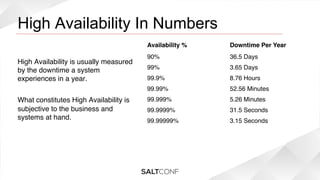
High Availability In Numbers

!

Availability %!

High Availability is usually measured
by the downtime a system
experiences in a year.!
!
What constitutes High Availability is
subjective to the business and
systems at hand.!
!
!
!

Downtime Per Year!

90%!

36.5 Days!

99%!

3.65 Days!

99.9%!

8.76 Hours!

99.99%!

52.56 Minutes!

99.999%!

5.26 Minutes!

99.9999%!

31.5 Seconds!

99.99999%!

3.15 Seconds!
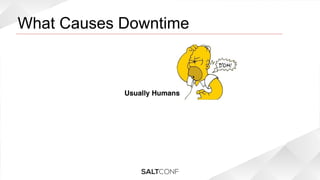
What Causes Downtime

!

Usually Humans
Best Practices
!
Replace manual processes
!
Replacing Humans with SaltStack!
Since humans are one of the top causes of service unavailability, it only makes sense to
replace them with automated processes.!
!
!
Building and Provisioning

!

By using a configuration management tool such as SaltStack you can automate the
installation and configuration of new systems. By automating this task you can ensure that
a system is deployed the same way every time. Ensuring a system is deployed in the
exact same method every time reduces configuration time bombs from impacting
production traffic later.!
!
Automate Everything!
The goal should be to automate everything. Not only does this decrease provisioning time,
but rather the more items that are automated the less likely those items are to be
repeatedly misconfigured or forgotten.!
It's easier to start fresh!
Building a new environment that is fully automated can be easier than introducing
automation into an existing environment. If you build it automated from the development
environment, to the testing environment and then to production. You can hash out any
issues in development and test rather than production.!
Automating Server Configuration!
One of the most opportune points for human error is in the server configurations. SaltStack
has great functionality around configuring a server, and it should be used to automatically
deploy server side configurations.!
 !
!
In the next few slides I will show how I created a pillar file that has all of my host specific
information inside. This pillar is then used to deploy a configuration file the same way
every time using templates.!
Server Settings Pillar!
In this example you will see a pillar labeled systems that sets items such as the SSH Port,
Node Groups, Active Interfaces and the IP information for those interfaces.!
systems:
{% if grains['fqdn'] == 'hostname01.example.com' %}
  sshport: 22
  nodegroups:
    - website_apps
  interfaces:
    - eth0
  defaultgw: 10.0.0.1
  ip:
    eth0: 10.0.0.10
  mask:
    eth0: 255.255.255.0
  mtu:
    eth0: 1500
{% elif grains['fqdn'] == 'hostname02.example.com' %}
System Settings State File!
Below is an example of deploying network interface files using the systems pillar values. !

{% for interface in pillar['systems']['interfaces'] %}
/etc/sysconfig/network-scripts/ifcfg-{{ interface }}:
  file.managed:
    - source: salt://network/config/etc/sysconfig/network-scripts/ifcfg-interfaces
    - user: root
    - group: root
    - mode: 644
    - template: jinja
    - context:
      interface: {{ interface }}
      ip: {{ pillar['systems']['ip'][interface] }}
      mask: {{ pillar['systems']['mask'][interface] }}
  
mtu: {{ pillar['systems']['mtu'][interface] }}
{% endfor %}
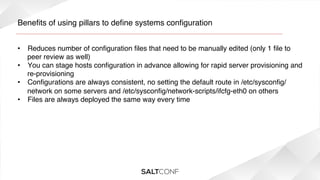
Benefits of using pillars to define systems configuration!
•  Reduces number of configuration files that need to be manually edited (only 1 file to
peer review as well)!
•  You can stage hosts configuration in advance allowing for rapid server provisioning and
re-provisioning!
•  Configurations are always consistent, no setting the default route in /etc/sysconfig/
network on some servers and /etc/sysconfig/network-scripts/ifcfg-eth0 on others!
•  Files are always deployed the same way every time!
!
Automating Application Installation!
SaltStack allows you to automate application installation easily. This should be one of the
first items to automate. By automating the installation of applications you can ensure that
the software is installed the same way each time, every time.!
Install a Package!
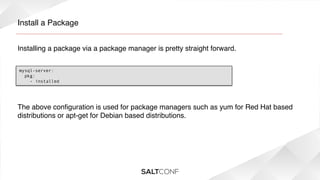
Installing a package via a package manager is pretty straight forward.!
mysql-server:
pkg:
- installed

The above configuration is used for package managers such as yum for Red Hat based
distributions or apt-get for Debian based distributions. !
3rd Party Vendor Applications!
Some 3rd party software companies don't always make it easy to automate a software's
installation.  !
!
You should do it regardless of the difficulty.  You may need to create a wrapper script, tell
SaltStack to run the 3rd party software vendors installation scripts, or become very familiar
with expect. But all of this work up front will save countless hours over the years of
installing and re-installing software.!
Installing Software with a Script!
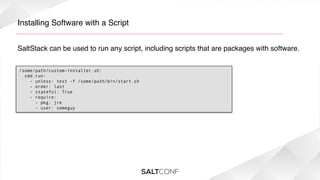
SaltStack can be used to run any script, including scripts that are packages with software.!
/some/path/custom-installer.sh:
  cmd.run:
    - unless: test -f /some/path/bin/start.sh
- order: last
- stateful: True
- require:
- pkg: jre
- user: someguy
Make all of your scripts stateful!
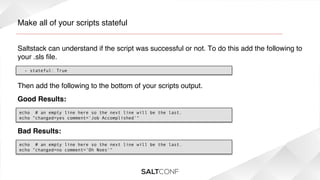
Saltstack can understand if the script was successful or not. To do this add the following to
your .sls file.!
- stateful: True

Then add the following to the bottom of your scripts output. !
Good Results:!
echo  # an empty line here so the next line will be the last.
echo "changed=yes comment='Job Accomplished'"

Bad Results:!
echo  # an empty line here so the next line will be the last.
echo "changed=no comment=’Oh Noes'"
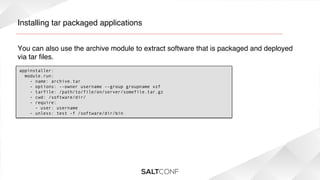
Installing tar packaged applications!
You can also use the archive module to extract software that is packaged and deployed
via tar files.!
appinstaller:
  module.run:
    - name: archive.tar
    - options: --owner username --group groupname xzf
    - tarfile: /path/to/file/on/server/somefile.tar.gz
    - cwd: /software/dir/
    - require:
      - user: username
    - unless: test -f /software/dir/bin
Configuring Applications!
Why stop at just automating the installation of the software? Why not automate the
configuration of it as well?!
Using Templates!
SaltStack allows you to utilize templates to deploy consistent configuration files. With a
combination of pillars and templates you can deploy custom configuration files easily.!
/etc/mysql/my.cnf:
  file.managed:
    - source: salt://mysql/config/etc/mysql/my.cnf
    - user: root
    - group: root
    - mode: 644
    - template: jinja
    - context:
      listenip: {{ salt['network.interfaces']()['eth0']['inet'][0]['address'] }}
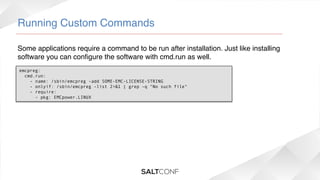
Running Custom Commands!
Some applications require a command to be run after installation. Just like installing
software you can configure the software with cmd.run as well.!
emcpreg:
  cmd.run:
    - name: /sbin/emcpreg -add SOME-EMC-LICENSE-STRING
    - onlyif: /sbin/emcpreg -list 2>&1 | grep -q "No such file"
    - require:
      - pkg: EMCpower.LINUX
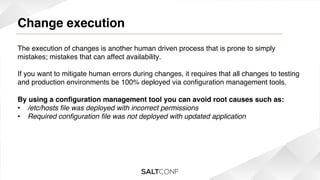
Change execution

!

The execution of changes is another human driven process that is prone to simply
mistakes; mistakes that can affect availability.!
!
If you want to mitigate human errors during changes, it requires that all changes to testing
and production environments be 100% deployed via configuration management tools.!
!
By using a configuration management tool you can avoid root causes such as:!
•  /etc/hosts file was deployed with incorrect permissions!
•  Required configuration file was not deployed with updated application!
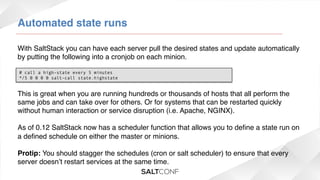
Automated state runs!
With SaltStack you can have each server pull the desired states and update automatically
by putting the following into a cronjob on each minion.!
# call a high-state every 5 minutes
*/5 0 0 0 0 salt-call state.highstate

This is great when you are running hundreds or thousands of hosts that all perform the
same jobs and can take over for others. Or for systems that can be restarted quickly
without human interaction or service disruption (i.e. Apache, NGINX).!
!
As of 0.12 SaltStack now has a scheduler function that allows you to define a state run on
a defined schedule on either the master or minions.!
!
Protip: You should stagger the schedules (cron or salt scheduler) to ensure that every
server doesn’t restart services at the same time.!
Automatic state runs is not appropriate for every
situation!
While having every system run a high state every 2 minutes sounds great; it is not the best
answer in every case. Knowing when to automate everything and when to keep some
things semi-automated is key to building highly available systems.!
!
If the systems you are managing are extremely sensitive to changes and application
restarts. It is best to establish a policy where the high state is run manually at a scheduled
time of day or week that aligns with your change management procedures.!
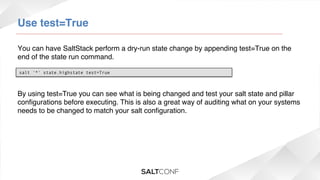
Use test=True!
You can have SaltStack perform a dry-run state change by appending test=True on the
end of the state run command.!
salt '*' state.highstate test=True

By using test=True you can see what is being changed and test your salt state and pillar
configurations before executing. This is also a great way of auditing what on your systems
needs to be changed to match your salt configuration.!
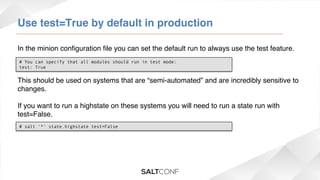
Use test=True by default in production!
In the minion configuration file you can set the default run to always use the test feature. !
# You can specify that all modules should run in test mode:
test: True

This should be used on systems that are “semi-automated” and are incredibly sensitive to
changes.!
!
If you want to run a highstate on these systems you will need to run a state run with
test=False. !
# salt '*' state.highstate test=False
Keep things well organized

!
Using more than the base environment

!

In large enterprise environments you will find various applications, some applications will
only have a hand full of servers, others have thousands. Keeping track of what gets
installed or configured where in these types of environments becomes unreasonable with
basic hostname matching. This is especially true if the enterprise hostname convention
does not allow for easy identification of server roles.!
Using additional environments!
SaltStack lets you define environments for both states and pillars. This allows you to
segregate configurations for each application environment. !
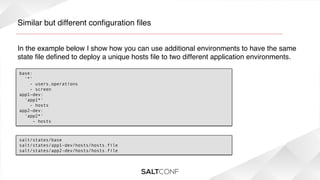
Similar but different configuration files!
In the example below I show how you can use additional environments to have the same
state file defined to deploy a unique hosts file to two different application environments.!
base:
'*'
- users.operations
- screen
app1-dev:
'app1*'
- hosts
app2-dev:
'app2*'
- hosts

salt/states/base
salt/states/app1-dev/hosts/hosts.file
salt/states/app2-dev/hosts/hosts.file
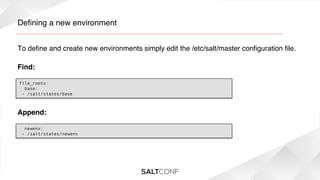
Defining a new environment!
To define and create new environments simply edit the /etc/salt/master configuration file.!
Find:!
file_roots:
  base:
 - /salt/states/base

Append:!
  newenv:
 - /salt/states/newenv
Using node groups!
In addition to custom environments you can also define node groups within SaltStack.
Node groups are a grouping of minions that can be grouped by several parameters. When
used with additional environments this allows you to perform salt runs on well defined
groups of minions.!
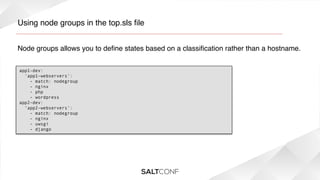
Using node groups in the top.sls file!
Node groups allows you to define states based on a classification rather than a hostname.!
app1-dev:
  'app1-webservers':
    - match: nodegroup
    - nginx
- php
- wordpress
app2-dev:
‘app2-webservers’:
- match: nodegroup
- nginx
- uwsgi
- django
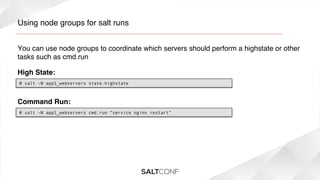
Using node groups for salt runs!
You can use node groups to coordinate which servers should perform a highstate or other
tasks such as cmd.run!
High State:!
# salt -N app1_webservers state.highstate

Command Run:!
# salt -N app1_webservers cmd.run “service nginx restart”
Defining node groups!
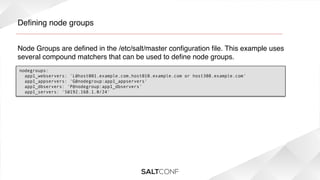
Node Groups are defined in the /etc/salt/master configuration file. This example uses
several compound matchers that can be used to define node groups.!
nodegroups:
  app1_webservers: 'L@host001.example.com,host010.example.com or host308.example.com'
  app1_appservers: 'G@nodegroup:app1_appservers'
  app1_dbservers: 'P@nodegroup:app1_dbservers'
app1_servers: 'S@192.168.1.0/24'
Architectural Considerations

!
Architectural Considerations

!

While using SaltStack appropriately can greatly increase your consistency and automation
which brings with it higher availability. This only works while SaltStack is up and running.!
Spread the load!
In large environments it is advisable to setup a dedicated salt master server for different
environment types.!
!
For example if you have a development, test and 2 production sites it would be advisable
to have at least 1 salt master for each environment. Using 2 salt masters for the 2
production sites would allow you to setup a master server for each site giving you
independence during data center outages..!
Setup multiple master servers!
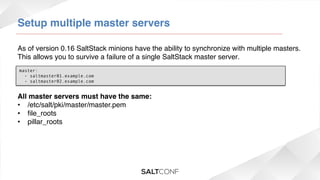
As of version 0.16 SaltStack minions have the ability to synchronize with multiple masters.
This allows you to survive a failure of a single SaltStack master server.!
master:
  - saltmaster01.example.com
  - saltmaster02.example.com

All master servers must have the same:!
•  /etc/salt/pki/master/master.pem!
•  file_roots!
•  pillar_roots!
!
Use source control!
Just like anything else, SaltStack only gets better with the use of source control. By
keeping your states, pillars, and master/minion configurations in source control you can
control your infrastructure the same way you control your application code/configuration.!
!
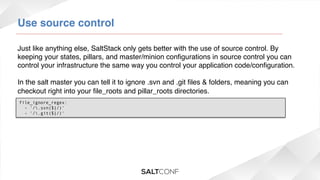
In the salt master you can tell it to ignore .svn and .git files & folders, meaning you can
checkout right into your file_roots and pillar_roots directories.!
!file_ignore_regex:
  - '/.svn($|/)'
  - '/.git($|/)'
Some other stuff

!
Pro tips!
•  Don't become so dependent on SaltStack that you can't perform remediation tasks
without it.!
•  Keep your implementation as simple to support as possible. !
•  Keep your implementation well organized to ensure configurations only go where they
are meant to go.!
•  Use test=True like your life depends on it, because it might...!
•  Use source control!!
•  If you are going to use SaltStack, use it! Automate or Semi Automate everything.!
•  Keep an eye on new features, SaltStack is evolving fast.!
•  Check out the modules there is some cool stuff in there.!
EOF!

Presented by: Benjamin Cane – bencane.com!
Twitter: @madflojo!

Salt conf 2014 - Using SaltStack in high availability environments

  • 1.
    Using SaltStack inHigh Availability Environments !
  • 2.
  • 3.
    Who is thisguy? ! My name is Benjamin Cane, I run a blog bencane.com focused on Linux Systems Administration.! ! By day I am a Solutions Architect working in the financial services industry. My focus is solely on building mission critical environments that require 99.99% to 99.999% availability. In other words High and Continuous Availability environments.! ! This presentation is going to cover a few best practices for using SaltStack in High Availability environments.! ! Note: The views, opinions and recommendations in this presentation are entirely my own and do not represent the views of my employer.!
  • 4.
  • 5.
    What is HighAvailability ! High availability is a system design approach and associated service implementation that ensures a prearranged level of operational performance will be met during a contractual measurement period. - Source: Wikipedia ! A Highly Available environment is a system that is designed to be available to the end user the majority of the time.!
  • 6.
    High Availability InNumbers ! Availability %! High Availability is usually measured by the downtime a system experiences in a year.! ! What constitutes High Availability is subjective to the business and systems at hand.! ! ! ! Downtime Per Year! 90%! 36.5 Days! 99%! 3.65 Days! 99.9%! 8.76 Hours! 99.99%! 52.56 Minutes! 99.999%! 5.26 Minutes! 99.9999%! 31.5 Seconds! 99.99999%! 3.15 Seconds!
  • 7.
  • 8.
  • 9.
  • 10.
    Replacing Humans withSaltStack! Since humans are one of the top causes of service unavailability, it only makes sense to replace them with automated processes.! ! !
  • 11.
    Building and Provisioning ! Byusing a configuration management tool such as SaltStack you can automate the installation and configuration of new systems. By automating this task you can ensure that a system is deployed the same way every time. Ensuring a system is deployed in the exact same method every time reduces configuration time bombs from impacting production traffic later.! !
  • 12.
    Automate Everything! The goalshould be to automate everything. Not only does this decrease provisioning time, but rather the more items that are automated the less likely those items are to be repeatedly misconfigured or forgotten.!
  • 13.
    It's easier tostart fresh! Building a new environment that is fully automated can be easier than introducing automation into an existing environment. If you build it automated from the development environment, to the testing environment and then to production. You can hash out any issues in development and test rather than production.!
  • 14.
    Automating Server Configuration! Oneof the most opportune points for human error is in the server configurations. SaltStack has great functionality around configuring a server, and it should be used to automatically deploy server side configurations.!  ! ! In the next few slides I will show how I created a pillar file that has all of my host specific information inside. This pillar is then used to deploy a configuration file the same way every time using templates.!
  • 15.
    Server Settings Pillar! Inthis example you will see a pillar labeled systems that sets items such as the SSH Port, Node Groups, Active Interfaces and the IP information for those interfaces.! systems: {% if grains['fqdn'] == 'hostname01.example.com' %}   sshport: 22   nodegroups:     - website_apps   interfaces:     - eth0   defaultgw: 10.0.0.1   ip:     eth0: 10.0.0.10   mask:     eth0: 255.255.255.0   mtu:     eth0: 1500 {% elif grains['fqdn'] == 'hostname02.example.com' %}
  • 16.
    System Settings StateFile! Below is an example of deploying network interface files using the systems pillar values. ! {% for interface in pillar['systems']['interfaces'] %} /etc/sysconfig/network-scripts/ifcfg-{{ interface }}:   file.managed:     - source: salt://network/config/etc/sysconfig/network-scripts/ifcfg-interfaces     - user: root     - group: root     - mode: 644     - template: jinja     - context:       interface: {{ interface }}       ip: {{ pillar['systems']['ip'][interface] }}       mask: {{ pillar['systems']['mask'][interface] }}    mtu: {{ pillar['systems']['mtu'][interface] }} {% endfor %}
  • 17.
    Benefits of usingpillars to define systems configuration! •  Reduces number of configuration files that need to be manually edited (only 1 file to peer review as well)! •  You can stage hosts configuration in advance allowing for rapid server provisioning and re-provisioning! •  Configurations are always consistent, no setting the default route in /etc/sysconfig/ network on some servers and /etc/sysconfig/network-scripts/ifcfg-eth0 on others! •  Files are always deployed the same way every time! !
  • 18.
    Automating Application Installation! SaltStackallows you to automate application installation easily. This should be one of the first items to automate. By automating the installation of applications you can ensure that the software is installed the same way each time, every time.!
  • 19.
    Install a Package! Installinga package via a package manager is pretty straight forward.! mysql-server: pkg: - installed The above configuration is used for package managers such as yum for Red Hat based distributions or apt-get for Debian based distributions. !
  • 20.
    3rd Party VendorApplications! Some 3rd party software companies don't always make it easy to automate a software's installation.  ! ! You should do it regardless of the difficulty.  You may need to create a wrapper script, tell SaltStack to run the 3rd party software vendors installation scripts, or become very familiar with expect. But all of this work up front will save countless hours over the years of installing and re-installing software.!
  • 21.
    Installing Software witha Script! SaltStack can be used to run any script, including scripts that are packages with software.! /some/path/custom-installer.sh:   cmd.run:     - unless: test -f /some/path/bin/start.sh - order: last - stateful: True - require: - pkg: jre - user: someguy
  • 22.
    Make all ofyour scripts stateful! Saltstack can understand if the script was successful or not. To do this add the following to your .sls file.! - stateful: True Then add the following to the bottom of your scripts output. ! Good Results:! echo  # an empty line here so the next line will be the last. echo "changed=yes comment='Job Accomplished'" Bad Results:! echo  # an empty line here so the next line will be the last. echo "changed=no comment=’Oh Noes'"
  • 23.
    Installing tar packagedapplications! You can also use the archive module to extract software that is packaged and deployed via tar files.! appinstaller:   module.run:     - name: archive.tar     - options: --owner username --group groupname xzf     - tarfile: /path/to/file/on/server/somefile.tar.gz     - cwd: /software/dir/     - require:       - user: username     - unless: test -f /software/dir/bin
  • 24.
    Configuring Applications! Why stopat just automating the installation of the software? Why not automate the configuration of it as well?!
  • 25.
    Using Templates! SaltStack allowsyou to utilize templates to deploy consistent configuration files. With a combination of pillars and templates you can deploy custom configuration files easily.! /etc/mysql/my.cnf:   file.managed:     - source: salt://mysql/config/etc/mysql/my.cnf     - user: root     - group: root     - mode: 644     - template: jinja     - context:       listenip: {{ salt['network.interfaces']()['eth0']['inet'][0]['address'] }}
  • 26.
    Running Custom Commands! Someapplications require a command to be run after installation. Just like installing software you can configure the software with cmd.run as well.! emcpreg:   cmd.run:     - name: /sbin/emcpreg -add SOME-EMC-LICENSE-STRING     - onlyif: /sbin/emcpreg -list 2>&1 | grep -q "No such file"     - require:       - pkg: EMCpower.LINUX
  • 27.
    Change execution ! The executionof changes is another human driven process that is prone to simply mistakes; mistakes that can affect availability.! ! If you want to mitigate human errors during changes, it requires that all changes to testing and production environments be 100% deployed via configuration management tools.! ! By using a configuration management tool you can avoid root causes such as:! •  /etc/hosts file was deployed with incorrect permissions! •  Required configuration file was not deployed with updated application!
  • 28.
    Automated state runs! WithSaltStack you can have each server pull the desired states and update automatically by putting the following into a cronjob on each minion.! # call a high-state every 5 minutes */5 0 0 0 0 salt-call state.highstate This is great when you are running hundreds or thousands of hosts that all perform the same jobs and can take over for others. Or for systems that can be restarted quickly without human interaction or service disruption (i.e. Apache, NGINX).! ! As of 0.12 SaltStack now has a scheduler function that allows you to define a state run on a defined schedule on either the master or minions.! ! Protip: You should stagger the schedules (cron or salt scheduler) to ensure that every server doesn’t restart services at the same time.!
  • 29.
    Automatic state runsis not appropriate for every situation! While having every system run a high state every 2 minutes sounds great; it is not the best answer in every case. Knowing when to automate everything and when to keep some things semi-automated is key to building highly available systems.! ! If the systems you are managing are extremely sensitive to changes and application restarts. It is best to establish a policy where the high state is run manually at a scheduled time of day or week that aligns with your change management procedures.!
  • 30.
    Use test=True! You canhave SaltStack perform a dry-run state change by appending test=True on the end of the state run command.! salt '*' state.highstate test=True By using test=True you can see what is being changed and test your salt state and pillar configurations before executing. This is also a great way of auditing what on your systems needs to be changed to match your salt configuration.!
  • 31.
    Use test=True bydefault in production! In the minion configuration file you can set the default run to always use the test feature. ! # You can specify that all modules should run in test mode: test: True This should be used on systems that are “semi-automated” and are incredibly sensitive to changes.! ! If you want to run a highstate on these systems you will need to run a state run with test=False. ! # salt '*' state.highstate test=False
  • 32.
    Keep things wellorganized !
  • 33.
    Using more thanthe base environment ! In large enterprise environments you will find various applications, some applications will only have a hand full of servers, others have thousands. Keeping track of what gets installed or configured where in these types of environments becomes unreasonable with basic hostname matching. This is especially true if the enterprise hostname convention does not allow for easy identification of server roles.!
  • 34.
    Using additional environments! SaltStacklets you define environments for both states and pillars. This allows you to segregate configurations for each application environment. !
  • 35.
    Similar but differentconfiguration files! In the example below I show how you can use additional environments to have the same state file defined to deploy a unique hosts file to two different application environments.! base: '*' - users.operations - screen app1-dev: 'app1*' - hosts app2-dev: 'app2*' - hosts salt/states/base salt/states/app1-dev/hosts/hosts.file salt/states/app2-dev/hosts/hosts.file
  • 36.
    Defining a newenvironment! To define and create new environments simply edit the /etc/salt/master configuration file.! Find:! file_roots:   base:  - /salt/states/base Append:!   newenv:  - /salt/states/newenv
  • 37.
    Using node groups! Inaddition to custom environments you can also define node groups within SaltStack. Node groups are a grouping of minions that can be grouped by several parameters. When used with additional environments this allows you to perform salt runs on well defined groups of minions.!
  • 38.
    Using node groupsin the top.sls file! Node groups allows you to define states based on a classification rather than a hostname.! app1-dev:   'app1-webservers':     - match: nodegroup     - nginx - php - wordpress app2-dev: ‘app2-webservers’: - match: nodegroup - nginx - uwsgi - django
  • 39.
    Using node groupsfor salt runs! You can use node groups to coordinate which servers should perform a highstate or other tasks such as cmd.run! High State:! # salt -N app1_webservers state.highstate Command Run:! # salt -N app1_webservers cmd.run “service nginx restart”
  • 40.
    Defining node groups! NodeGroups are defined in the /etc/salt/master configuration file. This example uses several compound matchers that can be used to define node groups.! nodegroups:   app1_webservers: 'L@host001.example.com,host010.example.com or host308.example.com'   app1_appservers: 'G@nodegroup:app1_appservers'   app1_dbservers: 'P@nodegroup:app1_dbservers' app1_servers: 'S@192.168.1.0/24'
  • 41.
  • 42.
    Architectural Considerations ! While usingSaltStack appropriately can greatly increase your consistency and automation which brings with it higher availability. This only works while SaltStack is up and running.!
  • 43.
    Spread the load! Inlarge environments it is advisable to setup a dedicated salt master server for different environment types.! ! For example if you have a development, test and 2 production sites it would be advisable to have at least 1 salt master for each environment. Using 2 salt masters for the 2 production sites would allow you to setup a master server for each site giving you independence during data center outages..!
  • 44.
    Setup multiple masterservers! As of version 0.16 SaltStack minions have the ability to synchronize with multiple masters. This allows you to survive a failure of a single SaltStack master server.! master:   - saltmaster01.example.com   - saltmaster02.example.com All master servers must have the same:! •  /etc/salt/pki/master/master.pem! •  file_roots! •  pillar_roots! !
  • 45.
    Use source control! Justlike anything else, SaltStack only gets better with the use of source control. By keeping your states, pillars, and master/minion configurations in source control you can control your infrastructure the same way you control your application code/configuration.! ! In the salt master you can tell it to ignore .svn and .git files & folders, meaning you can checkout right into your file_roots and pillar_roots directories.! !file_ignore_regex:   - '/.svn($|/)'   - '/.git($|/)'
  • 46.
  • 47.
    Pro tips! •  Don'tbecome so dependent on SaltStack that you can't perform remediation tasks without it.! •  Keep your implementation as simple to support as possible. ! •  Keep your implementation well organized to ensure configurations only go where they are meant to go.! •  Use test=True like your life depends on it, because it might...! •  Use source control!! •  If you are going to use SaltStack, use it! Automate or Semi Automate everything.! •  Keep an eye on new features, SaltStack is evolving fast.! •  Check out the modules there is some cool stuff in there.!
  • 48.
    EOF! Presented by: BenjaminCane – bencane.com! Twitter: @madflojo!