Automated Server Configuration and Web Site Deployments with Chef and CapistranoNLIT Summit 2011Nick Muerdter06/15/2011
2Photo from National Library NZhttp://www.flickr.com/photos/nationallibrarynz_commons/5015573731
3Bringing OrderPhoto from U.S. National Archiveshttp://www.flickr.com/photos/usnationalarchives/4011449131
4Party like it’s 2011!Image © Hanna-Barbera and Warner Bros. Entertainment Inc.
5Photo by hey skinnyhttp://www.flickr.com/photos/heyskinny/1464641723
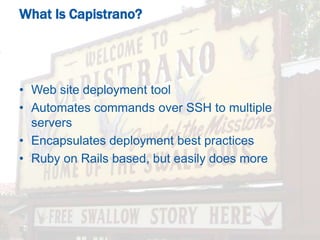
6Web site deployment tool
Automates commands over SSH to multiple servers
Encapsulates deployment best practices
Ruby on Rails based, but easily does moreWhat Is Capistrano?
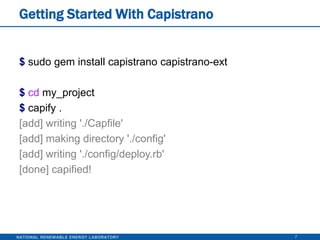
Getting Started With Capistrano7$sudo gem install capistranocapistrano-ext$cd my_project$capify .[add] writing './Capfile'[add] making directory './config'[add] writing './config/deploy.rb'[done] capified!
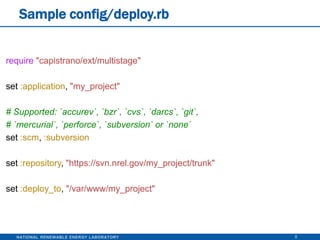
Sample config/deploy.rb8require"capistrano/ext/multistage"set :application, "my_project"# Supported: `accurev`, `bzr`, `cvs`, `darcs`, `git`,# `mercurial`, `perforce`, `subversion` or `none`set :scm, :subversionset :repository, "https://svn.nrel.gov/my_project/trunk"set :deploy_to, "/var/www/my_project"
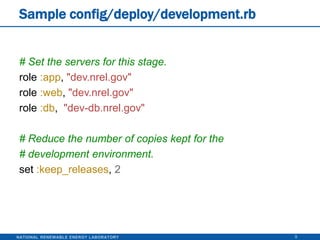
Sample config/deploy/development.rb9# Set the servers for this stage.role :app, "dev.nrel.gov"role :web, "dev.nrel.gov"role :db,  "dev-db.nrel.gov"# Reduce the number of copies kept for the# development environment.set :keep_releases, 2
Sample config/deploy/staging.rb10# Set the servers for this stage.role :app, "staging.nrel.gov"role :web, "staging.nrel.gov"role :db,  "staging-db.nrel.gov"
Sample config/deploy/production.rb11# Set the servers for this stage.role :app, "nrel.gov"role :web, "nrel.gov"role :db,  "db.nrel.gov"
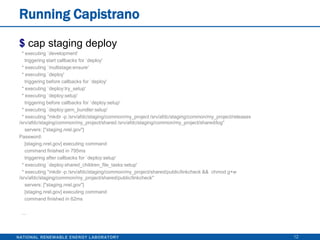
Running Capistrano12$ cap staging deploy  * executing `development'    triggering start callbacks for `deploy'  * executing `multistage:ensure'  * executing `deploy'    triggering before callbacks for `deploy'  * executing `deploy:try_setup'  * executing `deploy:setup'    triggering before callbacks for `deploy:setup'  * executing `deploy:gem_bundler:setup'  * executing "mkdir -p /srv/afdc/staging/common/my_project /srv/afdc/staging/common/my_project/releases /srv/afdc/staging/common/my_project/shared /srv/afdc/staging/common/my_project/shared/log"    servers: ["staging.nrel.gov"]Password:     [staging.nrel.gov] executing command    command finished in 795ms    triggering after callbacks for `deploy:setup'  * executing `deploy:shared_children_file_tasks:setup'  * executing "mkdir -p /srv/afdc/staging/common/my_project/shared/public/linkcheck &&  chmodg+w /srv/afdc/staging/common/my_project/shared/public/linkcheck"    servers: ["staging.nrel.gov"]    [staging.nrel.gov] executing command    command finished in 62ms  ...
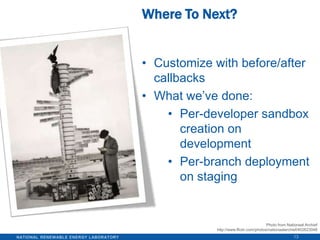
Customize with before/after callbacks
What we’ve done:
Per-developer sandbox creation on development
Per-branch deployment on staging13Where To Next?Photo from NationaalArchiefhttp://www.flickr.com/photos/nationaalarchief/402623048
14What Is Chef?Automated server configuration tool
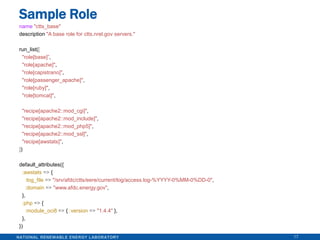
Programmatically define:
System requirements
System configuration

NLIT 2011: Chef & Capistrano

Editor's Notes

  • #3 Single production serverDevelop on your live server.Cross fingers and hope you’re perfect.
  • #4 Separate servers and environments for development, staging, and production.Manually move things from one stage to the next.
  • #5 Maintaining separate servers can be burdensome.Script it! Things are then easily repeatable.Lots of tools and solutions out there. We’ve used Capistrano and Chef.
  • #7 Best practices:Deployments are (mostly) atomic: Deployment happens inside separate directory. Only made live at the last minute if all other deployment tasks have succeeded.Previous versions kept around, so rollbacks are quick.Deploy to multiple servers at the same timeLoad balanced application serversPerform tasks on the database server.Not just Ruby on RailsWe use it for lots of PHP applications.Can handle anything that can be automated through SSH.Flexible:Has a set of tasks it executes by default.Tasks can be overwritten or extended using before/after hooks.
  • #8 “capistrano-ext” gem: Useful extension to handle multiple server environments (eg, development, staging, production).“Capfile” required file.“config/deploy.rb” main configuration file.
  • #9 Lots of variables to control things: https://github.com/peritor/webistrano/wiki/configuration-parametersYou can define your own variables to do other things.
  • #10 Per-environment configuration.Define the servers to be used for this environment.Override variable defaults for this environment.
  • #11 Per-environment configuration.
  • #12 Per-environment configuration.
  • #13 Always just one command for an identical deployment.cap development deploycap production deploy
  • #14 Our website Apache configuration is part of application’s code base and deployment process.This allows dynamic deployments.cap development deploy SANDBOX=nmuerdterCompletely sets up a separate version of our code at a separate subdomain (eg, nmuerdter.dev.nrel.gov).Each developer doesn’t have to maintain a server, but their code and site is completely separate.cap staging deploy BRANCH=feature-aDeploy a different branch of our code to the staging server at a separate subdomain (eg, feature-a.staging.nrel.gov).Useful when multiple developers are working on different features of the same site, but each feature needs to be reviewed separately.
  • #15 Web site deployment only half of puzzle.Underlying servers need to be maintained.What software packages need to be installed? What configuration needs to be made? What about that magic file that needs to be in a certain place or everything breaks?Server changes required for development need to be remembered and applied to each sever when ready (development, staging, then production).Completely different servers often need to be setup similarly (for example, we setup Apache similarly between servers).Duplicate servers for load balancing purposes.
  • #16 Cookbooks: Encapsulates everything for a single piece of software (for example, Apache).Recipes: The script that defines the actions to perform to install and configure the software (for example, how to install Apache, what configuration files to install, and more). Written in Ruby.Attributes: Variables that can be set and customized (for example, what ports Apache should listen on).Files: Static files that should be installed onto the server.Templates: Like files, installed onto the server, but can contain attribute variables, so things can be customized depending on the server’s attributes (for example, the httpd.conf file).Roles: Define a series of cookbooks or other roles to run and attributes to set.Reusable, generic roles: “apache”Per-server roles: specific web server.Nodes: Any machine you’re dealing with.Server/Client modelChef Server: The master machine that hosts the chef server. Where cookbooks, roles, etc are stored.Chef Clients: Any machine you wish to configure using chef. The chef server machine itself is also a client.
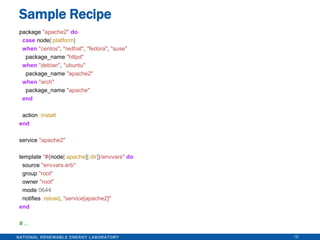
  • #17 “package” defines the software package to install.Your recipe doesn’t have to be cross-platform, but a lot of the available cookbooks are.You give a package name, Chef handles the appropriate logic (yum for RedHat, apt-get for Debian).“service” defines the service that’s available.Again, Chef handles the cross-platform logic (init.d, etc).“template” installs a file onto the server after parsing “envvars.erb” with ruby. Allows for dynamic templates.“node” gives access to the attributes for the server being setup.
  • #18 The run list defines which other roles or recipes to run.You can nest roles.Some roles are generic “apache”Others we build for specific server types (eg, the web server responsible for a specific site).default_attributes defines or overrides variables for this specific role. Recipes use these variables to control logic or configuration. Self documenting: Now you know the exact requirements for your machines.
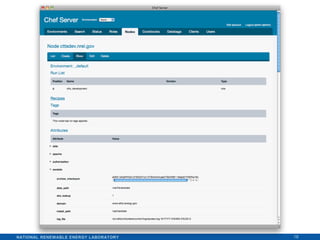
  • #19 Web interface available.I only like to use for browsing (not node configuration).I keep logic defined in role files, so changes are tracked in subversion.
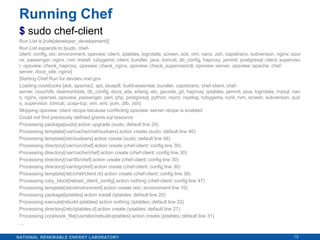
  • #20 Updating a server, just a matter of running “chef-client”Fetches the run list for this specific machine from the chef server and runs recipes.Only performs actions if needed (eg, software packages only upgraded if needed, files only installed if they differ).I’ve glossed over initially bootstrapping client nodes and the chef server itself, but those directions can be found elsewhere.
  • #21 There is undoubtedly upfront overhead with this approach.
  • #22 However, the upfront overhead pays off in the long run.Maintenance is easier.CapistranoNew developer? One command sets up their separate sandbox on our development server.Deployments to staging and production are reliable. Always deploy via capistrano and any kinks get worked out early on in staging before going to production.ChefServer software updates? Never forget what you’ve done between your development and production servers.New server? Reuse existing cookbooks to speed up the process.Standardized process is followed.By scripting everything, the scripts become documentation for exactly how a server is configured and what is done during deployment.