Downloaded 57 times


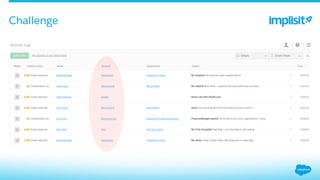
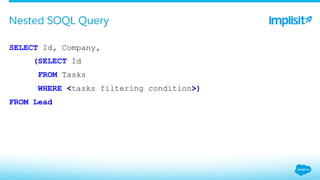
![ { 'totalSize': 2,
'records': [
{'Company': ‘Salesforce.com', u'Tasks': None, u'Id': u'00Qd0000007Q36GEAS'},
{'Company': ‘Implisit',
'Tasks': {'totalSize': 1, u'records': [{'Id': u'00Ti000000zM7rLEAS'}]},
'Id': u'00Qd0000007Q36GEAS'}
]}
Nested SOQL Query - result](https://image.slidesharecdn.com/l4madhx1rrejvm7h9tqf-signature-7873c75031ac31677418d06ca1135ba58cf1db5a062456d83a04778887726afe-poli-151012220143-lva1-app6891/85/Salesforce-Data-Models-for-Pros-Simplifying-The-Complexities-22-320.jpg)


![ from suds.client import Client
…
soap_api = Client(wsdl_url)
describe_global_res = soap_api.service.describeGlobal()
supported_obj_names = [sobject.name for describe_global_res['sobjects']]
describeGlobal() - list supported objects](https://image.slidesharecdn.com/l4madhx1rrejvm7h9tqf-signature-7873c75031ac31677418d06ca1135ba58cf1db5a062456d83a04778887726afe-poli-151012220143-lva1-app6891/85/Salesforce-Data-Models-for-Pros-Simplifying-The-Complexities-34-320.jpg)
![ get_desc_url = "https://na15.salesforce.com/services/data/v32/sobjects/Lead/describe"
desc_json = json.loads(perform_request(get_desc_url))
lead_fields_metadata = desc_json['fields']
// get all available field names
lead_field_names = [field['name'] for field in lead_fields_metadata]
Describe](https://image.slidesharecdn.com/l4madhx1rrejvm7h9tqf-signature-7873c75031ac31677418d06ca1135ba58cf1db5a062456d83a04778887726afe-poli-151012220143-lva1-app6891/85/Salesforce-Data-Models-for-Pros-Simplifying-The-Complexities-36-320.jpg)
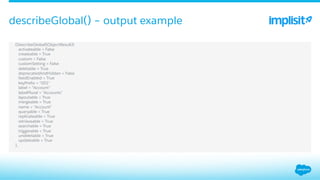
![ [(DescribeSObjectResult){
…
activateable = False
keyPrefix = "00Q"
label = "Lead"
labelPlural = "Leads"
layoutable = True
mergeable = True
name = "Lead"
queryable = True
replicateable = True
retrieveable = True
searchLayoutable = True
searchable = True
triggerable = True
undeletable = True
updateable = True
….
}]
Describe - output](https://image.slidesharecdn.com/l4madhx1rrejvm7h9tqf-signature-7873c75031ac31677418d06ca1135ba58cf1db5a062456d83a04778887726afe-poli-151012220143-lva1-app6891/85/Salesforce-Data-Models-for-Pros-Simplifying-The-Complexities-37-320.jpg)
![ # get all picklist values for a field
def get_active_picklist_values(obj_fields_metadata, field_name):
for field_metadata in fields_metadata:
if field_metadata['name'] != field_name:
continue
picklist_values = field_metadata.get('picklistValues', [])
return [ picklist_val['value']
for picklist_val in picklist_values
if picklist_val['active'] ]
Describe](https://image.slidesharecdn.com/l4madhx1rrejvm7h9tqf-signature-7873c75031ac31677418d06ca1135ba58cf1db5a062456d83a04778887726afe-poli-151012220143-lva1-app6891/85/Salesforce-Data-Models-for-Pros-Simplifying-The-Complexities-38-320.jpg)
![ (Field){
autoNumber = False
byteLength = 120
calculated = False
caseSensitive = False
createable = True
custom = False
defaultedOnCreate = False
deprecatedAndHidden = False
digits = 0
filterable = True
groupable = True
idLookup = False
label = "Lead Source"
length = 40
name = "LeadSource"
nameField = False
namePointing = False
nillable = True
permissionable = True
picklistValues[] =
(PicklistEntry){
active = True
defaultValue = False
label = "Advertisement"
value = "Advertisement"
},
...
precision = 0
restrictedPicklist = False
scale = 0
soapType = "xsd:string"
sortable = True
type = "picklist"
unique = False
updateable = True
},
Describe – single field output](https://image.slidesharecdn.com/l4madhx1rrejvm7h9tqf-signature-7873c75031ac31677418d06ca1135ba58cf1db5a062456d83a04778887726afe-poli-151012220143-lva1-app6891/85/Salesforce-Data-Models-for-Pros-Simplifying-The-Complexities-39-320.jpg)

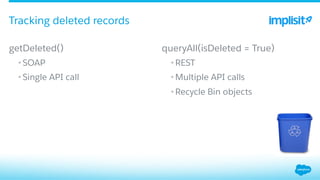
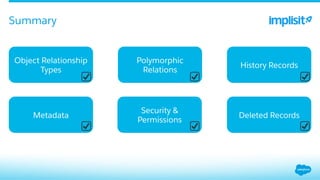




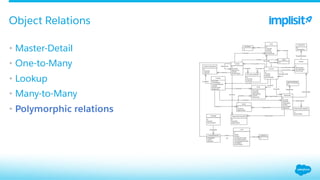
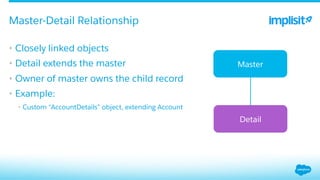
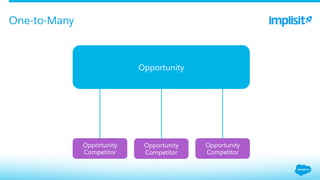
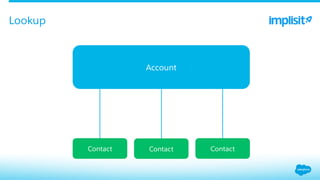
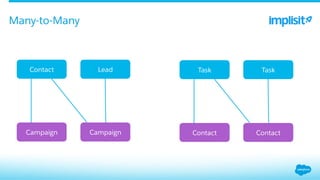
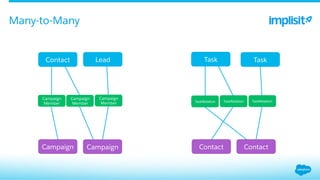
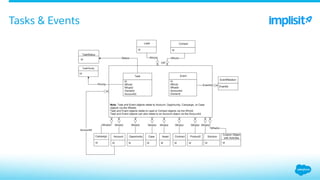
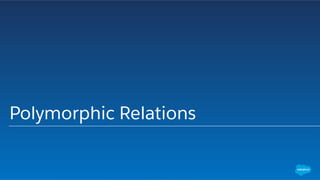
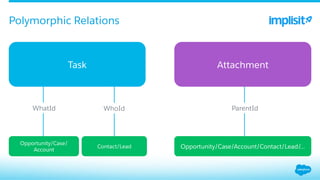
This document discusses Salesforce (SFDC) data models, focusing on object relationships such as master-detail, one-to-many, lookup, and polymorphic relations. It details querying techniques using SOQL to handle tasks and events, including fetching deleted records and tracking metadata history. Additionally, it highlights security and permissions related to access and interactions with SFDC data, alongside examples of how to use the Salesforce API for data manipulation.


![[React Native] Lecture 4: Basic Elements and UI Layout by using FlexBox](https://cdn.slidesharecdn.com/ss_thumbnails/l4-react-native-layout-160911060742-thumbnail.jpg?width=640&height=640&fit=bounds)


![[MoT SP #1] PRISMA para Testes Baseados em Risco](https://cdn.slidesharecdn.com/ss_thumbnails/prismaparatestesbaseadosemrisco-181221105843-thumbnail.jpg?width=640&height=640&fit=bounds)


