SYSTEM ANALYSIS AND
DESIGN
CHAP 3
RQEUIREMENTS MODELING
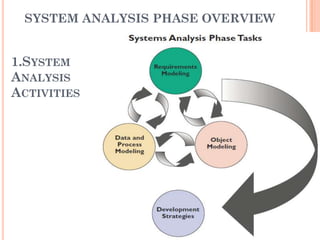
SYSTEM ANALYSIS PHASE OVERVIEW


1.SYSTEM
ANALYSIS
ACTIVITIES
   Requirement modeling involve fact finding to
    describe the current system and identification if the
    requirements for the new system, such as
       Output-electronic or printed information produced by the
        system.
       Input-Necessary data that enters the system either
        manually of automatically.
       Processes-Logic rules that are applied to transform the
        data into meaningful information.
       Performance- system characteristic such as
        speed, volume , capacity , availability , reliability.
       Security-hardware ,software, technical controls that safe
        and protect the system and its data from internal or
        external threats.
   Data and process modeling –how to represent
    graphically system data and process using traditional
    structured analysis techniques.
   Object Modeling -Popular modeling technique ex.
    object oriented analysis.
   Development Strategies –Diff. development
    options and prepare for transition to the system
    design stage of SDLC.
2.SYSTEM ANALYSIS SKILLS
    Need Strong analytical and interpersonal skills
     to build accurate model of new system
      Analytical Skill –Enable you to identify a
       problem, evaluate the key elements, and develop a
       useful solution.
      Interpersonal skills –especially valuable – Balance
       conflicting needs of users and communicate
       effectively.
3.TEAM ORIENTED METHODS AND
TECHNIQUE
  Joint Application Development –User oriented
   technique for fact finding and requirement
   modeling
  Rapid Application Development –Version of the
   SDLC.
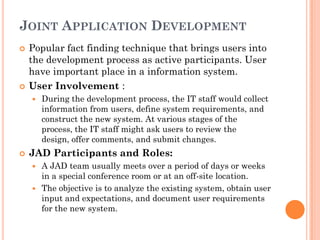
JOINT APPLICATION DEVELOPMENT
   Popular fact finding technique that brings users into
    the development process as active participants. User
    have important place in a information system.
   User Involvement :
       During the development process, the IT staff would collect
        information from users, define system requirements, and
        construct the new system. At various stages of the
        process, the IT staff might ask users to review the
        design, offer comments, and submit changes.
   JAD Participants and Roles:
     A JAD team usually meets over a period of days or weeks
      in a special conference room or at an off-site location.
     The objective is to analyze the existing system, obtain user
      input and expectations, and document user requirements
      for the new system.
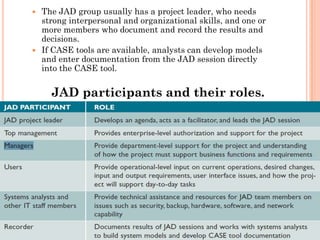
 The JAD group usually has a project leader, who needs
  strong interpersonal and organizational skills, and one or
  more members who document and record the results and
  decisions.
 If CASE tools are available, analysts can develop models
  and enter documentation from the JAD session directly
  into the CASE tool.


    JAD participants and their roles.
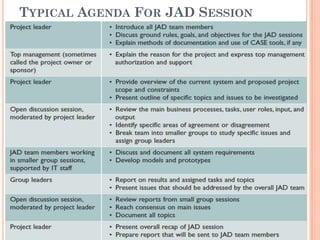
TYPICAL AGENDA FOR JAD SESSION
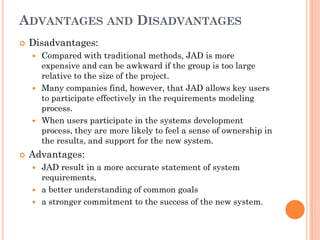
ADVANTAGES AND DISADVANTAGES
   Disadvantages:
     Compared with traditional methods, JAD is more
      expensive and can be awkward if the group is too large
      relative to the size of the project.
     Many companies find, however, that JAD allows key users
      to participate effectively in the requirements modeling
      process.
     When users participate in the systems development
      process, they are more likely to feel a sense of ownership in
      the results, and support for the new system.
   Advantages:
     JAD result in a more accurate statement of system
      requirements,
     a better understanding of common goals
     a stronger commitment to the success of the new system.
RAPID APPLICATION DEVELOPMENT
   Team-based technique that speeds up information
    systems development and produces a functioning
    information system.
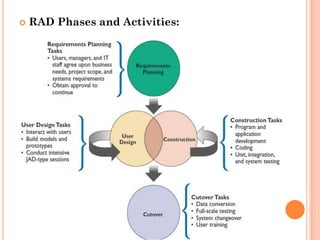
   RAD is a complete methodology, with a four-phase life
    cycle that parallels the traditional SDLC phases.
   Companies use RAD to reduce cost and development
    time, and increase the probability of success.
   RAD depend heavily on prototyping and user
    involvement.
   The RAD process allows users to examine a working
    model as early as possible, determine if it meets their
    needs, and suggest necessary changes.
   Based on user input, the prototype is modified and
    the interactive(combine) process continues until the
    system is completely developed and users are
    satisfied.
   RAD Phases and Activities:
   RAD Objectives :
       cut development time and expense by involving
        users.
       RAD allows the development team to make necessary
        modifications quickly.
       limit the cost of changes in Rad.
       RAD is especially valuable when a company needs an
        information system to support a new business
        function.
       RAD also helps a development team design a highly
        interactive or complex user interface.
MODELING TOOLS AND TECHNIQUES.
 Help to understand the design of a system.
 Modeling involves graphical methods and
  nontechnical language that represent the system at
  various stages of development.
     Case Tools
     Functional Decomposition Diagrams.(FDD)
     Data Flow Diagrams.(DFD)
     Unified Modeling Language.(UML)
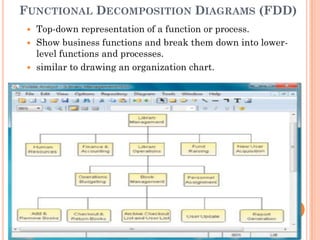
FUNCTIONAL DECOMPOSITION DIAGRAMS (FDD)
    Top-down representation of a function or process.
    Show business functions and break them down into lower-
     level functions and processes.
    similar to drawing an organization chart.
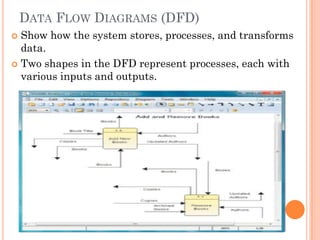
DATA FLOW DIAGRAMS (DFD)
 Show how the system stores, processes, and transforms
  data.
 Two shapes in the DFD represent processes, each with
  various inputs and outputs.
UNIFIED MODELING LANGUAGE
 widely used method of visualizing and
  documenting software systems design.
 Use object oriented design concept- free from
  programming language.
 Represent information from user’s view point.

 Provide Graphical Tools
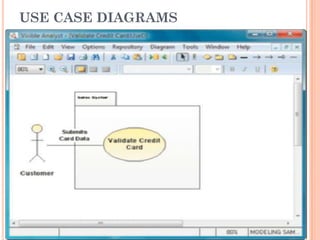
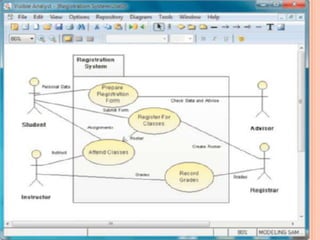
       Use-case Diagrams.
         Visually represent interaction between users and
          information.
         User become actor

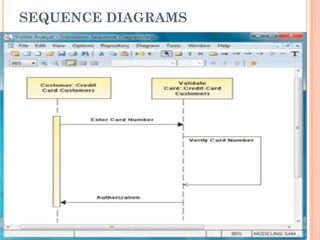
       Sequence Diagrams.
           Timing of interaction between objects.
USE CASE DIAGRAMS
SEQUENCE DIAGRAMS
SCALABILITY
   system’s ability to handle increased business in the
    future.
   Because it will have a longer useful life, a scalable
    system offers a better return on the initial
    investment.
   Ex. Face book
   To evaluate scalability, you need information about
    projected future volume for all outputs, inputs, and
    processes.
   Transaction volume has a significant impact on
    operating costs. When volume exceeds a system’s
    limitations, maintenance costs increase sharply.
    Volume can change dramatically if a company
    expands or enters a new line of business.
   Data storage also is an important scalability issue
TOTAL COST OF OWNERSHIP
 Total cost of ownership (TCO) is a financial
  estimate whose purpose is to help consumers and
  enterprise managers determine direct and
  indirect costs of a product or system.
 Which topic are included ex.:return on
  investment, internal rate of return, economic
  value added, return on information technology.
 if accurate figures are unavailable, systems
  analysts should try to identify indirect costs and
  include them in TCO estimates.
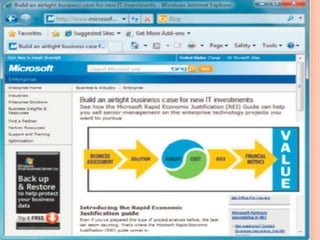
 Microsoft has developed a method for measuring
  total costs and benefits, called Rapid Economic
  Justification (REJ).
       REJ is a framework to help IT professionals analyze
        and optimize IT investments.
FACT-FINDING
   you must identify the information you need.
   some ques. That u ask.
       What business functions are supported by the current system?
       What strategic objectives and business requirements must be
        supported by the new system?
       What are the benefits and TCO of the proposed system?
       What transactions will the system process?
       What information do users and managers need from the system?
       Must the new system interface with legacy systems?
       What procedures could be eliminated by business process
        reengineering?
       What security issues exist?
       What risks are acceptable?
       What budget and timetable constraints will affect system
        development?
WHO, WHAT, WHERE, WHEN, HOW, AND
    WHY?
 1. Who? Who performs each of the procedures within
  the system? Why? Are the correct people performing
  the activity? Could other people perform the tasks more
  effectively?
 2. What? What is being done? What procedures are
  being followed? Why is that process necessary?
  Often, procedures are followed for many years and no
  one knows why. You should question why a procedure
  is being followed at all.
 3. Where? Where are operations being performed?
  Why? Where could they be performed? Could they be
  performed more efficiently elsewhere?
 4. When? When is a procedure performed? Why is it
  being performed at this time? Is this the best time?
 5. How? How is a procedure performed? Why is it
  performed in that manner? Could it be
SAMPLE QUESTIONS DURING REQUIREMENTS
MODELING AS THE FOCUS SHIFTS FROM THE
CURRENT SYSTEM TO
THE PROPOSED SYSTEM.

CURRENT SYSTEM                                PROPOSED SYSTEM
Who does it?        Why does this person do   Who should do it?
                    it?
What is done?       Why is it done?           What should be done?
Where is it done?   Why is it done there?     Where should it be
                                              done?

When is it done?    Why is it done then?      When should it be done?

How is it done?     Why is it done this way? How should it be done?
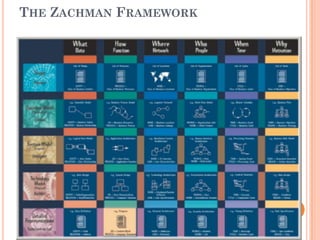
THE ZACHMAN FRAMEWORK
INTERVIEWS
 An interview is a planned meeting during
  which you obtain information from another
  person.
 seven steps for each interview:
       1. Determine the people to interview.
       2. Establish objectives for the interview.
       3. Develop interview questions.
       4. Prepare for the interview.
       5. Conduct the interview.
       6. Document the interview.
       7. Evaluate the interview.
STEP 1: DETERMINE THE PEOPLE TO
INTERVIEW
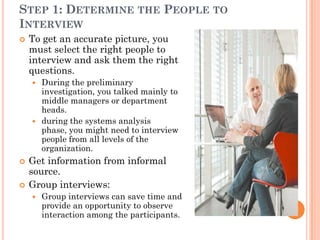
   To get an accurate picture, you
    must select the right people to
    interview and ask them the right
    questions.
     During the preliminary
      investigation, you talked mainly to
      middle managers or department
      heads.
     during the systems analysis
      phase, you might need to interview
      people from all levels of the
      organization.
   Get information from informal
    source.
   Group interviews:
       Group interviews can save time and
        provide an opportunity to observe
        interaction among the participants.
STEP 2: ESTABLISH OBJECTIVES FOR
THE INTERVIEW
 General areas to be discussed, and then list the
  facts you want to gather.
 Try solicit ideas, suggestions, and opinions.

 The objectives of an interview depend on the role
  of the person being interviewed.
 By setting specific objectives, you create a
  framework that helps you decide what questions
  to ask and how to phrase the questions.
STEP 3: DEVELOP INTERVIEW QUESTIONS


 Creating a standard list of interview questions
  helps to keep you on track.
 if you interview several people who perform the
  same job, a standard question list allows you to
  compare their answers.
 The interview should consist of several different
  kinds of questions:
     open-ended
     closed-ended
     questions with a range of responses
STEP 4: PREPARE FOR THE INTERVIEW


 Careful preparation is essential because an
  interview is an important meeting and not just a
  casual chat.
 When you schedule the interview, suggest a
  specific day and time.
 Remember that the interview is an interruption
  of the other person’s routine, so you should limit
  the interview to no more than one hour.
 Send email to department head.

 Document.

 Location.
STEP 5: CONDUCT THE INTERVIEW

 When conducting an interview, you should begin
  by introducing yourself, describing the
  project, and explaining your interview objectives.
 ask questions in the order- give the sufficient
  time to provide thoughtful answers.
 Establishing a good relation with the interviewee
  is important, especially if this is your first
  meeting.
 Listen carefully to the answer.

 engaged listening.

 thank the person and encourage – any questions
  of additional comments.
STEP 6: DOCUMENT THE INTERVIEW
   write down a few notes to jog your memory after the
    interview-don’t write everything.
   After conducting the interview, you must record the
    information quickly.
   recording the answers-tap recorder.
   Recorded interview takes twice the amount of time.
   After the interview, send a memo or feedback form to
    the interviewee expressing your appreciation for his
    or her time and cooperation.

STEP 7: Evaluate THE INTERVIEW
    Unsuccessful Interviews
OTHER FACT-FINDING TECHNIQUES
   Document Review
       How current system work
   Observation
       perspective and a better understanding of system
        procedures.
       Workers productivity improve in observation.
       Personal observation allows you to verify statements
        made in interviews and determine whether
        procedures really operate as they are described.
       Plan your observations –create list.
         Observe all the steps in a transaction and note the
          documents, inputs, outputs, and processes involved.
         Examine each form, record, and report. Determine the
          purpose each item of information serves.
         Consider each user who works with the system.
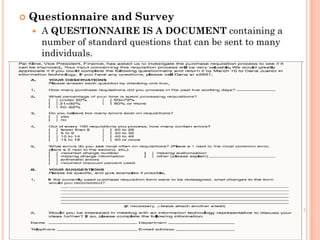
   Questionnaire and Survey
       A QUESTIONNAIRE IS A DOCUMENT containing a
        number of standard questions that can be sent to many
        individuals.
   When designing a questionnaire, the most
    important rule of all is to make sure that your
    questions collect the right data in a form that you
    can use to further your fact-finding.

       Keep the questionnaire brief and user-friendly.
       Provide clear instructions that will answer all
        questions.
       Arrange the questions in a logical order, going from
        simple to more complex topics.
       Phrase questions to avoid misunderstandings; use
        simple terms and wording.
       Limit the use of open-ended questions that are
        difficult to tabulate.
        Include a section at the end of the questionnaire for
        general comments.
   Sampling
       When studying an information system, you should collect
        examples of actual documents using a process called
        sampling. The samples might include
        records, reports, operational logs, data entry
        documents, complaint summaries, work requests, and
        various types of forms.
 Research :
 Interviews versus Questionnaires :
       Brainstorming-structured & Unstructured.
DOCUMENTATION
   The Need for Recording the Facts:
     write down information.
     Document your work : principle-
         Record information as soon as you obtain it.
         Use the simplest recording method possible.

         Record your findings in such a way that they can be

          understood by someone else.
         Organize your documentation so related material is located
          easily.
   Software Tools
       case tools
       productivity software :
       graphic modeling software : Visio
       personal information managers
       wireless communication devices

Sadchap3

  • 1.
    SYSTEM ANALYSIS AND DESIGN CHAP3 RQEUIREMENTS MODELING
  • 2.
    SYSTEM ANALYSIS PHASEOVERVIEW 1.SYSTEM ANALYSIS ACTIVITIES
  • 3.
    Requirement modeling involve fact finding to describe the current system and identification if the requirements for the new system, such as  Output-electronic or printed information produced by the system.  Input-Necessary data that enters the system either manually of automatically.  Processes-Logic rules that are applied to transform the data into meaningful information.  Performance- system characteristic such as speed, volume , capacity , availability , reliability.  Security-hardware ,software, technical controls that safe and protect the system and its data from internal or external threats.  Data and process modeling –how to represent graphically system data and process using traditional structured analysis techniques.  Object Modeling -Popular modeling technique ex. object oriented analysis.  Development Strategies –Diff. development options and prepare for transition to the system design stage of SDLC.
  • 4.
    2.SYSTEM ANALYSIS SKILLS  Need Strong analytical and interpersonal skills to build accurate model of new system  Analytical Skill –Enable you to identify a problem, evaluate the key elements, and develop a useful solution.  Interpersonal skills –especially valuable – Balance conflicting needs of users and communicate effectively. 3.TEAM ORIENTED METHODS AND TECHNIQUE  Joint Application Development –User oriented technique for fact finding and requirement modeling  Rapid Application Development –Version of the SDLC.
  • 5.
    JOINT APPLICATION DEVELOPMENT  Popular fact finding technique that brings users into the development process as active participants. User have important place in a information system.  User Involvement :  During the development process, the IT staff would collect information from users, define system requirements, and construct the new system. At various stages of the process, the IT staff might ask users to review the design, offer comments, and submit changes.  JAD Participants and Roles:  A JAD team usually meets over a period of days or weeks in a special conference room or at an off-site location.  The objective is to analyze the existing system, obtain user input and expectations, and document user requirements for the new system.
  • 6.
     The JADgroup usually has a project leader, who needs strong interpersonal and organizational skills, and one or more members who document and record the results and decisions.  If CASE tools are available, analysts can develop models and enter documentation from the JAD session directly into the CASE tool. JAD participants and their roles.
  • 7.
    TYPICAL AGENDA FORJAD SESSION
  • 8.
    ADVANTAGES AND DISADVANTAGES  Disadvantages:  Compared with traditional methods, JAD is more expensive and can be awkward if the group is too large relative to the size of the project.  Many companies find, however, that JAD allows key users to participate effectively in the requirements modeling process.  When users participate in the systems development process, they are more likely to feel a sense of ownership in the results, and support for the new system.  Advantages:  JAD result in a more accurate statement of system requirements,  a better understanding of common goals  a stronger commitment to the success of the new system.
  • 9.
    RAPID APPLICATION DEVELOPMENT  Team-based technique that speeds up information systems development and produces a functioning information system.  RAD is a complete methodology, with a four-phase life cycle that parallels the traditional SDLC phases.  Companies use RAD to reduce cost and development time, and increase the probability of success.  RAD depend heavily on prototyping and user involvement.  The RAD process allows users to examine a working model as early as possible, determine if it meets their needs, and suggest necessary changes.  Based on user input, the prototype is modified and the interactive(combine) process continues until the system is completely developed and users are satisfied.
  • 10.
    RAD Phases and Activities:
  • 11.
    RAD Objectives :  cut development time and expense by involving users.  RAD allows the development team to make necessary modifications quickly.  limit the cost of changes in Rad.  RAD is especially valuable when a company needs an information system to support a new business function.  RAD also helps a development team design a highly interactive or complex user interface.
  • 12.
    MODELING TOOLS ANDTECHNIQUES.  Help to understand the design of a system.  Modeling involves graphical methods and nontechnical language that represent the system at various stages of development.  Case Tools  Functional Decomposition Diagrams.(FDD)  Data Flow Diagrams.(DFD)  Unified Modeling Language.(UML)
  • 13.
    FUNCTIONAL DECOMPOSITION DIAGRAMS(FDD)  Top-down representation of a function or process.  Show business functions and break them down into lower- level functions and processes.  similar to drawing an organization chart.
  • 14.
    DATA FLOW DIAGRAMS(DFD)  Show how the system stores, processes, and transforms data.  Two shapes in the DFD represent processes, each with various inputs and outputs.
  • 15.
    UNIFIED MODELING LANGUAGE widely used method of visualizing and documenting software systems design.  Use object oriented design concept- free from programming language.  Represent information from user’s view point.  Provide Graphical Tools  Use-case Diagrams.  Visually represent interaction between users and information.  User become actor  Sequence Diagrams.  Timing of interaction between objects.
  • 16.
  • 18.
  • 19.
    SCALABILITY  system’s ability to handle increased business in the future.  Because it will have a longer useful life, a scalable system offers a better return on the initial investment.  Ex. Face book  To evaluate scalability, you need information about projected future volume for all outputs, inputs, and processes.  Transaction volume has a significant impact on operating costs. When volume exceeds a system’s limitations, maintenance costs increase sharply. Volume can change dramatically if a company expands or enters a new line of business.  Data storage also is an important scalability issue
  • 20.
    TOTAL COST OFOWNERSHIP  Total cost of ownership (TCO) is a financial estimate whose purpose is to help consumers and enterprise managers determine direct and indirect costs of a product or system.  Which topic are included ex.:return on investment, internal rate of return, economic value added, return on information technology.  if accurate figures are unavailable, systems analysts should try to identify indirect costs and include them in TCO estimates.  Microsoft has developed a method for measuring total costs and benefits, called Rapid Economic Justification (REJ).  REJ is a framework to help IT professionals analyze and optimize IT investments.
  • 22.
    FACT-FINDING  you must identify the information you need.  some ques. That u ask.  What business functions are supported by the current system?  What strategic objectives and business requirements must be supported by the new system?  What are the benefits and TCO of the proposed system?  What transactions will the system process?  What information do users and managers need from the system?  Must the new system interface with legacy systems?  What procedures could be eliminated by business process reengineering?  What security issues exist?  What risks are acceptable?  What budget and timetable constraints will affect system development?
  • 23.
    WHO, WHAT, WHERE,WHEN, HOW, AND WHY?  1. Who? Who performs each of the procedures within the system? Why? Are the correct people performing the activity? Could other people perform the tasks more effectively?  2. What? What is being done? What procedures are being followed? Why is that process necessary? Often, procedures are followed for many years and no one knows why. You should question why a procedure is being followed at all.  3. Where? Where are operations being performed? Why? Where could they be performed? Could they be performed more efficiently elsewhere?  4. When? When is a procedure performed? Why is it being performed at this time? Is this the best time?  5. How? How is a procedure performed? Why is it performed in that manner? Could it be
  • 24.
    SAMPLE QUESTIONS DURINGREQUIREMENTS MODELING AS THE FOCUS SHIFTS FROM THE CURRENT SYSTEM TO THE PROPOSED SYSTEM. CURRENT SYSTEM PROPOSED SYSTEM Who does it? Why does this person do Who should do it? it? What is done? Why is it done? What should be done? Where is it done? Why is it done there? Where should it be done? When is it done? Why is it done then? When should it be done? How is it done? Why is it done this way? How should it be done?
  • 25.
  • 26.
    INTERVIEWS  An interviewis a planned meeting during which you obtain information from another person.  seven steps for each interview:  1. Determine the people to interview.  2. Establish objectives for the interview.  3. Develop interview questions.  4. Prepare for the interview.  5. Conduct the interview.  6. Document the interview.  7. Evaluate the interview.
  • 27.
    STEP 1: DETERMINETHE PEOPLE TO INTERVIEW  To get an accurate picture, you must select the right people to interview and ask them the right questions.  During the preliminary investigation, you talked mainly to middle managers or department heads.  during the systems analysis phase, you might need to interview people from all levels of the organization.  Get information from informal source.  Group interviews:  Group interviews can save time and provide an opportunity to observe interaction among the participants.
  • 28.
    STEP 2: ESTABLISHOBJECTIVES FOR THE INTERVIEW  General areas to be discussed, and then list the facts you want to gather.  Try solicit ideas, suggestions, and opinions.  The objectives of an interview depend on the role of the person being interviewed.  By setting specific objectives, you create a framework that helps you decide what questions to ask and how to phrase the questions.
  • 29.
    STEP 3: DEVELOPINTERVIEW QUESTIONS  Creating a standard list of interview questions helps to keep you on track.  if you interview several people who perform the same job, a standard question list allows you to compare their answers.  The interview should consist of several different kinds of questions:  open-ended  closed-ended  questions with a range of responses
  • 30.
    STEP 4: PREPAREFOR THE INTERVIEW  Careful preparation is essential because an interview is an important meeting and not just a casual chat.  When you schedule the interview, suggest a specific day and time.  Remember that the interview is an interruption of the other person’s routine, so you should limit the interview to no more than one hour.  Send email to department head.  Document.  Location.
  • 31.
    STEP 5: CONDUCTTHE INTERVIEW  When conducting an interview, you should begin by introducing yourself, describing the project, and explaining your interview objectives.  ask questions in the order- give the sufficient time to provide thoughtful answers.  Establishing a good relation with the interviewee is important, especially if this is your first meeting.  Listen carefully to the answer.  engaged listening.  thank the person and encourage – any questions of additional comments.
  • 32.
    STEP 6: DOCUMENTTHE INTERVIEW  write down a few notes to jog your memory after the interview-don’t write everything.  After conducting the interview, you must record the information quickly.  recording the answers-tap recorder.  Recorded interview takes twice the amount of time.  After the interview, send a memo or feedback form to the interviewee expressing your appreciation for his or her time and cooperation. STEP 7: Evaluate THE INTERVIEW Unsuccessful Interviews
  • 33.
    OTHER FACT-FINDING TECHNIQUES  Document Review  How current system work  Observation  perspective and a better understanding of system procedures.  Workers productivity improve in observation.  Personal observation allows you to verify statements made in interviews and determine whether procedures really operate as they are described.  Plan your observations –create list.  Observe all the steps in a transaction and note the documents, inputs, outputs, and processes involved.  Examine each form, record, and report. Determine the purpose each item of information serves.  Consider each user who works with the system.
  • 34.
    Questionnaire and Survey  A QUESTIONNAIRE IS A DOCUMENT containing a number of standard questions that can be sent to many individuals.
  • 35.
    When designing a questionnaire, the most important rule of all is to make sure that your questions collect the right data in a form that you can use to further your fact-finding.  Keep the questionnaire brief and user-friendly.  Provide clear instructions that will answer all questions.  Arrange the questions in a logical order, going from simple to more complex topics.  Phrase questions to avoid misunderstandings; use simple terms and wording.  Limit the use of open-ended questions that are difficult to tabulate.  Include a section at the end of the questionnaire for general comments.
  • 36.
    Sampling  When studying an information system, you should collect examples of actual documents using a process called sampling. The samples might include records, reports, operational logs, data entry documents, complaint summaries, work requests, and various types of forms.  Research :  Interviews versus Questionnaires :  Brainstorming-structured & Unstructured.
  • 37.
    DOCUMENTATION  The Need for Recording the Facts:  write down information.  Document your work : principle-  Record information as soon as you obtain it.  Use the simplest recording method possible.  Record your findings in such a way that they can be understood by someone else.  Organize your documentation so related material is located easily.  Software Tools  case tools  productivity software :  graphic modeling software : Visio  personal information managers  wireless communication devices