1
CREATION OF
INFORMATION SYSTEMS
JOEL PHILLIP T. GRANADA
MIS
2
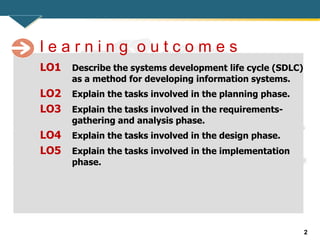
LO1 Describe the systems development life cycle (SDLC)
as a method for developing information systems.
LO2 Explain the tasks involved in the planning phase.
LO3 Explain the tasks involved in the requirements-
gathering and analysis phase.
LO4 Explain the tasks involved in the design phase.
LO5 Explain the tasks involved in the implementation
phase.
l e a r n i n g o u t c o m e s
3
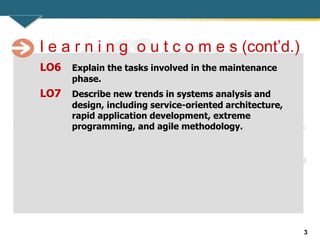
LO6 Explain the tasks involved in the maintenance
phase.
LO7 Describe new trends in systems analysis and
design, including service-oriented architecture,
rapid application development, extreme
programming, and agile methodology.
l e a r n i n g o u t c o m e s (cont’d.)
4
Systems Development Life Cycle: An Overview
• System failure can happen for several reasons:
– Missed deadlines
– Users’ needs that weren’t met
– Dissatisfied customers
– Lack of support from top management
– Going over budget, and so forth
5
Systems Development Life Cycle: An Overview
(cont’d.)
• Systems development life cycle (SDLC)
– Also known as the “waterfall model”
– Series of well-defined phases performed in sequence
that serve as a framework for developing a system or
project
– Each phase’s output (results) becomes the input for
the next phase
6
Systems Development Life Cycle: An Overview
(cont’d.)
• Systems planning
– Evaluating all potential systems that need to be
implemented
– Preliminary analysis of requirements
• Feasibility study
– Conducted for each system
– Organization decides which ones are a priority
• Information system projects
– Often an extension of existing systems or involve
replacing an old technology with a new one
7
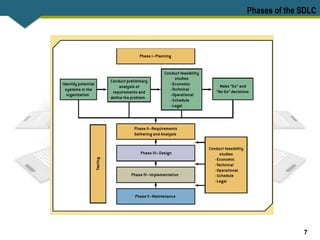
Phases of the SDLC
8
Phase 1: Planning
• One of the most crucial phases of the SDLC
model
• Systems designer must understand and define
the problem the organization faces
– Problem can be identified internally or externally
• Analyst or team of analysts assesses the current
and future needs of organization or a specific
group of users
9
Phase 1: Planning (cont’d.)
• Questions:
– Why is this information system being developed?
– Who are the system’s current and future users?
– Is the system new or an upgrade or extension of an
existing system?
– Which functional areas (departments) will be using
the system?
10
Phase 1: Planning (cont’d.)
• Analysts must examine:
– Organization’s strategic goals
– How the proposed system can support these goals
– Which factors are critical to the proposed system’s
success
– Criteria for evaluating the proposed system’s
performance
11
Phase 1: Planning (cont’d.)
• Make sure users understand the four Ws:
– Why
– Who
– When
– What
• End result of this phase should give users and
top management a clear view of:
– What the problem is
– How the information system will solve the problem
12
Phase 1: Planning (cont’d.)
• Example: ABC Furniture is planning for an
information system to solve the problem of
inaccurate inventory forecasts
– Why
– Who
– When
– What
13
Formation of the Task Force
• Consisting of representatives from different
departments, systems analysts, technical
advisors, and top management
• Team collects user feedback and tries to get
users involved from the beginning
• Internal users
– Employees who will use the system regularly
• External users
– Include customers, contractors, suppliers, and other
business partners
14
Formation of the Task Force (cont’d.)
• Joint application design (JAD)
– Collective activity involving users and top
management IT professionals
– Centers on a structured workshop
– Results in a final document containing definitions for
data elements, workflows, screens, reports, and
general system specifications
15
Feasibility Study
• Feasibility
– Measure of how beneficial or practical an information
system will be to an organization
– Should be measured continuously throughout the
SDLC process
• Usually has five major dimensions:
– Economic, technical, operational, schedule, and legal
16
Economic Feasibility
• Assesses a system’s costs and benefits
• Team tallies tangible development and operating
costs for the system and compares them with
expected financial benefits of the system
• Keep in mind that an information system project
that’s feasible at the outset could become
unfeasible later
17
Economic Feasibility (cont’d.)
• Tangible benefits
– Quantified in terms of monthly or annual savings
• Intangible benefits
– Difficult to quantify in terms of dollar amounts
– If they aren’t at least identified, many information
system projects can’t be justified
• Cost-effectiveness analysis
– Based on the concept that a dollar today is worth
more than a dollar one year from now
18
Economic Feasibility (cont’d.)
• Most common analysis methods
– Payback, net present value (NPV)
– Return on investment (ROI)
– Internal rate of return (IRR)
• Cost-benefit analysis (CBA) report
– Used to sell the system to top management
19
Technical Feasibility
• Concerned with technology to be used in the
system
• Team needs to assess whether technology to
support the new system is available or feasible
to implement
• Lack of technical feasibility
– Can also stem from an organization lacking the
expertise, time, or personnel to implement the new
system
20
Operational Feasibility
• Measure of:
– How well the proposed solution will work in the
organization
– How internal and external customers will react to it
• “Is the information system worth
implementing?”
21
Schedule Feasibility
• Whether the new system can be completed on
time
• If the new system can’t be delivered in time
– Loss of customers could force the organization out of
business
• Problem of going over schedule
– Common in the information systems field
22
Legal Feasibility
• Concerned with legal issues
• Typically addresses these questions:
– Will the system violate any legal issues in the country
where it will be used?
– Are there any political repercussions of using the
system?
– Is there any conflict between the proposed system
and legal requirements?
• For example, does the system take the
Information Privacy Act into account?
23
Phase 2: Requirements Gathering and Analysis
• Requirements-gathering and analysis
phase
– Analysts define the problem and generate alternatives
for solving
• First step
– Gathering requirements
– Interviews, surveys, observations, JAD approach, etc.
• Team uses this information to determine:
– What the new system should do (process analysis)
– What data is needed for this process to be performed
(data analysis)
24
Phase 2: Requirements Gathering and Analysis
(cont’d.)
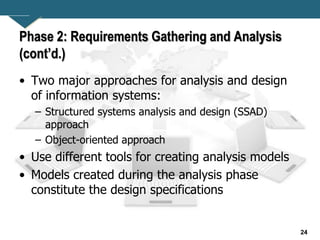
• Two major approaches for analysis and design
of information systems:
– Structured systems analysis and design (SSAD)
approach
– Object-oriented approach
• Use different tools for creating analysis models
• Models created during the analysis phase
constitute the design specifications
25
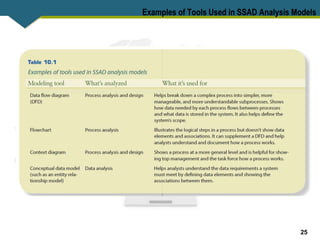
Examples of Tools Used in SSAD Analysis Models
26
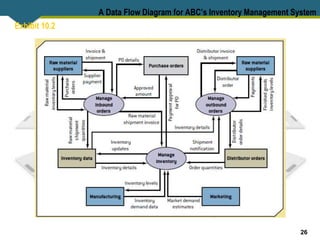
Exhibit 10.2
A Data Flow Diagram for ABC’s Inventory Management System
27
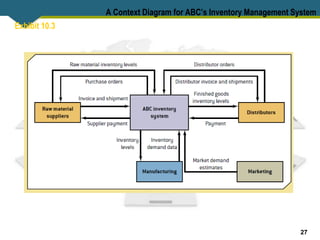
Exhibit 10.3
A Context Diagram for ABC’s Inventory Management System
28
Phase 3: Design
• Design phase
– Analysts choose the solution that’s the most realistic
and offers the highest payoff for the organization
• Output of this phase
– Document with exact specifications for implementing
the system
– Includes files and databases, forms and reports,
documentation, procedures, hardware and software,
networking components, and general system
specifications
29
Phase 3: Design (cont’d.)
• Design consists of three parts:
– Conceptual design
– Logical design
– Physical design
30
Computer-Aided Systems Engineering
• Computer-aided systems engineering
(CASE) tools
– Automate parts of the application development
process
• Benefits
• Capabilities
• Products:
– CA Technologies ERwin Process Modeler, Oracle
Designer, and Visible System Visible Analyst
31
Computer-Aided Systems Engineering (cont’d.)
• Outputs:
– Specifications documents
– Documentation of the analysis, including models and
explanations
– Design specifications with related documentation
– Logical and physical design documents based on the
conceptual design
– Code modules that can be incorporated into the
system
32
Prototyping
• Small-scale version of the system is developed
– Large enough to illustrate the system’s benefits
– Allows users to offer feedback
• Prototypes are used for:
– Gathering system requirements
– Helping to determine system requirements
– Determining a system’s technical feasibility
– Selling the proposed system to users and
management
33
Prototyping (cont’d.)
• Steps:
– Define the initial requirements
– Develop the prototype
– Review and evaluate the prototype
– Revise the prototype
• Numerous prototyping development tools are
available: e.g., spreadsheets
• Prototyping has advantages and disadvantages
34
Phase 4: Implementation
• Implementation phase
– Solution is transferred from paper to action
– Team configures the system and procures
components for it
• Tasks
– Acquiring new equipment
– Hiring new employees
– Training employees
– Planning and designing the system’s physical layout
35
Phase 4: Implementation (cont’d.)
– Coding
– Testing
– Designing security measures and safeguards
– Creating a disaster recovery plan
• Options for conversion:
– Parallel conversion
– Phased-in-phased-out conversion
– Plunge (direct cutover) conversion
– Pilot conversion
36
Request for Proposal
• Written document with detailed specifications
– Used to request bids for equipment, supplies, or
services from vendors
• Usually prepared during the implementation
phase
• Advantage:
– All vendors get the same information and
requirements
• Disadvantage:
– Time involved in writing and evaluating proposals
37
Request for Proposal (cont’d.)
• Free templates available for RFPs
• Request for information (RFI)
– Screening document for gathering vendor information
and narrowing the list of potential vendors
38
Implementation Alternatives
• Insourcing
– Organization’s team develops the system internally
• Self-sourcing
– End users develop information systems with little or
no formal assistance from the information systems
team
– Managers are concerned about end users’ lack of
adequate systems analysis and design background
and loosening of system development standards
39
Implementation Alternatives (cont’d.)
• Outsourcing
– Organization hires an external vendor or consultant
who specializes in providing development services
– Options:
• Onshore
• Nearshore
• Offshore
– Disadvantages of outsourcing:
• Loss of control
• Dependency
• Vulnerability of strategic information
40
Phase 5: Maintenance
• Information system is operating
• Enhancements and modifications to the system
have been developed and tested
• Hardware and software components have been
added or replaced
• Team collects performance data and gathers
information on whether the system is meeting
its objectives
– By talking with users, customers, and other people
affected by the new system
41
New Trends in Systems Analysis and Design
• SDLC model might not be appropriate in these
situations:
– Lack of specifications
– Input-output process can’t be identified completely
– Problem is “ad hoc”
– Users’ needs change constantly
42
Service-Oriented Architecture
• SOA focuses on the development, use, and
reuse of small, self-contained blocks of codes
(called services) to meet the software needs of
an organization
• The fundamental principle behind SOA is that
the “blocks of codes” can be reused in a variety
of different applications, allowing new business
processes to be created from a pool of existing
services
43
Rapid Application Development
• Concentrates on user involvement and
continuous interaction between users and
designers
• Combines the planning and analysis phases into
one phase
• Develops a prototype of the system
• Uses an iterative process
– Repeats the design, development, and testing steps
as needed, based on feedback from users
44
Extreme Programming
• Recent method for developing software
applications and information system projects
• Divides a project into smaller functions
– Developers can’t go on to the next phase until the
current phase is finished
• “Story” written on index cards
• Pair programming
– Two programmers participate in one development
effort at one workstation
• Major departure from traditional software
development
45
Agile Methodology
• Similar to XP
• Less emphasis on team coding and more
emphasis on limiting the project’s scope
• Focuses on setting a minimum number of
requirements and turning them into a working
product
• Agile Alliance organization
– Manifesto contains principles for this methodology
46
Summary
• SDLC phases:
– Planning, requirements gathering and analysis,
design, implementation, and maintenance
• CASE tools
• Prototyping
• RFP
• Self sourcing and outsourcing
• New trends in systems development

Creation of Information Systems.pptx

  • 1.
  • 2.
    2 LO1 Describe thesystems development life cycle (SDLC) as a method for developing information systems. LO2 Explain the tasks involved in the planning phase. LO3 Explain the tasks involved in the requirements- gathering and analysis phase. LO4 Explain the tasks involved in the design phase. LO5 Explain the tasks involved in the implementation phase. l e a r n i n g o u t c o m e s
  • 3.
    3 LO6 Explain thetasks involved in the maintenance phase. LO7 Describe new trends in systems analysis and design, including service-oriented architecture, rapid application development, extreme programming, and agile methodology. l e a r n i n g o u t c o m e s (cont’d.)
  • 4.
    4 Systems Development LifeCycle: An Overview • System failure can happen for several reasons: – Missed deadlines – Users’ needs that weren’t met – Dissatisfied customers – Lack of support from top management – Going over budget, and so forth
  • 5.
    5 Systems Development LifeCycle: An Overview (cont’d.) • Systems development life cycle (SDLC) – Also known as the “waterfall model” – Series of well-defined phases performed in sequence that serve as a framework for developing a system or project – Each phase’s output (results) becomes the input for the next phase
  • 6.
    6 Systems Development LifeCycle: An Overview (cont’d.) • Systems planning – Evaluating all potential systems that need to be implemented – Preliminary analysis of requirements • Feasibility study – Conducted for each system – Organization decides which ones are a priority • Information system projects – Often an extension of existing systems or involve replacing an old technology with a new one
  • 7.
  • 8.
    8 Phase 1: Planning •One of the most crucial phases of the SDLC model • Systems designer must understand and define the problem the organization faces – Problem can be identified internally or externally • Analyst or team of analysts assesses the current and future needs of organization or a specific group of users
  • 9.
    9 Phase 1: Planning(cont’d.) • Questions: – Why is this information system being developed? – Who are the system’s current and future users? – Is the system new or an upgrade or extension of an existing system? – Which functional areas (departments) will be using the system?
  • 10.
    10 Phase 1: Planning(cont’d.) • Analysts must examine: – Organization’s strategic goals – How the proposed system can support these goals – Which factors are critical to the proposed system’s success – Criteria for evaluating the proposed system’s performance
  • 11.
    11 Phase 1: Planning(cont’d.) • Make sure users understand the four Ws: – Why – Who – When – What • End result of this phase should give users and top management a clear view of: – What the problem is – How the information system will solve the problem
  • 12.
    12 Phase 1: Planning(cont’d.) • Example: ABC Furniture is planning for an information system to solve the problem of inaccurate inventory forecasts – Why – Who – When – What
  • 13.
    13 Formation of theTask Force • Consisting of representatives from different departments, systems analysts, technical advisors, and top management • Team collects user feedback and tries to get users involved from the beginning • Internal users – Employees who will use the system regularly • External users – Include customers, contractors, suppliers, and other business partners
  • 14.
    14 Formation of theTask Force (cont’d.) • Joint application design (JAD) – Collective activity involving users and top management IT professionals – Centers on a structured workshop – Results in a final document containing definitions for data elements, workflows, screens, reports, and general system specifications
  • 15.
    15 Feasibility Study • Feasibility –Measure of how beneficial or practical an information system will be to an organization – Should be measured continuously throughout the SDLC process • Usually has five major dimensions: – Economic, technical, operational, schedule, and legal
  • 16.
    16 Economic Feasibility • Assessesa system’s costs and benefits • Team tallies tangible development and operating costs for the system and compares them with expected financial benefits of the system • Keep in mind that an information system project that’s feasible at the outset could become unfeasible later
  • 17.
    17 Economic Feasibility (cont’d.) •Tangible benefits – Quantified in terms of monthly or annual savings • Intangible benefits – Difficult to quantify in terms of dollar amounts – If they aren’t at least identified, many information system projects can’t be justified • Cost-effectiveness analysis – Based on the concept that a dollar today is worth more than a dollar one year from now
  • 18.
    18 Economic Feasibility (cont’d.) •Most common analysis methods – Payback, net present value (NPV) – Return on investment (ROI) – Internal rate of return (IRR) • Cost-benefit analysis (CBA) report – Used to sell the system to top management
  • 19.
    19 Technical Feasibility • Concernedwith technology to be used in the system • Team needs to assess whether technology to support the new system is available or feasible to implement • Lack of technical feasibility – Can also stem from an organization lacking the expertise, time, or personnel to implement the new system
  • 20.
    20 Operational Feasibility • Measureof: – How well the proposed solution will work in the organization – How internal and external customers will react to it • “Is the information system worth implementing?”
  • 21.
    21 Schedule Feasibility • Whetherthe new system can be completed on time • If the new system can’t be delivered in time – Loss of customers could force the organization out of business • Problem of going over schedule – Common in the information systems field
  • 22.
    22 Legal Feasibility • Concernedwith legal issues • Typically addresses these questions: – Will the system violate any legal issues in the country where it will be used? – Are there any political repercussions of using the system? – Is there any conflict between the proposed system and legal requirements? • For example, does the system take the Information Privacy Act into account?
  • 23.
    23 Phase 2: RequirementsGathering and Analysis • Requirements-gathering and analysis phase – Analysts define the problem and generate alternatives for solving • First step – Gathering requirements – Interviews, surveys, observations, JAD approach, etc. • Team uses this information to determine: – What the new system should do (process analysis) – What data is needed for this process to be performed (data analysis)
  • 24.
    24 Phase 2: RequirementsGathering and Analysis (cont’d.) • Two major approaches for analysis and design of information systems: – Structured systems analysis and design (SSAD) approach – Object-oriented approach • Use different tools for creating analysis models • Models created during the analysis phase constitute the design specifications
  • 25.
    25 Examples of ToolsUsed in SSAD Analysis Models
  • 26.
    26 Exhibit 10.2 A DataFlow Diagram for ABC’s Inventory Management System
  • 27.
    27 Exhibit 10.3 A ContextDiagram for ABC’s Inventory Management System
  • 28.
    28 Phase 3: Design •Design phase – Analysts choose the solution that’s the most realistic and offers the highest payoff for the organization • Output of this phase – Document with exact specifications for implementing the system – Includes files and databases, forms and reports, documentation, procedures, hardware and software, networking components, and general system specifications
  • 29.
    29 Phase 3: Design(cont’d.) • Design consists of three parts: – Conceptual design – Logical design – Physical design
  • 30.
    30 Computer-Aided Systems Engineering •Computer-aided systems engineering (CASE) tools – Automate parts of the application development process • Benefits • Capabilities • Products: – CA Technologies ERwin Process Modeler, Oracle Designer, and Visible System Visible Analyst
  • 31.
    31 Computer-Aided Systems Engineering(cont’d.) • Outputs: – Specifications documents – Documentation of the analysis, including models and explanations – Design specifications with related documentation – Logical and physical design documents based on the conceptual design – Code modules that can be incorporated into the system
  • 32.
    32 Prototyping • Small-scale versionof the system is developed – Large enough to illustrate the system’s benefits – Allows users to offer feedback • Prototypes are used for: – Gathering system requirements – Helping to determine system requirements – Determining a system’s technical feasibility – Selling the proposed system to users and management
  • 33.
    33 Prototyping (cont’d.) • Steps: –Define the initial requirements – Develop the prototype – Review and evaluate the prototype – Revise the prototype • Numerous prototyping development tools are available: e.g., spreadsheets • Prototyping has advantages and disadvantages
  • 34.
    34 Phase 4: Implementation •Implementation phase – Solution is transferred from paper to action – Team configures the system and procures components for it • Tasks – Acquiring new equipment – Hiring new employees – Training employees – Planning and designing the system’s physical layout
  • 35.
    35 Phase 4: Implementation(cont’d.) – Coding – Testing – Designing security measures and safeguards – Creating a disaster recovery plan • Options for conversion: – Parallel conversion – Phased-in-phased-out conversion – Plunge (direct cutover) conversion – Pilot conversion
  • 36.
    36 Request for Proposal •Written document with detailed specifications – Used to request bids for equipment, supplies, or services from vendors • Usually prepared during the implementation phase • Advantage: – All vendors get the same information and requirements • Disadvantage: – Time involved in writing and evaluating proposals
  • 37.
    37 Request for Proposal(cont’d.) • Free templates available for RFPs • Request for information (RFI) – Screening document for gathering vendor information and narrowing the list of potential vendors
  • 38.
    38 Implementation Alternatives • Insourcing –Organization’s team develops the system internally • Self-sourcing – End users develop information systems with little or no formal assistance from the information systems team – Managers are concerned about end users’ lack of adequate systems analysis and design background and loosening of system development standards
  • 39.
    39 Implementation Alternatives (cont’d.) •Outsourcing – Organization hires an external vendor or consultant who specializes in providing development services – Options: • Onshore • Nearshore • Offshore – Disadvantages of outsourcing: • Loss of control • Dependency • Vulnerability of strategic information
  • 40.
    40 Phase 5: Maintenance •Information system is operating • Enhancements and modifications to the system have been developed and tested • Hardware and software components have been added or replaced • Team collects performance data and gathers information on whether the system is meeting its objectives – By talking with users, customers, and other people affected by the new system
  • 41.
    41 New Trends inSystems Analysis and Design • SDLC model might not be appropriate in these situations: – Lack of specifications – Input-output process can’t be identified completely – Problem is “ad hoc” – Users’ needs change constantly
  • 42.
    42 Service-Oriented Architecture • SOAfocuses on the development, use, and reuse of small, self-contained blocks of codes (called services) to meet the software needs of an organization • The fundamental principle behind SOA is that the “blocks of codes” can be reused in a variety of different applications, allowing new business processes to be created from a pool of existing services
  • 43.
    43 Rapid Application Development •Concentrates on user involvement and continuous interaction between users and designers • Combines the planning and analysis phases into one phase • Develops a prototype of the system • Uses an iterative process – Repeats the design, development, and testing steps as needed, based on feedback from users
  • 44.
    44 Extreme Programming • Recentmethod for developing software applications and information system projects • Divides a project into smaller functions – Developers can’t go on to the next phase until the current phase is finished • “Story” written on index cards • Pair programming – Two programmers participate in one development effort at one workstation • Major departure from traditional software development
  • 45.
    45 Agile Methodology • Similarto XP • Less emphasis on team coding and more emphasis on limiting the project’s scope • Focuses on setting a minimum number of requirements and turning them into a working product • Agile Alliance organization – Manifesto contains principles for this methodology
  • 46.
    46 Summary • SDLC phases: –Planning, requirements gathering and analysis, design, implementation, and maintenance • CASE tools • Prototyping • RFP • Self sourcing and outsourcing • New trends in systems development