© 2015 IBM CorporationLiberté, Égalité, Fraternité
Michael Jones
Test Lead
Liberty in CICS
michaej8@uk.ibm.com
© 2015 IBM Corporation
Deploying CICS with Right Clicks - An Introduction to CICS Deployment Assistant v5.2 - S110
© 2015 IBM Corporation
IBM’s statements regarding its plans, directions, and intent are subject to change or withdrawal without notice at IBM’s sole
discretion.
Information regarding potential future products is intended to outline our general product direction and it should not be relied on
in making a purchasing decision.
The information mentioned regarding potential future products is not a commitment, promise, or legal obligation to deliver any
material, code or functionality. Information about potential future products may not be incorporated into any contract. The
development, release, and timing of any future features or functionality described for our products remains at our sole
discretion.
Performance is based on measurements and projections using standard IBM benchmarks in a controlled environment. The
actual throughput or performance that any user will experience will vary depending upon many factors, including considerations
such as the amount of multiprogramming in the user’s job stream, the I/O configuration, the storage configuration, and the
workload processed. Therefore, no assurance can be given that an individual user will achieve results similar to those stated
here.
© 2015 IBM Corporation
Deploying CICS with Right Clicks - An Introduction to CICS Deployment Assistant v5.2 - S110
© 2015 IBM Corporation
Deploying CICS with Right Clicks - An Introduction to CICS Deployment Assistant v5.2 - S110
© 2015 IBM Corporation
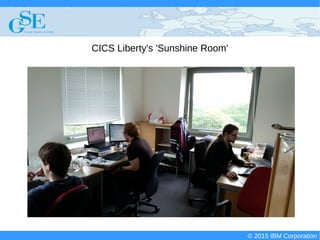
CICS Liberty's 'Sunshine Room'
© 2015 IBM Corporation
Deploying CICS with Right Clicks - An Introduction to CICS Deployment Assistant v5.2 - S110
© 2015 IBM Corporation
What is Liberty?
Lightweight application server created by WebSphere
Easily configurable opt-in customisation model
Runs on many platforms (Both distributed and z/OS)
Now integrated into CICS!
© 2015 IBM Corporation
Deploying CICS with Right Clicks - An Introduction to CICS Deployment Assistant v5.2 - S110
© 2015 IBM Corporation
What does Liberty buy me?
Support for the Java EE 6 Web Profile
Support for a number of Java EE technologies
HTTP endpoint for applications
Ability to closely integrate front end applications with CICS
© 2015 IBM Corporation
Deploying CICS with Right Clicks - An Introduction to CICS Deployment Assistant v5.2 - S110
© 2015 IBM Corporation
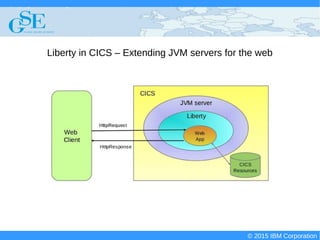
Liberty in CICS – Extending JVM servers for the web
© 2015 IBM Corporation
Deploying CICS with Right Clicks - An Introduction to CICS Deployment Assistant v5.2 - S110
© 2015 IBM Corporation
Where do I start?
© 2015 IBM Corporation
Deploying CICS with Right Clicks - An Introduction to CICS Deployment Assistant v5.2 - S110
© 2015 IBM Corporation
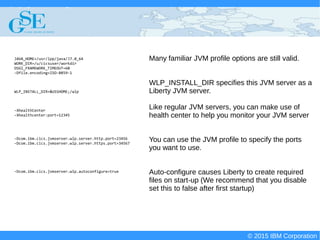
Many familiar JVM profile options are still valid.
WLP_INSTALL_DIR specifies this JVM server as a
Liberty JVM server.
Like regular JVM servers, you can make use of
health center to help you monitor your JVM server
You can use the JVM profile to specify the ports
you want to use.
Auto-configure causes Liberty to create required
files on start-up (We recommend that you disable
set this to false after first startup)
JAVA_HOME=/usr/lpp/java/J7.0_64
WORK_DIR=/u/cicsuser/workdir
OSGI_FRAMEWORK_TIMEOUT=60
-Dfile.encoding=ISO-8859-1
WLP_INSTALL_DIR=&USSHOME;/wlp
-XhealthCenter
-Xhealthcenter:port=12345
-Dcom.ibm.cics.jvmserver.wlp.server.http.port=23456
-Dcom.ibm.cics.jvmserver.wlp.server.https.port=34567
-Dcom.ibm.cics.jvmserver.wlp.autoconfigure=true
© 2015 IBM Corporation
Deploying CICS with Right Clicks - An Introduction to CICS Deployment Assistant v5.2 - S110
© 2015 IBM Corporation
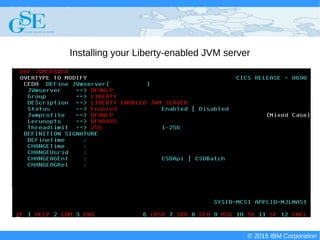
Installing your Liberty-enabled JVM server
© 2015 IBM Corporation
Deploying CICS with Right Clicks - An Introduction to CICS Deployment Assistant v5.2 - S110
© 2015 IBM Corporation
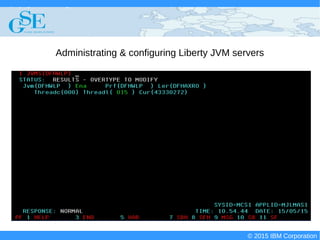
Administrating & configuring Liberty JVM servers
© 2015 IBM Corporation
Deploying CICS with Right Clicks - An Introduction to CICS Deployment Assistant v5.2 - S110
© 2015 IBM Corporation
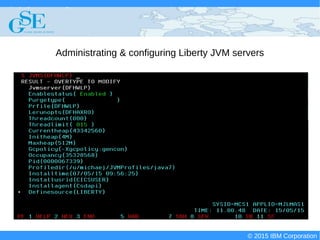
Administrating & configuring Liberty JVM servers
© 2015 IBM Corporation
Deploying CICS with Right Clicks - An Introduction to CICS Deployment Assistant v5.2 - S110
© 2015 IBM Corporation
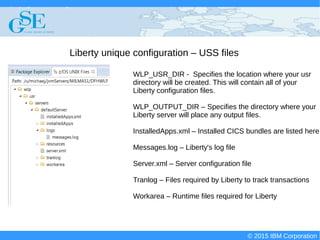
Liberty unique configuration – USS files
WLP_USR_DIR - Specifies the location where your usr
directory will be created. This will contain all of your
Liberty configuration files.
WLP_OUTPUT_DIR – Specifies the directory where your
Liberty server will place any output files.
InstalledApps.xml – Installed CICS bundles are listed here
Messages.log – Liberty's log file
Server.xml – Server configuration file
Tranlog – Files required by Liberty to track transactions
Workarea – Runtime files required for Liberty
© 2015 IBM Corporation
Deploying CICS with Right Clicks - An Introduction to CICS Deployment Assistant v5.2 - S110
© 2015 IBM Corporation
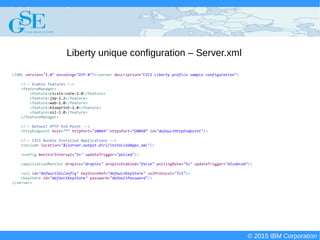
Liberty unique configuration – Server.xml
<?XML version="1.0" encoding="UTF-8"?><server description="CICS Liberty profile sample configuration">
<!-- Enable features -->
<featureManager>
<feature>cicsts:core-1.0</feature>
<feature>jsp-2.2</feature>
<feature>wab-1.0</feature>
<feature>blueprint-1.0</feature>
<feature>ssl-1.0</feature>
</featureManager>
<!-- Default HTTP End Point -->
<httpEndpoint host="*" httpPort="20049" httpsPort=”20050” id="defaultHttpEndpoint"/>
<!-- CICS Bundle Installed Applications -->
<include location="${server.output.dir}/installedApps.xml"/>
<config monitorInterval="5s" updateTrigger="polled"/>
<applicationMonitor dropins="dropins" dropinsEnabled="false" pollingRate="5s" updateTrigger="disabled"/>
<ssl id="defaultSSLConfig" keyStoreRef="defaultKeyStore" sslProtocol="TLS"/>
<keyStore id="defaultKeyStore" password="defaultPassword"/>
</server>
© 2015 IBM Corporation
Deploying CICS with Right Clicks - An Introduction to CICS Deployment Assistant v5.2 - S110
© 2015 IBM Corporation
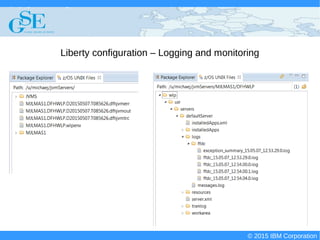
Liberty configuration – Logging and monitoring
© 2015 IBM Corporation
Deploying CICS with Right Clicks - An Introduction to CICS Deployment Assistant v5.2 - S110
© 2015 IBM Corporation
More on messages.log
********************************************************************************
product = CICS Transaction Server for z/OS 5.2.0, CICS LIBERTY NOTUSAGE, WebSphere Application Server 8.5.5.3, WAS FOR Z/OS 8.5.5.3 (wlp-1.0.6.cl50320140905-1604)
wlp.install.dir = /cics/cics690/wlp/
server.config.dir = /u/michaej/jatp/BEANV/JATP1351/JATP1351/WLPJVMS/wlp/usr/servers/defaultServer/
java.home = /java/J7.1_64
java.version = 1.7.0
java.runtime = Java(TM) SE Runtime Environment (pmz6470_27sr2fp10-20141218_02 (SR2 FP10))
os = z/OS (01.13.00; s390x) (en_US)
********************************************************************************
[5/8/15 13:46:54:328 GMT] 00000023 com.ibm.ws.logging.internal.TraceSpecification I TRAS0018I: The trace state has been changed. The new trace state is *=info.
[5/8/15 13:46:54:411 GMT] 00000023 com.ibm.ws.kernel.launch.internal.FrameworkManager A CWWKE0001I: The server defaultServer has been launched.
[5/8/15 13:46:57:357 GMT] 0000002e com.ibm.ws.zos.core.internal.NativeServiceTracker I CWWKB0103I: Authorized service group PRODMGR is available.
[5/8/15 13:46:57:357 GMT] 0000002e com.ibm.ws.zos.core.internal.NativeServiceTracker I CWWKB0103I: Authorized service group SAFCRED is available.
[5/8/15 13:46:57:358 GMT] 0000002e com.ibm.ws.zos.core.internal.NativeServiceTracker I CWWKB0104I: Authorized service group LOCALCOM is not available.
[5/8/15 13:46:57:358 GMT] 0000002e com.ibm.ws.zos.core.internal.NativeServiceTracker I CWWKB0104I: Authorized service group TXRRS is not available.
[5/8/15 13:46:57:358 GMT] 0000002e com.ibm.ws.zos.core.internal.NativeServiceTracker I CWWKB0104I: Authorized service group WOLA is not available.
[5/8/15 13:46:57:359 GMT] 0000002e com.ibm.ws.zos.core.internal.NativeServiceTracker I CWWKB0104I: Authorized service group ZOSDUMP is not available.
[5/8/15 13:46:57:359 GMT] 0000002e com.ibm.ws.zos.core.internal.NativeServiceTracker I CWWKB0104I: Authorized service group ZOSWLM is not available.
…
[5/8/15 13:47:04:861 GMT] 00000044 com.ibm.ws.tcpchannel.internal.TCPChannel I CWWKO0219I: TCP Channel defaultHttpEndpoint has been started and is now
listening for requests on host * (IPv6) port 29540.
[5/8/15 13:47:05:877 GMT] 00000036 com.ibm.ws.kernel.feature.internal.FeatureManager A CWWKF0015I: The server has the following interim fixes installed:
PI29785,PI15943,PI26809.
[5/8/15 13:47:05:877 GMT] 00000036 com.ibm.ws.kernel.feature.internal.FeatureManager I CWWKF0008I: Feature update completed in 6.884 seconds.
[5/8/15 13:47:05:877 GMT] 00000036 com.ibm.ws.kernel.feature.internal.FeatureManager A CWWKF0011I: The server defaultServer is ready to run a smarter planet.
© 2015 IBM Corporation
Deploying CICS with Right Clicks - An Introduction to CICS Deployment Assistant v5.2 - S110
© 2015 IBM Corporation
More on messages.log
[5/8/15 13:47:24:002 GMT] 00000034 com.ibm.ws.config.xml.internal.ConfigRefresher A CWWKG0016I: Starting server configuration update.
[5/8/15 13:47:24:005 GMT] 00000034 com.ibm.ws.config.xml.internal.XMLConfigParser A CWWKG0028A: Processing included configuration resource:
/u/michaej/jatp/BEANV/JATP1351/JATP1351/WLPJVMS/wlp/usr/servers/defaultServer/installedApps.xml
[5/8/15 13:47:24:089 GMT] 00000054 com.ibm.ws.config.xml.internal.ConfigRefresher A CWWKG0017I: The server configuration was successfully updated in
0.090 seconds.
[5/8/15 13:47:24:372 GMT] 00000055 com.ibm.ws.app.manager.AppMessageHelper I CWWKZ0018I: Starting application com.ibm.cics.fv.wlp.BeanValidation.
[5/8/15 13:47:25:162 GMT] 00000055 com.ibm.ws.webcontainer.osgi.webapp.WebGroup I SRVE0169I: Loading Web Module: com.ibm.cics.fv.wlp.BeanValidation.
[5/8/15 13:47:25:164 GMT] 00000055 com.ibm.ws.webcontainer I SRVE0250I: Web Module com.ibm.cics.fv.wlp.BeanValidation has been
bound to default_host.
[5/8/15 13:47:25:170 GMT] 00000055 com.ibm.ws.http.internal.VirtualHostImpl A CWWKT0016I: Web application available (default_host):
http://sysplex2-dvipa62.hursley.ibm.com:29540/com.ibm.cics.fv.wlp.BeanValidation/
[5/8/15 13:47:25:175 GMT] 00000055 com.ibm.ws.app.manager.AppMessageHelper A CWWKZ0001I: Application com.ibm.cics.fv.wlp.BeanValidation started in
0.809 seconds.
...
[5/8/15 13:48:00:312 GMT] 0000005c com.ibm.ws.webcontainer.servlet I SRVE0242I: [com.ibm.cics.fv.wlp.BeanValidation]
[/com.ibm.cics.fv.wlp.BeanValidation] [com.ibm.cics.fv.wlp.beanValidation.servlets.mainTestServlet]: Initialization successful.
[5/8/15 13:48:18:193 GMT] 00000097 SystemOut O TEST
[5/8/15 13:48:18:491 GMT] 00000098 SystemOut O Couldn't read items on queue:
CICS QIDERR Condition(RESP=QIDERR, RESP2=0)
[5/8/15 13:48:24:294 GMT] 00000034 com.ibm.ws.config.xml.internal.ConfigRefresher A CWWKG0016I: Starting server configuration update.
[5/8/15 13:48:24:298 GMT] 00000034 com.ibm.ws.config.xml.internal.XMLConfigParser A CWWKG0028A: Processing included configuration resource:
/u/michaej/jatp/BEANV/JATP1351/JATP1351/WLPJVMS/wlp/usr/servers/defaultServer/installedApps.xml
[5/8/15 13:48:24:342 GMT] 0000009c com.ibm.ws.config.xml.internal.ConfigRefresher A CWWKG0017I: The server configuration was successfully updated in
0.050 seconds.
[5/8/15 13:48:24:343 GMT] 00000096 com.ibm.ws.http.internal.VirtualHostImpl A CWWKT0017I: Web application removed (default_host): http://sysplex2-
dvipa62.hursley.ibm.com:29540/com.ibm.cics.fv.wlp.BeanValidation/
[5/8/15 13:48:24:346 GMT] 00000096 com.ibm.ws.webcontainer.servlet I SRVE0253I: [com.ibm.cics.fv.wlp.BeanValidation]
[/com.ibm.cics.fv.wlp.BeanValidation] [com.ibm.cics.fv.wlp.beanValidation.servlets.mainTestServlet]: Destroy successful.
[5/8/15 13:48:24:387 GMT] 00000096 com.ibm.ws.app.manager.AppMessageHelper A CWWKZ0009I: The application com.ibm.cics.fv.wlp.BeanValidation has
stopped successfully.
...
[5/8/15 13:48:36:393 GMT] 0000006b com.ibm.ws.tcpchannel.internal.TCPChannel I CWWKO0220I: TCP Channel defaultHttpEndpoint has stopped listening for
requests on host * (IPv6) port 29540.
...
[5/8/15 13:48:37:088 GMT] 00000023 com.ibm.ws.kernel.launch.internal.FrameworkManager A CWWKE0036I: The server defaultServer stopped after 1 minutes, 42.677
seconds.
© 2015 IBM Corporation
Deploying CICS with Right Clicks - An Introduction to CICS Deployment Assistant v5.2 - S110
© 2015 IBM Corporation
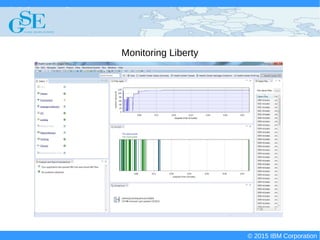
Monitoring Liberty
© 2015 IBM Corporation
Deploying CICS with Right Clicks - An Introduction to CICS Deployment Assistant v5.2 - S110
© 2015 IBM Corporation
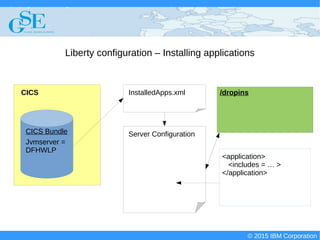
Liberty configuration – Installing applications
Server Configuration
/dropins
<application>
<includes = … >
</application>
CICS InstalledApps.xml
CICS Bundle
Jvmserver =
DFHWLP
© 2015 IBM Corporation
Deploying CICS with Right Clicks - An Introduction to CICS Deployment Assistant v5.2 - S110
© 2015 IBM Corporation
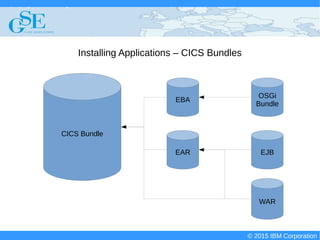
Installing Applications – CICS Bundles
CICS Bundle
EBA
EAR
WAR
EJB
OSGi
Bundle
© 2015 IBM Corporation
Deploying CICS with Right Clicks - An Introduction to CICS Deployment Assistant v5.2 - S110
© 2015 IBM Corporation
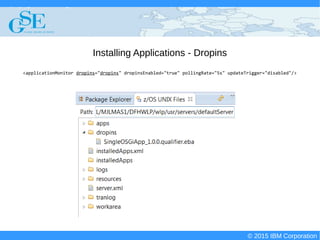
Installing Applications - Dropins
<applicationMonitor dropins="dropins" dropinsEnabled="true" pollingRate="5s" updateTrigger="disabled"/>
© 2015 IBM Corporation
Deploying CICS with Right Clicks - An Introduction to CICS Deployment Assistant v5.2 - S110
© 2015 IBM Corporation
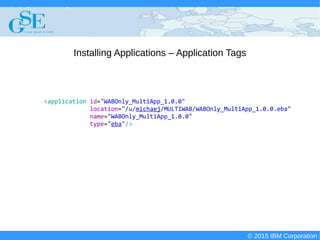
Installing Applications – Application Tags
<application id="WABOnly_MultiApp_1.0.0"
location="/u/michaej/MULTIWAB/WABOnly_MultiApp_1.0.0.eba"
name="WABOnly_MultiApp_1.0.0"
type="eba"/>
© 2015 IBM Corporation
Deploying CICS with Right Clicks - An Introduction to CICS Deployment Assistant v5.2 - S110
© 2015 IBM Corporation
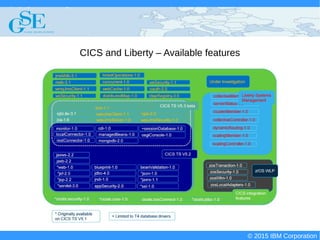
CICS and Liberty – Available features
© 2015 IBM Corporation
Deploying CICS with Right Clicks - An Introduction to CICS Deployment Assistant v5.2 - S110
© 2015 IBM Corporation
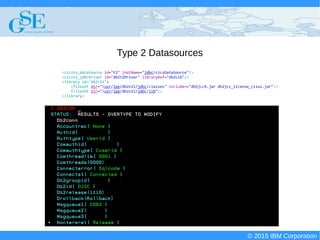
Type 2 Datasources
<cicsts_dataSource id="t2" jndiName="jdbc/cicsDataSource"/>
<cicsts_jdbcDriver id="db2t2Driver" libraryRef="db2Lib"/>
<library id="db2Lib">
<fileset dir="/usr/lpp/db2v11/jdbc/classes" includes="db2jcc4.jar db2jcc_license_cisuz.jar"/>
f<ileset dir="/usr/lpp/db2v11/jdbc/lib"/>
</library>
© 2015 IBM Corporation
Deploying CICS with Right Clicks - An Introduction to CICS Deployment Assistant v5.2 - S110
© 2015 IBM Corporation
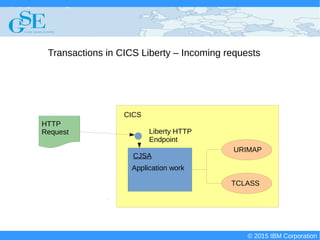
Transactions in CICS Liberty – Incoming requests
CICS
HTTP
Request Liberty HTTP
Endpoint
CJSA
URIMAP
TCLASS
Application work
© 2015 IBM Corporation
Deploying CICS with Right Clicks - An Introduction to CICS Deployment Assistant v5.2 - S110
© 2015 IBM Corporation
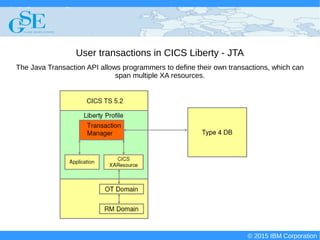
User transactions in CICS Liberty - JTA
The Java Transaction API allows programmers to define their own transactions, which can
span multiple XA resources.
© 2015 IBM Corporation
Deploying CICS with Right Clicks - An Introduction to CICS Deployment Assistant v5.2 - S110
© 2015 IBM Corporation
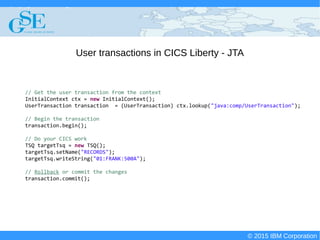
User transactions in CICS Liberty - JTA
// Get the user transaction from the context
InitialContext ctx = new InitialContext();
UserTransaction transaction = (UserTransaction) ctx.lookup("java:comp/UserTransaction");
// Begin the transaction
transaction.begin();
// Do your CICS work
TSQ targetTsq = new TSQ();
targetTsq.setName("RECORDS");
targetTsq.writeString("01:FRANK:500A");
// Rollback or commit the changes
transaction.commit();
© 2015 IBM Corporation
Deploying CICS with Right Clicks - An Introduction to CICS Deployment Assistant v5.2 - S110
© 2015 IBM Corporation
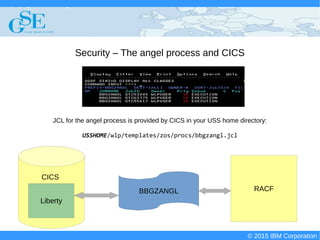
Security – The angel process and CICS
JCL for the angel process is provided by CICS in your USS home directory:
USSHOME/wlp/templates/zos/procs/bbgzangl.jcl
BBGZANGL RACF
Liberty
CICS
© 2015 IBM Corporation
Deploying CICS with Right Clicks - An Introduction to CICS Deployment Assistant v5.2 - S110
© 2015 IBM Corporation
Security – The angel process and CICS
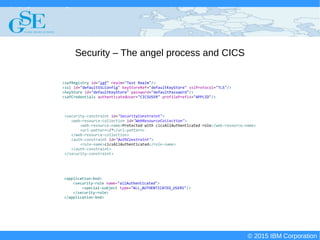
<safRegistry id="saf" realm="Test Realm"/>
<ssl id="defaultSSLConfig" keyStoreRef="defaultKeyStore" sslProtocol="TLS"/>
<keyStore id="defaultKeyStore" password="defaultPassword"/>
<safCredentials authenticatedUser="CICSUSER" profilePrefix="APPLID"/>
<application-bnd>
<security-role name="allAuthenticated">
<special-subject type="ALL_AUTHENTICATED_USERS"/>
</security-role>
</application-bnd>
<security-constraint id="SecurityConstraint">
<web-resource-collection id="WebResourceCollection">
<web-resource-name>Protected with cicsAllAuthenticated role</web-resource-name>
<url-pattern>/*</url-pattern>
</web-resource-collection>
<auth-constraint id="AuthConstraint">
<role-name>cicsAllAuthenticated</role-name>
</auth-constraint>
</security-constraint>
© 2015 IBM Corporation
Deploying CICS with Right Clicks - An Introduction to CICS Deployment Assistant v5.2 - S110
© 2015 IBM Corporation
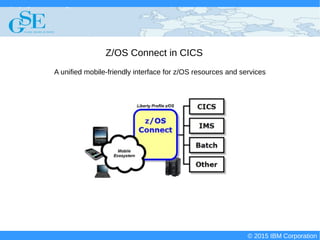
Z/OS Connect in CICS
A unified mobile-friendly interface for z/OS resources and services
© 2015 IBM Corporation
Deploying CICS with Right Clicks - An Introduction to CICS Deployment Assistant v5.2 - S110
© 2015 IBM Corporation
Z/OS Connect in CICS
<feature>cicsts:zosConnect-1.0</feature>
<com.ibm.cics.wlp.zosconnect.CICSEndpoint id="com.ibm.cics.wlp.zosconnect.CICSEndpointService"/>
{"zosConnectServices":[
{"ServiceName":"Test Service",
"ServiceDescription":"Simple service for testing.",
"ServiceProvider":"com.ibm.cics.wlp.zosconnect.CICSEndpointServiceImpl",
"ServiceURL":"https://winmvs2c.hursley.ibm.com:29461/zosConnect/services/Test Service"}]}
© 2015 IBM Corporation
Deploying CICS with Right Clicks - An Introduction to CICS Deployment Assistant v5.2 - S110
© 2015 IBM Corporation
JCICS and Liberty
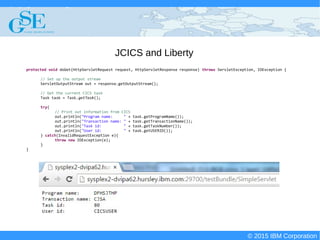
protected void doGet(HttpServletRequest request, HttpServletResponse response) throws ServletException, IOException {
// Set up the output stream
ServletOutputStream out = response.getOutputStream();
// Get the current CICS task
Task task = Task.getTask();
try{
// Print out information from CICS
out.println("Program name: " + task.getProgramName());
out.println("Transaction name: " + task.getTransactionName());
out.println("Task id: " + task.getTaskNumber());
out.println("User id: " + task.getUSERID());
} catch(InvalidRequestException e){
throw new IOException(e);
}
}
© 2015 IBM Corporation
Deploying CICS with Right Clicks - An Introduction to CICS Deployment Assistant v5.2 - S110
© 2015 IBM Corporation
Liberty and the web - Servlets
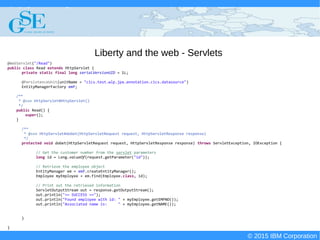
@WebServlet("/Read")
public class Read extends HttpServlet {
private static final long serialVersionUID = 1L;
@PersistenceUnit(unitName = "cics.test.wlp.jpa.annotation.cics.datasource")
EntityManagerFactory emf;
/**
* @see HttpServlet#HttpServlet()
*/
public Read() {
super();
}
/**
* @see HttpServlet#doGet(HttpServletRequest request, HttpServletResponse response)
*/
protected void doGet(HttpServletRequest request, HttpServletResponse response) throws ServletException, IOException {
// Get the customer number from the servlet parameters
long id = Long.valueOf(request.getParameter("id"));
// Retrieve the employee object
EntityManager em = emf.createEntityManager();
Employee myEmployee = em.find(Employee.class, id);
// Print out the retrieved information
ServletOutputStream out = response.getOutputStream();
out.println("== SUCCESS ==");
out.println("Found employee with id: " + myEmployee.getEMPNO());
out.println("Associated name is: " + myEmployee.getNAME());
}
}
© 2015 IBM Corporation
Deploying CICS with Right Clicks - An Introduction to CICS Deployment Assistant v5.2 - S110
© 2015 IBM Corporation
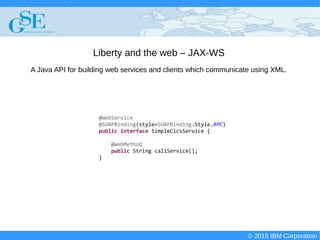
Liberty and the web – JAX-WS
@WebService
@SOAPBinding(style=SOAPBinding.Style.RPC)
public interface SimpleCicsService {
@WebMethod
public String callService();
}
A Java API for building web services and clients which communicate using XML.
© 2015 IBM Corporation
Deploying CICS with Right Clicks - An Introduction to CICS Deployment Assistant v5.2 - S110
© 2015 IBM Corporation
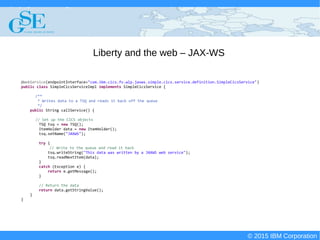
Liberty and the web – JAX-WS
@WebService(endpointInterface="com.ibm.cics.fv.wlp.jaxws.simple.cics.service.definition.SimpleCicsService")
public class SimpleCicsServiceImpl implements SimpleCicsService {
/**
* Writes data to a TSQ and reads it back off the queue
*/
public String callService() {
// Set up the CICS objects
TSQ tsq = new TSQ();
ItemHolder data = new ItemHolder();
tsq.setName("JAXWS");
try {
// Write to the queue and read it back
tsq.writeString("This data was written by a JAXWS web service");
tsq.readNextItem(data);
}
catch (Exception e) {
return e.getMessage();
}
// Return the data
return data.getStringValue();
}
}
© 2015 IBM Corporation
Deploying CICS with Right Clicks - An Introduction to CICS Deployment Assistant v5.2 - S110
© 2015 IBM Corporation
Bean Validation
@Target(value={ElementType.METHOD, ElementType.FIELD, ElementType.ANNOTATION_TYPE})
@Retention(value=RetentionPolicy.RUNTIME)
@Constraint(validatedBy={TSQValidator.class})
@Documented
public @interface ValidTsq {
public String message() default "Tsq must already exist in CICS and contain at least 1 item.";
public Class<?>[] groups() default {};
public Class<? extends Payload>[] payload() default {};
public String value() default "";
}
Bean validation is a Java specification which allows you to impose custom constraints and
validation processes on your Java objects.
© 2015 IBM Corporation
Deploying CICS with Right Clicks - An Introduction to CICS Deployment Assistant v5.2 - S110
© 2015 IBM Corporation
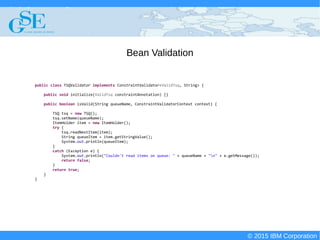
Bean Validation
public class TSQValidator implements ConstraintValidator<ValidTsq, String> {
public void initialize(ValidTsq constraintAnnotation) {}
public boolean isValid(String queueName, ConstraintValidatorContext context) {
TSQ tsq = new TSQ();
tsq.setName(queueName);
ItemHolder item = new ItemHolder();
try {
tsq.readNextItem(item);
String queueItem = item.getStringValue();
System.out.println(queueItem);
}
catch (Exception e) {
System.out.println("Couldn't read items on queue: " + queueName + "n" + e.getMessage());
return false;
}
return true;
}
}
© 2015 IBM Corporation
Deploying CICS with Right Clicks - An Introduction to CICS Deployment Assistant v5.2 - S110
© 2015 IBM Corporation
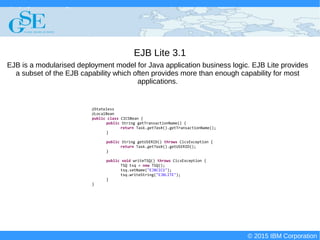
EJB Lite 3.1
@Stateless
@LocalBean
public class CICSBean {
public String getTransactionName() {
return Task.getTask().getTransactionName();
}
public String getUSERID() throws CicsException {
return Task.getTask().getUSERID();
}
public void writeTSQ() throws CicsException {
TSQ tsq = new TSQ();
tsq.setName("EJBCICS");
tsq.writeString("EJBLITE");
}
}
EJB is a modularised deployment model for Java application business logic. EJB Lite provides
a subset of the EJB capability which often provides more than enough capability for most
applications.
© 2015 IBM Corporation
Deploying CICS with Right Clicks - An Introduction to CICS Deployment Assistant v5.2 - S110
© 2015 IBM Corporation
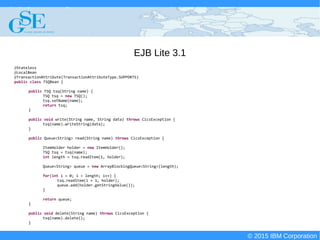
EJB Lite 3.1
@Stateless
@LocalBean
@TransactionAttribute(TransactionAttributeType.SUPPORTS)
public class TSQBean {
public TSQ tsq(String name) {
TSQ tsq = new TSQ();
tsq.setName(name);
return tsq;
}
public void write(String name, String data) throws CicsException {
tsq(name).writeString(data);
}
public Queue<String> read(String name) throws CicsException {
ItemHolder holder = new ItemHolder();
TSQ tsq = tsq(name);
int length = tsq.readItem(1, holder);
Queue<String> queue = new ArrayBlockingQueue<String>(length);
for(int i = 0; i < length; i++) {
tsq.readItem(i + 1, holder);
queue.add(holder.getStringValue());
}
return queue;
}
public void delete(String name) throws CicsException {
tsq(name).delete();
}
© 2015 IBM Corporation
Deploying CICS with Right Clicks - An Introduction to CICS Deployment Assistant v5.2 - S110
© 2015 IBM Corporation
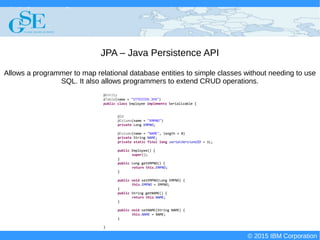
JPA – Java Persistence API
Allows a programmer to map relational database entities to simple classes without needing to use
SQL. It also allows programmers to extend CRUD operations.
@Entity
@Table(name = "STTESTER.JPA")
public class Employee implements Serializable {
@Id
@Column(name = "EMPNO")
private Long EMPNO;
@Column(name = "NAME", length = 8)
private String NAME;
private static final long serialVersionUID = 1L;
public Employee() {
super();
}
public Long getEMPNO() {
return this.EMPNO;
}
public void setEMPNO(Long EMPNO) {
this.EMPNO = EMPNO;
}
public String getNAME() {
return this.NAME;
}
public void setNAME(String NAME) {
this.NAME = NAME;
}
}
© 2015 IBM Corporation
Deploying CICS with Right Clicks - An Introduction to CICS Deployment Assistant v5.2 - S110
© 2015 IBM Corporation
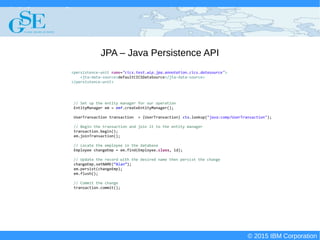
JPA – Java Persistence API
// Set up the entity manager for our operation
EntityManager em = emf.createEntityManager();
UserTransaction transaction = (UserTransaction) ctx.lookup("java:comp/UserTransaction");
// Begin the transaction and join it to the entity manager
transaction.begin();
em.joinTransaction();
// Locate the employee in the database
Employee changeEmp = em.find(Employee.class, id);
// Update the record with the desired name then persist the change
changeEmp.setNAME(“Alan”);
em.persist(changeEmp);
em.flush();
// Commit the change
transaction.commit();
<persistence-unit name="cics.test.wlp.jpa.annotation.cics.datasource">
<jta-data-source>defaultCICSDataSource</jta-data-source>
</persistence-unit>
© 2015 IBM Corporation
Deploying CICS with Right Clicks - An Introduction to CICS Deployment Assistant v5.2 - S110
© 2015 IBM Corporation
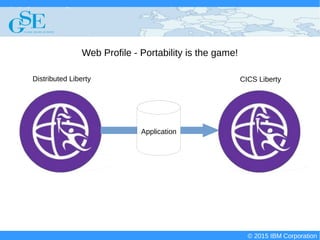
Web Profile - Portability is the game!
Application
Distributed Liberty CICS Liberty
© 2015 IBM Corporation
Deploying CICS with Right Clicks - An Introduction to CICS Deployment Assistant v5.2 - S110
© 2015 IBM Corporation
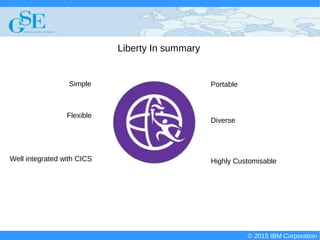
Liberty In summary
Simple
Highly CustomisableWell integrated with CICS
Portable
Flexible
Diverse
© 2015 IBM Corporation
Deploying CICS with Right Clicks - An Introduction to CICS Deployment Assistant v5.2 - S110
© 2015 IBM Corporation
End to end demo

S110 gse - liberte egalite fraternite

  • 1.
    © 2015 IBMCorporationLiberté, Égalité, Fraternité Michael Jones Test Lead Liberty in CICS michaej8@uk.ibm.com
  • 2.
    © 2015 IBMCorporation Deploying CICS with Right Clicks - An Introduction to CICS Deployment Assistant v5.2 - S110 © 2015 IBM Corporation IBM’s statements regarding its plans, directions, and intent are subject to change or withdrawal without notice at IBM’s sole discretion. Information regarding potential future products is intended to outline our general product direction and it should not be relied on in making a purchasing decision. The information mentioned regarding potential future products is not a commitment, promise, or legal obligation to deliver any material, code or functionality. Information about potential future products may not be incorporated into any contract. The development, release, and timing of any future features or functionality described for our products remains at our sole discretion. Performance is based on measurements and projections using standard IBM benchmarks in a controlled environment. The actual throughput or performance that any user will experience will vary depending upon many factors, including considerations such as the amount of multiprogramming in the user’s job stream, the I/O configuration, the storage configuration, and the workload processed. Therefore, no assurance can be given that an individual user will achieve results similar to those stated here.
  • 3.
    © 2015 IBMCorporation Deploying CICS with Right Clicks - An Introduction to CICS Deployment Assistant v5.2 - S110 © 2015 IBM Corporation
  • 4.
    © 2015 IBMCorporation Deploying CICS with Right Clicks - An Introduction to CICS Deployment Assistant v5.2 - S110 © 2015 IBM Corporation CICS Liberty's 'Sunshine Room'
  • 5.
    © 2015 IBMCorporation Deploying CICS with Right Clicks - An Introduction to CICS Deployment Assistant v5.2 - S110 © 2015 IBM Corporation What is Liberty? Lightweight application server created by WebSphere Easily configurable opt-in customisation model Runs on many platforms (Both distributed and z/OS) Now integrated into CICS!
  • 6.
    © 2015 IBMCorporation Deploying CICS with Right Clicks - An Introduction to CICS Deployment Assistant v5.2 - S110 © 2015 IBM Corporation What does Liberty buy me? Support for the Java EE 6 Web Profile Support for a number of Java EE technologies HTTP endpoint for applications Ability to closely integrate front end applications with CICS
  • 7.
    © 2015 IBMCorporation Deploying CICS with Right Clicks - An Introduction to CICS Deployment Assistant v5.2 - S110 © 2015 IBM Corporation Liberty in CICS – Extending JVM servers for the web
  • 8.
    © 2015 IBMCorporation Deploying CICS with Right Clicks - An Introduction to CICS Deployment Assistant v5.2 - S110 © 2015 IBM Corporation Where do I start?
  • 9.
    © 2015 IBMCorporation Deploying CICS with Right Clicks - An Introduction to CICS Deployment Assistant v5.2 - S110 © 2015 IBM Corporation Many familiar JVM profile options are still valid. WLP_INSTALL_DIR specifies this JVM server as a Liberty JVM server. Like regular JVM servers, you can make use of health center to help you monitor your JVM server You can use the JVM profile to specify the ports you want to use. Auto-configure causes Liberty to create required files on start-up (We recommend that you disable set this to false after first startup) JAVA_HOME=/usr/lpp/java/J7.0_64 WORK_DIR=/u/cicsuser/workdir OSGI_FRAMEWORK_TIMEOUT=60 -Dfile.encoding=ISO-8859-1 WLP_INSTALL_DIR=&USSHOME;/wlp -XhealthCenter -Xhealthcenter:port=12345 -Dcom.ibm.cics.jvmserver.wlp.server.http.port=23456 -Dcom.ibm.cics.jvmserver.wlp.server.https.port=34567 -Dcom.ibm.cics.jvmserver.wlp.autoconfigure=true
  • 10.
    © 2015 IBMCorporation Deploying CICS with Right Clicks - An Introduction to CICS Deployment Assistant v5.2 - S110 © 2015 IBM Corporation Installing your Liberty-enabled JVM server
  • 11.
    © 2015 IBMCorporation Deploying CICS with Right Clicks - An Introduction to CICS Deployment Assistant v5.2 - S110 © 2015 IBM Corporation Administrating & configuring Liberty JVM servers
  • 12.
    © 2015 IBMCorporation Deploying CICS with Right Clicks - An Introduction to CICS Deployment Assistant v5.2 - S110 © 2015 IBM Corporation Administrating & configuring Liberty JVM servers
  • 13.
    © 2015 IBMCorporation Deploying CICS with Right Clicks - An Introduction to CICS Deployment Assistant v5.2 - S110 © 2015 IBM Corporation Liberty unique configuration – USS files WLP_USR_DIR - Specifies the location where your usr directory will be created. This will contain all of your Liberty configuration files. WLP_OUTPUT_DIR – Specifies the directory where your Liberty server will place any output files. InstalledApps.xml – Installed CICS bundles are listed here Messages.log – Liberty's log file Server.xml – Server configuration file Tranlog – Files required by Liberty to track transactions Workarea – Runtime files required for Liberty
  • 14.
    © 2015 IBMCorporation Deploying CICS with Right Clicks - An Introduction to CICS Deployment Assistant v5.2 - S110 © 2015 IBM Corporation Liberty unique configuration – Server.xml <?XML version="1.0" encoding="UTF-8"?><server description="CICS Liberty profile sample configuration"> <!-- Enable features --> <featureManager> <feature>cicsts:core-1.0</feature> <feature>jsp-2.2</feature> <feature>wab-1.0</feature> <feature>blueprint-1.0</feature> <feature>ssl-1.0</feature> </featureManager> <!-- Default HTTP End Point --> <httpEndpoint host="*" httpPort="20049" httpsPort=”20050” id="defaultHttpEndpoint"/> <!-- CICS Bundle Installed Applications --> <include location="${server.output.dir}/installedApps.xml"/> <config monitorInterval="5s" updateTrigger="polled"/> <applicationMonitor dropins="dropins" dropinsEnabled="false" pollingRate="5s" updateTrigger="disabled"/> <ssl id="defaultSSLConfig" keyStoreRef="defaultKeyStore" sslProtocol="TLS"/> <keyStore id="defaultKeyStore" password="defaultPassword"/> </server>
  • 15.
    © 2015 IBMCorporation Deploying CICS with Right Clicks - An Introduction to CICS Deployment Assistant v5.2 - S110 © 2015 IBM Corporation Liberty configuration – Logging and monitoring
  • 16.
    © 2015 IBMCorporation Deploying CICS with Right Clicks - An Introduction to CICS Deployment Assistant v5.2 - S110 © 2015 IBM Corporation More on messages.log ******************************************************************************** product = CICS Transaction Server for z/OS 5.2.0, CICS LIBERTY NOTUSAGE, WebSphere Application Server 8.5.5.3, WAS FOR Z/OS 8.5.5.3 (wlp-1.0.6.cl50320140905-1604) wlp.install.dir = /cics/cics690/wlp/ server.config.dir = /u/michaej/jatp/BEANV/JATP1351/JATP1351/WLPJVMS/wlp/usr/servers/defaultServer/ java.home = /java/J7.1_64 java.version = 1.7.0 java.runtime = Java(TM) SE Runtime Environment (pmz6470_27sr2fp10-20141218_02 (SR2 FP10)) os = z/OS (01.13.00; s390x) (en_US) ******************************************************************************** [5/8/15 13:46:54:328 GMT] 00000023 com.ibm.ws.logging.internal.TraceSpecification I TRAS0018I: The trace state has been changed. The new trace state is *=info. [5/8/15 13:46:54:411 GMT] 00000023 com.ibm.ws.kernel.launch.internal.FrameworkManager A CWWKE0001I: The server defaultServer has been launched. [5/8/15 13:46:57:357 GMT] 0000002e com.ibm.ws.zos.core.internal.NativeServiceTracker I CWWKB0103I: Authorized service group PRODMGR is available. [5/8/15 13:46:57:357 GMT] 0000002e com.ibm.ws.zos.core.internal.NativeServiceTracker I CWWKB0103I: Authorized service group SAFCRED is available. [5/8/15 13:46:57:358 GMT] 0000002e com.ibm.ws.zos.core.internal.NativeServiceTracker I CWWKB0104I: Authorized service group LOCALCOM is not available. [5/8/15 13:46:57:358 GMT] 0000002e com.ibm.ws.zos.core.internal.NativeServiceTracker I CWWKB0104I: Authorized service group TXRRS is not available. [5/8/15 13:46:57:358 GMT] 0000002e com.ibm.ws.zos.core.internal.NativeServiceTracker I CWWKB0104I: Authorized service group WOLA is not available. [5/8/15 13:46:57:359 GMT] 0000002e com.ibm.ws.zos.core.internal.NativeServiceTracker I CWWKB0104I: Authorized service group ZOSDUMP is not available. [5/8/15 13:46:57:359 GMT] 0000002e com.ibm.ws.zos.core.internal.NativeServiceTracker I CWWKB0104I: Authorized service group ZOSWLM is not available. … [5/8/15 13:47:04:861 GMT] 00000044 com.ibm.ws.tcpchannel.internal.TCPChannel I CWWKO0219I: TCP Channel defaultHttpEndpoint has been started and is now listening for requests on host * (IPv6) port 29540. [5/8/15 13:47:05:877 GMT] 00000036 com.ibm.ws.kernel.feature.internal.FeatureManager A CWWKF0015I: The server has the following interim fixes installed: PI29785,PI15943,PI26809. [5/8/15 13:47:05:877 GMT] 00000036 com.ibm.ws.kernel.feature.internal.FeatureManager I CWWKF0008I: Feature update completed in 6.884 seconds. [5/8/15 13:47:05:877 GMT] 00000036 com.ibm.ws.kernel.feature.internal.FeatureManager A CWWKF0011I: The server defaultServer is ready to run a smarter planet.
  • 17.
    © 2015 IBMCorporation Deploying CICS with Right Clicks - An Introduction to CICS Deployment Assistant v5.2 - S110 © 2015 IBM Corporation More on messages.log [5/8/15 13:47:24:002 GMT] 00000034 com.ibm.ws.config.xml.internal.ConfigRefresher A CWWKG0016I: Starting server configuration update. [5/8/15 13:47:24:005 GMT] 00000034 com.ibm.ws.config.xml.internal.XMLConfigParser A CWWKG0028A: Processing included configuration resource: /u/michaej/jatp/BEANV/JATP1351/JATP1351/WLPJVMS/wlp/usr/servers/defaultServer/installedApps.xml [5/8/15 13:47:24:089 GMT] 00000054 com.ibm.ws.config.xml.internal.ConfigRefresher A CWWKG0017I: The server configuration was successfully updated in 0.090 seconds. [5/8/15 13:47:24:372 GMT] 00000055 com.ibm.ws.app.manager.AppMessageHelper I CWWKZ0018I: Starting application com.ibm.cics.fv.wlp.BeanValidation. [5/8/15 13:47:25:162 GMT] 00000055 com.ibm.ws.webcontainer.osgi.webapp.WebGroup I SRVE0169I: Loading Web Module: com.ibm.cics.fv.wlp.BeanValidation. [5/8/15 13:47:25:164 GMT] 00000055 com.ibm.ws.webcontainer I SRVE0250I: Web Module com.ibm.cics.fv.wlp.BeanValidation has been bound to default_host. [5/8/15 13:47:25:170 GMT] 00000055 com.ibm.ws.http.internal.VirtualHostImpl A CWWKT0016I: Web application available (default_host): http://sysplex2-dvipa62.hursley.ibm.com:29540/com.ibm.cics.fv.wlp.BeanValidation/ [5/8/15 13:47:25:175 GMT] 00000055 com.ibm.ws.app.manager.AppMessageHelper A CWWKZ0001I: Application com.ibm.cics.fv.wlp.BeanValidation started in 0.809 seconds. ... [5/8/15 13:48:00:312 GMT] 0000005c com.ibm.ws.webcontainer.servlet I SRVE0242I: [com.ibm.cics.fv.wlp.BeanValidation] [/com.ibm.cics.fv.wlp.BeanValidation] [com.ibm.cics.fv.wlp.beanValidation.servlets.mainTestServlet]: Initialization successful. [5/8/15 13:48:18:193 GMT] 00000097 SystemOut O TEST [5/8/15 13:48:18:491 GMT] 00000098 SystemOut O Couldn't read items on queue: CICS QIDERR Condition(RESP=QIDERR, RESP2=0) [5/8/15 13:48:24:294 GMT] 00000034 com.ibm.ws.config.xml.internal.ConfigRefresher A CWWKG0016I: Starting server configuration update. [5/8/15 13:48:24:298 GMT] 00000034 com.ibm.ws.config.xml.internal.XMLConfigParser A CWWKG0028A: Processing included configuration resource: /u/michaej/jatp/BEANV/JATP1351/JATP1351/WLPJVMS/wlp/usr/servers/defaultServer/installedApps.xml [5/8/15 13:48:24:342 GMT] 0000009c com.ibm.ws.config.xml.internal.ConfigRefresher A CWWKG0017I: The server configuration was successfully updated in 0.050 seconds. [5/8/15 13:48:24:343 GMT] 00000096 com.ibm.ws.http.internal.VirtualHostImpl A CWWKT0017I: Web application removed (default_host): http://sysplex2- dvipa62.hursley.ibm.com:29540/com.ibm.cics.fv.wlp.BeanValidation/ [5/8/15 13:48:24:346 GMT] 00000096 com.ibm.ws.webcontainer.servlet I SRVE0253I: [com.ibm.cics.fv.wlp.BeanValidation] [/com.ibm.cics.fv.wlp.BeanValidation] [com.ibm.cics.fv.wlp.beanValidation.servlets.mainTestServlet]: Destroy successful. [5/8/15 13:48:24:387 GMT] 00000096 com.ibm.ws.app.manager.AppMessageHelper A CWWKZ0009I: The application com.ibm.cics.fv.wlp.BeanValidation has stopped successfully. ... [5/8/15 13:48:36:393 GMT] 0000006b com.ibm.ws.tcpchannel.internal.TCPChannel I CWWKO0220I: TCP Channel defaultHttpEndpoint has stopped listening for requests on host * (IPv6) port 29540. ... [5/8/15 13:48:37:088 GMT] 00000023 com.ibm.ws.kernel.launch.internal.FrameworkManager A CWWKE0036I: The server defaultServer stopped after 1 minutes, 42.677 seconds.
  • 18.
    © 2015 IBMCorporation Deploying CICS with Right Clicks - An Introduction to CICS Deployment Assistant v5.2 - S110 © 2015 IBM Corporation Monitoring Liberty
  • 19.
    © 2015 IBMCorporation Deploying CICS with Right Clicks - An Introduction to CICS Deployment Assistant v5.2 - S110 © 2015 IBM Corporation Liberty configuration – Installing applications Server Configuration /dropins <application> <includes = … > </application> CICS InstalledApps.xml CICS Bundle Jvmserver = DFHWLP
  • 20.
    © 2015 IBMCorporation Deploying CICS with Right Clicks - An Introduction to CICS Deployment Assistant v5.2 - S110 © 2015 IBM Corporation Installing Applications – CICS Bundles CICS Bundle EBA EAR WAR EJB OSGi Bundle
  • 21.
    © 2015 IBMCorporation Deploying CICS with Right Clicks - An Introduction to CICS Deployment Assistant v5.2 - S110 © 2015 IBM Corporation Installing Applications - Dropins <applicationMonitor dropins="dropins" dropinsEnabled="true" pollingRate="5s" updateTrigger="disabled"/>
  • 22.
    © 2015 IBMCorporation Deploying CICS with Right Clicks - An Introduction to CICS Deployment Assistant v5.2 - S110 © 2015 IBM Corporation Installing Applications – Application Tags <application id="WABOnly_MultiApp_1.0.0" location="/u/michaej/MULTIWAB/WABOnly_MultiApp_1.0.0.eba" name="WABOnly_MultiApp_1.0.0" type="eba"/>
  • 23.
    © 2015 IBMCorporation Deploying CICS with Right Clicks - An Introduction to CICS Deployment Assistant v5.2 - S110 © 2015 IBM Corporation CICS and Liberty – Available features
  • 24.
    © 2015 IBMCorporation Deploying CICS with Right Clicks - An Introduction to CICS Deployment Assistant v5.2 - S110 © 2015 IBM Corporation Type 2 Datasources <cicsts_dataSource id="t2" jndiName="jdbc/cicsDataSource"/> <cicsts_jdbcDriver id="db2t2Driver" libraryRef="db2Lib"/> <library id="db2Lib"> <fileset dir="/usr/lpp/db2v11/jdbc/classes" includes="db2jcc4.jar db2jcc_license_cisuz.jar"/> f<ileset dir="/usr/lpp/db2v11/jdbc/lib"/> </library>
  • 25.
    © 2015 IBMCorporation Deploying CICS with Right Clicks - An Introduction to CICS Deployment Assistant v5.2 - S110 © 2015 IBM Corporation Transactions in CICS Liberty – Incoming requests CICS HTTP Request Liberty HTTP Endpoint CJSA URIMAP TCLASS Application work
  • 26.
    © 2015 IBMCorporation Deploying CICS with Right Clicks - An Introduction to CICS Deployment Assistant v5.2 - S110 © 2015 IBM Corporation User transactions in CICS Liberty - JTA The Java Transaction API allows programmers to define their own transactions, which can span multiple XA resources.
  • 27.
    © 2015 IBMCorporation Deploying CICS with Right Clicks - An Introduction to CICS Deployment Assistant v5.2 - S110 © 2015 IBM Corporation User transactions in CICS Liberty - JTA // Get the user transaction from the context InitialContext ctx = new InitialContext(); UserTransaction transaction = (UserTransaction) ctx.lookup("java:comp/UserTransaction"); // Begin the transaction transaction.begin(); // Do your CICS work TSQ targetTsq = new TSQ(); targetTsq.setName("RECORDS"); targetTsq.writeString("01:FRANK:500A"); // Rollback or commit the changes transaction.commit();
  • 28.
    © 2015 IBMCorporation Deploying CICS with Right Clicks - An Introduction to CICS Deployment Assistant v5.2 - S110 © 2015 IBM Corporation Security – The angel process and CICS JCL for the angel process is provided by CICS in your USS home directory: USSHOME/wlp/templates/zos/procs/bbgzangl.jcl BBGZANGL RACF Liberty CICS
  • 29.
    © 2015 IBMCorporation Deploying CICS with Right Clicks - An Introduction to CICS Deployment Assistant v5.2 - S110 © 2015 IBM Corporation Security – The angel process and CICS <safRegistry id="saf" realm="Test Realm"/> <ssl id="defaultSSLConfig" keyStoreRef="defaultKeyStore" sslProtocol="TLS"/> <keyStore id="defaultKeyStore" password="defaultPassword"/> <safCredentials authenticatedUser="CICSUSER" profilePrefix="APPLID"/> <application-bnd> <security-role name="allAuthenticated"> <special-subject type="ALL_AUTHENTICATED_USERS"/> </security-role> </application-bnd> <security-constraint id="SecurityConstraint"> <web-resource-collection id="WebResourceCollection"> <web-resource-name>Protected with cicsAllAuthenticated role</web-resource-name> <url-pattern>/*</url-pattern> </web-resource-collection> <auth-constraint id="AuthConstraint"> <role-name>cicsAllAuthenticated</role-name> </auth-constraint> </security-constraint>
  • 30.
    © 2015 IBMCorporation Deploying CICS with Right Clicks - An Introduction to CICS Deployment Assistant v5.2 - S110 © 2015 IBM Corporation Z/OS Connect in CICS A unified mobile-friendly interface for z/OS resources and services
  • 31.
    © 2015 IBMCorporation Deploying CICS with Right Clicks - An Introduction to CICS Deployment Assistant v5.2 - S110 © 2015 IBM Corporation Z/OS Connect in CICS <feature>cicsts:zosConnect-1.0</feature> <com.ibm.cics.wlp.zosconnect.CICSEndpoint id="com.ibm.cics.wlp.zosconnect.CICSEndpointService"/> {"zosConnectServices":[ {"ServiceName":"Test Service", "ServiceDescription":"Simple service for testing.", "ServiceProvider":"com.ibm.cics.wlp.zosconnect.CICSEndpointServiceImpl", "ServiceURL":"https://winmvs2c.hursley.ibm.com:29461/zosConnect/services/Test Service"}]}
  • 32.
    © 2015 IBMCorporation Deploying CICS with Right Clicks - An Introduction to CICS Deployment Assistant v5.2 - S110 © 2015 IBM Corporation JCICS and Liberty protected void doGet(HttpServletRequest request, HttpServletResponse response) throws ServletException, IOException { // Set up the output stream ServletOutputStream out = response.getOutputStream(); // Get the current CICS task Task task = Task.getTask(); try{ // Print out information from CICS out.println("Program name: " + task.getProgramName()); out.println("Transaction name: " + task.getTransactionName()); out.println("Task id: " + task.getTaskNumber()); out.println("User id: " + task.getUSERID()); } catch(InvalidRequestException e){ throw new IOException(e); } }
  • 33.
    © 2015 IBMCorporation Deploying CICS with Right Clicks - An Introduction to CICS Deployment Assistant v5.2 - S110 © 2015 IBM Corporation Liberty and the web - Servlets @WebServlet("/Read") public class Read extends HttpServlet { private static final long serialVersionUID = 1L; @PersistenceUnit(unitName = "cics.test.wlp.jpa.annotation.cics.datasource") EntityManagerFactory emf; /** * @see HttpServlet#HttpServlet() */ public Read() { super(); } /** * @see HttpServlet#doGet(HttpServletRequest request, HttpServletResponse response) */ protected void doGet(HttpServletRequest request, HttpServletResponse response) throws ServletException, IOException { // Get the customer number from the servlet parameters long id = Long.valueOf(request.getParameter("id")); // Retrieve the employee object EntityManager em = emf.createEntityManager(); Employee myEmployee = em.find(Employee.class, id); // Print out the retrieved information ServletOutputStream out = response.getOutputStream(); out.println("== SUCCESS =="); out.println("Found employee with id: " + myEmployee.getEMPNO()); out.println("Associated name is: " + myEmployee.getNAME()); } }
  • 34.
    © 2015 IBMCorporation Deploying CICS with Right Clicks - An Introduction to CICS Deployment Assistant v5.2 - S110 © 2015 IBM Corporation Liberty and the web – JAX-WS @WebService @SOAPBinding(style=SOAPBinding.Style.RPC) public interface SimpleCicsService { @WebMethod public String callService(); } A Java API for building web services and clients which communicate using XML.
  • 35.
    © 2015 IBMCorporation Deploying CICS with Right Clicks - An Introduction to CICS Deployment Assistant v5.2 - S110 © 2015 IBM Corporation Liberty and the web – JAX-WS @WebService(endpointInterface="com.ibm.cics.fv.wlp.jaxws.simple.cics.service.definition.SimpleCicsService") public class SimpleCicsServiceImpl implements SimpleCicsService { /** * Writes data to a TSQ and reads it back off the queue */ public String callService() { // Set up the CICS objects TSQ tsq = new TSQ(); ItemHolder data = new ItemHolder(); tsq.setName("JAXWS"); try { // Write to the queue and read it back tsq.writeString("This data was written by a JAXWS web service"); tsq.readNextItem(data); } catch (Exception e) { return e.getMessage(); } // Return the data return data.getStringValue(); } }
  • 36.
    © 2015 IBMCorporation Deploying CICS with Right Clicks - An Introduction to CICS Deployment Assistant v5.2 - S110 © 2015 IBM Corporation Bean Validation @Target(value={ElementType.METHOD, ElementType.FIELD, ElementType.ANNOTATION_TYPE}) @Retention(value=RetentionPolicy.RUNTIME) @Constraint(validatedBy={TSQValidator.class}) @Documented public @interface ValidTsq { public String message() default "Tsq must already exist in CICS and contain at least 1 item."; public Class<?>[] groups() default {}; public Class<? extends Payload>[] payload() default {}; public String value() default ""; } Bean validation is a Java specification which allows you to impose custom constraints and validation processes on your Java objects.
  • 37.
    © 2015 IBMCorporation Deploying CICS with Right Clicks - An Introduction to CICS Deployment Assistant v5.2 - S110 © 2015 IBM Corporation Bean Validation public class TSQValidator implements ConstraintValidator<ValidTsq, String> { public void initialize(ValidTsq constraintAnnotation) {} public boolean isValid(String queueName, ConstraintValidatorContext context) { TSQ tsq = new TSQ(); tsq.setName(queueName); ItemHolder item = new ItemHolder(); try { tsq.readNextItem(item); String queueItem = item.getStringValue(); System.out.println(queueItem); } catch (Exception e) { System.out.println("Couldn't read items on queue: " + queueName + "n" + e.getMessage()); return false; } return true; } }
  • 38.
    © 2015 IBMCorporation Deploying CICS with Right Clicks - An Introduction to CICS Deployment Assistant v5.2 - S110 © 2015 IBM Corporation EJB Lite 3.1 @Stateless @LocalBean public class CICSBean { public String getTransactionName() { return Task.getTask().getTransactionName(); } public String getUSERID() throws CicsException { return Task.getTask().getUSERID(); } public void writeTSQ() throws CicsException { TSQ tsq = new TSQ(); tsq.setName("EJBCICS"); tsq.writeString("EJBLITE"); } } EJB is a modularised deployment model for Java application business logic. EJB Lite provides a subset of the EJB capability which often provides more than enough capability for most applications.
  • 39.
    © 2015 IBMCorporation Deploying CICS with Right Clicks - An Introduction to CICS Deployment Assistant v5.2 - S110 © 2015 IBM Corporation EJB Lite 3.1 @Stateless @LocalBean @TransactionAttribute(TransactionAttributeType.SUPPORTS) public class TSQBean { public TSQ tsq(String name) { TSQ tsq = new TSQ(); tsq.setName(name); return tsq; } public void write(String name, String data) throws CicsException { tsq(name).writeString(data); } public Queue<String> read(String name) throws CicsException { ItemHolder holder = new ItemHolder(); TSQ tsq = tsq(name); int length = tsq.readItem(1, holder); Queue<String> queue = new ArrayBlockingQueue<String>(length); for(int i = 0; i < length; i++) { tsq.readItem(i + 1, holder); queue.add(holder.getStringValue()); } return queue; } public void delete(String name) throws CicsException { tsq(name).delete(); }
  • 40.
    © 2015 IBMCorporation Deploying CICS with Right Clicks - An Introduction to CICS Deployment Assistant v5.2 - S110 © 2015 IBM Corporation JPA – Java Persistence API Allows a programmer to map relational database entities to simple classes without needing to use SQL. It also allows programmers to extend CRUD operations. @Entity @Table(name = "STTESTER.JPA") public class Employee implements Serializable { @Id @Column(name = "EMPNO") private Long EMPNO; @Column(name = "NAME", length = 8) private String NAME; private static final long serialVersionUID = 1L; public Employee() { super(); } public Long getEMPNO() { return this.EMPNO; } public void setEMPNO(Long EMPNO) { this.EMPNO = EMPNO; } public String getNAME() { return this.NAME; } public void setNAME(String NAME) { this.NAME = NAME; } }
  • 41.
    © 2015 IBMCorporation Deploying CICS with Right Clicks - An Introduction to CICS Deployment Assistant v5.2 - S110 © 2015 IBM Corporation JPA – Java Persistence API // Set up the entity manager for our operation EntityManager em = emf.createEntityManager(); UserTransaction transaction = (UserTransaction) ctx.lookup("java:comp/UserTransaction"); // Begin the transaction and join it to the entity manager transaction.begin(); em.joinTransaction(); // Locate the employee in the database Employee changeEmp = em.find(Employee.class, id); // Update the record with the desired name then persist the change changeEmp.setNAME(“Alan”); em.persist(changeEmp); em.flush(); // Commit the change transaction.commit(); <persistence-unit name="cics.test.wlp.jpa.annotation.cics.datasource"> <jta-data-source>defaultCICSDataSource</jta-data-source> </persistence-unit>
  • 42.
    © 2015 IBMCorporation Deploying CICS with Right Clicks - An Introduction to CICS Deployment Assistant v5.2 - S110 © 2015 IBM Corporation Web Profile - Portability is the game! Application Distributed Liberty CICS Liberty
  • 43.
    © 2015 IBMCorporation Deploying CICS with Right Clicks - An Introduction to CICS Deployment Assistant v5.2 - S110 © 2015 IBM Corporation Liberty In summary Simple Highly CustomisableWell integrated with CICS Portable Flexible Diverse
  • 44.
    © 2015 IBMCorporation Deploying CICS with Right Clicks - An Introduction to CICS Deployment Assistant v5.2 - S110 © 2015 IBM Corporation End to end demo

Editor's Notes

  • #3 - Usual IBM disclaimer - Probably memorised it by now - Particularly relevant as some of the features are CICS 5.3 beta, subject to change
  • #4 - Bit about myself - Working at Hursley UK for 5 years - Originally from area of UK called Yorkshire, known for stuborness and pride - Natural fit for testing
  • #5 - Leading test effort for Liberty for 3 years - Small team of testers, of which I&amp;apos;m senior at 26 - Nicknamed the sunshine room for cheery outlook - Coined a collective noun for a group of testers → A grump
  • #6 - For those not familiar → Lightweight WAS → Opt-in configuration → Available on many platforms → Now integrated into CICS JVMs
  • #7 → Liberty is Java based web server → Gives you access to Java EE Web technologies → Can provide a HTTP endpoint for applications → Closely integrated with cICS
  • #8 Structure as it is today. Liberty run time is hosted in the CICS JVM server Java applications can then be hosted in Liberty and called by HTTP Usual access to CICS resources apply
  • #10 All JVM servers start with a profile, Liberty no exception Many familiar values apply, some new ones available. Important ones in brief
  • #11 Usual install methods
  • #12 CEMT still applicable
  • #13 CEMT can also be used to do the usual SET operations
  • #14 Some unique configuration options exist in USS for Liberty → Quick overview of the pieces
  • #15 Liberty&amp;apos;s server.xml file main source of configuration. Update this file to include new technology, change ports, etc. Liberty will automatically pick up changes
  • #25 - Special work done to allow you to use t2 database connections - Uses special cicsts datasource - Will automatically pick up your DB2connection for use - Easily configured via server.xml