© 2014 VMware Inc. All rights reserved.
Using Puppet with vRealize Automation
Self Service Provisioning and Configuration Management
Justin Jones
Senior Consultant, VMware
01/12/2015
About the speaker
2
Senior Consultant @ VMware
Integration and Automation Team
Previously:
Lockheed Martin
Accenture
justin7jones
justin7jones
Consulting Projects I’ve worked on:
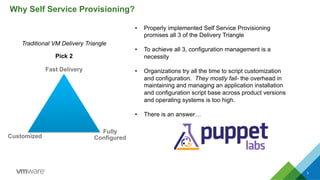
Why Self Service Provisioning?
3
Fast Delivery
Fully
ConfiguredCustomized
Traditional VM Delivery Triangle
Pick 2
•  Properly implemented Self Service Provisioning
promises all 3 of the Delivery Triangle
•  To achieve all 3, configuration management is a
necessity
•  Organizations try all the time to script customization
and configuration. They mostly fail- the overhead in
maintaining and managing an application installation
and configuration script base across product versions
and operating systems is too high.
•  There is an answer…
•  System Administrators are faced with managing much larger
numbers of virtual machines when a self service provisioning
system is deployed
•  Maintaining software package versions over large pools of
systems is time consuming and difficult
•  Without centralized configuration management, configuration
drift challenges standardized enterprise configuration which
can be a huge headache for system administrators
Puppet + Self Service Provisioning
Benefits Admins, too
4
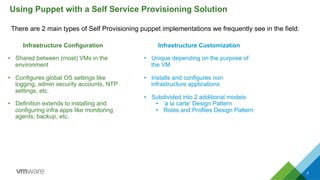
There are 2 main types of Self Provisioning puppet implementations we frequently see in the field:
Using Puppet with a Self Service Provisioning Solution
5
Infrastructure Configuration
•  Shared between (most) VMs in the
environment
•  Configures global OS settings like
logging, admin security accounts, NTP
settings, etc.
•  Definition extends to installing and
configuring infra apps like monitoring
agents, backup, etc.
Infrastructure Customization
•  Unique depending on the purpose of
the VM
•  Installs and configures non
infrastructure applications
•  Subdivided into 2 additional models
•  ‘a la carte’ Design Pattern
•  Roles and Profiles Design Pattern
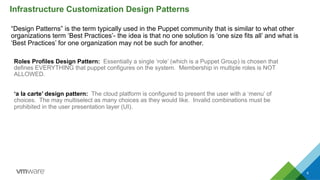
“Design Patterns” is the term typically used in the Puppet community that is similar to what other
organizations term ‘Best Practices’- the idea is that no one solution is ‘one size fits all’ and what is
‘Best Practices’ for one organization may not be such for another.
Infrastructure Customization Design Patterns
6
Roles Profiles Design Pattern: Essentially a single ‘role’ (which is a Puppet Group) is chosen that
defines EVERYTHING that puppet configures on the system. Membership in multiple roles is NOT
ALLOWED.
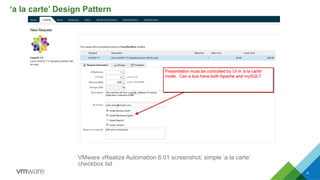
‘a la carte’ design pattern: The cloud platform is configured to present the user with a ‘menu’ of
choices. The may multiselect as many choices as they would like. Invalid combinations must be
prohibited in the user presentation layer (UI).
‘a la carte’ Design Pattern
(with Self Service Provisioning)
‘a la carte’ Design Pattern
8
VMware vRealize Automation 6.01 screenshot, simple ‘a la carte’
checkbox list
‘a la carte’ Design Pattern
9
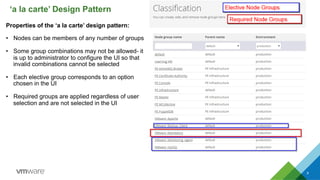
Properties of the ‘a la carte’ design pattern:
•  Nodes can be members of any number of groups
•  Some group combinations may not be allowed- it
is up to administrator to configure the UI so that
invalid combinations cannot be selected
•  Each elective group corresponds to an option
chosen in the UI
•  Required groups are applied regardless of user
selection and are not selected in the UI
Roles and Profiles Design Pattern
(with Self Service Provisioning)
Roles and Profiles Design Pattern
11
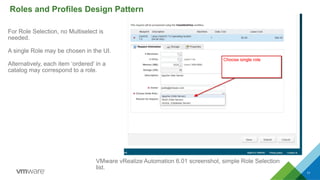
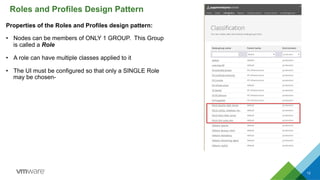
VMware vRealize Automation 6.01 screenshot, simple Role Selection
list.
For Role Selection, no Multiselect is
needed.
A single Role may be chosen in the UI.
Alternatively, each item ‘ordered’ in a
catalog may correspond to a role.
Roles and Profiles Design Pattern
12
Properties of the Roles and Profiles design pattern:
•  Nodes can be members of ONLY 1 GROUP. This Group
is called a Role
•  A role can have multiple classes applied to it
•  The UI must be configured so that only a SINGLE Role
may be chosen-
Which Design Pattern Should I use?
13
‘a la carte’ Attributes
•  Provides users with the greatest flexibility
•  Can allow ‘hybrid’ systems (web + db), etc.
•  Prevents ‘role sprawl’
•  If systems frequently end up with invalid
class combinations, you may want to
consider Roles and Profiles
Roles and Profiles Attributes
•  High level of consistency between servers
•  Easier to enforce compliance
•  Less choices for user (depends on your user base
if this is good or not)
•  If ‘role sprawl’ occurs, you have probably chosen
the wrong design pattern.
Self Service Provisioning
Task Flow Designs
14
15
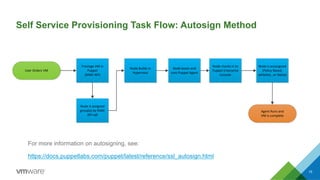
Self Service Provisioning Task Flow: Autosign Method
User	
  Orders	
  VM
Prestage	
  VM	
  in	
  
Puppet
(RAKE	
  API)
Node	
  Builds	
  in	
  
Hypervisor
Node	
  boots	
  and	
  
runs	
  Puppet	
  Agent
Node	
  checks	
  in	
  to	
  
Puppet	
  Enterprise	
  
Console
Node	
  is	
  autosigned
(Policy	
  Based,	
  
whitelist,	
  ,or	
  Naïve)
Node	
  is	
  assigned	
  
group(s)	
  by	
  RAKE	
  
API	
  call
Agent	
  Runs	
  and	
  
VM	
  is	
  complete
For more information on autosigning, see:
https://docs.puppetlabs.com/puppet/latest/reference/ssl_autosign.html
16
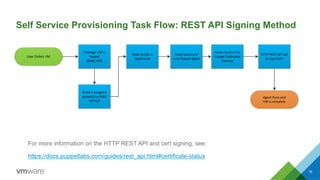
Self Service Provisioning Task Flow: REST API Signing Method
For more information on the HTTP REST API and cert signing, see:
https://docs.puppetlabs.com/guides/rest_api.html#certificate-status
User	
  Orders	
  VM
Prestage	
  VM	
  in	
  
Puppet
(RAKE	
  API)
Node	
  Builds	
  in	
  
Hypervisor
Node	
  boots	
  and	
  
runs	
  Puppet	
  Agent
Node	
  checks	
  in	
  to	
  
Puppet	
  Enterprise	
  
Console
HTTP	
  REST	
  API	
  call	
  
to	
  sign	
  CERT
Node	
  is	
  assigned	
  
group(s)	
  by	
  RAKE	
  
API	
  call
Agent	
  Runs	
  and	
  
VM	
  is	
  complete
Alternative Methods to
Assign Node Group
Membership
17
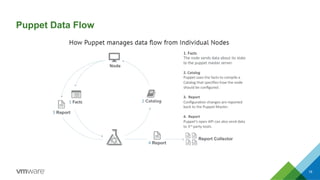
Puppet Data Flow
18
19
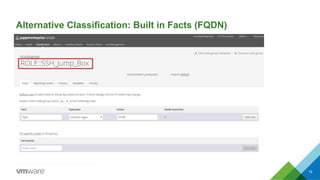
Alternative Classification: Built in Facts (FQDN)
20
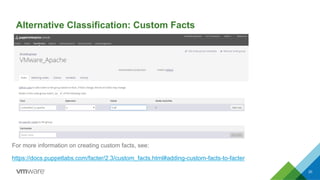
Alternative Classification: Custom Facts
For more information on creating custom facts, see:
https://docs.puppetlabs.com/facter/2.3/custom_facts.html#adding-custom-facts-to-facter
21
Sample RAKE API Commands (Prestage ‘a la carte’)
For more information on RAKE API, see the following:
https://docs.puppetlabs.com/pe/latest/console_rake_api.html
Automation engine will SSH into Puppet Enterprise Console and Create Node / Assign
Group membership is a single command
$	
  sudo	
  /opt/puppet/bin/rake	
  -­‐f	
  /opt/puppet/share/puppet-­‐dashboard/Rakefile	
  
RAILS_ENV=production	


node:add[my_vm_01,(VMware_Mandatory,VMware_Monitoring_Agent,	
  VMware_Apache)]	
  
22
Sample RAKE API Commands (Prestage ‘Roles and Profiles’)
For more information on RAKE API, see the following:
https://docs.puppetlabs.com/pe/latest/console_rake_api.html
Automation engine will SSH into Puppet Enterprise Console and Create Node / Assign
Group membership is a single command
$	
  sudo	
  /opt/puppet/bin/rake	
  -­‐f	
  /opt/puppet/share/puppet-­‐dashboard/Rakefile	
  
RAILS_ENV=production	


node:add[my_vm_01,(ROLE::Apache_Web_Server)]	
  
Integration with Puppet:
Automation Platform Requirements
23
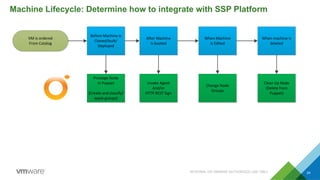
Machine Lifecycle: Determine how to integrate with SSP Platform
INTERNAL OR VMWARE AUTHORIZED USE ONLY 24
VM	
  is	
  ordered
From	
  Catalog
Before	
  Machine	
  is
Cloned/built/
Deployed
After	
  Machine
Is	
  booted
When	
  Machine
Is	
  Edited
When	
  machine	
  is
deleted
Prestage	
  Node
In	
  Puppet
(Create	
  and	
  classify/
apply	
  groups)
Invoke	
  Agent
And/or
HTTP	
  REST	
  Sign
Change	
  Node	
  
Groups
Clean	
  Up	
  Node	
  
(Delete	
  from	
  
Puppet)
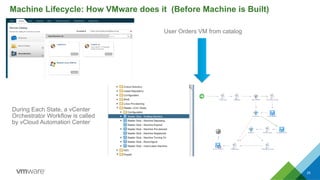
Machine Lifecycle: How VMware does it (Before Machine is Built)
25
User Orders VM from catalog
During Each State, a vCenter
Orchestrator Workflow is called
by vCloud Automation Center
•  System Administrators are faced with managing much larger numbers of virtual machines when
a self service provisioning system is deployed
•  Without configuration management, there is a gap in automated delivery of VMs (the ‘automatic’
process terminates with a manual final step, which defeats the purpose)
•  Without centralized configuration management, configuration drift and system standardization
(are they pointed at the correct DNS server?, etc.) can be a huge headache for system
administrators
•  Integration with Self Service Provisioning Platforms typically requires an orchestration engine
that can be called from the SSP Platform
Key Points
26
Questions?
27

Using Puppet with Self Service Provisioning

  • 1.
    © 2014 VMwareInc. All rights reserved. Using Puppet with vRealize Automation Self Service Provisioning and Configuration Management Justin Jones Senior Consultant, VMware 01/12/2015
  • 2.
    About the speaker 2 SeniorConsultant @ VMware Integration and Automation Team Previously: Lockheed Martin Accenture justin7jones justin7jones Consulting Projects I’ve worked on:
  • 3.
    Why Self ServiceProvisioning? 3 Fast Delivery Fully ConfiguredCustomized Traditional VM Delivery Triangle Pick 2 •  Properly implemented Self Service Provisioning promises all 3 of the Delivery Triangle •  To achieve all 3, configuration management is a necessity •  Organizations try all the time to script customization and configuration. They mostly fail- the overhead in maintaining and managing an application installation and configuration script base across product versions and operating systems is too high. •  There is an answer…
  • 4.
    •  System Administratorsare faced with managing much larger numbers of virtual machines when a self service provisioning system is deployed •  Maintaining software package versions over large pools of systems is time consuming and difficult •  Without centralized configuration management, configuration drift challenges standardized enterprise configuration which can be a huge headache for system administrators Puppet + Self Service Provisioning Benefits Admins, too 4
  • 5.
    There are 2main types of Self Provisioning puppet implementations we frequently see in the field: Using Puppet with a Self Service Provisioning Solution 5 Infrastructure Configuration •  Shared between (most) VMs in the environment •  Configures global OS settings like logging, admin security accounts, NTP settings, etc. •  Definition extends to installing and configuring infra apps like monitoring agents, backup, etc. Infrastructure Customization •  Unique depending on the purpose of the VM •  Installs and configures non infrastructure applications •  Subdivided into 2 additional models •  ‘a la carte’ Design Pattern •  Roles and Profiles Design Pattern
  • 6.
    “Design Patterns” isthe term typically used in the Puppet community that is similar to what other organizations term ‘Best Practices’- the idea is that no one solution is ‘one size fits all’ and what is ‘Best Practices’ for one organization may not be such for another. Infrastructure Customization Design Patterns 6 Roles Profiles Design Pattern: Essentially a single ‘role’ (which is a Puppet Group) is chosen that defines EVERYTHING that puppet configures on the system. Membership in multiple roles is NOT ALLOWED. ‘a la carte’ design pattern: The cloud platform is configured to present the user with a ‘menu’ of choices. The may multiselect as many choices as they would like. Invalid combinations must be prohibited in the user presentation layer (UI).
  • 7.
    ‘a la carte’Design Pattern (with Self Service Provisioning)
  • 8.
    ‘a la carte’Design Pattern 8 VMware vRealize Automation 6.01 screenshot, simple ‘a la carte’ checkbox list
  • 9.
    ‘a la carte’Design Pattern 9 Properties of the ‘a la carte’ design pattern: •  Nodes can be members of any number of groups •  Some group combinations may not be allowed- it is up to administrator to configure the UI so that invalid combinations cannot be selected •  Each elective group corresponds to an option chosen in the UI •  Required groups are applied regardless of user selection and are not selected in the UI
  • 10.
    Roles and ProfilesDesign Pattern (with Self Service Provisioning)
  • 11.
    Roles and ProfilesDesign Pattern 11 VMware vRealize Automation 6.01 screenshot, simple Role Selection list. For Role Selection, no Multiselect is needed. A single Role may be chosen in the UI. Alternatively, each item ‘ordered’ in a catalog may correspond to a role.
  • 12.
    Roles and ProfilesDesign Pattern 12 Properties of the Roles and Profiles design pattern: •  Nodes can be members of ONLY 1 GROUP. This Group is called a Role •  A role can have multiple classes applied to it •  The UI must be configured so that only a SINGLE Role may be chosen-
  • 13.
    Which Design PatternShould I use? 13 ‘a la carte’ Attributes •  Provides users with the greatest flexibility •  Can allow ‘hybrid’ systems (web + db), etc. •  Prevents ‘role sprawl’ •  If systems frequently end up with invalid class combinations, you may want to consider Roles and Profiles Roles and Profiles Attributes •  High level of consistency between servers •  Easier to enforce compliance •  Less choices for user (depends on your user base if this is good or not) •  If ‘role sprawl’ occurs, you have probably chosen the wrong design pattern.
  • 14.
  • 15.
    15 Self Service ProvisioningTask Flow: Autosign Method User  Orders  VM Prestage  VM  in   Puppet (RAKE  API) Node  Builds  in   Hypervisor Node  boots  and   runs  Puppet  Agent Node  checks  in  to   Puppet  Enterprise   Console Node  is  autosigned (Policy  Based,   whitelist,  ,or  Naïve) Node  is  assigned   group(s)  by  RAKE   API  call Agent  Runs  and   VM  is  complete For more information on autosigning, see: https://docs.puppetlabs.com/puppet/latest/reference/ssl_autosign.html
  • 16.
    16 Self Service ProvisioningTask Flow: REST API Signing Method For more information on the HTTP REST API and cert signing, see: https://docs.puppetlabs.com/guides/rest_api.html#certificate-status User  Orders  VM Prestage  VM  in   Puppet (RAKE  API) Node  Builds  in   Hypervisor Node  boots  and   runs  Puppet  Agent Node  checks  in  to   Puppet  Enterprise   Console HTTP  REST  API  call   to  sign  CERT Node  is  assigned   group(s)  by  RAKE   API  call Agent  Runs  and   VM  is  complete
  • 17.
    Alternative Methods to AssignNode Group Membership 17
  • 18.
  • 19.
  • 20.
    20 Alternative Classification: CustomFacts For more information on creating custom facts, see: https://docs.puppetlabs.com/facter/2.3/custom_facts.html#adding-custom-facts-to-facter
  • 21.
    21 Sample RAKE APICommands (Prestage ‘a la carte’) For more information on RAKE API, see the following: https://docs.puppetlabs.com/pe/latest/console_rake_api.html Automation engine will SSH into Puppet Enterprise Console and Create Node / Assign Group membership is a single command $  sudo  /opt/puppet/bin/rake  -­‐f  /opt/puppet/share/puppet-­‐dashboard/Rakefile   RAILS_ENV=production     node:add[my_vm_01,(VMware_Mandatory,VMware_Monitoring_Agent,  VMware_Apache)]  
  • 22.
    22 Sample RAKE APICommands (Prestage ‘Roles and Profiles’) For more information on RAKE API, see the following: https://docs.puppetlabs.com/pe/latest/console_rake_api.html Automation engine will SSH into Puppet Enterprise Console and Create Node / Assign Group membership is a single command $  sudo  /opt/puppet/bin/rake  -­‐f  /opt/puppet/share/puppet-­‐dashboard/Rakefile   RAILS_ENV=production     node:add[my_vm_01,(ROLE::Apache_Web_Server)]  
  • 23.
    Integration with Puppet: AutomationPlatform Requirements 23
  • 24.
    Machine Lifecycle: Determinehow to integrate with SSP Platform INTERNAL OR VMWARE AUTHORIZED USE ONLY 24 VM  is  ordered From  Catalog Before  Machine  is Cloned/built/ Deployed After  Machine Is  booted When  Machine Is  Edited When  machine  is deleted Prestage  Node In  Puppet (Create  and  classify/ apply  groups) Invoke  Agent And/or HTTP  REST  Sign Change  Node   Groups Clean  Up  Node   (Delete  from   Puppet)
  • 25.
    Machine Lifecycle: HowVMware does it (Before Machine is Built) 25 User Orders VM from catalog During Each State, a vCenter Orchestrator Workflow is called by vCloud Automation Center
  • 26.
    •  System Administratorsare faced with managing much larger numbers of virtual machines when a self service provisioning system is deployed •  Without configuration management, there is a gap in automated delivery of VMs (the ‘automatic’ process terminates with a manual final step, which defeats the purpose) •  Without centralized configuration management, configuration drift and system standardization (are they pointed at the correct DNS server?, etc.) can be a huge headache for system administrators •  Integration with Self Service Provisioning Platforms typically requires an orchestration engine that can be called from the SSP Platform Key Points 26
  • 27.