Taming the Beast – Best Practices
for zFS with CICS
Phil_Wakelin@uk.ibm.com
CICS Strategy & Design, IBM Hursley UK
Disclaimer
IBM’s statements regarding its plans, directions, and intent are subject to change or withdrawal without notice at IBM’s
sole discretion.
Information regarding potential future products is intended to outline our general product direction and it should not be
relied on in making a purchasing decision.
The information mentioned regarding potential future products is not a commitment, promise, or legal obligation to
deliver any material, code or functionality. Information about potential future products may not be incorporated into any
contract. The development, release, and timing of any future features or functionality described for our products
remains at our sole discretion.
Performance is based on measurements and projections using standard IBM benchmarks in a controlled environment.
The actual throughput or performance that any user will experience will vary depending upon many factors, including
considerations such as the amount of multiprogramming in the user’s job stream, the I/O configuration, the storage
configuration, and the workload processed. Therefore, no assurance can be given that an individual user will achieve
results similar to those stated here.
Why zFS?
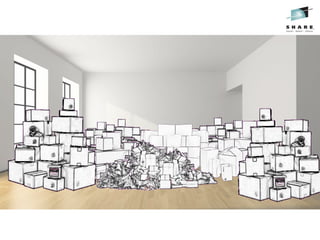
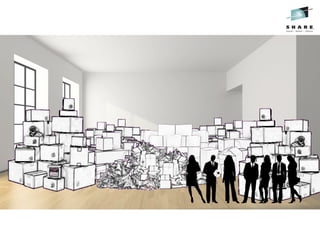
The Problem...
Objective
Aplace
for
everything
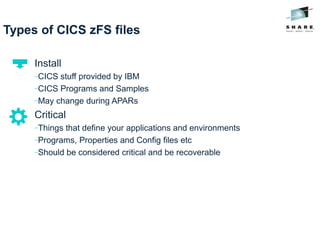
Types of CICS zFS files
Install
−CICS stuff provided by IBM
−CICS Programs and Samples
−May change during APARs
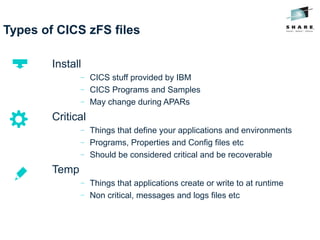
Types of CICS zFS files
Install
−CICS stuff provided by IBM
−CICS Programs and Samples
−May change during APARs
Critical
−Things that define your applications and environments
−Programs, Properties and Config files etc
−Should be considered critical and be recoverable
Types of CICS zFS files
Install
− CICS stuff provided by IBM
− CICS Programs and Samples
− May change during APARs
Critical
− Things that define your applications and environments
− Programs, Properties and Config files etc
− Should be considered critical and be recoverable
Temp
− Things that applications create or write to at runtime
− Non critical, messages and logs files etc
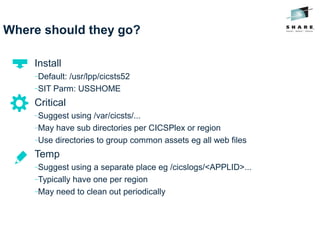
Where should they go?
Install
−Default: /usr/lpp/cicsts52
−SIT Parm: USSHOME
Critical
−Suggest using /var/cicsts/...
−May have sub directories per CICSPlex or region
−Use directories to group common assets eg all web files
Temp
−Suggest using a separate place eg /cicslogs/<APPLID>...
−Typically have one per region
−May need to clean out periodically
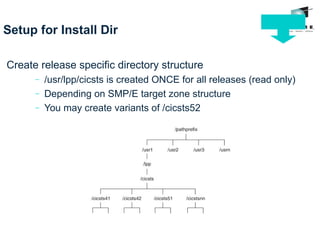
Setup for Install Dir
Create release specific directory structure
− /usr/lpp/cicsts is created ONCE for all releases (read only)
− Depending on SMP/E target zone structure
− You may create variants of /cicsts52
Setup for Install Dir

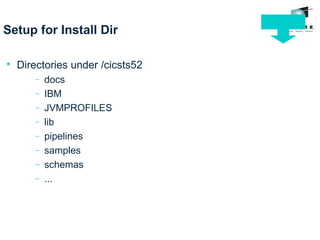
Directories under /cicsts52
− docs
− IBM
− JVMPROFILES
− lib
− pipelines
− samples
− schemas
− ...
Setup for Install Dir

SIT Parms

USSHOME
− The name and path of the root directory for CICS files
− Default: /usr/lpp/cicsts/cicsts52
Setup for Critical Dir

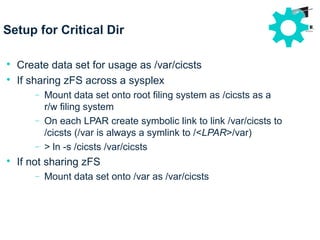
Create data set for usage as /var/cicsts

If sharing zFS across a sysplex
− Mount data set onto root filing system as /cicsts as a
r/w filing system
− On each LPAR create symbolic link to link /var/cicsts to
/cicsts (/var is always a symlink to /<LPAR>/var)
− > ln -s /cicsts /var/cicsts

If not sharing zFS
− Mount data set onto /var as /var/cicsts
Setup for Critical Dir

SIT Parms

USSCONFIG
− The name and path of the directory for CICS config
files
− Default: /var/cicsts/dfhconfig

JVMPROFILEDIR
− The directory name for the JVM profiles
− Suggest: /var/cicsts/jvmprofiles
− Sample profiles DFHJVMAX and DFHOSGI must be
copied to here (and edited) if you want to use them
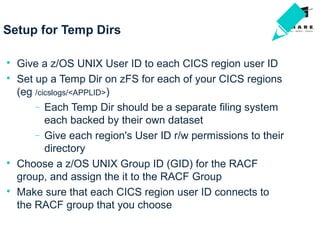
Setup for Temp Dirs

Give a z/OS UNIX User ID to each CICS region user ID

Set up a Temp Dir on zFS for each of your CICS regions
(eg /cicslogs/<APPLID>)
− Each Temp Dir should be a separate filing system
each backed by their own dataset
− Give each region's User ID r/w permissions to their
directory

Choose a z/OS UNIX Group ID (GID) for the RACF
group, and assign the it to the RACF Group

Make sure that each CICS region user ID connects to
the RACF group that you choose
Everything
initsplace
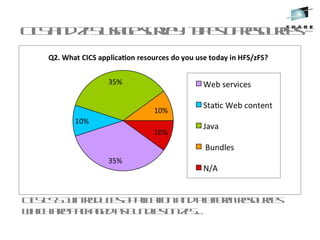
CICSTS5.1introducesApplicationandPlatformresources
whicharepackagedasbundlesonzFS…
CICSandzFSusagesurvey: typesofresources
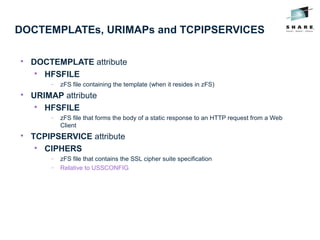
DOCTEMPLATEs, URIMAPs and TCPIPSERVICES

DOCTEMPLATE attribute

HFSFILE
− zFS file containing the template (when it resides in zFS)

URIMAP attribute

HFSFILE
− zFS file that forms the body of a static response to an HTTP request from a Web
Client

TCPIPSERVICE attribute

CIPHERS
− zFS file that contains the SSL cipher suite specification
− Relative to USSCONFIG
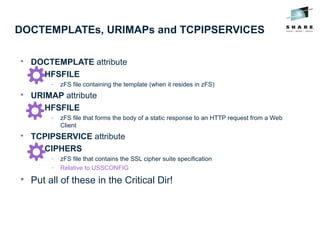
DOCTEMPLATEs, URIMAPs and TCPIPSERVICES

DOCTEMPLATE attribute

HFSFILE
− zFS file containing the template (when it resides in zFS)

URIMAP attribute

HFSFILE
− zFS file that forms the body of a static response to an HTTP request from a Web
Client

TCPIPSERVICE attribute

CIPHERS
− zFS file that contains the SSL cipher suite specification
− Relative to USSCONFIG

Put all of these in the Critical Dir!
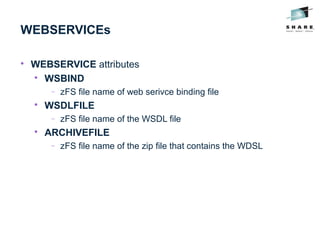
WEBSERVICEs

WEBSERVICE attributes

WSBIND
− zFS file name of web serivce binding file

WSDLFILE
− zFS file name of the WSDL file

ARCHIVEFILE
− zFS file name of the zip file that contains the WDSL
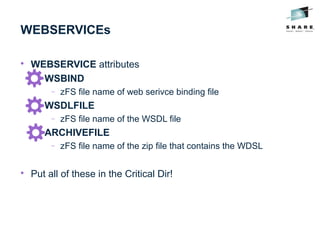
WEBSERVICEs

WEBSERVICE attributes

WSBIND
− zFS file name of web serivce binding file

WSDLFILE
− zFS file name of the WSDL file

ARCHIVEFILE
− zFS file name of the zip file that contains the WDSL

Put all of these in the Critical Dir!
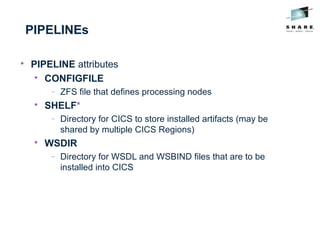
PIPELINEs

PIPELINE attributes

CONFIGFILE
− ZFS file that defines processing nodes

SHELF*
− Directory for CICS to store installed artifacts (may be
shared by multiple CICS Regions)

WSDIR
− Directory for WSDL and WSBIND files that are to be
installed into CICS
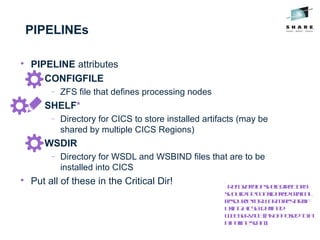
PIPELINEs

PIPELINE attributes

CONFIGFILE
− ZFS file that defines processing nodes

SHELF*
− Directory for CICS to store installed artifacts (may be
shared by multiple CICS Regions)

WSDIR
− Directory for WSDL and WSBIND files that are to be
installed into CICS

Put all of these in the Critical Dir! * Recoveryofshelfdirectory
shouldbeconsideredcritical
resourceforWARMrestartif
usingaCSDdefined
WEBSERVICE(asopposedtoa
pipelinescan)
BUNDLEs

BUNDLE attribute

BUNDLEDIR – zFS path to bundle directory
BUNDLEs

BUNDLE attribute

BUNDLEDIR – zFS path to bundle directory

Critical Dir again!
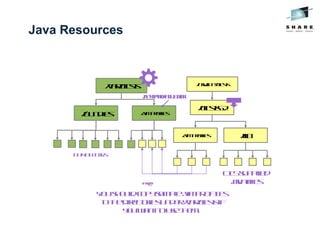
Java Resources

PROGRAM attribute

JVMCLASS
− Name of service defined in OSGI bundle, in a CICS
Bundle
− Contained in BUNDLEDIR on the BUNDLE

JVMSERVER attribute

JVMPROFILE
− zFS file name of the JVMPROFILE
− Relative to the SIT parm JVMPROFILEDIR

If the JVMSERVER is installed as a part of a bundle,
JVMPROFILE is relative to BUNDLEDIR on the
BUNDLE
Java Resources

PROGRAM attribute

JVMCLASS
− Name of service defined in OSGI bundle, in a CICS
Bundle
− Contained in BUNDLEDIR on the BUNDLE

JVMSERVER attribute

JVMPROFILE
− zFS file name of the JVMPROFILE
− Relative to the SIT parm JVMPROFILEDIR

If the JVMSERVER is installed as a part of a bundle,
JVMPROFILE is relative to BUNDLEDIR on the
BUNDLE

Critical Dir...
Java Resources
YoushouldcopysampleJVMPROFILEs
tothedirectoriesunder/var/cicstsif
youwanttousethem.
/usr/lpp/cicsts
/cicsts52
/lib/jvmprofiles
/var/cicsts
/bundles /jvmprofiles
JVMPROFILEDIR
copy
BUNDLEDIRs
CICSsupplied
javafiles
JVMPROFILEs

JVMPROFILE properties

$JAVA_HOME – zFS path to jre install

$WORK_DIR – zFS path to logs and dumps

JVMPROFILE (Liberty) properties

$WLP_INSTALL_DIR – install location wlp

$WLP_USER_DIR – zFS path to server.xml

$WLP_OUTPUT_DIR – Liberty logs and installedApps
JVMPROFILEs

JVMPROFILE properties

$JAVA_HOME – zFS path to jre install

$WORK_DIR – zFS path to logs and dumps

JVMPROFILE (Liberty) properties

$WLP_INSTALL_DIR – install location wlp

$WLP_USER_DIR – zFS path to server.xml

$WLP_OUTPUT_DIR – Liberty logs and installedApps
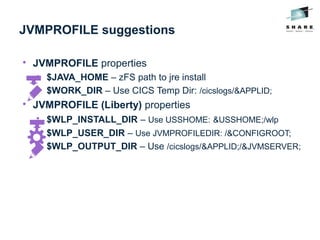
JVMPROFILE suggestions

JVMPROFILE properties

$JAVA_HOME – zFS path to jre install

$WORK_DIR – Use CICS Temp Dir: /cicslogs/&APPLID;

JVMPROFILE (Liberty) properties

$WLP_INSTALL_DIR – Use USSHOME: &USSHOME;/wlp

$WLP_USER_DIR – Use JVMPROFILEDIR: /&CONFIGROOT;

$WLP_OUTPUT_DIR – Use /cicslogs/&APPLID;/&JVMSERVER;
JTA Logs in server.xml

If you use JTA in Liberty, CICS needs r/w access to the
JTA transaction logs.

But they are critical for WARM restarts of CICS so should
be recoverable

Where do we put them?...
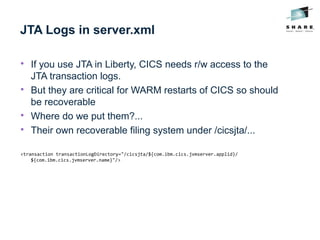
JTA Logs in server.xml

If you use JTA in Liberty, CICS needs r/w access to the
JTA transaction logs.

But they are critical for WARM restarts of CICS so should
be recoverable

Where do we put them?...

Their own recoverable filing system under /cicsjta/...
<transaction transactionLogDirectory="/cicsjta/${com.ibm.cics.jvmserver.applid}/
${com.ibm.cics.jvmserver.name}"/>
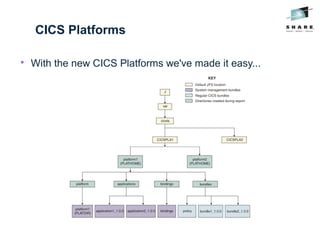
CICS Platforms

With the new CICS Platforms we've made it easy...
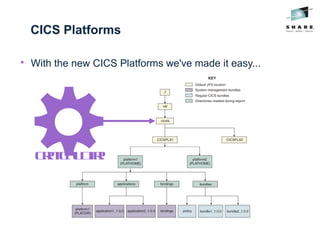
CICS Platforms

With the new CICS Platforms we've made it easy...
CriticalDir!
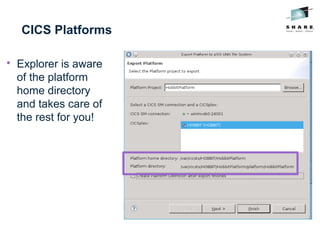
CICS Platforms

Explorer is aware
of the platform
home directory
and takes care of
the rest for you!
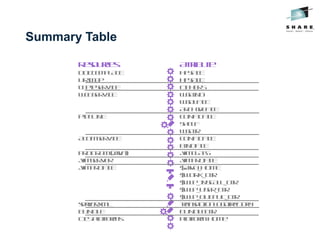
Summary Table
Resources Attribute
DOCTEMPLATE HFSFILE
URIMAP HFSFILE
TCPIPSERVICE CIPHERS
WEBSERVICE WSBIND
WSDLFILE
ARCHIVEFILE
PIPELINE CONFIGFILE
SHELF
WSDIR
ATOMSERVICE CONFIGFILE
BINDFILE
PROGRAM(Java) JVMCLASS
JVMSERVER JVMPROFILE
JVMPROFILE $JAVA_HOME
$WORK_DIR
$WLP_INSTALL_DIR
$WLP_USER_DIR
$WLP_OUTPUT_DIR
server.xml transactionLogDirectory
BUNDLE BUNDLEDIR
CICSPlatforms PlatformHome
Secure
access
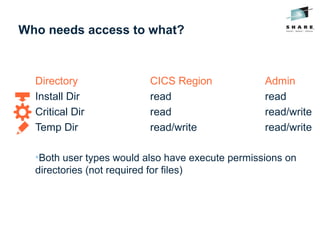
Who needs access to what?
Directory CICS Region Admin
Install Dir read read
Critical Dir read read/write
Temp Dir read/write read/write
•Both user types would also have execute permissions on
directories (not required for files)
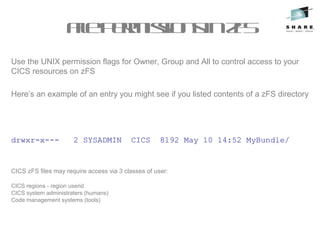
Use the UNIX permission flags for Owner, Group and All to control access to your
CICS resources on zFS
Here’s an example of an entry you might see if you listed contents of a zFS directory
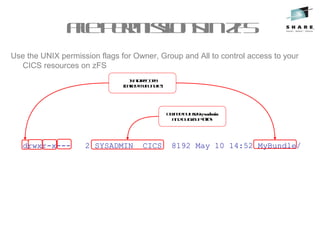
drwxr-x--- 2 SYSADMIN CICS 8192 May 10 14:52 MyBundle/
CICS zFS files may require access via 3 classes of user:
CICS regions - region userid
CICS system administraters (humans)
Code management systems (tools)
FilepermissionsinzFS
Use the UNIX permission flags for Owner, Group and All to control access to your
CICS resources on zFS
drwxr-x--- 2 SYSADMIN CICS 8192 May 10 14:52 MyBundle/
Isadirectory
(calledMyBundle)
FilepermissionsinzFS
Use the UNIX permission flags for Owner, Group and All to control access to your
CICS resources on zFS
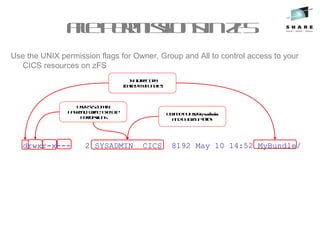
drwxr-x--- 2 SYSADMIN CICS 8192 May 10 14:52 MyBundle/
Ownedbyusersysadmin
andbygroupCICS
Isadirectory
(calledMyBundle)
FilepermissionsinzFS
Use the UNIX permission flags for Owner, Group and All to control access to your
CICS resources on zFS
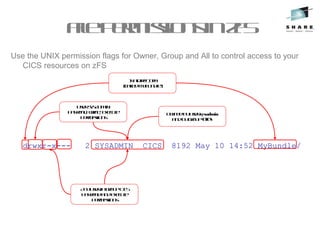
drwxr-x--- 2 SYSADMIN CICS 8192 May 10 14:52 MyBundle/
Ownedbyusersysadmin
andbygroupCICS
Isadirectory
(calledMyBundle)
UserSYSADMIN
hasread, write, execute
permissions
FilepermissionsinzFS
Use the UNIX permission flags for Owner, Group and All to control access to your
CICS resources on zFS
drwxr-x--- 2 SYSADMIN CICS 8192 May 10 14:52 MyBundle/
Ownedbyusersysadmin
andbygroupCICS
Isadirectory
(calledMyBundle)
UserSYSADMIN
hasread, write, execute
permissions
AnyuseringroupCICS
hasreadandexecute
permissions
FilepermissionsinzFS
Use the UNIX permission flags for Owner, Group and All to control access to your
CICS resources on zFS
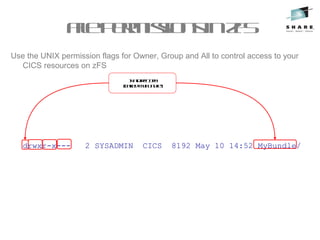
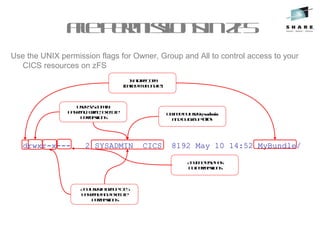
drwxr-x--- 2 SYSADMIN CICS 8192 May 10 14:52 MyBundle/
Ownedbyusersysadmin
andbygroupCICS
Isadirectory
(calledMyBundle)
UserSYSADMIN
hasread, write, execute
permissions
AnyuseringroupCICS
hasreadandexecute
permissions
Anyoneelsehas
nopermissions
UMASK

The file permission bits are set using the UMASK of the
creating process, which signifies the bits that are not set

i.e a umask of 022 causes
− Directories to be created with 755 (rwxr-xr-x) permissions
− Files to be created with 644 (rw-r--r--) –
− By default x permissions are not given for files
Example Setup for Critical Dir

Set permissions of /var/cicsts to allow access by
multiple readers (CICS regions) and a common writer
(administrator)

1. Set the owner to have read/write/execute, this will be the userid
required by zFS to export files into zFS

2. Set the readers to have read/execute access
− > chgrp –R <group> /cicsts
− > chmod –R 750 /cicsts

3. Set default file permission for the FTP daemon to give
writers(owners) rw and readers(group) r
− i.e UMASK 027
− see SYS1.TCPPARMS(FTPDATA)
− Used by CICS Explorer “Export Bundle Project to z/OS USS” process
Multiple writer's problem

A user can be in many groups, but a file has only one group
permission

Meaning that if multiple users need to access the file they must be in
that group, and will all share the same permissions

This means 2 logical groups of users (such as system admins and
CICS regions) can not use UNIX permission bits to be granted access

ACLs provide a solution to this as they allow a more flexible
model

Multiple groups can have file permissions

ACL inheritance can be controlled

However, they may only restrict the access permissions that are defined
by the UNIX permissions bits

RACF CLASS FSSEC

Control using setfacl USS command
PerformanceofzFS

Performance of shared zFS mounted r/w filesystems has been regarded as
an issue (in terms of XCF signalling costs) and function shipping of I/O
between LPARs

Often a problem on JVM startup due to loading of JARs from zFS and
writing of info to OSGi cache directory (under WORK_DIR)

Solutions:

V1R11 provides local read caching – removing overheads for reads

V1R13 provides direct I/O for read and write, removing need to function
ship these commands to the owning LPAR

Or mounting file system locally removes need to function ship I/O

JVM class caching provides ability to cache Java byte codes in a shared
memory area (i.e within LPAR)
•-> Requires APAR PM78799 on CICS TS V4.2 to support class caching
Manage
Change
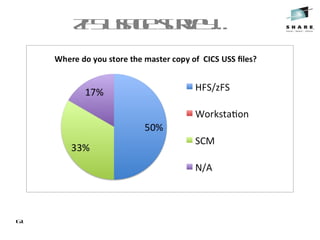
zFSusagesurvey…
61
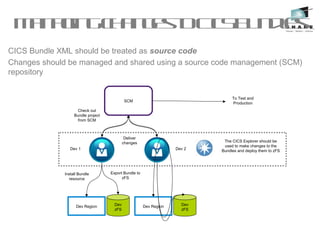
ManagingchangestoCICSBundles
CICS Bundle XML should be treated as source code
Changes should be managed and shared using a source code management (SCM)
repository
Dev 1 Dev 2
Check out
Bundle project
from SCM
Deliver
changes
Dev Region Dev
zFS
Dev Region Dev
zFS
Export Bundle to
zFS
To Test and
Production
The CICS Explorer should be
used to make changes to the
Bundles and deploy them to zFS
Install Bundle
resource
SCM
Migrating CICS Bundles from Dev to Test to Production

BUNDLEs should be treated like any other CICS resource that
has a reference to an artefact that lies outside the CSD eg:

PROGRAMS have load modules/java classes

WEBSERVICEs have wsbind files

You should migrate the CICS Bundle XML before the BUNDLE
resource

You wouldn't migrate a new PROGRAM resource before you migrated
the load module for it!
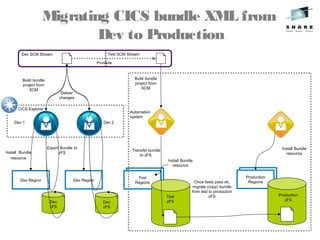
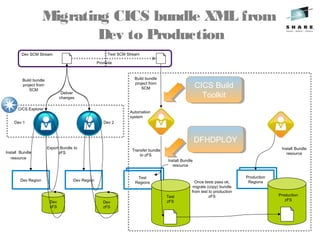
Migrating CICS bundle XML from
Dev to Production
Dev 1 Dev 2
Build bundle
project from
SCM
Dev Region
Dev
zFS
Install Bundle
resource
Dev Region
Dev
zFS
Transfer bundle
to zFS
Test
Regions
Test
Regions
Build bundle
project from
SCM
Test
Regions
Production
Regions
Install Bundle
resource
Install Bundle
resource
Once tests pass ok,
migrate (copy) bundle
from test to production
zFS
Automation
system
Export Bundle to
zFS
Test
zFS
Deliver
changes
Production
zFS
Dev SCM Stream Test SCM Stream
Promote
CICS Explorer
Migrating CICS bundle XML from
Dev to Production
Dev 1 Dev 2
Build bundle
project from
SCM
Dev Region
Dev
zFS
Install Bundle
resource
Dev Region
Dev
zFS
Transfer bundle
to zFS
Test
Regions
Test
Regions
Build bundle
project from
SCM
Test
Regions
Production
Regions
Install Bundle
resource
Install Bundle
resource
Once tests pass ok,
migrate (copy) bundle
from test to production
zFS
Automation
system
Export Bundle to
zFS
Test
zFS
Deliver
changes
Production
zFS
Dev SCM Stream Test SCM Stream
Promote
CICS Explorer
DFHDPLOYDFHDPLOY
CICS Build
Toolkit
CICS Build
Toolkit
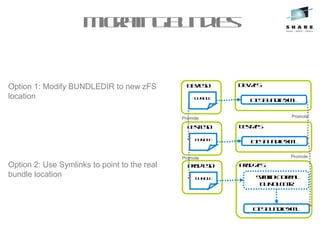
Migratingbundles
Option 1: Modify BUNDLEDIR to new zFS
location
Option 2: Use Symlinks to point to the real
bundle location
DevCSD
BUNDLE
DevzFS
CICSBundleXML
TestCSD
BUNDLE
TestzFS
CICSBundleXML
ProdCSD
BUNDLE
ProdzFS
CICSBundleXML
Symlinktoreal
BUNDLEDIR
Promote
Promote
Promote
Promote
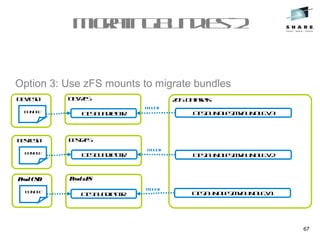
Migratingbundles-2
67
Option 3: Use zFS mounts to migrate bundles
DevCSD
BUNDLE
DevzFS
CICSBundleDIR
TestCSD
BUNDLE
TestzFS
CICSBundleDIR
ProdCSD
BUNDLE
ProdzFS
CICSBundleDIR
zOSDatasets
CICS.BUNDLES.MYBUNDLE.V3
CICS.BUNDLES.MYBUNDLE.V2
CICS.BUNDLES.MYBUNDLE.V1
Mount
Mount
Mount
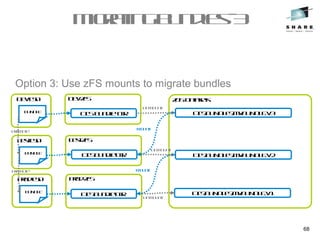
Migratingbundles-3
68
Option 3: Use zFS mounts to migrate bundles
DevCSD
BUNDLE
DevzFS
CICSBundleDIR
TestCSD
BUNDLE
TestzFS
CICSBundleDIR
ProdCSD
BUNDLE
ProdzFS
CICSBundleDIR
Promote
Promote
zOSDatasets
CICS.BUNDLES.MYBUNDLE.V3
CICS.BUNDLES.MYBUNDLE.V2
CICS.BUNDLES.MYBUNDLE.V1
Unmount
Unmount
Unmount
Mount
Mount
Migratingbundles-JVMSERVER
names
When using JVM server you need to have the same JVMSERVERs in all regions to
ensure no changes are needed when migrating CICS bundles project containing
OSGi bundles or Web project
DevRegion
MYJVMSERVER
Dev JVMSERVER
MYJVMSERVER
OSGIBundle
TestRegion
MYJVMSERVER
Test JVMSERVER
MYJVMSERVER
OSGIBundle
Production Region
MYJVMSERVER
Production JVMSERVER
MYJVMSERVER
OSGI Bundle
Defined in the .osgibundle or .warbundle in CICS bundle project
<osgibundle symbolicname="com.ibm.cics.server.examples.hello"
version="1.0.0" jvmserver="DFHJVMS"/>
Summary

A place for everything

Create separate file systems for install, critical and temp artifacts

Have places in those file system for each type of artifact

Consider requirements for sharing across LPARs

Everything in it's place

Put each artifact into it's appropriate place

Use symlinks where necessary

Consider requirement for recovery and backup

Secure access

Set permission bits on each file system to control access

Use ACLs to solve the multiple writer problem

Consider requirements for FTP access

Manage change

Manage changes to zFS artifacts through a SCM

Consider references from zFS files, to minimise changes

SHARE Seattle 2015 Taming the Beast – Best Practices for zFS with CICS

  • 1.
    Taming the Beast– Best Practices for zFS with CICS Phil_Wakelin@uk.ibm.com CICS Strategy & Design, IBM Hursley UK
  • 2.
    Disclaimer IBM’s statements regardingits plans, directions, and intent are subject to change or withdrawal without notice at IBM’s sole discretion. Information regarding potential future products is intended to outline our general product direction and it should not be relied on in making a purchasing decision. The information mentioned regarding potential future products is not a commitment, promise, or legal obligation to deliver any material, code or functionality. Information about potential future products may not be incorporated into any contract. The development, release, and timing of any future features or functionality described for our products remains at our sole discretion. Performance is based on measurements and projections using standard IBM benchmarks in a controlled environment. The actual throughput or performance that any user will experience will vary depending upon many factors, including considerations such as the amount of multiprogramming in the user’s job stream, the I/O configuration, the storage configuration, and the workload processed. Therefore, no assurance can be given that an individual user will achieve results similar to those stated here.
  • 3.
  • 4.
  • 12.
  • 13.
  • 14.
    Types of CICSzFS files Install −CICS stuff provided by IBM −CICS Programs and Samples −May change during APARs
  • 15.
    Types of CICSzFS files Install −CICS stuff provided by IBM −CICS Programs and Samples −May change during APARs Critical −Things that define your applications and environments −Programs, Properties and Config files etc −Should be considered critical and be recoverable
  • 16.
    Types of CICSzFS files Install − CICS stuff provided by IBM − CICS Programs and Samples − May change during APARs Critical − Things that define your applications and environments − Programs, Properties and Config files etc − Should be considered critical and be recoverable Temp − Things that applications create or write to at runtime − Non critical, messages and logs files etc
  • 17.
    Where should theygo? Install −Default: /usr/lpp/cicsts52 −SIT Parm: USSHOME Critical −Suggest using /var/cicsts/... −May have sub directories per CICSPlex or region −Use directories to group common assets eg all web files Temp −Suggest using a separate place eg /cicslogs/<APPLID>... −Typically have one per region −May need to clean out periodically
  • 18.
    Setup for InstallDir Create release specific directory structure − /usr/lpp/cicsts is created ONCE for all releases (read only) − Depending on SMP/E target zone structure − You may create variants of /cicsts52
  • 19.
    Setup for InstallDir  Directories under /cicsts52 − docs − IBM − JVMPROFILES − lib − pipelines − samples − schemas − ...
  • 20.
    Setup for InstallDir  SIT Parms  USSHOME − The name and path of the root directory for CICS files − Default: /usr/lpp/cicsts/cicsts52
  • 21.
    Setup for CriticalDir  Create data set for usage as /var/cicsts  If sharing zFS across a sysplex − Mount data set onto root filing system as /cicsts as a r/w filing system − On each LPAR create symbolic link to link /var/cicsts to /cicsts (/var is always a symlink to /<LPAR>/var) − > ln -s /cicsts /var/cicsts  If not sharing zFS − Mount data set onto /var as /var/cicsts
  • 22.
    Setup for CriticalDir  SIT Parms  USSCONFIG − The name and path of the directory for CICS config files − Default: /var/cicsts/dfhconfig  JVMPROFILEDIR − The directory name for the JVM profiles − Suggest: /var/cicsts/jvmprofiles − Sample profiles DFHJVMAX and DFHOSGI must be copied to here (and edited) if you want to use them
  • 23.
    Setup for TempDirs  Give a z/OS UNIX User ID to each CICS region user ID  Set up a Temp Dir on zFS for each of your CICS regions (eg /cicslogs/<APPLID>) − Each Temp Dir should be a separate filing system each backed by their own dataset − Give each region's User ID r/w permissions to their directory  Choose a z/OS UNIX Group ID (GID) for the RACF group, and assign the it to the RACF Group  Make sure that each CICS region user ID connects to the RACF group that you choose
  • 24.
  • 25.
  • 26.
    DOCTEMPLATEs, URIMAPs andTCPIPSERVICES  DOCTEMPLATE attribute  HFSFILE − zFS file containing the template (when it resides in zFS)  URIMAP attribute  HFSFILE − zFS file that forms the body of a static response to an HTTP request from a Web Client  TCPIPSERVICE attribute  CIPHERS − zFS file that contains the SSL cipher suite specification − Relative to USSCONFIG
  • 27.
    DOCTEMPLATEs, URIMAPs andTCPIPSERVICES  DOCTEMPLATE attribute  HFSFILE − zFS file containing the template (when it resides in zFS)  URIMAP attribute  HFSFILE − zFS file that forms the body of a static response to an HTTP request from a Web Client  TCPIPSERVICE attribute  CIPHERS − zFS file that contains the SSL cipher suite specification − Relative to USSCONFIG  Put all of these in the Critical Dir!
  • 28.
    WEBSERVICEs  WEBSERVICE attributes  WSBIND − zFSfile name of web serivce binding file  WSDLFILE − zFS file name of the WSDL file  ARCHIVEFILE − zFS file name of the zip file that contains the WDSL
  • 29.
    WEBSERVICEs  WEBSERVICE attributes  WSBIND − zFSfile name of web serivce binding file  WSDLFILE − zFS file name of the WSDL file  ARCHIVEFILE − zFS file name of the zip file that contains the WDSL  Put all of these in the Critical Dir!
  • 30.
    PIPELINEs  PIPELINE attributes  CONFIGFILE − ZFSfile that defines processing nodes  SHELF* − Directory for CICS to store installed artifacts (may be shared by multiple CICS Regions)  WSDIR − Directory for WSDL and WSBIND files that are to be installed into CICS
  • 31.
    PIPELINEs  PIPELINE attributes  CONFIGFILE − ZFSfile that defines processing nodes  SHELF* − Directory for CICS to store installed artifacts (may be shared by multiple CICS Regions)  WSDIR − Directory for WSDL and WSBIND files that are to be installed into CICS  Put all of these in the Critical Dir! * Recoveryofshelfdirectory shouldbeconsideredcritical resourceforWARMrestartif usingaCSDdefined WEBSERVICE(asopposedtoa pipelinescan)
  • 32.
  • 33.
    BUNDLEs  BUNDLE attribute  BUNDLEDIR –zFS path to bundle directory  Critical Dir again!
  • 34.
    Java Resources  PROGRAM attribute  JVMCLASS −Name of service defined in OSGI bundle, in a CICS Bundle − Contained in BUNDLEDIR on the BUNDLE  JVMSERVER attribute  JVMPROFILE − zFS file name of the JVMPROFILE − Relative to the SIT parm JVMPROFILEDIR  If the JVMSERVER is installed as a part of a bundle, JVMPROFILE is relative to BUNDLEDIR on the BUNDLE
  • 35.
    Java Resources  PROGRAM attribute  JVMCLASS −Name of service defined in OSGI bundle, in a CICS Bundle − Contained in BUNDLEDIR on the BUNDLE  JVMSERVER attribute  JVMPROFILE − zFS file name of the JVMPROFILE − Relative to the SIT parm JVMPROFILEDIR  If the JVMSERVER is installed as a part of a bundle, JVMPROFILE is relative to BUNDLEDIR on the BUNDLE  Critical Dir...
  • 36.
  • 37.
    JVMPROFILEs  JVMPROFILE properties  $JAVA_HOME –zFS path to jre install  $WORK_DIR – zFS path to logs and dumps  JVMPROFILE (Liberty) properties  $WLP_INSTALL_DIR – install location wlp  $WLP_USER_DIR – zFS path to server.xml  $WLP_OUTPUT_DIR – Liberty logs and installedApps
  • 38.
    JVMPROFILEs  JVMPROFILE properties  $JAVA_HOME –zFS path to jre install  $WORK_DIR – zFS path to logs and dumps  JVMPROFILE (Liberty) properties  $WLP_INSTALL_DIR – install location wlp  $WLP_USER_DIR – zFS path to server.xml  $WLP_OUTPUT_DIR – Liberty logs and installedApps
  • 39.
    JVMPROFILE suggestions  JVMPROFILE properties  $JAVA_HOME– zFS path to jre install  $WORK_DIR – Use CICS Temp Dir: /cicslogs/&APPLID;  JVMPROFILE (Liberty) properties  $WLP_INSTALL_DIR – Use USSHOME: &USSHOME;/wlp  $WLP_USER_DIR – Use JVMPROFILEDIR: /&CONFIGROOT;  $WLP_OUTPUT_DIR – Use /cicslogs/&APPLID;/&JVMSERVER;
  • 40.
    JTA Logs inserver.xml  If you use JTA in Liberty, CICS needs r/w access to the JTA transaction logs.  But they are critical for WARM restarts of CICS so should be recoverable  Where do we put them?...
  • 41.
    JTA Logs inserver.xml  If you use JTA in Liberty, CICS needs r/w access to the JTA transaction logs.  But they are critical for WARM restarts of CICS so should be recoverable  Where do we put them?...  Their own recoverable filing system under /cicsjta/... <transaction transactionLogDirectory="/cicsjta/${com.ibm.cics.jvmserver.applid}/ ${com.ibm.cics.jvmserver.name}"/>
  • 42.
    CICS Platforms  With thenew CICS Platforms we've made it easy...
  • 43.
    CICS Platforms  With thenew CICS Platforms we've made it easy... CriticalDir!
  • 44.
    CICS Platforms  Explorer isaware of the platform home directory and takes care of the rest for you!
  • 45.
    Summary Table Resources Attribute DOCTEMPLATEHFSFILE URIMAP HFSFILE TCPIPSERVICE CIPHERS WEBSERVICE WSBIND WSDLFILE ARCHIVEFILE PIPELINE CONFIGFILE SHELF WSDIR ATOMSERVICE CONFIGFILE BINDFILE PROGRAM(Java) JVMCLASS JVMSERVER JVMPROFILE JVMPROFILE $JAVA_HOME $WORK_DIR $WLP_INSTALL_DIR $WLP_USER_DIR $WLP_OUTPUT_DIR server.xml transactionLogDirectory BUNDLE BUNDLEDIR CICSPlatforms PlatformHome
  • 46.
  • 47.
    Who needs accessto what? Directory CICS Region Admin Install Dir read read Critical Dir read read/write Temp Dir read/write read/write •Both user types would also have execute permissions on directories (not required for files)
  • 48.
    Use the UNIXpermission flags for Owner, Group and All to control access to your CICS resources on zFS Here’s an example of an entry you might see if you listed contents of a zFS directory drwxr-x--- 2 SYSADMIN CICS 8192 May 10 14:52 MyBundle/ CICS zFS files may require access via 3 classes of user: CICS regions - region userid CICS system administraters (humans) Code management systems (tools) FilepermissionsinzFS
  • 49.
    FilepermissionsinzFS Use the UNIXpermission flags for Owner, Group and All to control access to your CICS resources on zFS drwxr-x--- 2 SYSADMIN CICS 8192 May 10 14:52 MyBundle/ Isadirectory (calledMyBundle)
  • 50.
    FilepermissionsinzFS Use the UNIXpermission flags for Owner, Group and All to control access to your CICS resources on zFS drwxr-x--- 2 SYSADMIN CICS 8192 May 10 14:52 MyBundle/ Ownedbyusersysadmin andbygroupCICS Isadirectory (calledMyBundle)
  • 51.
    FilepermissionsinzFS Use the UNIXpermission flags for Owner, Group and All to control access to your CICS resources on zFS drwxr-x--- 2 SYSADMIN CICS 8192 May 10 14:52 MyBundle/ Ownedbyusersysadmin andbygroupCICS Isadirectory (calledMyBundle) UserSYSADMIN hasread, write, execute permissions
  • 52.
    FilepermissionsinzFS Use the UNIXpermission flags for Owner, Group and All to control access to your CICS resources on zFS drwxr-x--- 2 SYSADMIN CICS 8192 May 10 14:52 MyBundle/ Ownedbyusersysadmin andbygroupCICS Isadirectory (calledMyBundle) UserSYSADMIN hasread, write, execute permissions AnyuseringroupCICS hasreadandexecute permissions
  • 53.
    FilepermissionsinzFS Use the UNIXpermission flags for Owner, Group and All to control access to your CICS resources on zFS drwxr-x--- 2 SYSADMIN CICS 8192 May 10 14:52 MyBundle/ Ownedbyusersysadmin andbygroupCICS Isadirectory (calledMyBundle) UserSYSADMIN hasread, write, execute permissions AnyuseringroupCICS hasreadandexecute permissions Anyoneelsehas nopermissions
  • 54.
    UMASK  The file permissionbits are set using the UMASK of the creating process, which signifies the bits that are not set  i.e a umask of 022 causes − Directories to be created with 755 (rwxr-xr-x) permissions − Files to be created with 644 (rw-r--r--) – − By default x permissions are not given for files
  • 55.
    Example Setup forCritical Dir  Set permissions of /var/cicsts to allow access by multiple readers (CICS regions) and a common writer (administrator)  1. Set the owner to have read/write/execute, this will be the userid required by zFS to export files into zFS  2. Set the readers to have read/execute access − > chgrp –R <group> /cicsts − > chmod –R 750 /cicsts  3. Set default file permission for the FTP daemon to give writers(owners) rw and readers(group) r − i.e UMASK 027 − see SYS1.TCPPARMS(FTPDATA) − Used by CICS Explorer “Export Bundle Project to z/OS USS” process
  • 56.
    Multiple writer's problem  Auser can be in many groups, but a file has only one group permission  Meaning that if multiple users need to access the file they must be in that group, and will all share the same permissions  This means 2 logical groups of users (such as system admins and CICS regions) can not use UNIX permission bits to be granted access  ACLs provide a solution to this as they allow a more flexible model  Multiple groups can have file permissions  ACL inheritance can be controlled  However, they may only restrict the access permissions that are defined by the UNIX permissions bits  RACF CLASS FSSEC  Control using setfacl USS command
  • 57.
    PerformanceofzFS  Performance of sharedzFS mounted r/w filesystems has been regarded as an issue (in terms of XCF signalling costs) and function shipping of I/O between LPARs  Often a problem on JVM startup due to loading of JARs from zFS and writing of info to OSGi cache directory (under WORK_DIR)  Solutions:  V1R11 provides local read caching – removing overheads for reads  V1R13 provides direct I/O for read and write, removing need to function ship these commands to the owning LPAR  Or mounting file system locally removes need to function ship I/O  JVM class caching provides ability to cache Java byte codes in a shared memory area (i.e within LPAR) •-> Requires APAR PM78799 on CICS TS V4.2 to support class caching
  • 58.
  • 59.
  • 60.
    ManagingchangestoCICSBundles CICS Bundle XMLshould be treated as source code Changes should be managed and shared using a source code management (SCM) repository Dev 1 Dev 2 Check out Bundle project from SCM Deliver changes Dev Region Dev zFS Dev Region Dev zFS Export Bundle to zFS To Test and Production The CICS Explorer should be used to make changes to the Bundles and deploy them to zFS Install Bundle resource SCM
  • 61.
    Migrating CICS Bundlesfrom Dev to Test to Production  BUNDLEs should be treated like any other CICS resource that has a reference to an artefact that lies outside the CSD eg:  PROGRAMS have load modules/java classes  WEBSERVICEs have wsbind files  You should migrate the CICS Bundle XML before the BUNDLE resource  You wouldn't migrate a new PROGRAM resource before you migrated the load module for it!
  • 62.
    Migrating CICS bundleXML from Dev to Production Dev 1 Dev 2 Build bundle project from SCM Dev Region Dev zFS Install Bundle resource Dev Region Dev zFS Transfer bundle to zFS Test Regions Test Regions Build bundle project from SCM Test Regions Production Regions Install Bundle resource Install Bundle resource Once tests pass ok, migrate (copy) bundle from test to production zFS Automation system Export Bundle to zFS Test zFS Deliver changes Production zFS Dev SCM Stream Test SCM Stream Promote CICS Explorer
  • 63.
    Migrating CICS bundleXML from Dev to Production Dev 1 Dev 2 Build bundle project from SCM Dev Region Dev zFS Install Bundle resource Dev Region Dev zFS Transfer bundle to zFS Test Regions Test Regions Build bundle project from SCM Test Regions Production Regions Install Bundle resource Install Bundle resource Once tests pass ok, migrate (copy) bundle from test to production zFS Automation system Export Bundle to zFS Test zFS Deliver changes Production zFS Dev SCM Stream Test SCM Stream Promote CICS Explorer DFHDPLOYDFHDPLOY CICS Build Toolkit CICS Build Toolkit
  • 64.
    Migratingbundles Option 1: ModifyBUNDLEDIR to new zFS location Option 2: Use Symlinks to point to the real bundle location DevCSD BUNDLE DevzFS CICSBundleXML TestCSD BUNDLE TestzFS CICSBundleXML ProdCSD BUNDLE ProdzFS CICSBundleXML Symlinktoreal BUNDLEDIR Promote Promote Promote Promote
  • 65.
    Migratingbundles-2 67 Option 3: UsezFS mounts to migrate bundles DevCSD BUNDLE DevzFS CICSBundleDIR TestCSD BUNDLE TestzFS CICSBundleDIR ProdCSD BUNDLE ProdzFS CICSBundleDIR zOSDatasets CICS.BUNDLES.MYBUNDLE.V3 CICS.BUNDLES.MYBUNDLE.V2 CICS.BUNDLES.MYBUNDLE.V1 Mount Mount Mount
  • 66.
    Migratingbundles-3 68 Option 3: UsezFS mounts to migrate bundles DevCSD BUNDLE DevzFS CICSBundleDIR TestCSD BUNDLE TestzFS CICSBundleDIR ProdCSD BUNDLE ProdzFS CICSBundleDIR Promote Promote zOSDatasets CICS.BUNDLES.MYBUNDLE.V3 CICS.BUNDLES.MYBUNDLE.V2 CICS.BUNDLES.MYBUNDLE.V1 Unmount Unmount Unmount Mount Mount
  • 67.
    Migratingbundles-JVMSERVER names When using JVMserver you need to have the same JVMSERVERs in all regions to ensure no changes are needed when migrating CICS bundles project containing OSGi bundles or Web project DevRegion MYJVMSERVER Dev JVMSERVER MYJVMSERVER OSGIBundle TestRegion MYJVMSERVER Test JVMSERVER MYJVMSERVER OSGIBundle Production Region MYJVMSERVER Production JVMSERVER MYJVMSERVER OSGI Bundle Defined in the .osgibundle or .warbundle in CICS bundle project <osgibundle symbolicname="com.ibm.cics.server.examples.hello" version="1.0.0" jvmserver="DFHJVMS"/>
  • 68.
    Summary  A place foreverything  Create separate file systems for install, critical and temp artifacts  Have places in those file system for each type of artifact  Consider requirements for sharing across LPARs  Everything in it's place  Put each artifact into it's appropriate place  Use symlinks where necessary  Consider requirement for recovery and backup  Secure access  Set permission bits on each file system to control access  Use ACLs to solve the multiple writer problem  Consider requirements for FTP access  Manage change  Manage changes to zFS artifacts through a SCM  Consider references from zFS files, to minimise changes

Editor's Notes

  • #4 Hierarchical, Powerful Familiar – Permissons, structures, UNIX, Java, Web etc Flexible – double edged sword...
  • #5 Bits added over time Grown organically Go in blind or without a plan and you can end up in an unmanageable mess (mess room analogy)
  • #6 Bits added over time Grown organically Go in blind or without a plan and you can end up in an unmanageable mess (mess room analogy)
  • #7 Bits added over time Grown organically Go in blind or without a plan and you can end up in an unmanageable mess (mess room analogy)
  • #8 Bits added over time Grown organically Go in blind or without a plan and you can end up in an unmanageable mess (mess room analogy)
  • #9 Bits added over time Grown organically Go in blind or without a plan and you can end up in an unmanageable mess (mess room analogy)
  • #10 Bits added over time Grown organically Go in blind or without a plan and you can end up in an unmanageable mess (mess room analogy)
  • #11 Bits added over time Grown organically Go in blind or without a plan and you can end up in an unmanageable mess (mess room analogy)
  • #12 Bits added over time Grown organically Go in blind or without a plan and you can end up in an unmanageable mess (mess room analogy)
  • #13 Tidy the room! Everything in it&amp;apos;s place Space for more things as they come along Locks on the right draws and cupboards
  • #65 Move this to zfs ppt
  • #66 Move this to zfs ppt