Garlic, Wooden Stakes and Silver Bullets -
  Ensuring Effective Data Destruction
               Practices


                  Ben Rothke, CISSP, CISA
                  Senior Security Consultant
                  BT Professional Services
                        June 29, 2010
About me

• Senior Security Consultant – BT Professional Services
• Frequent writer and speaker
• Author of Computer Security: 20 Things Every Employee
  Should Know (McGraw-Hill)
• Veteran O’Reilly webinarist
  – Information Security and Social Networks
  – http://www.oreillynet.com/pub/e/1417


         2
Agenda


•   Business case for media sanitization
•   Why must end-of-life media/data be sanitized?
•   Types of media sanitization
•   DIY or outsource?
•   References
•   Q/A

• Twitter hashtag #rothkewebinar


                              3
Business case for media sanitization
• Every business has digital media (often terabytes) that
  must be sanitized
• Media sanitization is often overlooked
• Failure to adequately sanitize media can have
  catastrophic consequences to a business
  –   financial loss
  –   damage to a company’s reputation
  –   regulatory violations
  –   civil and criminal liability for Directors and Officers
       • especially since effective media sanitization is not rocket science

• Therefore - digital media must be sanitized before
  disposal or redeployment
                                       4
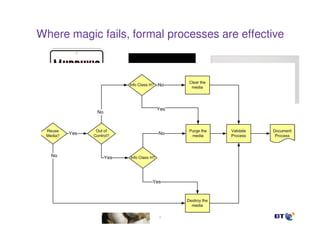
Where magic fails, formal processes are effective


                        5
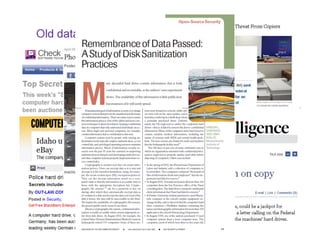
Old data is big news


                       6
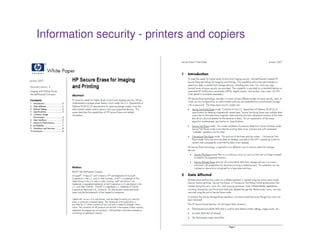
Information security - printers and copiers


                         7
Regulations, standards and other drivers

•   HIPAA
•   PCI DSS
•   GLBA
•   Privacy Act
•   Electronic Espionage Act
•   PIPEDA (Canada)
•   FACTA Disposal rule
•   Check 21
•   FISMA
•   Contracts
•   Best Practices
•   and more…..                8
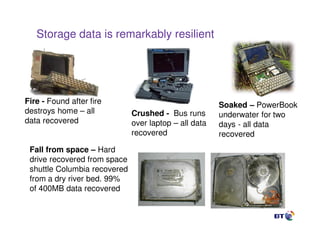
Storage data is remarkably resilient


Fire - Found after fire                                Soaked – PowerBook
destroys home – all           Crushed - Bus runs       underwater for two
data recovered                over laptop – all data   days - all data
                              recovered                recovered
 Fall from space – Hard
 drive recovered from space
 shuttle Columbia recovered
 from a dry river bed. 99%
 of 400MB data recovered
                                 9
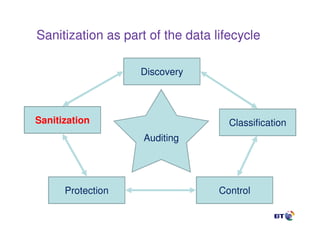
Sanitization as part of the data lifecycle

                   Discovery


Sanitization                        Classification
                    Auditing


      Protection                  Control
When do you need to sanitize media?


• Device is sold, donated, discarded or recycled
• End of lease
• Device returned to a manufacturer for warranty repair
• After severe malware/hacking attempt, for complete
  removal of offending code from infected storage device
• RAID or hot spare:
    – Hot spare placed into service, then removed when faulty RAID
      drive was replaced
    – Hot spare should be sanitized, as well as the original failed
      RAID drive if the drive is still operational


                                  11
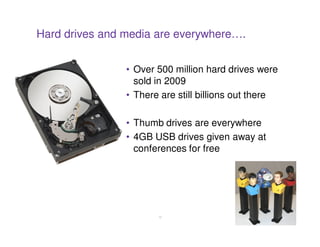
Hard drives and media are everywhere….


                • Over 500 million hard drives were
                  sold in 2009
                • There are still billions out there

                • Thumb drives are everywhere
                • 4GB USB drives given away at
                  conferences for free


                       12
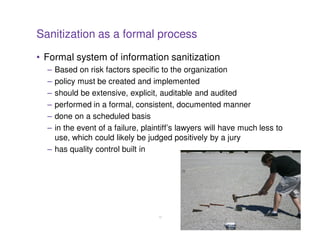
Sanitization as a formal process
• Formal system of information sanitization
  – Based on risk factors specific to the organization
  – policy must be created and implemented
  – should be extensive, explicit, auditable and audited
  – performed in a formal, consistent, documented manner
  – done on a scheduled basis
  – in the event of a failure, plaintiff’s lawyers will have much less to
    use, which could likely be judged positively by a jury
  – has quality control built in


                                   13
Policy

• Policy is dependent on a number of factors including:
  – age and type of the storage technology
  – classification of the data residing on the device
  – environment in which the device had been used
• One policy does not fit all
  – If device was used to store public data, but used in a SCIF that
    handles top secret information; the drive, since it was used in a
    SCIF, likely classified as the highest level of classification
• Create a responsible policy
  – must encompass all types of storage hardware and information
    classifications and employ a responsible sanitization practice
    using both in-house and if required external services/resources


                                  14
Sanitization moratorium

• Include notion of a data sanitization moratorium
  – Often called a Litigation Hold or Legal Hold
  – organization must stop its data sanitization activities
  – sanitization activities must immediately be placed on hold until
    Legal department determines whether these sanitization
    activities jeopardize sought-after data
  – doesn’t just mean when there is a lawsuit
     • can be regulatory investigation, internal investigation for workplace
       misconduct, preservation because a client or vendor is in litigation
     • while you aren’t technically part of it, you may have data material to
       the matter they are involved in


                                     15
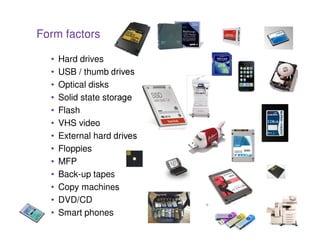
Form factors

  •   Hard drives
  •   USB / thumb drives
  •   Optical disks
  •   Solid state storage
  •   Flash
  •   VHS video
  •   External hard drives
  •   Floppies
  •   MFP
  •   Back-up tapes
  •   Copy machines
  •   DVD/CD
  •   Smart phones           16
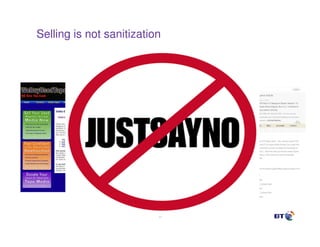
Selling is not sanitization


                          17
NIST Special Publication 800-88


• Guidelines for Media Sanitization
• Sanitization
  – general process of removing data from storage media, such that
    there is reasonable assurance that the data may not be easily
    retrieved and reconstructed
• 800-88 assists with decision-making when media
  require disposal, reuse, or will be leaving the effective
  control of an organization
• Develop and use local policies and procedures in
  conjunction with 800-88 to make effective, risk-based
  decisions on the ultimate sanitization and/or disposition
  of media and information
                                18
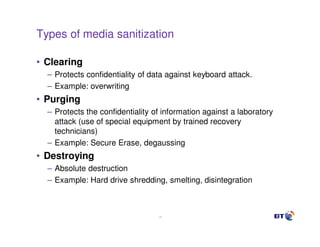
Types of media sanitization

• Clearing
  – Protects confidentiality of data against keyboard attack.
  – Example: overwriting
• Purging
  – Protects the confidentiality of information against a laboratory
    attack (use of special equipment by trained recovery
    technicians)
  – Example: Secure Erase, degaussing
• Destroying
  – Absolute destruction
  – Example: Hard drive shredding, smelting, disintegration


                                  19
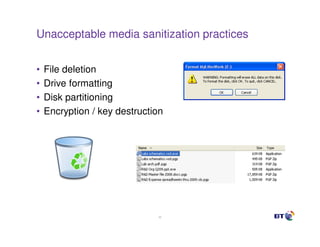
Unacceptable media sanitization practices


•   File deletion
•   Drive formatting
•   Disk partitioning
•   Encryption / key destruction


                               20
Software-based disk sanitization

Advantages                                        Disadvantages
• Single pass is adequate (as long as             • Requires significant time to process
  all data storage regions can be                   entire high capacity drive
  addressed)                                      • May not be able to sanitize data from
• Cost-effective and easily configurable            inaccessible regions (HPA, DCO, etc.)
  sanitization solution                           • Inconsistent data logging, audit trails or
• Can be configured to clear specific               certification labels
  data, files, partitions or just the free        • No security protection during the
  space                                             erasure process / subject to intentional
• Erases all remnants of deleted data               or accidental parameter changes
  to maintain ongoing security                    • May require separate license for every
• Green solution                                    hard drive
                                                  • Ineffective without good QA processes
                                                  • Not scalable


                                             21
Single pass vs. multiple passes
• DoD standard 5220.22-M (1995)
  – at least 3 passes required
• NIST Special Publication 800-88, section 2.3
  – Replaces 5220 which is retired
  – for ATA disk drives manufactured after 2001 (over 15 GB) clearing
    by overwriting the media once is adequate to protect the media
    from both keyboard and laboratory attack
  – single pass is adequate only if able to access the entire data
    storage region of the media surface


                                 22
Secure Erase – Purge Level Sanitization
• HDD manufacturers & Center for Magnetic Recording
  Research created Secure Erase sanitization standard
  – component of the ANSI ATA Specification
  – optional inclusion for use in SCSI as Secure Initialize
  – embedded in the firmware of all standards compliant ATA hard
    drives manufactured since 2001 (IDE, ATA, PATA, SATA)
  – single pass operation eradicates all data in all data sectors
  – highly effective and fast
  – validated and certified by various governing bodies
  – but most individuals and companies don’t even know it exists
  – HDD manufacturers scared of irate help-desk calls
  – inhibited by most PC manufacturers to protect from the potential
    exploitation by virus / malware

                                 23
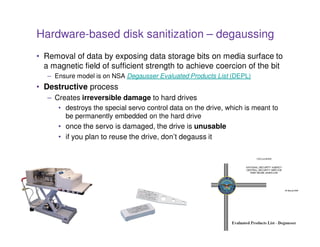
Hardware-based disk sanitization – degaussing
• Removal of data by exposing data storage bits on media surface to
  a magnetic field of sufficient strength to achieve coercion of the bit
   – Ensure model is on NSA Degausser Evaluated Products List (DEPL)
• Destructive process
   – Creates irreversible damage to hard drives
      • destroys the special servo control data on the drive, which is meant to
        be permanently embedded on the hard drive
      • once the servo is damaged, the drive is unusable
      • if you plan to reuse the drive, don’t degauss it


                                       24
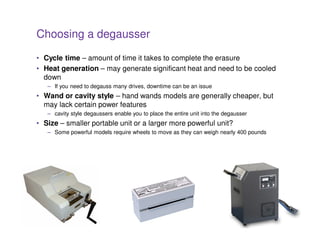
Choosing a degausser

• Cycle time – amount of time it takes to complete the erasure
• Heat generation – may generate significant heat and need to be cooled
  down
   – If you need to degauss many drives, downtime can be an issue
• Wand or cavity style – hand wands models are generally cheaper, but
  may lack certain power features
   – cavity style degaussers enable you to place the entire unit into the degausser
• Size – smaller portable unit or a larger more powerful unit?
   – Some powerful models require wheels to move as they can weigh nearly 400 pounds


                                               25
Environmental considerations - location placement


• Should be installed in a location that will not interfere with
  equipment or cause risk to operator or the public
• Caution must be taken so that the strong electromagnetic
  fields created by the degausser don’t produce collateral
  damage to other susceptible equipment nearby
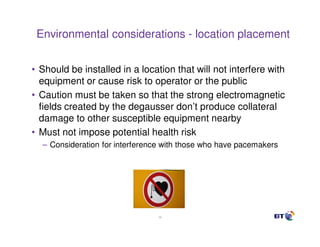
• Must not impose potential health risk
  – Consideration for interference with those who have pacemakers


                                 26
Physical disk destruction
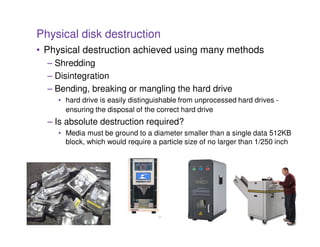
• Physical destruction achieved using many methods
  – Shredding
  – Disintegration
  – Bending, breaking or mangling the hard drive
    • hard drive is easily distinguishable from unprocessed hard drives -
      ensuring the disposal of the correct hard drive
  – Is absolute destruction required?
    • Media must be ground to a diameter smaller than a single data 512KB
      block, which would require a particle size of no larger than 1/250 inch


                                   27
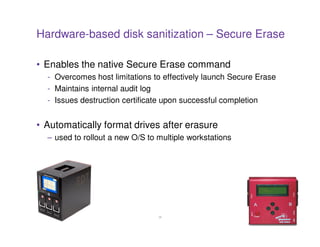
Hardware-based disk sanitization – Secure Erase

• Enables the native Secure Erase command
  - Overcomes host limitations to effectively launch Secure Erase
  - Maintains internal audit log
  - Issues destruction certificate upon successful completion


• Automatically format drives after erasure
  – used to rollout a new O/S to multiple workstations


                                 28
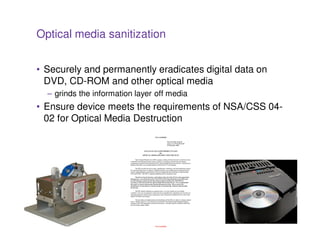
Optical media sanitization


• Securely and permanently eradicates digital data on
  DVD, CD-ROM and other optical media
  – grinds the information layer off media
• Ensure device meets the requirements of NSA/CSS 04-
  02 for Optical Media Destruction


                                 29
In-house data sanitization


Advantages                                         Disadvantages
• Media never leaves your location, no risk    •   Destruction systems can be expensive
  of loss in transit                           •   Low volume makes a longer time for ROI
• Full control                                 •   Staff with other duties may miss devices
• Data is destroyed by your own trusted        •   Must manage internal personnel and
  staff                                            technology changes
   – Recommended that all destruction          •   Lack of space and/or resources for proper
       activities be carried out under the         segregation between destroyed and non-
       office of the CISO, and by a trained        destroyed units
       and trusted technology support          •   Still must have a qualified vendor to deal with
       technician                                  residual waste and/or drives that fail
                                                   sanitization/wiping process
                                               •   Disposal of residual material
                                               •   Technicians will miss drives
                                               •   Requires good QC process to be effective

                                              30
In-house sanitization


• Quality control
  – If your organization is going to do any of its own data
    sanitization, it must have quality control mechanisms
     • Separation of duties - one tech removes hard drives while another
       is assigned to verify the drives have been removed, document the
       verification, and replace the cover
  – Wiping - assign a separate tech to take a random sample of at
    least 10% (depending on quantity) and attempt to recover data
    with a COTS data recovery tool


                                   31
Outsourced data sanitization

Advantages                                             Disadvantages
• No initial capital investment required               • No direct control of vendor employees
• can handle varying destruction needs                 • media may be transported outside of your
  (disintegration, degaussing, etc.)                     location
• can handle varying volume needs                      • possible security concerns with off-
• experts utilizing best practices                       premise transportation and handling
• may have higher security standards than              • may get locked into a bad contract
  your location                                        • may require minimums greater than your
• no need to manage personnel and                        needs
  technology changes                                   • data is handled/destroyed by non-
• regulatory compliant residual disposal                 employees
• if litigated, professional secure destruction        • if hardware is not disposed of properly,
  services destruction documentation is                  you could be included in a pollution
  more credible than internally generated                liability case
  processes                                            • Given these disadvantages, special
                                                         emphasis should be placed on vendor
                                                         selection criteria that specifically
                                                         address these issues

                                                  32
Questions for a prospective outsourced firm
• What type of insurance coverage do they have?
     – professional liability (sometimes called Errors & Omissions)
     – pollution / environmental liability
     – demand to see certificate of insurance demonstrating coverage for both
•   What processes do they follow from receipt of asset through disposition?
•   What are their security procedures?
•   How do they sanitize data?
•   Are they NAID certified for digital data destruction?
•   How do they verify data is eradicated?
•   Do they do full background checks?
•   What are financial capabilities?
•   If private, where do they get their funding? How stable is source?
•   Can they provide customer references?
•   Do they have the necessary state and local permits?
•   Do they export e-waste overseas?
•   Can they handle all or most of the locations for which you will require services?
•   Do they have processes around chain of custody?
•   Will they agree to the SLA’s that you have created?
•   Do they barcode items?
• The key is to ask a lot of questions in advance!
                                                       33
Outsourcing - Caveat Emptor


• A certificate of destruction, and a contract assuring
  responsibility of the process mean very little in the real
  world
• If a device is lost or data is exposed, it will be the owner
  of the data who will be getting the penalty and making
  the mandatory disclosure
• The service provider will be little more than a footnote in
  the disclosure


                              34
Taking data sanitization seriously
• Segregation
  – separate all storage devices and media from others to be
    disposed of materials.
  – specifically remove all hard drives from to-be-disposed-of PCs,
    laptops and servers
• Inventory
  – establish the chain of possession of the data storage device.
  – best practice - establish the connection of a particular storage
    device to the unit it was removed from and use internal asset
    management records to track the device back to the actual user
• Isolation
  – using secure collection containers, isolate the inventoried data
    storage devices in such a manner as to prevent unauthorized
    removal from the sanitization process
  – but avoid warehousing – Media must be processed frequently
    as to avoid warehousing of drives containing confidential data.
                                  35
NAID


• National Association for Information Destruction
• International trade association for companies providing
  information destruction services
• Mission is to promote the information destruction
  industry and the standards and ethics of its member
  companies
• NAID certified companies are audited annually by an
  independent 3rd-party and subject to unannounced
  audits
• www.naidonline.org


                            36
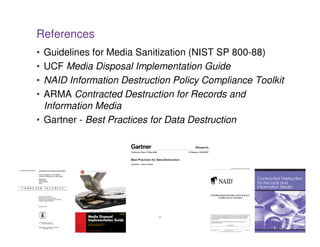
References
• Guidelines for Media Sanitization (NIST SP 800-88)
• UCF Media Disposal Implementation Guide
• NAID Information Destruction Policy Compliance Toolkit
• ARMA Contracted Destruction for Records and
  Information Media
• Gartner - Best Practices for Data Destruction


                           37
Vendors / solution providers

• DestructData                  • Ensconce Data
  – www.destructdata.com          Technology
                                      – www.deadondemand.com
• Security Engineered
  Machinery                     • Garner Products
  – www.semshred.com                  – www.garner-products.com

• Ontrack Eraser                • Darik’s Boot And Nuke
  – www.ontrack.com                   – www.dban.org

• CPR Tools                     • Reclamere
  – www.cprtools.net                  – www.reclamere.com
• Back Thru the Future
  – www.backthruthefuture.com


                                 38
For more information

• National Association of Corporate Directors
  – Record Retention and Document Destruction Policy
  – www.nacdonline.org/images/RecordRetention051023.pdf

• Remembrance of Data Passed: A Study of Disk
  Sanitization Practices
  – www.computer.org/portal/cms_docs_security/security/v1n1/garfinkel.pdf

• Best Practices for the Destruction of Digital Data
  – www.cicadasecurity.com/guide.html

• Hard Drive Disposal: The Overlooked Confidentiality
  Exposure
  –   http://www-03.ibm.com/financing/pdf/sg/Hard_Drive_Disposal_The_Overlooked_Confidentiality_Exposure_AP.pdf

• Storage & Destruction Business Magazine
  – www.sdbmagazine.com

                                                      39
References


• Center for Magnetic Recording Research
  – http://cmrr.ucsd.edu/

• Australian Department of Defence
  – Information and Communications Technology Security Manual
  – http://www.dsd.gov.au/_lib/pdf_doc/acsi33/acsi33_u_0907.pdf

• Can Intelligence Agencies Read Overwritten Data?
  – www.nber.org/sys-admin/overwritten-data-gutmann.html


                                      40
Conclusion / Action Items


• Management awareness
  – management must be aware of the risks
  – must ensure formal sanitization processes are developed
• Develop strategies on media sanitization
• Review security procedures for adequacy,
  completeness, scope and failure analysis
• Develop an information lifecycle audit program
  – Follow a life cycle approach to IT risk management that
    includes making an explicit decision about data destruction
• Implement sanitization process
• Ensure quality control is built into the process

                                 41
Thanks for attending – Q/A


Ben Rothke, CISSP, CISA
Senior Security Consultant
BT Professional Services
ben.rothke@bt.com

www.linkedin.com/in/benrothke
www.twitter.com/benrothke


                             42

Rothke effective data destruction practices

  • 1.
    Garlic, Wooden Stakesand Silver Bullets - Ensuring Effective Data Destruction Practices Ben Rothke, CISSP, CISA Senior Security Consultant BT Professional Services June 29, 2010
  • 2.
    About me • SeniorSecurity Consultant – BT Professional Services • Frequent writer and speaker • Author of Computer Security: 20 Things Every Employee Should Know (McGraw-Hill) • Veteran O’Reilly webinarist – Information Security and Social Networks – http://www.oreillynet.com/pub/e/1417 2
  • 3.
    Agenda • Business case for media sanitization • Why must end-of-life media/data be sanitized? • Types of media sanitization • DIY or outsource? • References • Q/A • Twitter hashtag #rothkewebinar 3
  • 4.
    Business case formedia sanitization • Every business has digital media (often terabytes) that must be sanitized • Media sanitization is often overlooked • Failure to adequately sanitize media can have catastrophic consequences to a business – financial loss – damage to a company’s reputation – regulatory violations – civil and criminal liability for Directors and Officers • especially since effective media sanitization is not rocket science • Therefore - digital media must be sanitized before disposal or redeployment 4
  • 5.
    Where magic fails,formal processes are effective 5
  • 6.
    Old data isbig news 6
  • 7.
    Information security -printers and copiers 7
  • 8.
    Regulations, standards andother drivers • HIPAA • PCI DSS • GLBA • Privacy Act • Electronic Espionage Act • PIPEDA (Canada) • FACTA Disposal rule • Check 21 • FISMA • Contracts • Best Practices • and more….. 8
  • 9.
    Storage data isremarkably resilient Fire - Found after fire Soaked – PowerBook destroys home – all Crushed - Bus runs underwater for two data recovered over laptop – all data days - all data recovered recovered Fall from space – Hard drive recovered from space shuttle Columbia recovered from a dry river bed. 99% of 400MB data recovered 9
  • 10.
    Sanitization as partof the data lifecycle Discovery Sanitization Classification Auditing Protection Control
  • 11.
    When do youneed to sanitize media? • Device is sold, donated, discarded or recycled • End of lease • Device returned to a manufacturer for warranty repair • After severe malware/hacking attempt, for complete removal of offending code from infected storage device • RAID or hot spare: – Hot spare placed into service, then removed when faulty RAID drive was replaced – Hot spare should be sanitized, as well as the original failed RAID drive if the drive is still operational 11
  • 12.
    Hard drives andmedia are everywhere…. • Over 500 million hard drives were sold in 2009 • There are still billions out there • Thumb drives are everywhere • 4GB USB drives given away at conferences for free 12
  • 13.
    Sanitization as aformal process • Formal system of information sanitization – Based on risk factors specific to the organization – policy must be created and implemented – should be extensive, explicit, auditable and audited – performed in a formal, consistent, documented manner – done on a scheduled basis – in the event of a failure, plaintiff’s lawyers will have much less to use, which could likely be judged positively by a jury – has quality control built in 13
  • 14.
    Policy • Policy isdependent on a number of factors including: – age and type of the storage technology – classification of the data residing on the device – environment in which the device had been used • One policy does not fit all – If device was used to store public data, but used in a SCIF that handles top secret information; the drive, since it was used in a SCIF, likely classified as the highest level of classification • Create a responsible policy – must encompass all types of storage hardware and information classifications and employ a responsible sanitization practice using both in-house and if required external services/resources 14
  • 15.
    Sanitization moratorium • Includenotion of a data sanitization moratorium – Often called a Litigation Hold or Legal Hold – organization must stop its data sanitization activities – sanitization activities must immediately be placed on hold until Legal department determines whether these sanitization activities jeopardize sought-after data – doesn’t just mean when there is a lawsuit • can be regulatory investigation, internal investigation for workplace misconduct, preservation because a client or vendor is in litigation • while you aren’t technically part of it, you may have data material to the matter they are involved in 15
  • 16.
    Form factors • Hard drives • USB / thumb drives • Optical disks • Solid state storage • Flash • VHS video • External hard drives • Floppies • MFP • Back-up tapes • Copy machines • DVD/CD • Smart phones 16
  • 17.
    Selling is notsanitization 17
  • 18.
    NIST Special Publication800-88 • Guidelines for Media Sanitization • Sanitization – general process of removing data from storage media, such that there is reasonable assurance that the data may not be easily retrieved and reconstructed • 800-88 assists with decision-making when media require disposal, reuse, or will be leaving the effective control of an organization • Develop and use local policies and procedures in conjunction with 800-88 to make effective, risk-based decisions on the ultimate sanitization and/or disposition of media and information 18
  • 19.
    Types of mediasanitization • Clearing – Protects confidentiality of data against keyboard attack. – Example: overwriting • Purging – Protects the confidentiality of information against a laboratory attack (use of special equipment by trained recovery technicians) – Example: Secure Erase, degaussing • Destroying – Absolute destruction – Example: Hard drive shredding, smelting, disintegration 19
  • 20.
    Unacceptable media sanitizationpractices • File deletion • Drive formatting • Disk partitioning • Encryption / key destruction 20
  • 21.
    Software-based disk sanitization Advantages Disadvantages • Single pass is adequate (as long as • Requires significant time to process all data storage regions can be entire high capacity drive addressed) • May not be able to sanitize data from • Cost-effective and easily configurable inaccessible regions (HPA, DCO, etc.) sanitization solution • Inconsistent data logging, audit trails or • Can be configured to clear specific certification labels data, files, partitions or just the free • No security protection during the space erasure process / subject to intentional • Erases all remnants of deleted data or accidental parameter changes to maintain ongoing security • May require separate license for every • Green solution hard drive • Ineffective without good QA processes • Not scalable 21
  • 22.
    Single pass vs.multiple passes • DoD standard 5220.22-M (1995) – at least 3 passes required • NIST Special Publication 800-88, section 2.3 – Replaces 5220 which is retired – for ATA disk drives manufactured after 2001 (over 15 GB) clearing by overwriting the media once is adequate to protect the media from both keyboard and laboratory attack – single pass is adequate only if able to access the entire data storage region of the media surface 22
  • 23.
    Secure Erase –Purge Level Sanitization • HDD manufacturers & Center for Magnetic Recording Research created Secure Erase sanitization standard – component of the ANSI ATA Specification – optional inclusion for use in SCSI as Secure Initialize – embedded in the firmware of all standards compliant ATA hard drives manufactured since 2001 (IDE, ATA, PATA, SATA) – single pass operation eradicates all data in all data sectors – highly effective and fast – validated and certified by various governing bodies – but most individuals and companies don’t even know it exists – HDD manufacturers scared of irate help-desk calls – inhibited by most PC manufacturers to protect from the potential exploitation by virus / malware 23
  • 24.
    Hardware-based disk sanitization– degaussing • Removal of data by exposing data storage bits on media surface to a magnetic field of sufficient strength to achieve coercion of the bit – Ensure model is on NSA Degausser Evaluated Products List (DEPL) • Destructive process – Creates irreversible damage to hard drives • destroys the special servo control data on the drive, which is meant to be permanently embedded on the hard drive • once the servo is damaged, the drive is unusable • if you plan to reuse the drive, don’t degauss it 24
  • 25.
    Choosing a degausser •Cycle time – amount of time it takes to complete the erasure • Heat generation – may generate significant heat and need to be cooled down – If you need to degauss many drives, downtime can be an issue • Wand or cavity style – hand wands models are generally cheaper, but may lack certain power features – cavity style degaussers enable you to place the entire unit into the degausser • Size – smaller portable unit or a larger more powerful unit? – Some powerful models require wheels to move as they can weigh nearly 400 pounds 25
  • 26.
    Environmental considerations -location placement • Should be installed in a location that will not interfere with equipment or cause risk to operator or the public • Caution must be taken so that the strong electromagnetic fields created by the degausser don’t produce collateral damage to other susceptible equipment nearby • Must not impose potential health risk – Consideration for interference with those who have pacemakers 26
  • 27.
    Physical disk destruction •Physical destruction achieved using many methods – Shredding – Disintegration – Bending, breaking or mangling the hard drive • hard drive is easily distinguishable from unprocessed hard drives - ensuring the disposal of the correct hard drive – Is absolute destruction required? • Media must be ground to a diameter smaller than a single data 512KB block, which would require a particle size of no larger than 1/250 inch 27
  • 28.
    Hardware-based disk sanitization– Secure Erase • Enables the native Secure Erase command - Overcomes host limitations to effectively launch Secure Erase - Maintains internal audit log - Issues destruction certificate upon successful completion • Automatically format drives after erasure – used to rollout a new O/S to multiple workstations 28
  • 29.
    Optical media sanitization •Securely and permanently eradicates digital data on DVD, CD-ROM and other optical media – grinds the information layer off media • Ensure device meets the requirements of NSA/CSS 04- 02 for Optical Media Destruction 29
  • 30.
    In-house data sanitization Advantages Disadvantages • Media never leaves your location, no risk • Destruction systems can be expensive of loss in transit • Low volume makes a longer time for ROI • Full control • Staff with other duties may miss devices • Data is destroyed by your own trusted • Must manage internal personnel and staff technology changes – Recommended that all destruction • Lack of space and/or resources for proper activities be carried out under the segregation between destroyed and non- office of the CISO, and by a trained destroyed units and trusted technology support • Still must have a qualified vendor to deal with technician residual waste and/or drives that fail sanitization/wiping process • Disposal of residual material • Technicians will miss drives • Requires good QC process to be effective 30
  • 31.
    In-house sanitization • Qualitycontrol – If your organization is going to do any of its own data sanitization, it must have quality control mechanisms • Separation of duties - one tech removes hard drives while another is assigned to verify the drives have been removed, document the verification, and replace the cover – Wiping - assign a separate tech to take a random sample of at least 10% (depending on quantity) and attempt to recover data with a COTS data recovery tool 31
  • 32.
    Outsourced data sanitization Advantages Disadvantages • No initial capital investment required • No direct control of vendor employees • can handle varying destruction needs • media may be transported outside of your (disintegration, degaussing, etc.) location • can handle varying volume needs • possible security concerns with off- • experts utilizing best practices premise transportation and handling • may have higher security standards than • may get locked into a bad contract your location • may require minimums greater than your • no need to manage personnel and needs technology changes • data is handled/destroyed by non- • regulatory compliant residual disposal employees • if litigated, professional secure destruction • if hardware is not disposed of properly, services destruction documentation is you could be included in a pollution more credible than internally generated liability case processes • Given these disadvantages, special emphasis should be placed on vendor selection criteria that specifically address these issues 32
  • 33.
    Questions for aprospective outsourced firm • What type of insurance coverage do they have? – professional liability (sometimes called Errors & Omissions) – pollution / environmental liability – demand to see certificate of insurance demonstrating coverage for both • What processes do they follow from receipt of asset through disposition? • What are their security procedures? • How do they sanitize data? • Are they NAID certified for digital data destruction? • How do they verify data is eradicated? • Do they do full background checks? • What are financial capabilities? • If private, where do they get their funding? How stable is source? • Can they provide customer references? • Do they have the necessary state and local permits? • Do they export e-waste overseas? • Can they handle all or most of the locations for which you will require services? • Do they have processes around chain of custody? • Will they agree to the SLA’s that you have created? • Do they barcode items? • The key is to ask a lot of questions in advance! 33
  • 34.
    Outsourcing - CaveatEmptor • A certificate of destruction, and a contract assuring responsibility of the process mean very little in the real world • If a device is lost or data is exposed, it will be the owner of the data who will be getting the penalty and making the mandatory disclosure • The service provider will be little more than a footnote in the disclosure 34
  • 35.
    Taking data sanitizationseriously • Segregation – separate all storage devices and media from others to be disposed of materials. – specifically remove all hard drives from to-be-disposed-of PCs, laptops and servers • Inventory – establish the chain of possession of the data storage device. – best practice - establish the connection of a particular storage device to the unit it was removed from and use internal asset management records to track the device back to the actual user • Isolation – using secure collection containers, isolate the inventoried data storage devices in such a manner as to prevent unauthorized removal from the sanitization process – but avoid warehousing – Media must be processed frequently as to avoid warehousing of drives containing confidential data. 35
  • 36.
    NAID • National Associationfor Information Destruction • International trade association for companies providing information destruction services • Mission is to promote the information destruction industry and the standards and ethics of its member companies • NAID certified companies are audited annually by an independent 3rd-party and subject to unannounced audits • www.naidonline.org 36
  • 37.
    References • Guidelines forMedia Sanitization (NIST SP 800-88) • UCF Media Disposal Implementation Guide • NAID Information Destruction Policy Compliance Toolkit • ARMA Contracted Destruction for Records and Information Media • Gartner - Best Practices for Data Destruction 37
  • 38.
    Vendors / solutionproviders • DestructData • Ensconce Data – www.destructdata.com Technology – www.deadondemand.com • Security Engineered Machinery • Garner Products – www.semshred.com – www.garner-products.com • Ontrack Eraser • Darik’s Boot And Nuke – www.ontrack.com – www.dban.org • CPR Tools • Reclamere – www.cprtools.net – www.reclamere.com • Back Thru the Future – www.backthruthefuture.com 38
  • 39.
    For more information •National Association of Corporate Directors – Record Retention and Document Destruction Policy – www.nacdonline.org/images/RecordRetention051023.pdf • Remembrance of Data Passed: A Study of Disk Sanitization Practices – www.computer.org/portal/cms_docs_security/security/v1n1/garfinkel.pdf • Best Practices for the Destruction of Digital Data – www.cicadasecurity.com/guide.html • Hard Drive Disposal: The Overlooked Confidentiality Exposure – http://www-03.ibm.com/financing/pdf/sg/Hard_Drive_Disposal_The_Overlooked_Confidentiality_Exposure_AP.pdf • Storage & Destruction Business Magazine – www.sdbmagazine.com 39
  • 40.
    References • Center forMagnetic Recording Research – http://cmrr.ucsd.edu/ • Australian Department of Defence – Information and Communications Technology Security Manual – http://www.dsd.gov.au/_lib/pdf_doc/acsi33/acsi33_u_0907.pdf • Can Intelligence Agencies Read Overwritten Data? – www.nber.org/sys-admin/overwritten-data-gutmann.html 40
  • 41.
    Conclusion / ActionItems • Management awareness – management must be aware of the risks – must ensure formal sanitization processes are developed • Develop strategies on media sanitization • Review security procedures for adequacy, completeness, scope and failure analysis • Develop an information lifecycle audit program – Follow a life cycle approach to IT risk management that includes making an explicit decision about data destruction • Implement sanitization process • Ensure quality control is built into the process 41
  • 42.
    Thanks for attending– Q/A Ben Rothke, CISSP, CISA Senior Security Consultant BT Professional Services ben.rothke@bt.com www.linkedin.com/in/benrothke www.twitter.com/benrothke 42