
RIGGING
IN ANIMATION
PRESENTATION BY:
Sameeksha Jain
What?
Why?
Conclusi
on
Clay
Model
example
sA&D
1
What?
What is it?
Rigging is a fundamental part of the animation, where
various custom controllers are attached to each skeletal
body part. These controllers and manipulators usually
consist of simple joints, locators, selection handles, spine
curves, or even an independent graphical user interface
for control selection
Extra points..
• Connecting a rig to a model is a process called binding
• The process of manually doing this for each character and
object in a project makes the pipeline of character
animation more time-consuming, difficult and problematic
• A good character rig is created according to the needs and
principle requirements of the characters motions
Conclusi
on
Clay
Model
example
s
Why?
A&D
2
What?
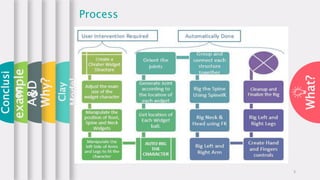
Process
Conclusi
on
Clay
Model
example
s
Why?
A&D
3
What?
Types of Rigging
Fingers
3
Root
2
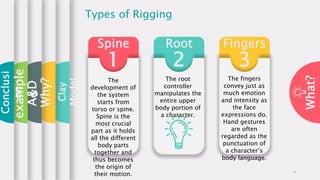
Spine
1
The
development of
the system
starts from
torso or spine.
Spine is the
most crucial
part as it holds
all the different
body parts
together and
thus becomes
the origin of
their motion.
The root
controller
manipulates the
entire upper
body portion of
a character.
The fingers
convey just as
much emotion
and intensity as
the face
expressions do.
Hand gestures
are often
regarded as the
punctuation of
a character’s
body language.
Conclusi
on
Clay
Model
example
s
Why?
A&D
4
What?
Types of Rigging
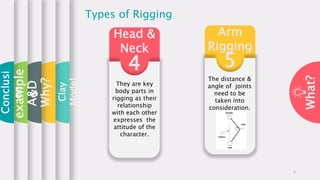
Arm
Rigging
5
Head &
Neck
4
They are key
body parts in
rigging as their
relationship
with each other
expresses the
attitude of the
character.
The distance &
angle of joints
need to be
taken into
consideration.
Conclusi
on
Clay
Model
example
s
Why?
A&D
5
What?
Clay
Model
Clay Model
1. Modeling clay is any of a group of malleable
substances used in building and sculpting.
2. There are different kinds of clays available for
instance; Ceramic Clay, Oil- based Clay, Polymer
Clay, Paper Clay.
3. To make these models into motion, clay models are
transformed into marionettes( puppets worked by
strings or under control). This is where 3D rigging
comes into process.
4. 3D rigging creates a skeleton for a 3D model- all the
bones and joints inside a character gives an
animation software vertices which it can recognize.
5. Each bone is assigned properties and constraints.
6. It gets even more technical when you start animating
facial expressions. Using programs such as Unity and
Blender, animators can use drivers, morphs,
kinematics, and weight painting, among other tools,
Conclusi
onexample
s
Why?
A&D
6
What?
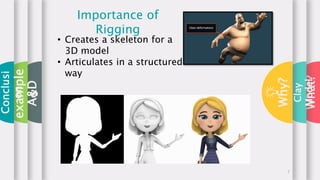
• Creates a skeleton for a
3D model
• Articulates in a structured
way
Importance of
Rigging
Conclusi
on
Clay
Model
example
s
Why?
A&D
7
What?
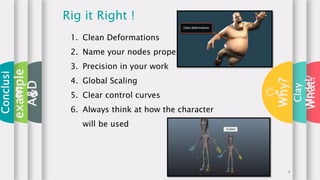
1. Clean Deformations
2. Name your nodes properly
3. Precision in your work
4. Global Scaling
5. Clear control curves
6. Always think at how the character
will be used
Rig it Right !
Conclusi
on
Clay
Model
example
s
Why?
A&D
8
What?
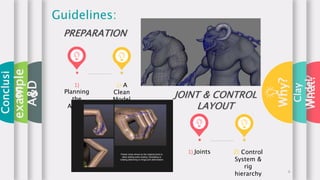
1)
Planning
the
Action
2) A
Clean
Model
Guidelines:
PREPARATION
1) Joints 2) Control
System &
rig
hierarchy
JOINT & CONTROL
LAYOUT
Conclusi
on
Clay
Model
example
s
Why?
A&D
9
What?
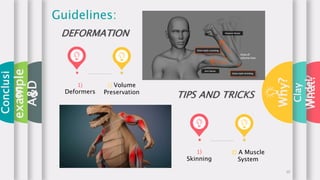
1)
Deformers
2) Volume
Preservation
Guidelines:
DEFORMATION
1)
Skinning
2) A Muscle
System
TIPS AND TRICKS
Conclusi
on
Clay
Model
example
s
Why?
A&D
10
What?
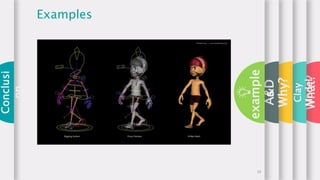
Principles of
Rigging
Joint hierarchy Forward kinematics
Inverse kinematics Skinning
Conclusi
on
Clay
Model
example
s
Why?
A&D
11
What?
A&D
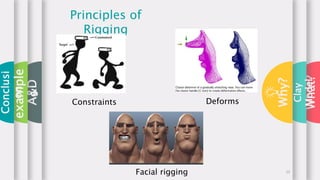
Principles of
Rigging
Constraints
Facial rigging
Deforms
Conclusi
on
Clay
Model
example
s
Why?
12
What?
A&D
Always
Remember!
1. Keep it Simple
2. Quick to pose – consistent
3. Essential to know what the director want
from the character and what the story
board is
4. Lock anything you don’t need to animate
with (prevent potential rig damage)
5. Clean hierarchy under one main node
6. Layered deformation system
7. Give animator control over some
deformations
8. Better communication between animator
and rigger
Conclusi
on
Clay
Model
example
s
Why?
13
What?
A&D
-Rigging makes animation faster and smoother
without difficulties
-This technique simplifies the animation process
and improves production efficiency. Once rigged
with skeletal bones, any 3D object can be controlled
and distorted as needed.
-In the entertainment industry rigging is a major
step in the standard way of animating characters.
Achieving smooth and complex animations is
entirely dependent on the quality of the rigging
phase in the animation pipeline.
Advantages
Conclusi
on
Clay
Model
example
s
Why?
14
What?
A&D
-Time Consuming: It can take some time to prepare
and the character is limited by the rig. That means,
you can’t put the object in any position you can
imagine, only those you can achieve with the rig.
-Not the fastest way to animate: Another disadvantage
is that it’s not the fastest way to animate, because if
you want to move his hand, then you need to rotate
the shoulder, then the arm, then the forearm until you
get the hand to the place you need.
-Restrictions: Another disadvantage is that you have
limits, you can only do what the Rig allows you to. You
can’t move the character into any position you can
imagine, but only into those allowed by the rig.
Disadvantages
Conclusi
on
Clay
Model
example
s
Why?
15
What?
A&D
Controller
PropertiesTo move and rotate the different part of the character around for themselves. Animators take
help of variety of shapes to identify the function of the control. These are the control types we'll
encounter in this rig:
1. Spheres serve as rotate controls.
2. Diamonds serve as translate and rotate controls.
3. Cubes serve as translate controls.
4. Trapezoids serve as joint controls.
Some controls affect the position and rotation of other controls. This
is because the controls are arranged in a hierarchy. For example,
when you manipulate Topcon (the highest control in the hierarchy),
all the other controls move and rotate with it.
In a hierarchy of objects, an object directly above another object is
called a parent of that other object, while an object directly below
another object is called a child of that object.
Conclusi
on
Clay
Model
example
s
Why?
16
What?
A&D
example
s
Examples
Conclusi
on
Clay
Model
Why?
17
What?
A&D
follow
Examples
Clay
Model
example
s
Why?
18
What?
A&D
Examples
Conclusi
on
Clay
Model
example
s
Why?
19
What?
A&D
Conclusi
on
Conclusion
Clay
Model
example
s
Why?
• Rigging is placing bones in order to support a
model with a skeleton like structure.
• It works in a hierarchy.
• It is done at the preproduction stage.
• There are 5 types of Rigging.
• All the bones are attached to the parent bone.
• Rigging helps in getting smooth movements making
the animation look more realistic.
• Some of the Software's used for rigging are:
i. Max
ii. Maya
iii.Animate cc
iv. Smart Body
v. Blender
• https://www.miraclenext.com/gaming/cooking-game-case-study.htm 20
What?
A&D
Conclusi
on
Questions?
Clay
Model
example
s
Why?
21

Rigging in 3D animation

  • 1.
    RIGGING IN ANIMATION PRESENTATION BY: SameekshaJain What? Why? Conclusi on Clay Model example sA&D 1
  • 2.
    What? What is it? Riggingis a fundamental part of the animation, where various custom controllers are attached to each skeletal body part. These controllers and manipulators usually consist of simple joints, locators, selection handles, spine curves, or even an independent graphical user interface for control selection Extra points.. • Connecting a rig to a model is a process called binding • The process of manually doing this for each character and object in a project makes the pipeline of character animation more time-consuming, difficult and problematic • A good character rig is created according to the needs and principle requirements of the characters motions Conclusi on Clay Model example s Why? A&D 2
  • 3.
  • 4.
    What? Types of Rigging Fingers 3 Root 2 Spine 1 The developmentof the system starts from torso or spine. Spine is the most crucial part as it holds all the different body parts together and thus becomes the origin of their motion. The root controller manipulates the entire upper body portion of a character. The fingers convey just as much emotion and intensity as the face expressions do. Hand gestures are often regarded as the punctuation of a character’s body language. Conclusi on Clay Model example s Why? A&D 4
  • 5.
    What? Types of Rigging Arm Rigging 5 Head& Neck 4 They are key body parts in rigging as their relationship with each other expresses the attitude of the character. The distance & angle of joints need to be taken into consideration. Conclusi on Clay Model example s Why? A&D 5
  • 6.
    What? Clay Model Clay Model 1. Modelingclay is any of a group of malleable substances used in building and sculpting. 2. There are different kinds of clays available for instance; Ceramic Clay, Oil- based Clay, Polymer Clay, Paper Clay. 3. To make these models into motion, clay models are transformed into marionettes( puppets worked by strings or under control). This is where 3D rigging comes into process. 4. 3D rigging creates a skeleton for a 3D model- all the bones and joints inside a character gives an animation software vertices which it can recognize. 5. Each bone is assigned properties and constraints. 6. It gets even more technical when you start animating facial expressions. Using programs such as Unity and Blender, animators can use drivers, morphs, kinematics, and weight painting, among other tools, Conclusi onexample s Why? A&D 6
  • 7.
    What? • Creates askeleton for a 3D model • Articulates in a structured way Importance of Rigging Conclusi on Clay Model example s Why? A&D 7
  • 8.
    What? 1. Clean Deformations 2.Name your nodes properly 3. Precision in your work 4. Global Scaling 5. Clear control curves 6. Always think at how the character will be used Rig it Right ! Conclusi on Clay Model example s Why? A&D 8
  • 9.
    What? 1) Planning the Action 2) A Clean Model Guidelines: PREPARATION 1) Joints2) Control System & rig hierarchy JOINT & CONTROL LAYOUT Conclusi on Clay Model example s Why? A&D 9
  • 10.
    What? 1) Deformers 2) Volume Preservation Guidelines: DEFORMATION 1) Skinning 2) AMuscle System TIPS AND TRICKS Conclusi on Clay Model example s Why? A&D 10
  • 11.
    What? Principles of Rigging Joint hierarchyForward kinematics Inverse kinematics Skinning Conclusi on Clay Model example s Why? A&D 11
  • 12.
  • 13.
    What? A&D Always Remember! 1. Keep itSimple 2. Quick to pose – consistent 3. Essential to know what the director want from the character and what the story board is 4. Lock anything you don’t need to animate with (prevent potential rig damage) 5. Clean hierarchy under one main node 6. Layered deformation system 7. Give animator control over some deformations 8. Better communication between animator and rigger Conclusi on Clay Model example s Why? 13
  • 14.
    What? A&D -Rigging makes animationfaster and smoother without difficulties -This technique simplifies the animation process and improves production efficiency. Once rigged with skeletal bones, any 3D object can be controlled and distorted as needed. -In the entertainment industry rigging is a major step in the standard way of animating characters. Achieving smooth and complex animations is entirely dependent on the quality of the rigging phase in the animation pipeline. Advantages Conclusi on Clay Model example s Why? 14
  • 15.
    What? A&D -Time Consuming: Itcan take some time to prepare and the character is limited by the rig. That means, you can’t put the object in any position you can imagine, only those you can achieve with the rig. -Not the fastest way to animate: Another disadvantage is that it’s not the fastest way to animate, because if you want to move his hand, then you need to rotate the shoulder, then the arm, then the forearm until you get the hand to the place you need. -Restrictions: Another disadvantage is that you have limits, you can only do what the Rig allows you to. You can’t move the character into any position you can imagine, but only into those allowed by the rig. Disadvantages Conclusi on Clay Model example s Why? 15
  • 16.
    What? A&D Controller PropertiesTo move androtate the different part of the character around for themselves. Animators take help of variety of shapes to identify the function of the control. These are the control types we'll encounter in this rig: 1. Spheres serve as rotate controls. 2. Diamonds serve as translate and rotate controls. 3. Cubes serve as translate controls. 4. Trapezoids serve as joint controls. Some controls affect the position and rotation of other controls. This is because the controls are arranged in a hierarchy. For example, when you manipulate Topcon (the highest control in the hierarchy), all the other controls move and rotate with it. In a hierarchy of objects, an object directly above another object is called a parent of that other object, while an object directly below another object is called a child of that object. Conclusi on Clay Model example s Why? 16
  • 17.
  • 18.
  • 19.
  • 20.
    What? A&D Conclusi on Conclusion Clay Model example s Why? • Rigging isplacing bones in order to support a model with a skeleton like structure. • It works in a hierarchy. • It is done at the preproduction stage. • There are 5 types of Rigging. • All the bones are attached to the parent bone. • Rigging helps in getting smooth movements making the animation look more realistic. • Some of the Software's used for rigging are: i. Max ii. Maya iii.Animate cc iv. Smart Body v. Blender • https://www.miraclenext.com/gaming/cooking-game-case-study.htm 20
  • 21.