Building a Disaster Recovery
 Solution using OpenStack
               Jorke Odolphi
        Principal Research Engineer
                   NICTA
       jorke.odolphi@nicta.com.au
                   @jorke
http://bionicvision.org.au/eye
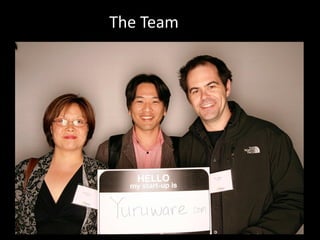
The Team
Yuru – ‘cloud’, Gamilaraay People NSW
Problem


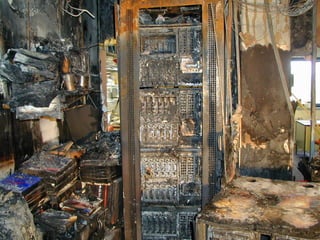
           The cloud can fail.

Online businesses that rely and benefit
most from the cloud don’t have the skills
           to handle failure.
Disaster Recovery

  process, policies and procedures related to
   preparing for recovery or continuation of
    technology infrastructure critical to an
organisation after a natural or human-induced
                    disaster *


               *according to wikipedia..
RPO
          Recovery Point Objective

“maximum tolerable period in which data might
   be lost from an IT Service due to a Major
                 incident…” *


               *according to wikipedia..
RTO
           Recovery Time Objective

  “duration of time and a service level within
which a business process must be restored after
                 a disaster…” *


                *according to wikipedia..
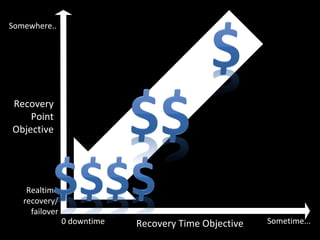
Somewhere..


Recovery
    Point
Objective


    Realtime
   recovery/
     failover
                0 downtime   Recovery Time Objective   Sometime...
Our Goal

  Without re-architecting your application;

Provide a configurable warm standby solution,
        with a known consistent RPO,
                reducing RTO,
         minimising business impact.
Goals and Challenges
Replicate application over to OpenStack in
case of a disaster
  – Preserve the running environment of the
    application, this includes:
    • Compute instances
    • Networks
    • DNS
Minimise RTO and RPO AND cost!
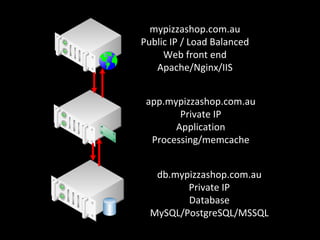
mypizzashop.com.au
Public IP / Load Balanced
     Web front end
   Apache/Nginx/IIS


 app.mypizzashop.com.au
        Private IP
       Application
  Processing/memcache


   db.mypizzashop.com.au
         Private IP
         Database
  MySQL/PostgreSQL/MSSQL
Architecting for DR in Cloud

Virtualise your servers
  – snapshotting support in hypervisor primarily at
    the disk


Use Dynamic DNS solutions
  – E.g. Route 53, Anycast DNS
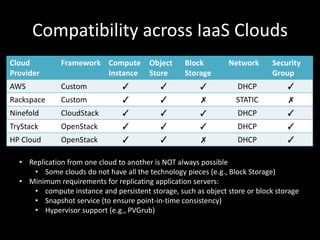
Compatibility across IaaS Clouds
Cloud         Framework Compute         Object     Block        Network      Security
Provider                Instance        Store      Storage                   Group
AWS           Custom            ✓          ✓           ✓          DHCP           ✓
Rackspace     Custom            ✓          ✓           ✗          STATIC         ✗
Ninefold      CloudStack        ✓          ✓           ✓          DHCP           ✓
TryStack      OpenStack         ✓          ✓           ✓          DHCP           ✓
HP Cloud      OpenStack         ✓          ✓           ✗          DHCP           ✓

  • Replication from one cloud to another is NOT always possible
     • Some clouds do not have all the technology pieces (e.g., Block Storage)
  • Minimum requirements for replicating application servers:
     • compute instance and persistent storage, such as object store or block storage
     • Snapshot service (to ensure point-in-time consistency)
     • Hypervisor support (e.g., PVGrub)
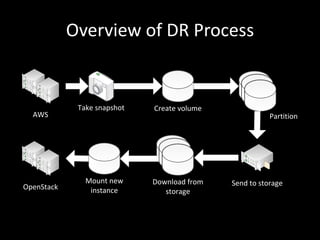
Overview of DR Process


             Take snapshot   Create volume
  AWS                                                   Partition


               Mount new     Download from   Send to storage
OpenStack       instance        storage
Building DR using OpenStack
Progress:
  – Deploying OpenStack in our NICTA lab
  – Successfully replicated AWS compute instances to
    OpenStack
     • In Rackspace OpenStack public cloud (private beta)
     • Instances created from standard 64-bit EXT3 AWS OpenSuse
       image

Requirements:
  – Xen support for PVGrub
  – Write access to partition table
  – Network support
Problems
Latency

Point in Time

Log and replay / transactional

How do modern databases handle broken
transactions / problem disks?

Rollback
Optimisations: Incremental Backup
Typical AWS system volume is around 10GB
Replication is tricky for large data volumes
  – Initial backup:
     • Send the whole data volume (unavoidable!)
     • Optimise by compression and skipping empty space
       (0’s)
  – Subsequent backups:
     • Incremental – partition a volume into chunks and
       resend only the difference (the ‘delta’)
Large Data Transfer Across
Cloud Datacenters

Why so slow?
Optimisations: Large Data Transfer
   Across Cloud Datacenters for DR
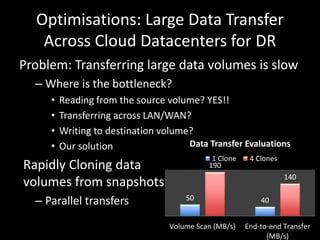
Problem: Transferring large data volumes is slow
  – Where is the bottleneck?
     •   Reading from the source volume? YES!!
     •   Transferring across LAN/WAN?
     •   Writing to destination volume?
     •   Our solution                 Data Transfer Evaluations
                                             1 Clone    4 Clones
Rapidly Cloning data                        190
                                                                   140
volumes from snapshots
  – Parallel transfers                50                   40


                                  Volume Scan (MB/s)   End-to-end Transfer
                                                             (MB/s)
Reversing..
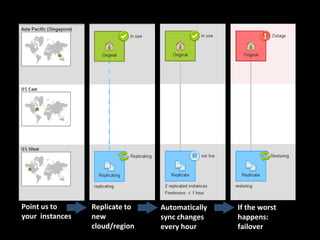
Point us to      Replicate to   Automatically   If the worst
your instances   new            sync changes    happens:
                 cloud/region   every hour      failover
Questions?

       Or answers?

       Jorke Odolphi
Jorke.odolphi@nicta.com.au
          @jorke
NICTA, Disaster Recovery Using OpenStack

NICTA, Disaster Recovery Using OpenStack

  • 1.
    Building a DisasterRecovery Solution using OpenStack Jorke Odolphi Principal Research Engineer NICTA jorke.odolphi@nicta.com.au @jorke
  • 3.
  • 4.
  • 5.
    Yuru – ‘cloud’,Gamilaraay People NSW
  • 6.
    Problem The cloud can fail. Online businesses that rely and benefit most from the cloud don’t have the skills to handle failure.
  • 7.
    Disaster Recovery process, policies and procedures related to preparing for recovery or continuation of technology infrastructure critical to an organisation after a natural or human-induced disaster * *according to wikipedia..
  • 9.
    RPO Recovery Point Objective “maximum tolerable period in which data might be lost from an IT Service due to a Major incident…” * *according to wikipedia..
  • 11.
    RTO Recovery Time Objective “duration of time and a service level within which a business process must be restored after a disaster…” * *according to wikipedia..
  • 13.
    Somewhere.. Recovery Point Objective Realtime recovery/ failover 0 downtime Recovery Time Objective Sometime...
  • 14.
    Our Goal Without re-architecting your application; Provide a configurable warm standby solution, with a known consistent RPO, reducing RTO, minimising business impact.
  • 15.
    Goals and Challenges Replicateapplication over to OpenStack in case of a disaster – Preserve the running environment of the application, this includes: • Compute instances • Networks • DNS Minimise RTO and RPO AND cost!
  • 16.
    mypizzashop.com.au Public IP /Load Balanced Web front end Apache/Nginx/IIS app.mypizzashop.com.au Private IP Application Processing/memcache db.mypizzashop.com.au Private IP Database MySQL/PostgreSQL/MSSQL
  • 17.
    Architecting for DRin Cloud Virtualise your servers – snapshotting support in hypervisor primarily at the disk Use Dynamic DNS solutions – E.g. Route 53, Anycast DNS
  • 18.
    Compatibility across IaaSClouds Cloud Framework Compute Object Block Network Security Provider Instance Store Storage Group AWS Custom ✓ ✓ ✓ DHCP ✓ Rackspace Custom ✓ ✓ ✗ STATIC ✗ Ninefold CloudStack ✓ ✓ ✓ DHCP ✓ TryStack OpenStack ✓ ✓ ✓ DHCP ✓ HP Cloud OpenStack ✓ ✓ ✗ DHCP ✓ • Replication from one cloud to another is NOT always possible • Some clouds do not have all the technology pieces (e.g., Block Storage) • Minimum requirements for replicating application servers: • compute instance and persistent storage, such as object store or block storage • Snapshot service (to ensure point-in-time consistency) • Hypervisor support (e.g., PVGrub)
  • 19.
    Overview of DRProcess Take snapshot Create volume AWS Partition Mount new Download from Send to storage OpenStack instance storage
  • 20.
    Building DR usingOpenStack Progress: – Deploying OpenStack in our NICTA lab – Successfully replicated AWS compute instances to OpenStack • In Rackspace OpenStack public cloud (private beta) • Instances created from standard 64-bit EXT3 AWS OpenSuse image Requirements: – Xen support for PVGrub – Write access to partition table – Network support
  • 22.
    Problems Latency Point in Time Logand replay / transactional How do modern databases handle broken transactions / problem disks? Rollback
  • 23.
    Optimisations: Incremental Backup TypicalAWS system volume is around 10GB Replication is tricky for large data volumes – Initial backup: • Send the whole data volume (unavoidable!) • Optimise by compression and skipping empty space (0’s) – Subsequent backups: • Incremental – partition a volume into chunks and resend only the difference (the ‘delta’)
  • 24.
    Large Data TransferAcross Cloud Datacenters Why so slow?
  • 25.
    Optimisations: Large DataTransfer Across Cloud Datacenters for DR Problem: Transferring large data volumes is slow – Where is the bottleneck? • Reading from the source volume? YES!! • Transferring across LAN/WAN? • Writing to destination volume? • Our solution Data Transfer Evaluations 1 Clone 4 Clones Rapidly Cloning data 190 140 volumes from snapshots – Parallel transfers 50 40 Volume Scan (MB/s) End-to-end Transfer (MB/s)
  • 26.
  • 27.
    Point us to Replicate to Automatically If the worst your instances new sync changes happens: cloud/region every hour failover
  • 28.
    Questions? Or answers? Jorke Odolphi Jorke.odolphi@nicta.com.au @jorke