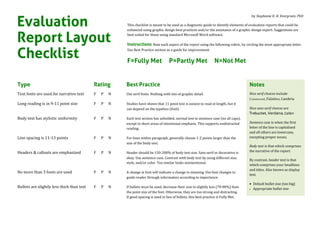
Type Rating Best Practice
Text fonts are used for narrative text F P N Use serif fonts. Nothing with lots of graphic detail.
Long reading is in 9-11 point size F P N Studies have shown that 11 point text is easiest to read at length, but it
can depend on the typeface (font).
Body text has stylistic uniformity F P N Each text section has unbolded, normal text in sentence case (no all caps),
except in short areas of intentional emphasis. This supports undistracted
reading.
Line spacing is 11-13 points F P N For lines within paragraph, generally choose 1-2 points larger than the
size of the body text.
Headers & callouts are emphasized F P N Header should be 150-200% of body text size. Sans serif or decorative is
okay. Use sentence case. Contrast with body text by using different size,
style, and/or color. Too similar looks unintentional.
No more than 3 fonts are used F P N A change in font will indicate a change in meaning. Use font changes to
guide reader through information according to importance.
Bullets are slightly less thick than text F P N If bullets must be used, decrease their size to slightly less (70-80%) than
the point size of the font. Otherwise, they are too strong and distracting.
If good spacing is used in lieu of bullets, this best practice is Fully Met.
Evaluation
Report Layout
Checklist
by Stephanie D. H. Evergreen, PhD
This checklist is meant to be used as a diagnostic guide to identify elements of evaluation reports that could be
enhanced using graphic design best practices and/or the assistance of a graphic design expert. Suggestions are
best suited for those using standard Microsoft Word software.
Instructions Rate each aspect of the report using the following rubric, by circling the most appropriate letter.
Use Best Practice section as a guide for improvement.
F=Fully Met P=Partly Met N=Not Met
Notes
Nice serif choices include
Garamond, Palatino, Cambria
Nice sans serif choices are
Trebuchet, Verdana, Calibri
Sentence case is when the first
letter of the line is capitalized
and all others are lowercase,
excepting proper nouns.
Body text is that which comprises
the narrative of the report.
By contrast, header text is that
which comprises your headlines
and titles. Also known as display
text.
 Default bullet size (too big)
 Appropriate bullet size
© Stephanie Evergreen 2013 2
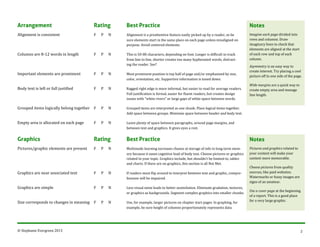
Arrangement Rating Best Practice
Alignment is consistent F P N Alignment is a preattentive feature easily picked up by a reader, so be
sure elements start in the same place on each page unless misaligned on
purpose. Avoid centered elements.
Columns are 8-12 words in length F P N This is 50-80 characters, depending on font. Longer is difficult to track
from line to line, shorter creates too many hyphenated words, distract-
ing the reader. See?
Important elements are prominent F P N Most prominent position is top half of page and/or emphasized by size,
color, orientation, etc. Supportive information is toned down.
Body text is left or full justified F P N Ragged right edge is more informal, but easier to read for average readers.
Full justification is formal, easier for fluent readers, but creates design
issues with "white rivers" or large gaps of white space between words.
Grouped items logically belong together F P N Grouped items are interpreted as one chunk. Place logical items together.
Add space between groups. Minimize space between header and body text.
Empty area is allocated on each page F P N Leave plenty of space between paragraphs, around page margins, and
between text and graphics. It gives eyes a rest.
Graphics Rating Best Practice
Pictures/graphic elements are present F P N Multimode learning increases chance at storage of info in long-term mem-
ory because it eases cognitive load of body text. Choose pictures or graphics
related to your topic. Graphics include, but shouldn’t be limited to, tables
and charts. If there are no graphics, this section is all Not Met.
Graphics are near associated text F P N If readers must flip around to interpret between text and graphic, compre-
hension will be impaired.
Graphics are simple F P N Less visual noise leads to better assimilation. Eliminate gradation, textures,
or graphics as backgrounds. Segment complex graphics into smaller chunks.
Size corresponds to changes in meaning F P N Use, for example, larger pictures on chapter start pages. In graphing, for
example, be sure height of columns proportionately represents data.
Notes
Imagine each page divided into
rows and columns. Draw
imaginary lines to check that
elements are aligned at the start
of each row and top of each
column.
Asymmetry is an easy way to
create interest. Try placing a cool
picture off to one side of the page.
Wide margins are a quick way to
create empty area and manage
line length.
Notes
Pictures and graphics related to
your content will make your
content more memorable.
Choose pictures from quality
sources, like paid websites.
Watermarks or fuzzy images are
signs of an amateur.
Use a cover page at the beginning
of a report. This is a good place
for a very large graphic.
© Stephanie Evergreen 2013 3
Graphics direct toward text F P N Use the power of an image to direct the reader’s gaze from the image to the
associated text. Eyes in a photo, for example, should look inward at text.
Visual theme is evident F P N Pick a visual theme that can be used in different forms throughout report
to give strong emotional connection.
Some elements are repeated F P N Repetition of some graphic elements adds unity to the piece, makes work
more memorable. Careful not to overdo it – too many elements can add
clutter or complication.
Color Rating Best Practice
Narrative text is dark grey or black F P N Black has highest comprehension levels, with low intensity colors taking
a distant second place.
Background has white/subdued color F P N Reversed-out text (e.g., white text on black background) impairs informa-
tion retention.
One or two emphasis colors are used F P N Subdued colors that still contrast with background should be used. When
used, it should be to actually emphasize important information, like data
in a graph. If more than one is selected, consider choosing along a color
gradation so that order of importance is implicit.
Color changes mark meaning changes F P N Color changes signal a change in hierarchy of information. Be intentional
with color changes so that a viewer doesn’t get confused.
Color reprints legibly in black and white F P N Color looks different on a computer screen than on paper. Print on a black-
and-white printer and then make a copy of that printout to check legibility.
Time to add up your points: ______
Notes
Keep in mind various culture-
laden color connotations. For
example, pink is highly
associated with feminine
qualities in the USA. Make sure
your color choices are
appropriate for your audience.
Note that people with
colorblindness have difficulty
with red-green and yellow-blue
combinations.
A safe bet is to use your client’s
colors.
Well-formatted reports score within 23-25 points. At this level, report readers are better able to read and retain
content. For more easily-accessible resources, check out:
Robin Williams’ book The Non-Designer’s Design Book
Design Elements by Timothy Samara, for those ready for more advanced material
My book, website, and blog at www.stephanieevergreen.com
F = 1 point
P = ½ point
N = 0 points

Report Design Checklist

  • 1.
    Type Rating BestPractice Text fonts are used for narrative text F P N Use serif fonts. Nothing with lots of graphic detail. Long reading is in 9-11 point size F P N Studies have shown that 11 point text is easiest to read at length, but it can depend on the typeface (font). Body text has stylistic uniformity F P N Each text section has unbolded, normal text in sentence case (no all caps), except in short areas of intentional emphasis. This supports undistracted reading. Line spacing is 11-13 points F P N For lines within paragraph, generally choose 1-2 points larger than the size of the body text. Headers & callouts are emphasized F P N Header should be 150-200% of body text size. Sans serif or decorative is okay. Use sentence case. Contrast with body text by using different size, style, and/or color. Too similar looks unintentional. No more than 3 fonts are used F P N A change in font will indicate a change in meaning. Use font changes to guide reader through information according to importance. Bullets are slightly less thick than text F P N If bullets must be used, decrease their size to slightly less (70-80%) than the point size of the font. Otherwise, they are too strong and distracting. If good spacing is used in lieu of bullets, this best practice is Fully Met. Evaluation Report Layout Checklist by Stephanie D. H. Evergreen, PhD This checklist is meant to be used as a diagnostic guide to identify elements of evaluation reports that could be enhanced using graphic design best practices and/or the assistance of a graphic design expert. Suggestions are best suited for those using standard Microsoft Word software. Instructions Rate each aspect of the report using the following rubric, by circling the most appropriate letter. Use Best Practice section as a guide for improvement. F=Fully Met P=Partly Met N=Not Met Notes Nice serif choices include Garamond, Palatino, Cambria Nice sans serif choices are Trebuchet, Verdana, Calibri Sentence case is when the first letter of the line is capitalized and all others are lowercase, excepting proper nouns. Body text is that which comprises the narrative of the report. By contrast, header text is that which comprises your headlines and titles. Also known as display text.  Default bullet size (too big)  Appropriate bullet size
  • 2.
    © Stephanie Evergreen2013 2 Arrangement Rating Best Practice Alignment is consistent F P N Alignment is a preattentive feature easily picked up by a reader, so be sure elements start in the same place on each page unless misaligned on purpose. Avoid centered elements. Columns are 8-12 words in length F P N This is 50-80 characters, depending on font. Longer is difficult to track from line to line, shorter creates too many hyphenated words, distract- ing the reader. See? Important elements are prominent F P N Most prominent position is top half of page and/or emphasized by size, color, orientation, etc. Supportive information is toned down. Body text is left or full justified F P N Ragged right edge is more informal, but easier to read for average readers. Full justification is formal, easier for fluent readers, but creates design issues with "white rivers" or large gaps of white space between words. Grouped items logically belong together F P N Grouped items are interpreted as one chunk. Place logical items together. Add space between groups. Minimize space between header and body text. Empty area is allocated on each page F P N Leave plenty of space between paragraphs, around page margins, and between text and graphics. It gives eyes a rest. Graphics Rating Best Practice Pictures/graphic elements are present F P N Multimode learning increases chance at storage of info in long-term mem- ory because it eases cognitive load of body text. Choose pictures or graphics related to your topic. Graphics include, but shouldn’t be limited to, tables and charts. If there are no graphics, this section is all Not Met. Graphics are near associated text F P N If readers must flip around to interpret between text and graphic, compre- hension will be impaired. Graphics are simple F P N Less visual noise leads to better assimilation. Eliminate gradation, textures, or graphics as backgrounds. Segment complex graphics into smaller chunks. Size corresponds to changes in meaning F P N Use, for example, larger pictures on chapter start pages. In graphing, for example, be sure height of columns proportionately represents data. Notes Imagine each page divided into rows and columns. Draw imaginary lines to check that elements are aligned at the start of each row and top of each column. Asymmetry is an easy way to create interest. Try placing a cool picture off to one side of the page. Wide margins are a quick way to create empty area and manage line length. Notes Pictures and graphics related to your content will make your content more memorable. Choose pictures from quality sources, like paid websites. Watermarks or fuzzy images are signs of an amateur. Use a cover page at the beginning of a report. This is a good place for a very large graphic.
  • 3.
    © Stephanie Evergreen2013 3 Graphics direct toward text F P N Use the power of an image to direct the reader’s gaze from the image to the associated text. Eyes in a photo, for example, should look inward at text. Visual theme is evident F P N Pick a visual theme that can be used in different forms throughout report to give strong emotional connection. Some elements are repeated F P N Repetition of some graphic elements adds unity to the piece, makes work more memorable. Careful not to overdo it – too many elements can add clutter or complication. Color Rating Best Practice Narrative text is dark grey or black F P N Black has highest comprehension levels, with low intensity colors taking a distant second place. Background has white/subdued color F P N Reversed-out text (e.g., white text on black background) impairs informa- tion retention. One or two emphasis colors are used F P N Subdued colors that still contrast with background should be used. When used, it should be to actually emphasize important information, like data in a graph. If more than one is selected, consider choosing along a color gradation so that order of importance is implicit. Color changes mark meaning changes F P N Color changes signal a change in hierarchy of information. Be intentional with color changes so that a viewer doesn’t get confused. Color reprints legibly in black and white F P N Color looks different on a computer screen than on paper. Print on a black- and-white printer and then make a copy of that printout to check legibility. Time to add up your points: ______ Notes Keep in mind various culture- laden color connotations. For example, pink is highly associated with feminine qualities in the USA. Make sure your color choices are appropriate for your audience. Note that people with colorblindness have difficulty with red-green and yellow-blue combinations. A safe bet is to use your client’s colors. Well-formatted reports score within 23-25 points. At this level, report readers are better able to read and retain content. For more easily-accessible resources, check out: Robin Williams’ book The Non-Designer’s Design Book Design Elements by Timothy Samara, for those ready for more advanced material My book, website, and blog at www.stephanieevergreen.com F = 1 point P = ½ point N = 0 points