
Why Build
a Design System?
The Pocket Guide for Product Teams
Copyright © 2017 by UXPin Inc.
All rights reserved. No part of this publication text may be uploaded or
posted online without the prior written permission of the publisher.
For permission requests, write to the publisher, addressed “Attention:
Permissions Request,” to hello@uxpin.com.
Why Build
a Design System?
The Pocket Guide for Product Teams
Index
The Challenges Facing Product Teams Today 5
Conclusion7
Enter the Design System  8
The Single Source of Truth 9
The ROI of Design Systems  9
Building the Design System 11
Recommended Resources 17
Marcin Treder
Since co-founding UXPin in 2010, he has helped build and lead prod-
uct teams in the Poland and Silicon Valley office. Previously, he was a
UX Manager at Grupa Nokaut, an enterprise ecommerce platform. He
holds an M.A. in Psychology from the University of Gdansk.
Jerry Cao
Jerry Cao is a content strategist at UXPin where he gets to put his over-
ly active imagination to paper every day. In a past life, he developed
content strategies for clients at Brafton and worked in traditional ad-
vertising at DDB San Francisco. In his spare time he enjoys playing elec-
tric guitar, watching foreign horror films, and expanding his knowledge
of random facts. Follow me on Twitter
Authors
The Challenges Facing
Product Teams Today
As a product team grows, its processes become more difficult to
manage.
Without a standardized workflow or toolkit, the team’s inefficiencies
and inconsistencies will eventually work their way back into the
product.
Software is often built by incredibly large teams of people. The
challenge to create coherent experiences multiplies exponentially
as more people are added to the mix. Over time, no matter how
consistent or small a team is, different people will contribute new
solutions and styles, causing experiences to diverge.
Building a Visual Language, Karri Saarinen,
Principal Designer and creator of Airbnb design system
Based on working with thousands of customers around the world,
we’ve seen four patterns emerge through the years.
The Challenges Facing Product Teams Today 6
1.	 Inconsistencies across products and platforms
UX inconsistencies reduces the user’s efficiency, which devalues
the product.
Especially common in enterprise products that span different
technology stacks, devices, and user groups, product inconsistency
is nearly impossible to resolve until the company’s workflows are
first addressed.
2.	 Lack of centralized assets leads to version control issues
Because different design teams use different tools that don’t always
integrate, nobody can truly guarantee that the right assets are all
being used in projects at any given time.
If the tools are desktop-based, version control issues become even
more of a pain. Designers must follow a strict naming convention,
otherwise the wrong assets will eventually make it to development.
3.	 Widening knowledge gaps between product teams
Without a “golden source” of assets and best practices, different
teams work off different guidelines and assumptions. Over time,
product inconsistency is inevitable.
4.	 Inefficient processes lead to repetitive or wasted work
Without a common toolkit for design and development, one-off
solutions and repetitive work drain a team’s efficiency.
The Challenges Facing Product Teams Today 7
Iteration cycles planned for 1-2 weeks may require 2-3x the time
because designers find themselves creating common elements and
pages from scratch. The inefficiency multiplies as designers redline
those assets for handoff and developers code up new solutions.
Conclusion
All of the above pain points are interconnected.
To improve product consistency and team efficiency, it helps to con-
solidate assets and workflows between designers and developers.
Otherwise, the ongoing pain of unscalable design remains the reality.
When I joined Spotify’s design team in 2012, the level of incon-
sistency and fragmentation shocked me. Up-close, the treatment
of type, colour, imagery, layout, IA, and interactions just didn’t
seem to align anywhere. We concluded the fragmentation in the
product was just reflecting the fragmentation in the team, that
designers spread across so many different projects, timezones
and competing timetables, just didn’t stand a chance.
Design Doesn’t Scale, Stanley Wood, Design Director at Spotify
Enter the Design System
Popularized by companies like Salesforce and Airbnb, design sys-
tems give product teams a reusable, component-based approach to
product development.
A design system can create value on at least two levels. At the
team level, it can create a more streamlined, predictable process
that reduces design and engineering time. At the UX level it helps
deliver consistency and predictability in the interface, and to
raise the quality of the experience overall when designers and
engineers are freed up to think about higher-order tasks.
Selling Design Systems At Your Company,
Nick Stamas, Creative Lead at WeWork
Enter the Design System 9
The Single Source of Truth
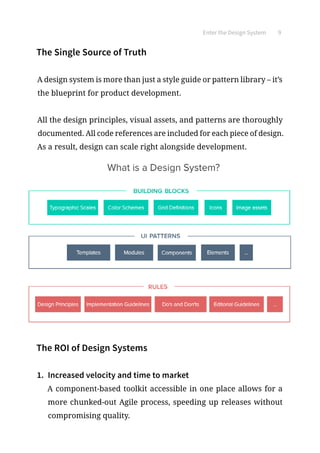
A design system is more than just a style guide or pattern library – it’s
the blueprint for product development.
All the design principles, visual assets, and patterns are thoroughly
documented. All code references are included for each piece of design.
As a result, design can scale right alongside development.
The ROI of Design Systems
1.	 Increased velocity and time to market
A component-based toolkit accessible in one place allows for a
more chunked-out Agile process, speeding up releases without
compromising quality.
Enter the Design System 10
2.	 Increased product value
Reusable components build upon each other, which creates a
consistent look, feel, and behavior to the product. As consistency
increases, so too does user efficiency.
3.	 Increased collaboration and knowledge sharing
Because the shared design system includes approved assets and
conventions, designers and developers are more autonomous
without closing off into silos.
4.	 Less time and money wasted
Because designers and developers aren’t caught up in redundant
questions or repetitive work, they’re freed up for projects that
deliver more business value.
An estimated $1.5MM+ in annual savings or 21.25% time saved
for a typical product development annual budget (based on on-
shore/offshore team of 100 resources)
What Is a Design System and What Are It’s Benefits?
Projekt 202
Building the Design System
Here’s the simple truth: you can’t innovate on products without
first innovating the way you build them.
The Way We Build, Karri Saarinen,
Principal Designer and creator of Airbnb design system
1.	 Create your interface inventory
To quickly identify current inconsistencies, start by creating an
inventory of everything in your product UI: color palette, text
styles, and UI patterns. The inventory is your strongest tool for
selling the need for a design system.
1.	Review the interface and code and list all the colors and text-
styles you can find.
2.	Take screenshots of UI patterns or copy patterns from your
projects. Place all the screenshots in one place.
Building the Design System 12
3.	Categorize your patterns by their purpose (e.g. buttons, form-
fields, navigation etc).
4.	Mark inconsistencies between the patterns and create a pre-
sentation for your team.
2.	 Get buy-in from the team
As you present the inconsistencies reflected in your interface in-
ventory, emphasize the ROI of the design system.
Engineers respond well to the source control, improved modu-
larity, and increased autonomy. Business stakeholders respond
well to the faster time to market, increased product value, and
less resources wasted.
Building the Design System 13
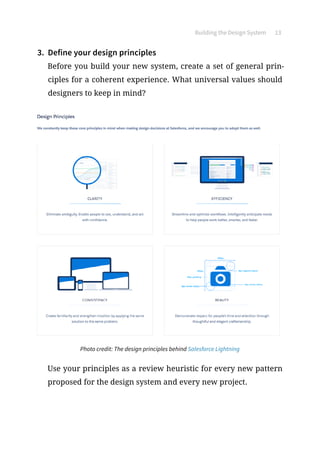
3.	 Define your design principles
Before you build your new system, create a set of general prin-
ciples for a coherent experience. What universal values should
designers to keep in mind?
Photo credit: The design principles behind Salesforce Lightning
Use your principles as a review heuristic for every new pattern
proposed for the design system and every new project.
Building the Design System 14
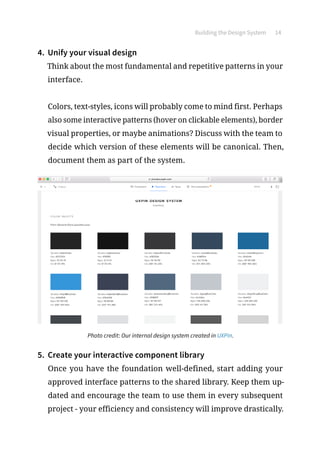
4.	 Unify your visual design
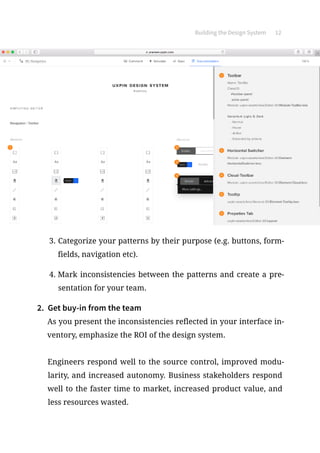
Think about the most fundamental and repetitive patterns in your
interface.
Colors, text-styles, icons will probably come to mind first. Perhaps
also some interactive patterns (hover on clickable elements), border
visual properties, or maybe animations? Discuss with the team to
decide which version of these elements will be canonical. Then,
document them as part of the system.
Photo credit: Our internal design system created in UXPin.
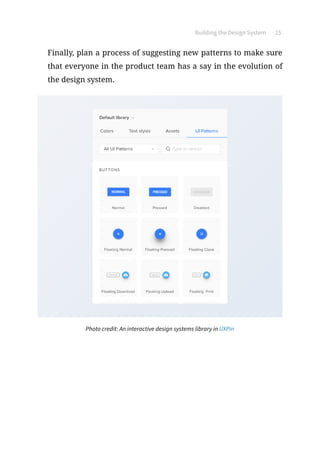
5.	 Create your interactive component library
Once you have the foundation well-defined, start adding your
approved interface patterns to the shared library. Keep them up-
dated and encourage the team to use them in every subsequent
project - your efficiency and consistency will improve drastically.
Building the Design System 15
Finally, plan a process of suggesting new patterns to make sure
that everyone in the product team has a say in the evolution of
the design system.
Photo credit: An interactive design systems library in UXPin
DESIGNSYSTEMS
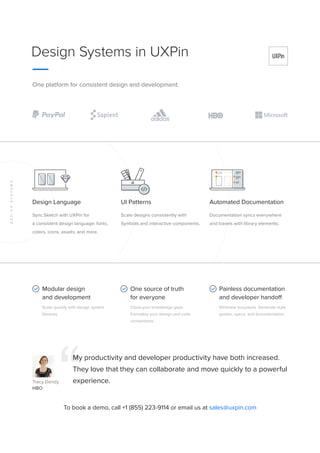
Design Systems in UXPin
One platform for consistent design and development.
Modular design
and development
Scale quickly with design system
libraries.
One source of truth
for everyone
Close your knowledge gaps.
Formalize your design and code
conventions.
Painless documentation
and developer handoff
Eliminate busywork. Generate style
guides, specs, and documentation.
Design Language
Sync Sketch with UXPin for
a consistent design language: fonts,
colors, icons, assets, and more.
UI Patterns
Scale designs consistently with
Symbols and interactive components.
Automated Documentation
Documentation syncs everywhere
and travels with library elements.
My productivity and developer productivity have both increased.
They love that they can collaborate and move quickly to a powerful
experience.Tracy Dendy
HBO
To book a demo, call +1 (855) 223-9114 or email us at sales@uxpin.com
Recommended Resources
Nathan Curtis
Design Systems Leaders and Managers
The Principles of Designing Systems
What Will Your Design Systems Deliver?
Contributions to Design Systems
Component QA in Design Systems
Patterns ≠ Components
Light  Dark Color Systems
Reference Designs for Systems
Tokens in Design Systems
Buttons in Design Systems
Color in Design Systems
Picking Parts, Product, and People: A Team Activity to Start a Design System
Right-Sizing the Rectangle: Grappling With Hierarchy in Design Systems
A Design System Isn’t a Project, It’s a Product Serving Products
Reduce, Reuse, and Recycle
A Design System’s Reach
The Component-Cut Up Workshop
Balancing Platforms in a Design System
Brad Frost
Atomic Design: The Online Guide
Recommended Resources 18
Dan Mall
Researching Design Systems
Selling Design Systems
Cooking With Design Systems
WeWork
Selling a Design System at Your Company
The Plasma Design System
Salesforce
Living Design Systems
The Lightning Design System is the Next Generation of Living Style Guides
Introducing Design System Ops
React JS and the Lightning Design System
Airbnb
Design Ops at Airbnb
Building a Visual Language
The Way We Build
Spotify
Design Doesn’t Scale
GE
The Predix Design System
Intuit
Intuit Design System Overview
Recommended Resources 19
Bottomline Technologies
Creating and Scaling Enterprise Design Systems
Beautiful Seams: Creating a Coherent Experience Across Products
Other
How to Construct a Design System
Design Systems in 2016
The Current State of Design Systems
Design Systems and Postel’s Law
How Designers Can Use Unit Testing to Build Resilient and Happy Design
Systems
What is Design Operations and Why Should You Care?
Component Workshops: Our One-Two Punch for Kicking Off a New Design
System
Object-Oriented UX
The Most Exciting Design Systems Are Boring
The Full-Stack Design System
Uxpin Why Build a Design System

Uxpin Why Build a Design System

  • 1.
    Why Build a DesignSystem? The Pocket Guide for Product Teams
  • 2.
    Copyright © 2017by UXPin Inc. All rights reserved. No part of this publication text may be uploaded or posted online without the prior written permission of the publisher. For permission requests, write to the publisher, addressed “Attention: Permissions Request,” to hello@uxpin.com. Why Build a Design System? The Pocket Guide for Product Teams
  • 3.
    Index The Challenges FacingProduct Teams Today 5 Conclusion7 Enter the Design System 8 The Single Source of Truth 9 The ROI of Design Systems 9 Building the Design System 11 Recommended Resources 17
  • 4.
    Marcin Treder Since co-foundingUXPin in 2010, he has helped build and lead prod- uct teams in the Poland and Silicon Valley office. Previously, he was a UX Manager at Grupa Nokaut, an enterprise ecommerce platform. He holds an M.A. in Psychology from the University of Gdansk. Jerry Cao Jerry Cao is a content strategist at UXPin where he gets to put his over- ly active imagination to paper every day. In a past life, he developed content strategies for clients at Brafton and worked in traditional ad- vertising at DDB San Francisco. In his spare time he enjoys playing elec- tric guitar, watching foreign horror films, and expanding his knowledge of random facts. Follow me on Twitter Authors
  • 5.
    The Challenges Facing ProductTeams Today As a product team grows, its processes become more difficult to manage. Without a standardized workflow or toolkit, the team’s inefficiencies and inconsistencies will eventually work their way back into the product. Software is often built by incredibly large teams of people. The challenge to create coherent experiences multiplies exponentially as more people are added to the mix. Over time, no matter how consistent or small a team is, different people will contribute new solutions and styles, causing experiences to diverge. Building a Visual Language, Karri Saarinen, Principal Designer and creator of Airbnb design system Based on working with thousands of customers around the world, we’ve seen four patterns emerge through the years.
  • 6.
    The Challenges FacingProduct Teams Today 6 1. Inconsistencies across products and platforms UX inconsistencies reduces the user’s efficiency, which devalues the product. Especially common in enterprise products that span different technology stacks, devices, and user groups, product inconsistency is nearly impossible to resolve until the company’s workflows are first addressed. 2. Lack of centralized assets leads to version control issues Because different design teams use different tools that don’t always integrate, nobody can truly guarantee that the right assets are all being used in projects at any given time. If the tools are desktop-based, version control issues become even more of a pain. Designers must follow a strict naming convention, otherwise the wrong assets will eventually make it to development. 3. Widening knowledge gaps between product teams Without a “golden source” of assets and best practices, different teams work off different guidelines and assumptions. Over time, product inconsistency is inevitable. 4. Inefficient processes lead to repetitive or wasted work Without a common toolkit for design and development, one-off solutions and repetitive work drain a team’s efficiency.
  • 7.
    The Challenges FacingProduct Teams Today 7 Iteration cycles planned for 1-2 weeks may require 2-3x the time because designers find themselves creating common elements and pages from scratch. The inefficiency multiplies as designers redline those assets for handoff and developers code up new solutions. Conclusion All of the above pain points are interconnected. To improve product consistency and team efficiency, it helps to con- solidate assets and workflows between designers and developers. Otherwise, the ongoing pain of unscalable design remains the reality. When I joined Spotify’s design team in 2012, the level of incon- sistency and fragmentation shocked me. Up-close, the treatment of type, colour, imagery, layout, IA, and interactions just didn’t seem to align anywhere. We concluded the fragmentation in the product was just reflecting the fragmentation in the team, that designers spread across so many different projects, timezones and competing timetables, just didn’t stand a chance. Design Doesn’t Scale, Stanley Wood, Design Director at Spotify
  • 8.
    Enter the DesignSystem Popularized by companies like Salesforce and Airbnb, design sys- tems give product teams a reusable, component-based approach to product development. A design system can create value on at least two levels. At the team level, it can create a more streamlined, predictable process that reduces design and engineering time. At the UX level it helps deliver consistency and predictability in the interface, and to raise the quality of the experience overall when designers and engineers are freed up to think about higher-order tasks. Selling Design Systems At Your Company, Nick Stamas, Creative Lead at WeWork
  • 9.
    Enter the DesignSystem 9 The Single Source of Truth A design system is more than just a style guide or pattern library – it’s the blueprint for product development. All the design principles, visual assets, and patterns are thoroughly documented. All code references are included for each piece of design. As a result, design can scale right alongside development. The ROI of Design Systems 1. Increased velocity and time to market A component-based toolkit accessible in one place allows for a more chunked-out Agile process, speeding up releases without compromising quality.
  • 10.
    Enter the DesignSystem 10 2. Increased product value Reusable components build upon each other, which creates a consistent look, feel, and behavior to the product. As consistency increases, so too does user efficiency. 3. Increased collaboration and knowledge sharing Because the shared design system includes approved assets and conventions, designers and developers are more autonomous without closing off into silos. 4. Less time and money wasted Because designers and developers aren’t caught up in redundant questions or repetitive work, they’re freed up for projects that deliver more business value. An estimated $1.5MM+ in annual savings or 21.25% time saved for a typical product development annual budget (based on on- shore/offshore team of 100 resources) What Is a Design System and What Are It’s Benefits? Projekt 202
  • 11.
    Building the DesignSystem Here’s the simple truth: you can’t innovate on products without first innovating the way you build them. The Way We Build, Karri Saarinen, Principal Designer and creator of Airbnb design system 1. Create your interface inventory To quickly identify current inconsistencies, start by creating an inventory of everything in your product UI: color palette, text styles, and UI patterns. The inventory is your strongest tool for selling the need for a design system. 1. Review the interface and code and list all the colors and text- styles you can find. 2. Take screenshots of UI patterns or copy patterns from your projects. Place all the screenshots in one place.
  • 12.
    Building the DesignSystem 12 3. Categorize your patterns by their purpose (e.g. buttons, form- fields, navigation etc). 4. Mark inconsistencies between the patterns and create a pre- sentation for your team. 2. Get buy-in from the team As you present the inconsistencies reflected in your interface in- ventory, emphasize the ROI of the design system. Engineers respond well to the source control, improved modu- larity, and increased autonomy. Business stakeholders respond well to the faster time to market, increased product value, and less resources wasted.
  • 13.
    Building the DesignSystem 13 3. Define your design principles Before you build your new system, create a set of general prin- ciples for a coherent experience. What universal values should designers to keep in mind? Photo credit: The design principles behind Salesforce Lightning Use your principles as a review heuristic for every new pattern proposed for the design system and every new project.
  • 14.
    Building the DesignSystem 14 4. Unify your visual design Think about the most fundamental and repetitive patterns in your interface. Colors, text-styles, icons will probably come to mind first. Perhaps also some interactive patterns (hover on clickable elements), border visual properties, or maybe animations? Discuss with the team to decide which version of these elements will be canonical. Then, document them as part of the system. Photo credit: Our internal design system created in UXPin. 5. Create your interactive component library Once you have the foundation well-defined, start adding your approved interface patterns to the shared library. Keep them up- dated and encourage the team to use them in every subsequent project - your efficiency and consistency will improve drastically.
  • 15.
    Building the DesignSystem 15 Finally, plan a process of suggesting new patterns to make sure that everyone in the product team has a say in the evolution of the design system. Photo credit: An interactive design systems library in UXPin
  • 16.
    DESIGNSYSTEMS Design Systems inUXPin One platform for consistent design and development. Modular design and development Scale quickly with design system libraries. One source of truth for everyone Close your knowledge gaps. Formalize your design and code conventions. Painless documentation and developer handoff Eliminate busywork. Generate style guides, specs, and documentation. Design Language Sync Sketch with UXPin for a consistent design language: fonts, colors, icons, assets, and more. UI Patterns Scale designs consistently with Symbols and interactive components. Automated Documentation Documentation syncs everywhere and travels with library elements. My productivity and developer productivity have both increased. They love that they can collaborate and move quickly to a powerful experience.Tracy Dendy HBO To book a demo, call +1 (855) 223-9114 or email us at sales@uxpin.com
  • 17.
    Recommended Resources Nathan Curtis DesignSystems Leaders and Managers The Principles of Designing Systems What Will Your Design Systems Deliver? Contributions to Design Systems Component QA in Design Systems Patterns ≠ Components Light Dark Color Systems Reference Designs for Systems Tokens in Design Systems Buttons in Design Systems Color in Design Systems Picking Parts, Product, and People: A Team Activity to Start a Design System Right-Sizing the Rectangle: Grappling With Hierarchy in Design Systems A Design System Isn’t a Project, It’s a Product Serving Products Reduce, Reuse, and Recycle A Design System’s Reach The Component-Cut Up Workshop Balancing Platforms in a Design System Brad Frost Atomic Design: The Online Guide
  • 18.
    Recommended Resources 18 DanMall Researching Design Systems Selling Design Systems Cooking With Design Systems WeWork Selling a Design System at Your Company The Plasma Design System Salesforce Living Design Systems The Lightning Design System is the Next Generation of Living Style Guides Introducing Design System Ops React JS and the Lightning Design System Airbnb Design Ops at Airbnb Building a Visual Language The Way We Build Spotify Design Doesn’t Scale GE The Predix Design System Intuit Intuit Design System Overview
  • 19.
    Recommended Resources 19 BottomlineTechnologies Creating and Scaling Enterprise Design Systems Beautiful Seams: Creating a Coherent Experience Across Products Other How to Construct a Design System Design Systems in 2016 The Current State of Design Systems Design Systems and Postel’s Law How Designers Can Use Unit Testing to Build Resilient and Happy Design Systems What is Design Operations and Why Should You Care? Component Workshops: Our One-Two Punch for Kicking Off a New Design System Object-Oriented UX The Most Exciting Design Systems Are Boring The Full-Stack Design System