1 
E-BALL TECHNOLOGY 
B.E. I.T Semester- V 
Prepared By Guided By 
Subhash S. Vadadoriya Mr. Uday K. Kakkad 
120590116011 CE/IT Department 
I.T. Rajkot. 
SUBMITTED TO 
G K Bharad Institute of Engineering 
Kasturbadham, Rajkot – Bhavnagar Highway, Rajkot – 360020. Gujarat – India. 
T +0281 2785159 | www.gkbharad.org | gkbharad1@gmail.com
2 
ACKNOWLEDGMENT 
The Acknowledgement is just like a drop in the ocean of the deep sense of 
gratitude within our heat for people who helped us out of most embarrassing part 
of our life when we were standing at most difficult step towards our dream of life. 
Many people have contributed to the success of this. Although a single 
sentence hardly suffices, I would like to thank Almighty God for blessing us with 
His grace. I extend my sincere and heartfelt thanks to Mr. N.C. Ranapara, Head 
of Department, Computer Engineering, for providing us the right ambience for 
carrying out this work. 
I am profoundly indebted to my seminar guide, Mr. Uday K. Kakkad for 
innumerable acts of timely advice, encouragement and I sincerely express my 
gratitude to him. 
I express my immense pleasure and thankfulness to all the teachers and staff 
of the Department of Computer Engineering for their cooperation and support. 
Last but not the least, I thank all others, and especially my classmates who in 
one way or another helped me in the successful completion of this work. 
Subhash S. Vadadoriya
3 
ABSTRACT 
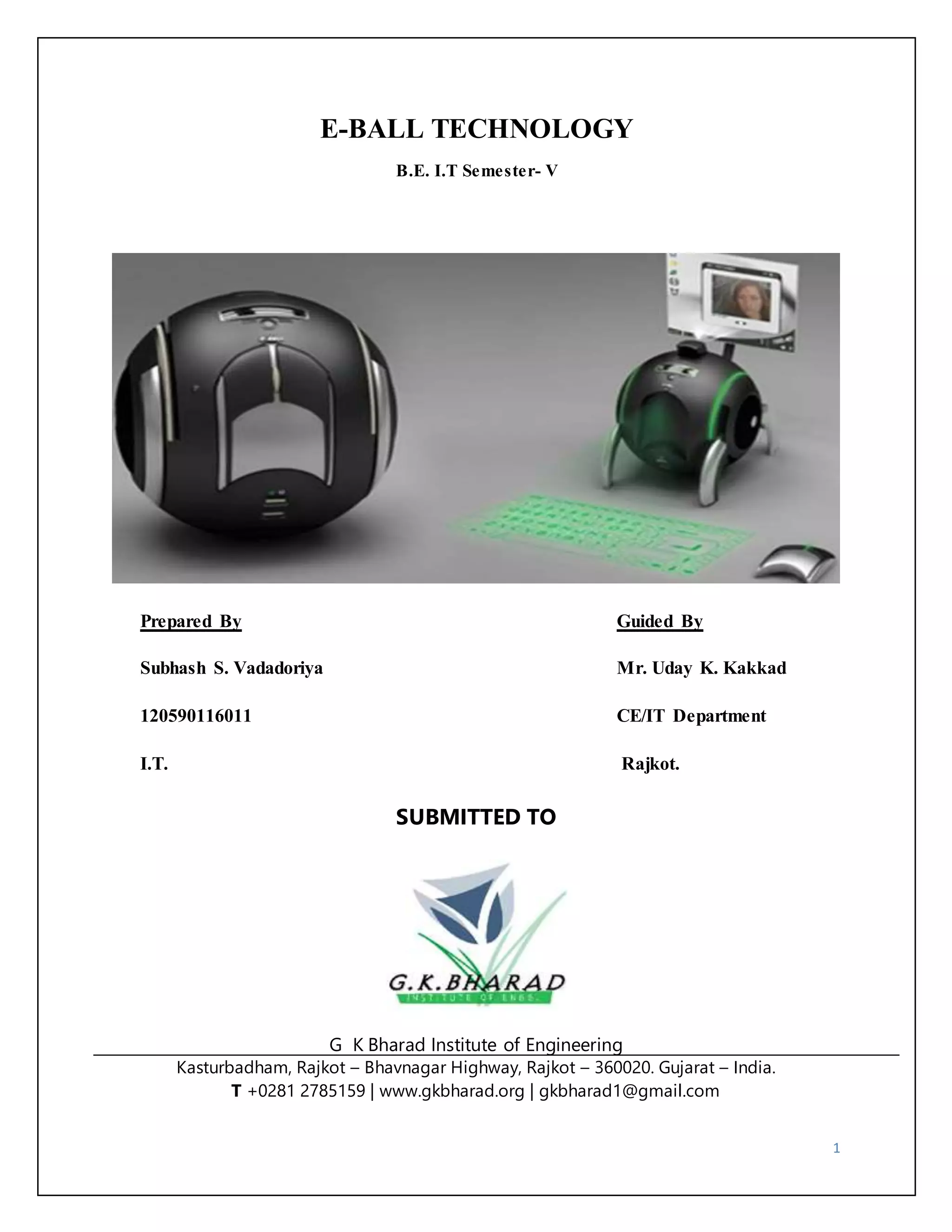
A new concept of pc is coming now that is E-Ball Concept pc. The E-Ball 
concept pc is a sphere shaped computer which is the smallest design among all the 
laptops and desktops. This computer has all the feature like a traditional computer, 
elements like keyboard or mouse, DVD, large screen display. E Ball is designed 
that pc is be placed on two stands, opens by pressing and holding the two buttons 
located on each side of the E-Ball pc, this pc is the latest concept technology. 
The E-Ball is a sphere shaped computer concept which is the smallest design 
among all the laptops and desktops have ever made. This PC concept features all 
the traditional elements like mouse, keyboard, large screen display, DVD recorder, 
etc…, all in an innovative manner. E-Ball is designed to be placed on two stands, 
opens by simultaneously pressing and holding the two buttons located on each 
side. After opening the stand and turning ON the PC, pressing the detaching mouse 
button will allow you to detach the optical mouse from the PC body. This concept 
features a laser keyboard that can be activated by pressing the particular button. E-Ball 
is very small, it is having only 6 inch diameter sphere. It is having 
120×120mm motherboard.
4 
INDEX 
1: INTRODUCTION 
1.1 Characteristics of Computer ……………..………………………………………………….. 7 
1.2 Evolution of Computer.....……… ……………………………….………………………….. 8 
1.3 Computer Generations ……………….…………………………………………………….... 9 
2: THE MEANING OF E-BALL TECHNOLOGY 
2.1 Defining E-Ball Technology …………..…………………………………………………… 13 
2.2 Features of E-Ball ………….………………………………………………………………. 14 
A) Processor ………..……………………………………………………………………….. 15 
B) Hard Drive ………………………………………………………………………………. 16 
C) RAM …………………………………………………………………………………….. 17 
D) Sound & Graphics Card ………………….……………………………………………… 18 
3: VIRTUAL KEYBOARD 
3.1 Virtual keyboard …………………..……………………………………………………….. 19 
3.2 Components ……………………………………………...………………………………… 20 
3.3 Advantages & Disadvantages ……………………………...………………………………. 21 
4: PROJECTOR USED IN E-BALL 
4.1 LCD Projectors …………………………………………………………………………….. 25 
4.2 DLP Projectors ……………….…………………………………………………………….. 27 
4.3 Comparison & Conclusion ……………………….………………………………………… 30
5 
5: WORKING OF E-BALL 
5.1 Working ………………….………………………………………………………………… 34 
5.2 If there is no wall …………………………………….…………………………………….. 36 
5.3 Scenario in Use …………..………………………………………………………………… 38 
5.4 Advantages & Disadvantages ……………………………………………………………… 39 
6: CONCLUSION 
Conclusion ……..……………………….……………………………………………………… 40 
7: REFERENCES 
References ……………………………..……..………………………………………………… 41
6 
INTRODUCTION 
The word “computer” comes from the word “compute”, which means, “to calculate”. 
Hence, people usually consider a computer to be a calculating device that can perform arithmetic 
operations at high speed. 
In fact, the original objective for inventing a computer was to create a fast calculating 
machine. However, more than 80% of work done by computers today is non-mathematical or 
non- numerical nature. Hence, to define a computer merely as a calculating device is to ignore 
over 80% of its functions. More accurately, we can define a computer as a device that operates 
upon data. Data can be anything like bio-data of applicants when computer is used for short 
listing candidates for recruiting; marks obtained by students in various subjects when used for 
preparing result; details (name, age, sex, etc.) of passengers when used for making airlines or 
railways reservations; or number of different parameters when used for solving scientific 
research problems, etc. 
Hence, data comes in various shapes and sizes depending upon the type of computer 
application. A computer can store, process, and retrieve data as and when desired. The fact that 
computers process data is so fundamental that many people have started calling it as data 
processor. 
The name data processor is more inclusive because modern computers not only compute 
in a usual sense but also perform other functions with data that flows to and from them. The 
activity of processing data using computer is called data processing. Data processing consists of 
three sub-activities: capturing input data, manipulating the data, and managing output results. 
Data is basically a raw material used as input to data processing and information is processed 
data obtained as output of data processing.
7 
1.1 CHARACTERISTICS OF COMPUTERS 
Increasing popularity of computers has proved that it is very powerful and useful tool. 
The power and usefulness of this popular tool are mainly due to its following characteristics 
A) AUTOMATIC 
An automatic machine works by itself without human intervention. Computers are 
automatic machines because once started on a job, they carry out the job until it is finished. 
However, computers being machines cannot start themselves and cannot go out and find 
problems and solutions. We need to instruct a computer using coded instructions that specify 
how it will do a particular job. 
B) SPEED 
A computer is a very fast device. It can perform in a few seconds, the amount of work 
that a human being can do in an entire year. While talking about speed of a computer we do not 
talk in terms of seconds or milliseconds but in terms of microseconds, nanoseconds and even 
picoseconds. A powerful computer is capable of performing several billion simple arithmetic 
operations per second. 
C) ACCURACY 
In addition to being very fast, computers are very accurate. Accuracy of a computer is 
consistently high and the degree of its accuracy depends upon its design. A computer performs 
every calculation with the same accuracy. 
D) VERSATILITY 
Versatility is one of the most wonderful things about computer. One moment it is 
preparing result of an examination, next moment it is busy preparing electricity bills etc. In brief, 
a computer is capable of performing almost any task, if the task can be reduced to a finite series 
of logical steps.
8 
E) DILIGENCE 
Unlike human beings, a computer is free from monotony, tiredness, and lack of 
concentration. It can continuously work for hours without creating any error and without 
grumbling. Hence, computer score over human beings in doing routing type jobs that require 
great accuracy. 
1.2 EVOLUTION OF COMPUTERS 
A) 1623: Mechanical calculator Wilhelm Schickard invented first known mechanical calculator, 
capable of simple arithmetic. Similar mechanical adding machine made in 1640’s by Blaise 
Pascal. 
B) 1673: More advanced mechanical calculator.1673byGerman mathematician Gottfried Leibniz 
Capable of multiplication and division purely mechanical with no source of power. 
C) 1823: Charles Babbage begins work on Difference Engine. He designed, but it was completed 
by a Swedish inventor in 1854. Image of the Difference Engine from Niagara College 
D) 1833: Charles Babbage begins Analytical Engine Never completed. Important concept: a 
general-purpose machine capable of performing difference functions based on programming. 
E) 1834: Ada Byron, Lady Lovelace impressed with the concept of the Analytical Engine at a 
dinner party. Daughter of poet Lord Bryan Created plans for how the machine could calculate 
Bernoulli numbers. This is regarded as the first “computer program," and she is the first 
"programmer. “The Department of Defense named a language “Ada” in her honor in 1979. 
F) 1890: Punched cards used by Herman Hollerith to automate Census Concept of programming 
the machine to perform different tasks with punched cards were from Babbage. Punch cards 
based on Joseph Marie Jacquard’s device to automate weaving looms. Hollerith founded a 
company that became International Business Machines (IBM) to market the technology.
G) 1946: ENIAC completed Electronic Numerical Integrator and Computer. By Prosper Eckert 
and John Mauchly 18,000 vacuum tubes, occupied a 30 by 50 foot room Programming by 
plugging wires into a patch panel. Very difficult to do, because this style programming requires 
intimate knowledge of the computer 
9 
1.3 COMPUTER GENERATIONS 
The history of computer development is often referred to in reference to the different 
generations of computing devices. Each generation of computer is characterized by a major 
technological development that fundamentally changed the way computers operate, resulting in 
increasingly smaller, cheaper, and more powerful, and more efficient and reliable devices. 
First Generation (1940-1956) Vacuum Tubes 
The first computers used vacuum tubes for circuitry and magnetic drums for memory, 
and were often enormous, taking up entire rooms. They were very expensive to operate and in 
addition to using a great deal of electricity, generated a lot of heat, which was often the cause of 
malfunctions. 
First generation computers relied on machine language, the lowest-level programming 
language understood by computers, to perform operations, and they could only solve one 
problem at a time. Input was based on punched cards and paper tape, and output was displayed 
on printouts. 
The UNIVAC and ENIAC computers are examples of first-generation computing 
devices. The UNIVAC was the first commercial computer delivered to a business client, the U.S. 
Census Bureau in 1951. Figure shows first generation computer.
10 
Second Generation (1956-1963) Transistors 
Transistors replaced vacuum tubes and ushered in the second generation of computers. 
The transistor was invented in 1947 but did not see widespread use in computers until the late 
1950s. The transistor was far superior to the vacuum tube, allowing computers to become 
smaller, faster, cheaper, more energy-efficient and more reliable than their first-generation 
predecessors. Though the transistor still generated a great deal of heat that subjected the 
computer to damage, it was a vast improvement over the vacuum tube. Second-generation 
computers still relied on punched cards for input and printouts for output. Second-generation 
computers moved from cryptic binary machine language to symbolic, or assembly, languages, 
which allowed programmers to specify instructions in words. High-level programming languages 
were also being developed at this time, such as early versions of COBOL and FORTRAN. These 
were also the first computers that stored their instructions in their memory, which moved from a 
magnetic drum to magnetic core technology. The first computers of this generation were 
developed for the atomic energy industry. Figure (b) shows second generation computer 
Third Generation (1964-1971) Integrated Circuits 
The development of the integrated circuit was the hallmark of the third generation of 
computers. Transistors were miniaturized and placed on silicon chips, called semiconductors, 
which drastically increased the speed and efficiency of computers. Instead of punched cards and 
printouts, users interacted with third generation computers through keyboards and monitors and 
interfaced with an operating system, which allowed the device to run many different applications 
at one time with a central program that monitored the memory. Computers for the first time
became accessible to a mass audience because they were smaller and cheaper than their 
predecessors Figure (c) shows second generation computer. 
11 
Fourth Generation (1971-Present) Microprocessors 
The microprocessor brought the fourth generation of computers, as thousands of 
integrated circuits were built onto a single silicon chip. What in the first generation filled an 
entire room could now fit in the palm of the hand. The Intel 4004 chip, developed in 1971, 
located all the components of the computer—from the central processing unit and memory to 
input/output controls—on a single chip. In 1981 IBM introduced its first computer for the home 
user, and in 1984 Apple introduced the Macintosh. Microprocessors also moved out of the realm 
of desktop computers and into many areas of life as more and more everyday products began to 
use microprocessors. As these small computers became more powerful, they could be linked 
together to form networks, which eventually led to the development of the Internet Fourth 
generation computers also saw the development of GUIs, the mouse and handheld devices. 
Figure (d) shows second generation computer
12 
Fifth Generation (Present and Beyond) Artificial Intelligence 
Fifth generation computing devices, based on artificial intelligence, are still in 
development, though there are some applications, such as voice recognition, that are being used 
today. The use of parallel processing and superconductors is helping to make artificial 
intelligence a reality. Quantum computation and molecular and nanotechnology will radically 
change the face of computers in years to come. The goal of fifth-generation computing is to 
develop devices that respond to natural language input and are capable of learning and self-organization.
2: THE MEANING OF E-BALL TECHNOLOGY 
13 
2.1 DEFINING E-BALL TECHNOLOGY 
Aren’t you tired of your PC? By his ugly shape and the way that it looks? Well, this is 
exactly what designer Apostol Tnokovski was feeling when he decided to create the smallest PC 
ever made. 
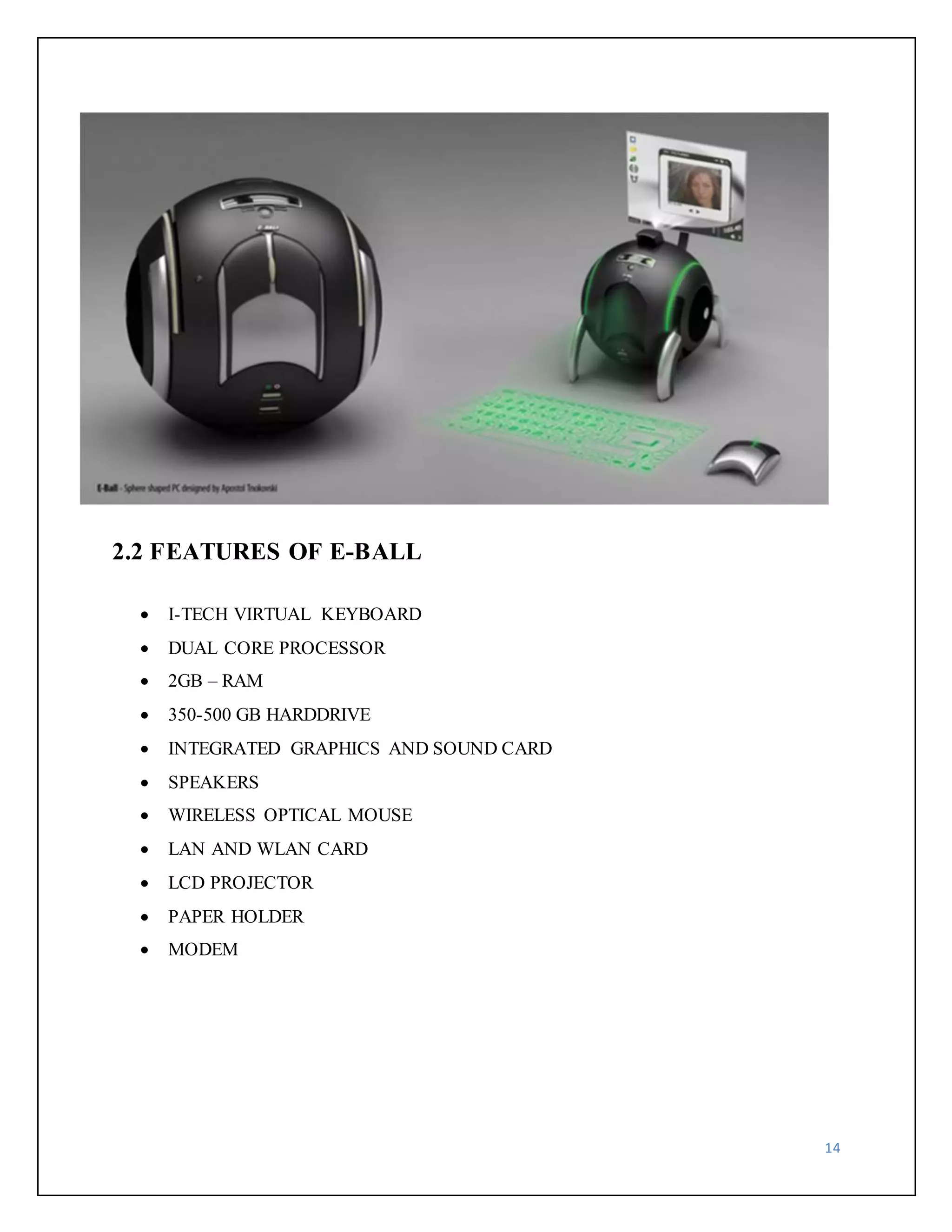
Apostol Tnokovski introduced a new pc that is E-Ball Concept pc. The E-Ball concept pc 
is a sphere shaped pc which is the smallest design among all the laptops and desktops. This 
computer has all the feature like a traditional computer, elements like keyboard, mouse, DVD, 
large screen display etc. 
E-Ball is designed to be placed on two stands, opens by simultaneously pressing and 
holding the two buttons located on each side. E Ball concept pc don't have any external display 
unit. 
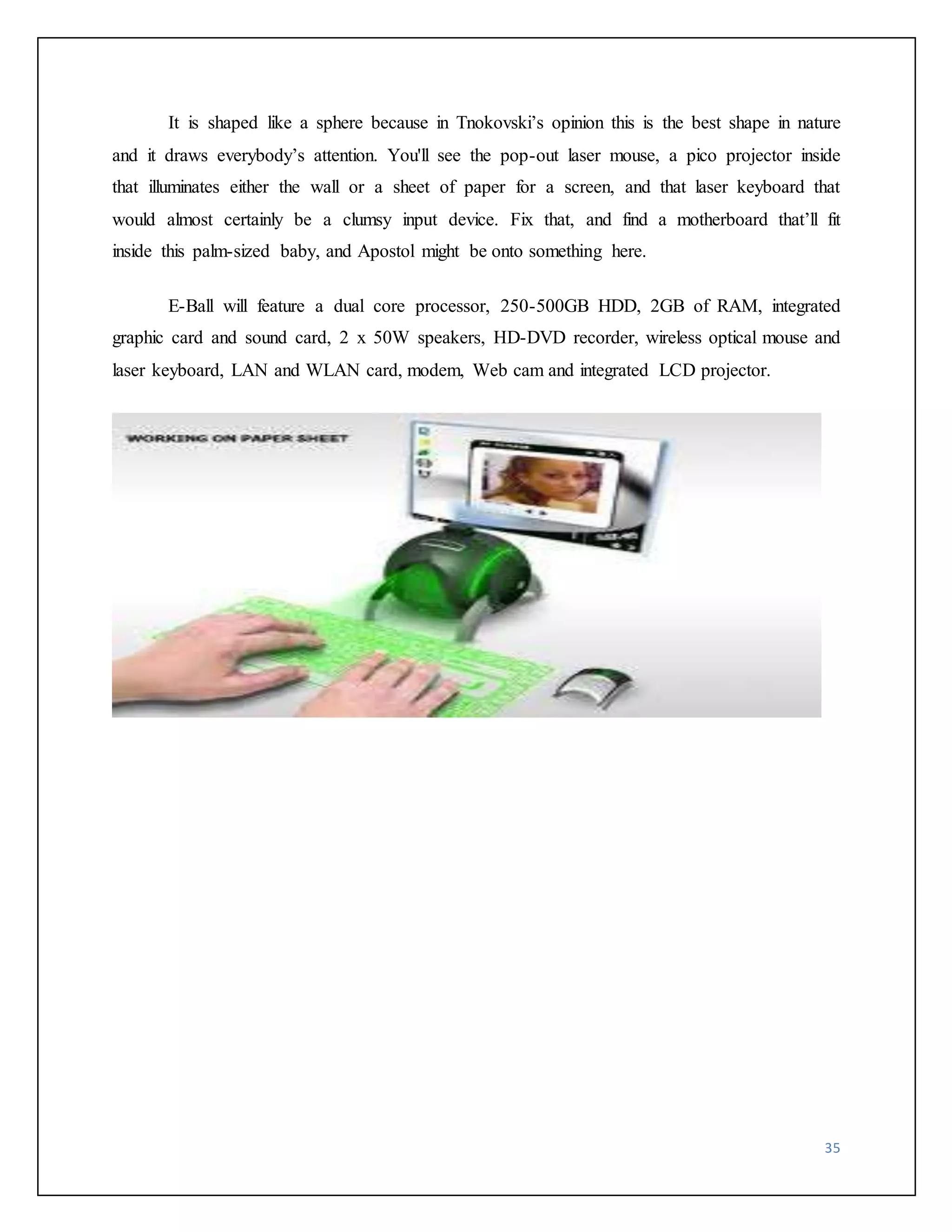
It has a button when you press this button a projector will pop and it focus the computer 
screen on the wall which can be adjusted with navigation keys. This concept PC will measure 
160mm in diameter and it was designed for Microsoft Windows OS. 
For the moment there is no word on pricing or when it’s going to be available, however, I 
am sure that everybody would like to see a small spherical PC like this E-BALL shape is 
spherical because in Tnokovski’s opinion this is the best shape in nature and it draws everybody’s 
attention. 
E-Ball will feature a dual core processor, 250-500GB HDD, 2GB of RAM, integrated 
graphic card and sound card, 2 x 50W speakers, HD-DVD recorder, wireless optical mouse and 
laser keyboard, LAN and WLAN card, modem, Web cam and integrated LCD projector.
14 
2.2 FEATURES OF E-BALL 
 I-TECH VIRTUAL KEYBOARD 
 DUAL CORE PROCESSOR 
 2GB – RAM 
 350-500 GB HARDDRIVE 
 INTEGRATED GRAPHICS AND SOUND CARD 
 SPEAKERS 
 WIRELESS OPTICAL MOUSE 
 LAN AND WLAN CARD 
 LCD PROJECTOR 
 PAPER HOLDER 
 MODEM
15 
A) PROCESSOR 
Intel Core is a brand name used for various mid-ranges to high-end consumer and business 
microprocessor made by Intel. The current lineup of Core processors includes the latest 
following processors: 
Intel Core i7 Intel Core i5 
Intel Core i3 Intel Core 
Intel Core Intel Core 2 Duo 
Intel Core 2 Solo Intel Core 2 Quad 
The e-ball pc basically uses Intel core 2 Duo processor. Figure shown below shows the Intel core 
2 duo process
16 
B) RAM 
RAM stands for Random Access memory. It gets the word “random” because 
information can be accessed in non-sequential order. Though the data itself is stored tighter, it 
could be anywhere in the “container” or amount of RAM available. RAM is measure in “bits”, 
and 8 bits equal to 1 byte. A kilobyte is equal to 1024 bits, and megabyte is equal to 1024 
kilobyte. The E-BALL pc uses 2 GB of RAM. 
1) SRAM don’t require external refresh circuitry 
2) SRAM is faster than DRAM. 
3) SRAM is more power-efficient when idle. 
4) SRAM is several times more expensive than DRAM
17 
C) HARD DRIVE 
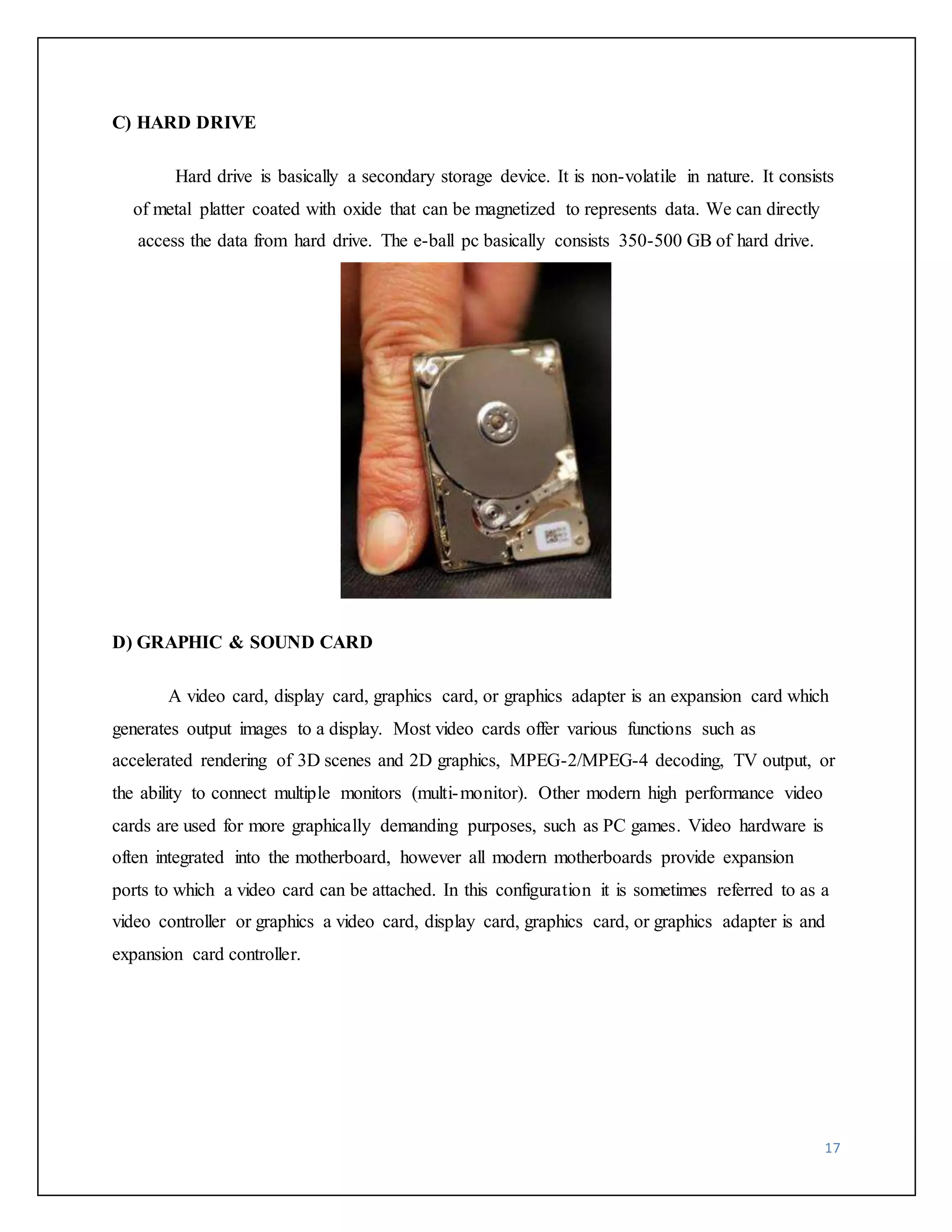
Hard drive is basically a secondary storage device. It is non-volatile in nature. It consists 
of metal platter coated with oxide that can be magnetized to represents data. We can directly 
access the data from hard drive. The e-ball pc basically consists 350-500 GB of hard drive. 
D) GRAPHIC & SOUND CARD 
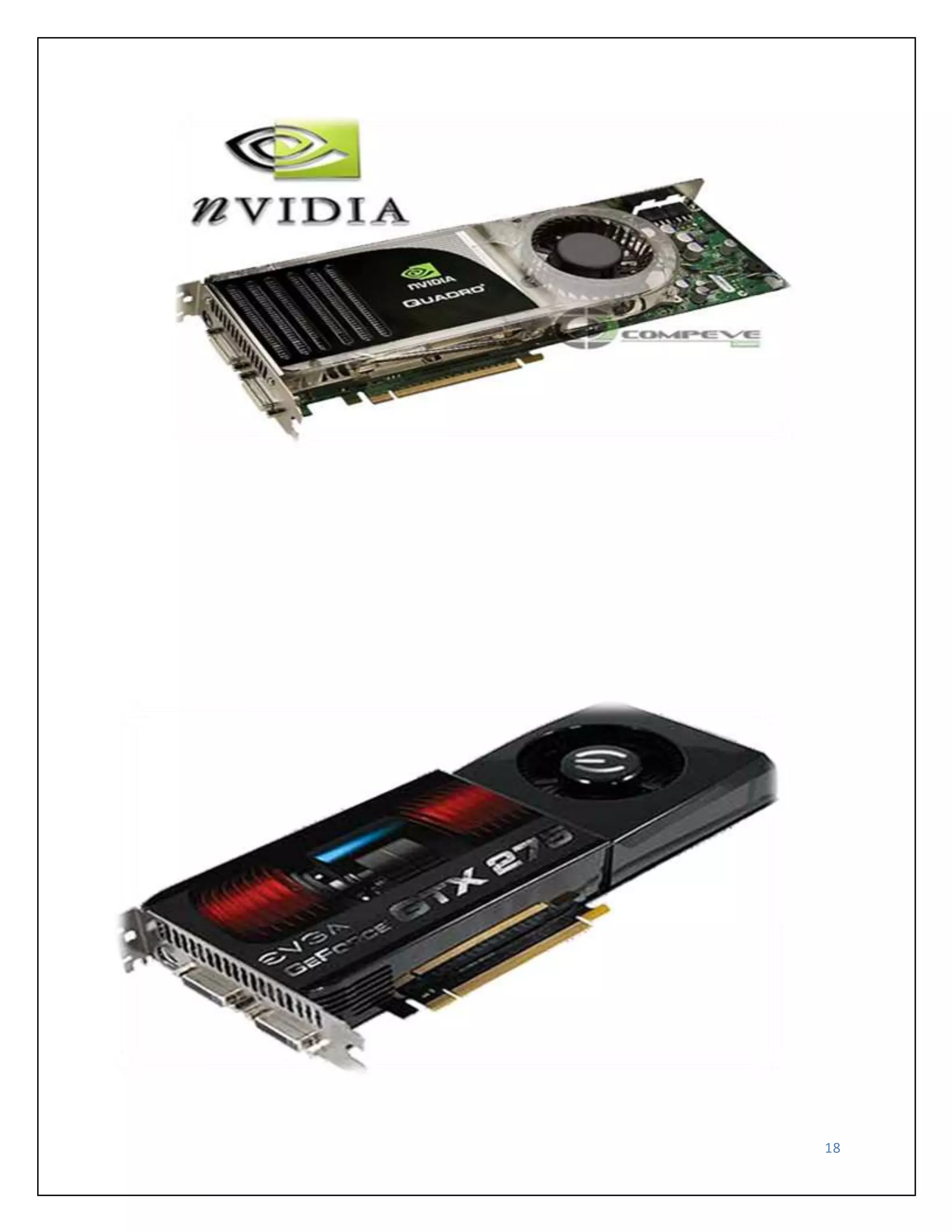
A video card, display card, graphics card, or graphics adapter is an expansion card which 
generates output images to a display. Most video cards offer various functions such as 
accelerated rendering of 3D scenes and 2D graphics, MPEG-2/MPEG-4 decoding, TV output, or 
the ability to connect multiple monitors (multi-monitor). Other modern high performance video 
cards are used for more graphically demanding purposes, such as PC games. Video hardware is 
often integrated into the motherboard, however all modern motherboards provide expansion 
ports to which a video card can be attached. In this configuration it is sometimes referred to as a 
video controller or graphics a video card, display card, graphics card, or graphics adapter is and 
expansion card controller.
18
19 
3: VIRTUAL KETBOARD 
3.1 VIRTUAL KEYBOARD 
Virtual Keyboard is just another example of today’s computer trend of ‘smaller and 
faster’. It uses sensor technology and artificial intelligence to let users work on any surface as if 
it were a keyboard. 
Virtual Keyboard is a small Java application that lets you easily create multilingual text 
content on almost any existing platform and output it directly to web pages. Virtual Keyboard, 
being a small, handy, well-designed and easy to use application, turns into a perfect solution for 
cross platform multilingual text input. 
The main features are: platform-independent multilingual support for keyboard text input, 
built-in language layouts and settings, copy/paste etc. operations support just as in a regular text 
editor, already existing system language settings remain intact, easy and user-friendly interface 
and design, and small file size.
The Virtual Keyboard uses light to project a full-sized computer keyboard onto almost 
any surface, and disappears when not in use. Used with Smart Phones and PDAs, the Virtual 
Keyboard (TM) provides a practical way to do email, word processing and spreadsheet tasks, 
allowing the user to leave the laptop computer at home. 
Virtual Keyboard technology has many applications in various high-tech and industrial 
Sectors. These include data entry and control panel applications in hazardous and harsh 
environments and medical markets. 
Projection key boards or virtual key boards claim to provide the convenience of 
compactness with the advantages of a full-blown QWERTY keyboard. An interesting use of such 
keyboards would be in sterile environments where silence or low noise is essential like operation 
theaters. The advantage of such a system is that you do not need a surface for typing, you can 
even type in plain air. The company's Virtual Keyboard is designed for anyone who's become 
frustrated with trying to put information into a handheld but doesn't want to carry a notebook 
computer around. There is also the provision for a pause function to avoid translating extraneous 
hand movement’s function, so that users can stop to eat, drink etc.… 
20 
3.2 COMPONENTS 
This system comprises of three modules, 
1. The sensor module 
2. IR-light source 
3. The pattern projector
21 
1) SENSOR MODULE 
The Sensor Module serves as the eyes of the Keyboard Perception technology. The 
Sensor Module operates by locating the user's fingers in 3-D space and tracking the intended 
keystrokes, or mouse movements. Mouse tracking and keystroke information is processed and 
can then be output to the host device via a USB or other interface. 
Electronic Perception Technology: 
Electronic perception technology enables ordinary electronic devices to “see” the world 
around them so they can perceive and interact with it. Now everyday electronic devices in a 
variety of markets can perceive users actions, gaining functionality and ease of use. 
The tiny electronic perception chips and embedded software work by developing a 3D 
“distance map” to nearby objects in real-time. This information is factored through an on-chip 
processor running imaging software that translates the image into defined events before sending 
it off-chip for application-specific processing. It’s an action that is continually repeated, 
generating over 30 frames of 3D information per second. 
Electronic perception technology has a fundamental advantage over classical image 
processing that struggles to construct three-dimensional representations using complex 
mathematics and images from multiple cameras or points of view. This single chip “contour 
mapping” approach results in a high reduction of complexity, making it possible to embed the 
application independent processing software directly into the chips themselves – so they may be 
used in the most modestly-priced, and even pocket-sized electronic devices. 
2) IR-LIGHT SOURCE 
The Infrared Light Source emits a beam of infrared light. This light beam I designed to 
overlap the area on which the keyboard pattern projector or printed image resides. This is done 
so as to illuminate the user’s fingers by the infra-red light beam. This helps in recognizing the 
hand movements and the pressing of keys. The light beam facilitates in scanning the image. 
Accordingly the information is passed on to the sensor module which decodes the information. 
An invisible infra-red beam is projected above the virtual keyboard. Finger makes keystroke on 
virtual keyboard. This breaks infrared beam and infrared light is reflected back to projector. 
Reflected infrared beam passes through infrared filter to camera. The camera photographs angle
of incoming infrared light. The Sensor chip in the sensor module determines where the infrared 
beam was broken, detected co-ordinates determine actions or characters to be generated. 
22 
3) THE PATTERN PROJECTOR 
The Pattern Projector or optional printed image presents the image of the keyboard or 
mouse zone of the system. This image can be projected on any flat surface. 
The projected image is that of a standard qwerty-keyboard, with all the keys and control 
functions as in the keyboard. 
The Projector features a wide-angle lens so that a large pattern can be projected from 
relatively low elevations. A printed image, with replaceable templates allows system flexibility, 
permitting most any kind of keyboard configuration for greater functionality.
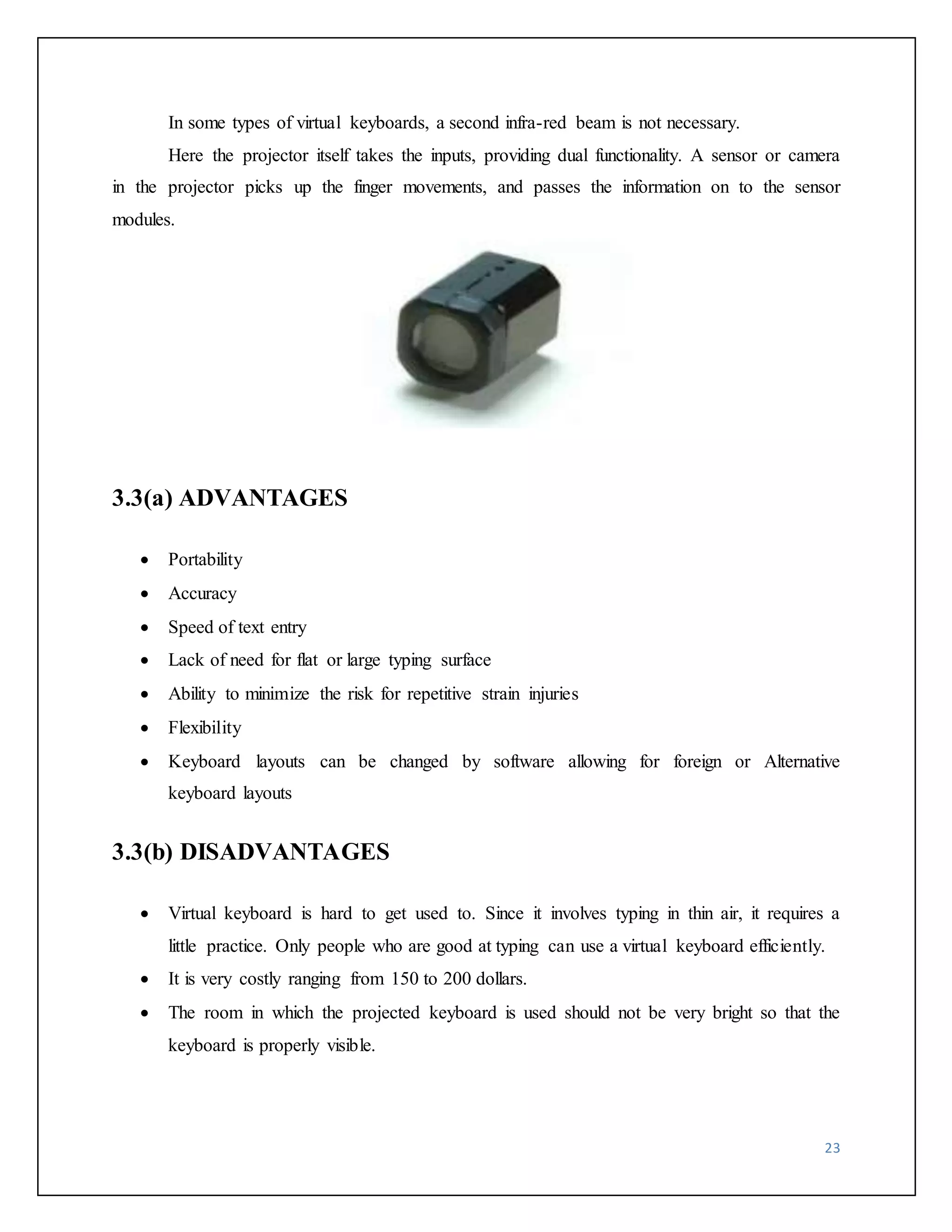
In some types of virtual keyboards, a second infra-red beam is not necessary. 
Here the projector itself takes the inputs, providing dual functionality. A sensor or camera 
in the projector picks up the finger movements, and passes the information on to the sensor 
modules. 
23 
3.3(a) ADVANTAGES 
 Portability 
 Accuracy 
 Speed of text entry 
 Lack of need for flat or large typing surface 
 Ability to minimize the risk for repetitive strain injuries 
 Flexibility 
 Keyboard layouts can be changed by software allowing for foreign or Alternative 
keyboard layouts 
3.3(b) DISADVANTAGES 
 Virtual keyboard is hard to get used to. Since it involves typing in thin air, it requires a 
little practice. Only people who are good at typing can use a virtual keyboard efficiently. 
 It is very costly ranging from 150 to 200 dollars. 
 The room in which the projected keyboard is used should not be very bright so that the 
keyboard is properly visible.
24 
APPLICATIONS 
 High-tech and industrial Sectors 
 Used with Smart phones, PDAs, email, word processing and spreadsheet tasks 
 Operation Theatres 
 as computer/PDA input 
 Gaming control 
 TV remote control
25 
4: PROJECTOR USED IN E-BALL 
4.1 LCD PROJECTORS 
LCD projectors are systems that display or project information or video onto a 
surface. LCD stands for liquid crystal display, the technology used to project images. They are 
the technological descendants of overhead and slide projectors, older systems which serve the 
same purpose. They are most commonly used for displaying images in presentations or lectures, 
but are also used in home theaters. 
Video signals are comprised of three colors: red, green, and blue. LCD projectors contain 
a separate glass panel for each. Each panel consists of two plates of glass with a layer of liquid 
crystal between them. When a charge is applied, the crystals open to allow light through or close 
to block it. This opening and closing of pixels is what forms the image. 
These devices use dichroic mirrors to split the light from the input source into red, green, 
and blue components. Each then passes through the corresponding panel, where pixels form an 
image. The three colors are then recombined in a prism before being projected through a lens. 
LCD projectors use separate panels for each color because it results in better color saturating 
than using a single panel for all three.
LCD projectors employ a three-panel LCD (Liquid Crystal Display) system, referred to 
as 3LCD. LCD projectors crisply reproduce bright, naturally colored images that are easy on the 
eyes. LCD projectors are also capable of detailed shadow reproduction that is ideal for 
demanding business and home theater applications. 
The white light from the projector lamp is split into red, green, and blue components 
using two dichroic mirrors, special mirrors that only transmit light of a specified wavelength. 
Each red, green and blue beam then passes through a dedicated LCD panel made up of thousands 
of miniscule pixels. An electrical current turns the panel's pixels on or off to create the grayscale 
equivalent of that color channel. The three colors are then recombined in a prism and projected 
through the projector lens and onto the screen. 
By using a combination of three LCDs to produce a final image, LCD projectors are 
capable of billions of colors and smooth grayscale gradations. The resolution of the image is 
determined by the number of pixels in the LCD panels used. Currently LCD panels offer 
resolutions as high as true HD (1920 x 1080) for home theater applications. New panels 
promise resolutions as high as 4K (3840 x 2160). 
26
LCDs are not just found in projectors. They are found in many of the electronics you 
use every day, from a cell phone to an MP3 player to your digital alarm clock. LCDs are very 
common because they offer distinct advantages: they are thinner, lighter, and draw less power 
than many competing display technologies. A reliable, sophisticated technology with universal 
appeal, 3LCD is the world's most popular projection technology, delivering high quality 
images for the most demanding business and consumer audiences. 
27 
ADVANTAGES 
 LCD is generally more light efficient than DLP. 
 LCD projectors can project bright, vivid images with a low output lamp. 
 1000 lumen LCD is more preferred than 1200 lumen DLP. 
 LCD trends to produce a sharper image. 
 More accurate color. 
 Sharper image. 
 LCD also delivers a somewhat sharper image than DLP at any given resolution. 
 Another benefit of LCD is that it is more light-efficient. 
 One benefit of LCD is that it controls red, green, and blue independently through. 
DISADVANTAGES 
 More bulky as there are more internal components. 
 Dead pixels. 
 DLC panel can fail. 
 Screen door effect. 
 Contrast. 
 Portability. 
 Image degradation. 
 LCD competes extremely well when high light output is required.
28 
4.2 DLP PROJECTORS 
DLP stands for Digital Light Processing. 
A video projection technology, developed by Texas Instruments, that utilizes a chip, 
referred to as a DMD (Digital Micro mirror Device). In essence, every pixel on a DMD chip is a 
reflective mirror. 
The video image is displayed on the DMD chip. The micro mirrors on the chip 
(remember: each micro mirror represents one pixel) then tilt very rapidly as the image changes. 
This process produces the grayscale foundation for the image. Then, color is added as 
light passes through a high-speed color wheel and is reflected off of the micro mirrors on the 
DLP chip as they rapidly tilt towards or away from the light source. The degree of tilt of each 
micro mirror coupled with the rapidly spinning color wheel determines the color structure of the 
projected image. As the amplified light bounces off the micro mirrors, it is sent through the lens 
and can be projected on a large screen. 
Another way that DLP is implemented is to utilize a separate DLP chip for each primary 
color. Light from a single source is passed through a prism, which creates separate red, green, 
and blue light sources, then reflected on each of the chips designated for each primary color, and 
from there, projected onto a screen. This application very expensive, in comparison to the color 
wheel method, and is used only in higher-end consumer and commercial DLP projectors. 
This technology is used in both rear-projection televisions and in separate video 
projector, screen applications.
29 
ADVANTAGES 
 Portability 
 Higher contrast 
 Reduced pixilation 
 Reliability 
 Sealed optics this makes it better for use in dusty environment 
 Less screen door effects 
 Since the DLP light engine consists of a single chip rather than three LCD panels, DLP 
Projectors tend to be more compact. 
 Another DLP advantage is that it can produce smooth, high contrast video. 
DISADVANTAGES 
 Rainbow effect 
 Light leakage 
 High cost
30 
4.3 COMPARISON AND CONCLUSION 
1: Pixelization (fill factor) 
DLP = Seam-less, Film-like. 
LCD = Grainy, Pixelated. 
2: Contrast Ratio 
DLP = Simple optics, easier light management 
LCD = Complex optics, more difficult light management 
3: Video Quality 
DLP = Fast switching, minimal lag 
LCD = Slow switching, significant lag 
4: Sharpness 
DLP =No misalignment 
LCD =Misalignment likely over time 
5: Color Quality 
DLP = Can match any LCD color gamut 
LCD = can’t match any DLP color gamut 
R, G, B, bandwidth is depend on each color because of non – sequential system.
31 
6: Smallest & Brightest 
DLP = Simple optical system, good reflectivity. 
LCD = Complex optical system 
7: Repeatable Performance 
DLP = Digital, precise control, constant performance over time. 
LCD = Analog, variable, affected by temperature, vibration, heat, humidity, 
Deterioration over time. 
8: Reliable 
DLP = Reflects heat 
LCD = Absorbs heat, performance degrades 
While both technologies have produced improvements in contrast in the past year, and 
Sanyo's new PLV-70 is rated at 900:1. Meanwhile, the latest DLP products geared toward home 
theater are rated has high as 1800:1. However, one should not place too much emphasis on the 
specs. In reality, though the difference between projectors rated at 400:1 vs. 800:1 is quite 
noticeable, the difference is not so dramatic between products rated at 900:1 vs. 1800:1. Once 
you get to contrast ranges of 900:1 or higher, blacks appear as solid black and shadow details 
resolve quite nicely. Increased contrast can yield relatively subtle improvements, but there are 
other factors which contribute to image quality that become equally if not more important. 
Reduced pixilation is another benefit of DLP. LCDs were always known for their visible pixel 
structure, often referred to as the screen door effect because it appears as though the picture is 
being viewed through a screen door. 
Historically, LCD technology has had a hard time being taken seriously among many 
home theater enthusiasts (quite understandably) because of this flaw in the image. DLP 
technology went a long way toward eliminating the screen door effect. In SVGA (800x600)
resolution, DLP projectors have either a muted pixel structure or an invisible pixel structure 
depending upon the size of the projected image relative to the viewing distance (the larger the 
image the more visible the pixels). Conversely, 
SVGA-resolution LCD projectors uniformly have a clearly visible pixel grid at just about 
any screen image size. For this reason, we don't recommend SVGA-resolution LCD projectors 
for home theater use except for those on the most limited of budgets. Three developments have 
served to close the gap between DLP and LCD in the area of pixel visibility. First was the step 
up to XGA resolution (1,024x768). This higher resolution uses 64% more pixels to paint the 
image on the screen, as compared to an SVGA-resolution projector. The inter-pixel gaps are 
reduced in XGA resolution, so pixels are denser and less visible. In XGA resolution, DLP 
projectors have an invisible pixel grid on any typical home theater screen no matter how big. 
LCD projectors with standard XGA panels still have a visible, but much reduced screen door 
effect. Second, the inter-pixel gaps on all LCD machines, no matter what resolution, are reduced 
compared to what they use to be. So even the inexpensive SVGA-resolution LCD projectors 
have less screen door effect than they used to. 
The third development in LCDs was the use of Micro-Lens Array (MLA) to boost the 
efficiency of light transmission through XGA-resolution LCD panels. Some XGA-class LCD 
projectors have this feature, but most do not. For those that do, MLA has the happy side effect of 
reducing pixel visibility a little bit as compared to an XGA LCD projector without MLA. On 
some projectors with this feature, placing the focus just a slight hair off perfect, a practice The 
Current State of the Art DLP maintains its lead in contrast performance, while LCD projector 
makers have continued to emphasize latent advantages in color fidelity and image sharpness for 
data display. DLP color has improved of late, and color accuracy on the latest models is much 
better than it used to be. Both LCD and DLP are evolving rapidly to the benefit of the consumer. 
The race for miniaturization has produced smaller yet more powerful projectors than we might 
have even imagined possible just a couple of years ago. Light output per pound has increased 
dramatically. And video quality on the best LCD and DLP projectors now surpasses that 
available in a commercial movie theater. 
32
When it comes to home theater, DLP has continued to make competitive advances in 
color, contrast, and image stability that have served to establish DLP as the preferred technology 
for video. But the fact is that both DLP and LCD continue to improve, and both are capable of 
delivering higher quality video for home theater than they ever were before. Which technology is 
the best? When comparing DLP to LCD in a home theater environment DLP is the winner. 
Better blacks and the removal of the screen door effect making the DLP an obvious choice. 
33
34 
5: WORKING OF E-BALL 
5.1 WORKING 
E Ball concept pc don't have any external display unit, It has a button when you press this 
button a projector will pop and it focus the computer screen on the wall which can be adjusted 
with navigation keys. 
If there is no wall then it has a paper sheet holder that divides into three pieces like an 
umbrella just after popping up, and it will show desktop on the paper sheet. Also, the E-Ball PC 
supports a paper holder and the paper sheet on the holder could act like a screen where you can 
watch movies or something. 
This concept PC will measure 160mm in diameter and it was designed for Microsoft 
Windows OS, sorry about the others. For the moment there is no word on pricing or when it’s 
going to be available, however, I am sure that everybody would like to see a small spherical PC 
like this one. 
E-Ball concept pc has a laser keyboard that is fully a concept keyboard that is visible 
when the pc is in working. The keyboard is not physical - it is interpreted by lasers that appear 
after you press the respective button. It recognizes your fingers with the help of an IR sensor 
when you are typing at a particular place, while the mouse is a pop out wonder making this an 
unique piece of technology. 
The software interface of E-Ball concept pc is highly stylized with icons that can be 
remembered easily that support all type of windows operating system. E-Ball concept pc work 
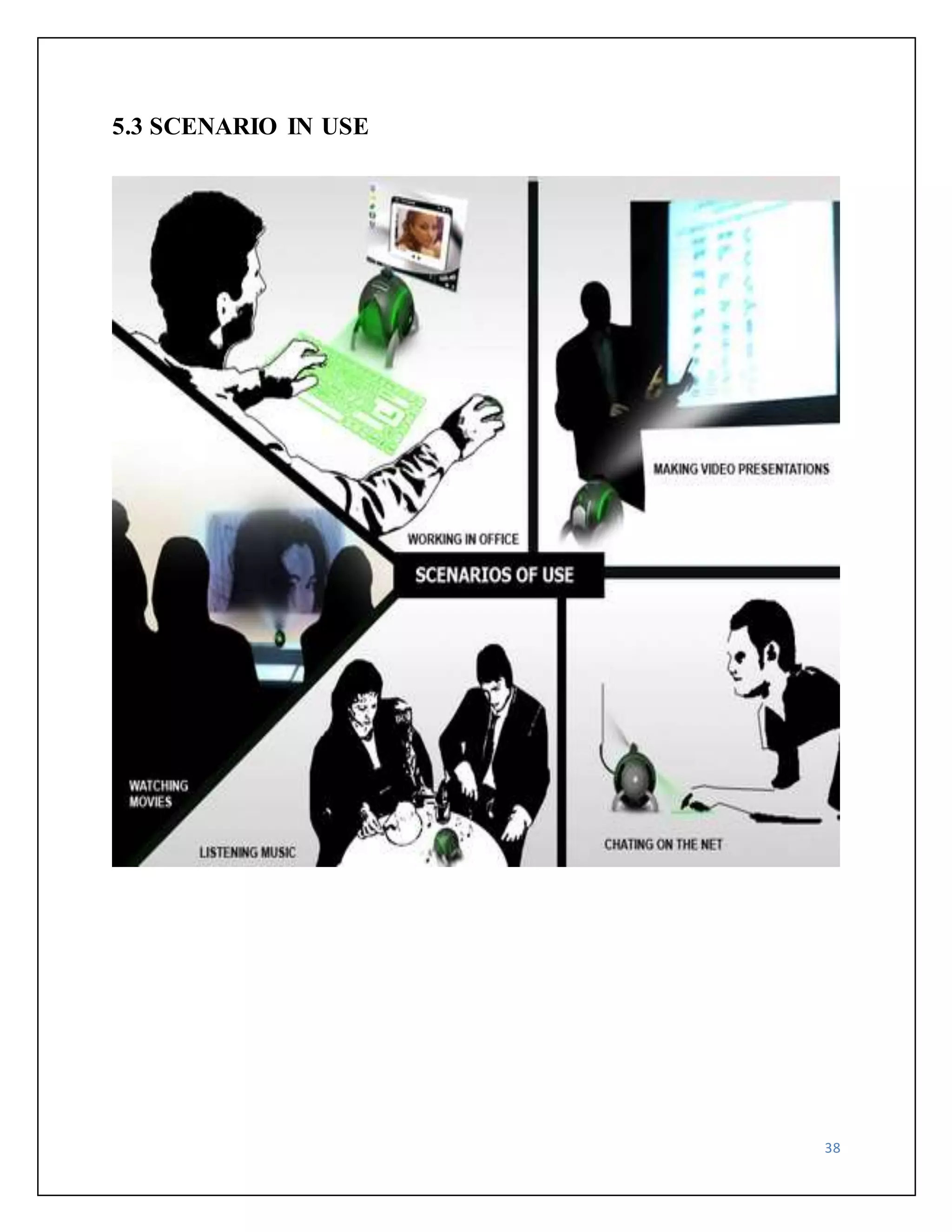
very easy while you are making video presentations, listening music watching large screen 
movies, and chatting on the net. 
As year passes, the computer size is becoming smaller. This ball is known as E-Ball and 
its design is given by Apostol Tnokovski. He was trying to create the smallest PC in the world 
when he came across this idea.
It is shaped like a sphere because in Tnokovski’s opinion this is the best shape in nature 
and it draws everybody’s attention. You'll see the pop-out laser mouse, a pico projector inside 
that illuminates either the wall or a sheet of paper for a screen, and that laser keyboard that 
would almost certainly be a clumsy input device. Fix that, and find a motherboard that’ll fit 
inside this palm-sized baby, and Apostol might be onto something here. 
E-Ball will feature a dual core processor, 250-500GB HDD, 2GB of RAM, integrated 
graphic card and sound card, 2 x 50W speakers, HD-DVD recorder, wireless optical mouse and 
laser keyboard, LAN and WLAN card, modem, Web cam and integrated LCD projector. 
35
36 
5.2 IF THERE IS NO WALL 
1) When we are working in an open place we can make use of a paper sheet as a screen. 
2) Paper sheet holder is placed at the back panel of this computer. 
3) The holder can be opened by pressing it in the lower part
37
38 
5.3 SCENARIO IN USE
39 
5.4(A) ADVANTAGES 
 E-BALL is portable. 
 E-BALL has large memory. 
 E-BALL is useful for making video presentation. 
 E-BALL support user defined keyboard layouts. 
 E-BALL is efficient. 
 E-BALL is very easy to use. 
 E-BALL is more secure than other computer. 
5.4(B) DISADVANTAGES 
 Normal operating systems cannot work in these computers. 
 Cost of E-BALL is very high. 
 It is difficult to understand if any problems occur in hardware part.
40 
6: CONCLUSION 
CONCLUSION 
 As the year passes, the computer size is becoming smaller. 
 Today’s technology is at its peak point beyond what we could ever imagine. 
 New inventions and innovations are emerging on daily basis. 
 Our imaginations have dressed into reality and today it has become possible to have a 
whole computer in our pocket all the time. 
 At last this ball technology has taken the computer technology to new horizons.
41 
7: REFERENCES 
REFERENCES 
http://www.google.co.in/EBALL 
http://www.slideshare.com 
http://www.seminarsonly.com 
http://www.scribd.com 
http://www.amfastech.com 
http://www.wikipedia.org

Report

  • 1.
    1 E-BALL TECHNOLOGY B.E. I.T Semester- V Prepared By Guided By Subhash S. Vadadoriya Mr. Uday K. Kakkad 120590116011 CE/IT Department I.T. Rajkot. SUBMITTED TO G K Bharad Institute of Engineering Kasturbadham, Rajkot – Bhavnagar Highway, Rajkot – 360020. Gujarat – India. T +0281 2785159 | www.gkbharad.org | gkbharad1@gmail.com
  • 2.
    2 ACKNOWLEDGMENT TheAcknowledgement is just like a drop in the ocean of the deep sense of gratitude within our heat for people who helped us out of most embarrassing part of our life when we were standing at most difficult step towards our dream of life. Many people have contributed to the success of this. Although a single sentence hardly suffices, I would like to thank Almighty God for blessing us with His grace. I extend my sincere and heartfelt thanks to Mr. N.C. Ranapara, Head of Department, Computer Engineering, for providing us the right ambience for carrying out this work. I am profoundly indebted to my seminar guide, Mr. Uday K. Kakkad for innumerable acts of timely advice, encouragement and I sincerely express my gratitude to him. I express my immense pleasure and thankfulness to all the teachers and staff of the Department of Computer Engineering for their cooperation and support. Last but not the least, I thank all others, and especially my classmates who in one way or another helped me in the successful completion of this work. Subhash S. Vadadoriya
  • 3.
    3 ABSTRACT Anew concept of pc is coming now that is E-Ball Concept pc. The E-Ball concept pc is a sphere shaped computer which is the smallest design among all the laptops and desktops. This computer has all the feature like a traditional computer, elements like keyboard or mouse, DVD, large screen display. E Ball is designed that pc is be placed on two stands, opens by pressing and holding the two buttons located on each side of the E-Ball pc, this pc is the latest concept technology. The E-Ball is a sphere shaped computer concept which is the smallest design among all the laptops and desktops have ever made. This PC concept features all the traditional elements like mouse, keyboard, large screen display, DVD recorder, etc…, all in an innovative manner. E-Ball is designed to be placed on two stands, opens by simultaneously pressing and holding the two buttons located on each side. After opening the stand and turning ON the PC, pressing the detaching mouse button will allow you to detach the optical mouse from the PC body. This concept features a laser keyboard that can be activated by pressing the particular button. E-Ball is very small, it is having only 6 inch diameter sphere. It is having 120×120mm motherboard.
  • 4.
    4 INDEX 1:INTRODUCTION 1.1 Characteristics of Computer ……………..………………………………………………….. 7 1.2 Evolution of Computer.....……… ……………………………….………………………….. 8 1.3 Computer Generations ……………….…………………………………………………….... 9 2: THE MEANING OF E-BALL TECHNOLOGY 2.1 Defining E-Ball Technology …………..…………………………………………………… 13 2.2 Features of E-Ball ………….………………………………………………………………. 14 A) Processor ………..……………………………………………………………………….. 15 B) Hard Drive ………………………………………………………………………………. 16 C) RAM …………………………………………………………………………………….. 17 D) Sound & Graphics Card ………………….……………………………………………… 18 3: VIRTUAL KEYBOARD 3.1 Virtual keyboard …………………..……………………………………………………….. 19 3.2 Components ……………………………………………...………………………………… 20 3.3 Advantages & Disadvantages ……………………………...………………………………. 21 4: PROJECTOR USED IN E-BALL 4.1 LCD Projectors …………………………………………………………………………….. 25 4.2 DLP Projectors ……………….…………………………………………………………….. 27 4.3 Comparison & Conclusion ……………………….………………………………………… 30
  • 5.
    5 5: WORKINGOF E-BALL 5.1 Working ………………….………………………………………………………………… 34 5.2 If there is no wall …………………………………….…………………………………….. 36 5.3 Scenario in Use …………..………………………………………………………………… 38 5.4 Advantages & Disadvantages ……………………………………………………………… 39 6: CONCLUSION Conclusion ……..……………………….……………………………………………………… 40 7: REFERENCES References ……………………………..……..………………………………………………… 41
  • 6.
    6 INTRODUCTION Theword “computer” comes from the word “compute”, which means, “to calculate”. Hence, people usually consider a computer to be a calculating device that can perform arithmetic operations at high speed. In fact, the original objective for inventing a computer was to create a fast calculating machine. However, more than 80% of work done by computers today is non-mathematical or non- numerical nature. Hence, to define a computer merely as a calculating device is to ignore over 80% of its functions. More accurately, we can define a computer as a device that operates upon data. Data can be anything like bio-data of applicants when computer is used for short listing candidates for recruiting; marks obtained by students in various subjects when used for preparing result; details (name, age, sex, etc.) of passengers when used for making airlines or railways reservations; or number of different parameters when used for solving scientific research problems, etc. Hence, data comes in various shapes and sizes depending upon the type of computer application. A computer can store, process, and retrieve data as and when desired. The fact that computers process data is so fundamental that many people have started calling it as data processor. The name data processor is more inclusive because modern computers not only compute in a usual sense but also perform other functions with data that flows to and from them. The activity of processing data using computer is called data processing. Data processing consists of three sub-activities: capturing input data, manipulating the data, and managing output results. Data is basically a raw material used as input to data processing and information is processed data obtained as output of data processing.
  • 7.
    7 1.1 CHARACTERISTICSOF COMPUTERS Increasing popularity of computers has proved that it is very powerful and useful tool. The power and usefulness of this popular tool are mainly due to its following characteristics A) AUTOMATIC An automatic machine works by itself without human intervention. Computers are automatic machines because once started on a job, they carry out the job until it is finished. However, computers being machines cannot start themselves and cannot go out and find problems and solutions. We need to instruct a computer using coded instructions that specify how it will do a particular job. B) SPEED A computer is a very fast device. It can perform in a few seconds, the amount of work that a human being can do in an entire year. While talking about speed of a computer we do not talk in terms of seconds or milliseconds but in terms of microseconds, nanoseconds and even picoseconds. A powerful computer is capable of performing several billion simple arithmetic operations per second. C) ACCURACY In addition to being very fast, computers are very accurate. Accuracy of a computer is consistently high and the degree of its accuracy depends upon its design. A computer performs every calculation with the same accuracy. D) VERSATILITY Versatility is one of the most wonderful things about computer. One moment it is preparing result of an examination, next moment it is busy preparing electricity bills etc. In brief, a computer is capable of performing almost any task, if the task can be reduced to a finite series of logical steps.
  • 8.
    8 E) DILIGENCE Unlike human beings, a computer is free from monotony, tiredness, and lack of concentration. It can continuously work for hours without creating any error and without grumbling. Hence, computer score over human beings in doing routing type jobs that require great accuracy. 1.2 EVOLUTION OF COMPUTERS A) 1623: Mechanical calculator Wilhelm Schickard invented first known mechanical calculator, capable of simple arithmetic. Similar mechanical adding machine made in 1640’s by Blaise Pascal. B) 1673: More advanced mechanical calculator.1673byGerman mathematician Gottfried Leibniz Capable of multiplication and division purely mechanical with no source of power. C) 1823: Charles Babbage begins work on Difference Engine. He designed, but it was completed by a Swedish inventor in 1854. Image of the Difference Engine from Niagara College D) 1833: Charles Babbage begins Analytical Engine Never completed. Important concept: a general-purpose machine capable of performing difference functions based on programming. E) 1834: Ada Byron, Lady Lovelace impressed with the concept of the Analytical Engine at a dinner party. Daughter of poet Lord Bryan Created plans for how the machine could calculate Bernoulli numbers. This is regarded as the first “computer program," and she is the first "programmer. “The Department of Defense named a language “Ada” in her honor in 1979. F) 1890: Punched cards used by Herman Hollerith to automate Census Concept of programming the machine to perform different tasks with punched cards were from Babbage. Punch cards based on Joseph Marie Jacquard’s device to automate weaving looms. Hollerith founded a company that became International Business Machines (IBM) to market the technology.
  • 9.
    G) 1946: ENIACcompleted Electronic Numerical Integrator and Computer. By Prosper Eckert and John Mauchly 18,000 vacuum tubes, occupied a 30 by 50 foot room Programming by plugging wires into a patch panel. Very difficult to do, because this style programming requires intimate knowledge of the computer 9 1.3 COMPUTER GENERATIONS The history of computer development is often referred to in reference to the different generations of computing devices. Each generation of computer is characterized by a major technological development that fundamentally changed the way computers operate, resulting in increasingly smaller, cheaper, and more powerful, and more efficient and reliable devices. First Generation (1940-1956) Vacuum Tubes The first computers used vacuum tubes for circuitry and magnetic drums for memory, and were often enormous, taking up entire rooms. They were very expensive to operate and in addition to using a great deal of electricity, generated a lot of heat, which was often the cause of malfunctions. First generation computers relied on machine language, the lowest-level programming language understood by computers, to perform operations, and they could only solve one problem at a time. Input was based on punched cards and paper tape, and output was displayed on printouts. The UNIVAC and ENIAC computers are examples of first-generation computing devices. The UNIVAC was the first commercial computer delivered to a business client, the U.S. Census Bureau in 1951. Figure shows first generation computer.
  • 10.
    10 Second Generation(1956-1963) Transistors Transistors replaced vacuum tubes and ushered in the second generation of computers. The transistor was invented in 1947 but did not see widespread use in computers until the late 1950s. The transistor was far superior to the vacuum tube, allowing computers to become smaller, faster, cheaper, more energy-efficient and more reliable than their first-generation predecessors. Though the transistor still generated a great deal of heat that subjected the computer to damage, it was a vast improvement over the vacuum tube. Second-generation computers still relied on punched cards for input and printouts for output. Second-generation computers moved from cryptic binary machine language to symbolic, or assembly, languages, which allowed programmers to specify instructions in words. High-level programming languages were also being developed at this time, such as early versions of COBOL and FORTRAN. These were also the first computers that stored their instructions in their memory, which moved from a magnetic drum to magnetic core technology. The first computers of this generation were developed for the atomic energy industry. Figure (b) shows second generation computer Third Generation (1964-1971) Integrated Circuits The development of the integrated circuit was the hallmark of the third generation of computers. Transistors were miniaturized and placed on silicon chips, called semiconductors, which drastically increased the speed and efficiency of computers. Instead of punched cards and printouts, users interacted with third generation computers through keyboards and monitors and interfaced with an operating system, which allowed the device to run many different applications at one time with a central program that monitored the memory. Computers for the first time
  • 11.
    became accessible toa mass audience because they were smaller and cheaper than their predecessors Figure (c) shows second generation computer. 11 Fourth Generation (1971-Present) Microprocessors The microprocessor brought the fourth generation of computers, as thousands of integrated circuits were built onto a single silicon chip. What in the first generation filled an entire room could now fit in the palm of the hand. The Intel 4004 chip, developed in 1971, located all the components of the computer—from the central processing unit and memory to input/output controls—on a single chip. In 1981 IBM introduced its first computer for the home user, and in 1984 Apple introduced the Macintosh. Microprocessors also moved out of the realm of desktop computers and into many areas of life as more and more everyday products began to use microprocessors. As these small computers became more powerful, they could be linked together to form networks, which eventually led to the development of the Internet Fourth generation computers also saw the development of GUIs, the mouse and handheld devices. Figure (d) shows second generation computer
  • 12.
    12 Fifth Generation(Present and Beyond) Artificial Intelligence Fifth generation computing devices, based on artificial intelligence, are still in development, though there are some applications, such as voice recognition, that are being used today. The use of parallel processing and superconductors is helping to make artificial intelligence a reality. Quantum computation and molecular and nanotechnology will radically change the face of computers in years to come. The goal of fifth-generation computing is to develop devices that respond to natural language input and are capable of learning and self-organization.
  • 13.
    2: THE MEANINGOF E-BALL TECHNOLOGY 13 2.1 DEFINING E-BALL TECHNOLOGY Aren’t you tired of your PC? By his ugly shape and the way that it looks? Well, this is exactly what designer Apostol Tnokovski was feeling when he decided to create the smallest PC ever made. Apostol Tnokovski introduced a new pc that is E-Ball Concept pc. The E-Ball concept pc is a sphere shaped pc which is the smallest design among all the laptops and desktops. This computer has all the feature like a traditional computer, elements like keyboard, mouse, DVD, large screen display etc. E-Ball is designed to be placed on two stands, opens by simultaneously pressing and holding the two buttons located on each side. E Ball concept pc don't have any external display unit. It has a button when you press this button a projector will pop and it focus the computer screen on the wall which can be adjusted with navigation keys. This concept PC will measure 160mm in diameter and it was designed for Microsoft Windows OS. For the moment there is no word on pricing or when it’s going to be available, however, I am sure that everybody would like to see a small spherical PC like this E-BALL shape is spherical because in Tnokovski’s opinion this is the best shape in nature and it draws everybody’s attention. E-Ball will feature a dual core processor, 250-500GB HDD, 2GB of RAM, integrated graphic card and sound card, 2 x 50W speakers, HD-DVD recorder, wireless optical mouse and laser keyboard, LAN and WLAN card, modem, Web cam and integrated LCD projector.
  • 14.
    14 2.2 FEATURESOF E-BALL  I-TECH VIRTUAL KEYBOARD  DUAL CORE PROCESSOR  2GB – RAM  350-500 GB HARDDRIVE  INTEGRATED GRAPHICS AND SOUND CARD  SPEAKERS  WIRELESS OPTICAL MOUSE  LAN AND WLAN CARD  LCD PROJECTOR  PAPER HOLDER  MODEM
  • 15.
    15 A) PROCESSOR Intel Core is a brand name used for various mid-ranges to high-end consumer and business microprocessor made by Intel. The current lineup of Core processors includes the latest following processors: Intel Core i7 Intel Core i5 Intel Core i3 Intel Core Intel Core Intel Core 2 Duo Intel Core 2 Solo Intel Core 2 Quad The e-ball pc basically uses Intel core 2 Duo processor. Figure shown below shows the Intel core 2 duo process
  • 16.
    16 B) RAM RAM stands for Random Access memory. It gets the word “random” because information can be accessed in non-sequential order. Though the data itself is stored tighter, it could be anywhere in the “container” or amount of RAM available. RAM is measure in “bits”, and 8 bits equal to 1 byte. A kilobyte is equal to 1024 bits, and megabyte is equal to 1024 kilobyte. The E-BALL pc uses 2 GB of RAM. 1) SRAM don’t require external refresh circuitry 2) SRAM is faster than DRAM. 3) SRAM is more power-efficient when idle. 4) SRAM is several times more expensive than DRAM
  • 17.
    17 C) HARDDRIVE Hard drive is basically a secondary storage device. It is non-volatile in nature. It consists of metal platter coated with oxide that can be magnetized to represents data. We can directly access the data from hard drive. The e-ball pc basically consists 350-500 GB of hard drive. D) GRAPHIC & SOUND CARD A video card, display card, graphics card, or graphics adapter is an expansion card which generates output images to a display. Most video cards offer various functions such as accelerated rendering of 3D scenes and 2D graphics, MPEG-2/MPEG-4 decoding, TV output, or the ability to connect multiple monitors (multi-monitor). Other modern high performance video cards are used for more graphically demanding purposes, such as PC games. Video hardware is often integrated into the motherboard, however all modern motherboards provide expansion ports to which a video card can be attached. In this configuration it is sometimes referred to as a video controller or graphics a video card, display card, graphics card, or graphics adapter is and expansion card controller.
  • 18.
  • 19.
    19 3: VIRTUALKETBOARD 3.1 VIRTUAL KEYBOARD Virtual Keyboard is just another example of today’s computer trend of ‘smaller and faster’. It uses sensor technology and artificial intelligence to let users work on any surface as if it were a keyboard. Virtual Keyboard is a small Java application that lets you easily create multilingual text content on almost any existing platform and output it directly to web pages. Virtual Keyboard, being a small, handy, well-designed and easy to use application, turns into a perfect solution for cross platform multilingual text input. The main features are: platform-independent multilingual support for keyboard text input, built-in language layouts and settings, copy/paste etc. operations support just as in a regular text editor, already existing system language settings remain intact, easy and user-friendly interface and design, and small file size.
  • 20.
    The Virtual Keyboarduses light to project a full-sized computer keyboard onto almost any surface, and disappears when not in use. Used with Smart Phones and PDAs, the Virtual Keyboard (TM) provides a practical way to do email, word processing and spreadsheet tasks, allowing the user to leave the laptop computer at home. Virtual Keyboard technology has many applications in various high-tech and industrial Sectors. These include data entry and control panel applications in hazardous and harsh environments and medical markets. Projection key boards or virtual key boards claim to provide the convenience of compactness with the advantages of a full-blown QWERTY keyboard. An interesting use of such keyboards would be in sterile environments where silence or low noise is essential like operation theaters. The advantage of such a system is that you do not need a surface for typing, you can even type in plain air. The company's Virtual Keyboard is designed for anyone who's become frustrated with trying to put information into a handheld but doesn't want to carry a notebook computer around. There is also the provision for a pause function to avoid translating extraneous hand movement’s function, so that users can stop to eat, drink etc.… 20 3.2 COMPONENTS This system comprises of three modules, 1. The sensor module 2. IR-light source 3. The pattern projector
  • 21.
    21 1) SENSORMODULE The Sensor Module serves as the eyes of the Keyboard Perception technology. The Sensor Module operates by locating the user's fingers in 3-D space and tracking the intended keystrokes, or mouse movements. Mouse tracking and keystroke information is processed and can then be output to the host device via a USB or other interface. Electronic Perception Technology: Electronic perception technology enables ordinary electronic devices to “see” the world around them so they can perceive and interact with it. Now everyday electronic devices in a variety of markets can perceive users actions, gaining functionality and ease of use. The tiny electronic perception chips and embedded software work by developing a 3D “distance map” to nearby objects in real-time. This information is factored through an on-chip processor running imaging software that translates the image into defined events before sending it off-chip for application-specific processing. It’s an action that is continually repeated, generating over 30 frames of 3D information per second. Electronic perception technology has a fundamental advantage over classical image processing that struggles to construct three-dimensional representations using complex mathematics and images from multiple cameras or points of view. This single chip “contour mapping” approach results in a high reduction of complexity, making it possible to embed the application independent processing software directly into the chips themselves – so they may be used in the most modestly-priced, and even pocket-sized electronic devices. 2) IR-LIGHT SOURCE The Infrared Light Source emits a beam of infrared light. This light beam I designed to overlap the area on which the keyboard pattern projector or printed image resides. This is done so as to illuminate the user’s fingers by the infra-red light beam. This helps in recognizing the hand movements and the pressing of keys. The light beam facilitates in scanning the image. Accordingly the information is passed on to the sensor module which decodes the information. An invisible infra-red beam is projected above the virtual keyboard. Finger makes keystroke on virtual keyboard. This breaks infrared beam and infrared light is reflected back to projector. Reflected infrared beam passes through infrared filter to camera. The camera photographs angle
  • 22.
    of incoming infraredlight. The Sensor chip in the sensor module determines where the infrared beam was broken, detected co-ordinates determine actions or characters to be generated. 22 3) THE PATTERN PROJECTOR The Pattern Projector or optional printed image presents the image of the keyboard or mouse zone of the system. This image can be projected on any flat surface. The projected image is that of a standard qwerty-keyboard, with all the keys and control functions as in the keyboard. The Projector features a wide-angle lens so that a large pattern can be projected from relatively low elevations. A printed image, with replaceable templates allows system flexibility, permitting most any kind of keyboard configuration for greater functionality.
  • 23.
    In some typesof virtual keyboards, a second infra-red beam is not necessary. Here the projector itself takes the inputs, providing dual functionality. A sensor or camera in the projector picks up the finger movements, and passes the information on to the sensor modules. 23 3.3(a) ADVANTAGES  Portability  Accuracy  Speed of text entry  Lack of need for flat or large typing surface  Ability to minimize the risk for repetitive strain injuries  Flexibility  Keyboard layouts can be changed by software allowing for foreign or Alternative keyboard layouts 3.3(b) DISADVANTAGES  Virtual keyboard is hard to get used to. Since it involves typing in thin air, it requires a little practice. Only people who are good at typing can use a virtual keyboard efficiently.  It is very costly ranging from 150 to 200 dollars.  The room in which the projected keyboard is used should not be very bright so that the keyboard is properly visible.
  • 24.
    24 APPLICATIONS High-tech and industrial Sectors  Used with Smart phones, PDAs, email, word processing and spreadsheet tasks  Operation Theatres  as computer/PDA input  Gaming control  TV remote control
  • 25.
    25 4: PROJECTORUSED IN E-BALL 4.1 LCD PROJECTORS LCD projectors are systems that display or project information or video onto a surface. LCD stands for liquid crystal display, the technology used to project images. They are the technological descendants of overhead and slide projectors, older systems which serve the same purpose. They are most commonly used for displaying images in presentations or lectures, but are also used in home theaters. Video signals are comprised of three colors: red, green, and blue. LCD projectors contain a separate glass panel for each. Each panel consists of two plates of glass with a layer of liquid crystal between them. When a charge is applied, the crystals open to allow light through or close to block it. This opening and closing of pixels is what forms the image. These devices use dichroic mirrors to split the light from the input source into red, green, and blue components. Each then passes through the corresponding panel, where pixels form an image. The three colors are then recombined in a prism before being projected through a lens. LCD projectors use separate panels for each color because it results in better color saturating than using a single panel for all three.
  • 26.
    LCD projectors employa three-panel LCD (Liquid Crystal Display) system, referred to as 3LCD. LCD projectors crisply reproduce bright, naturally colored images that are easy on the eyes. LCD projectors are also capable of detailed shadow reproduction that is ideal for demanding business and home theater applications. The white light from the projector lamp is split into red, green, and blue components using two dichroic mirrors, special mirrors that only transmit light of a specified wavelength. Each red, green and blue beam then passes through a dedicated LCD panel made up of thousands of miniscule pixels. An electrical current turns the panel's pixels on or off to create the grayscale equivalent of that color channel. The three colors are then recombined in a prism and projected through the projector lens and onto the screen. By using a combination of three LCDs to produce a final image, LCD projectors are capable of billions of colors and smooth grayscale gradations. The resolution of the image is determined by the number of pixels in the LCD panels used. Currently LCD panels offer resolutions as high as true HD (1920 x 1080) for home theater applications. New panels promise resolutions as high as 4K (3840 x 2160). 26
  • 27.
    LCDs are notjust found in projectors. They are found in many of the electronics you use every day, from a cell phone to an MP3 player to your digital alarm clock. LCDs are very common because they offer distinct advantages: they are thinner, lighter, and draw less power than many competing display technologies. A reliable, sophisticated technology with universal appeal, 3LCD is the world's most popular projection technology, delivering high quality images for the most demanding business and consumer audiences. 27 ADVANTAGES  LCD is generally more light efficient than DLP.  LCD projectors can project bright, vivid images with a low output lamp.  1000 lumen LCD is more preferred than 1200 lumen DLP.  LCD trends to produce a sharper image.  More accurate color.  Sharper image.  LCD also delivers a somewhat sharper image than DLP at any given resolution.  Another benefit of LCD is that it is more light-efficient.  One benefit of LCD is that it controls red, green, and blue independently through. DISADVANTAGES  More bulky as there are more internal components.  Dead pixels.  DLC panel can fail.  Screen door effect.  Contrast.  Portability.  Image degradation.  LCD competes extremely well when high light output is required.
  • 28.
    28 4.2 DLPPROJECTORS DLP stands for Digital Light Processing. A video projection technology, developed by Texas Instruments, that utilizes a chip, referred to as a DMD (Digital Micro mirror Device). In essence, every pixel on a DMD chip is a reflective mirror. The video image is displayed on the DMD chip. The micro mirrors on the chip (remember: each micro mirror represents one pixel) then tilt very rapidly as the image changes. This process produces the grayscale foundation for the image. Then, color is added as light passes through a high-speed color wheel and is reflected off of the micro mirrors on the DLP chip as they rapidly tilt towards or away from the light source. The degree of tilt of each micro mirror coupled with the rapidly spinning color wheel determines the color structure of the projected image. As the amplified light bounces off the micro mirrors, it is sent through the lens and can be projected on a large screen. Another way that DLP is implemented is to utilize a separate DLP chip for each primary color. Light from a single source is passed through a prism, which creates separate red, green, and blue light sources, then reflected on each of the chips designated for each primary color, and from there, projected onto a screen. This application very expensive, in comparison to the color wheel method, and is used only in higher-end consumer and commercial DLP projectors. This technology is used in both rear-projection televisions and in separate video projector, screen applications.
  • 29.
    29 ADVANTAGES Portability  Higher contrast  Reduced pixilation  Reliability  Sealed optics this makes it better for use in dusty environment  Less screen door effects  Since the DLP light engine consists of a single chip rather than three LCD panels, DLP Projectors tend to be more compact.  Another DLP advantage is that it can produce smooth, high contrast video. DISADVANTAGES  Rainbow effect  Light leakage  High cost
  • 30.
    30 4.3 COMPARISONAND CONCLUSION 1: Pixelization (fill factor) DLP = Seam-less, Film-like. LCD = Grainy, Pixelated. 2: Contrast Ratio DLP = Simple optics, easier light management LCD = Complex optics, more difficult light management 3: Video Quality DLP = Fast switching, minimal lag LCD = Slow switching, significant lag 4: Sharpness DLP =No misalignment LCD =Misalignment likely over time 5: Color Quality DLP = Can match any LCD color gamut LCD = can’t match any DLP color gamut R, G, B, bandwidth is depend on each color because of non – sequential system.
  • 31.
    31 6: Smallest& Brightest DLP = Simple optical system, good reflectivity. LCD = Complex optical system 7: Repeatable Performance DLP = Digital, precise control, constant performance over time. LCD = Analog, variable, affected by temperature, vibration, heat, humidity, Deterioration over time. 8: Reliable DLP = Reflects heat LCD = Absorbs heat, performance degrades While both technologies have produced improvements in contrast in the past year, and Sanyo's new PLV-70 is rated at 900:1. Meanwhile, the latest DLP products geared toward home theater are rated has high as 1800:1. However, one should not place too much emphasis on the specs. In reality, though the difference between projectors rated at 400:1 vs. 800:1 is quite noticeable, the difference is not so dramatic between products rated at 900:1 vs. 1800:1. Once you get to contrast ranges of 900:1 or higher, blacks appear as solid black and shadow details resolve quite nicely. Increased contrast can yield relatively subtle improvements, but there are other factors which contribute to image quality that become equally if not more important. Reduced pixilation is another benefit of DLP. LCDs were always known for their visible pixel structure, often referred to as the screen door effect because it appears as though the picture is being viewed through a screen door. Historically, LCD technology has had a hard time being taken seriously among many home theater enthusiasts (quite understandably) because of this flaw in the image. DLP technology went a long way toward eliminating the screen door effect. In SVGA (800x600)
  • 32.
    resolution, DLP projectorshave either a muted pixel structure or an invisible pixel structure depending upon the size of the projected image relative to the viewing distance (the larger the image the more visible the pixels). Conversely, SVGA-resolution LCD projectors uniformly have a clearly visible pixel grid at just about any screen image size. For this reason, we don't recommend SVGA-resolution LCD projectors for home theater use except for those on the most limited of budgets. Three developments have served to close the gap between DLP and LCD in the area of pixel visibility. First was the step up to XGA resolution (1,024x768). This higher resolution uses 64% more pixels to paint the image on the screen, as compared to an SVGA-resolution projector. The inter-pixel gaps are reduced in XGA resolution, so pixels are denser and less visible. In XGA resolution, DLP projectors have an invisible pixel grid on any typical home theater screen no matter how big. LCD projectors with standard XGA panels still have a visible, but much reduced screen door effect. Second, the inter-pixel gaps on all LCD machines, no matter what resolution, are reduced compared to what they use to be. So even the inexpensive SVGA-resolution LCD projectors have less screen door effect than they used to. The third development in LCDs was the use of Micro-Lens Array (MLA) to boost the efficiency of light transmission through XGA-resolution LCD panels. Some XGA-class LCD projectors have this feature, but most do not. For those that do, MLA has the happy side effect of reducing pixel visibility a little bit as compared to an XGA LCD projector without MLA. On some projectors with this feature, placing the focus just a slight hair off perfect, a practice The Current State of the Art DLP maintains its lead in contrast performance, while LCD projector makers have continued to emphasize latent advantages in color fidelity and image sharpness for data display. DLP color has improved of late, and color accuracy on the latest models is much better than it used to be. Both LCD and DLP are evolving rapidly to the benefit of the consumer. The race for miniaturization has produced smaller yet more powerful projectors than we might have even imagined possible just a couple of years ago. Light output per pound has increased dramatically. And video quality on the best LCD and DLP projectors now surpasses that available in a commercial movie theater. 32
  • 33.
    When it comesto home theater, DLP has continued to make competitive advances in color, contrast, and image stability that have served to establish DLP as the preferred technology for video. But the fact is that both DLP and LCD continue to improve, and both are capable of delivering higher quality video for home theater than they ever were before. Which technology is the best? When comparing DLP to LCD in a home theater environment DLP is the winner. Better blacks and the removal of the screen door effect making the DLP an obvious choice. 33
  • 34.
    34 5: WORKINGOF E-BALL 5.1 WORKING E Ball concept pc don't have any external display unit, It has a button when you press this button a projector will pop and it focus the computer screen on the wall which can be adjusted with navigation keys. If there is no wall then it has a paper sheet holder that divides into three pieces like an umbrella just after popping up, and it will show desktop on the paper sheet. Also, the E-Ball PC supports a paper holder and the paper sheet on the holder could act like a screen where you can watch movies or something. This concept PC will measure 160mm in diameter and it was designed for Microsoft Windows OS, sorry about the others. For the moment there is no word on pricing or when it’s going to be available, however, I am sure that everybody would like to see a small spherical PC like this one. E-Ball concept pc has a laser keyboard that is fully a concept keyboard that is visible when the pc is in working. The keyboard is not physical - it is interpreted by lasers that appear after you press the respective button. It recognizes your fingers with the help of an IR sensor when you are typing at a particular place, while the mouse is a pop out wonder making this an unique piece of technology. The software interface of E-Ball concept pc is highly stylized with icons that can be remembered easily that support all type of windows operating system. E-Ball concept pc work very easy while you are making video presentations, listening music watching large screen movies, and chatting on the net. As year passes, the computer size is becoming smaller. This ball is known as E-Ball and its design is given by Apostol Tnokovski. He was trying to create the smallest PC in the world when he came across this idea.
  • 35.
    It is shapedlike a sphere because in Tnokovski’s opinion this is the best shape in nature and it draws everybody’s attention. You'll see the pop-out laser mouse, a pico projector inside that illuminates either the wall or a sheet of paper for a screen, and that laser keyboard that would almost certainly be a clumsy input device. Fix that, and find a motherboard that’ll fit inside this palm-sized baby, and Apostol might be onto something here. E-Ball will feature a dual core processor, 250-500GB HDD, 2GB of RAM, integrated graphic card and sound card, 2 x 50W speakers, HD-DVD recorder, wireless optical mouse and laser keyboard, LAN and WLAN card, modem, Web cam and integrated LCD projector. 35
  • 36.
    36 5.2 IFTHERE IS NO WALL 1) When we are working in an open place we can make use of a paper sheet as a screen. 2) Paper sheet holder is placed at the back panel of this computer. 3) The holder can be opened by pressing it in the lower part
  • 37.
  • 38.
  • 39.
    39 5.4(A) ADVANTAGES  E-BALL is portable.  E-BALL has large memory.  E-BALL is useful for making video presentation.  E-BALL support user defined keyboard layouts.  E-BALL is efficient.  E-BALL is very easy to use.  E-BALL is more secure than other computer. 5.4(B) DISADVANTAGES  Normal operating systems cannot work in these computers.  Cost of E-BALL is very high.  It is difficult to understand if any problems occur in hardware part.
  • 40.
    40 6: CONCLUSION CONCLUSION  As the year passes, the computer size is becoming smaller.  Today’s technology is at its peak point beyond what we could ever imagine.  New inventions and innovations are emerging on daily basis.  Our imaginations have dressed into reality and today it has become possible to have a whole computer in our pocket all the time.  At last this ball technology has taken the computer technology to new horizons.
  • 41.
    41 7: REFERENCES REFERENCES http://www.google.co.in/EBALL http://www.slideshare.com http://www.seminarsonly.com http://www.scribd.com http://www.amfastech.com http://www.wikipedia.org