Name : Vadadoriya Subhash S. 
En No. : 120590116011 
Sem. : 5th 
Branch : Information & Technology
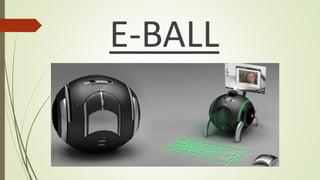
E-BALL
Key Points 
 Vision 
 Introduction 
 Size of E-Ball 
 Elements of E-Ball 
 Working of E-Ball 
 Features of E-Ball 
 LCD & DLP projectors 
 Laser keyboard 
 If there is no wall? 
 Advantages of E-Ball 
 Disadvantages 
 Conclusion 
3
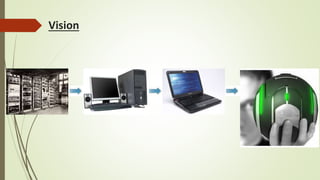
Vision
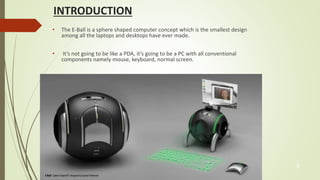
INTRODUCTION 
• The E-Ball is a sphere shaped computer concept which is the smallest design 
among all the laptops and desktops have ever made. 
• It’s not going to be like a PDA, it’s going to be a PC with all conventional 
components namely mouse, keyboard, normal screen. 
5
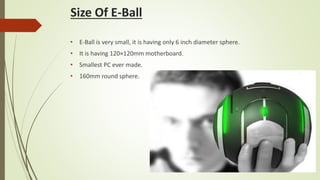
Size Of E-Ball 
• E-Ball is very small, it is having only 6 inch diameter sphere. 
• It is having 120×120mm motherboard. 
• Smallest PC ever made. 
• 160mm round sphere.
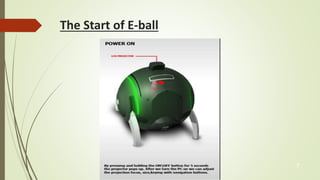
The Start of E-ball 
7
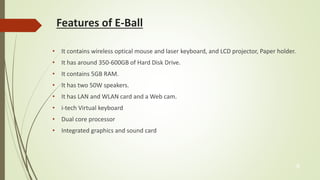
Features of E-Ball 
• It contains wireless optical mouse and laser keyboard, and LCD projector, Paper holder. 
• It has around 350-600GB of Hard Disk Drive. 
• It contains 5GB RAM. 
• It has two 50W speakers. 
• It has LAN and WLAN card and a Web cam. 
• i-tech Virtual keyboard 
• Dual core processor 
• Integrated graphics and sound card 
8
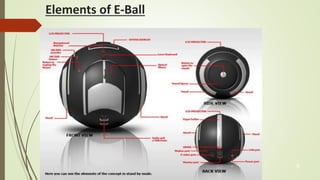
Elements of E-Ball 
9
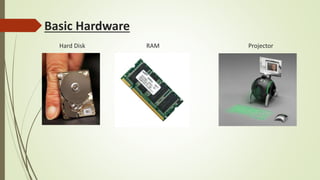
Basic Hardware 
Hard Disk RAM Projector
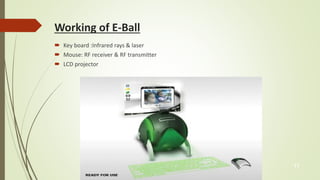
Working of E-Ball 
 Key board :Infrared rays & laser 
 Mouse: RF receiver & RF transmitter 
 LCD projector 
11
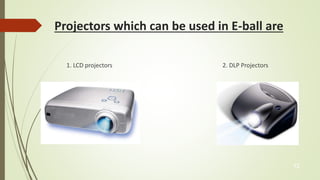
Projectors which can be used in E-ball are 
1. LCD projectors 2. DLP Projectors 
12
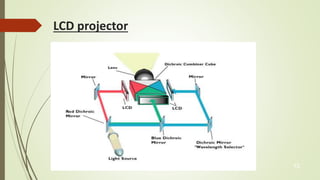
LCD projector 
13
Contd… 
• Metal halide lamp is emitting the light. 
• Series of di-chroic filters are separates light. 
• 3 polysillicon panels placed in red, blue, green color's 
• These primary color's are making the image. 
• Metal halide lamps are output an ideal color temperature. 
• LCD technology is used by many manufactures such as Epson, Hitachi, and NEC. 
14
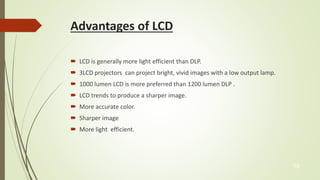
Advantages of LCD 
 LCD is generally more light efficient than DLP. 
 3LCD projectors can project bright, vivid images with a low output lamp. 
 1000 lumen LCD is more preferred than 1200 lumen DLP . 
 LCD trends to produce a sharper image. 
 More accurate color. 
 Sharper image 
 More light efficient. 
15
Disadvantages 
 More bulky as there are more internal components. 
 Dead Pixels. 
 LCD panel can fail 
 Screen door effect. 
 Contrast. 
 Portability. 
 Image degradation. 
16
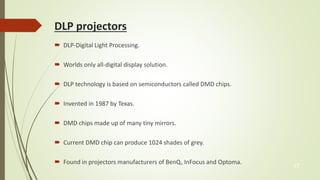
DLP projectors 
 DLP-Digital Light Processing. 
 Worlds only all-digital display solution. 
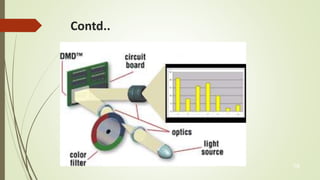
 DLP technology is based on semiconductors called DMD chips. 
 Invented in 1987 by Texas. 
 DMD chips made up of many tiny mirrors. 
 Current DMD chip can produce 1024 shades of grey. 
 Found in projectors manufacturers of BenQ, InFocus and Optoma. 
17
Contd.. 
18
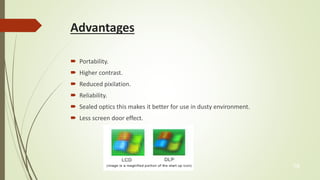
Advantages 
 Portability. 
 Higher contrast. 
 Reduced pixilation. 
 Reliability. 
 Sealed optics this makes it better for use in dusty environment. 
 Less screen door effect. 
19
Disadvantages 
 Rainbow effect. 
 Light leakage. 
 High cost. 
20
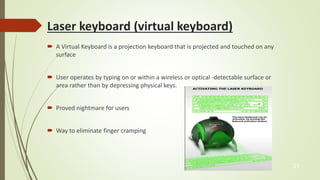
Laser keyboard (virtual keyboard) 
 A Virtual Keyboard is a projection keyboard that is projected and touched on any 
surface 
 User operates by typing on or within a wireless or optical -detectable surface or 
area rather than by depressing physical keys. 
 Proved nightmare for users 
 Way to eliminate finger cramping 
21
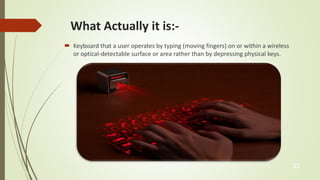
What Actually it is:- 
 Keyboard that a user operates by typing (moving fingers) on or within a wireless 
or optical-detectable surface or area rather than by depressing physical keys. 
22
Advantages of Virtual Key-Board:- 
• Portability 
• Accuracy 
• Speed of text entry 
• Lack of need for flat or large typing surface 
• Ability to minimize the risk for repetitive strain injuries 
• Flexibility 
• Keyboard layouts can be changed by software allowing for foreign or Alternative 
keyboard layouts. 
23
If there is no wall? 
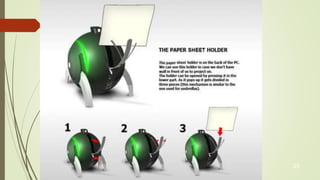
 When we are working in an open place we can make use of a paper sheet as a 
screen. 
 paper sheet holder is placed at the back panel of this computer. 
 The holder can be opened by pressing it in the lower part 
24
25
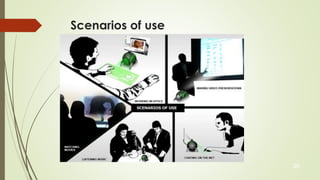
Scenarios of use 
26
Advantages of E-Ball 
 It is portable. 
 E-Ball has large memory. 
 Useful for making video presentations. 
 These have greater speed. 
 Supports user-defined keyboard layouts 
27
Disadvantages of E-Ball 
 It support only Microsoft Windows OS,not any other OS support. 
 Cost of E-Ball is very high. 
 It is difficult to understand if any problems occur in hardware components. 
 Plane surface required for using the keyboard 
28
E-Ball Design By 
 Apostol Tnokovski

E Ball Computer

  • 1.
    Name : VadadoriyaSubhash S. En No. : 120590116011 Sem. : 5th Branch : Information & Technology
  • 2.
  • 3.
    Key Points Vision  Introduction  Size of E-Ball  Elements of E-Ball  Working of E-Ball  Features of E-Ball  LCD & DLP projectors  Laser keyboard  If there is no wall?  Advantages of E-Ball  Disadvantages  Conclusion 3
  • 4.
  • 5.
    INTRODUCTION • TheE-Ball is a sphere shaped computer concept which is the smallest design among all the laptops and desktops have ever made. • It’s not going to be like a PDA, it’s going to be a PC with all conventional components namely mouse, keyboard, normal screen. 5
  • 6.
    Size Of E-Ball • E-Ball is very small, it is having only 6 inch diameter sphere. • It is having 120×120mm motherboard. • Smallest PC ever made. • 160mm round sphere.
  • 7.
    The Start ofE-ball 7
  • 8.
    Features of E-Ball • It contains wireless optical mouse and laser keyboard, and LCD projector, Paper holder. • It has around 350-600GB of Hard Disk Drive. • It contains 5GB RAM. • It has two 50W speakers. • It has LAN and WLAN card and a Web cam. • i-tech Virtual keyboard • Dual core processor • Integrated graphics and sound card 8
  • 9.
  • 10.
    Basic Hardware HardDisk RAM Projector
  • 11.
    Working of E-Ball  Key board :Infrared rays & laser  Mouse: RF receiver & RF transmitter  LCD projector 11
  • 12.
    Projectors which canbe used in E-ball are 1. LCD projectors 2. DLP Projectors 12
  • 13.
  • 14.
    Contd… • Metalhalide lamp is emitting the light. • Series of di-chroic filters are separates light. • 3 polysillicon panels placed in red, blue, green color's • These primary color's are making the image. • Metal halide lamps are output an ideal color temperature. • LCD technology is used by many manufactures such as Epson, Hitachi, and NEC. 14
  • 15.
    Advantages of LCD  LCD is generally more light efficient than DLP.  3LCD projectors can project bright, vivid images with a low output lamp.  1000 lumen LCD is more preferred than 1200 lumen DLP .  LCD trends to produce a sharper image.  More accurate color.  Sharper image  More light efficient. 15
  • 16.
    Disadvantages  Morebulky as there are more internal components.  Dead Pixels.  LCD panel can fail  Screen door effect.  Contrast.  Portability.  Image degradation. 16
  • 17.
    DLP projectors DLP-Digital Light Processing.  Worlds only all-digital display solution.  DLP technology is based on semiconductors called DMD chips.  Invented in 1987 by Texas.  DMD chips made up of many tiny mirrors.  Current DMD chip can produce 1024 shades of grey.  Found in projectors manufacturers of BenQ, InFocus and Optoma. 17
  • 18.
  • 19.
    Advantages  Portability.  Higher contrast.  Reduced pixilation.  Reliability.  Sealed optics this makes it better for use in dusty environment.  Less screen door effect. 19
  • 20.
    Disadvantages  Rainboweffect.  Light leakage.  High cost. 20
  • 21.
    Laser keyboard (virtualkeyboard)  A Virtual Keyboard is a projection keyboard that is projected and touched on any surface  User operates by typing on or within a wireless or optical -detectable surface or area rather than by depressing physical keys.  Proved nightmare for users  Way to eliminate finger cramping 21
  • 22.
    What Actually itis:-  Keyboard that a user operates by typing (moving fingers) on or within a wireless or optical-detectable surface or area rather than by depressing physical keys. 22
  • 23.
    Advantages of VirtualKey-Board:- • Portability • Accuracy • Speed of text entry • Lack of need for flat or large typing surface • Ability to minimize the risk for repetitive strain injuries • Flexibility • Keyboard layouts can be changed by software allowing for foreign or Alternative keyboard layouts. 23
  • 24.
    If there isno wall?  When we are working in an open place we can make use of a paper sheet as a screen.  paper sheet holder is placed at the back panel of this computer.  The holder can be opened by pressing it in the lower part 24
  • 25.
  • 26.
  • 27.
    Advantages of E-Ball  It is portable.  E-Ball has large memory.  Useful for making video presentations.  These have greater speed.  Supports user-defined keyboard layouts 27
  • 28.
    Disadvantages of E-Ball  It support only Microsoft Windows OS,not any other OS support.  Cost of E-Ball is very high.  It is difficult to understand if any problems occur in hardware components.  Plane surface required for using the keyboard 28
  • 29.
    E-Ball Design By  Apostol Tnokovski