Relational Algebra Lecture 5
Relational Query Languages Languages for describing queries on a relational database Structured Query Language (SQL) Predominant application query language Declarative Relational Algebra Intermediate language within DBMS Procedural
Algebra Based on operators and a domain of values Operators map arguments from domain into another domain value Hence, an expression involving operators and arguments produces a value in the domain.  We refer to the expression as a query and the value produced as the result of that query
Relational Algebra Domain: set of relations, i.e., result is another relation Basic operators: select, project, union, set difference, Cartesian product (or cross product) Derived operators: set intersection, division, join Procedural: Relational expression specifies query by describing an algorithm (the sequence in which operators are applied) for determining the result of an expression
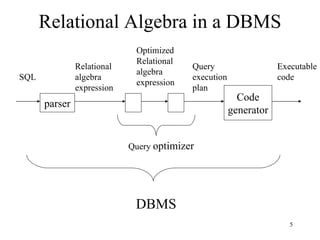
Relational Algebra in a DBMS parser SQL Relational algebra expression Optimized Relational algebra expression Query  optimizer Code generator Query execution plan Executable code DBMS
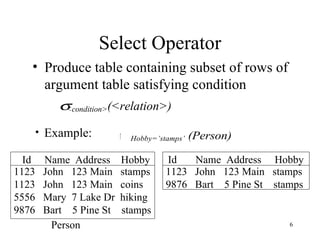
Select Operator Produce table containing subset of rows of argument table satisfying condition Example: 1123  John  123 Main  stamps 1123  John  123 Main  coins 5556  Mary  7 Lake Dr  hiking 9876  Bart  5 Pine St  stamps 1123  John  123 Main  stamps 9876  Bart  5 Pine St  stamps Person Id  Name  Address  Hobby Id  Name  Address  Hobby
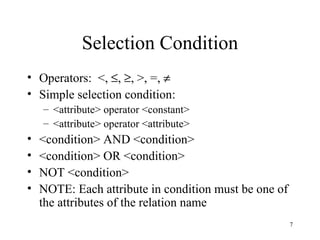
Selection Condition Operators:  <,   ,   , >, =,   Simple selection condition: <attribute> operator <constant> <attribute> operator <attribute> <condition> AND <condition> <condition> OR <condition> NOT <condition> NOTE: Each attribute in condition must be one of the attributes of the relation name
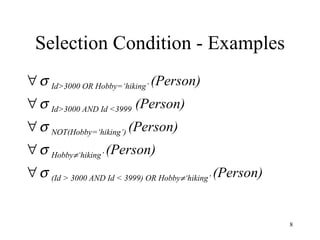
   Id>3000 OR Hobby=‘hiking’  (Person)    Id>3000 AND Id <3999  (Person)    NOT(Hobby=‘hiking’)  (Person)    Hobby  ‘hiking’  (Person)    (Id > 3000 AND Id < 3999) OR Hobby  ‘hiking’  (Person) Selection Condition - Examples
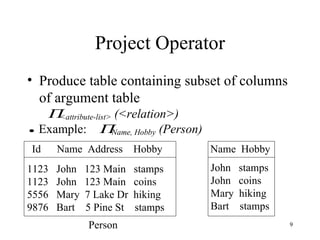
Project Operator Produce table containing subset of columns of argument table 1123  John  123 Main  stamps 1123  John  123 Main  coins 5556  Mary  7 Lake Dr  hiking 9876  Bart  5 Pine St  stamps John  stamps John  coins Mary  hiking Bart  stamps Id  Name  Address  Hobby  Name  Hobby Person
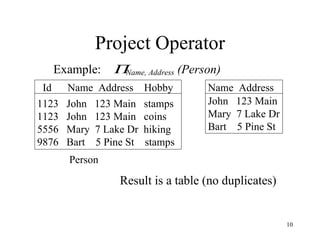
Project Operator 1123  John  123 Main  stamps 1123  John  123 Main  coins 5556  Mary  7 Lake Dr  hiking 9876  Bart  5 Pine St  stamps John  123 Main Mary  7 Lake Dr Bart  5 Pine St Result is a table (no duplicates) Id  Name  Address  Hobby Name  Address Person
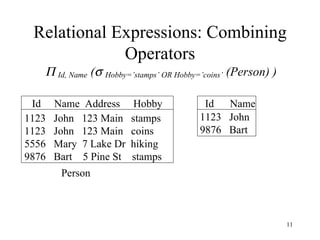
Relational Expressions: Combining Operators 1123  John  123 Main  stamps 1123  John  123 Main  coins 5556  Mary  7 Lake Dr  hiking 9876  Bart  5 Pine St  stamps 1123  John 9876  Bart Id  Name  Address  Hobby  Id  Name Person
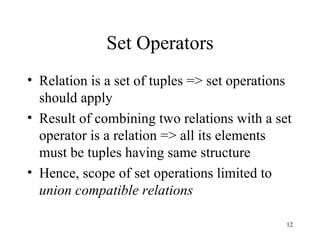
Set Operators Relation is a set of tuples => set operations should apply Result of combining two relations with a set operator is a relation => all its elements must be tuples having same structure Hence, scope of set operations limited to  union compatible relations
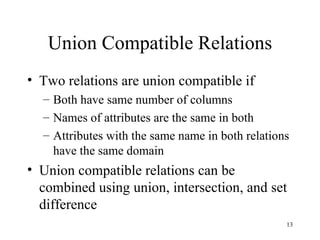
Union Compatible Relations Two relations are union compatible if Both have same number of columns Names of attributes are the same in both Attributes with the same name in both relations have the same domain Union compatible relations can be combined using union, intersection, and set difference
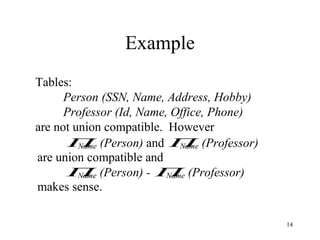
Example Tables: Person (SSN, Name, Address, Hobby) Professor (Id, Name, Office, Phone) are not union compatible.  However
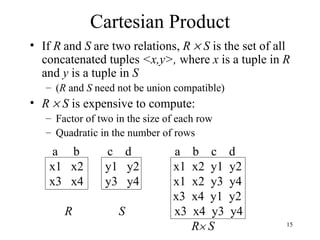
Cartesian Product If  R   and  S   are two relations,  R    S  is the set of all concatenated tuples  <x,y>,  where  x  is a tuple in  R  and  y  is a tuple in  S ( R  and  S  need not be union compatible) R    S  is expensive to compute: Factor of two in the size of each row Quadratic in the number of rows a  b  c  d  a  b  c  d x1  x2  y1  y2  x1  x2  y1  y2 x3  x4  y3  y4  x1  x2  y3  y4 x3  x4  y1  y2 R   S   x3  x4  y3  y4 R   S
Renaming Result of expression evaluation is a relation Attributes of relation must have distinct names.  This is not guaranteed with Cartesian product e.g., suppose in previous example  a = c Renaming operator tidies this up.  To assign the names A 1 , A 2 ,… A n  to the attributes of the  n  column relation produced by  expression  use    expression [A 1 , A 2 , … A n ]
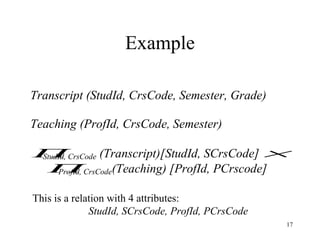
Example This is a relation with 4 attributes:  StudId, SCrsCode, ProfId, PCrsCode
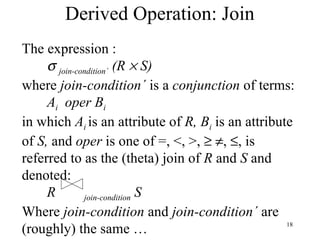
Derived Operation: Join The expression :    join-condition ´  (R    S)  where  join-condition ´  is a  conjunction  of terms: A i   oper B i in which  A i  is an attribute of  R,   B i  is an attribute of  S,  and  oper  is one of =, <, >,      ,   , is referred to as the (theta) join of  R  and  S  and denoted: R   join-condition   S Where  join-condition  and  join-condition ´  are (roughly) the same …
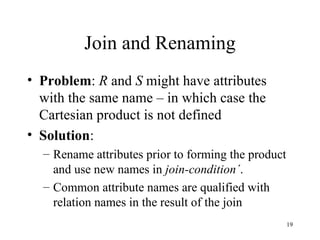
Join and Renaming Problem :  R  and  S  might have attributes with the same name – in which case the Cartesian product is not defined Solution :  Rename attributes prior to forming the product and use new names in  join-condition ´ . Common attribute names are qualified with relation names in the result of the join
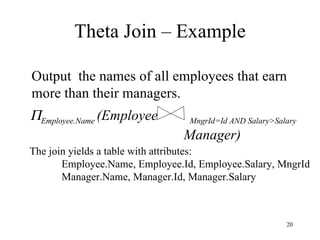
Theta Join – Example Output  the names of all employees that earn more than their managers.  Employee.Name  (Employee  MngrId=Id AND Salary>Salary   Manager) The join yields a table with attributes: Employee.Name, Employee.Id, Employee.Salary, MngrId Manager.Name, Manager.Id, Manager.Salary
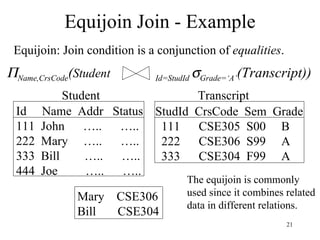
Equijoin Join - Example  Name,CrsCode ( Student   Id=StudId   Grade=‘A’ (Transcript)) Id  Name  Addr  Status 111  John  …..  ….. 222  Mary  …..  ….. 333  Bill  …..  ….. 444  Joe  …..  ….. StudId  CrsCode  Sem  Grade 111  CSE305  S00  B 222  CSE306  S99  A 333  CSE304  F99  A Mary  CSE306 Bill  CSE304 The equijoin is commonly used since it combines related  data in different relations. Student Transcript Equijoin: Join condition is a conjunction of  equalities .
Natural Join Special case of equijoin:  join condition equates  all  and  only  those attributes with the same name (condition doesn’t have to be explicitly stated) duplicate columns eliminated from the result Transcript (StudId, CrsCode, Sem, Grade) Teaching (ProfId, CrsCode, Sem) Transcript  Teaching =    StudId, Transcript.CrsCode, Transcript.Sem, Grade, ProfId  ( Transcript  CrsCode=CrsCode AND Sem=Sem Teaching) [StudId, CrsCode, Sem, Grade, ProfId ]
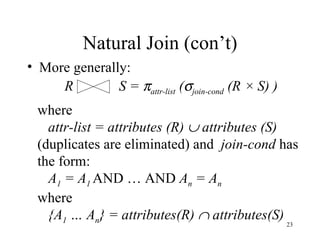
Natural Join (con’t) More generally: R S =   attr-list  (  join-cond  (R × S) ) where attr-list = attributes (R)    attributes (S) (duplicates are eliminated) and  join-cond  has  the form: A 1  = A 1   AND … AND  A n  = A n where  {A 1  … A n } = attributes(R)    attributes(S)
Natural Join Example List all Id’s of students who took at least two different courses:  StudId  (   CrsCode    CrsCode2  ( Transcript  Transcript [StudId, CrsCode2, Sem2, Grade2])) (don’t join on CrsCode, Sem,  and Grade attributes)
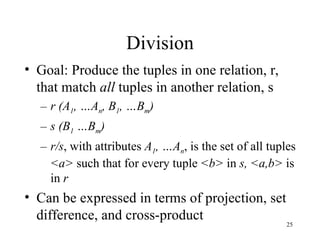
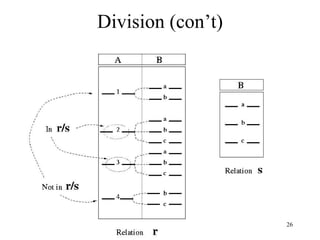
Division Goal: Produce the tuples in one relation, r, that match  all  tuples in another relation, s r (A 1 , …A n , B 1 , …B m ) s (B 1  …B m ) r/s , with attributes  A 1 , …A n , is the set of all tuples  <a>  such that for every tuple  <b>  in  s,   <a,b>  is in  r Can be expressed in terms of projection, set difference, and cross-product
Division (con’t)
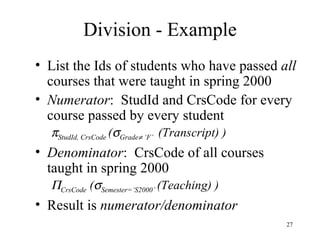
Division - Example List the Ids of students who have passed  all  courses that were taught in spring 2000 Numerator :  StudId and CrsCode for every course passed by every student  StudId, CrsCode  (  Grade   ‘F’  (Transcript) ) Denominator :  CrsCode of all courses taught in spring 2000  CrsCode  (  Semester=‘S2000’  (Teaching) ) Result is  numerator/denominator
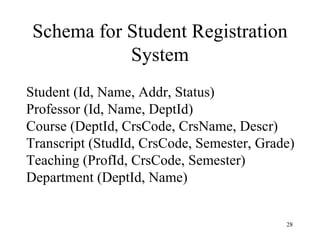
Schema for Student Registration System Student (Id, Name, Addr, Status) Professor (Id, Name, DeptId) Course (DeptId, CrsCode, CrsName, Descr) Transcript (StudId, CrsCode, Semester, Grade) Teaching (ProfId, CrsCode, Semester) Department (DeptId, Name)
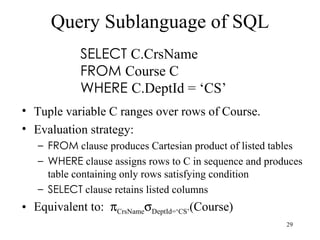
Query Sublanguage of SQL Tuple variable C ranges over rows of Course. Evaluation strategy: FROM  clause produces Cartesian product of listed tables WHERE  clause assigns rows to C in sequence and produces table containing only rows satisfying condition SELECT  clause retains listed columns Equivalent to:   CrsName  DeptId=‘CS’ (Course) SELECT  C.CrsName FROM  Course C WHERE  C.DeptId = ‘CS’
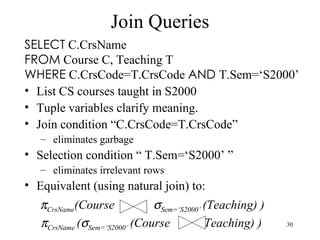
Join Queries List CS courses taught in S2000 Tuple variables clarify meaning. Join condition “C.CrsCode=T.CrsCode” eliminates garbage Selection condition “ T.Sem=‘S2000’ ”  eliminates irrelevant rows Equivalent (using natural join) to: SELECT  C.CrsName FROM  Course C, Teaching T WHERE  C.CrsCode=T.CrsCode  AND  T.Sem=‘S2000’  CrsName (Course  Sem=‘S2000’  (Teaching) )  CrsName  (  Sem=‘S2000’  (Course  Teaching) )
Correspondence Between SQL and Relational Algebra SELECT  C.CrsName FROM  Course C, Teaching T WHERE  C.CrsCode=T.CrsCode  AND  T.Sem=‘S2000’ Also equivalent to:  CrsName   C_ CrsCode=T_CrsCode AND Sem=‘S2000’ (Course [C_CrsCode, DeptId, CrsName, Desc ]     Teaching  [ ProfId, T_CrsCode, Sem ]) This is the simple evaluation algorithm for  SELECT . Relational algebra expressions are procedural.  Which of  the two equivalent expressions is more easily evaluated?

Relational+algebra (1)

  • 1.
  • 2.
    Relational Query LanguagesLanguages for describing queries on a relational database Structured Query Language (SQL) Predominant application query language Declarative Relational Algebra Intermediate language within DBMS Procedural
  • 3.
    Algebra Based onoperators and a domain of values Operators map arguments from domain into another domain value Hence, an expression involving operators and arguments produces a value in the domain. We refer to the expression as a query and the value produced as the result of that query
  • 4.
    Relational Algebra Domain:set of relations, i.e., result is another relation Basic operators: select, project, union, set difference, Cartesian product (or cross product) Derived operators: set intersection, division, join Procedural: Relational expression specifies query by describing an algorithm (the sequence in which operators are applied) for determining the result of an expression
  • 5.
    Relational Algebra ina DBMS parser SQL Relational algebra expression Optimized Relational algebra expression Query optimizer Code generator Query execution plan Executable code DBMS
  • 6.
    Select Operator Producetable containing subset of rows of argument table satisfying condition Example: 1123 John 123 Main stamps 1123 John 123 Main coins 5556 Mary 7 Lake Dr hiking 9876 Bart 5 Pine St stamps 1123 John 123 Main stamps 9876 Bart 5 Pine St stamps Person Id Name Address Hobby Id Name Address Hobby
  • 7.
    Selection Condition Operators: <,  ,  , >, =,  Simple selection condition: <attribute> operator <constant> <attribute> operator <attribute> <condition> AND <condition> <condition> OR <condition> NOT <condition> NOTE: Each attribute in condition must be one of the attributes of the relation name
  • 8.
    Id>3000 OR Hobby=‘hiking’ (Person)  Id>3000 AND Id <3999 (Person)  NOT(Hobby=‘hiking’) (Person)  Hobby  ‘hiking’ (Person)  (Id > 3000 AND Id < 3999) OR Hobby  ‘hiking’ (Person) Selection Condition - Examples
  • 9.
    Project Operator Producetable containing subset of columns of argument table 1123 John 123 Main stamps 1123 John 123 Main coins 5556 Mary 7 Lake Dr hiking 9876 Bart 5 Pine St stamps John stamps John coins Mary hiking Bart stamps Id Name Address Hobby Name Hobby Person
  • 10.
    Project Operator 1123 John 123 Main stamps 1123 John 123 Main coins 5556 Mary 7 Lake Dr hiking 9876 Bart 5 Pine St stamps John 123 Main Mary 7 Lake Dr Bart 5 Pine St Result is a table (no duplicates) Id Name Address Hobby Name Address Person
  • 11.
    Relational Expressions: CombiningOperators 1123 John 123 Main stamps 1123 John 123 Main coins 5556 Mary 7 Lake Dr hiking 9876 Bart 5 Pine St stamps 1123 John 9876 Bart Id Name Address Hobby Id Name Person
  • 12.
    Set Operators Relationis a set of tuples => set operations should apply Result of combining two relations with a set operator is a relation => all its elements must be tuples having same structure Hence, scope of set operations limited to union compatible relations
  • 13.
    Union Compatible RelationsTwo relations are union compatible if Both have same number of columns Names of attributes are the same in both Attributes with the same name in both relations have the same domain Union compatible relations can be combined using union, intersection, and set difference
  • 14.
    Example Tables: Person(SSN, Name, Address, Hobby) Professor (Id, Name, Office, Phone) are not union compatible. However
  • 15.
    Cartesian Product If R and S are two relations, R  S is the set of all concatenated tuples <x,y>, where x is a tuple in R and y is a tuple in S ( R and S need not be union compatible) R  S is expensive to compute: Factor of two in the size of each row Quadratic in the number of rows a b c d a b c d x1 x2 y1 y2 x1 x2 y1 y2 x3 x4 y3 y4 x1 x2 y3 y4 x3 x4 y1 y2 R S x3 x4 y3 y4 R  S
  • 16.
    Renaming Result ofexpression evaluation is a relation Attributes of relation must have distinct names. This is not guaranteed with Cartesian product e.g., suppose in previous example a = c Renaming operator tidies this up. To assign the names A 1 , A 2 ,… A n to the attributes of the n column relation produced by expression use expression [A 1 , A 2 , … A n ]
  • 17.
    Example This isa relation with 4 attributes: StudId, SCrsCode, ProfId, PCrsCode
  • 18.
    Derived Operation: JoinThe expression :  join-condition ´ (R  S) where join-condition ´ is a conjunction of terms: A i oper B i in which A i is an attribute of R, B i is an attribute of S, and oper is one of =, <, >,   ,  , is referred to as the (theta) join of R and S and denoted: R join-condition S Where join-condition and join-condition ´ are (roughly) the same …
  • 19.
    Join and RenamingProblem : R and S might have attributes with the same name – in which case the Cartesian product is not defined Solution : Rename attributes prior to forming the product and use new names in join-condition ´ . Common attribute names are qualified with relation names in the result of the join
  • 20.
    Theta Join –Example Output the names of all employees that earn more than their managers.  Employee.Name (Employee MngrId=Id AND Salary>Salary Manager) The join yields a table with attributes: Employee.Name, Employee.Id, Employee.Salary, MngrId Manager.Name, Manager.Id, Manager.Salary
  • 21.
    Equijoin Join -Example  Name,CrsCode ( Student Id=StudId  Grade=‘A’ (Transcript)) Id Name Addr Status 111 John ….. ….. 222 Mary ….. ….. 333 Bill ….. ….. 444 Joe ….. ….. StudId CrsCode Sem Grade 111 CSE305 S00 B 222 CSE306 S99 A 333 CSE304 F99 A Mary CSE306 Bill CSE304 The equijoin is commonly used since it combines related data in different relations. Student Transcript Equijoin: Join condition is a conjunction of equalities .
  • 22.
    Natural Join Specialcase of equijoin: join condition equates all and only those attributes with the same name (condition doesn’t have to be explicitly stated) duplicate columns eliminated from the result Transcript (StudId, CrsCode, Sem, Grade) Teaching (ProfId, CrsCode, Sem) Transcript Teaching =  StudId, Transcript.CrsCode, Transcript.Sem, Grade, ProfId ( Transcript CrsCode=CrsCode AND Sem=Sem Teaching) [StudId, CrsCode, Sem, Grade, ProfId ]
  • 23.
    Natural Join (con’t)More generally: R S =  attr-list (  join-cond (R × S) ) where attr-list = attributes (R)  attributes (S) (duplicates are eliminated) and join-cond has the form: A 1 = A 1 AND … AND A n = A n where {A 1 … A n } = attributes(R)  attributes(S)
  • 24.
    Natural Join ExampleList all Id’s of students who took at least two different courses:  StudId (  CrsCode  CrsCode2 ( Transcript Transcript [StudId, CrsCode2, Sem2, Grade2])) (don’t join on CrsCode, Sem, and Grade attributes)
  • 25.
    Division Goal: Producethe tuples in one relation, r, that match all tuples in another relation, s r (A 1 , …A n , B 1 , …B m ) s (B 1 …B m ) r/s , with attributes A 1 , …A n , is the set of all tuples <a> such that for every tuple <b> in s, <a,b> is in r Can be expressed in terms of projection, set difference, and cross-product
  • 26.
  • 27.
    Division - ExampleList the Ids of students who have passed all courses that were taught in spring 2000 Numerator : StudId and CrsCode for every course passed by every student  StudId, CrsCode (  Grade  ‘F’ (Transcript) ) Denominator : CrsCode of all courses taught in spring 2000  CrsCode (  Semester=‘S2000’ (Teaching) ) Result is numerator/denominator
  • 28.
    Schema for StudentRegistration System Student (Id, Name, Addr, Status) Professor (Id, Name, DeptId) Course (DeptId, CrsCode, CrsName, Descr) Transcript (StudId, CrsCode, Semester, Grade) Teaching (ProfId, CrsCode, Semester) Department (DeptId, Name)
  • 29.
    Query Sublanguage ofSQL Tuple variable C ranges over rows of Course. Evaluation strategy: FROM clause produces Cartesian product of listed tables WHERE clause assigns rows to C in sequence and produces table containing only rows satisfying condition SELECT clause retains listed columns Equivalent to:  CrsName  DeptId=‘CS’ (Course) SELECT C.CrsName FROM Course C WHERE C.DeptId = ‘CS’
  • 30.
    Join Queries ListCS courses taught in S2000 Tuple variables clarify meaning. Join condition “C.CrsCode=T.CrsCode” eliminates garbage Selection condition “ T.Sem=‘S2000’ ” eliminates irrelevant rows Equivalent (using natural join) to: SELECT C.CrsName FROM Course C, Teaching T WHERE C.CrsCode=T.CrsCode AND T.Sem=‘S2000’  CrsName (Course  Sem=‘S2000’ (Teaching) )  CrsName (  Sem=‘S2000’ (Course Teaching) )
  • 31.
    Correspondence Between SQLand Relational Algebra SELECT C.CrsName FROM Course C, Teaching T WHERE C.CrsCode=T.CrsCode AND T.Sem=‘S2000’ Also equivalent to:  CrsName  C_ CrsCode=T_CrsCode AND Sem=‘S2000’ (Course [C_CrsCode, DeptId, CrsName, Desc ]  Teaching [ ProfId, T_CrsCode, Sem ]) This is the simple evaluation algorithm for SELECT . Relational algebra expressions are procedural. Which of the two equivalent expressions is more easily evaluated?