Visualizing your Honeypot Data
   Wasim Halani
    ◦ Security Analyst @ Network Intelligence India
      (http://www.niiconsulting.com/)
    ◦ Interests
      Exploit development
      Malware Analysis
   Harsh Patel
    ◦ Student @ Symbiosis center for Information
      technology.
    ◦ Interest
      Anything and everything about security
   A deliberately vulnerable system, placed on
    the network
    ◦ Lure attackers towards itself
    ◦ Capture the malwares sent to the network/system
    ◦ Help in offline analysis
   Types
    ◦ Low Interaction
    ◦ High Interaction
   NepenthesFE is a front end to the low
    interaction honeypot ‘nepenthes’

   Originally developed by Emre Bastuz

   Helps in cataloguing malware collected using
    nepenthes

   Has modules which performs operations to
    automate some aspects of malware analysis
   Our Nepenthes honeypot provided only
    minimal data about the captured binaries
    ◦   File hash (MD5)
    ◦   Attacker IP
    ◦   File Name
    ◦   ...
   What next?
   Is that all the value a honeypot can provide?
   Lenny Zeltser
    ◦ ‘What to include in a Malware Analysis Report?’
      http://zeltser.com/reverse-malware/malware-analysis-report.html

   Summary of Analysis
   Identification
   Characteristics
   Dependencies
   Behavioral & Code Analysis
   Screenshots
   Recommendations
   Once we have captured the binary, we’re still
    left with doing the routine basic stuff
    ◦ strings, file, virustotal, geo-ip ...


   Can’t we automate it!?

   Enter ‘NepenthesFE’
    ◦ Basic analysis like filetype, hashes, ASCII strings,
      packer information, geographical information
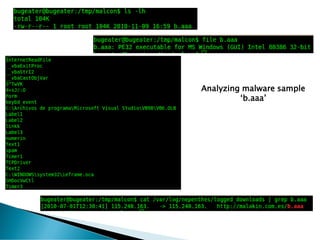
Analyzing malware sample
         ‘b.aaa’
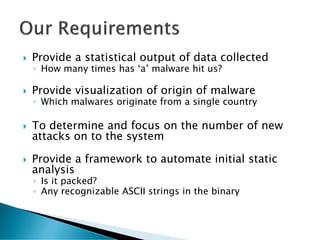
   Provide a statistical output of data collected
    ◦ How many times has ‘a’ malware hit us?

   Provide visualization of origin of malware
    ◦ Which malwares originate from a single country

   To determine and focus on the number of new
    attacks on to the system

   Provide a framework to automate initial static
    analysis
    ◦ Is it packed?
    ◦ Any recognizable ASCII strings in the binary
   Integrate with the Nepenthes honeypot
    ◦ Integration with multiple sensors possible
   Statistical count of malware hits
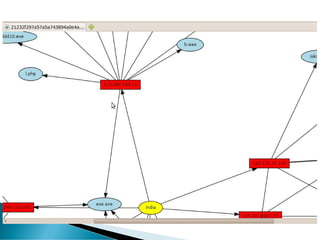
   AfterGlow diagrams
    ◦ Country of Origin
    ◦ ASN
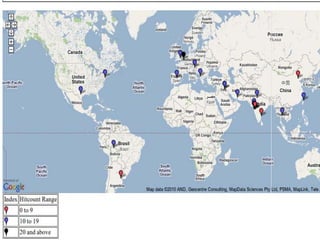
   Provide details of the attacking IP
    ◦ GEO IP database
    ◦ Google maps
   Can be extended with custom modules for
    static malware analysis on real time
    ◦ Packer Information
    ◦ ‘Strings’

   Anti-virus scanning (for known malwares)
   Based on Sample (malware)
    ◦ VirusTotal Scanning
      API
    ◦ Bit defender scanning
    ◦ Unix based commands execution like File,
      objdump, UPX and string
    ◦ *nix based custom script execution to find out
      details like Packer Information, PE information
      and entropy analyser
   Based on Instance (Information about the
    attacker)
    ◦ GEO IP database
    ◦ ASN Information
      Mapping of ASN to Robtex
       Mapping of ASN to Phishtank
       Visualization of attack vectors from a ASN
        number
    ◦ Visualisation of attack vectors from a IP address
   Install Nepenthes Honeypot sensor
      http://nepenthes.carnivore.it/
   Refer to our first report at IHP
      http://www.honeynet.org.in/reports/KK_Project1.pdf
   List of packages are :-
    ◦   Build essentials
    ◦   Apache2
    ◦   Libapache2-mod-php5
    ◦   phppear
    ◦   Mysql-server-5.1
    ◦   Php5-msql
    ◦   Php5-mhash
    ◦   Php5-dev
    ◦   Upx-ucl
    ◦   File
   List of packages are :-
    ◦ geoip-bin
    ◦ rrdtool                       (for Graphs)
    ◦ Librrd2                       (for Graphs)
    ◦ Librrd2-dev                   (for Graphs)
    ◦ Python-pefile                 (for Pefile module)
    ◦ Python-all                    (for Pefile module)
    ◦ Bitdefender-scanner           (for bit-defender
      scanning)
    ◦ graphviz                      (for visualization)

    And Lots of Configuration....
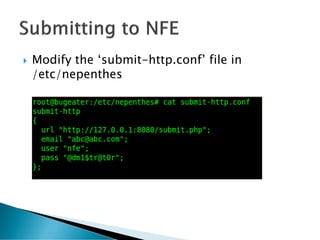
   Modify the ‘submit-http.conf’ file in
    /etc/nepenthes
   Download the freely available database from
    MaxMind
    ◦ http://www.maxmind.com/download/geoip/database/GeoLiteCity.dat.gz
   Get the Google API Key
      http://code.google.com/apis/maps/signup.html
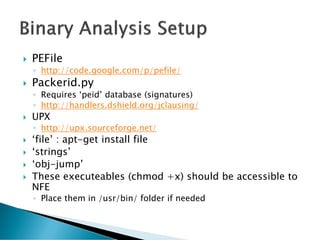
   PEFile
    ◦ http://code.google.com/p/pefile/
   Packerid.py
    ◦ Requires ‘peid’ database (signatures)
    ◦ http://handlers.dshield.org/jclausing/
   UPX
    ◦ http://upx.sourceforge.net/
   ‘file’ : apt-get install file
   ‘strings’
   ‘obj-jump’
   These executeables (chmod +x) should be accessible to
    NFE
    ◦ Place them in /usr/bin/ folder if needed
Analysis Report        Nepenthes             Nepenthes + FE


File name                 Yes           Yes


Unique Identification –   MD5,SHA512    MD5, SHA512, (possibly ssdeep)
Hashes
Malware Name (Family)     No            VirusTotal, Bitdefender (free Linux
                                        AV scanners)
Binary File Type          No            ‘file’

Malware Origin            IP address    Geo-location data


Screenshots               None          GoogleMaps, AfterGlow graphs,
                                        Robtex graphs
Is it packed? Which       No            packerid.py, UPX
Packer?
Statistics                No            Yes (hit counts,RRD graphs)
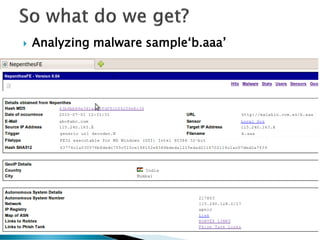
   Analyzing malware sample‘b.aaa’
   Works only with Nepenthes honeypot 

   No search functionality

   VirusTotal functionality is broken (new API
    released by VT recently)

   Report cannot be exported
   Open-source
    ◦ Requires volunteers
    ◦ Current version – 0.04 (Releasing v0.05 today)
   Complete documentation available at:
    ◦ http://www.niiconsulting.com/nepenthesfe/
   Implementation of a central NepenthesFE for
    multiple Nepenthes sensors
    ◦ As part of the Indian Honeynet Project (IHP)
      http://honeynet.org.in/
   Submit the malware to a sandbox environment to
    retrieve more in-depth analysis
wasimhalani@gmail.com
 har.duro@gmail.com

Real-Time Static Malware Analysis using NepenthesFE

  • 1.
  • 2.
    Wasim Halani ◦ Security Analyst @ Network Intelligence India (http://www.niiconsulting.com/) ◦ Interests  Exploit development  Malware Analysis  Harsh Patel ◦ Student @ Symbiosis center for Information technology. ◦ Interest  Anything and everything about security
  • 3.
    A deliberately vulnerable system, placed on the network ◦ Lure attackers towards itself ◦ Capture the malwares sent to the network/system ◦ Help in offline analysis  Types ◦ Low Interaction ◦ High Interaction
  • 4.
    NepenthesFE is a front end to the low interaction honeypot ‘nepenthes’  Originally developed by Emre Bastuz  Helps in cataloguing malware collected using nepenthes  Has modules which performs operations to automate some aspects of malware analysis
  • 5.
    Our Nepenthes honeypot provided only minimal data about the captured binaries ◦ File hash (MD5) ◦ Attacker IP ◦ File Name ◦ ...  What next?  Is that all the value a honeypot can provide?
  • 6.
    Lenny Zeltser ◦ ‘What to include in a Malware Analysis Report?’  http://zeltser.com/reverse-malware/malware-analysis-report.html  Summary of Analysis  Identification  Characteristics  Dependencies  Behavioral & Code Analysis  Screenshots  Recommendations
  • 7.
    Once we have captured the binary, we’re still left with doing the routine basic stuff ◦ strings, file, virustotal, geo-ip ...  Can’t we automate it!?  Enter ‘NepenthesFE’ ◦ Basic analysis like filetype, hashes, ASCII strings, packer information, geographical information
  • 8.
  • 9.
    Provide a statistical output of data collected ◦ How many times has ‘a’ malware hit us?  Provide visualization of origin of malware ◦ Which malwares originate from a single country  To determine and focus on the number of new attacks on to the system  Provide a framework to automate initial static analysis ◦ Is it packed? ◦ Any recognizable ASCII strings in the binary
  • 11.
    Integrate with the Nepenthes honeypot ◦ Integration with multiple sensors possible  Statistical count of malware hits  AfterGlow diagrams ◦ Country of Origin ◦ ASN  Provide details of the attacking IP ◦ GEO IP database ◦ Google maps
  • 12.
    Can be extended with custom modules for static malware analysis on real time ◦ Packer Information ◦ ‘Strings’  Anti-virus scanning (for known malwares)
  • 13.
    Based on Sample (malware) ◦ VirusTotal Scanning  API ◦ Bit defender scanning ◦ Unix based commands execution like File, objdump, UPX and string ◦ *nix based custom script execution to find out details like Packer Information, PE information and entropy analyser
  • 14.
    Based on Instance (Information about the attacker) ◦ GEO IP database ◦ ASN Information  Mapping of ASN to Robtex  Mapping of ASN to Phishtank  Visualization of attack vectors from a ASN number ◦ Visualisation of attack vectors from a IP address
  • 17.
    Install Nepenthes Honeypot sensor  http://nepenthes.carnivore.it/  Refer to our first report at IHP  http://www.honeynet.org.in/reports/KK_Project1.pdf
  • 18.
    List of packages are :- ◦ Build essentials ◦ Apache2 ◦ Libapache2-mod-php5 ◦ phppear ◦ Mysql-server-5.1 ◦ Php5-msql ◦ Php5-mhash ◦ Php5-dev ◦ Upx-ucl ◦ File
  • 19.
    List of packages are :- ◦ geoip-bin ◦ rrdtool (for Graphs) ◦ Librrd2 (for Graphs) ◦ Librrd2-dev (for Graphs) ◦ Python-pefile (for Pefile module) ◦ Python-all (for Pefile module) ◦ Bitdefender-scanner (for bit-defender scanning) ◦ graphviz (for visualization) And Lots of Configuration....
  • 20.
    Modify the ‘submit-http.conf’ file in /etc/nepenthes
  • 21.
    Download the freely available database from MaxMind ◦ http://www.maxmind.com/download/geoip/database/GeoLiteCity.dat.gz
  • 22.
    Get the Google API Key  http://code.google.com/apis/maps/signup.html
  • 24.
    PEFile ◦ http://code.google.com/p/pefile/  Packerid.py ◦ Requires ‘peid’ database (signatures) ◦ http://handlers.dshield.org/jclausing/  UPX ◦ http://upx.sourceforge.net/  ‘file’ : apt-get install file  ‘strings’  ‘obj-jump’  These executeables (chmod +x) should be accessible to NFE ◦ Place them in /usr/bin/ folder if needed
  • 25.
    Analysis Report Nepenthes Nepenthes + FE File name Yes Yes Unique Identification – MD5,SHA512 MD5, SHA512, (possibly ssdeep) Hashes Malware Name (Family) No VirusTotal, Bitdefender (free Linux AV scanners) Binary File Type No ‘file’ Malware Origin IP address Geo-location data Screenshots None GoogleMaps, AfterGlow graphs, Robtex graphs Is it packed? Which No packerid.py, UPX Packer? Statistics No Yes (hit counts,RRD graphs)
  • 26.
    Analyzing malware sample‘b.aaa’
  • 32.
    Works only with Nepenthes honeypot   No search functionality  VirusTotal functionality is broken (new API released by VT recently)  Report cannot be exported
  • 33.
    Open-source ◦ Requires volunteers ◦ Current version – 0.04 (Releasing v0.05 today)  Complete documentation available at: ◦ http://www.niiconsulting.com/nepenthesfe/  Implementation of a central NepenthesFE for multiple Nepenthes sensors ◦ As part of the Indian Honeynet Project (IHP)  http://honeynet.org.in/  Submit the malware to a sandbox environment to retrieve more in-depth analysis
  • 35.