
My Bro The ELK
Obtaining Security Context from Security Events
Travis Smith
tsmith@tripwire.com
• What is the problem?
• Who is the Bro?
• What is an ELK?
• Beefing up the ELK
• Making Your Bro the ELK Intelligent
• Visualization w/ Kibana
• Introducing the TARDIS framework
Agenda
• I’m a lumberjack and I’m OK
• 10+ years in security
• Security Researcher at Tripwire
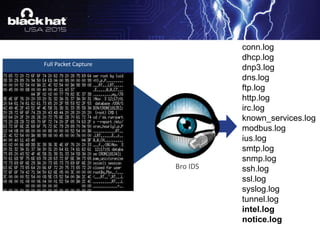
conn.log
dhcp.log
dnp3.log
dns.log
ftp.log
http.log
irc.log
known_services.log
modbus.log
ius.log
smtp.log
snmp.log
ssh.log
ssl.log
syslog.log
tunnel.log
intel.log
notice.log
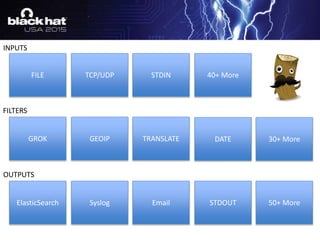
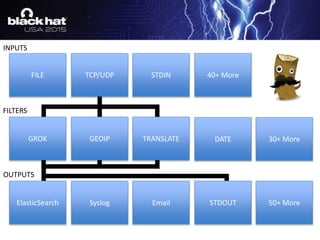
INPUTS
FILTERS
OUTPUTS
FILE TCP/UDP 40+ More
GROK GEOIP TRANSLATE 30+ More
ElasticSearch Syslog Email STDOUT
STDIN
50+ More
DATE
INPUTS
FILTERS
OUTPUTS
FILE TCP/UDP 40+ More
GROK GEOIP TRANSLATE 30+ More
ElasticSearch Syslog Email STDOUT
STDIN
50+ More
DATE
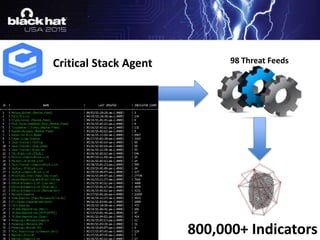
Threat Intelligence Made Easy
98 Threat Feeds
800,000+ Indicators
Critical Stack Agent
• Utilizing Custom Patterns
• GROK Message Filtering
• Adding Custom Fields
• Adding Geo IP Data
• Date Match
• Using Translations for Threat Intel
Logstash Filtering
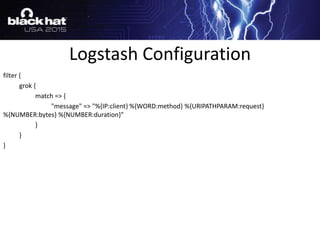
filter {
grok {
match => {
"message" => "%{IP:client} %{WORD:method} %{URIPATHPARAM:request}
%{NUMBER:bytes} %{NUMBER:duration}"
}
}
}
Logstash Configuration
filter {
grok {
patterns_dir => "/opt/logstash/custom_patterns"
match => {
message => "%{291001}“
}
}
}
/opt/logstash/custom_patterns/bro.rule
291001 (?<start_time>d{10}.d{6})t(?<evt_srcip>[d.]+)t(?<evt_dstip>[d.]+)t(?<evt_srcport>d+)t…
Utilize Custom Patterns
filter {
if [message] =~ /^((d{10}.d{6})t([d.]+)([d.]+)t(d+)t(d+)t(w+))/ {
grok {
patterns_dir => "/opt/logstash/custom_patterns"
match => {
message => "%{291001}“
}
}
}
}
Message Filtering
291001 (?<start_time>d{10}.d{6})t(?<evt_srcip>[d.]+)t(?<evt_dstip>[d.]+)t(?<evt_srcport>d+)t…
Remove Capture Groups
filter {
if [message] =~ /^((d{10}.d{6})t([d.]+)([d.]+)t(d+)t(d+)t(w+))/ {
grok {
patterns_dir => "/opt/logstash/custom_patterns"
match => {
message => "%{291001}“
}
add_field => [ "rule_id", "291001" ]
add_field => [ "Device Type", "IPSIDSDevice" ]
add_field => [ "Object", "NetworkTraffic" ]
add_field => [ "Action", "General" ]
add_field => [ "Status", "Informational" ]
}
}
}
Add Custom Fields
filter {
…..all normalization code above here….
geoip {
source => "evt_dstip"
target => "geoip_dst"
database => “/etc/logstash/conf.d/GeoLiteCity.dat“
add_field => [ "[geoip_dst][coordinates]", "%{[geoip_dst][longitude]}" ]
add_field => [ "[geoip_dst][coordinates]", "%{[geoip_dst][latitude]}" ]
add_field => [ "[geoip_dst][coordinates]", "%{[geoip_dst][city_name]}" ]
add_field => [ "[geoip_dst][coordinates]", "%{[geoip_dst][continent_code]}" ]
add_field => [ "[geoip_dst][coordinates]", "%{[geoip_dst][country_name]}" ]
add_field => [ "[geoip_dst][coordinates]", "%{[geoip_dst][postal_code]}" ]}
mutate {
convert => [ "[geoip_dst][coordinates]", "float"]
}
}
Geo IP
New ElasticSearch
Template Needed
GeoIP Template Update
curl -XGET localhost:9200/_template/logstash
{"logstash":{
"order":0,
"template":"logstash-*",
"settings":{
"index.refresh_interval":"5s"
},
"mappings":{
"properties":{
"geoip":{
"dynamic":true,
"properties":{
"location":{
"type":"geo_point"
}
},
"type":"object"
},
…
{"logstash":{
"order":0,
"template":"logstash-*",
"settings":{
"index.refresh_interval":"5s"
},
"mappings":{
"properties":{
"geoip_dst":{
"dynamic":true,
"properties":{
"location":{
"type":"geo_point"
}
},
"type":"object"
},
…
curl -XPUT localhost:9200/_template/logstash -d ‘….’
filter {
....all normalization code above here….
.…all GeoIP code here....
date {
match => [ "start_time", "UNIX" ]
}
}
Date Match
filter {
....all normalization code above here….
.…all GeoIP code here....
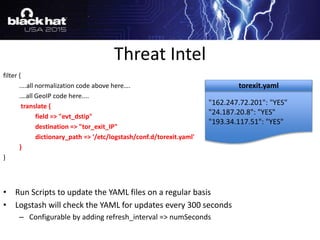
translate {
field => "evt_dstip"
destination => "tor_exit_IP"
dictionary_path => '/etc/logstash/conf.d/torexit.yaml'
}
}
• Run Scripts to update the YAML files on a regular basis
• Logstash will check the YAML for updates every 300 seconds
– Configurable by adding refresh_interval => numSeconds
Threat Intel
"162.247.72.201": "YES"
"24.187.20.8": "YES"
"193.34.117.51": "YES"
torexit.yaml
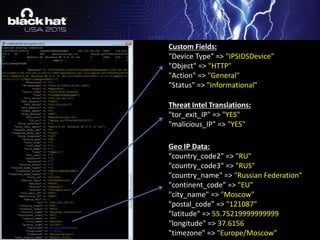
Custom Fields:
"Device Type" => "IPSIDSDevice"
"Object" => "HTTP"
"Action" => "General"
"Status" => "Informational"
Threat Intel Translations:
"tor_exit_IP" => "YES"
"malicious_IP" => "YES"
Geo IP Data:
"country_code2" => "RU"
"country_code3" => "RUS"
"country_name" => "Russian Federation"
"continent_code" => "EU"
"city_name" => "Moscow"
"postal_code" => "121087"
"latitude" => 55.75219999999999
"longitude" => 37.6156
"timezone" => "Europe/Moscow"
• Threat Analysis, Reconnaissance, & Data
Intelligence System
• Historical exploit/IOC detection
• Time Lord of forensic log data
• Available at
https://github.com/tripwire/tardis
• Demo at Arsenal Thursday @ 12:45
The TARDIS Framework
10.10.10.10- - [06/Aug/2015:05:00:38 -0400] "GET /cgi-bin/test.cgi HTTP/1.1" 200 525 "-" "() { test;};echo "Content-type: text/plain"; echo; echo; /bin/cat /etc/passwd“
10.10.10.10- - [06/Aug/2015:05:00:39 -0400] "GET /cgi-bin/test.cgi HTTP/1.1" 200 525 "-" "() { test;};echo "Content-type: text/plain"; echo; echo; /bin/cat /etc/passwd"
10.10.10.10- - [06/Aug/2015:05:00:40 -0400] "GET /cgi-bin/test.cgi HTTP/1.1" 200 525 "-" "() { test;};echo "Content-type: text/plain"; echo; echo; /bin/cat /etc/passwd"
10.10.10.10- - [06/Aug/2015:05:00:41 -0400] "GET /cgi-bin/test.cgi HTTP/1.1" 200 525 "-" "() { test;};echo "Content-type: text/plain"; echo; echo; /bin/cat /etc/passwd"
10.10.10.10- - [06/Aug/2015:05:00:42 -0400] "GET /cgi-bin/test.cgi HTTP/1.1" 200 525 "-" "() { test;};echo "Content-type: text/plain"; echo; echo; /bin/cat /etc/passwd"
10.10.10.10- - [06/Aug/2015:05:00:43 -0400] "GET /cgi-bin/test.cgi HTTP/1.1" 200 525 "-" "() { test;};echo "Content-type: text/plain"; echo; echo; /bin/cat /etc/passwd"
• Use NSM With Log
• Security Tools Are Better With Intelligence
• Take Integrations to the Next Level With TARDIS
Sound Bytes
Travis Smith
tsmith@tripwire.com
https://github.com/Tripwire/tardis
https://github.com/TravisFSmith/MyBroElk
Thank You

My Bro The ELK

  • 1.
    My Bro TheELK Obtaining Security Context from Security Events Travis Smith tsmith@tripwire.com
  • 2.
    • What isthe problem? • Who is the Bro? • What is an ELK? • Beefing up the ELK • Making Your Bro the ELK Intelligent • Visualization w/ Kibana • Introducing the TARDIS framework Agenda
  • 3.
    • I’m alumberjack and I’m OK • 10+ years in security • Security Researcher at Tripwire
  • 6.
  • 7.
    INPUTS FILTERS OUTPUTS FILE TCP/UDP 40+More GROK GEOIP TRANSLATE 30+ More ElasticSearch Syslog Email STDOUT STDIN 50+ More DATE
  • 8.
    INPUTS FILTERS OUTPUTS FILE TCP/UDP 40+More GROK GEOIP TRANSLATE 30+ More ElasticSearch Syslog Email STDOUT STDIN 50+ More DATE
  • 11.
  • 12.
    98 Threat Feeds 800,000+Indicators Critical Stack Agent
  • 13.
    • Utilizing CustomPatterns • GROK Message Filtering • Adding Custom Fields • Adding Geo IP Data • Date Match • Using Translations for Threat Intel Logstash Filtering
  • 14.
    filter { grok { match=> { "message" => "%{IP:client} %{WORD:method} %{URIPATHPARAM:request} %{NUMBER:bytes} %{NUMBER:duration}" } } } Logstash Configuration
  • 15.
    filter { grok { patterns_dir=> "/opt/logstash/custom_patterns" match => { message => "%{291001}“ } } } /opt/logstash/custom_patterns/bro.rule 291001 (?<start_time>d{10}.d{6})t(?<evt_srcip>[d.]+)t(?<evt_dstip>[d.]+)t(?<evt_srcport>d+)t… Utilize Custom Patterns
  • 16.
    filter { if [message]=~ /^((d{10}.d{6})t([d.]+)([d.]+)t(d+)t(d+)t(w+))/ { grok { patterns_dir => "/opt/logstash/custom_patterns" match => { message => "%{291001}“ } } } } Message Filtering 291001 (?<start_time>d{10}.d{6})t(?<evt_srcip>[d.]+)t(?<evt_dstip>[d.]+)t(?<evt_srcport>d+)t… Remove Capture Groups
  • 17.
    filter { if [message]=~ /^((d{10}.d{6})t([d.]+)([d.]+)t(d+)t(d+)t(w+))/ { grok { patterns_dir => "/opt/logstash/custom_patterns" match => { message => "%{291001}“ } add_field => [ "rule_id", "291001" ] add_field => [ "Device Type", "IPSIDSDevice" ] add_field => [ "Object", "NetworkTraffic" ] add_field => [ "Action", "General" ] add_field => [ "Status", "Informational" ] } } } Add Custom Fields
  • 18.
    filter { …..all normalizationcode above here…. geoip { source => "evt_dstip" target => "geoip_dst" database => “/etc/logstash/conf.d/GeoLiteCity.dat“ add_field => [ "[geoip_dst][coordinates]", "%{[geoip_dst][longitude]}" ] add_field => [ "[geoip_dst][coordinates]", "%{[geoip_dst][latitude]}" ] add_field => [ "[geoip_dst][coordinates]", "%{[geoip_dst][city_name]}" ] add_field => [ "[geoip_dst][coordinates]", "%{[geoip_dst][continent_code]}" ] add_field => [ "[geoip_dst][coordinates]", "%{[geoip_dst][country_name]}" ] add_field => [ "[geoip_dst][coordinates]", "%{[geoip_dst][postal_code]}" ]} mutate { convert => [ "[geoip_dst][coordinates]", "float"] } } Geo IP New ElasticSearch Template Needed
  • 19.
    GeoIP Template Update curl-XGET localhost:9200/_template/logstash {"logstash":{ "order":0, "template":"logstash-*", "settings":{ "index.refresh_interval":"5s" }, "mappings":{ "properties":{ "geoip":{ "dynamic":true, "properties":{ "location":{ "type":"geo_point" } }, "type":"object" }, … {"logstash":{ "order":0, "template":"logstash-*", "settings":{ "index.refresh_interval":"5s" }, "mappings":{ "properties":{ "geoip_dst":{ "dynamic":true, "properties":{ "location":{ "type":"geo_point" } }, "type":"object" }, … curl -XPUT localhost:9200/_template/logstash -d ‘….’
  • 20.
    filter { ....all normalizationcode above here…. .…all GeoIP code here.... date { match => [ "start_time", "UNIX" ] } } Date Match
  • 21.
    filter { ....all normalizationcode above here…. .…all GeoIP code here.... translate { field => "evt_dstip" destination => "tor_exit_IP" dictionary_path => '/etc/logstash/conf.d/torexit.yaml' } } • Run Scripts to update the YAML files on a regular basis • Logstash will check the YAML for updates every 300 seconds – Configurable by adding refresh_interval => numSeconds Threat Intel "162.247.72.201": "YES" "24.187.20.8": "YES" "193.34.117.51": "YES" torexit.yaml
  • 22.
    Custom Fields: "Device Type"=> "IPSIDSDevice" "Object" => "HTTP" "Action" => "General" "Status" => "Informational" Threat Intel Translations: "tor_exit_IP" => "YES" "malicious_IP" => "YES" Geo IP Data: "country_code2" => "RU" "country_code3" => "RUS" "country_name" => "Russian Federation" "continent_code" => "EU" "city_name" => "Moscow" "postal_code" => "121087" "latitude" => 55.75219999999999 "longitude" => 37.6156 "timezone" => "Europe/Moscow"
  • 25.
    • Threat Analysis,Reconnaissance, & Data Intelligence System • Historical exploit/IOC detection • Time Lord of forensic log data • Available at https://github.com/tripwire/tardis • Demo at Arsenal Thursday @ 12:45 The TARDIS Framework
  • 26.
    10.10.10.10- - [06/Aug/2015:05:00:38-0400] "GET /cgi-bin/test.cgi HTTP/1.1" 200 525 "-" "() { test;};echo "Content-type: text/plain"; echo; echo; /bin/cat /etc/passwd“ 10.10.10.10- - [06/Aug/2015:05:00:39 -0400] "GET /cgi-bin/test.cgi HTTP/1.1" 200 525 "-" "() { test;};echo "Content-type: text/plain"; echo; echo; /bin/cat /etc/passwd" 10.10.10.10- - [06/Aug/2015:05:00:40 -0400] "GET /cgi-bin/test.cgi HTTP/1.1" 200 525 "-" "() { test;};echo "Content-type: text/plain"; echo; echo; /bin/cat /etc/passwd" 10.10.10.10- - [06/Aug/2015:05:00:41 -0400] "GET /cgi-bin/test.cgi HTTP/1.1" 200 525 "-" "() { test;};echo "Content-type: text/plain"; echo; echo; /bin/cat /etc/passwd" 10.10.10.10- - [06/Aug/2015:05:00:42 -0400] "GET /cgi-bin/test.cgi HTTP/1.1" 200 525 "-" "() { test;};echo "Content-type: text/plain"; echo; echo; /bin/cat /etc/passwd" 10.10.10.10- - [06/Aug/2015:05:00:43 -0400] "GET /cgi-bin/test.cgi HTTP/1.1" 200 525 "-" "() { test;};echo "Content-type: text/plain"; echo; echo; /bin/cat /etc/passwd"
  • 27.
    • Use NSMWith Log • Security Tools Are Better With Intelligence • Take Integrations to the Next Level With TARDIS Sound Bytes
  • 28.

Editor's Notes

  • #5 As the security maturity expands, so does complexity, costs, and data volumes
  • #6 -Typical logs collected are only the tip of the iceberg when it comes to analyzing threat data. Adding in session, packet string, and full packet captures is the best method to truly analyze threats against the organization. -Using a product like bro allows you to either analyze this information in real-time or in a post-mortem manner after a potential attack has occurred
  • #7 -Analyze network traffic in real-time or from packet captures -Application Layer analysis -Brogramming scripts to analyze protocol and application data, looking for suspicious activity -Ability to do SIEM type correlation
  • #8 -Use Logstash (or other LM products like TLC or Splunk) to ingest, normalize, and store data. -44 Inputs -40 Filters -54 Outputs
  • #9 -Use Logstash (or other LM products like TLC or Splunk) to ingest, normalize, and store data. -44 Inputs -40 Filters -54 Outputs
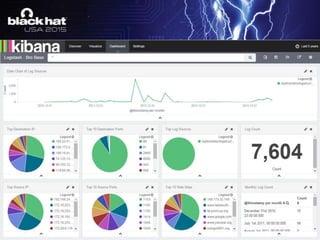
  • #10 -Cool visualizations with kibana to expose key data -Lots of information, but what does it mean
  • #11 -Collection of tons of valuable data, but what do we do with it all? -It’s not big data, it’s obese data -Looking for a needle in a pile of needles
  • #12 -Critical Stack for Bro makes starting out with Threat Intelligence incredibly easy. -Install the agent and automatically pull data that generates bro scripts from threat intel providers
  • #13 Single command to pull from 98 threat feeds which contain over 800k IoC’s
  • #15 -What a basic normalization rule looks like
  • #16 -Take the Oniguruma syntax out of the conf file and put it in a log file for each device in a custom patterns directory. -Makes management of normalization/parsing rules easier -Allows us to utilize add_field to our advantage
  • #17 We’ll need to filter each message to apply the add_field -Take the Oniguruma syntax and remove the column mappings to expose raw regex code
  • #18 -Add custom fields to find relevant data quickly in Kibana -Adding a rule ID will allow us to optimize the normalization engine in logstash by exposing the most commonly parsed logs in your environment
  • #19 -Get a copy of a GeoLiteCity database file and place it on the server -Reference an normalized IP address field in the source field -Create a new field in the target field to place all the GEO IP data in -Choose from a bunch of geo IP fields
  • #21 Not necessary when collecting logs in real time When you read pcap files and normalize the logs, this will take the timestamp from the log file, which bro uses from the PCAP file
  • #22 Use this for tor exit node IP’s, malicious IP’s, command and control servers, file hashes, etc. -Python scripts available to pull data and generate YAML files, only downside is it requires a restart of logstash to use the new YAML files -Translate plugin is a community-maintainted plugin, so you need to install it before adding it to the config file.
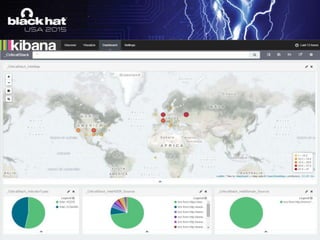
  • #24 -With the GEO IP we can now build maps with the data collected from BRO. -We can also start generating reports on known malicious IP’s, file hashes, etc. -Historograms can help pinpoint malicious activity, as seen here by a spike in malicious traffic around 11:25
  • #27 -Take a STIX/Cybox Artifact, convert it into a supported search string, and generate evidence of exloitation/attack from those signatures. -Can take this further, which we do internally by integrating with vulnerability management, FIM, threat intel, etc.