REACT.JS
Smita Prasad
Intro
• Big, fast Web apps with JavaScript can be easily built with
React.
• It has scaled very well for Facebook and Instagram.
• One of the many great parts of React is how it makes you
think about apps as you build them.
Hello World (In JSX Syntax)
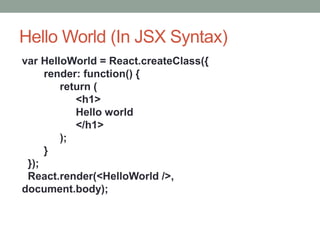
var HelloWorld = React.createClass({
render: function() {
return (
<h1>
Hello world
</h1>
);
}
});
React.render(<HelloWorld />,
document.body);
Hello World in Javascript
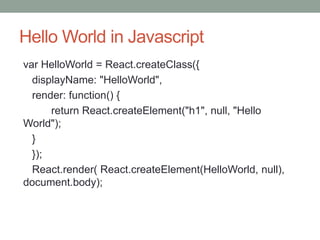
var HelloWorld = React.createClass({
displayName: "HelloWorld",
render: function() {
return React.createElement("h1", null, "Hello
World");
}
});
React.render( React.createElement(HelloWorld, null),
document.body);
React Element
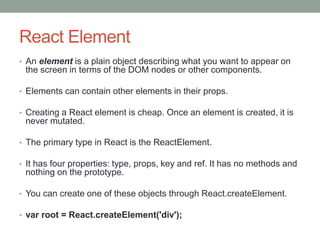
• An element is a plain object describing what you want to appear on
the screen in terms of the DOM nodes or other components.
• Elements can contain other elements in their props.
• Creating a React element is cheap. Once an element is created, it is
never mutated.
• The primary type in React is the ReactElement.
• It has four properties: type, props, key and ref. It has no methods and
nothing on the prototype.
• You can create one of these objects through React.createElement.
• var root = React.createElement('div');
Factories
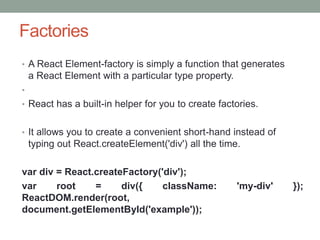
• A React Element-factory is simply a function that generates
a React Element with a particular type property.
•
• React has a built-in helper for you to create factories.
• It allows you to create a convenient short-hand instead of
typing out React.createElement('div') all the time.
var div = React.createFactory('div');
var root = div({ className: 'my-div' });
ReactDOM.render(root,
document.getElementById('example'));
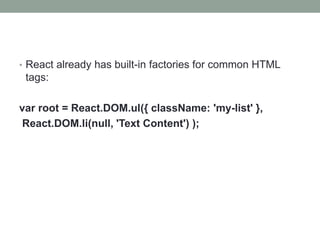
• React already has built-in factories for common HTML
tags:
var root = React.DOM.ul({ className: 'my-list' },
React.DOM.li(null, 'Text Content') );
React Nodes
• A ReactNode can be either:
• ReactElement
• string (aka ReactText)
• number (aka ReactText)
• Array of ReactNodes (aka ReactFragment)
• These are used as properties of other ReactElements to
represent children.
• Effectively they create a tree of ReactElements.
React Components
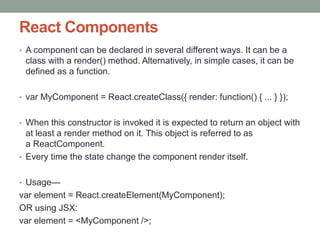
• A component can be declared in several different ways. It can be a
class with a render() method. Alternatively, in simple cases, it can be
defined as a function.
• var MyComponent = React.createClass({ render: function() { ... } });
• When this constructor is invoked it is expected to return an object with
at least a render method on it. This object is referred to as
a ReactComponent.
• Every time the state change the component render itself.
• Usage—
var element = React.createElement(MyComponent);
OR using JSX:
var element = <MyComponent />;
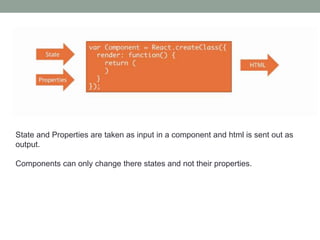
State and Properties are taken as input in a component and html is sent out as
output.
Components can only change there states and not their properties.
Virtual DOM
• React code acts on a fake DOM (virtual dom)
• React.js take care of keep virtual DOM and real DOM
synchronized
• Every ReactElement is a light, stateless, immutable,
virtual representation of a DOM Element
• A virtual DOM div element contains only 6 properties.
Advantages
• Easy to learn, easy to use
• True reusable components (1 single file per component)
• Functional approach
• Human error messages
• Active community
Sample
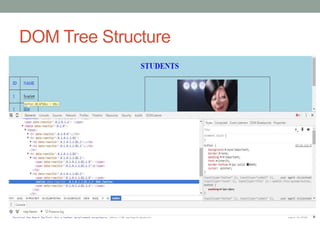
DOM Tree Structure
Steps to build a React Page
• Step 1: break the UI into a component hierarchy
• Step 2: Build a static version in React
• Step 3: Identify the minimal (but complete)
representation of UI state
• Step 4: Identify where your state should live
• Step 5: Add inverse data flow
Samples
• https://plnkr.co/users/sendmita
• https://github.com/sendmita/react-samples
Thank You

Intro to React.js

  • 1.
  • 2.
    Intro • Big, fastWeb apps with JavaScript can be easily built with React. • It has scaled very well for Facebook and Instagram. • One of the many great parts of React is how it makes you think about apps as you build them.
  • 3.
    Hello World (InJSX Syntax) var HelloWorld = React.createClass({ render: function() { return ( <h1> Hello world </h1> ); } }); React.render(<HelloWorld />, document.body);
  • 4.
    Hello World inJavascript var HelloWorld = React.createClass({ displayName: "HelloWorld", render: function() { return React.createElement("h1", null, "Hello World"); } }); React.render( React.createElement(HelloWorld, null), document.body);
  • 5.
    React Element • Anelement is a plain object describing what you want to appear on the screen in terms of the DOM nodes or other components. • Elements can contain other elements in their props. • Creating a React element is cheap. Once an element is created, it is never mutated. • The primary type in React is the ReactElement. • It has four properties: type, props, key and ref. It has no methods and nothing on the prototype. • You can create one of these objects through React.createElement. • var root = React.createElement('div');
  • 6.
    Factories • A ReactElement-factory is simply a function that generates a React Element with a particular type property. • • React has a built-in helper for you to create factories. • It allows you to create a convenient short-hand instead of typing out React.createElement('div') all the time. var div = React.createFactory('div'); var root = div({ className: 'my-div' }); ReactDOM.render(root, document.getElementById('example'));
  • 7.
    • React alreadyhas built-in factories for common HTML tags: var root = React.DOM.ul({ className: 'my-list' }, React.DOM.li(null, 'Text Content') );
  • 8.
    React Nodes • AReactNode can be either: • ReactElement • string (aka ReactText) • number (aka ReactText) • Array of ReactNodes (aka ReactFragment) • These are used as properties of other ReactElements to represent children. • Effectively they create a tree of ReactElements.
  • 9.
    React Components • Acomponent can be declared in several different ways. It can be a class with a render() method. Alternatively, in simple cases, it can be defined as a function. • var MyComponent = React.createClass({ render: function() { ... } }); • When this constructor is invoked it is expected to return an object with at least a render method on it. This object is referred to as a ReactComponent. • Every time the state change the component render itself. • Usage— var element = React.createElement(MyComponent); OR using JSX: var element = <MyComponent />;
  • 10.
    State and Propertiesare taken as input in a component and html is sent out as output. Components can only change there states and not their properties.
  • 11.
    Virtual DOM • Reactcode acts on a fake DOM (virtual dom) • React.js take care of keep virtual DOM and real DOM synchronized • Every ReactElement is a light, stateless, immutable, virtual representation of a DOM Element • A virtual DOM div element contains only 6 properties.
  • 12.
    Advantages • Easy tolearn, easy to use • True reusable components (1 single file per component) • Functional approach • Human error messages • Active community
  • 13.
  • 14.
  • 15.
    Steps to builda React Page • Step 1: break the UI into a component hierarchy • Step 2: Build a static version in React • Step 3: Identify the minimal (but complete) representation of UI state • Step 4: Identify where your state should live • Step 5: Add inverse data flow
  • 16.
  • 17.