1 / 41
Intro & Concept
Learning React
Eueung Mulyana
https://eueung.github.io/112016/react
CodeLabs | Attribution-ShareAlike CC BY-SA
Outline
Introduction
React Basics
Thinking in React
Examples
2 / 41
Introduction
A JavaScript library for building UIs | React
3 / 41
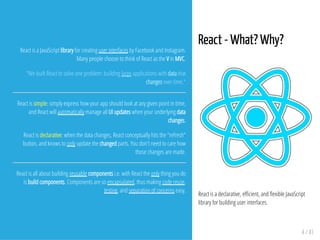
React - What? Why?
React is a declarative, e cient, and exible JavaScript
library for building user interfaces.
4 / 41
React is a JavaScript library for creating user interfaces by Facebook and Instagram.
Many people choose to think of React as the V in MVC.
"We built React to solve one problem: building large applications with data that
changes over time."
React is simple: simply express how your app should look at any given point in time,
and React will automatically manage all UI updates when your underlying data
changes.
React is declarative: when the data changes, React conceptually hits the "refresh"
button, and knows to only update the changed parts. You don't need to care how
those changes are made.
React is all about building reusable components i.e. with React the only thing you do
is build components. Components are so encapsulated, thus making code reuse,
testing, and separation of concerns easy.
How does It Work?
1. Maintains a "Virtual DOM"
2. On changes, it creates a di
3. Applies the changes in batches to the DOM
Virtual DOM
Abstracts the DOM and give a simpler
programming model and better performance
Minimizes the repaints focusing only on what has
changed
Data Flow
One-way reactive data ow
Much simpler then traditional data binding
Declarative
Refs: React Investigation, React Native
5 / 41
Just the V in MVC
React does one thing very well, it manages updating the state of the view. Because you
can just use this, it is Relatively easy to integrate into other frameworks. Basically,
React doesn't care about how your application is architectured.
Popularity
Support from some of the largest companies in the valley and a thriving open-source
community. Support continues to grow for it every day.
Server-Side Rendering
Since react is able to represent the DOM virtually, it is able to render app state server
side and be able to then take the current UI state and manage it as a SPA after the
client has loaded. This allows for better SEO, performance and progressive
enhancement.
Devs Productivity
Because of the large amount of tooling that supports react, and the focus on simplicity
in build react components, it can make building large applications much easier for
developers.
6 / 41
Declarative
React makes it painless to create interactive UIs. Design simple views for each state in
your application, and React will e ciently update and render just the right
components when your data changes. Declarative views make your code more
predictable, simpler to understand, and easier to debug.
Component-Based
Build encapsulated components that manage their own state, then compose them to
make complex UIs. Since component logic is written in JavaScript instead of templates,
you can easily pass rich data through your app and keep state out of the DOM.
Learn Once, Write Anywhere
We don't make assumptions about the rest of your technology stack, so you can
develop new features in React without rewriting existing code. React can also render
on the server using Node and power mobile apps using React Native.
Ref: facebook/react
7 / 41
Adding React to an Existing Application
You don't need to rewrite your app to start using React.
We recommend adding React to a small part of your application, such an individual
widget, so you can see if it works well for your use case.
While React can be used without a build pipeline, we recommend setting it up so you
can be more productive. A modern build pipeline typically consists of:
A package manager, such as Yarn or npm. It lets you take advantage of a vast
ecosystem of third-party packages, and easily install or update them.
A bundler, such as webpack or Browserify. It lets you write modular code and
bundle it together into small packages to optimize load time.
A compiler such as Babel. It lets you write modern JavaScript code that still works in
older browsers.
Ref: Installation - React
React Basics
8 / 41
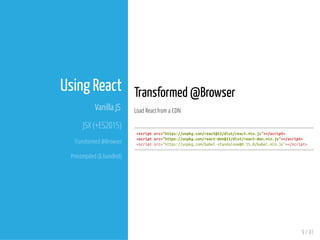
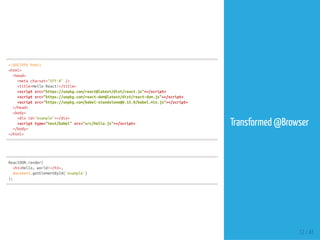
Transformed @Browser
Load React from a CDN
<scriptsrc="https://unpkg.com/react@15/dist/react.min.js"></script>
<scriptsrc="https://unpkg.com/react-dom@15/dist/react-dom.min.js"></script>
<scriptsrc="https://unpkg.com/babel-standalone@6.15.0/babel.min.js"></script>
9 / 41
Using React
Vanilla JS
JSX (+ES2015)
Transformed @Browser
Precompiled (& bundled)
JSX lets you create JavaScript objects using XML/HTML syntax. To generate a link in React
using pure JavaScript you'd write:
React.createElement('a',{href:'http://facebook.github.io/react/'},'Hello!')
With JSX this becomes:
<ahref="http://facebook.github.io/react/">Hello!</a>
We've found this has made building React apps easier and designers tend to prefer the
syntax, but everyone has their own work ow, so JSX is not required to use React.
10 / 41
JSX
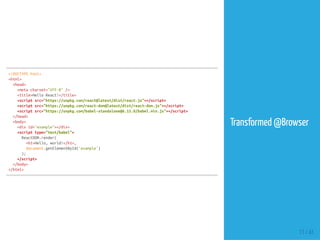
JSX is a syntax extension to JavaScript. We can use it
with React to describe what the UI should look like.
JSX may remind us of a template language, but it
comes with the full power of JavaScript. JSX produces
React "elements" (tree nodes).
JSX is not required to use React, but it makes code
more readable, and writing it feels like writing HTML.
A simple transform is included with React that allows
converting JSX into native JavaScript for browsers to
digest.
Ref: Introducing JSX - React
<!DOCTYPEhtml>
<html>
<head>
<metacharset="UTF-8"/>
<title>HelloReact!</title>
<scriptsrc="https://unpkg.com/react@latest/dist/react.js"></script>
<scriptsrc="https://unpkg.com/react-dom@latest/dist/react-dom.js"></script>
<scriptsrc="https://unpkg.com/babel-standalone@6.15.0/babel.min.js"></script>
</head>
<body>
<divid="example"></div>
<scripttype="text/babel">
ReactDOM.render(
<h1>Hello,world!</h1>,
document.getElementById('example')
);
</script>
</body>
</html>
Transformed @Browser
11 / 41
<!DOCTYPEhtml>
<html>
<head>
<metacharset="UTF-8"/>
<title>HelloReact!</title>
<scriptsrc="https://unpkg.com/react@latest/dist/react.js"></script>
<scriptsrc="https://unpkg.com/react-dom@latest/dist/react-dom.js"></script>
<scriptsrc="https://unpkg.com/babel-standalone@6.15.0/babel.min.js"></script>
</head>
<body>
<divid="example"></div>
<scripttype="text/babel"src="src/hello.js"></script>
</body>
</html>
ReactDOM.render(
<h1>Hello,world!</h1>,
document.getElementById('example')
);
Transformed @Browser
12 / 41
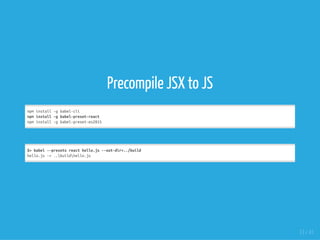
Precompile JSX to JS
npminstall-gbabel-cli
npminstall-gbabel-preset-react
npminstall-gbabel-preset-es2015
$>babel--presetsreacthello.js--out-dir=../build
hello.js->..buildhello.js
13 / 41
<!DOCTYPEhtml>
<html>
<head>
<metacharset="UTF-8"/>
<title>HelloReact!</title>
<scriptsrc="https://unpkg.com/react@latest/dist/react.js"></script>
<scriptsrc="https://unpkg.com/react-dom@latest/dist/react-dom.js"></script>
</head>
<body>
<divid="example"></div>
<scriptsrc="build/hello.js"></script>
</body>
</html>
#src/hello.js(JSX)
ReactDOM.render(
<h1>Hello,world!</h1>,
document.getElementById('example')
);
#---
#build/hello.js(compiled)
ReactDOM.render(React.createElement(
'h1',
null,
'Hello,world!'
),document.getElementById('example'));
Precompiled
14 / 41
this.props
 
<!DOCTYPEhtml>
<html>
<head>
<metacharset="UTF-8"/>
<title>HelloReact!</title>
<scriptsrc="https://unpkg.com/react@latest/dist/react.js"></script>
<scriptsrc="https://unpkg.com/react-dom@latest/dist/react-dom.js"></script>
<scriptsrc="https://unpkg.com/babel-standalone@6.15.0/babel.min.js"></script>
</head>
<body>
<divid="example"></div>
<scripttype="text/babel"src="src/hello-props.js"></script>
</body>
</html>
varHelloMessage=React.createClass({
render:function(){
return<div>Hello{this.props.name}</div>;
}
});
ReactDOM.render(<HelloMessagename="John"/>,document.getElementById('example'));
hello-props.js
15 / 41
this.state
 
varTimer=React.createClass({
getInitialState:function(){
return{secondsElapsed:0};
},
tick:function(){
this.setState({secondsElapsed:this.state.secondsElapsed+1});
},
componentDidMount:function(){
this.interval=setInterval(this.tick,1000);
},
componentWillUnmount:function(){
clearInterval(this.interval);
},
render:function(){
return(
<div>SecondsElapsed:{this.state.secondsElapsed}</div>
);
}
});
ReactDOM.render(<Timer/>,document.getElementById('example'));
hello-state.js
16 / 41
Thinking in React
17 / 41
Thinking in React
One of the many great parts of React is
how it makes you think about apps as
you build them.
In this part, we will walk you through the thought
process of building a searchable product data table
using React.
Ref: Thinking in React
1. Start with a Mock
2. Break the UI into a Component Hierarchy
3. Build a Static Version in React
4. Identify the minimal representation of UI State
5. Identify where the state should live
6. Add inverse data ow
18 / 41
Step #1
Data
[
{
category:"SportingGoods",
price:"$49.99",
stocked:true,
name:"Football"
},
{category:"SportingGoods",price:"$9.99",stocked:true,name:
{category:"SportingGoods",price:"$29.99",stocked:false,name:
{category:"Electronics",price:"$99.99",stocked:true,name:"iPo
{category:"Electronics",price:"$399.99",stocked:false,name:
{category:"Electronics",price:"$199.99",stocked:true,name:"Ne
];
19 / 41
Step #2
20 / 41
Step #3
varPRODUCTS=[
{category:'SportingGoods',price:'$49.99',stocked:true,name:
{category:'SportingGoods',price:'$9.99',stocked:true,name:
{category:'SportingGoods',price:'$29.99',stocked:false,name:
{category:'Electronics',price:'$99.99',stocked:true,name:'iPodTouch'
{category:'Electronics',price:'$399.99',stocked:false,name:
{category:'Electronics',price:'$199.99',stocked:true,name:'Nexus7'
];
classProductCategoryRowextendsReact.Component{
render(){
return<tr><thcolSpan="2">{this.props.category}</th></tr>;
}
}
classProductRowextendsReact.Component{
render(){
varname=this.props.product.stocked?
this.props.product.name:
<spanstyle={{color:'red'}}>
{this.props.product.name}
</span>;
return(
<tr>
<td>{name}</td>
<td>{this.props.product.price}</td>
</tr>
);
}
}
21 / 41
Step #3
classProductTableextendsReact.Component{
render(){
varrows=[];
varlastCategory=null;
this.props.products.forEach(function(product){
if(product.category!==lastCategory){
rows.push(<ProductCategoryRowcategory={product.category}key={product.category}/>);
}
rows.push(<ProductRowproduct={product}key={product.name}/>);
lastCategory=product.category;
});
return(
<table>
<thead>
<tr>
<th>Name</th>
<th>Price</th>
</tr>
</thead>
<tbody>{rows}</tbody>
</table>
);
}
}
classSearchBarextendsReact.Component{
render(){
return(
<form>
<inputtype="text"placeholder="Search..."/>
<p>
<inputtype="checkbox"/>
{''}
Onlyshowproductsinstock
</p>
</form>
);
}
}
classFilterableProductTableextendsReact.Component{
render(){
return(
<div>
<SearchBar/>
<ProductTableproducts={this.props.products}/>
</div>
);
}
}
ReactDOM.render(
<FilterableProductTableproducts={PRODUCTS}/>,
document.getElementById('container')
);
22 / 41
Step #3
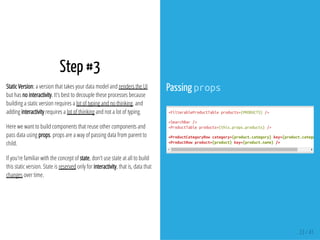
Static Version: a version that takes your data model and renders the UI
but has no interactivity. It's best to decouple these processes because
building a static version requires a lot of typing and no thinking, and
adding interactivity requires a lot of thinking and not a lot of typing.
Here we want to build components that reuse other components and
pass data using props. props are a way of passing data from parent to
child.
If you're familiar with the concept of state, don't use state at all to build
this static version. State is reserved only for interactivity, that is, data that
changes over time.
Passing props
<FilterableProductTableproducts={PRODUCTS}/>
<SearchBar/>
<ProductTableproducts={this.props.products}/>
<ProductCategoryRowcategory={product.category}key={product.category}
<ProductRowproduct={product}key={product.name}/>
23 / 41
Step #4
To make your UI interactive, you need to be able to trigger changes to
your underlying data model. React makes this easy with state.
To build your app correctly, you rst need to think of the minimal set of
mutable state that your app needs.
DRY (Don't Repeat Yourself): Figure out the absolute minimal
representation of the state your application needs and compute
everything else you need on-demand.
The original list of products is passed in as props, so that's not state. The
search text and the checkbox seem to be state since they change over
time and can't be computed from anything. And nally, the ltered list of
products isn't state because it can be computed by combining the
original list of products with the search text and value of the checkbox.
Think of all of the pieces of data in our example application. We have:
The original list of products
The search text the user has entered
The value of the checkbox
The ltered list of products
Then, simply ask three questions about each piece of data:
Is it passed in from a parent via props? If so, it probably isn't state.
Does it remain unchanged over time? If so, it probably isn't state.
Can you compute it based on any other state or props in your
component? If so, it isn't state.
24 / 41
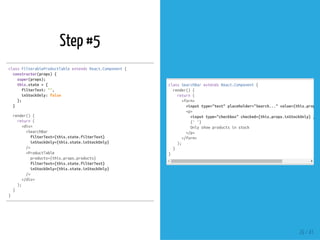
Step #5
Next, we need to identify which component mutates, or owns, this state.
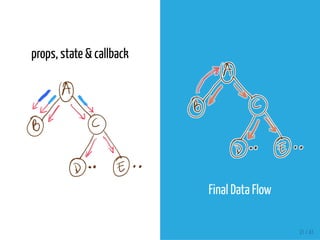
Remember: React is all about one-way data ow down the component hierarchy. It may
not be immediately clear which component should own what state. This is often the most
challenging part for newcomers to understand.
For each piece of state in your application:
Identify every component that renders something based on that state.
Find a common owner component (a single component above all the components
that need the state in the hierarchy).
Either the common owner or another component higher up in the hierarchy
should own the state.
If you can't nd a component where it makes sense to own the state, create a new
component simply for holding the state and add it somewhere in the hierarchy
above the common owner component.
Identify Where Your State Should
Live
ProductTable needs to lter the product list based
on state and SearchBar needs to display the search
text and checked state.
The common owner component is
FilterableProductTable.
It conceptually makes sense for the lter text and
checked value to live in FilterableProductTable
25 / 41
Step #5
classFilterableProductTableextendsReact.Component{
constructor(props){
super(props);
this.state={
filterText:'',
inStockOnly:false
};
}
render(){
return(
<div>
<SearchBar
filterText={this.state.filterText}
inStockOnly={this.state.inStockOnly}
/>
<ProductTable
products={this.props.products}
filterText={this.state.filterText}
inStockOnly={this.state.inStockOnly}
/>
</div>
);
}
}
classSearchBarextendsReact.Component{
render(){
return(
<form>
<inputtype="text"placeholder="Search..."value={this.props.f
<p>
<inputtype="checkbox"checked={this.props.inStockOnly}/>
{''}
Onlyshowproductsinstock
</p>
</form>
);
}
}
26 / 41
Step #5
For each product in products:
if no lter-text matches, always return empty
if there is a match, checkbox is checked AND
stocked is false, return empty
otherwise return element
classProductTableextendsReact.Component{
render(){
varrows=[];
varlastCategory=null;
this.props.products.forEach((product)=>{
if(product.name.indexOf(this.props.filterText)===-1||(!product.stocked&&
return;
}
if(product.category!==lastCategory){
rows.push(<ProductCategoryRowcategory={product.category}key={product.categ
}
rows.push(<ProductRowproduct={product}key={product.name}/>);
lastCategory=product.category;
});
return(
<table>
<thead>
<tr>
<th>Name</th>
<th>Price</th>
</tr>
</thead>
<tbody>{rows}</tbody>
</table>
);
}
}
27 / 41
Step #6
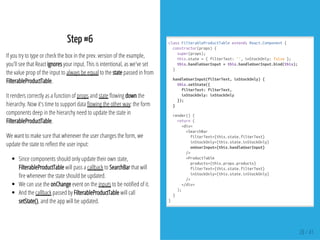
If you try to type or check the box in the prev. version of the example,
you'll see that React ignores your input. This is intentional, as we've set
the value prop of the input to always be equal to the state passed in from
FilterableProductTable.
It renders correctly as a function of props and state owing down the
hierarchy. Now it's time to support data owing the other way: the form
components deep in the hierarchy need to update the state in
FilterableProductTable.
We want to make sure that whenever the user changes the form, we
update the state to re ect the user input:
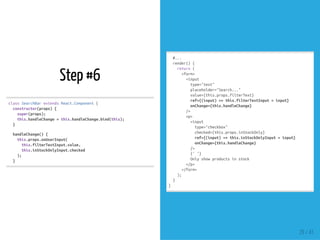
Since components should only update their own state,
FilterableProductTable will pass a callback to SearchBar that will
re whenever the state should be updated.
We can use the onChange event on the inputs to be noti ed of it.
And the callback passed by FilterableProductTable will call
setState(), and the app will be updated.
classFilterableProductTableextendsReact.Component{
constructor(props){
super(props);
this.state={filterText:'',inStockOnly:false};
this.handleUserInput=this.handleUserInput.bind(this);
}
handleUserInput(filterText,inStockOnly){
this.setState({
filterText:filterText,
inStockOnly:inStockOnly
});
}
render(){
return(
<div>
<SearchBar
filterText={this.state.filterText}
inStockOnly={this.state.inStockOnly}
onUserInput={this.handleUserInput}
/>
<ProductTable
products={this.props.products}
filterText={this.state.filterText}
inStockOnly={this.state.inStockOnly}
/>
</div>
);
}
}
28 / 41
Step #6
classSearchBarextendsReact.Component{
constructor(props){
super(props);
this.handleChange=this.handleChange.bind(this);
}
handleChange(){
this.props.onUserInput(
this.filterTextInput.value,
this.inStockOnlyInput.checked
);
}
#...
render(){
return(
<form>
<input
type="text"
placeholder="Search..."
value={this.props.filterText}
ref={(input)=>this.filterTextInput=input}
onChange={this.handleChange}
/>
<p>
<input
type="checkbox"
checked={this.props.inStockOnly}
ref={(input)=>this.inStockOnlyInput=input}
onChange={this.handleChange}
/>
{''}
Onlyshowproductsinstock
</p>
</form>
);
}
}
29 / 41
Notes
In the typical React data ow, props are the only way that parent
components interact with their children. To modify a child, you re-
render it with new props.
However, there are a few cases where you need to imperatively
modify a child outside of the typical data ow. The child to be
modi ed could be an instance of a React component, or it could be a
DOM element. For both of these cases, React provides an escape
hatch.
React supports a special attribute that you can attach to any
component. The ref attribute takes a callback function, and the
callback will be executed immediately after the component is
mounted or unmounted.
When the ref attribute is used on an HTML element, the ref callback
receives the underlying DOM element as its argument. In the previous
code, the ref callback is used to store a reference to a DOM node.
See: Refs and the DOM
30 / 41
props, state & callback
Final Data Flow
31 / 41
Examples
32 / 41
TodoApp
This example uses state to track the current list of
items as well as the text that the user has entered.
See: React Mainpage
33 / 41
classTodoListextendsReact.Component{
render(){
return(
<ul>
{this.props.items.map(item=>(
<likey={item.id}>{item.text}</li>
))}
</ul>
);
}
}
ReactDOM.render(<TodoApp/>,document.getElementById('example'));
classTodoAppextendsReact.Component{
constructor(props){
super(props);
this.handleChange=this.handleChange.bind(this);
this.handleSubmit=this.handleSubmit.bind(this);
this.state={items:[],text:''};
}
#...
#...
render(){
return(
<div>
<h3>TODO</h3>
<TodoListitems={this.state.items}/>
<formonSubmit={this.handleSubmit}>
<inputonChange={this.handleChange}value={this.state.text}
<button>{'Add#'+(this.state.items.length+1)}</button>
</form>
</div>
);
}
handleChange(e){
this.setState({text:e.target.value});
}
handleSubmit(e){
e.preventDefault();
varnewItem={
text:this.state.text,
id:Date.now()
};
this.setState((prevState)=>({
items:prevState.items.concat(newItem),
text:''
}));
}
}
34 / 41
TodoApp
35 / 41
Notes
Default Behaviour To prevent default behavior in React, you must call preventDefault
explicitly (e.preventDefault() - eis a synthetic event, compatible with the W3C)
State Updates May Be Asynchronous React may batch multiple setState()calls into
a single update for performance. Because this.props and this.state may be updated
asynchronously, you should not rely on their values for calculating the next state.
//Wrong
this.setState({
counter:this.state.counter+this.props.increment,
});
//Correct
this.setState((prevState,props)=>({
counter:prevState.counter+props.increment
}));
The second form of setState()accepts the previous state as the rst argument, and
the props at the time the update is applied as the second argument.
36 / 41
<!DOCTYPEhtml>
<html>
<head>
<metacharset="UTF-8"/>
<title>HelloReact!</title>
<scriptsrc="https://unpkg.com/react@latest/dist/react.js"></script
<scriptsrc="https://unpkg.com/react-dom@latest/dist/react-dom.js"
<scriptsrc="https://unpkg.com/babel-standalone@6.15.0/babel.min.js"
<scriptsrc="https://facebook.github.io/react/js/remarkable.min.js"
</head>
<body>
<divid="example"></div>
<scripttype="text/babel"src="src/app.js"></script>
</body>
</html>
app.html
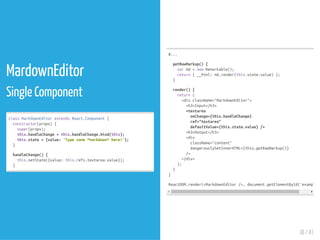
MarkdownEditor
A Component Using External Plugins
 
37 / 41
MardownEditor
Single Component
classMarkdownEditorextendsReact.Component{
constructor(props){
super(props);
this.handleChange=this.handleChange.bind(this);
this.state={value:'Typesome*markdown*here!'};
}
handleChange(){
this.setState({value:this.refs.textarea.value});
}
#...
getRawMarkup(){
varmd=newRemarkable();
return{__html:md.render(this.state.value)};
}
render(){
return(
<divclassName="MarkdownEditor">
<h3>Input</h3>
<textarea
onChange={this.handleChange}
ref="textarea"
defaultValue={this.state.value}/>
<h3>Output</h3>
<div
className="content"
dangerouslySetInnerHTML={this.getRawMarkup()}
/>
</div>
);
}
}
ReactDOM.render(<MarkdownEditor/>,document.getElementById('example')
38 / 41
Refs
39 / 41
Refs
1. A JavaScript library for building user interfaces | React
2. facebook/react: A declarative, e cient, and exible JavaScript library for building user
interfaces.
3. Getting Started | React
4. Thinking in React
5. React Investigation
6. React Native
7. Why React? | React Prev. Version
40 / 41
41 / 41
END
Eueung Mulyana
https://eueung.github.io/112016/react
CodeLabs | Attribution-ShareAlike CC BY-SA

learning react