React JS
REACT.JS
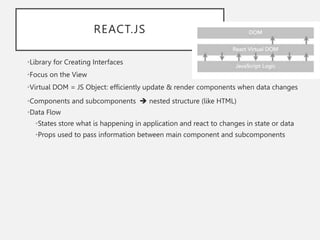
•Library for Creating Interfaces
•Focus on the View
•Virtual DOM = JS Object: efficiently update & render components when data changes
•Components and subcomponents  nested structure (like HTML)
•Data Flow
•States store what is happening in application and react to changes in state or data
•Props used to pass information between main component and subcomponents
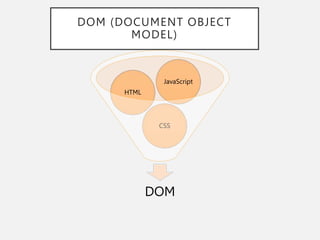
DOM (DOCUMENT OBJECT MODEL)
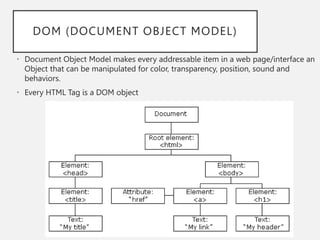
• Document Object Model makes every addressable item in a web page/interface an
Object that can be manipulated for color, transparency, position, sound and
behaviors.
• Every HTML Tag is a DOM object
DOM (DOCUMENT OBJECT
MODEL)
DOM
CSS
HTML
JavaScript
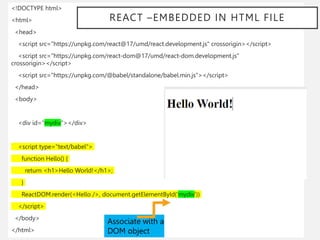
<!DOCTYPE html>
<html>
<head>
<script src="https://unpkg.com/react@17/umd/react.development.js" crossorigin></script>
<script src="https://unpkg.com/react-dom@17/umd/react-dom.development.js"
crossorigin></script>
<script src="https://unpkg.com/@babel/standalone/babel.min.js"></script>
</head>
<body>
<div id="mydiv"></div>
<script type="text/babel">
function Hello() {
return <h1>Hello World!</h1>;
}
ReactDOM.render(<Hello />, document.getElementById('mydiv'))
</script>
</body>
</html>
Associate with a
DOM object
REACT –EMBEDDED IN HTML FILE
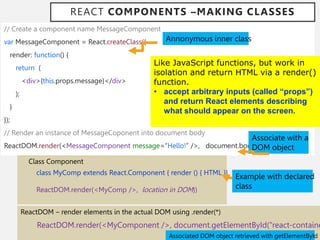
REACT COMPONENTS –MAKING CLASSES
// Create a component name MessageComponent
var MessageComponent = React.createClass({
render: function() {
return (
<div>{this.props.message}</div>
);
}
});
// Render an instance of MessageCoponent into document body
ReactDOM.render(<MessageComponent message=“Hello!” />, document.body );
Like JavaScript functions, but work in
isolation and return HTML via a render()
function.
• accept arbitrary inputs (called “props”)
and return React elements describing
what should appear on the screen.
ReactDOM – render elements in the actual DOM using .render(*)
ReactDOM.render(<MyComponent />, document.getElementById("react-containe
Class Component
class MyComp extends React.Component { render () { HTML }}
ReactDOM.render(<MyComp />, location in DOM))
Annonymous inner class
Example with declared
class
Associate with a
DOM object
Associated DOM object retrieved with getElementById
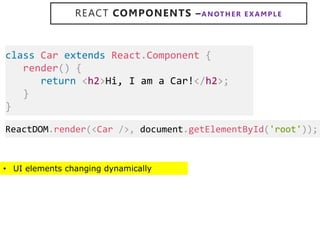
REACT COMPONENTS –ANOTHER E XAMPLE
• UI elements changing dynamically
class Car extends React.Component {
render() {
return <h2>Hi, I am a Car!</h2>;
}
}
ReactDOM.render(<Car />, document.getElementById('root'));
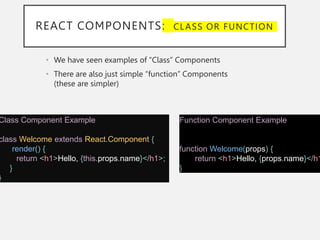
REACT COMPONENTS: CLASS OR FUNCTION
• We have seen examples of “Class” Components
• There are also just simple “function” Components
(these are simpler)
Class Component Example
class Welcome extends React.Component {
render() {
return <h1>Hello, {this.props.name}</h1>;
}
}
Function Component Example
function Welcome(props) {
return <h1>Hello, {props.name}</h1
}
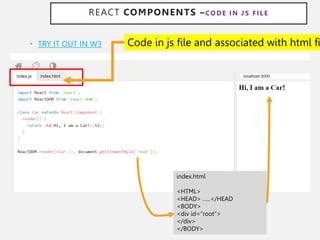
• TRY IT OUT IN W3
REACT COMPONENTS –CODE IN JS FILE
index.html
<HTML>
<HEAD> …..</HEAD
<BODY>
<div id=“root”>
</div>
</BODY>
Code in js file and associated with html fi
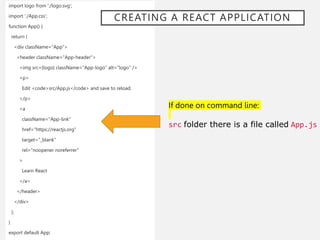
import logo from './logo.svg';
import './App.css';
function App() {
return (
<div className="App">
<header className="App-header">
<img src={logo} className="App-logo" alt="logo" />
<p>
Edit <code>src/App.js</code> and save to reload.
</p>
<a
className="App-link"
href="https://reactjs.org"
target="_blank"
rel="noopener noreferrer"
>
Learn React
</a>
</header>
</div>
);
}
export default App;
If done on command line:
src folder there is a file called App.js
CREATING A REACT APPLICATION
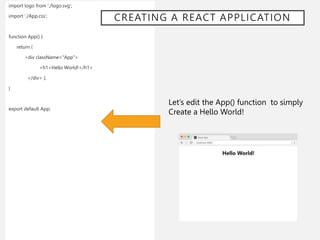
import logo from './logo.svg';
import './App.css’;
function App() {
return (
<div className="App">
<h1>Hello World!</h1>
</div> );
}
export default App;
Let’s edit the App() function to simply
Create a Hello World!
CREATING A REACT APPLICATION
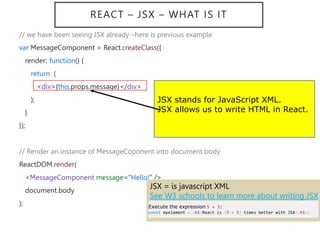
REACT – JSX – WHAT IS IT
// we have been seeing JSX already –here is previous example
var MessageComponent = React.createClass({
render: function() {
return (
<div>{this.props.message}</div>
);
}
});
// Render an instance of MessageCoponent into document body
ReactDOM.render(
<MessageComponent message=“Hello!” />
document.body
);
JSX stands for JavaScript XML.
JSX allows us to write HTML in React.
JSX = is javascript XML
See W3 schools to learn more about writing JSX
Execute the expression 5 + 5:
const myelement = <h1>React is {5 + 5} times better with JSX</h1>;
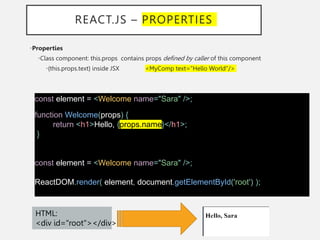
REACT.JS – PROPERTIES
•Properties
•Class component: this.props contains props defined by caller of this component
•{this.props.text} inside JSX <MyComp text="Hello World"/>
const element = <Welcome name="Sara" />;
function Welcome(props) {
return <h1>Hello, {props.name}</h1>;
}
const element = <Welcome name="Sara" />;
ReactDOM.render( element, document.getElementById('root') );
HTML:
<div id="root"></div>
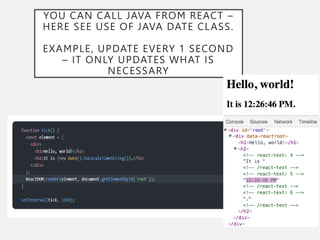
YOU CAN CALL JAVA FROM REACT –
HERE SEE USE OF JAVA DATE CLASS.
EXAMPLE, UPDATE EVERY 1 SECOND
– IT ONLY UPDATES WHAT IS
NECESSARY
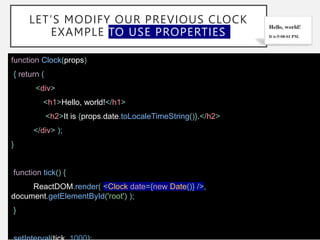
LET’S MODIFY OUR PREVIOUS CLOCK
EXAMPLE TO USE PROPERTIES
function Clock(props)
{ return (
<div>
<h1>Hello, world!</h1>
<h2>It is {props.date.toLocaleTimeString()}.</h2>
</div> );
}
function tick() {
ReactDOM.render( <Clock date={new Date()} />,
document.getElementById('root') );
}
MORE MORE TO LEARN…GO TO REACT WEBSITE
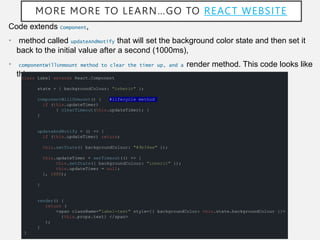
Code extends Component,
• method called updateAndNotify that will set the background color state and then set it
back to the initial value after a second (1000ms),
• componentWillUnmount method to clear the timer up, and a render method. This code looks like
this:
class Label extends React.Component
state = { backgroundColour: "inherit" };
componentWillUnmount() { #lifecycle method
if (this.updateTimer)
{ clearTimeout(this.updateTimer); }
}
updateAndNotify = () => {
if (this.updateTimer) return;
this.setState({ backgroundColour: "#9b34ee" });
this.updateTimer = setTimeout(() => {
this.setState({ backgroundColour: "inherit" });
this.updateTimer = null;
}, 1000);
}
render() {
return (
<span className="label-text" style={{ backgroundColor: this.state.backgroundColour }}>
{this.props.text} </span>
);
}
}
LEARN REACT – SOME
RESOURCES
https://www.codecademy.com/lrn/react-101
https://css-tricks.com/learning-react-redux/
Webstorm:
https://www.jetbrains.com/help/idea/react.h
tml#creating_react_app_with_create_react_a
pp

ReactJS.ppt

  • 1.
  • 2.
    REACT.JS •Library for CreatingInterfaces •Focus on the View •Virtual DOM = JS Object: efficiently update & render components when data changes •Components and subcomponents  nested structure (like HTML) •Data Flow •States store what is happening in application and react to changes in state or data •Props used to pass information between main component and subcomponents
  • 3.
    DOM (DOCUMENT OBJECTMODEL) • Document Object Model makes every addressable item in a web page/interface an Object that can be manipulated for color, transparency, position, sound and behaviors. • Every HTML Tag is a DOM object
  • 4.
  • 5.
    <!DOCTYPE html> <html> <head> <script src="https://unpkg.com/react@17/umd/react.development.js"crossorigin></script> <script src="https://unpkg.com/react-dom@17/umd/react-dom.development.js" crossorigin></script> <script src="https://unpkg.com/@babel/standalone/babel.min.js"></script> </head> <body> <div id="mydiv"></div> <script type="text/babel"> function Hello() { return <h1>Hello World!</h1>; } ReactDOM.render(<Hello />, document.getElementById('mydiv')) </script> </body> </html> Associate with a DOM object REACT –EMBEDDED IN HTML FILE
  • 6.
    REACT COMPONENTS –MAKINGCLASSES // Create a component name MessageComponent var MessageComponent = React.createClass({ render: function() { return ( <div>{this.props.message}</div> ); } }); // Render an instance of MessageCoponent into document body ReactDOM.render(<MessageComponent message=“Hello!” />, document.body ); Like JavaScript functions, but work in isolation and return HTML via a render() function. • accept arbitrary inputs (called “props”) and return React elements describing what should appear on the screen. ReactDOM – render elements in the actual DOM using .render(*) ReactDOM.render(<MyComponent />, document.getElementById("react-containe Class Component class MyComp extends React.Component { render () { HTML }} ReactDOM.render(<MyComp />, location in DOM)) Annonymous inner class Example with declared class Associate with a DOM object Associated DOM object retrieved with getElementById
  • 7.
    REACT COMPONENTS –ANOTHERE XAMPLE • UI elements changing dynamically class Car extends React.Component { render() { return <h2>Hi, I am a Car!</h2>; } } ReactDOM.render(<Car />, document.getElementById('root'));
  • 8.
    REACT COMPONENTS: CLASSOR FUNCTION • We have seen examples of “Class” Components • There are also just simple “function” Components (these are simpler) Class Component Example class Welcome extends React.Component { render() { return <h1>Hello, {this.props.name}</h1>; } } Function Component Example function Welcome(props) { return <h1>Hello, {props.name}</h1 }
  • 9.
    • TRY ITOUT IN W3 REACT COMPONENTS –CODE IN JS FILE index.html <HTML> <HEAD> …..</HEAD <BODY> <div id=“root”> </div> </BODY> Code in js file and associated with html fi
  • 10.
    import logo from'./logo.svg'; import './App.css'; function App() { return ( <div className="App"> <header className="App-header"> <img src={logo} className="App-logo" alt="logo" /> <p> Edit <code>src/App.js</code> and save to reload. </p> <a className="App-link" href="https://reactjs.org" target="_blank" rel="noopener noreferrer" > Learn React </a> </header> </div> ); } export default App; If done on command line: src folder there is a file called App.js CREATING A REACT APPLICATION
  • 11.
    import logo from'./logo.svg'; import './App.css’; function App() { return ( <div className="App"> <h1>Hello World!</h1> </div> ); } export default App; Let’s edit the App() function to simply Create a Hello World! CREATING A REACT APPLICATION
  • 12.
    REACT – JSX– WHAT IS IT // we have been seeing JSX already –here is previous example var MessageComponent = React.createClass({ render: function() { return ( <div>{this.props.message}</div> ); } }); // Render an instance of MessageCoponent into document body ReactDOM.render( <MessageComponent message=“Hello!” /> document.body ); JSX stands for JavaScript XML. JSX allows us to write HTML in React. JSX = is javascript XML See W3 schools to learn more about writing JSX Execute the expression 5 + 5: const myelement = <h1>React is {5 + 5} times better with JSX</h1>;
  • 13.
    REACT.JS – PROPERTIES •Properties •Classcomponent: this.props contains props defined by caller of this component •{this.props.text} inside JSX <MyComp text="Hello World"/> const element = <Welcome name="Sara" />; function Welcome(props) { return <h1>Hello, {props.name}</h1>; } const element = <Welcome name="Sara" />; ReactDOM.render( element, document.getElementById('root') ); HTML: <div id="root"></div>
  • 14.
    YOU CAN CALLJAVA FROM REACT – HERE SEE USE OF JAVA DATE CLASS. EXAMPLE, UPDATE EVERY 1 SECOND – IT ONLY UPDATES WHAT IS NECESSARY
  • 15.
    LET’S MODIFY OURPREVIOUS CLOCK EXAMPLE TO USE PROPERTIES function Clock(props) { return ( <div> <h1>Hello, world!</h1> <h2>It is {props.date.toLocaleTimeString()}.</h2> </div> ); } function tick() { ReactDOM.render( <Clock date={new Date()} />, document.getElementById('root') ); }
  • 16.
    MORE MORE TOLEARN…GO TO REACT WEBSITE Code extends Component, • method called updateAndNotify that will set the background color state and then set it back to the initial value after a second (1000ms), • componentWillUnmount method to clear the timer up, and a render method. This code looks like this: class Label extends React.Component state = { backgroundColour: "inherit" }; componentWillUnmount() { #lifecycle method if (this.updateTimer) { clearTimeout(this.updateTimer); } } updateAndNotify = () => { if (this.updateTimer) return; this.setState({ backgroundColour: "#9b34ee" }); this.updateTimer = setTimeout(() => { this.setState({ backgroundColour: "inherit" }); this.updateTimer = null; }, 1000); } render() { return ( <span className="label-text" style={{ backgroundColor: this.state.backgroundColour }}> {this.props.text} </span> ); } }
  • 17.
    LEARN REACT –SOME RESOURCES https://www.codecademy.com/lrn/react-101 https://css-tricks.com/learning-react-redux/ Webstorm: https://www.jetbrains.com/help/idea/react.h tml#creating_react_app_with_create_react_a pp