Stuart Macdonald
RDM Service Coordinator
University of Edinburgh
stuart.macdonald@ed.ac.uk
RDMF 12 - Research Data and Repositories (and other systems), RDMF, University of Leicester, 19
November 2014
RDM PROGRAMME @ EDINBURGH
- Service Interoperation
Background
• EDINA and University Data Library (EDL) together are a
division within Information Services (IS) of the University of
Edinburgh.
• EDINA is a Jisc-designated centre for digital expertise &
online service delivery - http://edina.ac.uk/
• The Data Library assists Edinburgh University users in the
discovery, access, use and management of research datasets:
http://www.ed.ac.uk/is/data-library
• Research and Learning Services offer specific services to the
University with a focus on enabling research (OA publications,
research data, bibliometrics) and resource discovery for
learners (resource search systems).
University of Edinburgh RDM Policy
 University of Edinburgh is one
of the first Universities in UK
to adopt a policy for managing
research data:
http://www.ed.ac.uk/is/resear
ch-data-policy
 The policy was approved by
the University Court on 16 May
2011.
 It’s acknowledged that this is
an aspirational policy and that
implementation will take some
years.
An RDM Policy Implementation Committee was set up by the
VP of Knowledge Management charged with delivering
services that will meet RDM policy objectives:
• Membership from across Information Services
• Iterate with researchers to ensure services meet the needs of
researchers
The VP also established a Steering Committee led by
Prof. Peter Clarke with members of the Research Committee
from the 3 colleges, IS, and the Research Office (ERI).
Their role is to:
• Provide oversight to the activity of the Implementation
Committee
• Ensure services meet researcher requirements without harming
research competitiveness
Governance
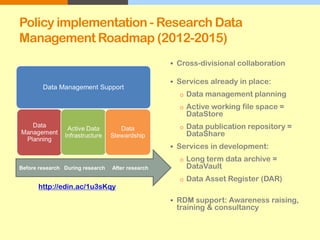
Policy implementation - Research Data
Management Roadmap (2012-2015)
 Cross-divisional collaboration
 Services already in place:
o Data management planning
o Active working file space =
DataStore
o Data publication repository =
DataShare
 Services in development:
o Long term data archive =
DataVault
o Data Asset Register (DAR)
 RDM support: Awareness raising,
training & consultancy
http://edin.ac/1u3sKqy
Before research During research After research
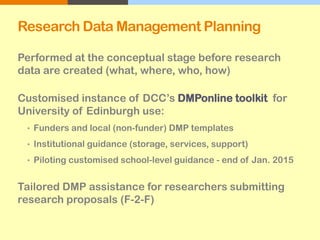
Research Data Management Planning
Performed at the conceptual stage before research
data are created (what, where, who, how)
Customised instance of DCC’s DMPonline toolkit for
University of Edinburgh use:
• Funders and local (non-funder) DMP templates
• Institutional guidance (storage, services, support)
• Piloting customised school-level guidance - end of Jan. 2015
Tailored DMP assistance for researchers submitting
research proposals (F-2-F)
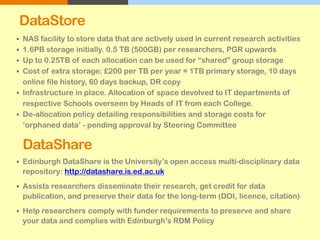
DataStore
 NAS facility to store data that are actively used in current research activities
 1.6PB storage initially. 0.5 TB (500GB) per researchers, PGR upwards
 Up to 0.25TB of each allocation can be used for “shared” group storage
 Cost of extra storage: £200 per TB per year = 1TB primary storage, 10 days
online file history, 60 days backup, DR copy
 Infrastructure in place. Allocation of space devolved to IT departments of
respective Schools overseen by Heads of IT from each College.
 De-allocation policy detailing responsibilities and storage costs for
‘orphaned data’ - pending approval by Steering Committee
DataShare
 Edinburgh DataShare is the University’s open access multi-disciplinary data
repository: http://datashare.is.ed.ac.uk
 Assists researchers disseminate their research, get credit for data
publication, and preserve their data for the long-term (DOI, licence, citation)
 Help researchers comply with funder requirements to preserve and share
your data and complies with Edinburgh’s RDM Policy
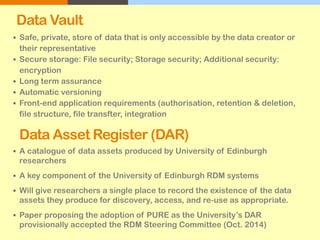
Data Vault
 Safe, private, store of data that is only accessible by the data creator or
their representative
 Secure storage: File security; Storage security; Additional security:
encryption
 Long term assurance
 Automatic versioning
 Front-end application requirements (authorisation, retention & deletion,
file structure, file transfter, integration
Data Asset Register (DAR)
 A catalogue of data assets produced by University of Edinburgh
researchers
 A key component of the University of Edinburgh RDM systems
 Will give researchers a single place to record the existence of the data
assets they produce for discovery, access, and re-use as appropriate.
 Paper proposing the adoption of PURE as the University’s DAR
provisionally accepted the RDM Steering Committee (Oct. 2014)
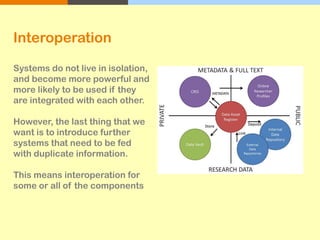
Systems do not live in isolation,
and become more powerful and
more likely to be used if they
are integrated with each other.
However, the last thing that we
want is to introduce further
systems that need to be fed
with duplicate information.
This means interoperation for
some or all of the components
Interoperation
RDM Support
Making the most of local support!
• RDM team will work with the Research Administrators in
each School.
• Academic Support Librarians (who represent each of the 22
Schools).
• IT staff in each School.
• ERI staff. They will be receiving RDM training.
• Each School’s Ethics Committee
• Queries can be sent to the IS Helpline who will direct them
as appropriate.
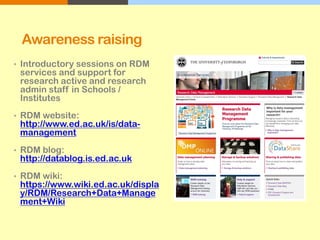
Awareness raising
• Introductory sessions on RDM
services and support for
research active and research
admin staff in Schools /
Institutes
• RDM website:
http://www.ed.ac.uk/is/data-
management
• RDM blog:
http://datablog.is.ed.ac.uk
• RDM wiki:
https://www.wiki.ed.ac.uk/displa
y/RDM/Research+Data+Manage
ment+Wiki
MANTRA
 MANTRA is an
internationally recognized
self-paced online training
course developed here for
PGR’s and early career
researchers in data
management issues.
 Data handling exercises
with open datasets in 4
analytical packages: R,
SPSS, NVivo, ArcGIS
 CC License & embed units
in VLE’s e.g. Moodle
http://datalib.edina.ac.uk/mantra
Training: Tailored Courses
 A range of training
programmes on research
data management (RDM) in
the form of workshops,
power sessions, seminars
and drop in sessions to
help researchers with
research data management
issues
 http://www.ed.ac.uk/schools-
departments/information-
services/research-support/data-
management/rdm-training
 Creating a data management
plan for your grant application
 Research Data Management
Programme at the University of
Edinburgh
 Good practice in Research
Data Management
 Handling data using SPSS
 Handling data with ArcGIS
http://edin.ac/1kRMPv3

Service Integration
• DataShare is a customised DSpace instance with a
selection of OAI-PMH compliant DCMI metadata fields for data
discovery through Google and other search engines
• Records are harvested by Data Citation Index
• SWORD API utilised for batch deposit of large and/or many
files from remote computers (‘Push using http’)
• Internal batch ingest of many/large files to circumvent 2.1GB
limit via the web interface (‘Pull via command line interface’)
• Use of checksums to determine that delivered object mirrors deposited
object
• Working with F1000Research to define a workflow for
depositors to get credit for data as research output by
publishing data articles - http://f1000research.com/
• Published new list of data journals for our depositors
DSpace GITHUB plugin* - allows software to be archived from
GitHub (or similar) source code repository into DataShare, which can
then be assigned a DOI to facilitate citation - using the SWORD deposit
protocol
DataSync - to allow sharing of data on DataStore:
• drop-box type functionality
• uses open source ‘ownCloud’ technology
• desktop and mobile machines synchronize files with the ownCloud
server
• file updates are pushed between all devices connected to a user's
account.
Research data deposit from RSpace Electronic Lab Notebook (ELN)
interface into DataShare (and Datastore & Data Vault) using SWORD
* http://blog.stuartlewis.com/2014/09/09/github-to-repository-deposit/
Integrating an electronic lab notebook
with a university research infrastructure:
Case Study with RSpace at the
University of Edinburgh
Rory Macneil
Research Space
rmacneil@researchspace.com
RDMF 12 - Research Data and
Repositories (and other systems), RDMF,
University of Leicester, 19 November 2014
Overview
● ELNs – where the demand coming from
● RSpace – origins and overview
● RSpace at Edinburgh
– Linking to files in Edinburgh DataStore
– Depositing content in Edinburgh DataShare
– Archiving in Edinburgh DataVault
● Platform for integration with other RDM
infrastructures
Who and what is driving demand for
ELNs?
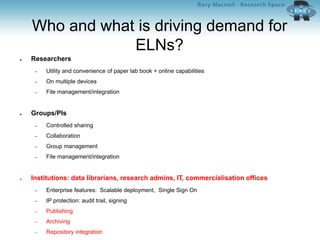
● Researchers
– Utility and convenience of paper lab book + online capabilities
– On multiple devices
– File management/integration
● Groups/PIs
– Controlled sharing
– Collaboration
– Group management
– File management/integration
● Institutions: data librarians, research admins, IT, commercialisation offices
– Enterprise features: Scalable deployment, Single Sign On
– IP protection: audit trail, signing
– Publishing
– Archiving
– Repository integration
RSpace
● Conceived in response to Wisconsin RFP
and trial 2011 - 2012
● Developed with Wisconsin by Research
Space 2012 - 2013
Researcher experience
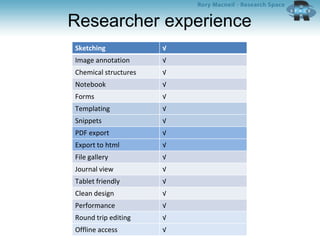
Sketching √
Image annotation √
Chemical structures √
Notebook √
Forms √
Templating √
Snippets √
PDF export √
Export to html √
File gallery √
Journal view √
Tablet friendly √
Clean design √
Performance √
Round trip editing √
Offline access √
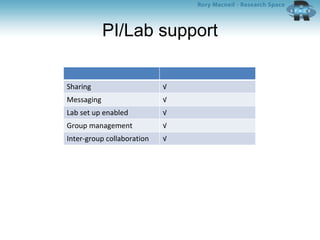
PI/Lab support
Sharing √
Messaging √
Lab set up enabled √
Group management √
Inter-group collaboration √
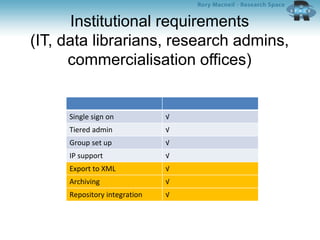
Institutional requirements
(IT, data librarians, research admins,
commercialisation offices)
Single sign on √
Tiered admin √
Group set up √
IP support √
Export to XML √
Archiving √
Repository integration √
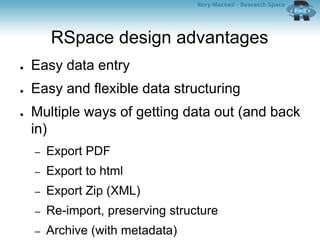
RSpace design advantages
● Easy data entry
● Easy and flexible data structuring
● Multiple ways of getting data out (and back
in)
– Export PDF
– Export to html
– Export Zip (XML)
– Re-import, preserving structure
– Archive (with metadata)
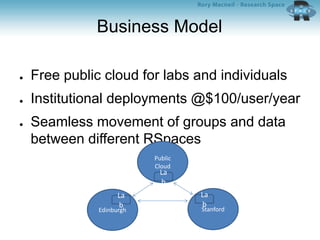
Business Model
● Free public cloud for labs and individuals
● Institutional deployments @$100/user/year
● Seamless movement of groups and data
between different RSpaces
Edinburgh
Public
Cloud
Stanford
La
b
La
b
La
b
RSpace at Edinburgh
– Linking to files in Edinburgh DataStore
– Depositing content in Edinburgh DataShare
– Archiving in Edinburgh DataVault
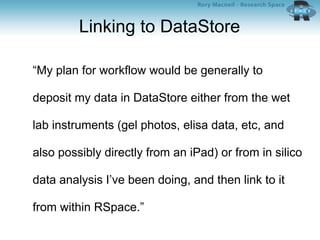
Linking to DataStore
“My plan for workflow would be generally to
deposit my data in DataStore either from the wet
lab instruments (gel photos, elisa data, etc, and
also possibly directly from an iPad) or from in silico
data analysis I’ve been doing, and then link to it
from within RSpace.”
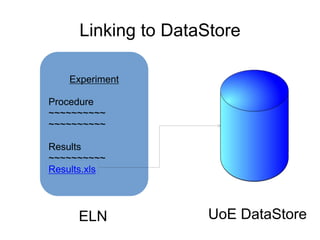
Linking to DataStore
Experiment
Procedure
~~~~~~~~~~
~~~~~~~~~~
Results
~~~~~~~~~~
Results.xls
ELN UoE DataStore
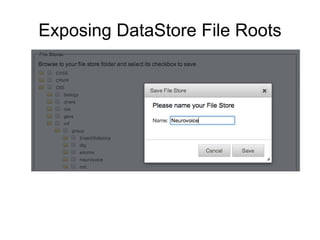
Exposing DataStore File Roots
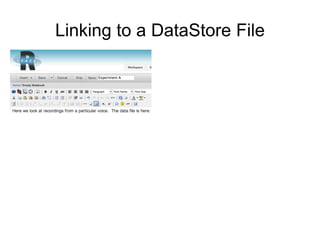
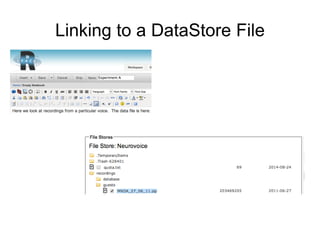
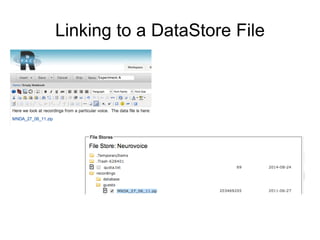
Linking to a DataStore File
DataStore integration: Designing for
the User
● Single Sign On via EASE
● Seamless file access
– Common Internet File Standard with user
credentials
● Multiple file roots per user
– Idiosyncratic organisation
– Sharing between users/groups
– Accessing external files (DataStore, Box,
Dropbox)
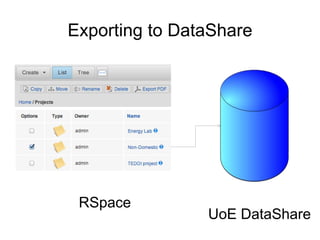
Exporting to DataShare
RSpace
UoE DataShare
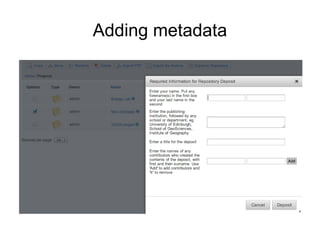
Adding metadata
RSpace – DataShare integration:
Backend platform
–Edinburgh DataShare has three interfaces/APIs
●Web-UI
●Python
●SWORD (simple Java based web-service which supports repository
deposits)
–RSpace uses the SWORD Interface
–The SWORD server accepts a file for deposition if a METS
description file is provided
Four part METS implementation in
RSpace – DataShare integration
•RSpace uses the standard METS header
•DMD -- field definitions are based on Dublin Core
–Four required fields in Edinburgh DataShare -- contributor,
publisher, title, and data creator -- must be completed as part
of the deposit through RSpace
–Additional optional fields can be filled in later by DataShare
administrator:
●FUNDER, SPATIAL_COVERAGE, TIME_PERIOD, DATA_CREATOR, AVAILABLE_DATE,
DESCRIPTION_ABSTRACT, DESCRIPTION_TOC, LANGUAGE, RELATION_VERSION_OF,
RELATION_REFERENCED_BY, SUPERCEDES, RIGHT, SOURCE, SUBJECT_KEYWORDS,
SUBJECT_CLASSIFICATION, ALTERNATIVE_TITLE
•All zipped files and their mime-types (e.g. application/pdf,
text/html) are included
•A structure map describes the full structure and relationships
between the above three elements
RSpace – DataShare integration:
Workflow
•Front end trigger
–An RSpace user selects files/folders/notebooks to be
deposited from RSpace, and starts the deposit process
•Backend to support the user workflow
–RSpace extracts the associated data and resources from
its database and file-store
–These are turned into xml files
–METS is used to describe the zip file and each selected
file
–The xml, resource, and METS files are zipped into a zip file
for archiving
–The DSpace SWORD client deposits the zip file to
DataShare after an authentication and validation
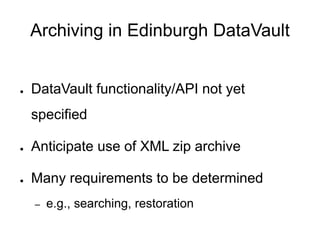
Archiving in Edinburgh DataVault
● DataVault functionality/API not yet
specified
● Anticipate use of XML zip archive
● Many requirements to be determined
– e.g., searching, restoration
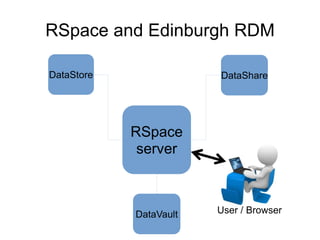
RSpace and Edinburgh RDM
RSpace
server
DataShareDataStore
DataVault User / Browser
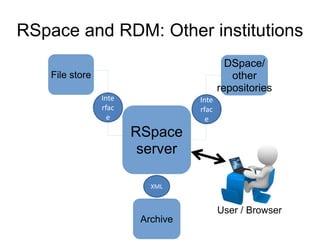
RSpace and RDM: Other institutions
RSpace
server
DSpace/
other
repositories
File store
Archive
User / Browser
Inte
rfac
e
Inte
rfac
e
XML

RDM Programme @ Edinburgh - Service Interoperation

  • 1.
    Stuart Macdonald RDM ServiceCoordinator University of Edinburgh stuart.macdonald@ed.ac.uk RDMF 12 - Research Data and Repositories (and other systems), RDMF, University of Leicester, 19 November 2014 RDM PROGRAMME @ EDINBURGH - Service Interoperation
  • 2.
    Background • EDINA andUniversity Data Library (EDL) together are a division within Information Services (IS) of the University of Edinburgh. • EDINA is a Jisc-designated centre for digital expertise & online service delivery - http://edina.ac.uk/ • The Data Library assists Edinburgh University users in the discovery, access, use and management of research datasets: http://www.ed.ac.uk/is/data-library • Research and Learning Services offer specific services to the University with a focus on enabling research (OA publications, research data, bibliometrics) and resource discovery for learners (resource search systems).
  • 3.
    University of EdinburghRDM Policy  University of Edinburgh is one of the first Universities in UK to adopt a policy for managing research data: http://www.ed.ac.uk/is/resear ch-data-policy  The policy was approved by the University Court on 16 May 2011.  It’s acknowledged that this is an aspirational policy and that implementation will take some years.
  • 4.
    An RDM PolicyImplementation Committee was set up by the VP of Knowledge Management charged with delivering services that will meet RDM policy objectives: • Membership from across Information Services • Iterate with researchers to ensure services meet the needs of researchers The VP also established a Steering Committee led by Prof. Peter Clarke with members of the Research Committee from the 3 colleges, IS, and the Research Office (ERI). Their role is to: • Provide oversight to the activity of the Implementation Committee • Ensure services meet researcher requirements without harming research competitiveness Governance
  • 5.
    Policy implementation -Research Data Management Roadmap (2012-2015)  Cross-divisional collaboration  Services already in place: o Data management planning o Active working file space = DataStore o Data publication repository = DataShare  Services in development: o Long term data archive = DataVault o Data Asset Register (DAR)  RDM support: Awareness raising, training & consultancy http://edin.ac/1u3sKqy Before research During research After research
  • 6.
    Research Data ManagementPlanning Performed at the conceptual stage before research data are created (what, where, who, how) Customised instance of DCC’s DMPonline toolkit for University of Edinburgh use: • Funders and local (non-funder) DMP templates • Institutional guidance (storage, services, support) • Piloting customised school-level guidance - end of Jan. 2015 Tailored DMP assistance for researchers submitting research proposals (F-2-F)
  • 7.
    DataStore  NAS facilityto store data that are actively used in current research activities  1.6PB storage initially. 0.5 TB (500GB) per researchers, PGR upwards  Up to 0.25TB of each allocation can be used for “shared” group storage  Cost of extra storage: £200 per TB per year = 1TB primary storage, 10 days online file history, 60 days backup, DR copy  Infrastructure in place. Allocation of space devolved to IT departments of respective Schools overseen by Heads of IT from each College.  De-allocation policy detailing responsibilities and storage costs for ‘orphaned data’ - pending approval by Steering Committee DataShare  Edinburgh DataShare is the University’s open access multi-disciplinary data repository: http://datashare.is.ed.ac.uk  Assists researchers disseminate their research, get credit for data publication, and preserve their data for the long-term (DOI, licence, citation)  Help researchers comply with funder requirements to preserve and share your data and complies with Edinburgh’s RDM Policy
  • 8.
    Data Vault  Safe,private, store of data that is only accessible by the data creator or their representative  Secure storage: File security; Storage security; Additional security: encryption  Long term assurance  Automatic versioning  Front-end application requirements (authorisation, retention & deletion, file structure, file transfter, integration Data Asset Register (DAR)  A catalogue of data assets produced by University of Edinburgh researchers  A key component of the University of Edinburgh RDM systems  Will give researchers a single place to record the existence of the data assets they produce for discovery, access, and re-use as appropriate.  Paper proposing the adoption of PURE as the University’s DAR provisionally accepted the RDM Steering Committee (Oct. 2014)
  • 9.
    Systems do notlive in isolation, and become more powerful and more likely to be used if they are integrated with each other. However, the last thing that we want is to introduce further systems that need to be fed with duplicate information. This means interoperation for some or all of the components Interoperation
  • 10.
    RDM Support Making themost of local support! • RDM team will work with the Research Administrators in each School. • Academic Support Librarians (who represent each of the 22 Schools). • IT staff in each School. • ERI staff. They will be receiving RDM training. • Each School’s Ethics Committee • Queries can be sent to the IS Helpline who will direct them as appropriate.
  • 11.
    Awareness raising • Introductorysessions on RDM services and support for research active and research admin staff in Schools / Institutes • RDM website: http://www.ed.ac.uk/is/data- management • RDM blog: http://datablog.is.ed.ac.uk • RDM wiki: https://www.wiki.ed.ac.uk/displa y/RDM/Research+Data+Manage ment+Wiki
  • 12.
    MANTRA  MANTRA isan internationally recognized self-paced online training course developed here for PGR’s and early career researchers in data management issues.  Data handling exercises with open datasets in 4 analytical packages: R, SPSS, NVivo, ArcGIS  CC License & embed units in VLE’s e.g. Moodle http://datalib.edina.ac.uk/mantra
  • 13.
    Training: Tailored Courses A range of training programmes on research data management (RDM) in the form of workshops, power sessions, seminars and drop in sessions to help researchers with research data management issues  http://www.ed.ac.uk/schools- departments/information- services/research-support/data- management/rdm-training  Creating a data management plan for your grant application  Research Data Management Programme at the University of Edinburgh  Good practice in Research Data Management  Handling data using SPSS  Handling data with ArcGIS http://edin.ac/1kRMPv3 
  • 14.
    Service Integration • DataShareis a customised DSpace instance with a selection of OAI-PMH compliant DCMI metadata fields for data discovery through Google and other search engines • Records are harvested by Data Citation Index • SWORD API utilised for batch deposit of large and/or many files from remote computers (‘Push using http’) • Internal batch ingest of many/large files to circumvent 2.1GB limit via the web interface (‘Pull via command line interface’) • Use of checksums to determine that delivered object mirrors deposited object • Working with F1000Research to define a workflow for depositors to get credit for data as research output by publishing data articles - http://f1000research.com/ • Published new list of data journals for our depositors
  • 15.
    DSpace GITHUB plugin*- allows software to be archived from GitHub (or similar) source code repository into DataShare, which can then be assigned a DOI to facilitate citation - using the SWORD deposit protocol DataSync - to allow sharing of data on DataStore: • drop-box type functionality • uses open source ‘ownCloud’ technology • desktop and mobile machines synchronize files with the ownCloud server • file updates are pushed between all devices connected to a user's account. Research data deposit from RSpace Electronic Lab Notebook (ELN) interface into DataShare (and Datastore & Data Vault) using SWORD * http://blog.stuartlewis.com/2014/09/09/github-to-repository-deposit/
  • 16.
    Integrating an electroniclab notebook with a university research infrastructure: Case Study with RSpace at the University of Edinburgh Rory Macneil Research Space rmacneil@researchspace.com RDMF 12 - Research Data and Repositories (and other systems), RDMF, University of Leicester, 19 November 2014
  • 17.
    Overview ● ELNs –where the demand coming from ● RSpace – origins and overview ● RSpace at Edinburgh – Linking to files in Edinburgh DataStore – Depositing content in Edinburgh DataShare – Archiving in Edinburgh DataVault ● Platform for integration with other RDM infrastructures
  • 18.
    Who and whatis driving demand for ELNs? ● Researchers – Utility and convenience of paper lab book + online capabilities – On multiple devices – File management/integration ● Groups/PIs – Controlled sharing – Collaboration – Group management – File management/integration ● Institutions: data librarians, research admins, IT, commercialisation offices – Enterprise features: Scalable deployment, Single Sign On – IP protection: audit trail, signing – Publishing – Archiving – Repository integration
  • 19.
    RSpace ● Conceived inresponse to Wisconsin RFP and trial 2011 - 2012 ● Developed with Wisconsin by Research Space 2012 - 2013
  • 20.
    Researcher experience Sketching √ Imageannotation √ Chemical structures √ Notebook √ Forms √ Templating √ Snippets √ PDF export √ Export to html √ File gallery √ Journal view √ Tablet friendly √ Clean design √ Performance √ Round trip editing √ Offline access √
  • 21.
    PI/Lab support Sharing √ Messaging√ Lab set up enabled √ Group management √ Inter-group collaboration √
  • 22.
    Institutional requirements (IT, datalibrarians, research admins, commercialisation offices) Single sign on √ Tiered admin √ Group set up √ IP support √ Export to XML √ Archiving √ Repository integration √
  • 23.
    RSpace design advantages ●Easy data entry ● Easy and flexible data structuring ● Multiple ways of getting data out (and back in) – Export PDF – Export to html – Export Zip (XML) – Re-import, preserving structure – Archive (with metadata)
  • 24.
    Business Model ● Freepublic cloud for labs and individuals ● Institutional deployments @$100/user/year ● Seamless movement of groups and data between different RSpaces Edinburgh Public Cloud Stanford La b La b La b
  • 25.
    RSpace at Edinburgh –Linking to files in Edinburgh DataStore – Depositing content in Edinburgh DataShare – Archiving in Edinburgh DataVault
  • 26.
    Linking to DataStore “Myplan for workflow would be generally to deposit my data in DataStore either from the wet lab instruments (gel photos, elisa data, etc, and also possibly directly from an iPad) or from in silico data analysis I’ve been doing, and then link to it from within RSpace.”
  • 27.
  • 28.
  • 29.
    Linking to aDataStore File
  • 30.
    Linking to aDataStore File
  • 31.
    Linking to aDataStore File
  • 32.
    DataStore integration: Designingfor the User ● Single Sign On via EASE ● Seamless file access – Common Internet File Standard with user credentials ● Multiple file roots per user – Idiosyncratic organisation – Sharing between users/groups – Accessing external files (DataStore, Box, Dropbox)
  • 33.
  • 34.
  • 35.
    RSpace – DataShareintegration: Backend platform –Edinburgh DataShare has three interfaces/APIs ●Web-UI ●Python ●SWORD (simple Java based web-service which supports repository deposits) –RSpace uses the SWORD Interface –The SWORD server accepts a file for deposition if a METS description file is provided
  • 36.
    Four part METSimplementation in RSpace – DataShare integration •RSpace uses the standard METS header •DMD -- field definitions are based on Dublin Core –Four required fields in Edinburgh DataShare -- contributor, publisher, title, and data creator -- must be completed as part of the deposit through RSpace –Additional optional fields can be filled in later by DataShare administrator: ●FUNDER, SPATIAL_COVERAGE, TIME_PERIOD, DATA_CREATOR, AVAILABLE_DATE, DESCRIPTION_ABSTRACT, DESCRIPTION_TOC, LANGUAGE, RELATION_VERSION_OF, RELATION_REFERENCED_BY, SUPERCEDES, RIGHT, SOURCE, SUBJECT_KEYWORDS, SUBJECT_CLASSIFICATION, ALTERNATIVE_TITLE •All zipped files and their mime-types (e.g. application/pdf, text/html) are included •A structure map describes the full structure and relationships between the above three elements
  • 37.
    RSpace – DataShareintegration: Workflow •Front end trigger –An RSpace user selects files/folders/notebooks to be deposited from RSpace, and starts the deposit process •Backend to support the user workflow –RSpace extracts the associated data and resources from its database and file-store –These are turned into xml files –METS is used to describe the zip file and each selected file –The xml, resource, and METS files are zipped into a zip file for archiving –The DSpace SWORD client deposits the zip file to DataShare after an authentication and validation
  • 38.
    Archiving in EdinburghDataVault ● DataVault functionality/API not yet specified ● Anticipate use of XML zip archive ● Many requirements to be determined – e.g., searching, restoration
  • 39.
    RSpace and EdinburghRDM RSpace server DataShareDataStore DataVault User / Browser
  • 40.
    RSpace and RDM:Other institutions RSpace server DSpace/ other repositories File store Archive User / Browser Inte rfac e Inte rfac e XML