The document discusses Random Access Memory (RAM), explaining its function, types, and characteristics, including Static RAM and Dynamic RAM. It highlights advantages like speed and efficiency, as well as disadvantages such as volatility and space limitations. Additionally, it provides information on how RAM is installed in Windows Vista and Windows 7.

RAM (RANDOM ACCESSMEMORY):
RAM is a random access memory in the form of memory
which stored the address by using program instructions
to increase the general speed of the system.
Why it is called the “RANDOMACCESS MEMORY”?
It is called the Random Access Memory: Because any storage location can be
access directly.
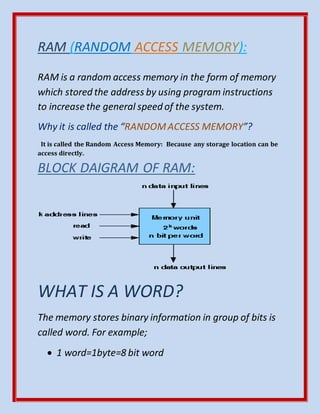
BLOCK DAIGRAM OF RAM:
WHAT IS A WORD?
The memory stores binary information in group of bits is
called word. For example;
1 word=1byte=8 bit word
3.
1 word=2bytes=16bit word
N bit per word is also known as word length.
A group of 8 bits is called byte.
Memory capacity is represented using symbols like:
K= (2)10=1024 M= (2)20=1048576
G= (2)30=1073741824
For example;
2k*16
N=16=word length/’n’ bit per word
= (2)1*(2)10*16
= (2)11*16 [Because; (a) c*(a) b= (a) c+ b]
K=11
=2048*16
In RAM, There are:
‘n’ numbers of inputs data lines;
‘n’ numbers of output data lines;
‘k’ address line;
4.
Read operation;
And write operation.
TYPES OF RAM:
STATIC RAM: It is a type of random-access memory
that uses flip flop to store each bit.
DYNAMIC RAM:
It is a type of random-access memory that stores
each bit of data in a separate capacitor. Capacitor
may be charged or discharged. Capacitor is a
device to stored electric charge in an electric field.
CHARACTERISTICS OF RAM:
SDRAM(Synchronous Dynamic Random Access
Memory) and DDR (Double DataRate): InRAM, Memory
modules are labeled with SDRAM or DDR.
SPEED: The two numbers are see in double quoted; first is
memory module specification and second is maximum
transfer rate.
Memory module specification is indicated the maximum clock
speed whereas; maximum transfer rate indicates the rate of
devices can be operated.
It is a form of:”DDR xxx / PC xxx”.
5.
For example: Ramlabeled DDR3-133
PC3200, clock speed is 66 MHz and
transfer rate is 3200 MB/s.
PINS: Number of pins in a memory has indicatedthe numbers of
connections.
VOLTS: The voltage rating associated with memory.
For example: 2.5 V.
REDUNDANCY:The redundancy built into memory, it indicates the
ability of recover from error and alerts the operating system to a problem.
HOW RAM IS INSTALLED IN WINDOW
VISTA AND WINDOW7?
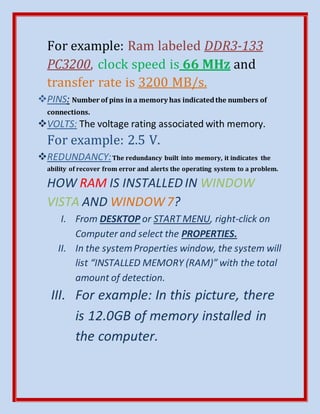
I. From DESKTOP or START MENU, right-click on
Computer and select the PROPERTIES.
II. In the systemProperties window, the system will
list “INSTALLED MEMORY (RAM)” with the total
amount of detection.
III. For example: In this picture, there
is 12.0GB of memory installed in
the computer.
6.
ADVANTAGES OF
RAM:
SILENT: Thereare no moving parts in RAM
operations is completely silent.
POWER- EFFICIENT: Same reason, RAM uses much
less power than disk drives.
FAST: RAM is the fasteststorage medium outside
of the CPU.
7.
DISADVANTAGES OF
RAM:
VOLATILE: Apower is high will cause the
irrecoverable data loss, unless there is some
power backup systemlike a laptop battery.
SPACE-LIMITED: RAMis a cost per bit is high
so, computer doesn’tinclude too much space.
BIBLIOGRAPHY:
https://en.m.wikipedia.org/wiki./.
www.computerhope.com
vagar.Org/asciiidoc/cachefs/userman.