COMPUTER SYSTEM
      RAM
(Random Access Memory)


COMPUTER SYSTEM
By:
-kadaii-
RAM
(Random Acess Memory)
RAM Overview
• RAM stands for Random Access Memory. It gets
  the word "random" because information can be
  accessed in non-sequential order. Though the
  data itself is stored together, it could be
  anywhere in the "container" or amount of RAM
  available. RAM is measured in "bits", and 8 bits
  equals 1 byte. A kilobyte equals 1024 bits, and a
  megabyte equals 1024 kilobytes.
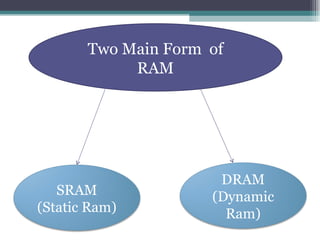
Two Main Form of
            RAM


                      DRAM
   SRAM              (Dynamic
(Static Ram)           Ram)
SRAM (Static Ram)
• Static RAM is a type of RAM that holds its data
  without external refresh, for as long as power is
  supplied to the circuit. This is contrasted to
  dynamic RAM (DRAM), which must be
  refreshed many times per second in order to
  hold its data contents. SRAMs are used for
  specific applications within the PC, where their
  strengths outweigh their weaknesses compared
  to DRAM:
• Simplicity: SRAMs don't require external refresh
  circuitry or other work in order for them to keep
  their data intact.

• Speed: SRAM is faster than DRAM.
• Compared to DRAM, SRAM is more power-
  efficient when idle.

• SRAM is several times more expensive than
  DRAM.
DRAM (Dynamic Ram)
• Dynamic RAM is the standard computer
  memory of the vast majority of modern desktop
  computers. It is a volatile memory that needs to
  be refreshed with voltage regularly, otherwise it
  loses the information stored on it. Dynamic
  RAM is also referred to as DRAM. Volatile
  means that it loses the information stored on it
  as soon as power is withdrawn.
• Dynamic RAM is referred to by its size and
  speed. For example, the packaging or description
  of the memory module might list 1066 Mhz 1 Gb
  DRAM. The 1066 Mhz is the speed at which a
  computer can read and write to the memory, and
  the higher number the better. The 1 Gb is the
  usable space on the chip; in this example, the
  chip can store 1 gigabyte of information on it
  while it has power. There are several different
  types of DRAM.

• Example of DRAM is DIMM, SO-DIMM and
  DDR Memory Sticks.
Types of RAM Memory Module
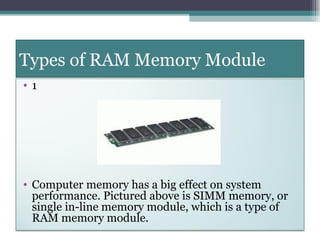
•1


• Computer memory has a big effect on system
  performance. Pictured above is SIMM memory, or
  single in-line memory module, which is a type of
  RAM memory module.
•2


• DIMM, or dual in-line memory module, has a
  64-bit path to memory chips, whereas the SIMM
  has only a 32-bit.
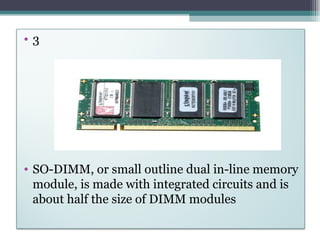
•3


• SO-DIMM, or small outline dual in-line memory
  module, is made with integrated circuits and is
  about half the size of DIMM modules
END

Ram presentation

  • 1.
    COMPUTER SYSTEM RAM (Random Access Memory) COMPUTER SYSTEM By: -kadaii- RAM (Random Acess Memory)
  • 2.
    RAM Overview • RAMstands for Random Access Memory. It gets the word "random" because information can be accessed in non-sequential order. Though the data itself is stored together, it could be anywhere in the "container" or amount of RAM available. RAM is measured in "bits", and 8 bits equals 1 byte. A kilobyte equals 1024 bits, and a megabyte equals 1024 kilobytes.
  • 3.
    Two Main Formof RAM DRAM SRAM (Dynamic (Static Ram) Ram)
  • 4.
    SRAM (Static Ram) •Static RAM is a type of RAM that holds its data without external refresh, for as long as power is supplied to the circuit. This is contrasted to dynamic RAM (DRAM), which must be refreshed many times per second in order to hold its data contents. SRAMs are used for specific applications within the PC, where their strengths outweigh their weaknesses compared to DRAM:
  • 5.
    • Simplicity: SRAMsdon't require external refresh circuitry or other work in order for them to keep their data intact. • Speed: SRAM is faster than DRAM. • Compared to DRAM, SRAM is more power- efficient when idle. • SRAM is several times more expensive than DRAM.
  • 6.
    DRAM (Dynamic Ram) •Dynamic RAM is the standard computer memory of the vast majority of modern desktop computers. It is a volatile memory that needs to be refreshed with voltage regularly, otherwise it loses the information stored on it. Dynamic RAM is also referred to as DRAM. Volatile means that it loses the information stored on it as soon as power is withdrawn.
  • 7.
    • Dynamic RAMis referred to by its size and speed. For example, the packaging or description of the memory module might list 1066 Mhz 1 Gb DRAM. The 1066 Mhz is the speed at which a computer can read and write to the memory, and the higher number the better. The 1 Gb is the usable space on the chip; in this example, the chip can store 1 gigabyte of information on it while it has power. There are several different types of DRAM. • Example of DRAM is DIMM, SO-DIMM and DDR Memory Sticks.
  • 8.
    Types of RAMMemory Module •1 • Computer memory has a big effect on system performance. Pictured above is SIMM memory, or single in-line memory module, which is a type of RAM memory module.
  • 9.
    •2 • DIMM, ordual in-line memory module, has a 64-bit path to memory chips, whereas the SIMM has only a 32-bit.
  • 10.
    •3 • SO-DIMM, orsmall outline dual in-line memory module, is made with integrated circuits and is about half the size of DIMM modules
  • 11.