R and Data Mining
美味书签 (AVOS China)
杨朝中
R and Data Mining
●
R 语言介绍
●
R 文本挖掘框架
● High Performance Computing in R
●
R 网络分析
●
统计图形
R and Data Mining
●
R 语言介绍
●
R 文本挖掘框架
● High Performance Computing in R
●
R 网络分析
●
统计图形
R 语言介绍
●
统计计算
● CRAN (Comprehensive R Archive Network)
R 语言介绍
●
统计计算

对象类型

统计分析模型
● CRAN (Comprehensive R Archive Network)
对象类型
●
向量 (vector)
●
因子 (factor)
●
数组和矩阵 (array and matrix)
●
数据框和列表 (data.frame and list)
●
函数 (function)
向量 (vector)
> test.vector = c(1:100)
> test.vector
[1] 1 2 3 4 5 6 7 8 9 10 11 12 13 14 15 16 17 18 19 20 21 22
[23] 23 24 25 26 27 28 29 30 31 32 33 34 35 36 37 38 39 40 41 42 43 44
[45] 45 46 47 48 49 50 51 52 53 54 55 56 57 58 59 60 61 62 63 64 65 66
[67] 67 68 69 70 71 72 73 74 75 76 77 78 79 80 81 82 83 84 85 86 87 88
[89] 89 90 91 92 93 94 95 96 97 98 99 100
> test.vector[3]
[1] 3
> test.vector[1]
[1] 1
> sum(test.vector)
[1] 5050
> mean(test.vector)
[1] 50.5
> var(test.vector)
[1] 841.6667
> sd(test.vector)
[1] 29.01149
因子 (factor)
> test.factor = factor(c(1,1,2,2,2,3,3,3,4,4,1,1,4,4))
> test.factor
[1] 1 1 2 2 2 3 3 3 4 4 1 1 4 4
Levels: 1 2 3 4
> levels(test.factor) = c("first","second","third","fourth")
> test.factor
[1] first first second second second third third third fourth fourth first first
[13] fourth fourth
Levels: first second third fourth
> levels(test.factor) = c("a","b","c","d")
> test.factor
[1] a a b b b c c c d d a a d d
Levels: a b c d
数组 (array)
> test.array = array(rbinom(100,5,0.5),dim=c(4,5,5))
> test.array
, , 1
[,1] [,2] [,3] [,4] [,5]
[1,] 1 3 2 3 1
[2,] 4 2 2 2 2
[3,] 2 1 3 3 5
[4,] 2 2 4 2 2
> test.array[,3,]
[,1] [,2] [,3] [,4] [,5]
[1,] 2 3 4 4 2
[2,] 2 2 2 1 1
[3,] 3 2 4 3 4
[4,] 4 3 3 1 2
> test.array[3,2,]
[1] 1 2 3 1 1
矩阵 (matrix)
> test.matrix = matrix(rpois(50,5),nrow=5)
> test.matrix
[,1] [,2] [,3] [,4] [,5] [,6] [,7] [,8] [,9] [,10]
[1,] 6 3 12 7 6 2 3 5 4 4
[2,] 2 5 11 3 1 4 7 2 5 5
[3,] 2 4 1 5 1 3 2 7 5 8
[4,] 4 7 5 8 4 5 3 2 6 2
[5,] 9 15 5 6 2 4 8 8 5 3
> t(test.matrix)
[,1] [,2] [,3] [,4] [,5]
[1,] 6 2 2 4 9
[2,] 3 5 4 7 15
[3,] 12 11 1 5 5
[4,] 7 3 5 8 6
[5,] 6 1 1 4 2
[6,] 2 4 3 5 4
[7,] 3 7 2 3 8
[8,] 5 2 7 2 8
[9,] 4 5 5 6 5
[10,] 4 5 8 2 3
矩阵 (matix)
> test.matrix = matrix(runif(25,min=1,max=5),nrow=5)
> test.matrix
[,1] [,2] [,3] [,4] [,5]
[1,] 1.844365 2.470590 4.744482 4.693239 2.597706
[2,] 2.051089 2.954349 4.807748 3.974937 2.487159
[3,] 4.554397 2.187724 4.519553 4.916905 3.988060
[4,] 4.629351 3.770774 2.992690 4.660705 2.510643
[5,] 3.894542 3.281654 2.471337 3.484586 2.115016
> qr(test.matrix)
$qr
[,1] [,2] [,3] [,4] [,5]
[1,] -8.0591276 -6.30550129 -7.7768280 -9.2254948 -5.94547975
[2,] 0.2545051 -2.20153679 -2.8030382 -2.2409546 -0.64008014
[3,] 0.5651229 -0.83950762 -3.5747057 -2.2750825 -1.96267828
[4,] 0.5744234 -0.15061209 -0.6607485 0.7479590 0.01142934
[5,] 0.4832462 -0.07700937 -0.6148309 0.9179222 0.06790194
$rank
[1] 5
$qraux
[1] 1.22885416 1.51634534 1.43057441 1.39676050 0.06790194
矩阵 (matrix)
> svd(test.matrix)
$d
[1] 17.66944239 3.22284465 1.78184517 0.61566884 0.05156261
$u
[,1] [,2] [,3] [,4] [,5]
[1,] -0.4285623 -0.55858839 0.1433838 0.6112554 0.33184518
[2,] -0.4207851 -0.46523651 0.3361892 -0.6261498 -0.31844658
[3,] -0.5179119 0.03462469 -0.8461578 -0.1172279 -0.02903471
[4,] -0.4722861 0.50932622 0.2777685 0.3687009 -0.55175807
[5,] -0.3846913 0.45926238 0.2707020 -0.2908960 0.69511911
$v
[,1] [,2] [,3] [,4] [,5]
[1,] -0.4356020 0.71976143 -0.31404796 -0.1898322 -0.39690304
[2,] -0.3666388 0.23238151 0.80369243 -0.2606880 0.31256209
[3,] -0.4958375 -0.64266729 -0.01537137 -0.4151453 -0.41053867
[4,] -0.5530530 -0.10129870 0.04863968 0.8254724 -0.01001832
[5,] -0.3522846 -0.06826158 -0.50284218 -0.2055605 0.75903264
矩阵 (matrix)
> cbind(test.matrix,rep(1,times=5))
[,1] [,2] [,3] [,4] [,5] [,6]
[1,] 1.844365 2.470590 4.744482 4.693239 2.597706 1
[2,] 2.051089 2.954349 4.807748 3.974937 2.487159 1
[3,] 4.554397 2.187724 4.519553 4.916905 3.988060 1
[4,] 4.629351 3.770774 2.992690 4.660705 2.510643 1
[5,] 3.894542 3.281654 2.471337 3.484586 2.115016 1
> rbind(test.matrix, seq(1,2,length.out=5))
[,1] [,2] [,3] [,4] [,5]
[1,] 1.844365 2.470590 4.744482 4.693239 2.597706
[2,] 2.051089 2.954349 4.807748 3.974937 2.487159
[3,] 4.554397 2.187724 4.519553 4.916905 3.988060
[4,] 4.629351 3.770774 2.992690 4.660705 2.510643
[5,] 3.894542 3.281654 2.471337 3.484586 2.115016
[6,] 1.000000 1.250000 1.500000 1.750000 2.000000
数据框 (data.frame)
> test.data.frame =
data.frame(id=1:10,name=letters[1:10],age=sample(c(25,23,24),size=10,replace=TRUE))
> test.data.frame
id name age
1 1 a 25
2 2 b 23
3 3 c 23
4 4 d 23
5 5 e 24
6 6 f 24
7 7 g 24
8 8 h 25
9 9 i 25
10 10 j 25
> test.data.frame$id
[1] 1 2 3 4 5 6 7 8 9 10
> test.data.frame$name
[1] a b c d e f g h i j
Levels: a b c d e f g h i j
> test.data.frame$age
[1] 25 23 23 23 24 24 24 25 25 25
列表 (List)
> test.list =
list(test.vector,test.factor,test.array,test.matrix,test.data.frame)
> str(test.list)
List of 5
$ : int [1:100] 1 2 3 4 5 6 7 8 9 10 ...
$ : Factor w/ 4 levels "a","b","c","d": 1 1 2 2 2 3 3 3 4 4 ...
$ : num [1:4, 1:5, 1:5] 1 4 2 2 3 2 1 2 2 2 ...
$ : num [1:5, 1:5] 1.84 2.05 4.55 4.63 3.89 ...
$ :'data.frame': 10 obs. of 3 variables:
..$ id : int [1:10] 1 2 3 4 5 6 7 8 9 10
..$ name: Factor w/ 10 levels "a","b","c","d",..: 1 2 3 4 5 6 7 8 9 10
..$ age : num [1:10] 25 23 23 23 24 24 24 25 25 25
> test.list[4]
[[1]]
[,1] [,2] [,3] [,4] [,5]
[1,] 1.844365 2.470590 4.744482 4.693239 2.597706
[2,] 2.051089 2.954349 4.807748 3.974937 2.487159
[3,] 4.554397 2.187724 4.519553 4.916905 3.988060
[4,] 4.629351 3.770774 2.992690 4.660705 2.510643
[5,] 3.894542 3.281654 2.471337 3.484586 2.115016
函数 (function)
> test.function = function(x) factorial(x)
> test.function(3)
[1] 6
>lapply(test.vector[31:35],test.function)
[[1]]
[1] 8.222839e+33
[[2]]
[1] 2.631308e+35
[[3]]
[1] 8.683318e+36
[[4]]
[1] 2.952328e+38
[[5]]
[1] 1.033315e+40
统计分析模型
●
回归分析
●
方差分析
●
判别分析
●
聚类分析
●
主成分分析
●
因子分析
●
连续系统模拟、离散系统模拟
R 语言介绍
●
统计计算
● CRAN (Comprehensive R Archive Network)
CRAN
● CRAN Task Views
● Natural Language Processing
● Machine Learning & Statistical Learning
● High-Performance and Parallel Computing with R
● gRaphical Models in R
● Graphic displays
R and Data Mining
●
R 语言介绍
●
R 文本挖掘框架
● High Performance Computing in R
●
R 网络分析
●
统计图形
R 文本挖掘框架
‘tm’ package UML 类图
Text Preprocessing in R
●
数据导入: Corpus 、 PlainTextDocument 、 tm_map
●
中文分词: rmmseg4j
●
英文词干提取: Rstem 、 Snowball 、 RWeka
●
英文句子识别: openNLP
●
英文同义词: wordnet
●
构造基于 tf-idf 的文档单词矩阵:
DocumentTermMatrix 、 weightTfIdf
Preprocessing
library(tm)
library(rmmseg4j)
library(openNLP)
library(Rstem)
library(Snowball)
cor = Corpus(DirSource("~/work/text-mining/20news-bydate-test/1000/"),
readerControl=list(reader=readPlain))
cwsed = tm_map(cor, function(x){
PlainTextDocument(mmseg4j(as.character(x), method="maxword"),
id=ID(x))
})
dtm = DocumentTermMatrix(cwsed, control=list(weighting = function(x){
weightTfIdf(x)
},wordLengths=c(1,Inf)))
文本聚类
降维处理
++++++++++++++++++++++++++++++++++++++++++
> nTerms(dtm)
[1] 103757
> dtm2 = removeSparseTerms(dtm, 0.9)
> nTerms(dtm2)
[1] 709
++++++++++++++++++++++++++++++++++++++++++
聚类
++++++++++++++++++++++++++++++++++++++++++
km = kmeans(as.matrix(dtm2), centers=5, iter.max=10)
dbscan?
spectral clustering?
Cluster validation
● Internal measures
● Stability measures
● Biological
Internal measures
● Connectivity
● Silhouette Width
● Dunn Index
Stability measures
● Average Proportion of Non-overlap(APN)
● Average Distance (AD)
Stability measures
● Average Distance between Means (ADM)
● Figure of Merit (FOM)
Biological
● Biological Homogeneity Index (BHI)
● Biological Stability Index (BSI)
Cluster validation
library(tm)
library(kernlab)
library(clValid)
intern=clValid(as.matrix(dtm2),2:10,clMethods=c("hierarchical","kmeans","pa
m"),validation="internal",maxitems=3000)
summary(intern)
op <- par(no.readonly=TRUE)
par(mfrow=c(2,2),mar=c(4,4,3,1))
plot(intern, legend=FALSE)
legend("right", clusterMethods(intern), col=1:9, lty=1:9, pch=paste(1:9))
par(op)
文本分类
●
朴素贝叶斯
●
支持向量机 (Support Vector Machine)
台湾大学 林智仁
Libsvm(e1071)
Liblinear(LiblinearR)
Evaluation and Acurracy
improvement
● Cross validation
● Bootstrap
● Ensemble Method
R and Data Mining
●
R 语言介绍
●
R 文本挖掘框架
● High Performance Computing in R
●
R 网络分析
●
统计图形
High Performance Computing in R
● Parallel Computing
Rmpi 、 snowfall 、 snowFT 、
parallel(>=R 2.14) 、 Rhadoop
● Large memory and out-of-memory data
ff 、 HadoopStreaming
● Easier interfaces for Compiled code
Rcpp 、 Rjava 、 inline
● Profiling tools
profr 、 proftools
Rhadoop
http://www.revolutionanalytics.com/
Rhadoop
● Rmr2
mapreduce 、 from.dfs 、 to.dfs 、 keyval
● Rhdfs
hdfs.file 、 hdfs.close 、 hdfs.exists 、 hdfs.cp
hdfs.read
● Rhbase
hb.new.table 、 hb.delete.table 、 hb.insert 、
hb.get
k-medios.iter =
function(points, distfun,ncenters,centers = NULL) {
from.dfs(mapreduce(input = points,
map =
if (is.null(centers)) {
function(k,v) keyval(sample(1:ncenters,1),v)
}
else {
function(k,v) {
distances = apply(centers, 1, function(c) distfun(c,v))
keyval(centers[which.min(distances),], v)
}
},
reduce = function(k,vv) keyval(NULL, iter.center(vv)),
structured = T))
}
Parallel computing
library(snowfall)
library(tm)
library(kernlab)
svm_parallel =
function(dtm){
sfInit(parallel=TRUE, cpus=4, type="MPI")
data = as.data.frame(inspect(dtm))
data$type = factor(rep(1:5, times=c(500,500,500,500,564)))
levels(data$type) = c('sports','tech','news','education','learning')
sub = sample(c(0,1,2,3,4), size=2564, replace=T)
wrapper = function(x){
if(require(kernlab)){
ksvm(type ~., data=x)
}
}
ksvm.models =
sfLapplyLB(c(data[sub==0,],data[sub==1,],data[sub==2,],data[sub==3,],data[sub==4,]),
wrapper)
sfStop()
ksvm.models
}
Parallel computing
> library(parallel)
> cl =
makeCluster(detectCores(logical=FALSE))
> parLapplyLB(cl, 46:50, test.function)
[[1]]
[1] 5.502622e+57
[[2]]
[1] 2.586232e+59
[[3]]
[1] 1.241392e+61
[[4]]
[1] 6.082819e+62
[[5]]
[1] 3.041409e+64
R and Data Mining
●
R 语言介绍
●
R 文本挖掘框架
● High Performance Computing in R
●
R 网络分析
●
统计图形
library(igraph)
g <- graph.full(6,
directed=FALSE)
plot(g)
library(igraph)
g <- graph.ring(10,
directed=FALSE)
plot(g)
library(igraph)
g <- graph.star(16, mode = c("undirected"), center = 1)
plot(g)
library(igraph)
g <-
graph(c(1,2,4,5,3,4,5,6),directed=FALSE)
plot(g)
library(igraph)
M <- matrix(runif(100),nrow=10)
g <- graph.adjacency(M>0.9)
plot(g)
> M[,1:5]
[,1] [,2] [,3] [,4] [,5] [,6] [,7] [,8]
[1,] 0.44746867 0.9753915 0.6890068 0.8500356 0.5812459
[2,] 0.10004725 0.9870645 0.9322102 0.6834764 0.8518852
[3,] 0.04882503 0.1599767 0.5268769 0.7756217 0.5713700
[4,] 0.91988082 0.4018993 0.3562261 0.7624379 0.1849250
[5,] 0.43281897 0.6032613 0.8240209 0.3340224 0.7189334
[6,] 0.87971431 0.9331585 0.4483813 0.4743045 0.5121772
[7,] 0.04519996 0.1875099 0.5615725 0.5913464 0.9487314
[8,] 0.78936780 0.6904077 0.6834867 0.2760950 0.1559759
[9,] 0.13621689 0.5607899 0.2745078 0.7246721 0.1932709
[10,] 0.54878255 0.4730136 0.7992216 0.4186087 0.2547914
> M[,1:5] > 0.9
[,1] [,2] [,3] [,4] [,5] [,6] [,7] [,8]
[1,] FALSE TRUE FALSE FALSE FALSE
[2,] FALSE TRUE TRUE FALSE FALSE
[3,] FALSE FALSE FALSE FALSE FALSE
[4,] TRUE FALSE FALSE FALSE FALSE
[5,] FALSE FALSE FALSE FALSE FALSE
[6,] FALSE TRUE FALSE FALSE FALSE
[7,] FALSE FALSE FALSE FALSE TRUE
[8,] FALSE FALSE FALSE FALSE FALSE
[9,] FALSE FALSE FALSE FALSE FALSE
[10,] FALSE FALSE FALSE FALSE FALSE
library(igraph)
g1 <- graph.full(6, directed=FALSE)
g2 <- graph(c(6,7,7,8,8,9,9,10,9,7,11,12,12,8),
directed=FALSE)
g <- graph.union(g1, g2)
plot(g)
> V(g)
Vertex sequence:
[1] 1 2 3 4 5 6 7 8 9 10 11 12
> degree(g)
[1] 5 5 5 5 5 6 3 3 3 1 1 2
> V(g)[degree(g)>1]
Vertex sequence:
[1] 1 2 3 4 5 6 7 8 9 12
> graph.dfs(g, 9)
$order
[1] 9 7 6 1 2 3 4 5 8 12 11 10
> graph.bfs(g, 9)
$order
[1] 9 7 8 10 6 12 1 2 3 4 5 11
网络分析
● igraph
● graph
● network
● sna
R and Data Mining
●
R 语言介绍
●
R 文本挖掘框架
● High Performance Computing in R
●
R 网络分析基本
●
统计图形
统计图形
Statistical graphics is, or should be, an
transdisciplinary field informed by scientific,
statistical,computing, aesthetic, psychological
and sociological considerations.[Leland
Wilkinson, The Grammar of Graphics]
The grammar of Graphics
In brief, the grammar tells us that the statistical
graphic is a mapping from data to aesthetic
attributes(color, shape,size) of geometric
objects(points, lines, bars).
直方图 (hist)
条形图 (barplot)
散点图 (plot)
> x=seq(from=-pi,to=pi,length.out=100)
> y=sin(x)
> plot(x, y, col="blue")
概率密度曲线
> x=seq(from=-pi,to=pi,length.out=100)
> y = dnorm(x)
> plot(x, y, col="blue")
颜色等高图
散点图矩阵
矩阵图 (matplot)
matplot(test.matrix,type="b")
高级绘图程序
● lattice
● ggplot2
An implementation of the grammar of graphics
in R
ggplot2
●
Data( 数据 ) 和 Mapping( 映射 )
●
Geom( 几何对象 )
●
Stat( 统计变换 )
●
Scale( 标度 )
●
Coord( 坐标系统 )
●
Facet( 分面 )
●
Layer( 图层 )
ggplot2
●
测试数据
> str(mpg)
'data.frame': 234 obs. of 11 variables:
$ manufacturer: Factor w/ 15 levels "audi","chevrolet",..: 1 1 1 1 1 1 1 1 1 1 ...
$ model : Factor w/ 38 levels "4runner 4wd",..: 2 2 2 2 2 2 2 3 3 3 ...
$ displ : num 1.8 1.8 2 2 2.8 2.8 3.1 1.8 1.8 2 ...
$ year : int 1999 1999 2008 2008 1999 1999 2008 1999 1999 2008 ...
$ cyl : int 4 4 4 4 6 6 6 4 4 4 ...
$ trans : Factor w/ 10 levels "auto(av)","auto(l3)",..: 4 9 10 1 4 9 1 9 4 10 ...
$ drv : Factor w/ 3 levels "4","f","r": 2 2 2 2 2 2 2 1 1 1 ...
$ cty : int 18 21 20 21 16 18 18 18 16 20 ...
$ hwy : int 29 29 31 30 26 26 27 26 25 28 ...
$ fl : Factor w/ 5 levels "c","d","e","p",..: 4 4 4 4 4 4 4 4 4 4 ...
$ class : Factor w/ 7 levels "2seater","compact",..: 2 2 2 2 2 2 2 2 2 2 ...
ggplot2
> library(ggplot2)
> p <- ggplot(data=mpg,
mapping=aes(x=cty,y=hwy))
> p + geom_point()
ggplot2
> p <- ggplot(data=mpg,
mapping=aes(x=cty,y=hwy,colour=factor(year)))
> p + geom_point()
ggplot2
> p + geom_point() + stat_smooth()
ggplot2
> p + geom_point(mapping=aes(size=displ)) +
stat_smooth()
ggplot2
> p + geom_point(mapping=aes(size=displ)) + stat_smooth() +
coord_cartesian(xlim=c(20,30),ylim=c(0,40))
ggplot2
> p + geom_point(mapping=aes(size=displ)) + stat_smooth() +
facet_wrap(~year,ncol=2)
ggplot2
qplot(x,y,colour=factor(y)
)
ggplot2
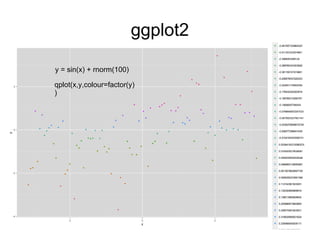
y = sin(x) + rnorm(100)
qplot(x,y,colour=factor(y)
)
ggplot2
plotmatrix(data,mapping=aes(),colour="blue")
R 中文博客
●
肖凯
http://xccds1977.blogspot.jp
●
刘思喆
统计之都 R 语言版版主
http://cos.name/cn/
●
谢益辉
http://yihui.name/
国外网站
●
数据科学家 twitter
Big Data: Experts to Follow on Twitter
●
R 语言相关论文或书籍
Journal of Statistical Software
● R and Data Mining
http://www.rdatamining.com/
● R-project search
http://www.rseek.org/

R and data mining

  • 1.
    R and DataMining 美味书签 (AVOS China) 杨朝中
  • 5.
    R and DataMining ● R 语言介绍 ● R 文本挖掘框架 ● High Performance Computing in R ● R 网络分析 ● 统计图形
  • 6.
    R and DataMining ● R 语言介绍 ● R 文本挖掘框架 ● High Performance Computing in R ● R 网络分析 ● 统计图形
  • 7.
    R 语言介绍 ● 统计计算 ● CRAN(Comprehensive R Archive Network)
  • 8.
  • 9.
    对象类型 ● 向量 (vector) ● 因子 (factor) ● 数组和矩阵(array and matrix) ● 数据框和列表 (data.frame and list) ● 函数 (function)
  • 10.
    向量 (vector) > test.vector= c(1:100) > test.vector [1] 1 2 3 4 5 6 7 8 9 10 11 12 13 14 15 16 17 18 19 20 21 22 [23] 23 24 25 26 27 28 29 30 31 32 33 34 35 36 37 38 39 40 41 42 43 44 [45] 45 46 47 48 49 50 51 52 53 54 55 56 57 58 59 60 61 62 63 64 65 66 [67] 67 68 69 70 71 72 73 74 75 76 77 78 79 80 81 82 83 84 85 86 87 88 [89] 89 90 91 92 93 94 95 96 97 98 99 100 > test.vector[3] [1] 3 > test.vector[1] [1] 1 > sum(test.vector) [1] 5050 > mean(test.vector) [1] 50.5 > var(test.vector) [1] 841.6667 > sd(test.vector) [1] 29.01149
  • 11.
    因子 (factor) > test.factor= factor(c(1,1,2,2,2,3,3,3,4,4,1,1,4,4)) > test.factor [1] 1 1 2 2 2 3 3 3 4 4 1 1 4 4 Levels: 1 2 3 4 > levels(test.factor) = c("first","second","third","fourth") > test.factor [1] first first second second second third third third fourth fourth first first [13] fourth fourth Levels: first second third fourth > levels(test.factor) = c("a","b","c","d") > test.factor [1] a a b b b c c c d d a a d d Levels: a b c d
  • 12.
    数组 (array) > test.array= array(rbinom(100,5,0.5),dim=c(4,5,5)) > test.array , , 1 [,1] [,2] [,3] [,4] [,5] [1,] 1 3 2 3 1 [2,] 4 2 2 2 2 [3,] 2 1 3 3 5 [4,] 2 2 4 2 2 > test.array[,3,] [,1] [,2] [,3] [,4] [,5] [1,] 2 3 4 4 2 [2,] 2 2 2 1 1 [3,] 3 2 4 3 4 [4,] 4 3 3 1 2 > test.array[3,2,] [1] 1 2 3 1 1
  • 13.
    矩阵 (matrix) > test.matrix= matrix(rpois(50,5),nrow=5) > test.matrix [,1] [,2] [,3] [,4] [,5] [,6] [,7] [,8] [,9] [,10] [1,] 6 3 12 7 6 2 3 5 4 4 [2,] 2 5 11 3 1 4 7 2 5 5 [3,] 2 4 1 5 1 3 2 7 5 8 [4,] 4 7 5 8 4 5 3 2 6 2 [5,] 9 15 5 6 2 4 8 8 5 3 > t(test.matrix) [,1] [,2] [,3] [,4] [,5] [1,] 6 2 2 4 9 [2,] 3 5 4 7 15 [3,] 12 11 1 5 5 [4,] 7 3 5 8 6 [5,] 6 1 1 4 2 [6,] 2 4 3 5 4 [7,] 3 7 2 3 8 [8,] 5 2 7 2 8 [9,] 4 5 5 6 5 [10,] 4 5 8 2 3
  • 14.
    矩阵 (matix) > test.matrix= matrix(runif(25,min=1,max=5),nrow=5) > test.matrix [,1] [,2] [,3] [,4] [,5] [1,] 1.844365 2.470590 4.744482 4.693239 2.597706 [2,] 2.051089 2.954349 4.807748 3.974937 2.487159 [3,] 4.554397 2.187724 4.519553 4.916905 3.988060 [4,] 4.629351 3.770774 2.992690 4.660705 2.510643 [5,] 3.894542 3.281654 2.471337 3.484586 2.115016 > qr(test.matrix) $qr [,1] [,2] [,3] [,4] [,5] [1,] -8.0591276 -6.30550129 -7.7768280 -9.2254948 -5.94547975 [2,] 0.2545051 -2.20153679 -2.8030382 -2.2409546 -0.64008014 [3,] 0.5651229 -0.83950762 -3.5747057 -2.2750825 -1.96267828 [4,] 0.5744234 -0.15061209 -0.6607485 0.7479590 0.01142934 [5,] 0.4832462 -0.07700937 -0.6148309 0.9179222 0.06790194 $rank [1] 5 $qraux [1] 1.22885416 1.51634534 1.43057441 1.39676050 0.06790194
  • 15.
    矩阵 (matrix) > svd(test.matrix) $d [1]17.66944239 3.22284465 1.78184517 0.61566884 0.05156261 $u [,1] [,2] [,3] [,4] [,5] [1,] -0.4285623 -0.55858839 0.1433838 0.6112554 0.33184518 [2,] -0.4207851 -0.46523651 0.3361892 -0.6261498 -0.31844658 [3,] -0.5179119 0.03462469 -0.8461578 -0.1172279 -0.02903471 [4,] -0.4722861 0.50932622 0.2777685 0.3687009 -0.55175807 [5,] -0.3846913 0.45926238 0.2707020 -0.2908960 0.69511911 $v [,1] [,2] [,3] [,4] [,5] [1,] -0.4356020 0.71976143 -0.31404796 -0.1898322 -0.39690304 [2,] -0.3666388 0.23238151 0.80369243 -0.2606880 0.31256209 [3,] -0.4958375 -0.64266729 -0.01537137 -0.4151453 -0.41053867 [4,] -0.5530530 -0.10129870 0.04863968 0.8254724 -0.01001832 [5,] -0.3522846 -0.06826158 -0.50284218 -0.2055605 0.75903264
  • 16.
    矩阵 (matrix) > cbind(test.matrix,rep(1,times=5)) [,1][,2] [,3] [,4] [,5] [,6] [1,] 1.844365 2.470590 4.744482 4.693239 2.597706 1 [2,] 2.051089 2.954349 4.807748 3.974937 2.487159 1 [3,] 4.554397 2.187724 4.519553 4.916905 3.988060 1 [4,] 4.629351 3.770774 2.992690 4.660705 2.510643 1 [5,] 3.894542 3.281654 2.471337 3.484586 2.115016 1 > rbind(test.matrix, seq(1,2,length.out=5)) [,1] [,2] [,3] [,4] [,5] [1,] 1.844365 2.470590 4.744482 4.693239 2.597706 [2,] 2.051089 2.954349 4.807748 3.974937 2.487159 [3,] 4.554397 2.187724 4.519553 4.916905 3.988060 [4,] 4.629351 3.770774 2.992690 4.660705 2.510643 [5,] 3.894542 3.281654 2.471337 3.484586 2.115016 [6,] 1.000000 1.250000 1.500000 1.750000 2.000000
  • 17.
    数据框 (data.frame) > test.data.frame= data.frame(id=1:10,name=letters[1:10],age=sample(c(25,23,24),size=10,replace=TRUE)) > test.data.frame id name age 1 1 a 25 2 2 b 23 3 3 c 23 4 4 d 23 5 5 e 24 6 6 f 24 7 7 g 24 8 8 h 25 9 9 i 25 10 10 j 25 > test.data.frame$id [1] 1 2 3 4 5 6 7 8 9 10 > test.data.frame$name [1] a b c d e f g h i j Levels: a b c d e f g h i j > test.data.frame$age [1] 25 23 23 23 24 24 24 25 25 25
  • 18.
    列表 (List) > test.list= list(test.vector,test.factor,test.array,test.matrix,test.data.frame) > str(test.list) List of 5 $ : int [1:100] 1 2 3 4 5 6 7 8 9 10 ... $ : Factor w/ 4 levels "a","b","c","d": 1 1 2 2 2 3 3 3 4 4 ... $ : num [1:4, 1:5, 1:5] 1 4 2 2 3 2 1 2 2 2 ... $ : num [1:5, 1:5] 1.84 2.05 4.55 4.63 3.89 ... $ :'data.frame': 10 obs. of 3 variables: ..$ id : int [1:10] 1 2 3 4 5 6 7 8 9 10 ..$ name: Factor w/ 10 levels "a","b","c","d",..: 1 2 3 4 5 6 7 8 9 10 ..$ age : num [1:10] 25 23 23 23 24 24 24 25 25 25 > test.list[4] [[1]] [,1] [,2] [,3] [,4] [,5] [1,] 1.844365 2.470590 4.744482 4.693239 2.597706 [2,] 2.051089 2.954349 4.807748 3.974937 2.487159 [3,] 4.554397 2.187724 4.519553 4.916905 3.988060 [4,] 4.629351 3.770774 2.992690 4.660705 2.510643 [5,] 3.894542 3.281654 2.471337 3.484586 2.115016
  • 19.
    函数 (function) > test.function= function(x) factorial(x) > test.function(3) [1] 6 >lapply(test.vector[31:35],test.function) [[1]] [1] 8.222839e+33 [[2]] [1] 2.631308e+35 [[3]] [1] 8.683318e+36 [[4]] [1] 2.952328e+38 [[5]] [1] 1.033315e+40
  • 20.
  • 21.
    R 语言介绍 ● 统计计算 ● CRAN(Comprehensive R Archive Network)
  • 22.
    CRAN ● CRAN TaskViews ● Natural Language Processing ● Machine Learning & Statistical Learning ● High-Performance and Parallel Computing with R ● gRaphical Models in R ● Graphic displays
  • 23.
    R and DataMining ● R 语言介绍 ● R 文本挖掘框架 ● High Performance Computing in R ● R 网络分析 ● 统计图形
  • 24.
  • 25.
  • 26.
    Text Preprocessing inR ● 数据导入: Corpus 、 PlainTextDocument 、 tm_map ● 中文分词: rmmseg4j ● 英文词干提取: Rstem 、 Snowball 、 RWeka ● 英文句子识别: openNLP ● 英文同义词: wordnet ● 构造基于 tf-idf 的文档单词矩阵: DocumentTermMatrix 、 weightTfIdf
  • 27.
    Preprocessing library(tm) library(rmmseg4j) library(openNLP) library(Rstem) library(Snowball) cor = Corpus(DirSource("~/work/text-mining/20news-bydate-test/1000/"), readerControl=list(reader=readPlain)) cwsed= tm_map(cor, function(x){ PlainTextDocument(mmseg4j(as.character(x), method="maxword"), id=ID(x)) }) dtm = DocumentTermMatrix(cwsed, control=list(weighting = function(x){ weightTfIdf(x) },wordLengths=c(1,Inf)))
  • 28.
    文本聚类 降维处理 ++++++++++++++++++++++++++++++++++++++++++ > nTerms(dtm) [1] 103757 >dtm2 = removeSparseTerms(dtm, 0.9) > nTerms(dtm2) [1] 709 ++++++++++++++++++++++++++++++++++++++++++ 聚类 ++++++++++++++++++++++++++++++++++++++++++ km = kmeans(as.matrix(dtm2), centers=5, iter.max=10) dbscan? spectral clustering?
  • 29.
    Cluster validation ● Internalmeasures ● Stability measures ● Biological
  • 30.
    Internal measures ● Connectivity ●Silhouette Width ● Dunn Index
  • 31.
    Stability measures ● AverageProportion of Non-overlap(APN) ● Average Distance (AD)
  • 32.
    Stability measures ● AverageDistance between Means (ADM) ● Figure of Merit (FOM)
  • 33.
    Biological ● Biological HomogeneityIndex (BHI) ● Biological Stability Index (BSI)
  • 34.
    Cluster validation library(tm) library(kernlab) library(clValid) intern=clValid(as.matrix(dtm2),2:10,clMethods=c("hierarchical","kmeans","pa m"),validation="internal",maxitems=3000) summary(intern) op <-par(no.readonly=TRUE) par(mfrow=c(2,2),mar=c(4,4,3,1)) plot(intern, legend=FALSE) legend("right", clusterMethods(intern), col=1:9, lty=1:9, pch=paste(1:9)) par(op)
  • 36.
    文本分类 ● 朴素贝叶斯 ● 支持向量机 (Support VectorMachine) 台湾大学 林智仁 Libsvm(e1071) Liblinear(LiblinearR)
  • 37.
    Evaluation and Acurracy improvement ●Cross validation ● Bootstrap ● Ensemble Method
  • 38.
    R and DataMining ● R 语言介绍 ● R 文本挖掘框架 ● High Performance Computing in R ● R 网络分析 ● 统计图形
  • 39.
    High Performance Computingin R ● Parallel Computing Rmpi 、 snowfall 、 snowFT 、 parallel(>=R 2.14) 、 Rhadoop ● Large memory and out-of-memory data ff 、 HadoopStreaming ● Easier interfaces for Compiled code Rcpp 、 Rjava 、 inline ● Profiling tools profr 、 proftools
  • 40.
  • 41.
    Rhadoop ● Rmr2 mapreduce 、from.dfs 、 to.dfs 、 keyval ● Rhdfs hdfs.file 、 hdfs.close 、 hdfs.exists 、 hdfs.cp hdfs.read ● Rhbase hb.new.table 、 hb.delete.table 、 hb.insert 、 hb.get
  • 42.
    k-medios.iter = function(points, distfun,ncenters,centers= NULL) { from.dfs(mapreduce(input = points, map = if (is.null(centers)) { function(k,v) keyval(sample(1:ncenters,1),v) } else { function(k,v) { distances = apply(centers, 1, function(c) distfun(c,v)) keyval(centers[which.min(distances),], v) } }, reduce = function(k,vv) keyval(NULL, iter.center(vv)), structured = T)) }
  • 43.
    Parallel computing library(snowfall) library(tm) library(kernlab) svm_parallel = function(dtm){ sfInit(parallel=TRUE,cpus=4, type="MPI") data = as.data.frame(inspect(dtm)) data$type = factor(rep(1:5, times=c(500,500,500,500,564))) levels(data$type) = c('sports','tech','news','education','learning') sub = sample(c(0,1,2,3,4), size=2564, replace=T) wrapper = function(x){ if(require(kernlab)){ ksvm(type ~., data=x) } } ksvm.models = sfLapplyLB(c(data[sub==0,],data[sub==1,],data[sub==2,],data[sub==3,],data[sub==4,]), wrapper) sfStop() ksvm.models }
  • 44.
    Parallel computing > library(parallel) >cl = makeCluster(detectCores(logical=FALSE)) > parLapplyLB(cl, 46:50, test.function) [[1]] [1] 5.502622e+57 [[2]] [1] 2.586232e+59 [[3]] [1] 1.241392e+61 [[4]] [1] 6.082819e+62 [[5]] [1] 3.041409e+64
  • 45.
    R and DataMining ● R 语言介绍 ● R 文本挖掘框架 ● High Performance Computing in R ● R 网络分析 ● 统计图形
  • 46.
  • 47.
  • 48.
    library(igraph) g <- graph.star(16,mode = c("undirected"), center = 1) plot(g)
  • 49.
  • 50.
    library(igraph) M <- matrix(runif(100),nrow=10) g<- graph.adjacency(M>0.9) plot(g)
  • 51.
    > M[,1:5] [,1] [,2][,3] [,4] [,5] [,6] [,7] [,8] [1,] 0.44746867 0.9753915 0.6890068 0.8500356 0.5812459 [2,] 0.10004725 0.9870645 0.9322102 0.6834764 0.8518852 [3,] 0.04882503 0.1599767 0.5268769 0.7756217 0.5713700 [4,] 0.91988082 0.4018993 0.3562261 0.7624379 0.1849250 [5,] 0.43281897 0.6032613 0.8240209 0.3340224 0.7189334 [6,] 0.87971431 0.9331585 0.4483813 0.4743045 0.5121772 [7,] 0.04519996 0.1875099 0.5615725 0.5913464 0.9487314 [8,] 0.78936780 0.6904077 0.6834867 0.2760950 0.1559759 [9,] 0.13621689 0.5607899 0.2745078 0.7246721 0.1932709 [10,] 0.54878255 0.4730136 0.7992216 0.4186087 0.2547914 > M[,1:5] > 0.9 [,1] [,2] [,3] [,4] [,5] [,6] [,7] [,8] [1,] FALSE TRUE FALSE FALSE FALSE [2,] FALSE TRUE TRUE FALSE FALSE [3,] FALSE FALSE FALSE FALSE FALSE [4,] TRUE FALSE FALSE FALSE FALSE [5,] FALSE FALSE FALSE FALSE FALSE [6,] FALSE TRUE FALSE FALSE FALSE [7,] FALSE FALSE FALSE FALSE TRUE [8,] FALSE FALSE FALSE FALSE FALSE [9,] FALSE FALSE FALSE FALSE FALSE [10,] FALSE FALSE FALSE FALSE FALSE
  • 52.
    library(igraph) g1 <- graph.full(6,directed=FALSE) g2 <- graph(c(6,7,7,8,8,9,9,10,9,7,11,12,12,8), directed=FALSE) g <- graph.union(g1, g2) plot(g)
  • 53.
    > V(g) Vertex sequence: [1]1 2 3 4 5 6 7 8 9 10 11 12 > degree(g) [1] 5 5 5 5 5 6 3 3 3 1 1 2 > V(g)[degree(g)>1] Vertex sequence: [1] 1 2 3 4 5 6 7 8 9 12 > graph.dfs(g, 9) $order [1] 9 7 6 1 2 3 4 5 8 12 11 10 > graph.bfs(g, 9) $order [1] 9 7 8 10 6 12 1 2 3 4 5 11
  • 54.
  • 55.
    R and DataMining ● R 语言介绍 ● R 文本挖掘框架 ● High Performance Computing in R ● R 网络分析基本 ● 统计图形
  • 56.
    统计图形 Statistical graphics is,or should be, an transdisciplinary field informed by scientific, statistical,computing, aesthetic, psychological and sociological considerations.[Leland Wilkinson, The Grammar of Graphics]
  • 57.
    The grammar ofGraphics In brief, the grammar tells us that the statistical graphic is a mapping from data to aesthetic attributes(color, shape,size) of geometric objects(points, lines, bars).
  • 58.
  • 59.
  • 60.
  • 61.
  • 62.
  • 63.
  • 64.
  • 65.
    高级绘图程序 ● lattice ● ggplot2 Animplementation of the grammar of graphics in R
  • 66.
    ggplot2 ● Data( 数据 )和 Mapping( 映射 ) ● Geom( 几何对象 ) ● Stat( 统计变换 ) ● Scale( 标度 ) ● Coord( 坐标系统 ) ● Facet( 分面 ) ● Layer( 图层 )
  • 67.
    ggplot2 ● 测试数据 > str(mpg) 'data.frame': 234obs. of 11 variables: $ manufacturer: Factor w/ 15 levels "audi","chevrolet",..: 1 1 1 1 1 1 1 1 1 1 ... $ model : Factor w/ 38 levels "4runner 4wd",..: 2 2 2 2 2 2 2 3 3 3 ... $ displ : num 1.8 1.8 2 2 2.8 2.8 3.1 1.8 1.8 2 ... $ year : int 1999 1999 2008 2008 1999 1999 2008 1999 1999 2008 ... $ cyl : int 4 4 4 4 6 6 6 4 4 4 ... $ trans : Factor w/ 10 levels "auto(av)","auto(l3)",..: 4 9 10 1 4 9 1 9 4 10 ... $ drv : Factor w/ 3 levels "4","f","r": 2 2 2 2 2 2 2 1 1 1 ... $ cty : int 18 21 20 21 16 18 18 18 16 20 ... $ hwy : int 29 29 31 30 26 26 27 26 25 28 ... $ fl : Factor w/ 5 levels "c","d","e","p",..: 4 4 4 4 4 4 4 4 4 4 ... $ class : Factor w/ 7 levels "2seater","compact",..: 2 2 2 2 2 2 2 2 2 2 ...
  • 68.
    ggplot2 > library(ggplot2) > p<- ggplot(data=mpg, mapping=aes(x=cty,y=hwy)) > p + geom_point()
  • 69.
    ggplot2 > p <-ggplot(data=mpg, mapping=aes(x=cty,y=hwy,colour=factor(year))) > p + geom_point()
  • 70.
    ggplot2 > p +geom_point() + stat_smooth()
  • 71.
    ggplot2 > p +geom_point(mapping=aes(size=displ)) + stat_smooth()
  • 72.
    ggplot2 > p +geom_point(mapping=aes(size=displ)) + stat_smooth() + coord_cartesian(xlim=c(20,30),ylim=c(0,40))
  • 73.
    ggplot2 > p +geom_point(mapping=aes(size=displ)) + stat_smooth() + facet_wrap(~year,ncol=2)
  • 74.
  • 75.
    ggplot2 y = sin(x)+ rnorm(100) qplot(x,y,colour=factor(y) )
  • 76.
  • 77.
    R 中文博客 ● 肖凯 http://xccds1977.blogspot.jp ● 刘思喆 统计之都 R语言版版主 http://cos.name/cn/ ● 谢益辉 http://yihui.name/
  • 78.
    国外网站 ● 数据科学家 twitter Big Data:Experts to Follow on Twitter ● R 语言相关论文或书籍 Journal of Statistical Software ● R and Data Mining http://www.rdatamining.com/ ● R-project search http://www.rseek.org/