
QuickBooks Accounting Software
By:
-Muaz Hamed
-Abdelhalim fouzy
-Emad Elmac
-Asim Ahmed
-Mohamed Omer
Topics discussed:
• Introduction to QuickBooks
• Definition of QuickBooks
• History of QuickBooks
• Types of intuit products(desktop version-
online version)
• Features of QuickBooks
• Types of users in QuickBooks
• How QuickBooks store your data
Introduction To QuickBooks
Developer(s) Intuit.Inc
Latest release 2015
Operating System Microsoft Windows
MAC OX (USA only)
Type Accounting Software
What is QuickBooks
Quickbooks is book keeping software that combines a variety
of accounting processes into one user-friendly system.
The software's primary function is to alleviate the use of
multiple tables, spreadsheets, and tracking sheets necessary
to document and maintain accounting tasks at a company.
Accounting figures are also easily reconciled for tax purposes
with QuickBooks. The software was developed by intuit and
can be customized based on the needs of the business
utilizing the software
Intuit was founded in 1983 by Scott
Cook and Tom Proulx in Mountain View,
California, USA. After the success of Quicken for
individual financial management, the company
developed a similar solution for small business
owners.
QuickBooks History
On September 27, 1994 Intuit purchased the right to
use the double-entry accounting program called
(Money Counts) developed by Bob Parsons' company
Parsons Technology.
This new integration of the programs was then named
QuickBooks. The software was popular among small
business owners. the software soon claimed up to 85
percent of the small business accounting software
market.
QuickBooks History
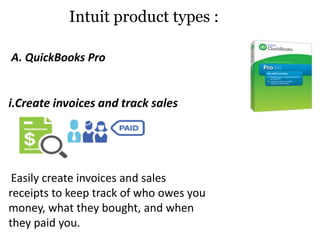
A. QuickBooks Pro
i.Create invoices and track sales
Easily create invoices and sales
receipts to keep track of who owes you
money, what they bought, and when
they paid you.
Intuit product types :
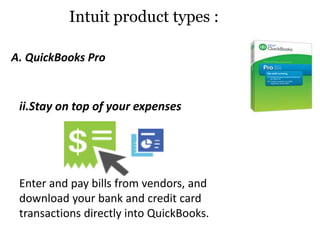
ii.Stay on top of your expenses
Enter and pay bills from vendors, and
download your bank and credit card
transactions directly into QuickBooks.
Intuit product types :
A. QuickBooks Pro
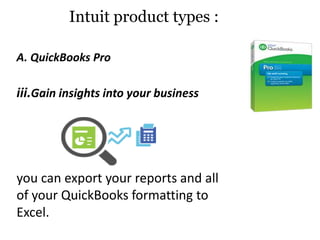
iii.Gain insights into your business
you can export your reports and all
of your QuickBooks formatting to
Excel.
Intuit product types :
A. QuickBooks Pro
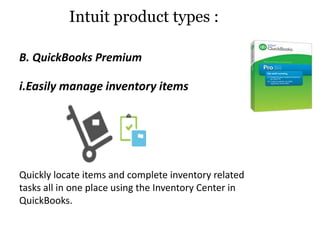
i.Easily manage inventory items
Quickly locate items and complete inventory related
tasks all in one place using the Inventory Center in
QuickBooks.
Intuit product types :
B. QuickBooks Premium
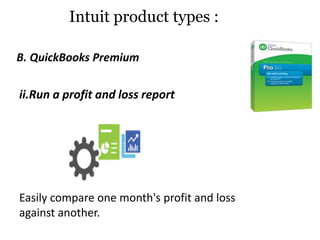
ii.Run a profit and loss report
Easily compare one month's profit and loss
against another.
B. QuickBooks Premium
Intuit product types :
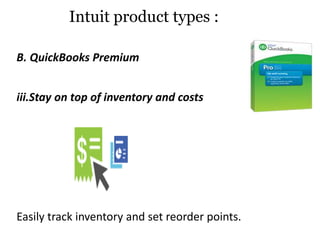
iii.Stay on top of inventory and costs
Easily track inventory and set reorder points.
Intuit product types :
B. QuickBooks Premium
QuickBooks Online
Intuit product types :
Intuit also offers a cloud solution called QuickBooks
Online (QBO). The user pays a monthly subscription
fee rather than an upfront fee and accesses the
software exclusively through a secure logon via a web
browser.
Run your business from anywhere with online and
mobile access.
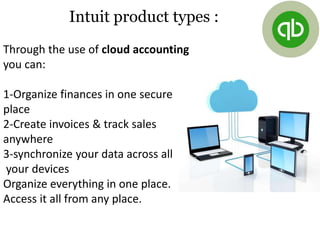
Through the use of cloud accounting
you can:
1-Organize finances in one secure
place
2-Create invoices & track sales
anywhere
3-synchronize your data across all
your devices
Organize everything in one place.
Access it all from any place.
Intuit product types :
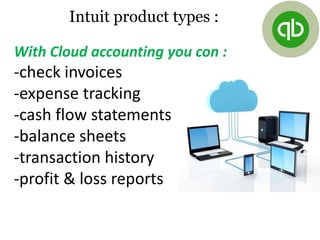
With Cloud accounting you con :
-check invoices
-expense tracking
-cash flow statements
-balance sheets
-transaction history
-profit & loss reports
Intuit product types :
QuickBooks Feature’s
Quick books has many features but the most important features
are :
1-Connecting your bank accounts to QB:
Connecting your bank accounts and credit card accounts to
QuickBooks helps you do much less manual data entry, faster
account balancing, and keeps you always ready for tax time.
How to Connecting Bank Accounts ?
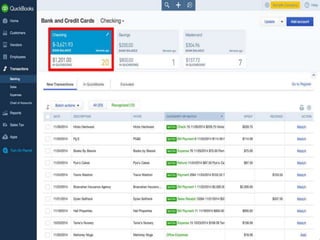
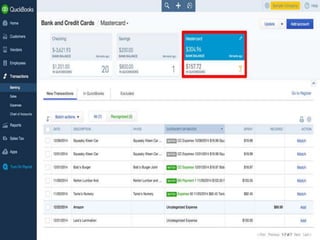
First Connecting Bank Accounts:
When you connect your bank accounts, QuickBooks keeps track
of all your ATM purchases and withdrawals, plus all direct
online funds transfers. Instead of methodically entering every
single transaction you make, you download them straight from
the bank, which saves you a lot of time.
Connecting Credit Cards :
If you share business credit cards with your colleagues, organizing
everyone’s receipts can be complicated. When you connect your credit
card accounts to QuickBooks, you can download all of these purchases
without worrying about who bought what.
Reconciling Made Easy:
Reconciling accounts is one of the most laborious tasks small business
owners have to deal with. Once you connect your accounts to
QuickBooks, every time you work with your downloaded transactions
you’re teaching QuickBooks about your business. QuickBooks will now
recognize some of these transactions for you and save you time. When
you have to file your taxes, your transactions will already be
categorized, which makes reconciling that much easier.
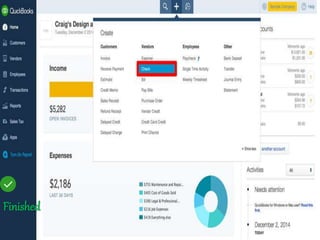
Finished
2-QuickBooks Backup :
Automatic backups:
QuickBooks backs up your data everyday with high
level security
QuickBooks offers 2 different automatic backups
IDP – Intuit Data Protect (online automatic back-up –
subscription based)
Local Backup – automatically backup your data when
you close your QuickBooks company file. You can
schedule an automatic backup to a network drive,
USB flash drive
QuickBooks Feature’s
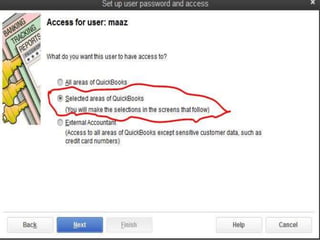
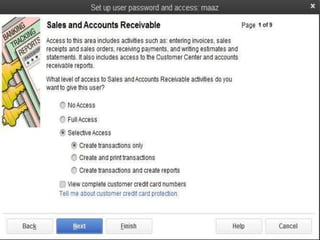
1-Company administrator:
the QuickBooks administrator has access to all
QuickBooks areas .
2-External accountant user:
external accountant user is a special type of
user who can access to all areas of QuickBooks
except sensitive customer data such as( credit
card numbers)
when creating a user in QuickBooks you can
select the areas of QuickBooks that a user can
have access to it such as ( entering invoices-
sales order-receiving payments ..etc)
Types of users in QB
How does QB store your data
QuickBooks is a computer program that helps
businesses manage their financial accounts. The
program uses one of three relational database
management systems. You must choose the
appropriate database for your company's needs.
Oracle:
is the most versatile of the QuickBooks-compatible
databases. If your company has multiple accounts or
handles large numbers of transactions, Oracle is the ideal
choice because Oracle funnels data through a central
tabular repository. What this means is that your database
administrator or financial controller can dictate user
privileges and can automate common transaction
processes. Furthermore, the database administrator can
encrypt sensitive data and hide or show financial data to
users on a "need to know" basis.
How does QB store your data
MySQL
If the security measures in Oracle don't suit your needs or if you
want versatility in terms of the type of computer your company
uses with QuickBooks, MySQL might be the best bet. MySQL
database has a high level of security and is nearly impossible to
hack. The database works on more than twenty platforms,
including Windows, Linux and Mac. If you're working across
platforms -- with a PC in the office and a Mac at home, for
instance -- you'll love MySQL's high level of encryption and
ability to work cross-platform.
How does QB store your data
Microsoft SQL
For the business professional working exclusively on
Windows-based computers, Microsoft SQL is a good
database for QuickBooks. MS SQL integrates easily with
QuickBooks and allows you to handle thousands or even
millions of records and transactions. Like Oracle, MS SQL
allows the database administrator to give out permissions
and control privacy. An unique feature of MS SQL is its ability
to automatically backup transactions without the need for
the database administrator to manually backup data at the
end of the business day.
How does QB store your data
Now finally will move on to the implementation side,
where we will enter a couple of financial transactions
into the program and create some reports.
Quick Books Accounting

Quick Books Accounting

  • 1.
    QuickBooks Accounting Software By: -MuazHamed -Abdelhalim fouzy -Emad Elmac -Asim Ahmed -Mohamed Omer
  • 2.
    Topics discussed: • Introductionto QuickBooks • Definition of QuickBooks • History of QuickBooks • Types of intuit products(desktop version- online version) • Features of QuickBooks • Types of users in QuickBooks • How QuickBooks store your data
  • 3.
    Introduction To QuickBooks Developer(s)Intuit.Inc Latest release 2015 Operating System Microsoft Windows MAC OX (USA only) Type Accounting Software
  • 4.
    What is QuickBooks Quickbooksis book keeping software that combines a variety of accounting processes into one user-friendly system. The software's primary function is to alleviate the use of multiple tables, spreadsheets, and tracking sheets necessary to document and maintain accounting tasks at a company. Accounting figures are also easily reconciled for tax purposes with QuickBooks. The software was developed by intuit and can be customized based on the needs of the business utilizing the software
  • 5.
    Intuit was foundedin 1983 by Scott Cook and Tom Proulx in Mountain View, California, USA. After the success of Quicken for individual financial management, the company developed a similar solution for small business owners. QuickBooks History
  • 6.
    On September 27,1994 Intuit purchased the right to use the double-entry accounting program called (Money Counts) developed by Bob Parsons' company Parsons Technology. This new integration of the programs was then named QuickBooks. The software was popular among small business owners. the software soon claimed up to 85 percent of the small business accounting software market. QuickBooks History
  • 7.
    A. QuickBooks Pro i.Createinvoices and track sales Easily create invoices and sales receipts to keep track of who owes you money, what they bought, and when they paid you. Intuit product types :
  • 8.
    ii.Stay on topof your expenses Enter and pay bills from vendors, and download your bank and credit card transactions directly into QuickBooks. Intuit product types : A. QuickBooks Pro
  • 9.
    iii.Gain insights intoyour business you can export your reports and all of your QuickBooks formatting to Excel. Intuit product types : A. QuickBooks Pro
  • 10.
    i.Easily manage inventoryitems Quickly locate items and complete inventory related tasks all in one place using the Inventory Center in QuickBooks. Intuit product types : B. QuickBooks Premium
  • 11.
    ii.Run a profitand loss report Easily compare one month's profit and loss against another. B. QuickBooks Premium Intuit product types :
  • 12.
    iii.Stay on topof inventory and costs Easily track inventory and set reorder points. Intuit product types : B. QuickBooks Premium
  • 13.
    QuickBooks Online Intuit producttypes : Intuit also offers a cloud solution called QuickBooks Online (QBO). The user pays a monthly subscription fee rather than an upfront fee and accesses the software exclusively through a secure logon via a web browser. Run your business from anywhere with online and mobile access.
  • 14.
    Through the useof cloud accounting you can: 1-Organize finances in one secure place 2-Create invoices & track sales anywhere 3-synchronize your data across all your devices Organize everything in one place. Access it all from any place. Intuit product types :
  • 15.
    With Cloud accountingyou con : -check invoices -expense tracking -cash flow statements -balance sheets -transaction history -profit & loss reports Intuit product types :
  • 16.
    QuickBooks Feature’s Quick bookshas many features but the most important features are : 1-Connecting your bank accounts to QB: Connecting your bank accounts and credit card accounts to QuickBooks helps you do much less manual data entry, faster account balancing, and keeps you always ready for tax time. How to Connecting Bank Accounts ?
  • 17.
    First Connecting BankAccounts: When you connect your bank accounts, QuickBooks keeps track of all your ATM purchases and withdrawals, plus all direct online funds transfers. Instead of methodically entering every single transaction you make, you download them straight from the bank, which saves you a lot of time.
  • 19.
    Connecting Credit Cards: If you share business credit cards with your colleagues, organizing everyone’s receipts can be complicated. When you connect your credit card accounts to QuickBooks, you can download all of these purchases without worrying about who bought what.
  • 21.
    Reconciling Made Easy: Reconcilingaccounts is one of the most laborious tasks small business owners have to deal with. Once you connect your accounts to QuickBooks, every time you work with your downloaded transactions you’re teaching QuickBooks about your business. QuickBooks will now recognize some of these transactions for you and save you time. When you have to file your taxes, your transactions will already be categorized, which makes reconciling that much easier.
  • 22.
  • 23.
    2-QuickBooks Backup : Automaticbackups: QuickBooks backs up your data everyday with high level security QuickBooks offers 2 different automatic backups IDP – Intuit Data Protect (online automatic back-up – subscription based) Local Backup – automatically backup your data when you close your QuickBooks company file. You can schedule an automatic backup to a network drive, USB flash drive QuickBooks Feature’s
  • 24.
    1-Company administrator: the QuickBooksadministrator has access to all QuickBooks areas . 2-External accountant user: external accountant user is a special type of user who can access to all areas of QuickBooks except sensitive customer data such as( credit card numbers) when creating a user in QuickBooks you can select the areas of QuickBooks that a user can have access to it such as ( entering invoices- sales order-receiving payments ..etc) Types of users in QB
  • 27.
    How does QBstore your data QuickBooks is a computer program that helps businesses manage their financial accounts. The program uses one of three relational database management systems. You must choose the appropriate database for your company's needs.
  • 28.
    Oracle: is the mostversatile of the QuickBooks-compatible databases. If your company has multiple accounts or handles large numbers of transactions, Oracle is the ideal choice because Oracle funnels data through a central tabular repository. What this means is that your database administrator or financial controller can dictate user privileges and can automate common transaction processes. Furthermore, the database administrator can encrypt sensitive data and hide or show financial data to users on a "need to know" basis. How does QB store your data
  • 29.
    MySQL If the securitymeasures in Oracle don't suit your needs or if you want versatility in terms of the type of computer your company uses with QuickBooks, MySQL might be the best bet. MySQL database has a high level of security and is nearly impossible to hack. The database works on more than twenty platforms, including Windows, Linux and Mac. If you're working across platforms -- with a PC in the office and a Mac at home, for instance -- you'll love MySQL's high level of encryption and ability to work cross-platform. How does QB store your data
  • 30.
    Microsoft SQL For thebusiness professional working exclusively on Windows-based computers, Microsoft SQL is a good database for QuickBooks. MS SQL integrates easily with QuickBooks and allows you to handle thousands or even millions of records and transactions. Like Oracle, MS SQL allows the database administrator to give out permissions and control privacy. An unique feature of MS SQL is its ability to automatically backup transactions without the need for the database administrator to manually backup data at the end of the business day. How does QB store your data
  • 31.
    Now finally willmove on to the implementation side, where we will enter a couple of financial transactions into the program and create some reports.