How did you use media
technologies in the
construction and research,
planning and evaluation
stages?
Prezi
Prezi is used in my project as it is a
creative way to present your work. It
allows for you to customise how the
viewer sees the information and the
journey they take. Like most
websites this could be shared online
and was easily able to implement it
into my Wix. It has a variety of
templates to use or you can easily
create your own with its own unique
path through your presentation.
Slideshare
Slideshare is a file sharing website
and useful when you wanted to share
PowerPoints online and make them
accessible. Slideshare is used
throughout my project due to ease of
use and the ability for it to be
embedded into my wix.
Wix
I chose Wix to host my coursework as it is
one of the leaders in free websites and
contains many different features and
applications which can enhance how I
present my work. It allows you to upload
almost any document such as images in
which you can put into galleries or place
into pages which you can fully edit. The
layout, colour scheme and font have a
wide range of variations thus allowing you
to be able to design it to fit your needs and
purposes.
SurveyMonkey
Survey Monkey was used in the
research section of my project, as
it allowed me to post our
questionnaire online and allow it
to be answered by anyone in the
world. This was great for getting a
much bigger sample and get
different views on thriller films
which would benefit us when we
constructed our own.
Youtube
Youtube was used to upload our
videos to the internet and therefore
share them and upload to our Wix via
links. I used YouTube during my film
analysis as it allowed me to add text
over the top of the short film. Youtube
is easy to upload more and is the go
to site for video sharing, this is why
our finished film was uploaded to it.
Camera and Accessories
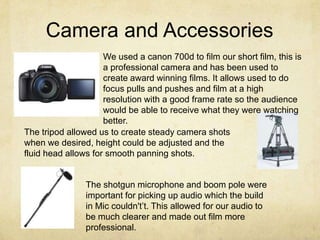
We used a canon 700d to film our short film, this is
a professional camera and has been used to
create award winning films. It allows used to do
focus pulls and pushes and film at a high
resolution with a good frame rate so the audience
would be able to receive what they were watching
better.
The tripod allowed us to create steady camera shots
when we desired, height could be adjusted and the
fluid head allows for smooth panning shots.
The shotgun microphone and boom pole were
important for picking up audio which the build
in Mic couldn't’t. This allowed for our audio to
be much clearer and made out film more
professional.
Motion
Motion was used in constructing
our title sequence for our
production company ‘BlackBox’.
This involved us creating a short
clip to visually advertise our
company that we had created. This
is a motion graphics program and
lets you create something from
scratch and put your own style onto
it. This is one of the best programs
in motion graphics so had a steep
learning curve but was happy with
the final result we got.
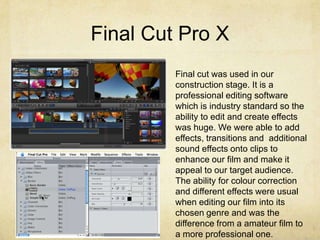
Final Cut Pro X
Final cut was used in our
construction stage. It is a
professional editing software
which is industry standard so the
ability to edit and create effects
was huge. We were able to add
effects, transitions and additional
sound effects onto clips to
enhance our film and make it
appeal to our target audience.
The ability for colour correction
and different effects were usual
when editing our film into its
chosen genre and was the
difference from a amateur film to
a more professional one.
Illustrator
I used illustrator to create our double
page spread film review, this was due
to the fact that illustrator is good for
fonts and layout which is a key aspect
of a film review. Illustrator is a vector
based program which allows you to
upscale designs without them
becoming pixelated and ruining the
design. Different fonts and headers
allowed me to design a visually
pleasing film review that looked good.
Photoshop
Photoshop was used in the construction of
our film poster. With its strong image
editing features it was ideal with editing
pictures taken from our Photoshop and
then adding them into our poster, giving it
a uniqueness to our individual film.
Photoshop is also good for brushes and
different textures which we used to great
effect. Various tutorials online show how to
do almost every feature you can do in
Photoshop so if we got stuck we would just
figure it out by searching about the
problem.

Question 4 Evaluation

  • 1.
    How did youuse media technologies in the construction and research, planning and evaluation stages?
  • 2.
    Prezi Prezi is usedin my project as it is a creative way to present your work. It allows for you to customise how the viewer sees the information and the journey they take. Like most websites this could be shared online and was easily able to implement it into my Wix. It has a variety of templates to use or you can easily create your own with its own unique path through your presentation.
  • 3.
    Slideshare Slideshare is afile sharing website and useful when you wanted to share PowerPoints online and make them accessible. Slideshare is used throughout my project due to ease of use and the ability for it to be embedded into my wix.
  • 4.
    Wix I chose Wixto host my coursework as it is one of the leaders in free websites and contains many different features and applications which can enhance how I present my work. It allows you to upload almost any document such as images in which you can put into galleries or place into pages which you can fully edit. The layout, colour scheme and font have a wide range of variations thus allowing you to be able to design it to fit your needs and purposes.
  • 5.
    SurveyMonkey Survey Monkey wasused in the research section of my project, as it allowed me to post our questionnaire online and allow it to be answered by anyone in the world. This was great for getting a much bigger sample and get different views on thriller films which would benefit us when we constructed our own.
  • 6.
    Youtube Youtube was usedto upload our videos to the internet and therefore share them and upload to our Wix via links. I used YouTube during my film analysis as it allowed me to add text over the top of the short film. Youtube is easy to upload more and is the go to site for video sharing, this is why our finished film was uploaded to it.
  • 7.
    Camera and Accessories Weused a canon 700d to film our short film, this is a professional camera and has been used to create award winning films. It allows used to do focus pulls and pushes and film at a high resolution with a good frame rate so the audience would be able to receive what they were watching better. The tripod allowed us to create steady camera shots when we desired, height could be adjusted and the fluid head allows for smooth panning shots. The shotgun microphone and boom pole were important for picking up audio which the build in Mic couldn't’t. This allowed for our audio to be much clearer and made out film more professional.
  • 8.
    Motion Motion was usedin constructing our title sequence for our production company ‘BlackBox’. This involved us creating a short clip to visually advertise our company that we had created. This is a motion graphics program and lets you create something from scratch and put your own style onto it. This is one of the best programs in motion graphics so had a steep learning curve but was happy with the final result we got.
  • 9.
    Final Cut ProX Final cut was used in our construction stage. It is a professional editing software which is industry standard so the ability to edit and create effects was huge. We were able to add effects, transitions and additional sound effects onto clips to enhance our film and make it appeal to our target audience. The ability for colour correction and different effects were usual when editing our film into its chosen genre and was the difference from a amateur film to a more professional one.
  • 10.
    Illustrator I used illustratorto create our double page spread film review, this was due to the fact that illustrator is good for fonts and layout which is a key aspect of a film review. Illustrator is a vector based program which allows you to upscale designs without them becoming pixelated and ruining the design. Different fonts and headers allowed me to design a visually pleasing film review that looked good.
  • 11.
    Photoshop Photoshop was usedin the construction of our film poster. With its strong image editing features it was ideal with editing pictures taken from our Photoshop and then adding them into our poster, giving it a uniqueness to our individual film. Photoshop is also good for brushes and different textures which we used to great effect. Various tutorials online show how to do almost every feature you can do in Photoshop so if we got stuck we would just figure it out by searching about the problem.