How did you use new media technologies
in the construction and research,
planning and evaluation stages?
By Hayley Townend
Research for our film
To research what should be included in the content of our film I used the
internet. It enabled me to find out everything that I needed.
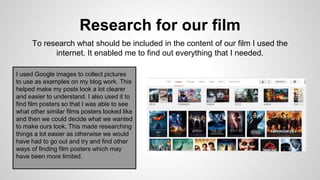
I used Google images to collect pictures
to use as examples on my blog work. This
helped make my posts look a lot clearer
and easier to understand. I also used it to
find film posters so that I was able to see
what other similar films posters looked like
and then we could decide what we wanted
to make ours look. This made researching
things a lot easier as otherwise we would
have had to go out and try and find other
ways of finding film posters which may
have been more limited.
Researching and planning the film
The IMDB website was really useful as I was able
to look at other similar films to ours and look at
the ratings and reviews to see if their was
anything similar with our storyline that we could
improve on.
We used the BBFC website to see what we
should classify our film as. I was able to to at the
different age ratings on the website and then
compare them to see what our film was most like.
This helped as it was a quick and easy process
as we had all of the information that we needed
right in front of us.
Researching and planning the film
To organise all of our planning and research for our
film we used Google Blogger. This was good to use
as we were able to view everything that we had
planned all in one place and also enabled us to
share work with other team members. This website
was really convenient as without it our work would
have been a lot less organised and would have
been harder to see what we have planned. Also
work could then be misplaced. Blogger helped us
save time with planning as everything could be
uploaded as soon as the work was finished.
Researching and planning the film
To get audience feedback on our film we used Google forms to
create a questionnaire. This was easy to use as you are able to
choose a layout and just input your questions into the boxes. This
had helped a lot as making one from scratch would have been
time consuming and may not have looked as good.
We were then able to get a link to
the questionnaire to be able to post it
anywhere.
Social Networking
We used Facebook to advertise our
questionnaire. This made it easy as all of the
friends that we have on Facebook would be able
to fill it in. Also, as there are a range of different
people on our groups friends list we could get a
variety of answers from them. Without social
networking, we would have had to find people to
do written questionnaires, which would have been
time consuming and harder to compare to results.
We used YouTube to post our finished work on,
such as: Films, radio trailers and video
questionnaire. This made it easier for us to share
our products with the audience as then anyone
was able to access it by clicking on the links from
Facebook. Without YouTube we would have had
to show the work separately to people either by
email or hard copies which wouldn't have been as
effective.
Planning the film
To write the script for our film we use a piece of
software called Celtx. This was easy to use as
everything on the software was straight forward.
It made the script look more organised than if I
would have just typing it up in a word processor.
To create our neat storyboards I used a website called
"StoryBoardThat". It enabled me to create images in
digital form. It was hard to use at first but after a few
strips of the storyboard it was easy to get used to.
Without this website I would have had to stick with the
rough drawn up copies of the storyboard and they
wouldn't have looked as neat/clear.
Final Cut Express
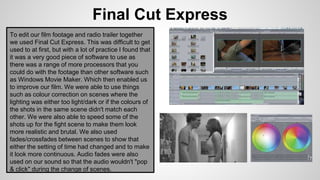
To edit our film footage and radio trailer together
we used Final Cut Express. This was difficult to get
used to at first, but with a lot of practice I found that
it was a very good piece of software to use as
there was a range of more processors that you
could do with the footage than other software such
as Windows Movie Maker. Which then enabled us
to improve our film. We were able to use things
such as colour correction on scenes where the
lighting was either too light/dark or if the colours of
the shots in the same scene didn't match each
other. We were also able to speed some of the
shots up for the fight scene to make them look
more realistic and brutal. We also used
fades/crossfades between scenes to show that
either the setting of time had changed and to make
it look more continuous. Audio fades were also
used on our sound so that the audio wouldn't "pop
& click" during the change of scenes.
Photoshop Elements
I used Photoshop Elements to create a film poster
and logo for our film. This piece of software has a lot
of different features that helped out poster and logo
have a more professional/ appealing look to it. I was
able to do things such as remove the background
from images which could be done with one of the
tools on the side bar. I was also able to make the
image of the two characters more translucent so that
they looked more ghost like which then made it
relate more to the film as both of the main characters
end up dead. What I found most useful about
Photoshop was the "layers" feature. Which made it
so that you could edit different images/items
separately and place them on top of each other.
These things would have been harder to do if we had
to use something like "Paint" which would have took
a lot more time and wouldn't have looked as
professional.
Audio
FreeSound.org-
We used this website to find royalty free music and sound effects, This made it a lot easier that
producing the music and sound effects ourselves as we could just instantly download the audio and
import it straight to Final Cut Express so that we were able to do what we wanted with it. Although we
did end up making our own sound effects in the end as we thought it made the film look more realistic.
Audacity-
I used this piece of software to increase the gain of audio for our radio trailer as the recording I did
wasn't loud enough. If this software wasn't available I would have had to record the voiceover all over
again which would have been time consuming.I used this piece of software to increase the gain of
audio for our radio trailer as the recording I did wasn't loud enough. If this software wasn't available I
would have had to record the voiceover all over again which would have been time consuming.
Prezi- I used Prezi to write part of my evaluation,
This was a good and easy way to present my
work. It has enabled me to show my work in a
different way as I could illustrate my work as well
as write about it which has made it more
interesting and to clear read.
SlideShare- I've also used SlideShare to write part
of my evaluation which is a way of sharing power
points online. This has made it easier to show the
different part of the evaluation as I could split up the
different sections of work into different slides.
Without slideshare I wouldn't have been able to
present a power point over the internet.
Google
I used Google Docs to plan out work before putting it on blogger as it has
an auto save feature which was useful as I didn't have to worry about
losing any work. If I'd had put the work straight on blogger I could have
lost it as it has to be saved manually. This was also a good website to
use as it is free.
I also used Google Slides, which is a type of power point processor made
by Google which is also free to used. I have used this to make part of my
evaluation as it is easy to use and can then be uploaded to SlideShare
when finished. It is also good as all of the Google websites are online, so
all of your work can be viewed anywhere where you can get internet
access.
Google Drawings has enabled me to crop images for me to
upload to Blogger as there is no cropping option in Blogger. I did
this so that my work would look neater and more presentable.
Conclusion
In conclusion, new media technologies have played a
big part in the construction and research, planning and
evaluation stages of making our short film, and without
them it would have taking a lot more time and hard
work to produce, and the final product may not have
been as good. Also, if it would have been a real film to
go on sale it would have cost more money without
these new technologies.

Q4

  • 1.
    How did youuse new media technologies in the construction and research, planning and evaluation stages? By Hayley Townend
  • 2.
    Research for ourfilm To research what should be included in the content of our film I used the internet. It enabled me to find out everything that I needed. I used Google images to collect pictures to use as examples on my blog work. This helped make my posts look a lot clearer and easier to understand. I also used it to find film posters so that I was able to see what other similar films posters looked like and then we could decide what we wanted to make ours look. This made researching things a lot easier as otherwise we would have had to go out and try and find other ways of finding film posters which may have been more limited.
  • 3.
    Researching and planningthe film The IMDB website was really useful as I was able to look at other similar films to ours and look at the ratings and reviews to see if their was anything similar with our storyline that we could improve on. We used the BBFC website to see what we should classify our film as. I was able to to at the different age ratings on the website and then compare them to see what our film was most like. This helped as it was a quick and easy process as we had all of the information that we needed right in front of us.
  • 4.
    Researching and planningthe film To organise all of our planning and research for our film we used Google Blogger. This was good to use as we were able to view everything that we had planned all in one place and also enabled us to share work with other team members. This website was really convenient as without it our work would have been a lot less organised and would have been harder to see what we have planned. Also work could then be misplaced. Blogger helped us save time with planning as everything could be uploaded as soon as the work was finished.
  • 5.
    Researching and planningthe film To get audience feedback on our film we used Google forms to create a questionnaire. This was easy to use as you are able to choose a layout and just input your questions into the boxes. This had helped a lot as making one from scratch would have been time consuming and may not have looked as good. We were then able to get a link to the questionnaire to be able to post it anywhere.
  • 6.
    Social Networking We usedFacebook to advertise our questionnaire. This made it easy as all of the friends that we have on Facebook would be able to fill it in. Also, as there are a range of different people on our groups friends list we could get a variety of answers from them. Without social networking, we would have had to find people to do written questionnaires, which would have been time consuming and harder to compare to results. We used YouTube to post our finished work on, such as: Films, radio trailers and video questionnaire. This made it easier for us to share our products with the audience as then anyone was able to access it by clicking on the links from Facebook. Without YouTube we would have had to show the work separately to people either by email or hard copies which wouldn't have been as effective.
  • 7.
    Planning the film Towrite the script for our film we use a piece of software called Celtx. This was easy to use as everything on the software was straight forward. It made the script look more organised than if I would have just typing it up in a word processor. To create our neat storyboards I used a website called "StoryBoardThat". It enabled me to create images in digital form. It was hard to use at first but after a few strips of the storyboard it was easy to get used to. Without this website I would have had to stick with the rough drawn up copies of the storyboard and they wouldn't have looked as neat/clear.
  • 8.
    Final Cut Express Toedit our film footage and radio trailer together we used Final Cut Express. This was difficult to get used to at first, but with a lot of practice I found that it was a very good piece of software to use as there was a range of more processors that you could do with the footage than other software such as Windows Movie Maker. Which then enabled us to improve our film. We were able to use things such as colour correction on scenes where the lighting was either too light/dark or if the colours of the shots in the same scene didn't match each other. We were also able to speed some of the shots up for the fight scene to make them look more realistic and brutal. We also used fades/crossfades between scenes to show that either the setting of time had changed and to make it look more continuous. Audio fades were also used on our sound so that the audio wouldn't "pop & click" during the change of scenes.
  • 9.
    Photoshop Elements I usedPhotoshop Elements to create a film poster and logo for our film. This piece of software has a lot of different features that helped out poster and logo have a more professional/ appealing look to it. I was able to do things such as remove the background from images which could be done with one of the tools on the side bar. I was also able to make the image of the two characters more translucent so that they looked more ghost like which then made it relate more to the film as both of the main characters end up dead. What I found most useful about Photoshop was the "layers" feature. Which made it so that you could edit different images/items separately and place them on top of each other. These things would have been harder to do if we had to use something like "Paint" which would have took a lot more time and wouldn't have looked as professional.
  • 10.
    Audio FreeSound.org- We used thiswebsite to find royalty free music and sound effects, This made it a lot easier that producing the music and sound effects ourselves as we could just instantly download the audio and import it straight to Final Cut Express so that we were able to do what we wanted with it. Although we did end up making our own sound effects in the end as we thought it made the film look more realistic. Audacity- I used this piece of software to increase the gain of audio for our radio trailer as the recording I did wasn't loud enough. If this software wasn't available I would have had to record the voiceover all over again which would have been time consuming.I used this piece of software to increase the gain of audio for our radio trailer as the recording I did wasn't loud enough. If this software wasn't available I would have had to record the voiceover all over again which would have been time consuming.
  • 11.
    Prezi- I usedPrezi to write part of my evaluation, This was a good and easy way to present my work. It has enabled me to show my work in a different way as I could illustrate my work as well as write about it which has made it more interesting and to clear read. SlideShare- I've also used SlideShare to write part of my evaluation which is a way of sharing power points online. This has made it easier to show the different part of the evaluation as I could split up the different sections of work into different slides. Without slideshare I wouldn't have been able to present a power point over the internet.
  • 12.
    Google I used GoogleDocs to plan out work before putting it on blogger as it has an auto save feature which was useful as I didn't have to worry about losing any work. If I'd had put the work straight on blogger I could have lost it as it has to be saved manually. This was also a good website to use as it is free. I also used Google Slides, which is a type of power point processor made by Google which is also free to used. I have used this to make part of my evaluation as it is easy to use and can then be uploaded to SlideShare when finished. It is also good as all of the Google websites are online, so all of your work can be viewed anywhere where you can get internet access. Google Drawings has enabled me to crop images for me to upload to Blogger as there is no cropping option in Blogger. I did this so that my work would look neater and more presentable.
  • 13.
    Conclusion In conclusion, newmedia technologies have played a big part in the construction and research, planning and evaluation stages of making our short film, and without them it would have taking a lot more time and hard work to produce, and the final product may not have been as good. Also, if it would have been a real film to go on sale it would have cost more money without these new technologies.