CREATIVE CRITICAL REFLECTION 4:
HOW DID YOU INTEGRATE
TECHNOLOGIES – SOFTWARE,
HARDWARE AND ONLINE – IN THIS
PROJECT?
A2 MEDIA COURSEWORK.
INTEGRATION OF SOFTWARE
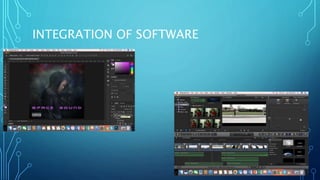
• Throughout the coursework, I have used multiple pieces of software to aid me in the creation
of my products and other pieces of work. For my major task, the moving image production, I
used Final Cut Pro X to edit my music video. I chose to use Final Cut Pro X because I am very
familiar with it and have used it in previous, personal projects of mine. Final Cut Pro is an
advanced industry grade software because its editing tools and effects match what is
stereotypically used to create industry grade music videos, so Final Cut Pro really helped me
in the post-production phase to create something that was industry standard. I used several
Final Cut Pro tools in order to create my project: I used colour grading options prominently
in order to help create meaning in my music video; I was able to substantially darken my
footage, add shadow and detail to connote the explicit themes of my production. I also used
the ’letterbox effect’, this allowed me to cut the ratio of the frame to 2.35:1 (anamorphic
ratio), which helped create an aesthetic for my frame. Furthermore, I used transitions
effectively, including the ‘bloom’ and ‘zoom’ transitions, which helped me forward the
narrative of my music video. The ‘bloom’ representing flashbacks and the ‘zoom’ moving us
forward to the afterlife sequence of my music video. I used cutting techniques such as blade,
to help me separate clips and move them around, as well. Finally, I used the stabilization
INTEGRATION OF SOFTWARE
• I also used Adobe Photoshop CC 2017 to create my minor tasks (Digipak
and World Tour Poster). I used Photoshop last year in the creation of my
foundation portfolio, so for me it was a case of transferring the skills I
developed on Photoshop into the creation of the Digipak and the World Tour
Poster, and this included working with creating visual effects with
fonts/text, cutting backgrounds out of pictures and adding the subject into
a composition, and using the several tools at my disposal. But, needless to
say, with the production of these new products, I challenged myself to learn
new skills to further refine my creative process – and this came through my
work with stock images, and blending them with other stock images using
visual effects options and colouring to make a finish. Furthermore, I
animated a few of my photos (the inside cover and CD Panel) to add to my
aesthetic, which helped me learn new skills in my Photoshop endeavour. I
INTEGRATION OF SOFTWARE
INTEGRATION OF HARDWARE
• I used a Canon EOS 70D to film my video and photograph my model for the
minor tasks. I used a 18mm – 135mm lens and a 50 mm lens for the video,
while I only used the 18-135mm lens for the photography session. I filmed
on manual and used natural lighting for filming, predominantly, however, I
did adjust the ISO and Aperture in interior filming locations. My manual
settings included a 24 frames per second with a 1/50 Shutter speed to keep
in line with the 180 degree shutter speed rule and to have a good aesthetic
look, so that there was less motion blur and more exposure to light, and
surroundings. I filmed at low ISOs to ensure less grain in my frames and
played with the Aperture to attain different Depth of Fields when creating
my frame. During my photography session, I used lighting and a black
screen to create my photos, which helped with creating a good look for the
photos, for when they are displayed in subsequent minor task productions.
Filming with the Canon EOS 70D was amazing because of the picture
quality, it brought out the different colours and gave me high quality videos
INTEGRATION OF ONLINE
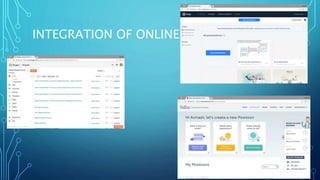
• I have made heavy use of online applications to present my coursework. I
make use of blogger for my coursework. I use blogger because of the
excessive amount of features it has to offer, most importantly, the feature
that allows me to embed other applications into blog posts (i.e. Pow Toon),
it’s simplicity in terms of utilisation also attracted me to it, and thus I
decided to use blogger, which seemed as itself, very user friendly.
• Another online application that I used was Wix, to create my online website
with. Wix had an array of different templates and again it was user friendly
which what attracted me to it, but more importantly, the tools that it (such
as creating social media links, adding pages and subpages, adding more
templates in to create aesthetic) really helped me make a professional
looking website that is user friendly and informative to my audience.
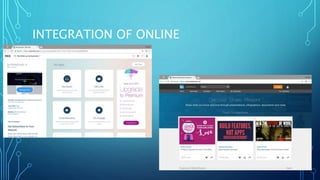
• I also used Slide Share, an app where I could upload word documents and
presentations, and them embed into blogger (thus implementing online
INTEGRATION OF ONLINE
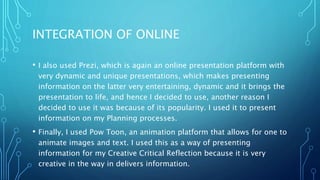
• I also used Prezi, which is again an online presentation platform with
very dynamic and unique presentations, which makes presenting
information on the latter very entertaining, dynamic and it brings the
presentation to life, and hence I decided to use, another reason I
decided to use it was because of its popularity. I used it to present
information on my Planning processes.
• Finally, I used Pow Toon, an animation platform that allows for one to
animate images and text. I used this as a way of presenting
information for my Creative Critical Reflection because it is very
creative in the way in delivers information.
INTEGRATION OF ONLINE
CONCLUSION
• In conclusion, I have made successful integration of all
technologies – software, hardware and online – into my
coursework. The use of all these aspects of technology have
helped me vastly in the presentation of my research, planning
and post-production aspects of my product, with each factor
bearing a responsibility for the production of this coursework.

Creative Critical Reflection 4

  • 1.
    CREATIVE CRITICAL REFLECTION4: HOW DID YOU INTEGRATE TECHNOLOGIES – SOFTWARE, HARDWARE AND ONLINE – IN THIS PROJECT? A2 MEDIA COURSEWORK.
  • 2.
    INTEGRATION OF SOFTWARE •Throughout the coursework, I have used multiple pieces of software to aid me in the creation of my products and other pieces of work. For my major task, the moving image production, I used Final Cut Pro X to edit my music video. I chose to use Final Cut Pro X because I am very familiar with it and have used it in previous, personal projects of mine. Final Cut Pro is an advanced industry grade software because its editing tools and effects match what is stereotypically used to create industry grade music videos, so Final Cut Pro really helped me in the post-production phase to create something that was industry standard. I used several Final Cut Pro tools in order to create my project: I used colour grading options prominently in order to help create meaning in my music video; I was able to substantially darken my footage, add shadow and detail to connote the explicit themes of my production. I also used the ’letterbox effect’, this allowed me to cut the ratio of the frame to 2.35:1 (anamorphic ratio), which helped create an aesthetic for my frame. Furthermore, I used transitions effectively, including the ‘bloom’ and ‘zoom’ transitions, which helped me forward the narrative of my music video. The ‘bloom’ representing flashbacks and the ‘zoom’ moving us forward to the afterlife sequence of my music video. I used cutting techniques such as blade, to help me separate clips and move them around, as well. Finally, I used the stabilization
  • 3.
    INTEGRATION OF SOFTWARE •I also used Adobe Photoshop CC 2017 to create my minor tasks (Digipak and World Tour Poster). I used Photoshop last year in the creation of my foundation portfolio, so for me it was a case of transferring the skills I developed on Photoshop into the creation of the Digipak and the World Tour Poster, and this included working with creating visual effects with fonts/text, cutting backgrounds out of pictures and adding the subject into a composition, and using the several tools at my disposal. But, needless to say, with the production of these new products, I challenged myself to learn new skills to further refine my creative process – and this came through my work with stock images, and blending them with other stock images using visual effects options and colouring to make a finish. Furthermore, I animated a few of my photos (the inside cover and CD Panel) to add to my aesthetic, which helped me learn new skills in my Photoshop endeavour. I
  • 4.
  • 5.
    INTEGRATION OF HARDWARE •I used a Canon EOS 70D to film my video and photograph my model for the minor tasks. I used a 18mm – 135mm lens and a 50 mm lens for the video, while I only used the 18-135mm lens for the photography session. I filmed on manual and used natural lighting for filming, predominantly, however, I did adjust the ISO and Aperture in interior filming locations. My manual settings included a 24 frames per second with a 1/50 Shutter speed to keep in line with the 180 degree shutter speed rule and to have a good aesthetic look, so that there was less motion blur and more exposure to light, and surroundings. I filmed at low ISOs to ensure less grain in my frames and played with the Aperture to attain different Depth of Fields when creating my frame. During my photography session, I used lighting and a black screen to create my photos, which helped with creating a good look for the photos, for when they are displayed in subsequent minor task productions. Filming with the Canon EOS 70D was amazing because of the picture quality, it brought out the different colours and gave me high quality videos
  • 6.
    INTEGRATION OF ONLINE •I have made heavy use of online applications to present my coursework. I make use of blogger for my coursework. I use blogger because of the excessive amount of features it has to offer, most importantly, the feature that allows me to embed other applications into blog posts (i.e. Pow Toon), it’s simplicity in terms of utilisation also attracted me to it, and thus I decided to use blogger, which seemed as itself, very user friendly. • Another online application that I used was Wix, to create my online website with. Wix had an array of different templates and again it was user friendly which what attracted me to it, but more importantly, the tools that it (such as creating social media links, adding pages and subpages, adding more templates in to create aesthetic) really helped me make a professional looking website that is user friendly and informative to my audience. • I also used Slide Share, an app where I could upload word documents and presentations, and them embed into blogger (thus implementing online
  • 7.
    INTEGRATION OF ONLINE •I also used Prezi, which is again an online presentation platform with very dynamic and unique presentations, which makes presenting information on the latter very entertaining, dynamic and it brings the presentation to life, and hence I decided to use, another reason I decided to use it was because of its popularity. I used it to present information on my Planning processes. • Finally, I used Pow Toon, an animation platform that allows for one to animate images and text. I used this as a way of presenting information for my Creative Critical Reflection because it is very creative in the way in delivers information.
  • 8.
  • 9.
  • 10.
    CONCLUSION • In conclusion,I have made successful integration of all technologies – software, hardware and online – into my coursework. The use of all these aspects of technology have helped me vastly in the presentation of my research, planning and post-production aspects of my product, with each factor bearing a responsibility for the production of this coursework.