I N T R O T O Q U A N T U M E S P R E S S O A N D
R E S E A R C H U P D A T E
B Y
C A M E R O N F O S S
N A N O E L E C T R O N I C T H E O R Y A N D
S I M U L A T I O N L A B
First-Principle Calculations
with Quantum Espresso
cjfoss@umass.edu
What is QE?
 First-Principle (“ab initio”)
 Suite of C and Fortran codes based on DFT, PW,
Pseudopotentials.
 Approximations:
 Theory: Born Oppenheimer, DFT, Pseudopotentials.
 Computational: FFT, cell size (nat), finite energy cutoff for
PW(ecutwfc), discrete BZ sampling (k-points) ...convergence!
 Results:
 Ground-state energy, atomic forces, stresses, MD, etc.
 Structural optimizations (“minimum energy structures”), Potential
Energy Superfaces, Vibrational Spectroscopy
 Alloys, supercells, metals, insulators, semi’s
P. Giannozzi, Quantum Simulations of materials using Quantum Espresso. Univ. of Udine (01/26/2012)
Using Quantum Espresso
 Linux
 Terminal based(but there is an interface for pw.x, PWGUI)
 Input files
 Defining the structure/material you want
 Unit cells and alloys
 Pseudopotentials
 Convergence
 Some results
 Batch scripting
 Using clusters
Input Files
 Main packages of QE are based off of the PWscf and
PHonon packages:
 pw.x (total energy), ph.x(phonons), q2r.x(IFC), matdyn.x(BZ),
plotband.x
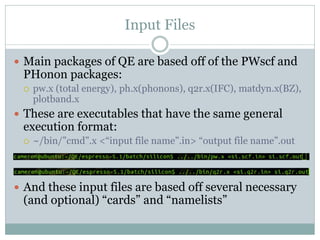
 These are executables that have the same general
execution format:
 ~/bin/”cmd”.x <“input file name”.in> “output file name”.out
 And these input files are based off several necessary
(and optional) “cards” and “namelists”
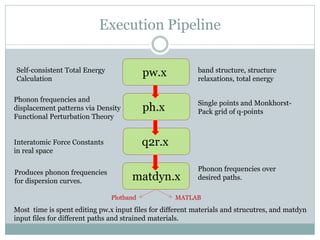
Execution Pipeline
q2r.x
matdyn.x
Self-consistent Total Energy
Calculation
Phonon frequencies and
displacement patterns via Density
Functional Perturbation Theory
Interatomic Force Constants
in real space
Produces phonon frequencies
for dispersion curves.
band structure, structure
relaxations, total energy
Single points and Monkhorst-
Pack grid of q-points
Phonon frequencies over
desired paths.
Most time is spent editing pw.x input files for different materials and strucutres, and matdyn
input files for different paths and strained materials.
Plotband MATLAB
pw.x
ph.x
Namelists and Cards
&control
simulation specific namelist, contains calculation type and paths for
pseudopotential files and output files.
/
&system
structure specific namelist, can specify desired Bravais lattice, lattice constants, number of
atoms in unit cell, number of species in unit cell, cutoff energies.
/
&electrons
parameters for convergence and self-consistency.
/
ATOMIC_SPECIES
define atomic species
ATOMIC_POSITIONS
define positioning of atoms in unit cell. (BEWARE!)
K_POINTS
define a grid of k-points with which the code uses to define other matrices within the codes.
Optional cards include: &ions, &cell, CELL_PARAMETERS, CONSTRAINTS, etc.
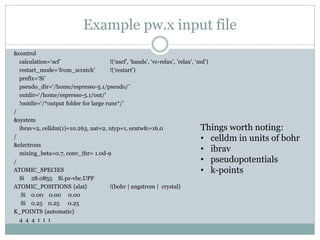
Example pw.x input file
&control
calculation=‘scf’ !(‘nscf’, ‘bands’, ‘vc-relax’, ’relax’, ‘md’)
restart_mode=‘from_scratch’ !(‘restart’)
prefix=‘Si’
pseudo_dir=‘/home/espresso-5.1/pseudo/’
outdir=‘/home/espresso-5.1/out/’
!outdir=‘/*output folder for large runs*/’
/
&system
ibrav=2, celldm(1)=10.263, nat=2, ntyp=1, ecutwfc=16.0
/
&electrons
mixing_beta=0.7, conv_thr= 1.0d-9
/
ATOMIC_SPECIES
Si 28.0855 Si.pz-vbc.UPF
ATOMIC_POSITIONS {alat} !(bohr | angstrom | crystal)
Si 0.00 0.00 0.00
Si 0.25 0.25 0.25
K_POINTS {automatic}
4 4 4 1 1 1
Things worth noting:
• celldm in units of bohr
• ibrav
• pseudopotentials
• k-points
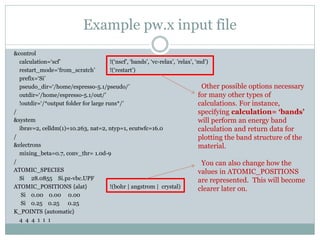
Example pw.x input file
&control
calculation=‘scf’ !(‘nscf’, ‘bands’, ‘vc-relax’, ’relax’, ‘md’)
restart_mode=‘from_scratch’ !(‘restart’)
prefix=‘Si’
pseudo_dir=‘/home/espresso-5.1/pseudo/’
outdir=‘/home/espresso-5.1/out/’
!outdir=‘/*output folder for large runs*/’
/
&system
ibrav=2, celldm(1)=10.263, nat=2, ntyp=1, ecutwfc=16.0
/
&electrons
mixing_beta=0.7, conv_thr= 1.0d-9
/
ATOMIC_SPECIES
Si 28.0855 Si.pz-vbc.UPF
ATOMIC_POSITIONS {alat} !(bohr | angstrom | crystal)
Si 0.00 0.00 0.00
Si 0.25 0.25 0.25
K_POINTS {automatic}
4 4 4 1 1 1
Other possible options necessary
for many other types of
calculations. For instance,
specifying calculation= ‘bands’
will perform an energy band
calculation and return data for
plotting the band structure of the
material.
You can also change how the
values in ATOMIC_POSITIONS
are represented. This will become
clearer later on.
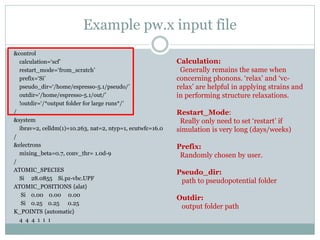
Example pw.x input file
&control
calculation=‘scf’
restart_mode=‘from_scratch’
prefix=‘Si’
pseudo_dir=‘/home/espresso-5.1/pseudo/’
outdir=‘/home/espresso-5.1/out/’
!outdir=‘/*output folder for large runs*/’
/
&system
ibrav=2, celldm(1)=10.263, nat=2, ntyp=1, ecutwfc=16.0
/
&electrons
mixing_beta=0.7, conv_thr= 1.0d-9
/
ATOMIC_SPECIES
Si 28.0855 Si.pz-vbc.UPF
ATOMIC_POSITIONS {alat}
Si 0.00 0.00 0.00
Si 0.25 0.25 0.25
K_POINTS {automatic}
4 4 4 1 1 1
Calculation:
Generally remains the same when
concerning phonons. ‘relax’ and ‘vc-
relax’ are helpful in applying strains and
in performing structure relaxations.
Restart_Mode:
Really only need to set ‘restart’ if
simulation is very long (days/weeks)
Prefix:
Randomly chosen by user.
Pseudo_dir:
path to pseudopotential folder
Outdir:
output folder path
Example pw.x input file
&control
calculation=‘scf’
restart_mode=‘from_scratch’
prefix=‘Si’
pseudo_dir=‘/home/espresso-5.1/pseudo/’
outdir=‘/home/espresso-5.1/out/’
!outdir=‘/*output folder for large runs*/’
/
&system
ibrav=2, celldm(1)=10.263, nat=2, ntyp=1, ecutwfc=16.0
/
&electrons
mixing_beta=0.7, conv_thr= 1.0d-9
/
ATOMIC_SPECIES
Si 28.0855 Si.pz-vbc.UPF
ATOMIC_POSITIONS {alat}
Si 0.00 0.00 0.00
Si 0.25 0.25 0.25
K_POINTS {automatic}
4 4 4 1 1 1
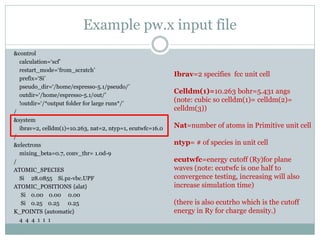
Ibrav=2 specifies fcc unit cell
Celldm(1)=10.263 bohr=5.431 angs
(note: cubic so celldm(1)= celldm(2)=
celldm(3))
Nat=number of atoms in Primitive unit cell
ntyp= # of species in unit cell
ecutwfc=energy cutoff (Ry)for plane
waves (note: ecutwfc is one half to
convergence testing, increasing will also
increase simulation time)
(there is also ecutrho which is the cutoff
energy in Ry for charge density.)
Example pw.x input file
&control
calculation=‘scf’
restart_mode=‘from_scratch’
prefix=‘Si’
pseudo_dir=‘/home/espresso-5.1/pseudo/’
outdir=‘/home/espresso-5.1/out/’
!outdir=‘/*output folder for large runs*/’
/
&system
ibrav=2, celldm(1)=10.263, nat=2, ntyp=1, ecutwfc=16.0
/
&electrons
mixing_beta=0.7, conv_thr= 1.0d-9
/
ATOMIC_SPECIES
Si 28.0855 Si.pz-vbc.UPF
ATOMIC_POSITIONS {alat}
Si 0.00 0.00 0.00
Si 0.25 0.25 0.25
K_POINTS {automatic}
4 4 4 1 1 1
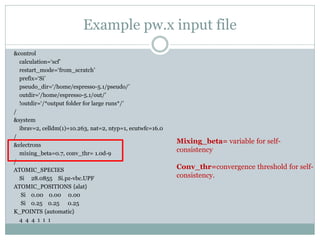
Mixing_beta= variable for self-
consistency
Conv_thr=convergence threshold for self-
consistency.
Example pw.x input file
&control
calculation=‘scf’
restart_mode=‘from_scratch’
prefix=‘Si’
pseudo_dir=‘/home/espresso-5.1/pseudo/’
outdir=‘/home/espresso-5.1/out/’
!outdir=‘/*output folder for large runs*/’
/
&system
ibrav=2, celldm(1)=10.263, nat=2, ntyp=1, ecutwfc=16.0
/
&electrons
mixing_beta=0.7, conv_thr= 1.0d-9
/
ATOMIC_SPECIES
Si 28.0855 Si.pz-vbc.UPF
ATOMIC_POSITIONS {alat}
Si 0.00 0.00 0.00
Si 0.25 0.25 0.25
K_POINTS {automatic}
4 4 4 1 1 1
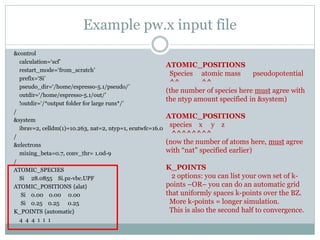
ATOMIC_POSITIONS
Species atomic mass pseudopotential
^^ ^^
(the number of species here must agree with
the ntyp amount specified in &system)
ATOMIC_POSITIONS
species x y z
^^^^^^^^
(now the number of atoms here, must agree
with “nat” specified earlier)
K_POINTS
2 options: you can list your own set of k-
points –OR– you can do an automatic grid
that uniformly spaces k-points over the BZ.
More k-points = longer simulation.
This is also the second half to convergence.
Example Input files
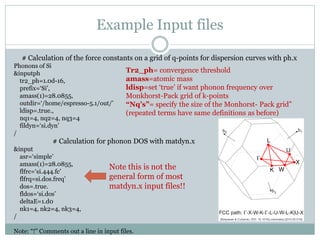
# Calculation of the force constants on a grid of q-points for dispersion curves with ph.x
Phonons of Si
&inputph
tr2_ph=1.0d-16,
prefix=‘Si’,
amass(1)=28.0855,
outdir=‘/home/espresso-5.1/out/’
ldisp=.true.,
nq1=4, nq2=4, nq3=4
fildyn=‘si.dyn’
/
# Calculation for phonon DOS with matdyn.x
&input
asr=‘simple’
amass(1)=28.0855,
flfrc=‘si.444.fc’
flfrq=si.dos.freq’
dos=.true.
fldos=‘si.dos’
deltaE=1.d0
nk1=4, nk2=4, nk3=4,
/
Note: “!” Comments out a line in input files.
Note this is not the
general form of most
matdyn.x input files!!
Tr2_ph= convergence threshold
amass=atomic mass
ldisp=set ‘true’ if want phonon frequency over
Monkhorst-Pack grid of k-points
“Nq’s”= specify the size of the Monhorst- Pack grid”
(repeated terms have same definitions as before)
Defining Crystal Structures
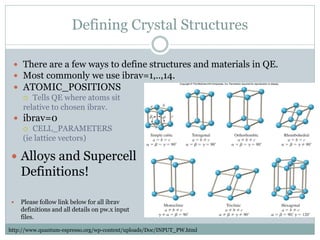
 There are a few ways to define structures and materials in QE.
 Most commonly we use ibrav=1,..,14.
 ATOMIC_POSITIONS
 Tells QE where atoms sit
relative to chosen ibrav.
 ibrav=0
 CELL_PARAMETERS
(ie lattice vectors)
 Alloys and Supercell
Definitions!
 Please follow link below for all ibrav
definitions and all details on pw.x input
files.
http://www.quantum-espresso.org/wp-content/uploads/Doc/INPUT_PW.html
Unit cells to Supercells
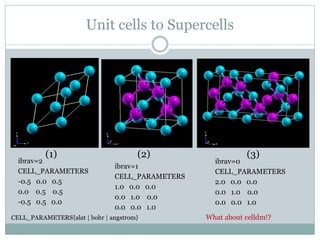
(1) (2) (3)
ibrav=2
CELL_PARAMETERS
-0.5 0.0 0.5
0.0 0.5 0.5
-0.5 0.5 0.0
ibrav=1
CELL_PARAMETERS
1.0 0.0 0.0
0.0 1.0 0.0
0.0 0.0 1.0
ibrav=0
CELL_PARAMETERS
2.0 0.0 0.0
0.0 1.0 0.0
0.0 0.0 1.0
What about celldm!?CELL_PARAMETERS{alat | bohr | angstrom}
Defining the Supercell
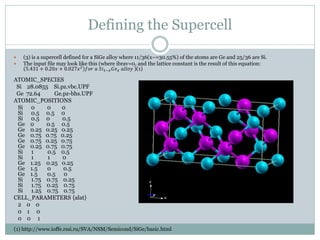
 (3) is a supercell defined for a SiGe alloy where 11/36(x~=30.55%) of the atoms are Ge and 25/36 are Si.
 The input file may look like this (where ibrav=0, and the lattice constant is the result of this equation:
5.431 + 0.20𝑥 + 0.027𝑥2
𝑓𝑜𝑟 𝑎 𝑆𝑖1−𝑥 𝐺𝑒 𝑥 𝑎𝑙𝑙𝑜𝑦 )(1)
ATOMIC_SPECIES
Si 28.0855 Si.pz.vbc.UPF
Ge 72.64 Ge.pz-bhs.UPF
ATOMIC_POSITIONS
Si 0 0 0
Si 0.5 0.5 0
Si 0.5 0 0.5
Ge 0 0.5 0.5
Ge 0.25 0.25 0.25
Ge 0.75 0.75 0.25
Ge 0.75 0.25 0.75
Ge 0.25 0.75 0.75
Si 1 0.5 0.5
Si 1 1 0
Ge 1.25 0.25 0.25
Ge 1.5 0 0.5
Ge 1.5 0.5 0
Si 1.75 0.75 0.25
Si 1.75 0.25 0.75
Si 1.25 0.75 0.75
CELL_PARAMETERS {alat}
2 0 0
0 1 0
0 0 1
(1) http://www.ioffe.rssi.ru/SVA/NSM/Semicond/SiGe/basic.html
Pseudopotentials
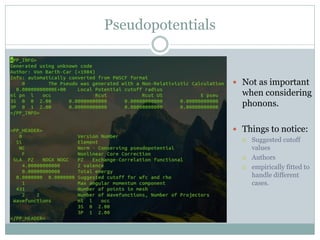
 Not as important
when considering
phonons.
 Things to notice:
 Suggested cutoff
values
 Authors
 empirically fitted to
handle different
cases.
Convergence!!!
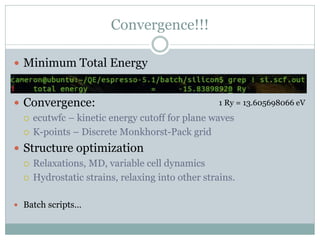
 Minimum Total Energy
 Convergence:
 ecutwfc – kinetic energy cutoff for plane waves
 K-points – Discrete Monkhorst-Pack grid
 Structure optimization
 Relaxations, MD, variable cell dynamics
 Hydrostatic strains, relaxing into other strains.
 Batch scripts…
1 Ry = 13.605698066 eV
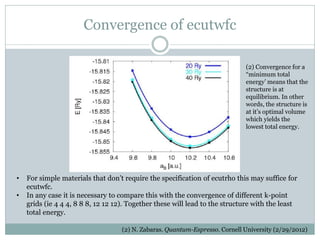
Convergence of ecutwfc
(2) N. Zabaras. Quantum-Espresso. Cornell University (2/29/2012)
• For simple materials that don’t require the specification of ecutrho this may suffice for
ecutwfc.
• In any case it is necessary to compare this with the convergence of different k-point
grids (ie 4 4 4, 8 8 8, 12 12 12). Together these will lead to the structure with the least
total energy.
(2) Convergence for a
“minimum total
energy’ means that the
structure is at
equilibrium. In other
words, the structure is
at it’s optimal volume
which yields the
lowest total energy.
My project: Effects of Strain
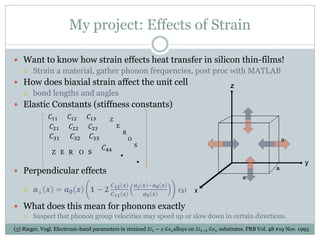
 Want to know how strain effects heat transfer in silicon thin-films!
 Strain a material, gather phonon frequencies, post proc with MATLAB
 How does biaxial strain affect the unit cell
 bond lengths and angles
 Elastic Constants (stiffness constants)
𝐶11 𝐶12 𝐶13
𝐶21 𝐶22 𝐶23
𝐶31 𝐶32 𝐶33
𝐶44
 Perpendicular effects
 𝒂⊥ 𝒙 = 𝒂 𝟎 𝒙 𝟏 − 𝟐
𝑪 𝟏𝟐 𝒙
𝑪 𝟏𝟏 𝒙
𝒂∥ 𝒙 −𝒂 𝟎 𝒙
𝒂 𝟎 𝒙
(3)
 What does this mean for phonons exactly
 Suspect that phonon group velocities may speed up or slow down in certain directions.
Z
E
R
O
S
Z E R O S
(3) Rieger, Vogl. Electronic-band parameters in strained 𝑆𝑖1 − 𝑥 𝐺𝑒 𝑥alloys on 𝑆𝑖1−𝑦 𝐺𝑒 𝑦 substrates. PRB Vol. 48 #19 Nov. 1993
Effects of Strain in QE
&control
calculation=‘scf’
restart_mode=‘from_scratch’
prefix=‘Strained_Si’
pseudo_dir=‘/home/espresso-5.1/pseudo/’
outdir=‘/home/espresso-5.1/out/’
/
&system
ibrav=10, A=5.646.B=5.646,C=5.234,
cosAB=0, cosBC=0, cosAC=0,
nat=2, ntyp=1, ecutwfc=16.0
/
&electrons
mixing_beta=0.7, conv_thr= 1.0d-9
/
ATOMIC_SPECIES
Si 28.0855 Si.pz-vbc.UPF
ATOMIC_POSITIONS {crystal | alat | bohr | angstrom}
Si 0.00 0.00 0.00
Si 0.25 0.25 0.25
K_POINTS {automatic}
4 4 4 1 1 1
- BZ is morphed due to the
strain. (Be careful of what
kind of effect this is.)
[−
2𝜋
𝑎
,
2𝜋
𝑎
]
Effects of Strain in QE
&control
calculation=‘scf’
restart_mode=‘from_scratch’
prefix=‘Strained_Si’
pseudo_dir=‘/home/espresso-5.1/pseudo/’
outdir=‘/home/espresso-5.1/out/’
/
&system
ibrav=10, A=5.646.B=5.646,C=5.234,
cosAB=0, cosBC=0, cosAC=0,
nat=2, ntyp=1, ecutwfc=16.0
/
&electrons
mixing_beta=0.7, conv_thr= 1.0d-9
/
ATOMIC_SPECIES
Si 28.0855 Si.pz-vbc.UPF
ATOMIC_POSITIONS {crystal | alat | bohr | angstrom}
Si 0.00 0.00 0.00
Si 0.25 0.25 0.25
K_POINTS {automatic}
4 4 4 1 1 1
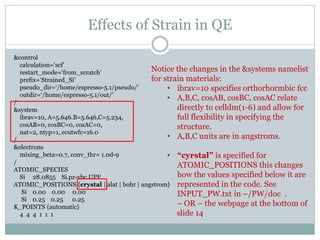
Notice the changes in the &systems namelist
for strain materials:
• ibrav=10 specifies orthorhormbic fcc
• A,B,C, cosAB, cosBC, cosAC relate
directly to celldm(1-6) and allow for
full flexibility in specifying the
structure.
• A,B,C units are in angstroms.
• “cyrstal” is specified for
ATOMIC_POSITIONS this changes
how the values specified below it are
represented in the code. See
INPUT_PW.txt in ~/PW/doc .
– OR – the webpage at the bottom of
slide 14
Results Context
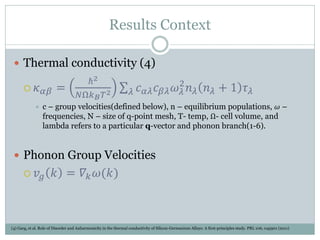
 Thermal conductivity (4)
 𝜅 𝛼𝛽 =
ℏ2
𝑁Ω𝑘 𝐵 𝑇2 𝑐 𝛼𝜆 𝑐 𝛽𝜆 𝜔 𝜆
2
𝑛 𝜆 𝑛 𝜆 + 1 𝜏 𝜆𝜆
 c – group velocities(defined below), n – equilibrium populations, 𝜔 –
frequencies, N – size of q-point mesh, T- temp, Ω- cell volume, and
lambda refers to a particular q-vector and phonon branch(1-6).
 Phonon Group Velocities
 𝑣𝑔 𝑘 = 𝛻𝑘 𝜔(𝑘)
(4) Garg, et al. Role of Disorder and Anharmonicity in the thermal conductivity of Silicon-Germanium Alloys: A first-principles study. PRL 106, 045901 (2011)
Recent Results
𝜅 𝛼𝛽 =
ℏ2
𝑁Ω𝑘 𝐵 𝑇2 𝑐 𝛼𝜆 𝑐 𝛽𝜆 𝜔 𝜆
2
𝑛 𝜆 𝑛 𝜆 + 1 𝜏 𝜆𝜆 ; 𝑣𝑔 𝑘 = 𝛻𝑘 𝜔(𝑘)
Results
𝜅 𝛼𝛽 =
ℏ2
𝑁Ω𝑘 𝐵 𝑇2 𝑐 𝛼𝜆 𝑐 𝛽𝜆 𝜔 𝜆
2
𝑛 𝜆 𝑛 𝜆 + 1 𝜏 𝜆𝜆 ; 𝑣𝑔 𝑘 = 𝛻𝑘 𝜔(𝑘)
Results
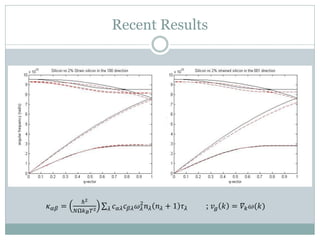
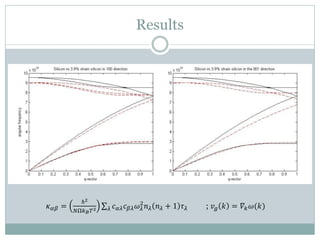
 When we look at the dispersions we are looking for two
effects:
 Any change in height in the actual branches  change in w(k)
 And any change in slope of the branches  change in group velocity
 Either effect will carry through the thermal conductivity
equation and result in a overall change in conductivity.
 We also want to see if the effects are different in different
directions.
 Eg the plots on the prior two slides are plotted for the
100 and 001 directions (100 and 010 should be
equivalent in this case due to symmetry)
Isosurfaces
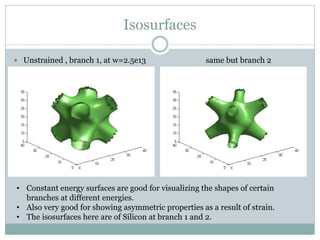
 Unstrained , branch 1, at w=2.5e13 same but branch 2
• Constant energy surfaces are good for visualizing the shapes of certain
branches at different energies.
• Also very good for showing asymmetric properties as a result of strain.
• The isosurfaces here are of Silicon at branch 1 and 2.
Batch Scripts
 Want to do convergence testing?
 Need to run a bunch of executables but can’t wait
around running each one at a time?
 Batch scripts solve this pretty easily.
 Iterative convergence testing!
 Getting dispersion for many paths!
 Example…
Using Clusters
 When do I use clusters and why?
 Lengthy simulations: more than 20 hrs.
 ph.x is the big time killer (other calculations are usually within
5-10 mins)
 Interactive jobs versus queue submissions(qsub).
 Interactive jobs are good for finding convergence of
resources(if necessary).
 queue’d jobs are where most researchers conduct work these
are batch scripts containing envrionment variables and
commands for running a “number” of simulations.
 GORDON
Resources
 www.quantum-espresso.org
 Here you’ll find pseudopotential for download, all other necessary downloads for
packages and extensions, and all links for tutorials and documentation.
 www.quantum-espresso.org/wp-
content/uploads/Doc/INPUT_PW.html#__top__
 Where I spend all my time
 Pw_forum (need to subscribe, its free though)
 This webpage has lots of tutorials and slides for describing both theory
and the use of QE: http://www.fisica.uniud.it/~giannozz/QE-Tutorial/
Downloading and installing QE (serial version)
 Go to the webpage: www.quantum-espresso.org
 Click the download tab, and find the highlighted link that says
“download page”
 You should now be on a page that lists a lot of tar.gz files. This is
the download page.
 Next, find an appropriate version of espresso (eg espresso-
5.1.tar.gz is what I downloaded)
 Untar the folder and browse the “Doc” and “install” folders for
READ_ME.txt’s and user_guides.
 Also check out the PW and PHonon folders for other helpful
Doc’s and user_guides.
More on installation
 Next, from the terminal, enter the untarred folder and run these
two commands:
 compile
 make all
 Note: make is the default cmd for compiling make files, which simply compile other
codes.
 If ‘make’ throws an error, most likely the folders in the ‘archive’
folder did not download correctly. The ‘archive’ folder contains
backup libraries necessary for running some calculations. You can
fix this by manually re-downloading them from the download page.
 Once ‘make’ is complete, you’re done and you can begin using QE!
 For parallel version installation see the ‘install’ folder for files like
README.CRAY-XE6, the CRAY-XE6 refers to the cluster’s node
type.

Quantum-Espresso_10_8_14

  • 1.
    I N TR O T O Q U A N T U M E S P R E S S O A N D R E S E A R C H U P D A T E B Y C A M E R O N F O S S N A N O E L E C T R O N I C T H E O R Y A N D S I M U L A T I O N L A B First-Principle Calculations with Quantum Espresso cjfoss@umass.edu
  • 2.
    What is QE? First-Principle (“ab initio”)  Suite of C and Fortran codes based on DFT, PW, Pseudopotentials.  Approximations:  Theory: Born Oppenheimer, DFT, Pseudopotentials.  Computational: FFT, cell size (nat), finite energy cutoff for PW(ecutwfc), discrete BZ sampling (k-points) ...convergence!  Results:  Ground-state energy, atomic forces, stresses, MD, etc.  Structural optimizations (“minimum energy structures”), Potential Energy Superfaces, Vibrational Spectroscopy  Alloys, supercells, metals, insulators, semi’s P. Giannozzi, Quantum Simulations of materials using Quantum Espresso. Univ. of Udine (01/26/2012)
  • 3.
    Using Quantum Espresso Linux  Terminal based(but there is an interface for pw.x, PWGUI)  Input files  Defining the structure/material you want  Unit cells and alloys  Pseudopotentials  Convergence  Some results  Batch scripting  Using clusters
  • 4.
    Input Files  Mainpackages of QE are based off of the PWscf and PHonon packages:  pw.x (total energy), ph.x(phonons), q2r.x(IFC), matdyn.x(BZ), plotband.x  These are executables that have the same general execution format:  ~/bin/”cmd”.x <“input file name”.in> “output file name”.out  And these input files are based off several necessary (and optional) “cards” and “namelists”
  • 5.
    Execution Pipeline q2r.x matdyn.x Self-consistent TotalEnergy Calculation Phonon frequencies and displacement patterns via Density Functional Perturbation Theory Interatomic Force Constants in real space Produces phonon frequencies for dispersion curves. band structure, structure relaxations, total energy Single points and Monkhorst- Pack grid of q-points Phonon frequencies over desired paths. Most time is spent editing pw.x input files for different materials and strucutres, and matdyn input files for different paths and strained materials. Plotband MATLAB pw.x ph.x
  • 6.
    Namelists and Cards &control simulationspecific namelist, contains calculation type and paths for pseudopotential files and output files. / &system structure specific namelist, can specify desired Bravais lattice, lattice constants, number of atoms in unit cell, number of species in unit cell, cutoff energies. / &electrons parameters for convergence and self-consistency. / ATOMIC_SPECIES define atomic species ATOMIC_POSITIONS define positioning of atoms in unit cell. (BEWARE!) K_POINTS define a grid of k-points with which the code uses to define other matrices within the codes. Optional cards include: &ions, &cell, CELL_PARAMETERS, CONSTRAINTS, etc.
  • 7.
    Example pw.x inputfile &control calculation=‘scf’ !(‘nscf’, ‘bands’, ‘vc-relax’, ’relax’, ‘md’) restart_mode=‘from_scratch’ !(‘restart’) prefix=‘Si’ pseudo_dir=‘/home/espresso-5.1/pseudo/’ outdir=‘/home/espresso-5.1/out/’ !outdir=‘/*output folder for large runs*/’ / &system ibrav=2, celldm(1)=10.263, nat=2, ntyp=1, ecutwfc=16.0 / &electrons mixing_beta=0.7, conv_thr= 1.0d-9 / ATOMIC_SPECIES Si 28.0855 Si.pz-vbc.UPF ATOMIC_POSITIONS {alat} !(bohr | angstrom | crystal) Si 0.00 0.00 0.00 Si 0.25 0.25 0.25 K_POINTS {automatic} 4 4 4 1 1 1 Things worth noting: • celldm in units of bohr • ibrav • pseudopotentials • k-points
  • 8.
    Example pw.x inputfile &control calculation=‘scf’ !(‘nscf’, ‘bands’, ‘vc-relax’, ’relax’, ‘md’) restart_mode=‘from_scratch’ !(‘restart’) prefix=‘Si’ pseudo_dir=‘/home/espresso-5.1/pseudo/’ outdir=‘/home/espresso-5.1/out/’ !outdir=‘/*output folder for large runs*/’ / &system ibrav=2, celldm(1)=10.263, nat=2, ntyp=1, ecutwfc=16.0 / &electrons mixing_beta=0.7, conv_thr= 1.0d-9 / ATOMIC_SPECIES Si 28.0855 Si.pz-vbc.UPF ATOMIC_POSITIONS {alat} !(bohr | angstrom | crystal) Si 0.00 0.00 0.00 Si 0.25 0.25 0.25 K_POINTS {automatic} 4 4 4 1 1 1 Other possible options necessary for many other types of calculations. For instance, specifying calculation= ‘bands’ will perform an energy band calculation and return data for plotting the band structure of the material. You can also change how the values in ATOMIC_POSITIONS are represented. This will become clearer later on.
  • 9.
    Example pw.x inputfile &control calculation=‘scf’ restart_mode=‘from_scratch’ prefix=‘Si’ pseudo_dir=‘/home/espresso-5.1/pseudo/’ outdir=‘/home/espresso-5.1/out/’ !outdir=‘/*output folder for large runs*/’ / &system ibrav=2, celldm(1)=10.263, nat=2, ntyp=1, ecutwfc=16.0 / &electrons mixing_beta=0.7, conv_thr= 1.0d-9 / ATOMIC_SPECIES Si 28.0855 Si.pz-vbc.UPF ATOMIC_POSITIONS {alat} Si 0.00 0.00 0.00 Si 0.25 0.25 0.25 K_POINTS {automatic} 4 4 4 1 1 1 Calculation: Generally remains the same when concerning phonons. ‘relax’ and ‘vc- relax’ are helpful in applying strains and in performing structure relaxations. Restart_Mode: Really only need to set ‘restart’ if simulation is very long (days/weeks) Prefix: Randomly chosen by user. Pseudo_dir: path to pseudopotential folder Outdir: output folder path
  • 10.
    Example pw.x inputfile &control calculation=‘scf’ restart_mode=‘from_scratch’ prefix=‘Si’ pseudo_dir=‘/home/espresso-5.1/pseudo/’ outdir=‘/home/espresso-5.1/out/’ !outdir=‘/*output folder for large runs*/’ / &system ibrav=2, celldm(1)=10.263, nat=2, ntyp=1, ecutwfc=16.0 / &electrons mixing_beta=0.7, conv_thr= 1.0d-9 / ATOMIC_SPECIES Si 28.0855 Si.pz-vbc.UPF ATOMIC_POSITIONS {alat} Si 0.00 0.00 0.00 Si 0.25 0.25 0.25 K_POINTS {automatic} 4 4 4 1 1 1 Ibrav=2 specifies fcc unit cell Celldm(1)=10.263 bohr=5.431 angs (note: cubic so celldm(1)= celldm(2)= celldm(3)) Nat=number of atoms in Primitive unit cell ntyp= # of species in unit cell ecutwfc=energy cutoff (Ry)for plane waves (note: ecutwfc is one half to convergence testing, increasing will also increase simulation time) (there is also ecutrho which is the cutoff energy in Ry for charge density.)
  • 11.
    Example pw.x inputfile &control calculation=‘scf’ restart_mode=‘from_scratch’ prefix=‘Si’ pseudo_dir=‘/home/espresso-5.1/pseudo/’ outdir=‘/home/espresso-5.1/out/’ !outdir=‘/*output folder for large runs*/’ / &system ibrav=2, celldm(1)=10.263, nat=2, ntyp=1, ecutwfc=16.0 / &electrons mixing_beta=0.7, conv_thr= 1.0d-9 / ATOMIC_SPECIES Si 28.0855 Si.pz-vbc.UPF ATOMIC_POSITIONS {alat} Si 0.00 0.00 0.00 Si 0.25 0.25 0.25 K_POINTS {automatic} 4 4 4 1 1 1 Mixing_beta= variable for self- consistency Conv_thr=convergence threshold for self- consistency.
  • 12.
    Example pw.x inputfile &control calculation=‘scf’ restart_mode=‘from_scratch’ prefix=‘Si’ pseudo_dir=‘/home/espresso-5.1/pseudo/’ outdir=‘/home/espresso-5.1/out/’ !outdir=‘/*output folder for large runs*/’ / &system ibrav=2, celldm(1)=10.263, nat=2, ntyp=1, ecutwfc=16.0 / &electrons mixing_beta=0.7, conv_thr= 1.0d-9 / ATOMIC_SPECIES Si 28.0855 Si.pz-vbc.UPF ATOMIC_POSITIONS {alat} Si 0.00 0.00 0.00 Si 0.25 0.25 0.25 K_POINTS {automatic} 4 4 4 1 1 1 ATOMIC_POSITIONS Species atomic mass pseudopotential ^^ ^^ (the number of species here must agree with the ntyp amount specified in &system) ATOMIC_POSITIONS species x y z ^^^^^^^^ (now the number of atoms here, must agree with “nat” specified earlier) K_POINTS 2 options: you can list your own set of k- points –OR– you can do an automatic grid that uniformly spaces k-points over the BZ. More k-points = longer simulation. This is also the second half to convergence.
  • 13.
    Example Input files #Calculation of the force constants on a grid of q-points for dispersion curves with ph.x Phonons of Si &inputph tr2_ph=1.0d-16, prefix=‘Si’, amass(1)=28.0855, outdir=‘/home/espresso-5.1/out/’ ldisp=.true., nq1=4, nq2=4, nq3=4 fildyn=‘si.dyn’ / # Calculation for phonon DOS with matdyn.x &input asr=‘simple’ amass(1)=28.0855, flfrc=‘si.444.fc’ flfrq=si.dos.freq’ dos=.true. fldos=‘si.dos’ deltaE=1.d0 nk1=4, nk2=4, nk3=4, / Note: “!” Comments out a line in input files. Note this is not the general form of most matdyn.x input files!! Tr2_ph= convergence threshold amass=atomic mass ldisp=set ‘true’ if want phonon frequency over Monkhorst-Pack grid of k-points “Nq’s”= specify the size of the Monhorst- Pack grid” (repeated terms have same definitions as before)
  • 14.
    Defining Crystal Structures There are a few ways to define structures and materials in QE.  Most commonly we use ibrav=1,..,14.  ATOMIC_POSITIONS  Tells QE where atoms sit relative to chosen ibrav.  ibrav=0  CELL_PARAMETERS (ie lattice vectors)  Alloys and Supercell Definitions!  Please follow link below for all ibrav definitions and all details on pw.x input files. http://www.quantum-espresso.org/wp-content/uploads/Doc/INPUT_PW.html
  • 15.
    Unit cells toSupercells (1) (2) (3) ibrav=2 CELL_PARAMETERS -0.5 0.0 0.5 0.0 0.5 0.5 -0.5 0.5 0.0 ibrav=1 CELL_PARAMETERS 1.0 0.0 0.0 0.0 1.0 0.0 0.0 0.0 1.0 ibrav=0 CELL_PARAMETERS 2.0 0.0 0.0 0.0 1.0 0.0 0.0 0.0 1.0 What about celldm!?CELL_PARAMETERS{alat | bohr | angstrom}
  • 16.
    Defining the Supercell (3) is a supercell defined for a SiGe alloy where 11/36(x~=30.55%) of the atoms are Ge and 25/36 are Si.  The input file may look like this (where ibrav=0, and the lattice constant is the result of this equation: 5.431 + 0.20𝑥 + 0.027𝑥2 𝑓𝑜𝑟 𝑎 𝑆𝑖1−𝑥 𝐺𝑒 𝑥 𝑎𝑙𝑙𝑜𝑦 )(1) ATOMIC_SPECIES Si 28.0855 Si.pz.vbc.UPF Ge 72.64 Ge.pz-bhs.UPF ATOMIC_POSITIONS Si 0 0 0 Si 0.5 0.5 0 Si 0.5 0 0.5 Ge 0 0.5 0.5 Ge 0.25 0.25 0.25 Ge 0.75 0.75 0.25 Ge 0.75 0.25 0.75 Ge 0.25 0.75 0.75 Si 1 0.5 0.5 Si 1 1 0 Ge 1.25 0.25 0.25 Ge 1.5 0 0.5 Ge 1.5 0.5 0 Si 1.75 0.75 0.25 Si 1.75 0.25 0.75 Si 1.25 0.75 0.75 CELL_PARAMETERS {alat} 2 0 0 0 1 0 0 0 1 (1) http://www.ioffe.rssi.ru/SVA/NSM/Semicond/SiGe/basic.html
  • 17.
    Pseudopotentials  Not asimportant when considering phonons.  Things to notice:  Suggested cutoff values  Authors  empirically fitted to handle different cases.
  • 18.
    Convergence!!!  Minimum TotalEnergy  Convergence:  ecutwfc – kinetic energy cutoff for plane waves  K-points – Discrete Monkhorst-Pack grid  Structure optimization  Relaxations, MD, variable cell dynamics  Hydrostatic strains, relaxing into other strains.  Batch scripts… 1 Ry = 13.605698066 eV
  • 19.
    Convergence of ecutwfc (2)N. Zabaras. Quantum-Espresso. Cornell University (2/29/2012) • For simple materials that don’t require the specification of ecutrho this may suffice for ecutwfc. • In any case it is necessary to compare this with the convergence of different k-point grids (ie 4 4 4, 8 8 8, 12 12 12). Together these will lead to the structure with the least total energy. (2) Convergence for a “minimum total energy’ means that the structure is at equilibrium. In other words, the structure is at it’s optimal volume which yields the lowest total energy.
  • 20.
    My project: Effectsof Strain  Want to know how strain effects heat transfer in silicon thin-films!  Strain a material, gather phonon frequencies, post proc with MATLAB  How does biaxial strain affect the unit cell  bond lengths and angles  Elastic Constants (stiffness constants) 𝐶11 𝐶12 𝐶13 𝐶21 𝐶22 𝐶23 𝐶31 𝐶32 𝐶33 𝐶44  Perpendicular effects  𝒂⊥ 𝒙 = 𝒂 𝟎 𝒙 𝟏 − 𝟐 𝑪 𝟏𝟐 𝒙 𝑪 𝟏𝟏 𝒙 𝒂∥ 𝒙 −𝒂 𝟎 𝒙 𝒂 𝟎 𝒙 (3)  What does this mean for phonons exactly  Suspect that phonon group velocities may speed up or slow down in certain directions. Z E R O S Z E R O S (3) Rieger, Vogl. Electronic-band parameters in strained 𝑆𝑖1 − 𝑥 𝐺𝑒 𝑥alloys on 𝑆𝑖1−𝑦 𝐺𝑒 𝑦 substrates. PRB Vol. 48 #19 Nov. 1993
  • 21.
    Effects of Strainin QE &control calculation=‘scf’ restart_mode=‘from_scratch’ prefix=‘Strained_Si’ pseudo_dir=‘/home/espresso-5.1/pseudo/’ outdir=‘/home/espresso-5.1/out/’ / &system ibrav=10, A=5.646.B=5.646,C=5.234, cosAB=0, cosBC=0, cosAC=0, nat=2, ntyp=1, ecutwfc=16.0 / &electrons mixing_beta=0.7, conv_thr= 1.0d-9 / ATOMIC_SPECIES Si 28.0855 Si.pz-vbc.UPF ATOMIC_POSITIONS {crystal | alat | bohr | angstrom} Si 0.00 0.00 0.00 Si 0.25 0.25 0.25 K_POINTS {automatic} 4 4 4 1 1 1 - BZ is morphed due to the strain. (Be careful of what kind of effect this is.) [− 2𝜋 𝑎 , 2𝜋 𝑎 ]
  • 22.
    Effects of Strainin QE &control calculation=‘scf’ restart_mode=‘from_scratch’ prefix=‘Strained_Si’ pseudo_dir=‘/home/espresso-5.1/pseudo/’ outdir=‘/home/espresso-5.1/out/’ / &system ibrav=10, A=5.646.B=5.646,C=5.234, cosAB=0, cosBC=0, cosAC=0, nat=2, ntyp=1, ecutwfc=16.0 / &electrons mixing_beta=0.7, conv_thr= 1.0d-9 / ATOMIC_SPECIES Si 28.0855 Si.pz-vbc.UPF ATOMIC_POSITIONS {crystal | alat | bohr | angstrom} Si 0.00 0.00 0.00 Si 0.25 0.25 0.25 K_POINTS {automatic} 4 4 4 1 1 1 Notice the changes in the &systems namelist for strain materials: • ibrav=10 specifies orthorhormbic fcc • A,B,C, cosAB, cosBC, cosAC relate directly to celldm(1-6) and allow for full flexibility in specifying the structure. • A,B,C units are in angstroms. • “cyrstal” is specified for ATOMIC_POSITIONS this changes how the values specified below it are represented in the code. See INPUT_PW.txt in ~/PW/doc . – OR – the webpage at the bottom of slide 14
  • 23.
    Results Context  Thermalconductivity (4)  𝜅 𝛼𝛽 = ℏ2 𝑁Ω𝑘 𝐵 𝑇2 𝑐 𝛼𝜆 𝑐 𝛽𝜆 𝜔 𝜆 2 𝑛 𝜆 𝑛 𝜆 + 1 𝜏 𝜆𝜆  c – group velocities(defined below), n – equilibrium populations, 𝜔 – frequencies, N – size of q-point mesh, T- temp, Ω- cell volume, and lambda refers to a particular q-vector and phonon branch(1-6).  Phonon Group Velocities  𝑣𝑔 𝑘 = 𝛻𝑘 𝜔(𝑘) (4) Garg, et al. Role of Disorder and Anharmonicity in the thermal conductivity of Silicon-Germanium Alloys: A first-principles study. PRL 106, 045901 (2011)
  • 24.
    Recent Results 𝜅 𝛼𝛽= ℏ2 𝑁Ω𝑘 𝐵 𝑇2 𝑐 𝛼𝜆 𝑐 𝛽𝜆 𝜔 𝜆 2 𝑛 𝜆 𝑛 𝜆 + 1 𝜏 𝜆𝜆 ; 𝑣𝑔 𝑘 = 𝛻𝑘 𝜔(𝑘)
  • 25.
    Results 𝜅 𝛼𝛽 = ℏ2 𝑁Ω𝑘𝐵 𝑇2 𝑐 𝛼𝜆 𝑐 𝛽𝜆 𝜔 𝜆 2 𝑛 𝜆 𝑛 𝜆 + 1 𝜏 𝜆𝜆 ; 𝑣𝑔 𝑘 = 𝛻𝑘 𝜔(𝑘)
  • 26.
    Results  When welook at the dispersions we are looking for two effects:  Any change in height in the actual branches  change in w(k)  And any change in slope of the branches  change in group velocity  Either effect will carry through the thermal conductivity equation and result in a overall change in conductivity.  We also want to see if the effects are different in different directions.  Eg the plots on the prior two slides are plotted for the 100 and 001 directions (100 and 010 should be equivalent in this case due to symmetry)
  • 27.
    Isosurfaces  Unstrained ,branch 1, at w=2.5e13 same but branch 2 • Constant energy surfaces are good for visualizing the shapes of certain branches at different energies. • Also very good for showing asymmetric properties as a result of strain. • The isosurfaces here are of Silicon at branch 1 and 2.
  • 28.
    Batch Scripts  Wantto do convergence testing?  Need to run a bunch of executables but can’t wait around running each one at a time?  Batch scripts solve this pretty easily.  Iterative convergence testing!  Getting dispersion for many paths!  Example…
  • 29.
    Using Clusters  Whendo I use clusters and why?  Lengthy simulations: more than 20 hrs.  ph.x is the big time killer (other calculations are usually within 5-10 mins)  Interactive jobs versus queue submissions(qsub).  Interactive jobs are good for finding convergence of resources(if necessary).  queue’d jobs are where most researchers conduct work these are batch scripts containing envrionment variables and commands for running a “number” of simulations.  GORDON
  • 30.
    Resources  www.quantum-espresso.org  Hereyou’ll find pseudopotential for download, all other necessary downloads for packages and extensions, and all links for tutorials and documentation.  www.quantum-espresso.org/wp- content/uploads/Doc/INPUT_PW.html#__top__  Where I spend all my time  Pw_forum (need to subscribe, its free though)  This webpage has lots of tutorials and slides for describing both theory and the use of QE: http://www.fisica.uniud.it/~giannozz/QE-Tutorial/
  • 31.
    Downloading and installingQE (serial version)  Go to the webpage: www.quantum-espresso.org  Click the download tab, and find the highlighted link that says “download page”  You should now be on a page that lists a lot of tar.gz files. This is the download page.  Next, find an appropriate version of espresso (eg espresso- 5.1.tar.gz is what I downloaded)  Untar the folder and browse the “Doc” and “install” folders for READ_ME.txt’s and user_guides.  Also check out the PW and PHonon folders for other helpful Doc’s and user_guides.
  • 32.
    More on installation Next, from the terminal, enter the untarred folder and run these two commands:  compile  make all  Note: make is the default cmd for compiling make files, which simply compile other codes.  If ‘make’ throws an error, most likely the folders in the ‘archive’ folder did not download correctly. The ‘archive’ folder contains backup libraries necessary for running some calculations. You can fix this by manually re-downloading them from the download page.  Once ‘make’ is complete, you’re done and you can begin using QE!  For parallel version installation see the ‘install’ folder for files like README.CRAY-XE6, the CRAY-XE6 refers to the cluster’s node type.