Interacting with
My-SQL Database
By,
Vikas S Kumar
Software Engineer
• Go to start and type mysql
client
• Select MySQL Command
Line Client
• Press enter
• The client window opens
Select mysql client
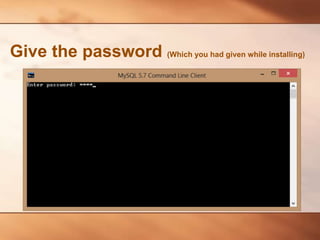
Give the password (Which you had given while installing)
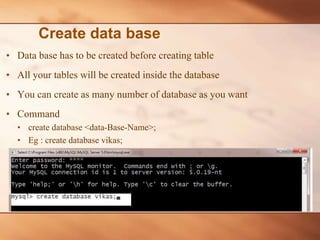
• Data base has to be created before creating table
• All your tables will be created inside the database
• You can create as many number of database as you want
• Command
• create database <data-Base-Name>;
• Eg : create database vikas;
Create data base
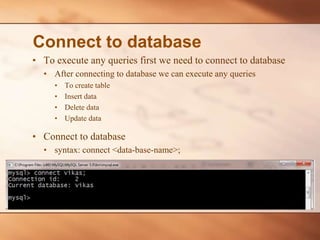
• To execute any queries first we need to connect to database
• After connecting to database we can execute any queries
• To create table
• Insert data
• Delete data
• Update data
• Connect to database
• syntax: connect <data-base-name>;
Connect to database
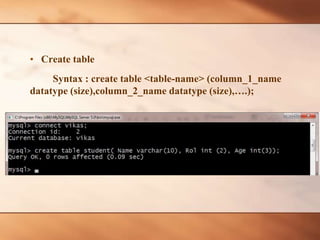
• Create table
Syntax : create table <table-name> (column_1_name
datatype (size),column_2_name datatype (size),….);
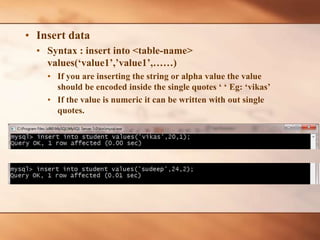
• Insert data
• Syntax : insert into <table-name>
values(‘value1’,’value1’,……)
• If you are inserting the string or alpha value the value
should be encoded inside the single quotes ‘ ‘ Eg: ‘vikas’
• If the value is numeric it can be written with out single
quotes.
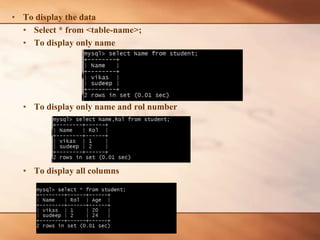
• To display the data
• Select * from <table-name>;
• To display only name
• To display only name and rol number
• To display all columns
• Update
• Syntax : update <table-name> set <column-name>=NewValue where <column-
name>=value;
• After update
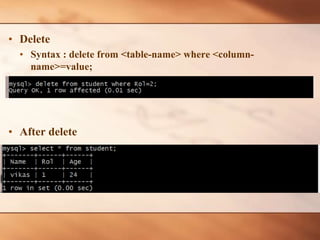
• Delete
• Syntax : delete from <table-name> where <column-
name>=value;
• After delete

QSpiders - Interacting with My SQL Database

  • 1.
  • 2.
    • Go tostart and type mysql client • Select MySQL Command Line Client • Press enter • The client window opens Select mysql client
  • 3.
    Give the password(Which you had given while installing)
  • 4.
    • Data basehas to be created before creating table • All your tables will be created inside the database • You can create as many number of database as you want • Command • create database <data-Base-Name>; • Eg : create database vikas; Create data base
  • 5.
    • To executeany queries first we need to connect to database • After connecting to database we can execute any queries • To create table • Insert data • Delete data • Update data • Connect to database • syntax: connect <data-base-name>; Connect to database
  • 6.
    • Create table Syntax: create table <table-name> (column_1_name datatype (size),column_2_name datatype (size),….);
  • 7.
    • Insert data •Syntax : insert into <table-name> values(‘value1’,’value1’,……) • If you are inserting the string or alpha value the value should be encoded inside the single quotes ‘ ‘ Eg: ‘vikas’ • If the value is numeric it can be written with out single quotes.
  • 8.
    • To displaythe data • Select * from <table-name>; • To display only name • To display only name and rol number • To display all columns
  • 9.
    • Update • Syntax: update <table-name> set <column-name>=NewValue where <column- name>=value; • After update
  • 10.
    • Delete • Syntax: delete from <table-name> where <column- name>=value; • After delete