A QUALITY PARTNER FOR YOUR GROWTH
MySql Overview
• In this presentation you will learn about-
• Introduction & features of MySQL
• Types of SQL Commands- DDL, DML, TCL & DCL
• Data types in MySQL
• Creating Database & Tables
• Inserting, Deleting and modifying records
• Making Simple Queries
• Altering Table Structure
Objective
• MySQL is an Open Source, Fast and Reliable Relational Database Management
System (RDBMS) software like Oracle, Sybase, MS SQL Server etc. It was developed
by Michael Widenius and AKA Monty.
• The main features of MySQL are-
 Open Source & Free of Cost:
• It is Open Source and available at free of cost.
 Portability:
• It can be installed and run on any types of Hardware and OS like Linux, MS
Windows or Mac etc.
 Security :
• It creates secured database protected with password.
 Connectivity
• It may connect various types of Network client using different protocols and
Programming Languages .
 Query Language
• It uses SQL (Structured Query Language) for handling database.
Introduction to MySQL
• In order to access data from the MySQL database, all program and user must
use SQL (Structured Query Language). SQL is a set of commands that are
recognized by all the RDBMSs and has become a standard language for
database handling.
• SQL is a language that enables you to create and manage a relational database, in
which all the information are kept in tables.
• There are numerous version of SQL. The original version was developed at IBM’s
San Jose Research Laboratory with a name of Sequel, as a part of System R project
in 1970s. It was standardized by ANSI in 1986 by the name of SQL.
MySQL & SQL
• MySQL follows SQL specifications for its commands . These SQL commands can be
categorized as -
 Data Definition Language (DDL)
• These SQL commands are used to create, alter and delete database objects like
table, views, index etc.
• Example : CREATE , ALTER , DROP etc.
 Data Manipulation Language (DML)
• These commands are used to insert, delete, update and retrieve the stored records from
the table.
• Ex. SELECT…., INSERT…, DELETE…, UPDATE…. etc.
 Transaction Control Language (TCL)
• These commands are used to control the transaction. Ex. COMMIT,
ROLLBACK, SAVEPOINT etc.
 Data Control Language (DCL)
• These commands are used to manipulate permissions or access rights to the tables etc.
• Ex. GRANT , REVOKE etc.
Types of SQL Commands
 Numeric Data Types:
 INTEGER or INT – up to 11 digit number without decimal.
 SMALLINT – up to 5 digit number without decimal.
 FLOAT (M,D) or DECIMAL(M,D) or NUMERIC(M,D)
• Stores Real numbers upto M digit length (including .) with D
• decimal places.
• e.g. Float (10,2) can store 1234567.89
 Date & Time Data Types:
 DATE - Stores date in YYYY-MM-DD format.
 TIME - Stores time in HH:MM:SS format.
 String or Text Data Type:
 CHAR(Size)
• A fixed length string up to 255 characters. (default is 1)
 VARCHAR(Size)
• A variable length string up to 255 characters.
Data type in MySQL
 Creating a Database.
• The following command will create School database in MySQL.
• mysql> CREATE DATABASE School;
 Opening a database
• To open an existing database, following command is used.
• mysql> USE school ;
 Getting listings of database and tables
• mysql> SHOW DATABASES;
• mysql> SHOW TABLES;
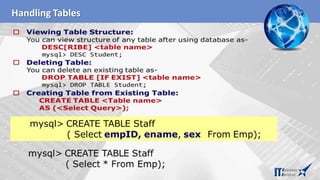
 Deleting a Database and Table
mysql> DROP DATABASE School;
DROP TABLE Student;
 Viewing Table Structure
mysql> DESCRIBE Student;
Database Handling commands in MySQL
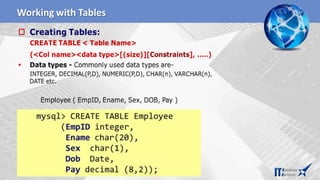
 Creating Simple Tables:
• CREATE TABLE < Table Name>
• (<Col name1><data type>[(size)],….);
• Data types- INTEGER, NUMERIC(P,D), CHAR(n), VARCHAR(n), DATE etc.
mysql> CREATE TABLE Employee
(empID Integer,
ename char(30),
city char(25),
pay decimal(10,2));
 Inserting Records:
• INSERT INTO <Table Name> VALUES (value1, vale2, …...); String and Date type
values must be enclosed in single or double quotes.
• mysql> INSERT INTO Employee VALUES (1,‘Amitabh’,‘Allahabad’,15000);
• mysql> INSERT INTO Employee VALUES (2, ‘Akbar’, ‘Dehradun’,20000);
Creating Tables & Inserting records
• The SELECT command of SQL, empower you to make a request (queries) to
retrieve stored records from the database.
• The syntax of SQL is given below-
SELECT < [Distinct | ALL] *| column name(s)> FROM <table(s)>
WHERE <condition>
ORDER BY <column name> [ASC | DESC] ;
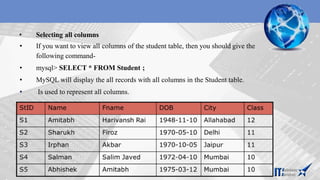
• Consider the table Student having some records as –
Making Simple Queries Using SELECT
• Selecting all columns
• If you want to view all columns of the student table, then you should give the
following command-
• mysql> SELECT * FROM Student ;
• MySQL will display the all records with all columns in the Student table.
• Is used to represent all columns.
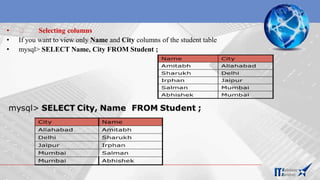
• Selecting columns
• If you want to view only Name and City columns of the student table
• mysql> SELECT Name, City FROM Student ;
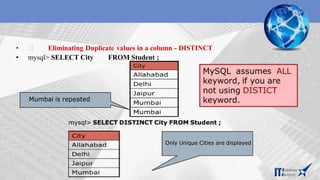
• Eliminating Duplicate values in a column - DISTINCT
• mysql> SELECT City FROM Student ;
Mumbai is repeated
Mumbai is repeated
Only Unique Cities are displayed
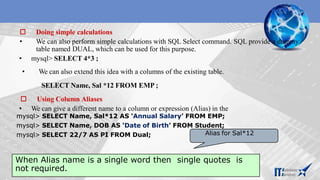
 Doing simple calculations
• We can also perform simple calculations with SQL Select command. SQL provide a dummy
table named DUAL, which can be used for this purpose.
• mysql> SELECT 4*3 ;
• We can also extend this idea with a columns of the existing table.
SELECT Name, Sal *12 FROM EMP ;
 Using Column Aliases
• We can give a different name to a column or expression (Alias) in the
mysql> SELECT Name, Sal*12 AS ‘Annual Salary’ FROM EMP;
mysql> SELECT Name, DOB AS ‘Date of Birth’ FROM Student;
mysql> SELECT 22/7 AS PI FROM Dual;
When Alias name is a single word then single quotes is
not required.
Alias for Sal*12
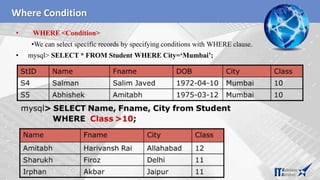
Where Condition
• WHERE <Condition>
•We can select specific records by specifying conditions with WHERE clause.
• mysql> SELECT * FROM Student WHERE City=‘Mumbai’;
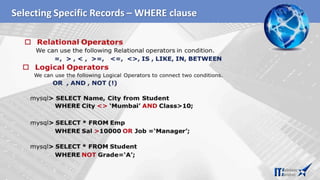
Selecting Specific Records – WHERE clause
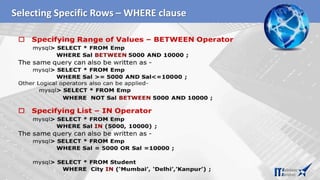
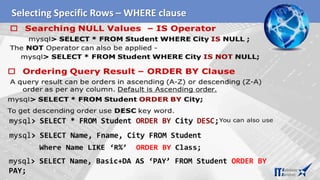
Selecting Specific Rows – WHERE clause
mysql> SELECT Name, Basic+DA AS ‘PAY’ FROM Student ORDER BY
PAY;
Inserting Records in a Table
• You can insert record in the table by using by using the following DML command.
• INSERT INTO<Table Name> [<Column list>] VALUES<list of
values>
• If value is not available for a column, NULL can be used.
• Suppose a table STUDENT has been created as per given structure-
StID NAME FNAME DOB CITY CLASS
mysql> INSERT INTO Student (StID, FName, Name, Class)
VALUES (‘s3’,’Amitabh’, ’Abhishek’, 10);
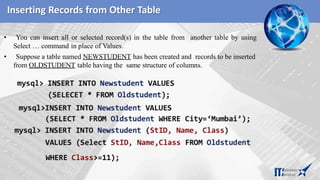
Inserting Records from Other Table
• You can insert all or selected record(s) in the table from another table by using
Select … command in place of Values.
• Suppose a table named NEWSTUDENT has been created and records to be inserted
from OLDSTUDENT table having the same structure of columns.
WHERE Class>=11);
Deleting Records from the Table
• You can delete all or selected record(s) from the table by using the following DML command.
• DELETE FROM<Table Name> [WHERE <Condition>]
Modifying Records –UPDATE Command
•You can modify the values of columns of all or selected records in the table by using
the following DML command.
• UPDATE <Table Name>
• SET <Column> = <Expression> [WHERE
<Condition>]
• mysql> UPDATE Student SET Class =10;
Working with Tables
Creating Table with Constraints
• One of the major responsibility of a DBMS is to maintain the Integrity of the data i.e.
Data being stored in the Database must be correct and valid.
• An Integrity Constraints are condition or checks applicable to a column or table which
ensures the integrity and validity of data.
• The following constraints are available in MySQL.
Implementing Constraints in the Table
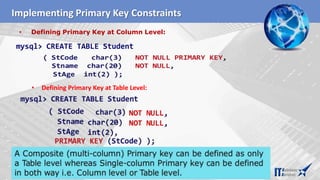
• Defining Primary Key at Column Level:
Implementing Primary Key Constraints
mysql> CREATE TABLE Student
• Defining Primary Key at Table Level:
Handling Tables
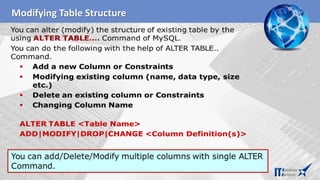
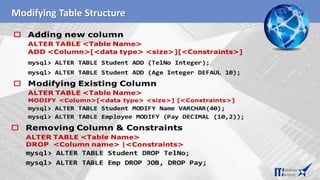
Modifying Table Structure
THANKYOU
THANKS FOR WATCHING THIS PRESENTATION
Information Technologies Solutions & Services
ADDRESS : 109, CHEMIN DU PONT DU CENTENAIRE, PLAN-LES-OUATES GENEVA 1228 SWITZERLAND.
EMAIL: INFO@ITSSGLOBAL.COM, URL: WWW.ITSSGLOBAL.COM

Mysql-overview.pptx

  • 1.
    A QUALITY PARTNERFOR YOUR GROWTH MySql Overview
  • 2.
    • In thispresentation you will learn about- • Introduction & features of MySQL • Types of SQL Commands- DDL, DML, TCL & DCL • Data types in MySQL • Creating Database & Tables • Inserting, Deleting and modifying records • Making Simple Queries • Altering Table Structure Objective
  • 3.
    • MySQL isan Open Source, Fast and Reliable Relational Database Management System (RDBMS) software like Oracle, Sybase, MS SQL Server etc. It was developed by Michael Widenius and AKA Monty. • The main features of MySQL are-  Open Source & Free of Cost: • It is Open Source and available at free of cost.  Portability: • It can be installed and run on any types of Hardware and OS like Linux, MS Windows or Mac etc.  Security : • It creates secured database protected with password.  Connectivity • It may connect various types of Network client using different protocols and Programming Languages .  Query Language • It uses SQL (Structured Query Language) for handling database. Introduction to MySQL
  • 4.
    • In orderto access data from the MySQL database, all program and user must use SQL (Structured Query Language). SQL is a set of commands that are recognized by all the RDBMSs and has become a standard language for database handling. • SQL is a language that enables you to create and manage a relational database, in which all the information are kept in tables. • There are numerous version of SQL. The original version was developed at IBM’s San Jose Research Laboratory with a name of Sequel, as a part of System R project in 1970s. It was standardized by ANSI in 1986 by the name of SQL. MySQL & SQL
  • 5.
    • MySQL followsSQL specifications for its commands . These SQL commands can be categorized as -  Data Definition Language (DDL) • These SQL commands are used to create, alter and delete database objects like table, views, index etc. • Example : CREATE , ALTER , DROP etc.  Data Manipulation Language (DML) • These commands are used to insert, delete, update and retrieve the stored records from the table. • Ex. SELECT…., INSERT…, DELETE…, UPDATE…. etc.  Transaction Control Language (TCL) • These commands are used to control the transaction. Ex. COMMIT, ROLLBACK, SAVEPOINT etc.  Data Control Language (DCL) • These commands are used to manipulate permissions or access rights to the tables etc. • Ex. GRANT , REVOKE etc. Types of SQL Commands
  • 6.
     Numeric DataTypes:  INTEGER or INT – up to 11 digit number without decimal.  SMALLINT – up to 5 digit number without decimal.  FLOAT (M,D) or DECIMAL(M,D) or NUMERIC(M,D) • Stores Real numbers upto M digit length (including .) with D • decimal places. • e.g. Float (10,2) can store 1234567.89  Date & Time Data Types:  DATE - Stores date in YYYY-MM-DD format.  TIME - Stores time in HH:MM:SS format.  String or Text Data Type:  CHAR(Size) • A fixed length string up to 255 characters. (default is 1)  VARCHAR(Size) • A variable length string up to 255 characters. Data type in MySQL
  • 7.
     Creating aDatabase. • The following command will create School database in MySQL. • mysql> CREATE DATABASE School;  Opening a database • To open an existing database, following command is used. • mysql> USE school ;  Getting listings of database and tables • mysql> SHOW DATABASES; • mysql> SHOW TABLES;  Deleting a Database and Table mysql> DROP DATABASE School; DROP TABLE Student;  Viewing Table Structure mysql> DESCRIBE Student; Database Handling commands in MySQL
  • 8.
     Creating SimpleTables: • CREATE TABLE < Table Name> • (<Col name1><data type>[(size)],….); • Data types- INTEGER, NUMERIC(P,D), CHAR(n), VARCHAR(n), DATE etc. mysql> CREATE TABLE Employee (empID Integer, ename char(30), city char(25), pay decimal(10,2));  Inserting Records: • INSERT INTO <Table Name> VALUES (value1, vale2, …...); String and Date type values must be enclosed in single or double quotes. • mysql> INSERT INTO Employee VALUES (1,‘Amitabh’,‘Allahabad’,15000); • mysql> INSERT INTO Employee VALUES (2, ‘Akbar’, ‘Dehradun’,20000); Creating Tables & Inserting records
  • 9.
    • The SELECTcommand of SQL, empower you to make a request (queries) to retrieve stored records from the database. • The syntax of SQL is given below- SELECT < [Distinct | ALL] *| column name(s)> FROM <table(s)> WHERE <condition> ORDER BY <column name> [ASC | DESC] ; • Consider the table Student having some records as – Making Simple Queries Using SELECT
  • 10.
    • Selecting allcolumns • If you want to view all columns of the student table, then you should give the following command- • mysql> SELECT * FROM Student ; • MySQL will display the all records with all columns in the Student table. • Is used to represent all columns.
  • 11.
    • Selecting columns •If you want to view only Name and City columns of the student table • mysql> SELECT Name, City FROM Student ;
  • 12.
    • Eliminating Duplicatevalues in a column - DISTINCT • mysql> SELECT City FROM Student ; Mumbai is repeated Mumbai is repeated Only Unique Cities are displayed
  • 13.
     Doing simplecalculations • We can also perform simple calculations with SQL Select command. SQL provide a dummy table named DUAL, which can be used for this purpose. • mysql> SELECT 4*3 ; • We can also extend this idea with a columns of the existing table. SELECT Name, Sal *12 FROM EMP ;  Using Column Aliases • We can give a different name to a column or expression (Alias) in the mysql> SELECT Name, Sal*12 AS ‘Annual Salary’ FROM EMP; mysql> SELECT Name, DOB AS ‘Date of Birth’ FROM Student; mysql> SELECT 22/7 AS PI FROM Dual; When Alias name is a single word then single quotes is not required. Alias for Sal*12
  • 14.
    Where Condition • WHERE<Condition> •We can select specific records by specifying conditions with WHERE clause. • mysql> SELECT * FROM Student WHERE City=‘Mumbai’;
  • 15.
  • 16.
    Selecting Specific Rows– WHERE clause
  • 17.
    Selecting Specific Rows– WHERE clause mysql> SELECT Name, Basic+DA AS ‘PAY’ FROM Student ORDER BY PAY;
  • 18.
    Inserting Records ina Table • You can insert record in the table by using by using the following DML command. • INSERT INTO<Table Name> [<Column list>] VALUES<list of values> • If value is not available for a column, NULL can be used. • Suppose a table STUDENT has been created as per given structure- StID NAME FNAME DOB CITY CLASS mysql> INSERT INTO Student (StID, FName, Name, Class) VALUES (‘s3’,’Amitabh’, ’Abhishek’, 10);
  • 19.
    Inserting Records fromOther Table • You can insert all or selected record(s) in the table from another table by using Select … command in place of Values. • Suppose a table named NEWSTUDENT has been created and records to be inserted from OLDSTUDENT table having the same structure of columns. WHERE Class>=11);
  • 20.
    Deleting Records fromthe Table • You can delete all or selected record(s) from the table by using the following DML command. • DELETE FROM<Table Name> [WHERE <Condition>]
  • 21.
    Modifying Records –UPDATECommand •You can modify the values of columns of all or selected records in the table by using the following DML command. • UPDATE <Table Name> • SET <Column> = <Expression> [WHERE <Condition>] • mysql> UPDATE Student SET Class =10;
  • 22.
  • 23.
    Creating Table withConstraints • One of the major responsibility of a DBMS is to maintain the Integrity of the data i.e. Data being stored in the Database must be correct and valid. • An Integrity Constraints are condition or checks applicable to a column or table which ensures the integrity and validity of data. • The following constraints are available in MySQL.
  • 24.
  • 25.
    • Defining PrimaryKey at Column Level: Implementing Primary Key Constraints mysql> CREATE TABLE Student • Defining Primary Key at Table Level:
  • 26.
  • 27.
  • 28.
  • 29.
    THANKYOU THANKS FOR WATCHINGTHIS PRESENTATION Information Technologies Solutions & Services ADDRESS : 109, CHEMIN DU PONT DU CENTENAIRE, PLAN-LES-OUATES GENEVA 1228 SWITZERLAND. EMAIL: INFO@ITSSGLOBAL.COM, URL: WWW.ITSSGLOBAL.COM