Session S288993
Virtualizing Exchange
2007:
The Final Frontier?
September 2007
S t     b


   Todd Muirhead, Enterprise TechCenter, Dell
   Kong Yang, Vi t li ti S l ti
   K    Y     Virtualization Solution
   Engineering, Dell
Some or all of the features in this document may be representative
of feature areas under development. Feature commitments must
not be included in contracts, purchase orders, or sales agreements
                               p                         g
of any kind. Technical feasibility and market demand will affect
final delivery.
Introduction

Microsoft Exchange 2007 Behavior On ESX S
Mi      ft E h           B h i O         Server
Virtual Machines Are Not Well Understood
  – How does Exchange 2007 p
                   g       profile differ from Exchange
                                                     g
    2003?
      – 64-bit
      – New server roles: Mailbox, Client Access, Hub Transport, Unified
        Messaging, and Edge Transport
      – Other new features such as CCR, administrative tools
  – How will these features affect an Exchange 2007 VM?
      – More memory utilization and features means that the
        performance profile could change.
      – The new server roles offer opportunities to virtualize the different
        roles.
        roles
      – Where to start?
Stages of Virtualization
  Adoption

Stage O
S     One: Evaluation / Test and Dev
           E l i        T      dD
  – Introduction to virtualization
  – Use of single server or small farm for test and
    development
Stage Two: Virtualization of Some Production Level Apps
/ Consolidation
  C    lid i
  – An initial set of “good candidates” for virtualization
  – Farm of servers is used to support load-balancing high
                                         load-balancing,
    availability, and easy maintenance
Stage Three: Extend Virtualization
  – Virtualize more applications to extend same advantages
    as seen in earlier stages
Typical Application “Good
Candidates
Candidates” for Virtualization

Characteristics
Ch       i i
  – Low utilization
  – Low I/O
  – Running on old hardware
Examples
    p
  – Test and development servers
  – Domain controllers
  – DNS servers
  – Intranet application servers
  – Anything running on Pentium Pro servers!
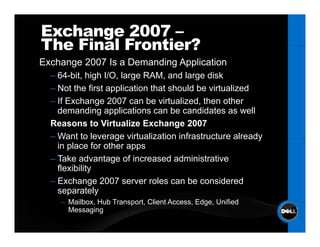
Exchange 2007 –
The Final Frontier?
Exchange 2007 Is a Demanding Application
  – 64-bit high I/O large RAM and large disk
    64 bit,      I/O,       RAM,
  – Not the first application that should be virtualized
  – If Exchange 2007 can be virtualized, then other
    demanding applications can b candidates as well
    d        di       li ti         be    did t          ll
  Reasons to Virtualize Exchange 2007
  – Want to leverage virtualization infrastructure already
    in place for other apps
  – Take advantage of increased administrative
    flexibility
  – Exchange 2007 server roles can be considered
    separately
    – Mailbox Hub Transport Client Access Edge Unified
      Mailbox,    Transport,       Access, Edge,
      Messaging
Exchange 2007 –
        The Final Frontier?
             Reasons not to Virtualize Exchange 2007
             – Not officially supported by Microsoft1
             – Easier-to-virtualize applications still exist in
               environment
             – Requirement for a very large number of users per
               server


1 When considering the deployment of Microsoft Exchange Server 2003 on a virtualization platform such as
 VMware ESX Server, please refer to support.microsoft.com/kb/897615 for information about the Microsoft
          support policy for their applications running in non-Microsoft virtualization software.
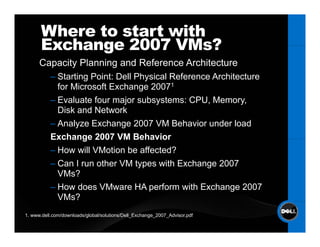
Where to start with
      Exchange 2007 VMs?
      Capacity Planning and Reference Architecture
           – Starting Point: Dell Physical Reference Architecture
             for Microsoft Exchange 20071
           – Evaluate four major subsystems: CPU, Memory,
             Disk d Network
             Di k and N t     k
           – Analyze Exchange 2007 VM Behavior under load
           Exchange 2007 VM Behavior
           – How will VMotion be affected?
           – Can I run other VM types with Exchange 2007
             VMs?
             VM ?
           – How does VMware HA perform with Exchange 2007
             VMs?
1. www.dell.com/downloads/global/solutions/Dell_Exchange_2007_Advisor.pdf
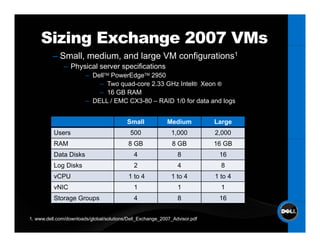
Sizing Exchange 2007 VMs
          g       g
          – Small, medium, and large VM configurations1
              – Physical server specifications
                        – DellTM PowerEdgeTM 2950
                            – Two quad-core 2.33 GHz Intel® Xeon ®
                            – 16 GB RAM
                        – DELL / EMC CX3-80 – RAID 1/0 for data and logs


                                          Small            Medium           Large
          Users                            500               1,000          2,000
          RAM                              8 GB               8 GB          16 GB
          Data Disks                         4                  8            16
          Log Disks                          2                  4             8
          vCPU                             1 to 4            1 to 4         1 to 4
          vNIC                               1                  1             1
          Storage Groups
               g      p                      4                  8            16


1. www.dell.com/downloads/global/solutions/Dell_Exchange_2007_Advisor.pdf
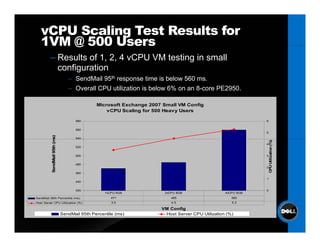
vCPU Scaling Test Results for
   1VM @ 500 Users
         – Results of 1, 2, 4 vCPU VM testing in small
           configuration
                                  – S dM il 95th response ti
                                    SendMail                  time i b l
                                                                   is below 560 ms.
                                  – Overall CPU utilization is below 6% on an 8-core PE2950.

                                               Microsoft Exchange 2007 Small VM Config
                                                   vCPU Scaling for 500 Heavy Users

                                     580                                                                      6


                                     560
                                                                                                              5
                         ms)


                                     540
          SendMail 95th (m


                                                                                                                  CPU Utilization (%)
                                                                                                              4
                                     520


                                     500                                                                      3


                                     480
                                                                                                              2
          S


                                                                                                                  C
                                     460

                                                                                                              1
                                     440


                                     420                                                                      0
                                                   1vCPU 8GB           2vCPU 8GB                  4vCPU 8GB
SendMail 95th Percentile (ms)                         471                 485                        560
Host Server CPU Utilization (%)                       3.5                 4.5                        5.3

                                                                      VM Config
                               SendMail 95th Percentile (ms)           Host Server CPU Utilization (%)
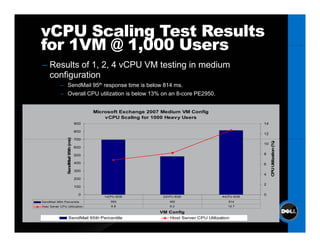
vCPU Scaling Test Results
for 1VM @ 1 000 Users
          1,000
– Results of 1, 2, 4 vCPU VM testing in medium
  configuration
            – SendMail 95th response time is below 814 ms.
            – Overall CPU utilization is below 13% on an 8-core PE2950.


                                            Microsoft Exchange 2007 Medium VM Config
                                                vCPU Scaling for 1000 Heavy Users
                                      900                                                                14

                                      800
                                                                                                         12
                                 s)


                                      700
                  endMail 95th (ms


                                                                                                              CPU Utilization (%)
                                                                                                         10
                                      600

                                      500                                                                8

                                      400                                                                6


                                                                                                                U
                 Se


                                      300
                                                                                                         4
                                      200
                                                                                                         2
                                      100

                                        0                                                                0
                                               1vCPU 8GB            2vCPU 8GB                4vCPU 8GB
SendMail
S dM il 95th P
             Percentile
                   til                            693                  482                      814
Host Server CPU Utilization                       6.8                  8.2                      12.7

                                                                   VM Config
                    SendMail 95th Percentile                          Host Server CPU Utilization
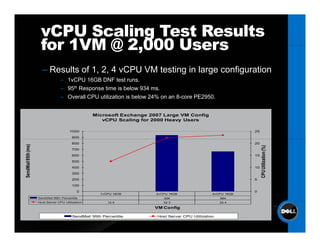
vCPU Scaling Test Results
                      for 1VM @ 2 000 Users
                                2,000
                       – Results of 1, 2, 4 vCPU VM testing in large configuration
                                  – 1vCPU 16GB DNF test runs.
                                  – 95th Response time is below 934 ms.
                                  – Overall CPU utilization is below 24% on an 8-core PE2950.


                                                   Microsoft Exchange 2007 Large VM Config
                                                      vCPU Scaling for 2000 Heavy Users

                                        1000                                                                   25
                                         900
                                         800                                                                   20
   dMail 95th (ms)


                                                                                                                    CPU Utilization (%)
                                         700
                                         600                                                                   15
                                         500
                                         400                                                                   10
Send


                                         300
                                         200                                                                   5
                                         100
                                            0                                                                  0
                                                       1vCPU 16GB       2vCPU 16GB                4vCPU 16GB
                     SendMail 95th Percentile                              934                        664
                     Host Server CPU Utilization          12.5             22.3                       23.4

                                                                       VM Config

                                          SendMail 95th Percentile      Host Server CPU Utilization
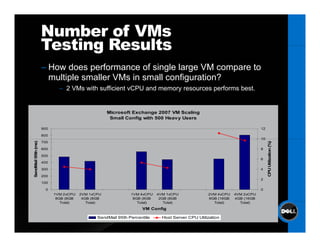
Number of VMs
                     Testing Results
                     – How does performance of single large VM compare to
                       multiple smaller VMs in small configuration?
                             – 2 VMs with sufficient vCPU and memory resources performs best.


                                                   Microsoft Exchange 2007 VM Scaling
                                                    Small Config with 500 Heavy Users

                     900                                                                                                12

                     800
                                                                                                                        10
  ndMail 95th (ms)


                     700


                                                                                                                             CPU Utilization (%)
                     600                                                                                                8

                     500
                                                                                                                        6
                     400


                                                                                                                               U
                     300                                                                                                4
Sen


                     200
                                                                                                                        2
                     100

                       0                                                                                                0
                           1VM 2vCPU   2VM 1vCPU             1VM 4vCPU   4VM 1vCPU              2VM 4vCPU   4VM 2vCPU
                            8GB (8GB    4GB (8GB              8GB (8GB    2GB (8GB              8GB (16GB   4GB (16GB
                              Total)      Total)                Total)      Total)                Total)      Total)
                                                                  VM Config

                                              SendMail 95th Percentile     Host Server CPU Utilization
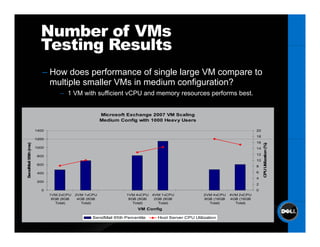
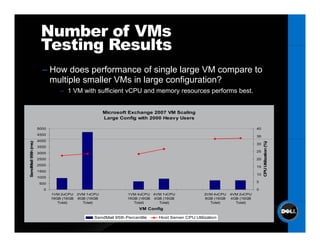
Number of VMs
                       Testing Results
                        – How does performance of single large VM compare to
                                                       g    g
                          multiple smaller VMs in medium configuration?
                                – 1 VM with sufficient vCPU and memory resources performs best.


                                                    Microsoft Exchange 2007 VM Scaling
                                                    Medium Config with 1000 Heavy Users

                     1400                                                                                                20
                                                                                                                         18
                     1200
                                                                                                                         16
                s)


                                                                                                                              CPU Utilization (%)
   dMail 95th (m


                     1000                                                                                                14
                                                                                                                         12
                      800
                                                                                                                         10
                      600
                                                                                                                         8
Send


                                                                                                                                U
                      400                                                                                                6
                                                                                                                         4
                      200
                                                                                                                         2
                        0                                                                                                0
                            1VM 2vCPU   2VM 1vCPU             1VM 4vCPU   4VM 1vCPU              2VM 4vCPU   4VM 2vCPU
                             8GB (8GB    4GB (8GB              8GB (8GB    2GB (8GB              8GB (16GB   4GB (16GB
                               Total)      Total)                Total)      Total)                Total)      Total)
                                                                   VM Config

                                               SendMail 95th Percentile     Host Server CPU Utilization
Number of VMs
                      Testing Results
                       – How does performance of single large VM compare to
                         multiple smaller VM i l
                           lti l     ll VMs in large configuration?
                                                        fi    ti ?
                                – 1 VM with sufficient vCPU and memory resources performs best.


                                                     Microsoft Exchange 2007 VM Scaling
                                                     Large Config with 2000 Heavy Users

                     5000                                                                                                40
                     4500
                                                                                                                         35
                     4000
  ndMail 95th (ms)


                                                                                                                              CPU Utilization (%)
                                                                                                                         30
                     3500
                                                                                                                         25
                     3000
                     2500                                                                                                20
                     2000
                                                                                                                         15


                                                                                                                                U
Sen


                     1500
                                                                                                                         10
                     1000
                      500                                                                                                5

                        0                                                                                                0
                            1VM 2vCPU    2VM 1vCPU             1VM 4vCPU 4VM 1vCPU               2VM 4vCPU   4VM 2vCPU
                            16GB (16GB   8GB (16GB             16GB (16GB 4GB (16GB              8GB (16GB   4GB (16GB
                               Total)      Total)                 Total)    Total)                 Total)      Total)
                                                                    VM Config

                                                SendMail 95th Percentile    Host Server CPU Utilization
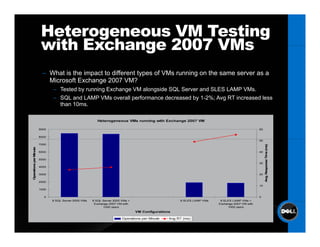
Heterogeneous VM Testing
                         with Exchange 2007 VMs
                          – What is the impact to different types of VMs running on the same server as a
                            Microsoft Exchange 2007 VM?
                               – Tested by running Exchange VM alongside SQL Server and SLES LAMP VMs.
                               – SQL and LAMP VMs overall performance decreased by 1-2%; Avg RT increased less
                                 than 10ms.

                                                          Heterogeneous VMs running with Exchange 2007 VM

                        9000                                                                                                                    60

                        8000
                                                                                                                                                50
                        7000


                                                                                                                                                                      e s)
                                                                                                                                                            sponse Tim (m
                inute


                        6000                                                                                                                    40
     tions per M


                        5000
                                                                                                                                                30
                        4000


                                                                                                                                                     Avg. Res
Operat


                        3000                                                                                                                    20

                        2000
                                                                                                                                                10
                        1000

                           0                                                                                                                    0
                               8 SQL Server 2005 VMs   8 SQL Server 2005 VMs +                        8 SLES LAMP VMs    8 SLES LAMP VMs +
                                                        Exchange 2007 VM with                                           Exchange 2007 VM with
                                                             1000 users                                                      1000 users
                                                                                 VM Configurations

                                                                         Operations per Minute   Avg RT (ms)
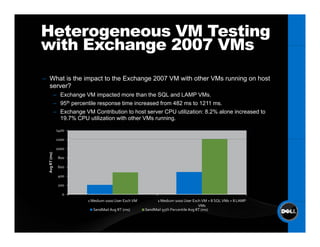
Heterogeneous VM Testing
with Exchange 2007 VMs
– Wh t i th i
  What is the impact t th E h
                   t to the Exchange 2007 VM with other VMs running on host
                                              ith th VM         i      h t
  server?
                – Exchange VM impacted more than the SQL and LAMP VMs.
                – 95th percentile response time increased from 482 ms to 1211 ms.
                – Exchange VM Contribution to host server CPU utilization: 8.2% alone increased to
                  19.7% CPU utilization with other VMs running.

                 1400

                 1200

                 1000
   vg RT (ms)


                 800

                 600
  Av


                 400

                 200

                   0
                             1 Medium 1000 User Exch VM        1 Medium 1000 User Exch VM + 8 SQL VMs + 8 LAMP 
                                                                                        VMs
                               SendMail Avg RT (ms)       SendMail 95th Percentile Avg RT (ms)
VMotion With Exchange
  2007 VMs
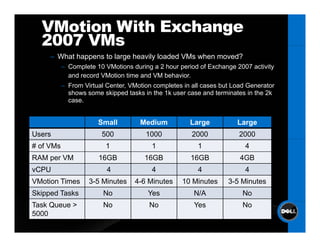
     – What happens to large heavily loaded VMs when moved?
           – Complete 10 VMotions during a 2 hour period of Exchange 2007 activity
             and record VMotion time and VM behavior
                                            behavior.
           – From Virtual Center, VMotion completes in all cases but Load Generator
             shows some skipped tasks in the 1k user case and terminates in the 2k
             case.


                       Small         Medium           Large           Large
Users                   500            1000            2000            2000
# of VMs                  1              1               1               4
RAM per VM             16GB            16GB           16GB             4GB
vCPU                      4              4               4               4
VMotion Times       3-5 Minutes    4-6 Minutes     10 Minutes      3-5 Minutes
Skipped Tasks            No             Yes            N/A              No
Task Queue >             No             No             Yes              No
5000
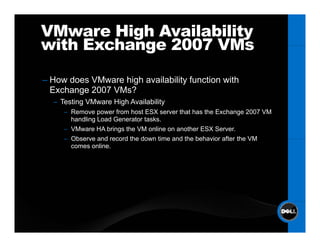
VMware High Availability
with Exchange 2007 VMs

–H
 How d
     does VM
          VMware hi h availability f
                 high    il bilit function with
                                      ti    ith
 Exchange 2007 VMs?
  – Testing VMware High Availability
     – Remove power from host ESX server that has the Exchange 2007 VM
       handling Load Generator tasks.
     – VMware HA brings the VM online on another ESX Server.
     – Observe and record the down time and the behavior after the VM
       comes online.
Testing High Availability
                  with Exchange 2007 VMs
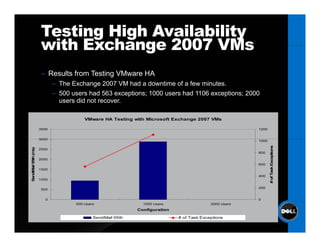
                   – Results from Testing VMware HA
                                        g
                         – The Exchange 2007 VM had a downtime of a few minutes.
                         – 500 users had 563 exceptions; 1000 users had 1106 exceptions; 2000
                           users did not recover.

                                    VMware HA Testing with Microsoft Exchange 2007 VMs

                  3500                                                                             1200


                  3000                                                                             1000


                                                                                                          # of Tas Exceptions
             s)


                  2500
SendM 95th (m


                                                                                                   800

                  2000
                                                                                                   600
     ail


                                                                                                                 sk
    M


                  1500

                                                                                                   400
                  1000


                   500                                                                             200


                     0                                                                             0
                                500 Users                 1000 Users                  2000 Users
                                                        Configuration

                                        SendMail 95th                   # of Task Exceptions
Summary of Observations
for Exchange 2007 VMs
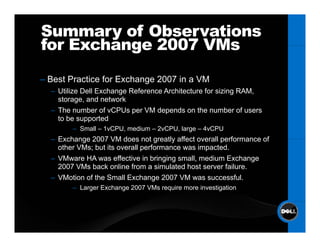
– B t Practice for Exchange 2007 i a VM
  Best P ti f E h                in
  – Utilize Dell Exchange Reference Architecture for sizing RAM,
    storage, and network
  – Th number of vCPUs per VM d
    The      b     f CPU          depends on th number of users
                                        d     the       b    f
    to be supported
        – Small – 1vCPU, medium – 2vCPU, large – 4vCPU
  – Exchange 2007 VM does not greatly affect overall performance of
    other VMs; but its overall performance was impacted.
  – VMware HA was effective in bringing small, medium Exchange
    2007 VMs back online from a simulated host server failure.
  – VMotion of the Small Exchange 2007 VM was successful.
        – Larger Exchange 2007 VMs require more investigation
Conclusions

– Mi
  Microsoft E h
          ft Exchange 2007 f ll capable i VI3
                            fully    bl in
– Stacking multiple, small Exchange VMs improves
                  p
  VMotion, HA capabilities
– Design Exchange 2007 VMs from physical reference
  Architecture
  – Ensures basic quality of service for storage and network subsystems
  – Provides tuning of CPU/memory through resource allocation in VI3
Questions?

Session S288993
S    i
Virtualizing Exchange 2007: The Final Frontier?

Todd Muirhead and Kong Yang
Dell Inc.

For more information …
www.dell.com/vmware
www.dell.com/techcenter
www.delltechcenter.com

Virt Exchange2k7 Final Frontier V Mworld2007

  • 1.
    Session S288993 Virtualizing Exchange 2007: TheFinal Frontier? September 2007 S t b Todd Muirhead, Enterprise TechCenter, Dell Kong Yang, Vi t li ti S l ti K Y Virtualization Solution Engineering, Dell
  • 2.
    Some or allof the features in this document may be representative of feature areas under development. Feature commitments must not be included in contracts, purchase orders, or sales agreements p g of any kind. Technical feasibility and market demand will affect final delivery.
  • 3.
    Introduction Microsoft Exchange 2007Behavior On ESX S Mi ft E h B h i O Server Virtual Machines Are Not Well Understood – How does Exchange 2007 p g profile differ from Exchange g 2003? – 64-bit – New server roles: Mailbox, Client Access, Hub Transport, Unified Messaging, and Edge Transport – Other new features such as CCR, administrative tools – How will these features affect an Exchange 2007 VM? – More memory utilization and features means that the performance profile could change. – The new server roles offer opportunities to virtualize the different roles. roles – Where to start?
  • 4.
    Stages of Virtualization Adoption Stage O S One: Evaluation / Test and Dev E l i T dD – Introduction to virtualization – Use of single server or small farm for test and development Stage Two: Virtualization of Some Production Level Apps / Consolidation C lid i – An initial set of “good candidates” for virtualization – Farm of servers is used to support load-balancing high load-balancing, availability, and easy maintenance Stage Three: Extend Virtualization – Virtualize more applications to extend same advantages as seen in earlier stages
  • 5.
    Typical Application “Good Candidates Candidates”for Virtualization Characteristics Ch i i – Low utilization – Low I/O – Running on old hardware Examples p – Test and development servers – Domain controllers – DNS servers – Intranet application servers – Anything running on Pentium Pro servers!
  • 6.
    Exchange 2007 – TheFinal Frontier? Exchange 2007 Is a Demanding Application – 64-bit high I/O large RAM and large disk 64 bit, I/O, RAM, – Not the first application that should be virtualized – If Exchange 2007 can be virtualized, then other demanding applications can b candidates as well d di li ti be did t ll Reasons to Virtualize Exchange 2007 – Want to leverage virtualization infrastructure already in place for other apps – Take advantage of increased administrative flexibility – Exchange 2007 server roles can be considered separately – Mailbox Hub Transport Client Access Edge Unified Mailbox, Transport, Access, Edge, Messaging
  • 7.
    Exchange 2007 – The Final Frontier? Reasons not to Virtualize Exchange 2007 – Not officially supported by Microsoft1 – Easier-to-virtualize applications still exist in environment – Requirement for a very large number of users per server 1 When considering the deployment of Microsoft Exchange Server 2003 on a virtualization platform such as VMware ESX Server, please refer to support.microsoft.com/kb/897615 for information about the Microsoft support policy for their applications running in non-Microsoft virtualization software.
  • 8.
    Where to startwith Exchange 2007 VMs? Capacity Planning and Reference Architecture – Starting Point: Dell Physical Reference Architecture for Microsoft Exchange 20071 – Evaluate four major subsystems: CPU, Memory, Disk d Network Di k and N t k – Analyze Exchange 2007 VM Behavior under load Exchange 2007 VM Behavior – How will VMotion be affected? – Can I run other VM types with Exchange 2007 VMs? VM ? – How does VMware HA perform with Exchange 2007 VMs? 1. www.dell.com/downloads/global/solutions/Dell_Exchange_2007_Advisor.pdf
  • 9.
    Sizing Exchange 2007VMs g g – Small, medium, and large VM configurations1 – Physical server specifications – DellTM PowerEdgeTM 2950 – Two quad-core 2.33 GHz Intel® Xeon ® – 16 GB RAM – DELL / EMC CX3-80 – RAID 1/0 for data and logs Small Medium Large Users 500 1,000 2,000 RAM 8 GB 8 GB 16 GB Data Disks 4 8 16 Log Disks 2 4 8 vCPU 1 to 4 1 to 4 1 to 4 vNIC 1 1 1 Storage Groups g p 4 8 16 1. www.dell.com/downloads/global/solutions/Dell_Exchange_2007_Advisor.pdf
  • 10.
    vCPU Scaling TestResults for 1VM @ 500 Users – Results of 1, 2, 4 vCPU VM testing in small configuration – S dM il 95th response ti SendMail time i b l is below 560 ms. – Overall CPU utilization is below 6% on an 8-core PE2950. Microsoft Exchange 2007 Small VM Config vCPU Scaling for 500 Heavy Users 580 6 560 5 ms) 540 SendMail 95th (m CPU Utilization (%) 4 520 500 3 480 2 S C 460 1 440 420 0 1vCPU 8GB 2vCPU 8GB 4vCPU 8GB SendMail 95th Percentile (ms) 471 485 560 Host Server CPU Utilization (%) 3.5 4.5 5.3 VM Config SendMail 95th Percentile (ms) Host Server CPU Utilization (%)
  • 11.
    vCPU Scaling TestResults for 1VM @ 1 000 Users 1,000 – Results of 1, 2, 4 vCPU VM testing in medium configuration – SendMail 95th response time is below 814 ms. – Overall CPU utilization is below 13% on an 8-core PE2950. Microsoft Exchange 2007 Medium VM Config vCPU Scaling for 1000 Heavy Users 900 14 800 12 s) 700 endMail 95th (ms CPU Utilization (%) 10 600 500 8 400 6 U Se 300 4 200 2 100 0 0 1vCPU 8GB 2vCPU 8GB 4vCPU 8GB SendMail S dM il 95th P Percentile til 693 482 814 Host Server CPU Utilization 6.8 8.2 12.7 VM Config SendMail 95th Percentile Host Server CPU Utilization
  • 12.
    vCPU Scaling TestResults for 1VM @ 2 000 Users 2,000 – Results of 1, 2, 4 vCPU VM testing in large configuration – 1vCPU 16GB DNF test runs. – 95th Response time is below 934 ms. – Overall CPU utilization is below 24% on an 8-core PE2950. Microsoft Exchange 2007 Large VM Config vCPU Scaling for 2000 Heavy Users 1000 25 900 800 20 dMail 95th (ms) CPU Utilization (%) 700 600 15 500 400 10 Send 300 200 5 100 0 0 1vCPU 16GB 2vCPU 16GB 4vCPU 16GB SendMail 95th Percentile 934 664 Host Server CPU Utilization 12.5 22.3 23.4 VM Config SendMail 95th Percentile Host Server CPU Utilization
  • 13.
    Number of VMs Testing Results – How does performance of single large VM compare to multiple smaller VMs in small configuration? – 2 VMs with sufficient vCPU and memory resources performs best. Microsoft Exchange 2007 VM Scaling Small Config with 500 Heavy Users 900 12 800 10 ndMail 95th (ms) 700 CPU Utilization (%) 600 8 500 6 400 U 300 4 Sen 200 2 100 0 0 1VM 2vCPU 2VM 1vCPU 1VM 4vCPU 4VM 1vCPU 2VM 4vCPU 4VM 2vCPU 8GB (8GB 4GB (8GB 8GB (8GB 2GB (8GB 8GB (16GB 4GB (16GB Total) Total) Total) Total) Total) Total) VM Config SendMail 95th Percentile Host Server CPU Utilization
  • 14.
    Number of VMs Testing Results – How does performance of single large VM compare to g g multiple smaller VMs in medium configuration? – 1 VM with sufficient vCPU and memory resources performs best. Microsoft Exchange 2007 VM Scaling Medium Config with 1000 Heavy Users 1400 20 18 1200 16 s) CPU Utilization (%) dMail 95th (m 1000 14 12 800 10 600 8 Send U 400 6 4 200 2 0 0 1VM 2vCPU 2VM 1vCPU 1VM 4vCPU 4VM 1vCPU 2VM 4vCPU 4VM 2vCPU 8GB (8GB 4GB (8GB 8GB (8GB 2GB (8GB 8GB (16GB 4GB (16GB Total) Total) Total) Total) Total) Total) VM Config SendMail 95th Percentile Host Server CPU Utilization
  • 15.
    Number of VMs Testing Results – How does performance of single large VM compare to multiple smaller VM i l lti l ll VMs in large configuration? fi ti ? – 1 VM with sufficient vCPU and memory resources performs best. Microsoft Exchange 2007 VM Scaling Large Config with 2000 Heavy Users 5000 40 4500 35 4000 ndMail 95th (ms) CPU Utilization (%) 30 3500 25 3000 2500 20 2000 15 U Sen 1500 10 1000 500 5 0 0 1VM 2vCPU 2VM 1vCPU 1VM 4vCPU 4VM 1vCPU 2VM 4vCPU 4VM 2vCPU 16GB (16GB 8GB (16GB 16GB (16GB 4GB (16GB 8GB (16GB 4GB (16GB Total) Total) Total) Total) Total) Total) VM Config SendMail 95th Percentile Host Server CPU Utilization
  • 16.
    Heterogeneous VM Testing with Exchange 2007 VMs – What is the impact to different types of VMs running on the same server as a Microsoft Exchange 2007 VM? – Tested by running Exchange VM alongside SQL Server and SLES LAMP VMs. – SQL and LAMP VMs overall performance decreased by 1-2%; Avg RT increased less than 10ms. Heterogeneous VMs running with Exchange 2007 VM 9000 60 8000 50 7000 e s) sponse Tim (m inute 6000 40 tions per M 5000 30 4000 Avg. Res Operat 3000 20 2000 10 1000 0 0 8 SQL Server 2005 VMs 8 SQL Server 2005 VMs + 8 SLES LAMP VMs 8 SLES LAMP VMs + Exchange 2007 VM with Exchange 2007 VM with 1000 users 1000 users VM Configurations Operations per Minute Avg RT (ms)
  • 17.
    Heterogeneous VM Testing withExchange 2007 VMs – Wh t i th i What is the impact t th E h t to the Exchange 2007 VM with other VMs running on host ith th VM i h t server? – Exchange VM impacted more than the SQL and LAMP VMs. – 95th percentile response time increased from 482 ms to 1211 ms. – Exchange VM Contribution to host server CPU utilization: 8.2% alone increased to 19.7% CPU utilization with other VMs running. 1400 1200 1000 vg RT (ms) 800 600 Av 400 200 0 1 Medium 1000 User Exch VM 1 Medium 1000 User Exch VM + 8 SQL VMs + 8 LAMP  VMs SendMail Avg RT (ms) SendMail 95th Percentile Avg RT (ms)
  • 18.
    VMotion With Exchange 2007 VMs – What happens to large heavily loaded VMs when moved? – Complete 10 VMotions during a 2 hour period of Exchange 2007 activity and record VMotion time and VM behavior behavior. – From Virtual Center, VMotion completes in all cases but Load Generator shows some skipped tasks in the 1k user case and terminates in the 2k case. Small Medium Large Large Users 500 1000 2000 2000 # of VMs 1 1 1 4 RAM per VM 16GB 16GB 16GB 4GB vCPU 4 4 4 4 VMotion Times 3-5 Minutes 4-6 Minutes 10 Minutes 3-5 Minutes Skipped Tasks No Yes N/A No Task Queue > No No Yes No 5000
  • 19.
    VMware High Availability withExchange 2007 VMs –H How d does VM VMware hi h availability f high il bilit function with ti ith Exchange 2007 VMs? – Testing VMware High Availability – Remove power from host ESX server that has the Exchange 2007 VM handling Load Generator tasks. – VMware HA brings the VM online on another ESX Server. – Observe and record the down time and the behavior after the VM comes online.
  • 20.
    Testing High Availability with Exchange 2007 VMs – Results from Testing VMware HA g – The Exchange 2007 VM had a downtime of a few minutes. – 500 users had 563 exceptions; 1000 users had 1106 exceptions; 2000 users did not recover. VMware HA Testing with Microsoft Exchange 2007 VMs 3500 1200 3000 1000 # of Tas Exceptions s) 2500 SendM 95th (m 800 2000 600 ail sk M 1500 400 1000 500 200 0 0 500 Users 1000 Users 2000 Users Configuration SendMail 95th # of Task Exceptions
  • 21.
    Summary of Observations forExchange 2007 VMs – B t Practice for Exchange 2007 i a VM Best P ti f E h in – Utilize Dell Exchange Reference Architecture for sizing RAM, storage, and network – Th number of vCPUs per VM d The b f CPU depends on th number of users d the b f to be supported – Small – 1vCPU, medium – 2vCPU, large – 4vCPU – Exchange 2007 VM does not greatly affect overall performance of other VMs; but its overall performance was impacted. – VMware HA was effective in bringing small, medium Exchange 2007 VMs back online from a simulated host server failure. – VMotion of the Small Exchange 2007 VM was successful. – Larger Exchange 2007 VMs require more investigation
  • 22.
    Conclusions – Mi Microsoft E h ft Exchange 2007 f ll capable i VI3 fully bl in – Stacking multiple, small Exchange VMs improves p VMotion, HA capabilities – Design Exchange 2007 VMs from physical reference Architecture – Ensures basic quality of service for storage and network subsystems – Provides tuning of CPU/memory through resource allocation in VI3
  • 23.
    Questions? Session S288993 S i Virtualizing Exchange 2007: The Final Frontier? Todd Muirhead and Kong Yang Dell Inc. For more information … www.dell.com/vmware www.dell.com/techcenter www.delltechcenter.com