Python Dictionary
Add a Slide Title - 4
• A dictionary is mutable and is another container
type that can store any number of Python objects
• Dictionaries consist of pairs (called items) of keys
and their corresponding values.
• Python dictionaries are also known as associative
arrays or hash tables.
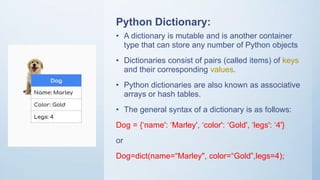
• The general syntax of a dictionary is as follows:
Dog = {‘name': ‘Marley', ‘color': ‘Gold', ‘legs': ‘4'}
or
Dog=dict(name=“Marley", color=“Gold”,legs=4);
Python Dictionary:
Python Dictionary Features:
• Each key is separated from its value by a colon (:).
• The items are separated by commas, and the whole thing is enclosed
in curly braces.
• An empty dictionary without any items is written with just two curly
braces, like this: {}.
• Keys are unique within a dictionary while values may not be
Accessing in Dictionary:
• d.items()
• d.values()
• d.keys()
Accessing Values in Dictionary:
• To access dictionary elements, you can use the familiar square
brackets along with the key to obtain its value.
• For example:
student = {'Name': 'Zara', 'Age': 7, 'Class': 'First'};
print (“student['Name']: ", student['Name'])
● Output: student['Name']: Zara
Updating Dictionary:
• You can update a dictionary by adding a new entry or item (i.e., a key-value
pair)
• modifying an existing entry, or deleting an existing entry as shown below in
the simple example
• student = {'Name': 'Zara', 'Age': 7, 'Class': 'First'};
student['Age'] = 8; # update existing entry
student['School'] = "DPS School"; # Add new entry
print (“student['Age']: ", student['Age'])
print (“student['School']: ", student['School'])
• Output: student['Age']: 8 student['School']: DPS School
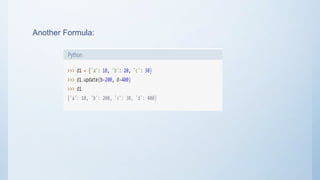
Another Formula:
Delete Dictionary Elements:
• You can either remove individual dictionary elements or clear the entire
contents of a dictionary
• To explicitly remove an entire dictionary, just use the del statement. i.e:
student = {'Name': 'Zara', 'Age': 7, 'Class': 'First'};
• del student['Name']; # remove entry with key 'Name'
• student.clear(); # remove all entries in student del student ; # delete
entire dictionary
• print (“student['Age']: ", student['Age'])
• print (“student['School']: ", student['School'])
Properties of Dictionary Keys:
There are two important points to remember about dictionary keys:
(a) More than one entry per key not allowed. Which means no duplicate key is allowed.
When duplicate keys encountered during assignment, the last assignment wins.
• student= {'Name': 'Zara', 'Age': 7, 'Name': 'Manni'};
• print (“student['Name']: ", student['Name']) //Output: student['Name']: Manni
(b) Keys must be immutable. Which means you can use strings or numbers as
dictionary keys but something like ['key'] is not allowed. Following is a simple example:
• student = {['Name']: 'Zara', 'Age': 7};
• print (student['Name']: ", student['Name']) //TypeError
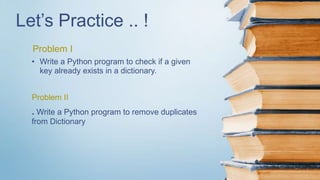
Let’s Practice .. !
Problem I
• Write a Python program to check if a given
key already exists in a dictionary.
Problem II
. Write a Python program to remove duplicates
from Dictionary
Python dictionary
Python dictionary

Python dictionary

  • 1.
  • 2.
    Add a SlideTitle - 4 • A dictionary is mutable and is another container type that can store any number of Python objects • Dictionaries consist of pairs (called items) of keys and their corresponding values. • Python dictionaries are also known as associative arrays or hash tables. • The general syntax of a dictionary is as follows: Dog = {‘name': ‘Marley', ‘color': ‘Gold', ‘legs': ‘4'} or Dog=dict(name=“Marley", color=“Gold”,legs=4); Python Dictionary:
  • 3.
    Python Dictionary Features: •Each key is separated from its value by a colon (:). • The items are separated by commas, and the whole thing is enclosed in curly braces. • An empty dictionary without any items is written with just two curly braces, like this: {}. • Keys are unique within a dictionary while values may not be
  • 4.
    Accessing in Dictionary: •d.items() • d.values() • d.keys()
  • 5.
    Accessing Values inDictionary: • To access dictionary elements, you can use the familiar square brackets along with the key to obtain its value. • For example: student = {'Name': 'Zara', 'Age': 7, 'Class': 'First'}; print (“student['Name']: ", student['Name']) ● Output: student['Name']: Zara
  • 6.
    Updating Dictionary: • Youcan update a dictionary by adding a new entry or item (i.e., a key-value pair) • modifying an existing entry, or deleting an existing entry as shown below in the simple example • student = {'Name': 'Zara', 'Age': 7, 'Class': 'First'}; student['Age'] = 8; # update existing entry student['School'] = "DPS School"; # Add new entry print (“student['Age']: ", student['Age']) print (“student['School']: ", student['School']) • Output: student['Age']: 8 student['School']: DPS School
  • 7.
  • 8.
    Delete Dictionary Elements: •You can either remove individual dictionary elements or clear the entire contents of a dictionary • To explicitly remove an entire dictionary, just use the del statement. i.e: student = {'Name': 'Zara', 'Age': 7, 'Class': 'First'}; • del student['Name']; # remove entry with key 'Name' • student.clear(); # remove all entries in student del student ; # delete entire dictionary • print (“student['Age']: ", student['Age']) • print (“student['School']: ", student['School'])
  • 9.
    Properties of DictionaryKeys: There are two important points to remember about dictionary keys: (a) More than one entry per key not allowed. Which means no duplicate key is allowed. When duplicate keys encountered during assignment, the last assignment wins. • student= {'Name': 'Zara', 'Age': 7, 'Name': 'Manni'}; • print (“student['Name']: ", student['Name']) //Output: student['Name']: Manni (b) Keys must be immutable. Which means you can use strings or numbers as dictionary keys but something like ['key'] is not allowed. Following is a simple example: • student = {['Name']: 'Zara', 'Age': 7}; • print (student['Name']: ", student['Name']) //TypeError
  • 10.
    Let’s Practice ..! Problem I • Write a Python program to check if a given key already exists in a dictionary. Problem II . Write a Python program to remove duplicates from Dictionary