Purchasing Documents Module 5 Lesson 5
What are purchasing documents? In a business, when you want to purchase something, there is usually a procedure in place for making those purchases. The purpose of having a procedure is to justify purchases, to account for money spent and goods received. This procedure involves 3 different documents.
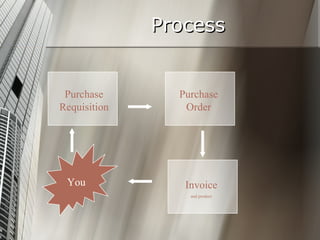
What is the procedure? Step 1: Complete a  Purchase Requisition  and submit to the correct person/department within your company Step 2: If approved, a  Purchase Order  is issued and products are purchased Step 3: The seller creates and sends an  Invoice  along with the product.
Sounds like a lot, right? Not really.  These forms are usually created using templates (preformatted documents.) So all an employee has to do is fill out the form. Let’s begin with Purchase Requisitions.
Purchase Requisitions
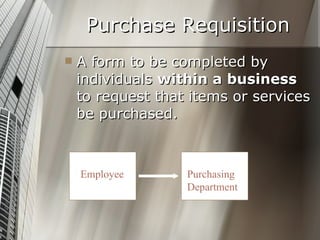
Purchase Requisition A form to be completed by individuals  within a business  to request that items or services be purchased.  Employee Purchasing Department
Purchase Requisition View the MS Office Purchase Requisition Templates below Sample 1 Sample 2 Sample 3
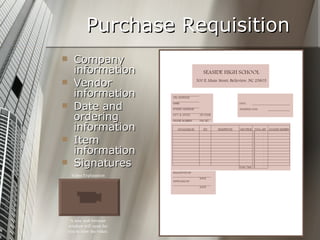
Purchase Requisition Company information Vendor information Date and ordering information Item information Signatures   A new web browser window will open for you to view the video. Video Explanation
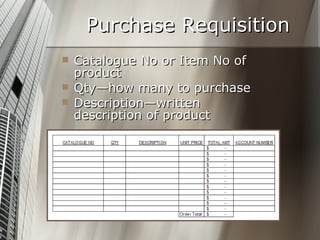
Purchase Requisition Catalogue No or Item No of product Qty—how many to purchase Description—written description of product
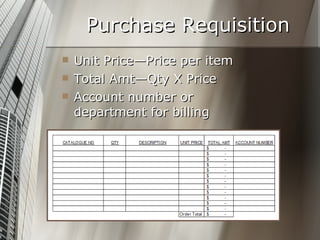
Purchase Requisition Unit Price—Price per item Total Amt—Qty X Price Account number or department for billing
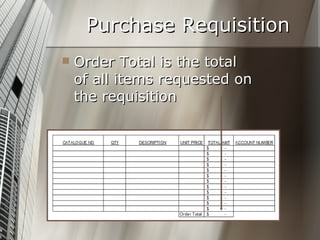
Purchase Requisition Order Total is the total of all items requested on the requisition
Purchase Orders View the MS Office Purchase Order Templates below Sample 1 Sample 2 Sample 3
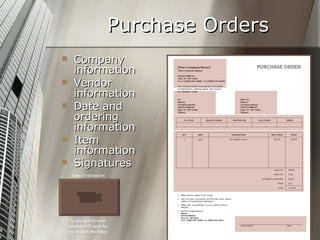
Purchase Orders Company information Vendor information Date and ordering information Item information Signatures   Video Explanation A new web browser window will open for you to view the video.
Invoice
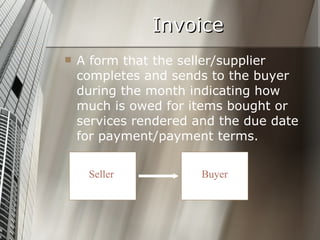
Invoice A form that the seller/supplier completes and sends to the buyer during the month indicating how much is owed for items bought or services rendered and the due date for payment/payment terms. Seller Buyer
Invoices View the MS Office Invoice Templates below Sample 1 Sample 2 Sample 3
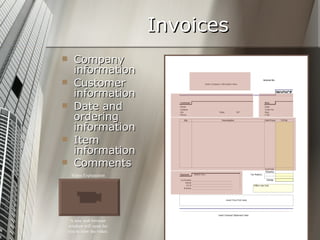
Invoices Company information Customer information Date and ordering information Item information Comments   A new web browser window will open for you to view the video. Video Explanation
Payment Terms Explained Example: 5/10, n/30, means the buyer can take a 5% discount on the purchase price if the invoice is paid within 10 days. However, if not paid early, the entire amount owed (the “net”, represented by the “n”) must be paid within 30 days of the invoice date. Late payments may result in additional charges being assessed to the buyer.
Process Purchase Requisition Invoice and product Purchase Order You
 

Purchasing documents

  • 1.
  • 2.
    What are purchasingdocuments? In a business, when you want to purchase something, there is usually a procedure in place for making those purchases. The purpose of having a procedure is to justify purchases, to account for money spent and goods received. This procedure involves 3 different documents.
  • 3.
    What is theprocedure? Step 1: Complete a Purchase Requisition and submit to the correct person/department within your company Step 2: If approved, a Purchase Order is issued and products are purchased Step 3: The seller creates and sends an Invoice along with the product.
  • 4.
    Sounds like alot, right? Not really. These forms are usually created using templates (preformatted documents.) So all an employee has to do is fill out the form. Let’s begin with Purchase Requisitions.
  • 5.
  • 6.
    Purchase Requisition Aform to be completed by individuals within a business to request that items or services be purchased. Employee Purchasing Department
  • 7.
    Purchase Requisition Viewthe MS Office Purchase Requisition Templates below Sample 1 Sample 2 Sample 3
  • 8.
    Purchase Requisition Companyinformation Vendor information Date and ordering information Item information Signatures A new web browser window will open for you to view the video. Video Explanation
  • 9.
    Purchase Requisition CatalogueNo or Item No of product Qty—how many to purchase Description—written description of product
  • 10.
    Purchase Requisition UnitPrice—Price per item Total Amt—Qty X Price Account number or department for billing
  • 11.
    Purchase Requisition OrderTotal is the total of all items requested on the requisition
  • 12.
    Purchase Orders Viewthe MS Office Purchase Order Templates below Sample 1 Sample 2 Sample 3
  • 13.
    Purchase Orders Companyinformation Vendor information Date and ordering information Item information Signatures Video Explanation A new web browser window will open for you to view the video.
  • 14.
  • 15.
    Invoice A formthat the seller/supplier completes and sends to the buyer during the month indicating how much is owed for items bought or services rendered and the due date for payment/payment terms. Seller Buyer
  • 16.
    Invoices View theMS Office Invoice Templates below Sample 1 Sample 2 Sample 3
  • 17.
    Invoices Company informationCustomer information Date and ordering information Item information Comments A new web browser window will open for you to view the video. Video Explanation
  • 18.
    Payment Terms ExplainedExample: 5/10, n/30, means the buyer can take a 5% discount on the purchase price if the invoice is paid within 10 days. However, if not paid early, the entire amount owed (the “net”, represented by the “n”) must be paid within 30 days of the invoice date. Late payments may result in additional charges being assessed to the buyer.
  • 19.
    Process Purchase RequisitionInvoice and product Purchase Order You
  • 20.