CONFIDENTIAL
Version 2008
SAP MM Training Material- Level 2
Purchasing
Document Name
CONFIDENTIAL
MM - Purchasing
Document Name
CONFIDENTIAL
Target Group
 Purchase department
Document Name
CONFIDENTIAL
Course Objectives
• Understand the concepts in SAP - Purchasing component
• Create, change PR
• Create, change, compare RFQ
• Create, change Purchase Order
• Create, change outline agreements
On conclusion of this course you should
be able to
Document Name
CONFIDENTIAL
Introduction
Contents
• Purchasing overview
• Purchase Requisitions
• Request for Quotations
• Purchase Order
• Outline Agreements
Document Name
CONFIDENTIAL
Purchasing - overview
• The Purchasing component has the following tasks:
 external procurement of materials and services
 determination of possible sources of supply for a requirement identified
by the materials planning and control system
 determination of possible sources of supply for a requirement arising
directly within a user department
 monitoring of deliveries and payments to vendors
Document Name
CONFIDENTIAL
Purchasing - integration with other modules
• Integration
– Controlling (CO)
• Purchase orders for materials intended for direct consumption
• They can be directly assigned to a cost center or a production order.
– Financial Accounting (FI)
• Vendor master is maintained by both accounting and purchasing
departments.
• Through PO account assignment, Purchasing can also specify which
G/L accounts are to be charged in the financial accounting system.
Document Name
CONFIDENTIAL
Purchasing - integration with other modules
– Sales and Distribution (SD)
• Within the framework of materials planning and control, a requirement
that has arisen in the Sales area can be passed on to Purchasing.
• When a requisition is created, it can be directly assigned to a sales
order.
Document Name
CONFIDENTIAL
Process flow in purchasing
• Determination of Requirements
– Materials requirements are identified either in the user departments or
via materials planning and control.
– It includes both MRP proper and the demand-based approach to
inventory control.
– The regular checking of stock levels of materials defined by master
records, use of the order-point method, and forecasting on the basis of
past usage are important aspects of the demand management.
– You can enter purchase requisitions yourself, or they can be generated
automatically by the materials planning and control system.
Document Name
CONFIDENTIAL
Process flow in purchasing
• Source Determination
– The Purchasing component helps in identifying potential sources of
supply based on past orders and existing longer-term purchase
agreements.
– This speeds the process of creating requests for quotation (RFQ)
• Vendor Selection and Comparison of Quotations
– The system is capable of simulating pricing scenarios, allowing you to
compare a number of different quotations.
– Rejection letters can be sent automatically.
Document Name
CONFIDENTIAL
Process flow in purchasing
• Purchase Order Processing
– The Purchasing system adopts information from the requisition and the
quotation to help you create a purchase order.
– You can generate Pos yourself or have the system generate them
automatically.
– Vendor scheduling agreements and contracts are also supported.
• Purchase Order Follow-Up
– The system checks the reminder periods you have specified
– System automatically prints reminders or expediters at the predefined
intervals.
– It provides you with an up-to-date status of all purchase requisitions,
quotations, and purchase orders.
Document Name
CONFIDENTIAL
Process flow in purchasing
• Goods Receiving and Inventory Management
– Goods Receiving personnel can confirm the receipt of goods simply by
entering the Po number.
– By specifying permissible tolerances, buyers can limit over- and under
deliveries of ordered goods.
• Invoice Verification
• The system supports the checking and matching of invoices.
• Invoice verification can be based on purchase orders or GR
documents or directly to a vendor without any document reference.
Document Name
CONFIDENTIAL
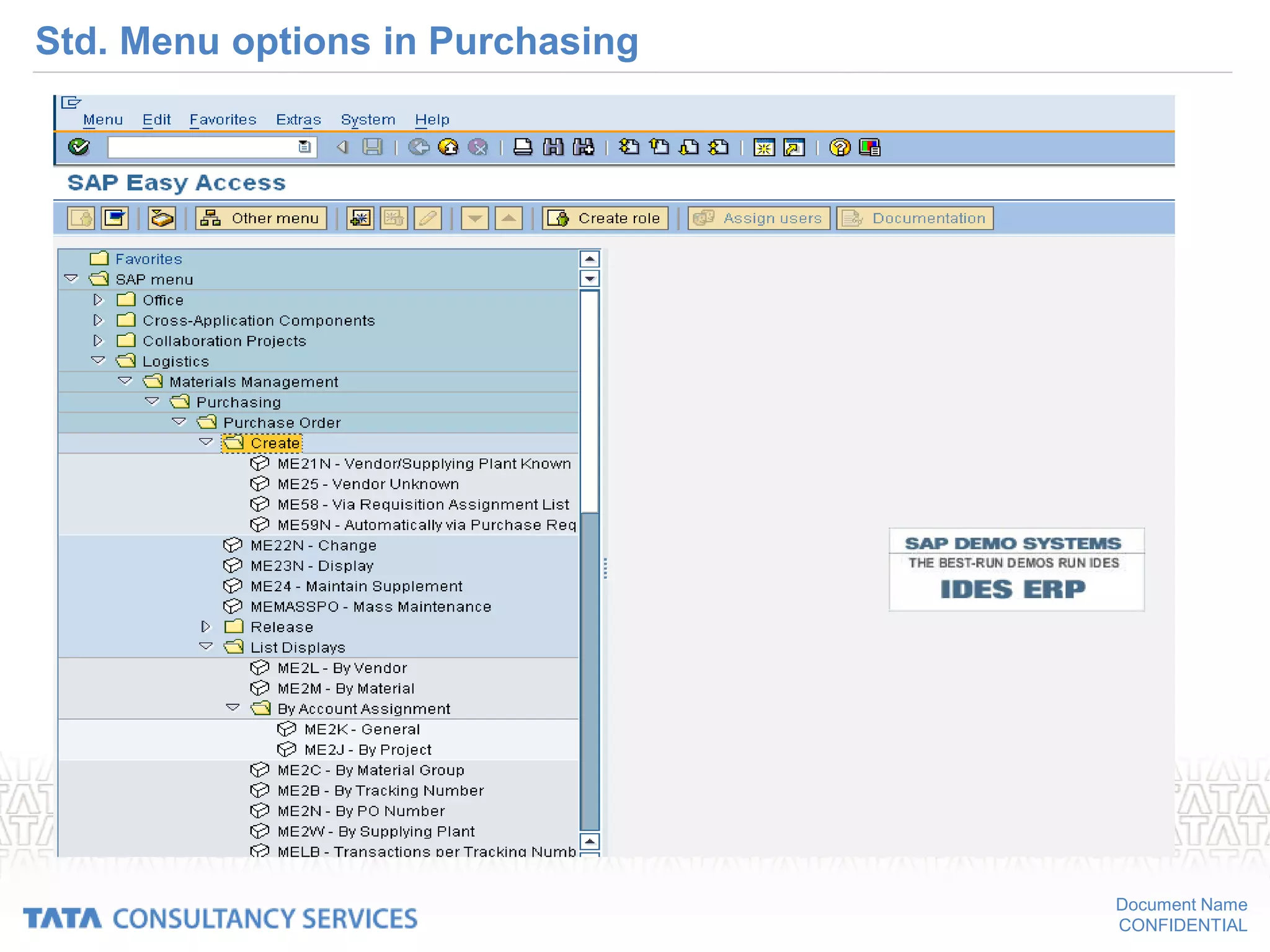
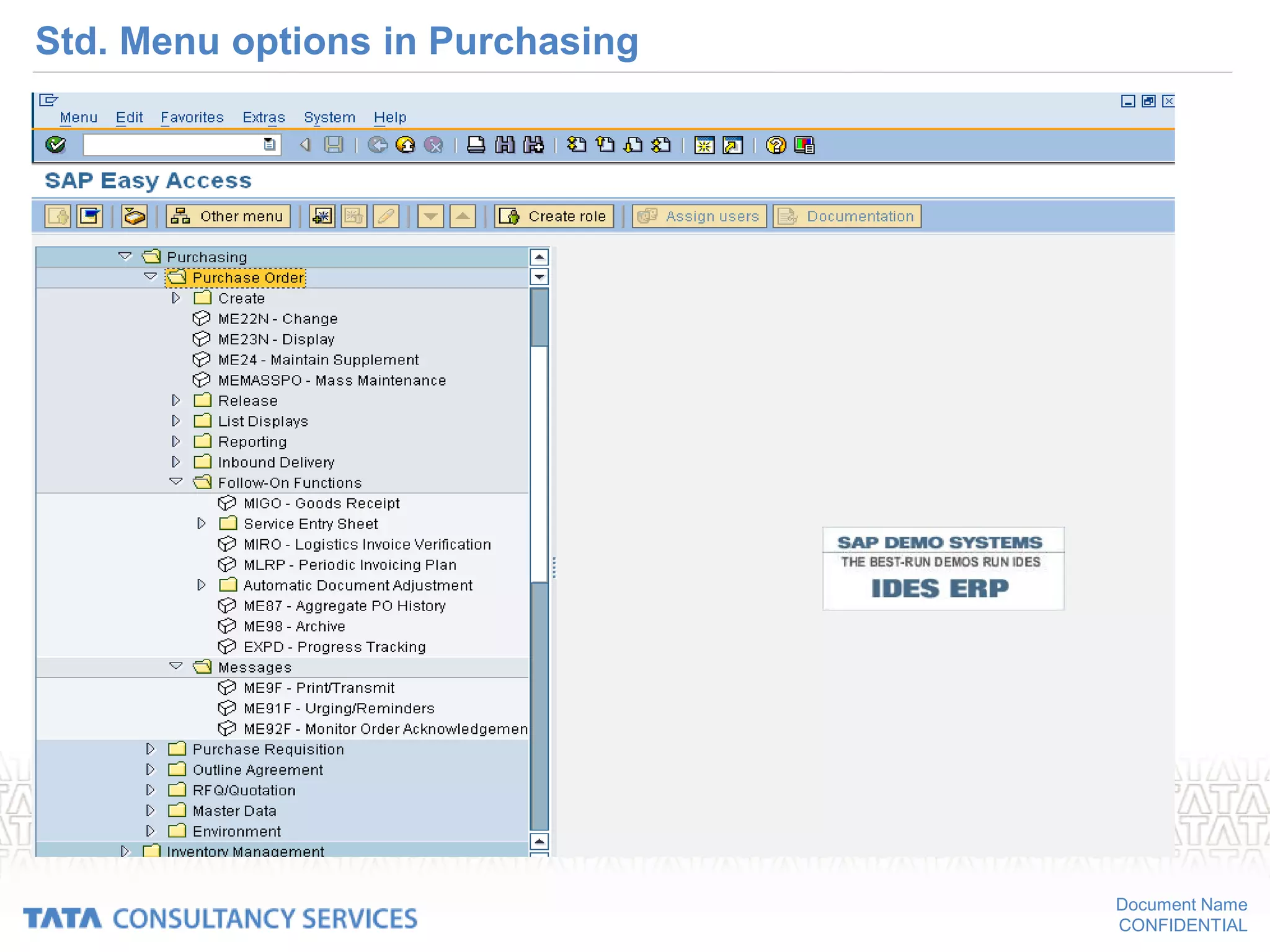
Std. Menu options in Purchasing
• Create
– Use this option to create a purchasing document .
– Enter the required information and save the document .
– The document is then stored under a unique number.
• Change
– Use this option to change a purchasing document .
– You need the document number in order to access the document.
Document Name
CONFIDENTIAL
Std. Menu options in Purchasing
• Display
– Use this option to display a purchasing document .
– You cannot change or add any information to the document that is
displayed .
– You need the document number in order to access the document.
• List displays/reporting
– You can use these options to generate reports analyzing purchasing
documents
– Example
• List of all purchase orders for Vendor ABC
Document Name
CONFIDENTIAL
Std. Menu options in Purchasing
• Follow-on functions
– This option allows you to perform tasks related to (following on from) but
not included in the purchasing functionality.
– Example
• Entering a goods receipt or an invoice in the system.
• Messages
– This option enables you to print or transmit documents in message form
– Example
• Transmission via fax, Printouts etc
Document Name
CONFIDENTIAL
Std. Menu options in Purchasing
Document Name
CONFIDENTIAL
Std. Menu options in Purchasing
Document Name
CONFIDENTIAL
Purchasing Documents
• Definition
– A purchasing document is an instrument used by Purchasing to procure
materials or services.
– Purchasing documents are two types
o Internal (Purchase requisitions)
o External (Request for quotations, Purchase orders & outline agreements)
• Purchase Requisition (PR)
– The requisition will contain the materials or services to be procured, a
required date of delivery and quantity.
– It is a document that is internal to the company, therefore it is treated
separately with in purchasing.
Document Name
CONFIDENTIAL
Purchasing Documents
• Types of External purchasing documents
• Request for quotation (RFQ) / Quotation
– RFQ is an invitation extended to a vendor by a purchasing department to
submit a quotation or bid for the supply of materials or performance of
services.
– Quotation is the vendor’s response against RFQ to purchasing department. It
is an offer given by a vendor regarding supply of materials or performance of
services, subject to specified conditions.
– Quotation contains a vendor's prices and conditions.
– It is the basis for vendor selection.
• Note : In SAP, RFQ & Quotations are a single document.
Document Name
CONFIDENTIAL
Purchasing Documents
• Purchase order (PO)
– The buying entity’s request or instruction to a vendor (external supplier) to
supply certain materials or perform certain services with duly agreed terms and
conditions for a confirmed delivery date.
– It formalizes a purchase transaction.
Document Name
CONFIDENTIAL
Purchasing Documents
• Outline Agreements
– Outline agreement is a long term agreement between a purchasing department
and a vendor regarding supply of materials / performance of services within a
certain period according to predefined terms & conditions.
– In SAP, outline agreements are subdivided into two types.
o Purchasing contract - It is a type of outline agreement against which
release orders (purchase orders) can be issued for agreed materials /
services as and when required during that period.
o Scheduling agreement - It is a type of outline agreement against which
materials / services are procured on predetermined delivery schedules
(specifying purchasing quantities, delivery dates) over a predefined period.
Document Name
CONFIDENTIAL
Purchasing documents
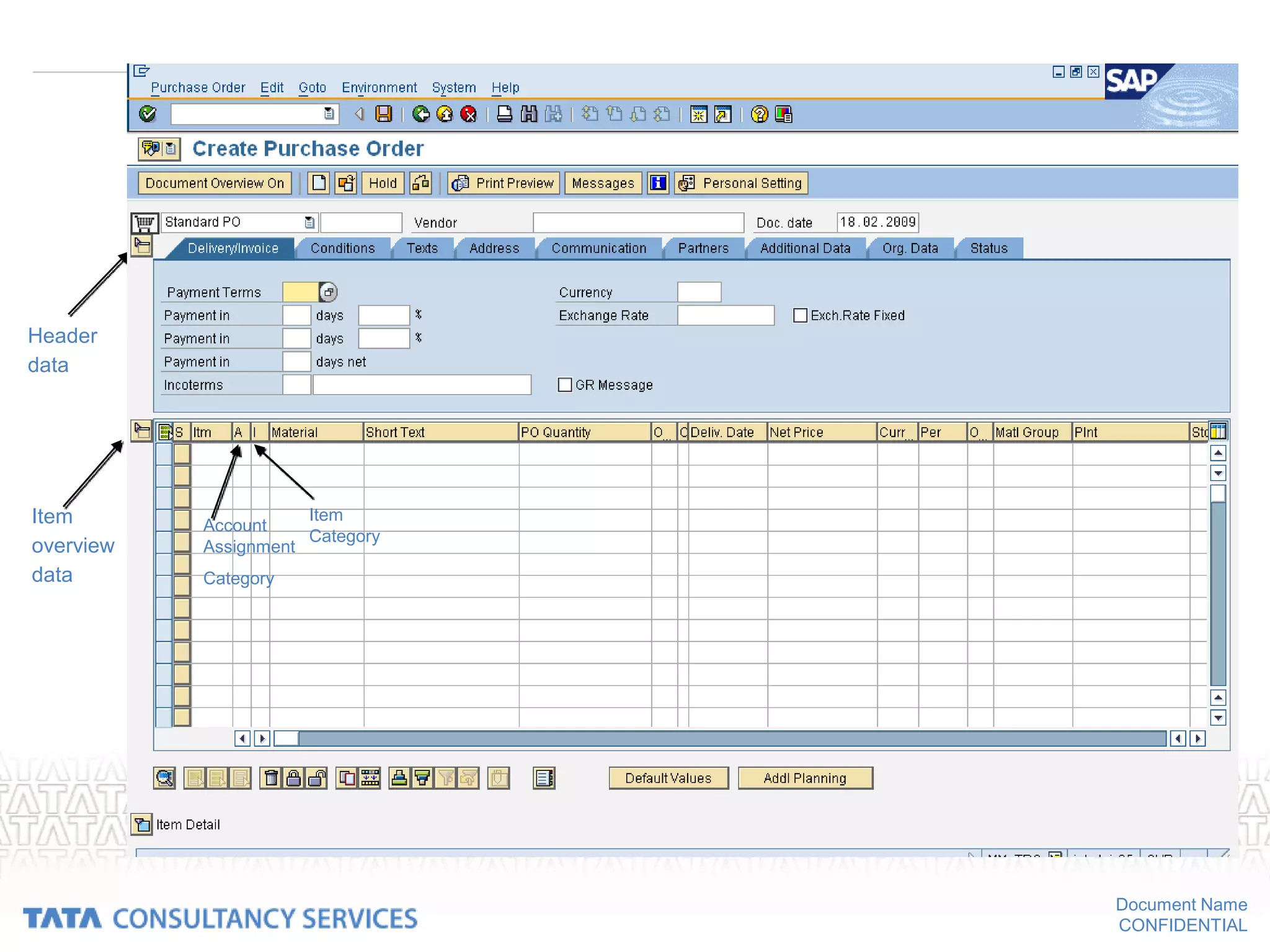
• Structure
– Each purchasing document is subdivided into two main areas:
• The header
– The header contains information relevant to the whole document .
– Example, information about the vendor and the document number is
contained in the document header
• The individual items .
– The items specify the materials or services to be procured .
– Example, The material description and the order quantity are
specified in each item.
Document Name
CONFIDENTIAL
Header
data
Item
overview
data
Account
Assignment
Category
Item
Category
Document Name
CONFIDENTIAL
Purchasing documents
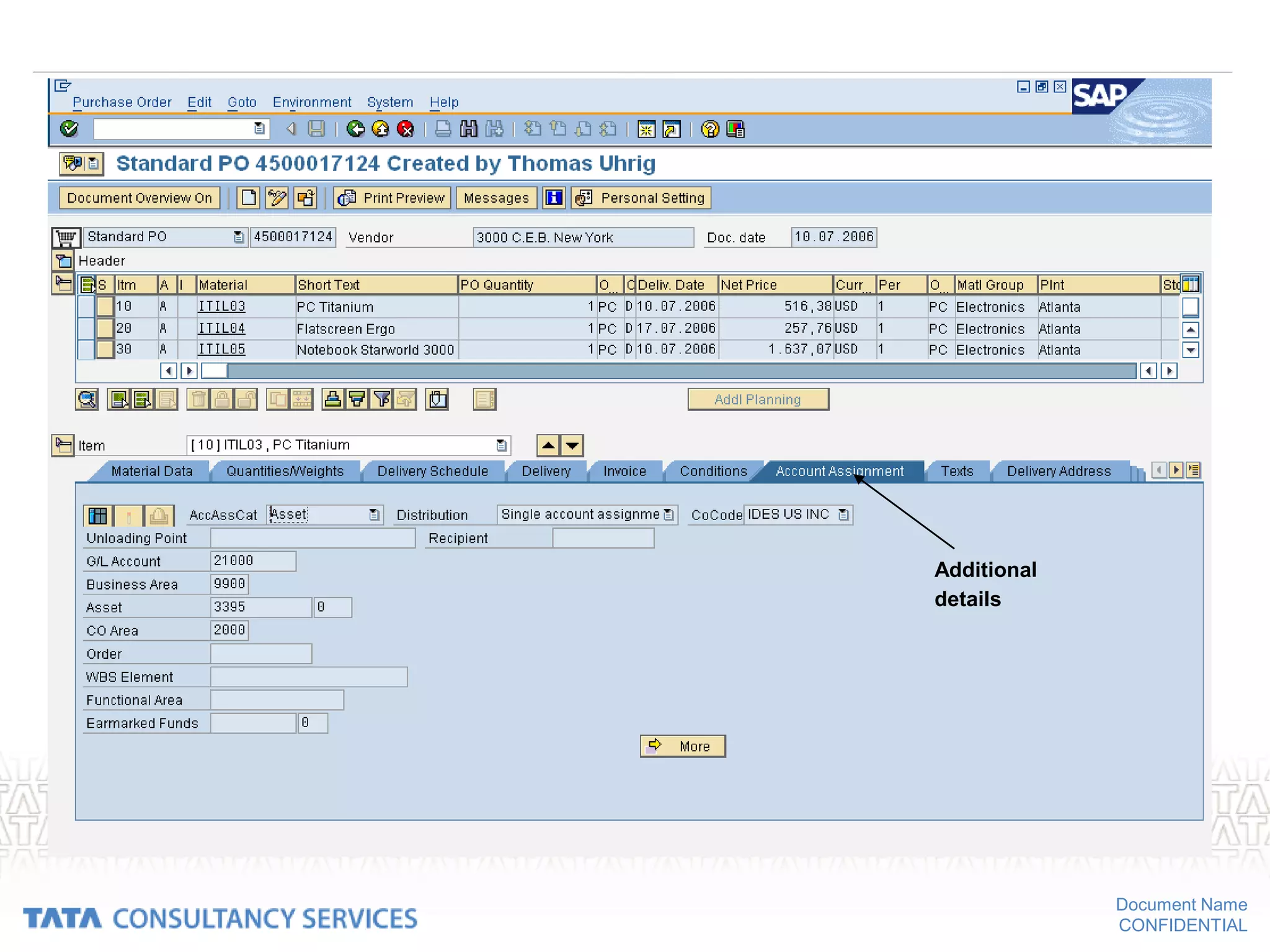
– The additional data
• It provides extra information about the item, and has no direct
connection with the item procurement data.
• Example,
– account assignment data
– PO history for an item, which contains information on already
recorded goods and invoice receipts relating to the item.
Document Name
CONFIDENTIAL
Additional
details
Document Name
CONFIDENTIAL
Purchasing documents
• Classification of Purchasing Documents
– Purchasing documents are differentiated in the SAP system via the
document type .
– Example, relevant number range depends on document types
– Document types are defined for RFQs, purchase orders, and contracts
• Numbering of purchasing documents
– Each document is assigned a unique number .
– This number can be assigned internally or externally , depending on the
policy .
– Internal number assignment means that the system assigns the number.
– External number assignment means that the person creating the
document must supply it.
– Alphanumeric assignment is only possible in the latter case.
Document Name
CONFIDENTIAL
Document Name
CONFIDENTIAL
Purchase Requisition
Document Name
CONFIDENTIAL
Purchase requisition
• Purchase requisition can be created in the following path:
SAP MENU LOGISTICS MATERIALS MANAGEMENT
PURCHASING  PURCHASE REQUISITION  CREATE
Document Name
CONFIDENTIAL
Document Name
CONFIDENTIAL
Purchase requisitions
• Definition
– A purchase requisition is a request or instruction to Purchasing to
procure a certain quantity of a material so that it is available at a certain
point in time.
– It is an internal document.
• Requisitions can be created in the following ways:
– Directly: Someone from the requesting department enters a purchase
requisition manually.
– Indirectly: The purchase requisition is created via MRP, production
orders, networks, sales order etc.
• Purchase requisitions can be subjected to a release procedure.
Document Name
CONFIDENTIAL
Document Name
CONFIDENTIAL
Purchase requisitions - integration
• Requisitions can be created indirectly in the following ways:
– via materials planning and control
• The component Consumption-Based Planning suggests materials that
need to be ordered on the basis of past consumption or usage figures
and existing stock levels.
• The order quantity and the delivery date are determined automatically.
• Materials planning and control can stipulate that a purchase
requisition is to be resubmitted to the purchasing department if it has
not been processed after a predefined period of time.
Document Name
CONFIDENTIAL
Purchase requisitions - integration
• Requisitions are generated automatically from production orders if
– They contain an external processing operation (e.g. subcontracting work)
– A precondition is that the control key for the operation allows or
prescribes external processing.
– they contain non-stock components
Document Name
CONFIDENTIAL
Purchase requisitions
• Item category: It’s a Key which determines how the procurement of a
material or service item is controlled. Depending upon the item category
chosen in the document the procurement type will be different.
• Procurement types
– Standard
– Subcontracting
• Components to be provided can be entered.
– Consignment
– Third party
– Stock transfer
– External service
• Service specifications can be entered
Document Name
CONFIDENTIAL
Different types of item category
Document Name
CONFIDENTIAL
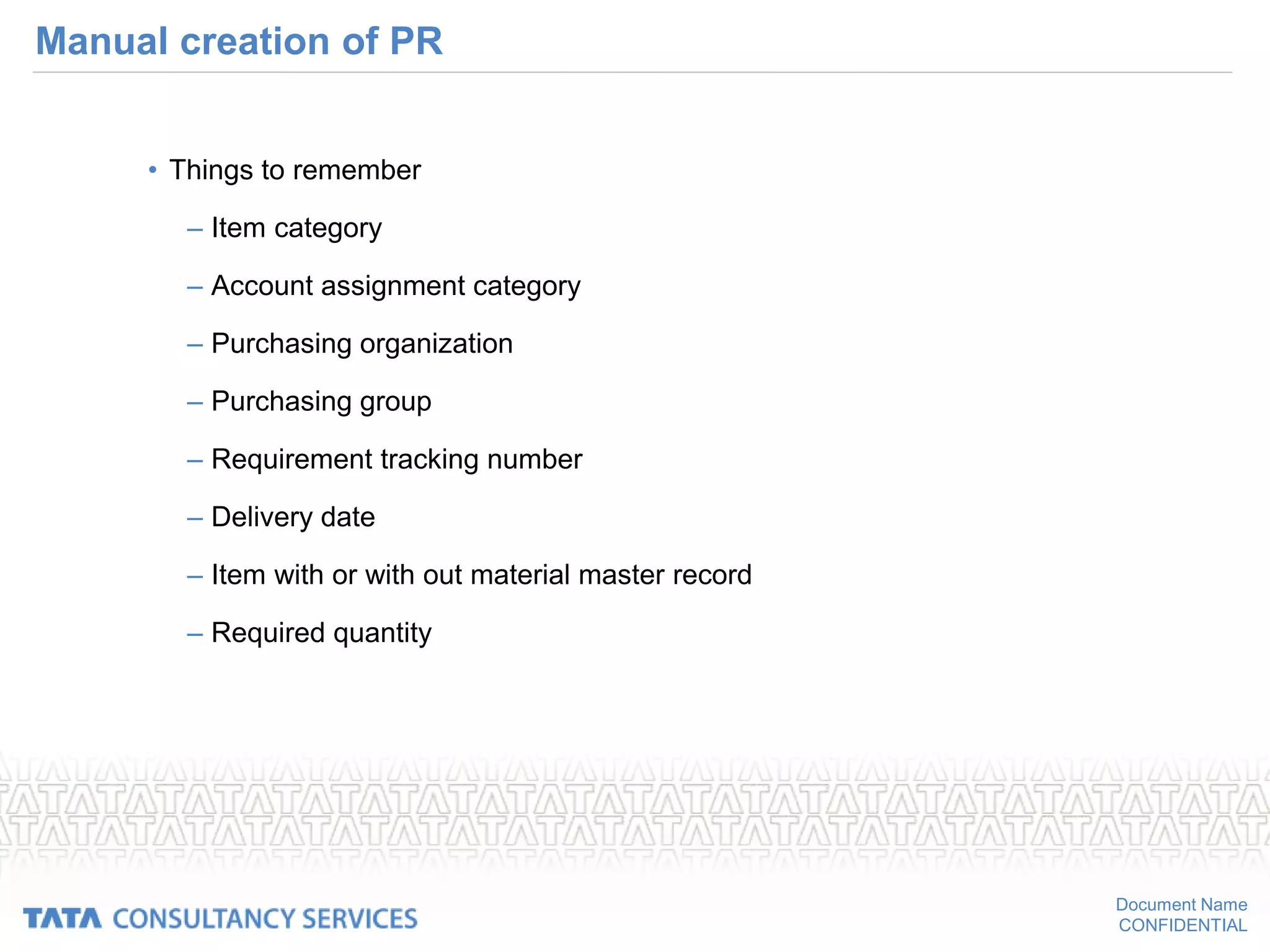
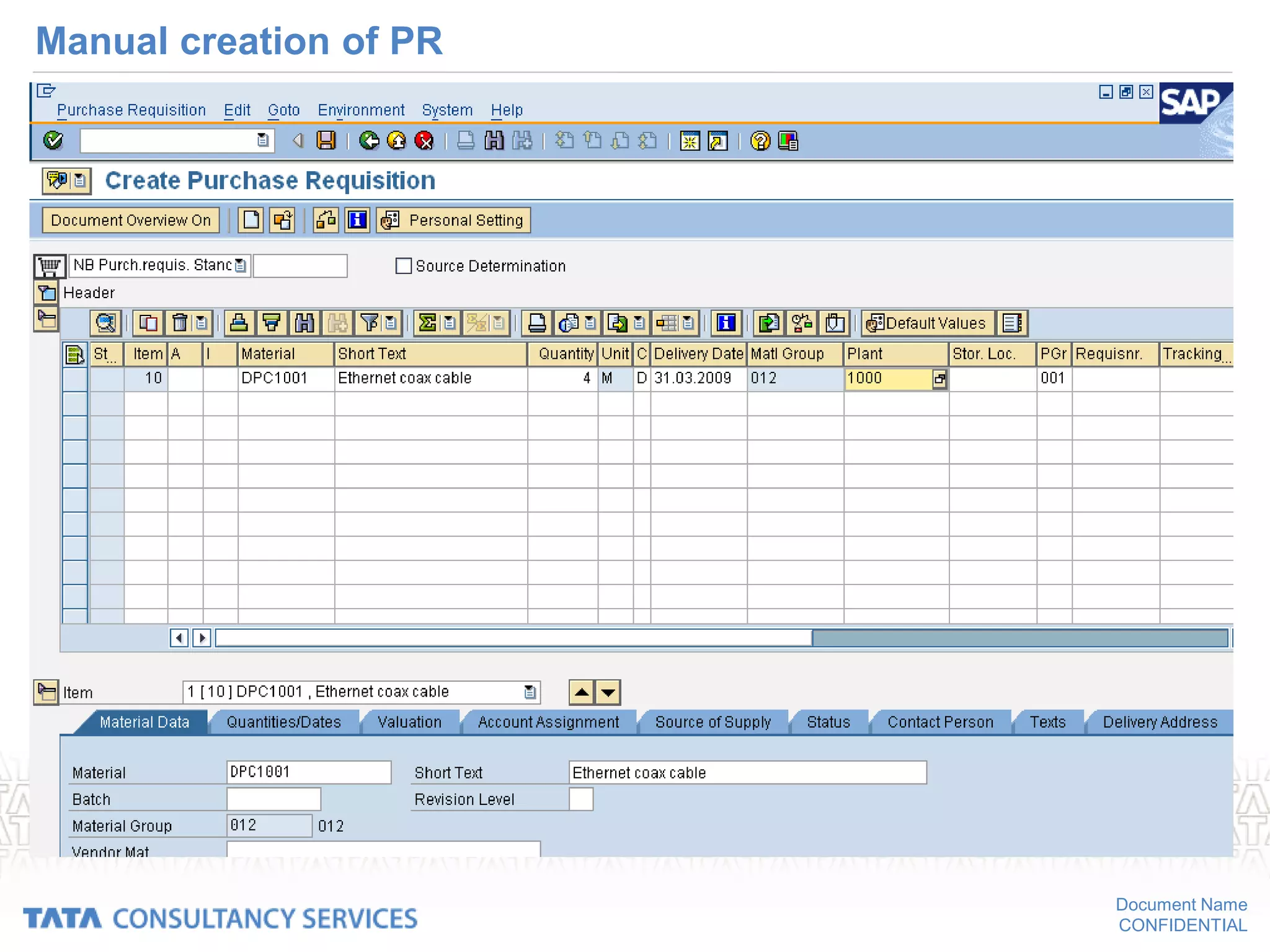
Manual creation of PR
• Things to remember
– Item category
– Account assignment category
– Purchasing organization
– Purchasing group
– Requirement tracking number
– Delivery date
– Item with or with out material master record
– Required quantity
Document Name
CONFIDENTIAL
Manual creation of PR
Document Name
CONFIDENTIAL
Request For Quotations
Document Name
CONFIDENTIAL
• Path for creation of request for quotation:
• SAP MENU  LOGISTICS  MATERIALS MANAGEMENT
PURCHASING  RFQ/QUOTATION  REQUEST FOR QUOTATION
 CREATE
Document Name
CONFIDENTIAL
Creating Request For Quotation
• Automatically from PR
• Manually
– With reference to PR
– With out reference to PR
• Delivery address
– Address of the company asking for quotation, by default it is the
address of E+L. But it can be changed.
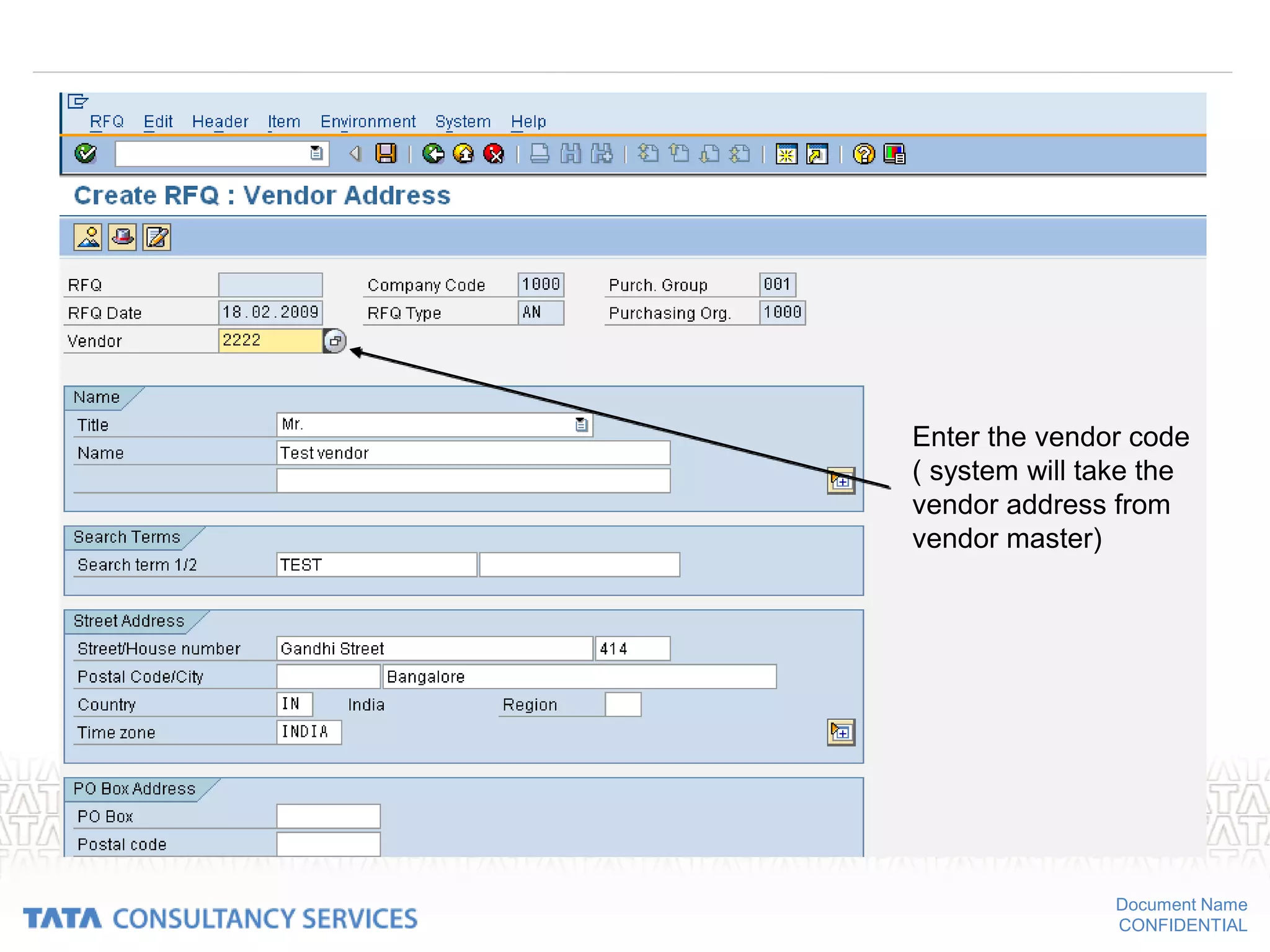
• vendor address
– Just enter the codes of the vendor, System will take other details
from vendor master.
• Quotation dead line
• Delivery date
Document Name
CONFIDENTIAL
RFQ (contd…)
• Printing RFQ
• Send the Printed RFQ to the vendors
• Receive the quotation from the vendor
• Maintain the quotation
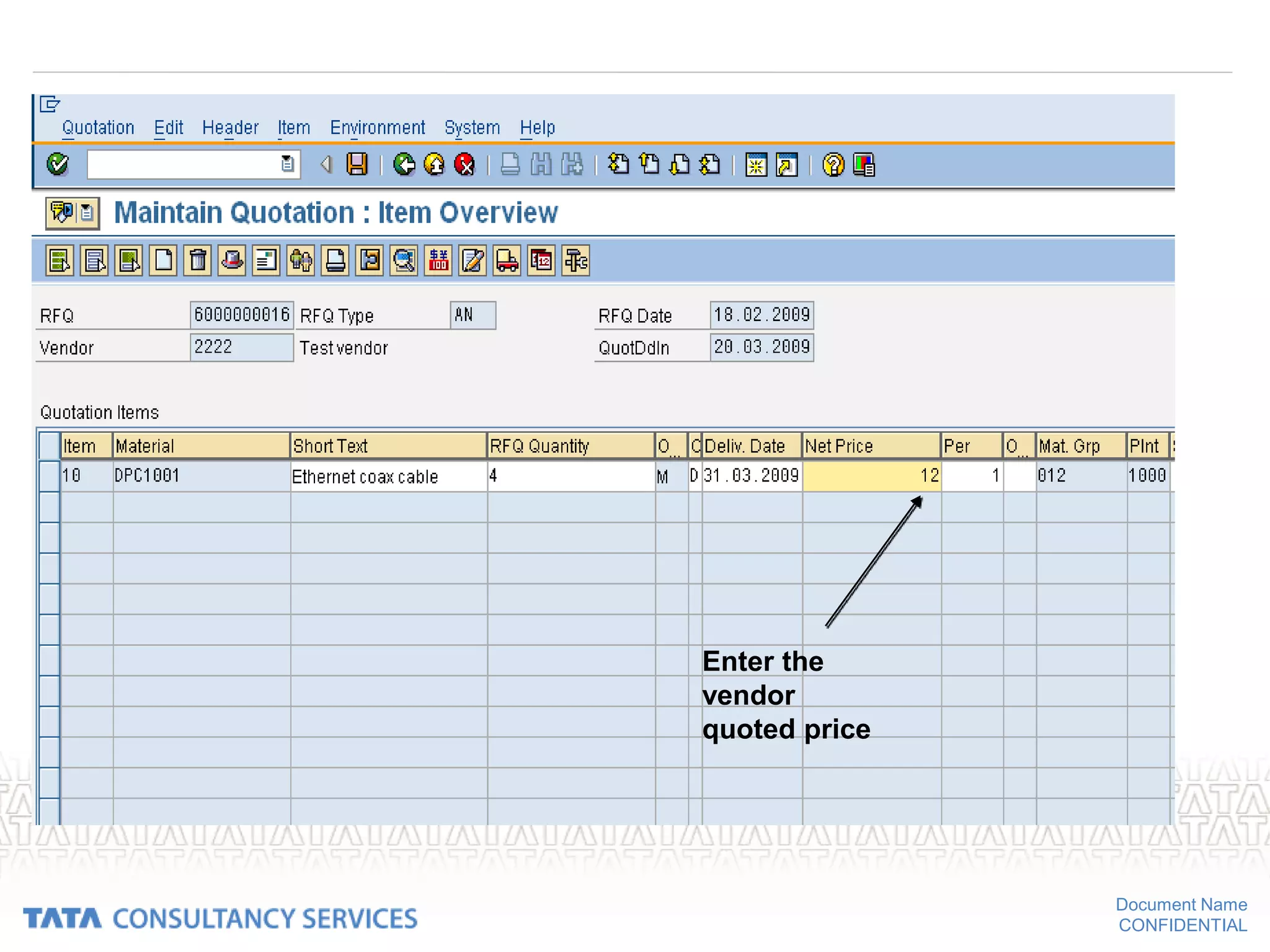
– Enter the net price quoted by the vendor
– Enter the pricing conditions
– Terms of payment
– Update the info record if required
Document Name
CONFIDENTIAL
Create request for quotation
Document Name
CONFIDENTIAL
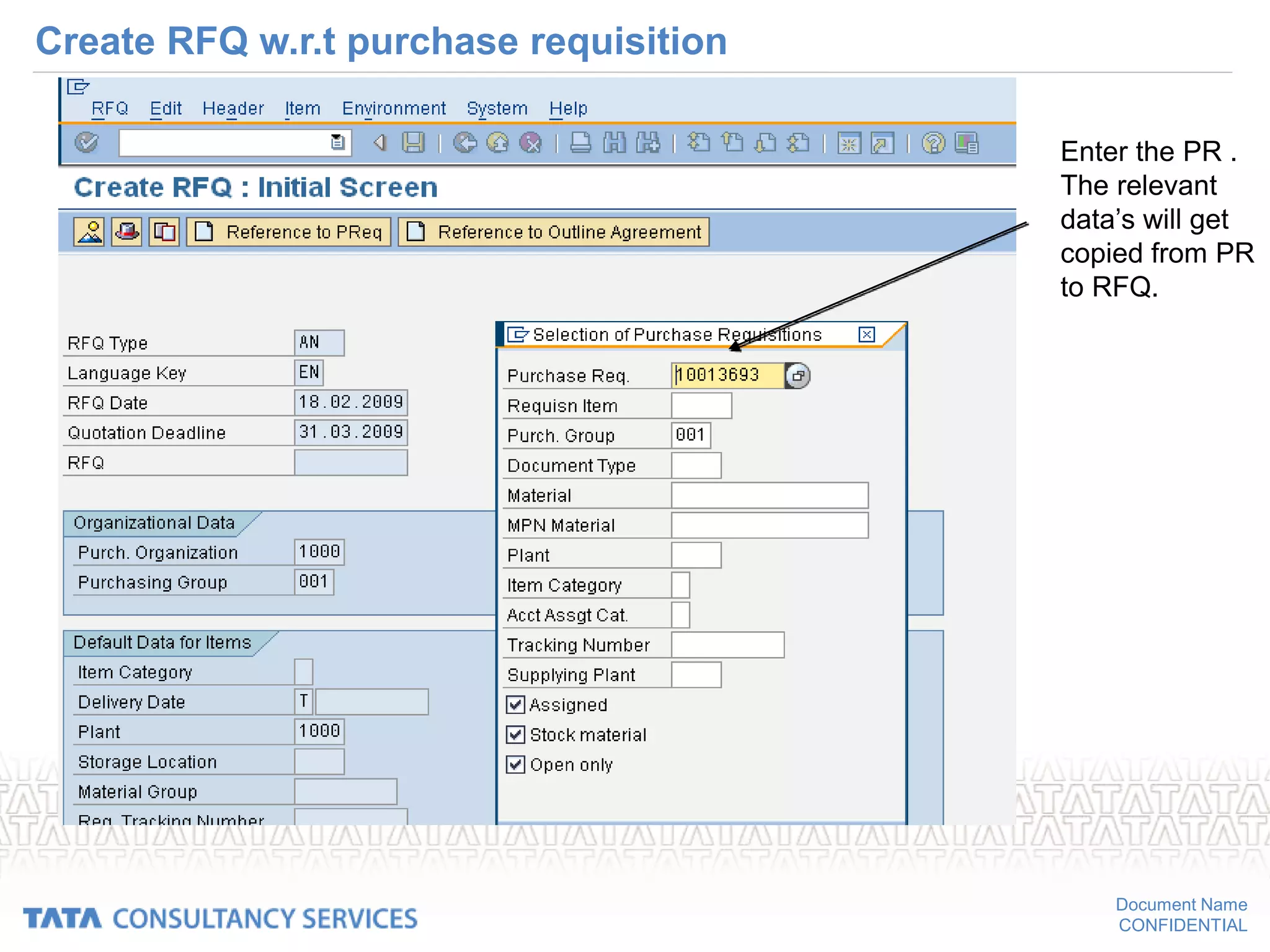
Create RFQ w.r.t purchase requisition
Enter the PR .
The relevant
data’s will get
copied from PR
to RFQ.
Document Name
CONFIDENTIAL
Enter
collective
number
Document Name
CONFIDENTIAL
Create Request for quotation:
• Collective number: If the RFQs of a particular procurement process have
been assigned to a collective number, it is then possible to list and process
all the individual RFQs/inquiries that are grouped under this number.
• You have created 20 RFQs/inquiries for the procurement of a material and
have filed them under the collective number “COL001".
So collective number helps in following ways:
• In respect of which RFQs have quotations been received?
• What is the net price of each quotation?
You can obtain this information by listing all individual RFQs entered under
the collective number “COL001”
Document Name
CONFIDENTIAL
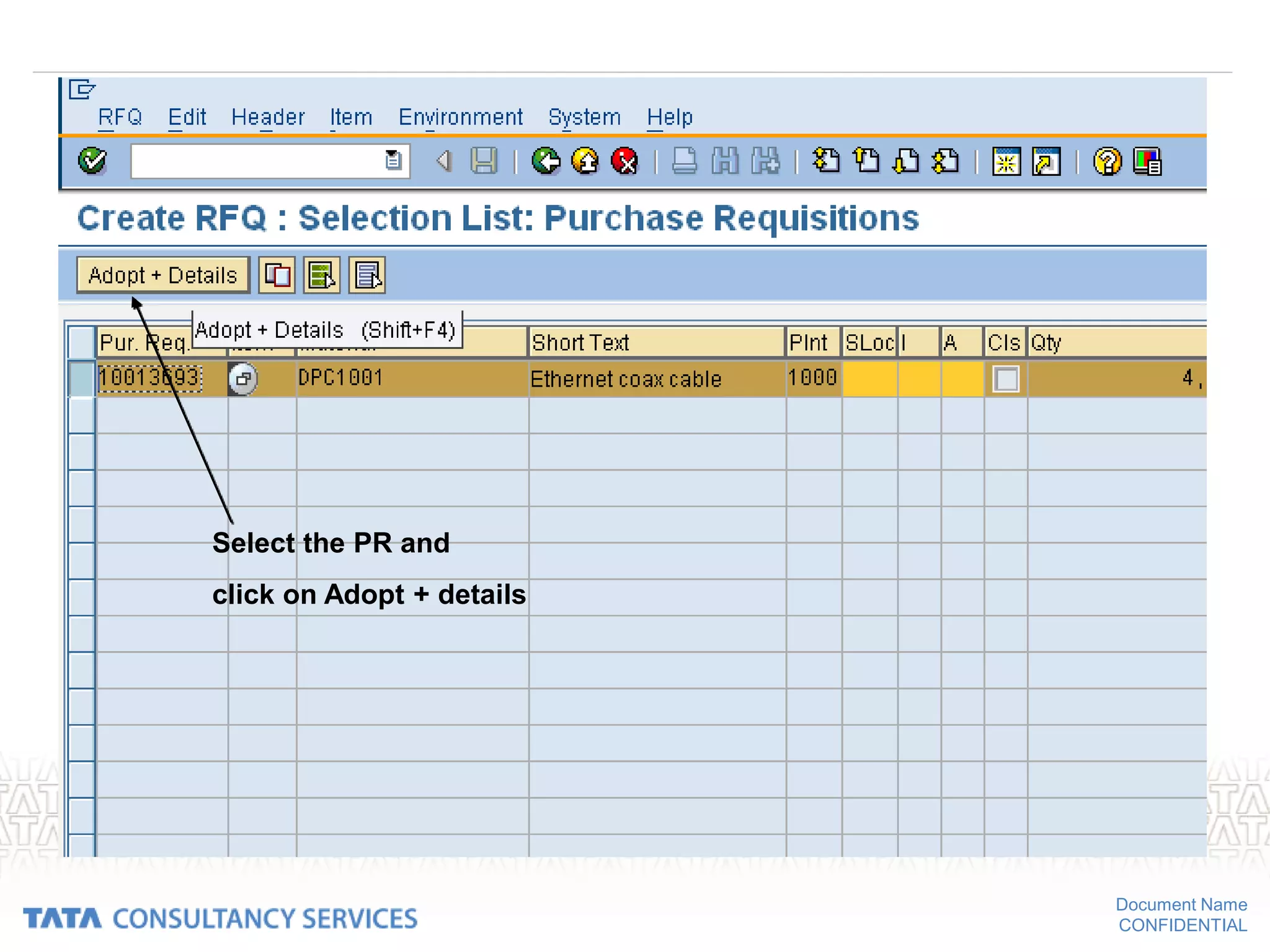
Select the PR and
click on Adopt + details
Document Name
CONFIDENTIAL
Document Name
CONFIDENTIAL
Document Name
CONFIDENTIAL
Enter the vendor code
( system will take the
vendor address from
vendor master)
Document Name
CONFIDENTIAL
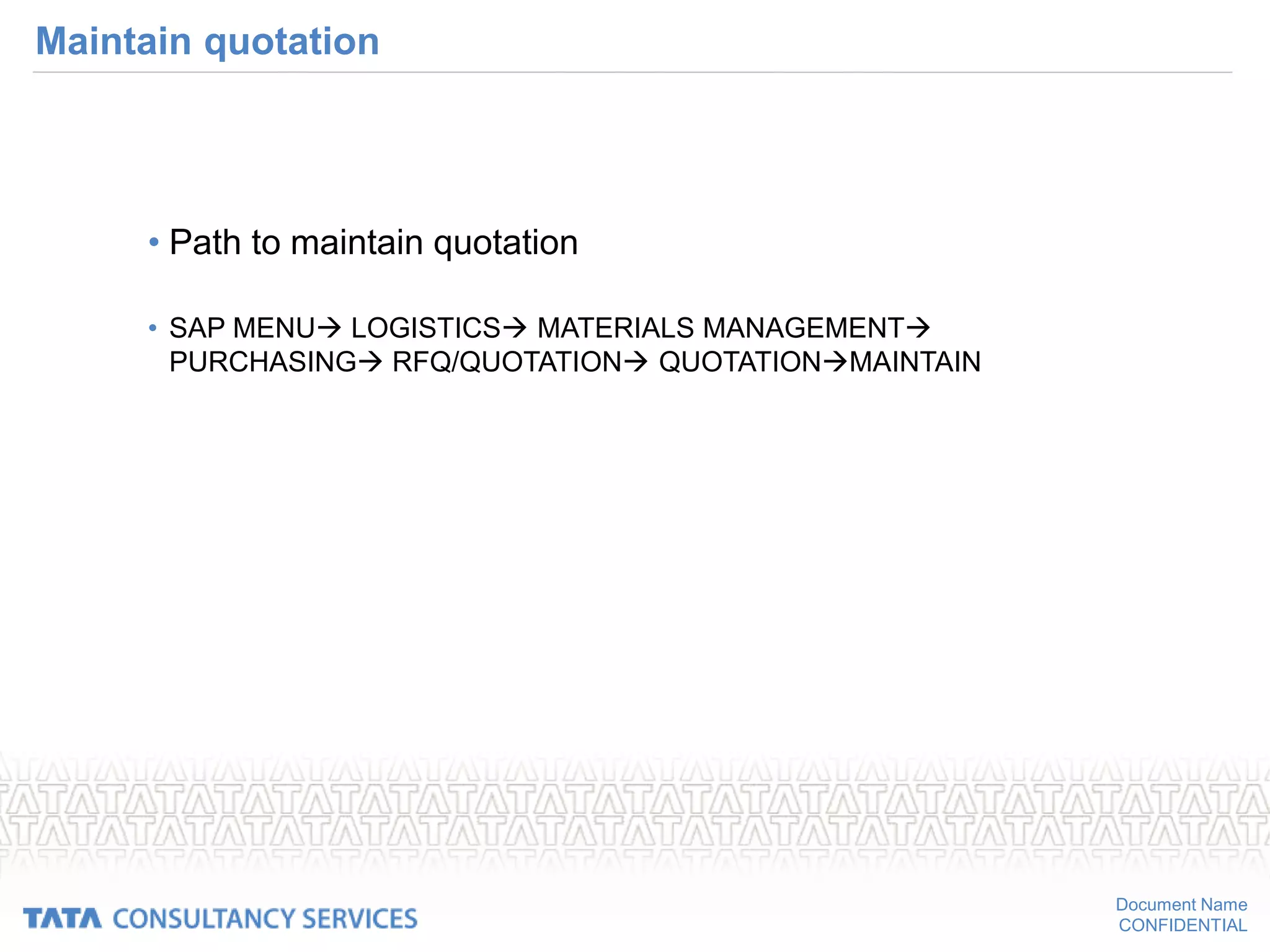
Maintain quotation
• Path to maintain quotation
• SAP MENU LOGISTICS MATERIALS MANAGEMENT
PURCHASING RFQ/QUOTATION QUOTATIONMAINTAIN
Document Name
CONFIDENTIAL
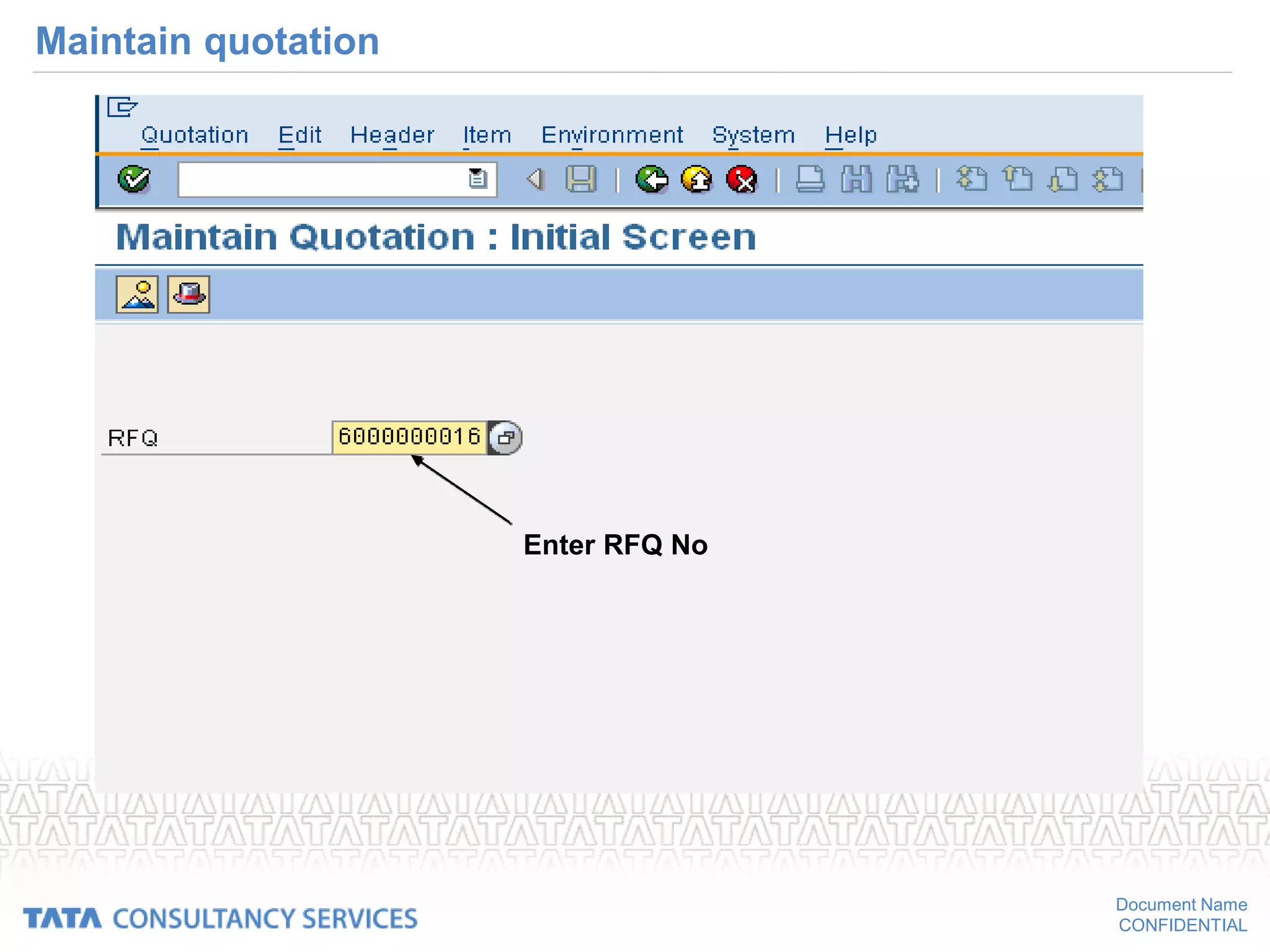
Maintain quotation
Enter RFQ No
Document Name
CONFIDENTIAL
Enter the
vendor
quoted price
Document Name
CONFIDENTIAL
Maintain quotation
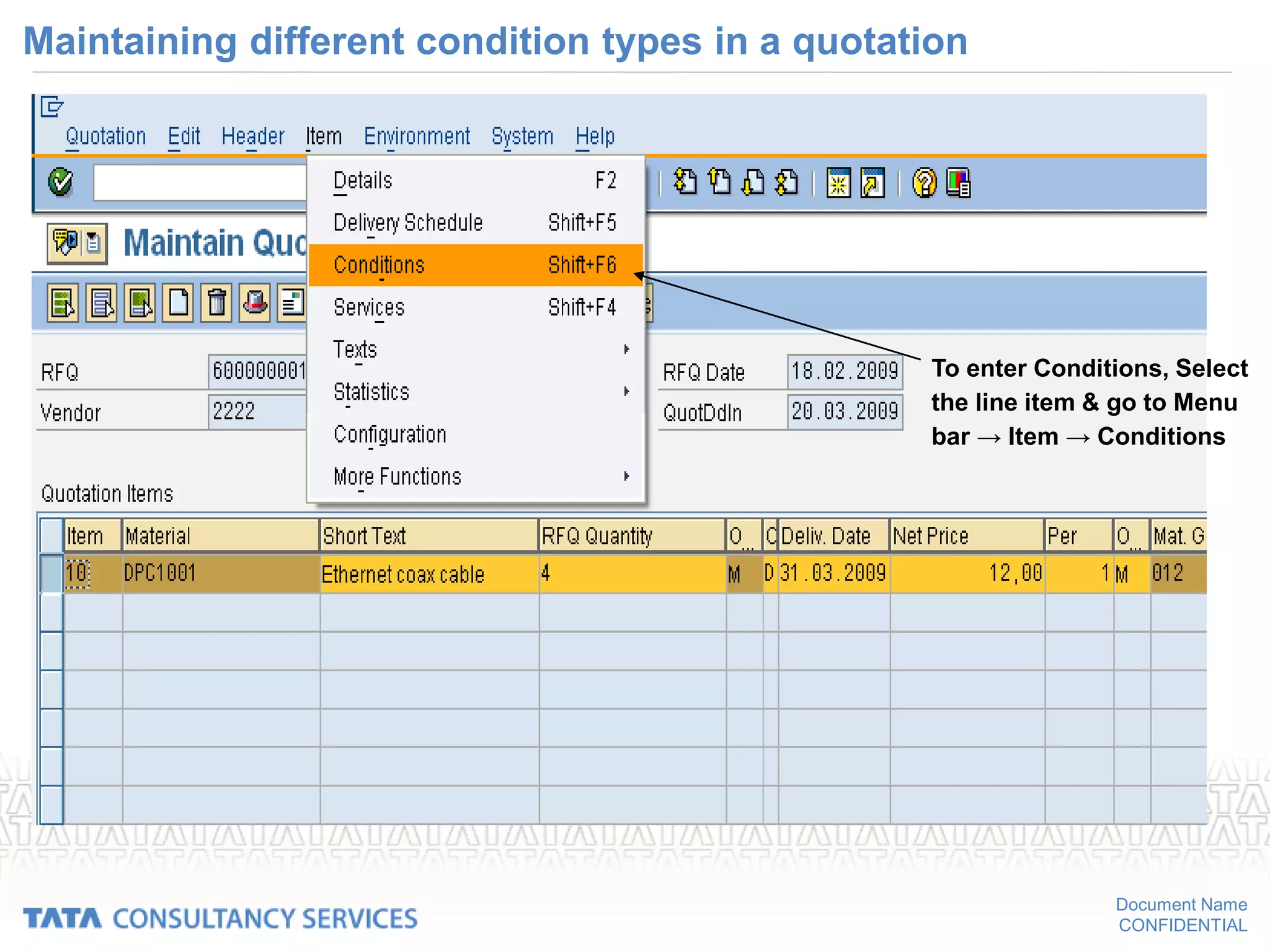
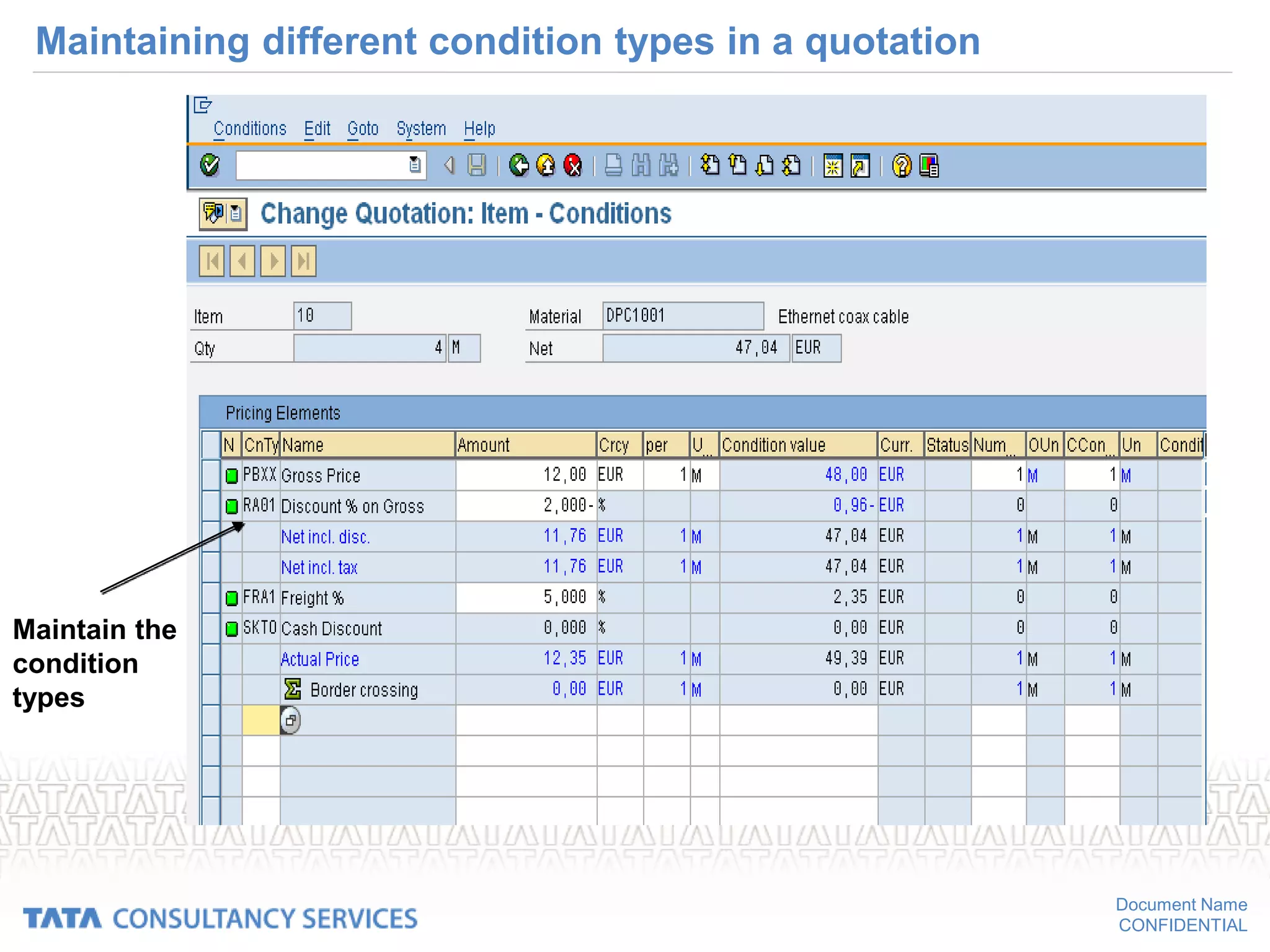
• Discounts, freight cost & any other additional planned costs can be entered
in the quotation which gives an opportunity to compare the actual landed
cost of material considering all pricing factors
• Besides entering the different kind of prices, the validity period of these
price can also be entered.
Document Name
CONFIDENTIAL
Maintaining different condition types in a quotation
To enter Conditions, Select
the line item & go to Menu
bar → Item → Conditions
Document Name
CONFIDENTIAL
Maintaining different condition types in a quotation
Maintain the
condition
types
Document Name
CONFIDENTIAL
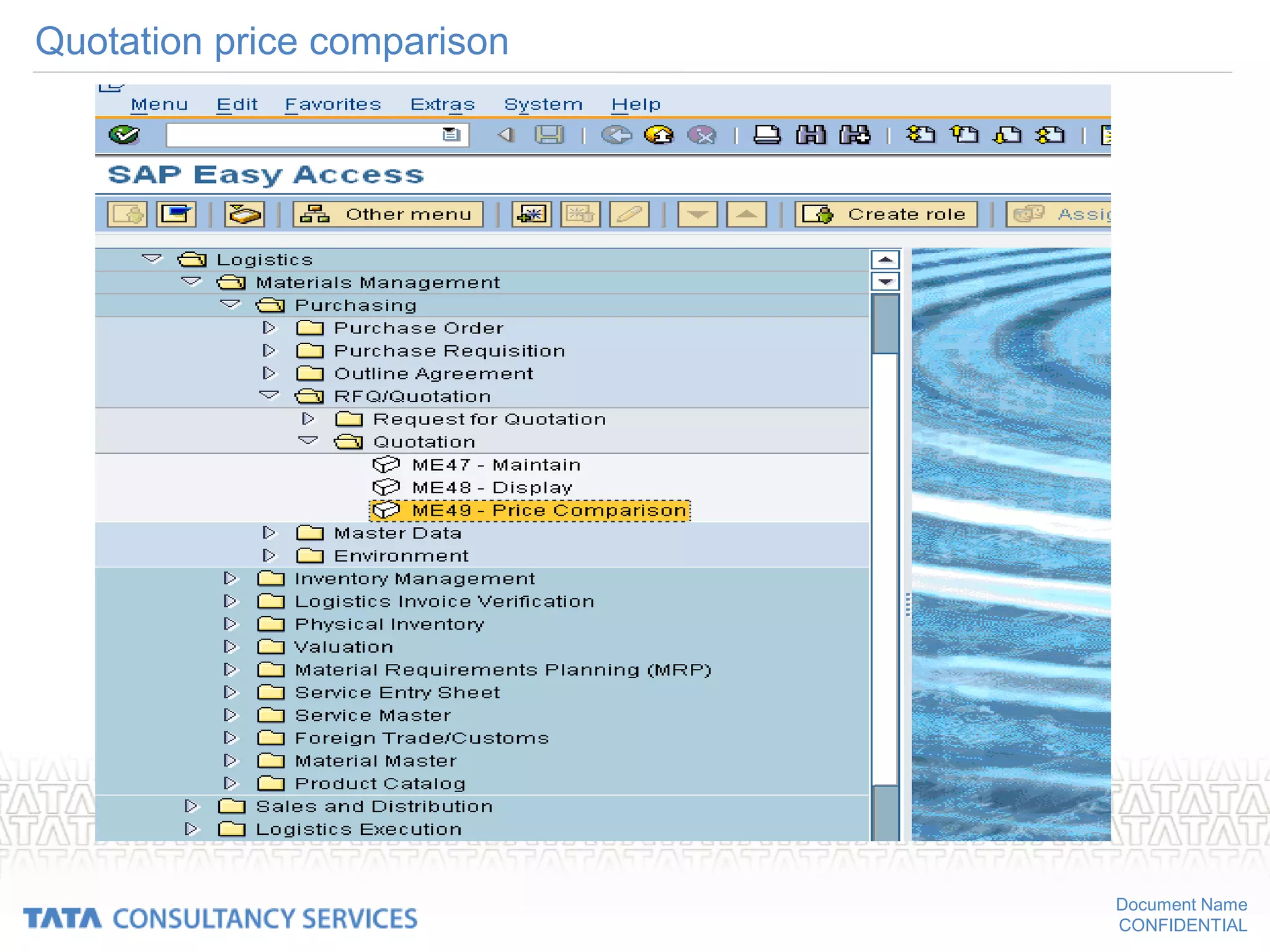
Quotation price comparison
• The path for price comparison of quotations
• SAP MENU  LOGISTICS  MATERIALS MANAGEMENT
PURCHASING  RFQ/QUOTATION QUOTATION  PRICE
COMPARISON
Document Name
CONFIDENTIAL
Quotation price comparison
Document Name
CONFIDENTIAL
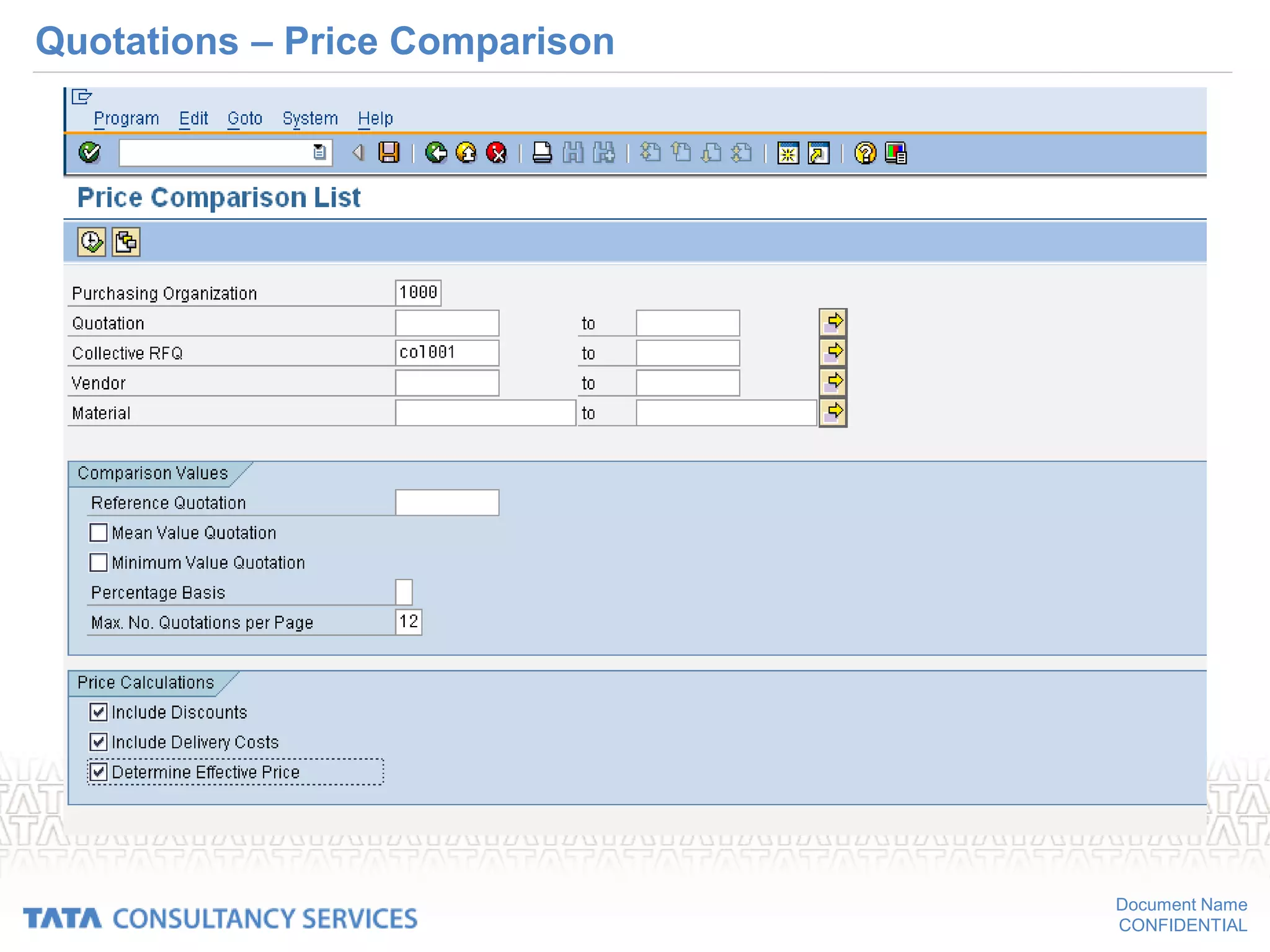
Quotations – Price Comparison
• Compare the quotations
– Maintain the collective number in the RFQs
– Quotations can be compared based on price
– Discounts and delivery costs can be included
– Comparison can be based on effective price also
– System compares and gives the ranking list
• Percentage basis for comparing quotations
– Mean value equals 100%
– Maximum value equals 100%
– Minimum value equals 100%
Document Name
CONFIDENTIAL
Quotations – Price Comparison
Document Name
CONFIDENTIAL
Quotations – Price Comparison
Document Name
CONFIDENTIAL
Outline agreement
Document Name
CONFIDENTIAL
Outline agreements with the vendor
• To set-up longer-term purchasing arrangements with vendors regarding the
supply of materials or the performance of services.
• Outline agreements can be subjected to a release (approval or clearance)
procedure.
• Outline agreement types
– contract
– Scheduling agreement
Document Name
CONFIDENTIAL
Contract
• Contract: A contract is a type of outline purchase agreement against which
release orders (releases) can be issued for agreed materials or services as
and when required during a certain overall time-frame.
Contracts can take the following forms:
• Quantity contracts:
Use this type of contract if the total quantity to be ordered during the validity
period of the contract is known in advance. The contract is regarded as
fulfilled when release orders totaling a given quantity have been issued.
• Value contracts:
Use this type of contract if the total value of all release orders issued against
the contract is not to exceed a certain predefined value. The contract is
regarded as fulfilled when release orders totaling a given value have been
issued.
Document Name
CONFIDENTIAL
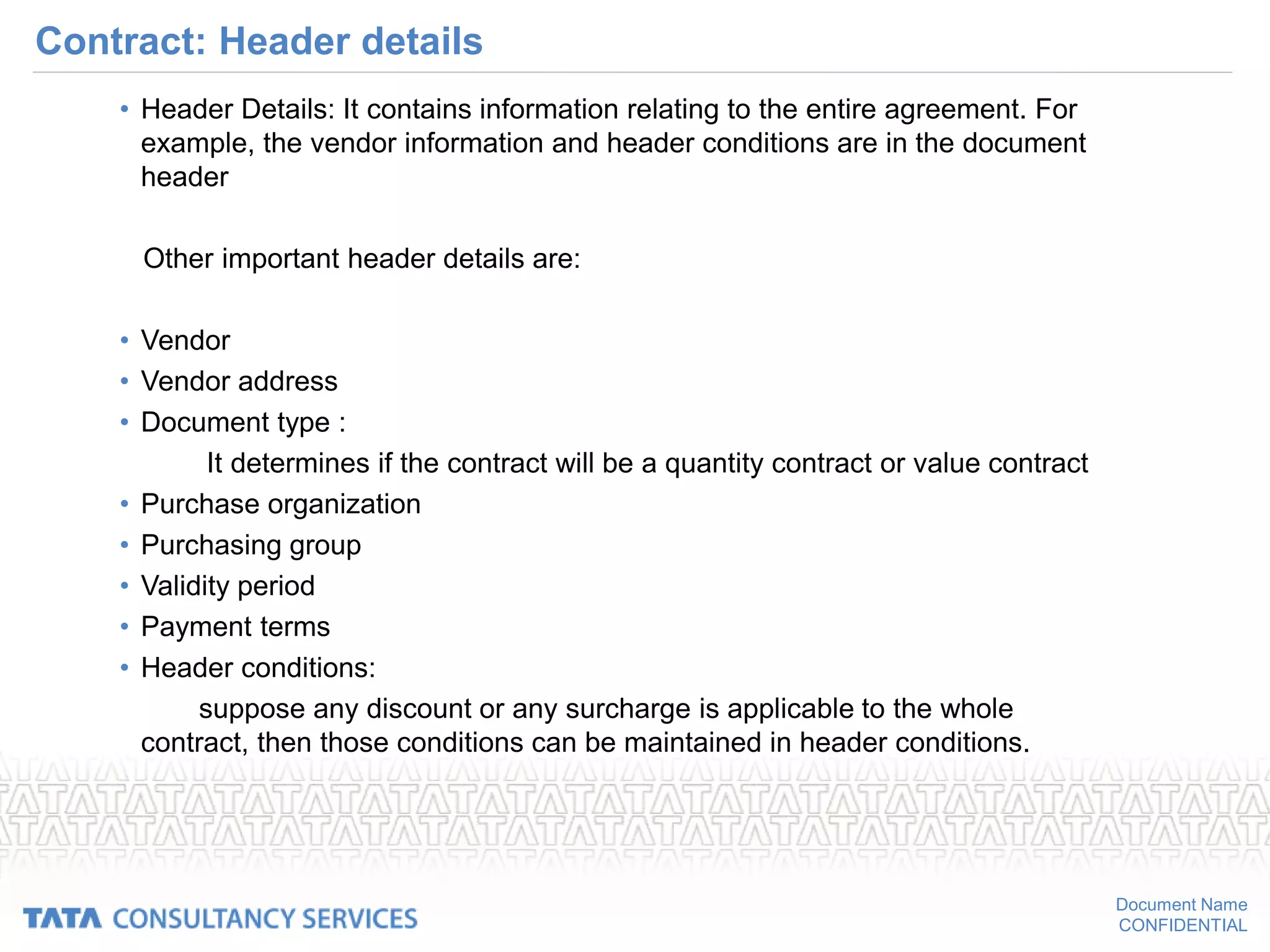
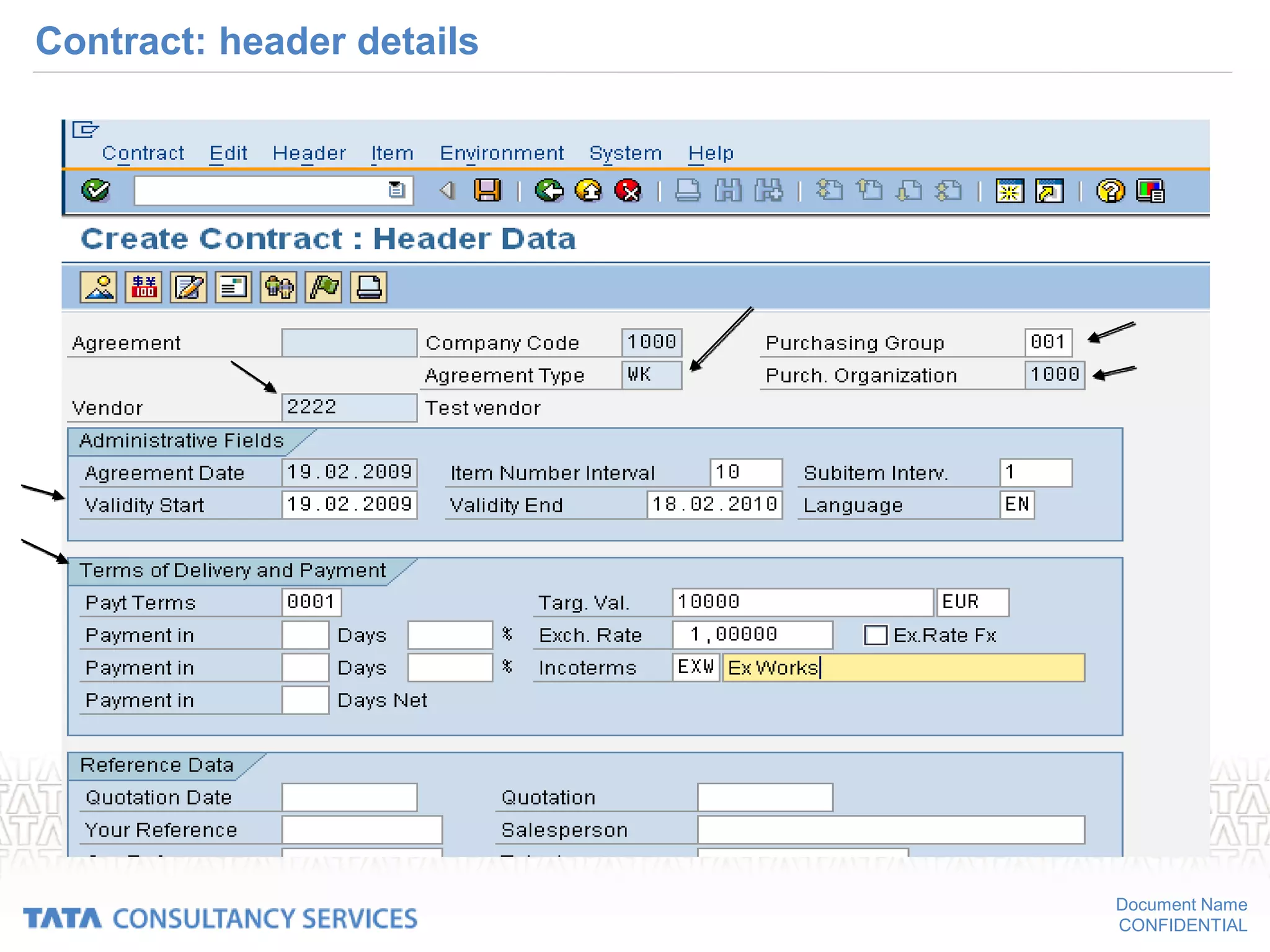
Contract: Header details
• Header Details: It contains information relating to the entire agreement. For
example, the vendor information and header conditions are in the document
header
Other important header details are:
• Vendor
• Vendor address
• Document type :
It determines if the contract will be a quantity contract or value contract
• Purchase organization
• Purchasing group
• Validity period
• Payment terms
• Header conditions:
suppose any discount or any surcharge is applicable to the whole
contract, then those conditions can be maintained in header conditions.
Document Name
CONFIDENTIAL
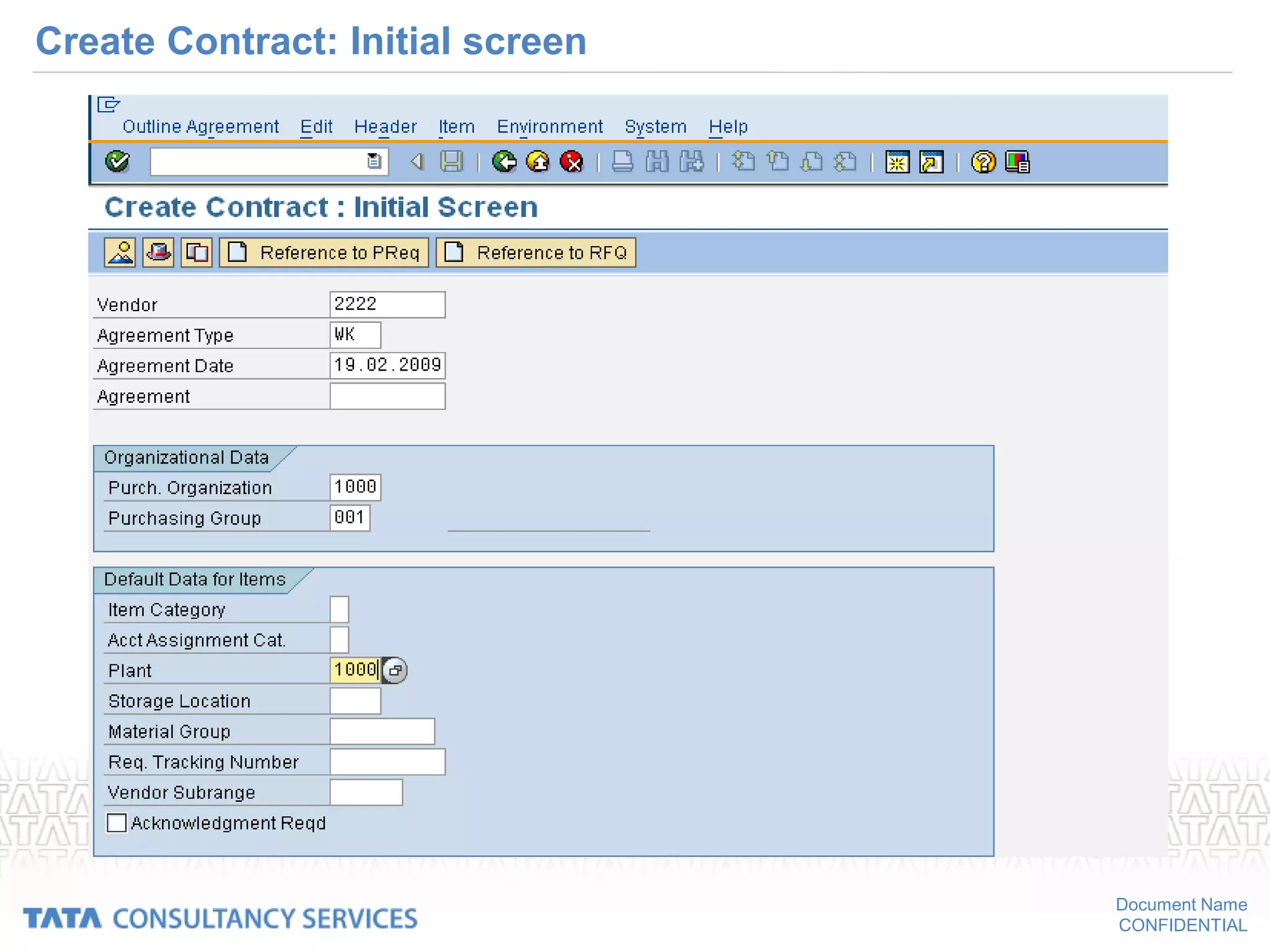
Create Contract: Initial screen
Document Name
CONFIDENTIAL
Contract: header details
Document Name
CONFIDENTIAL
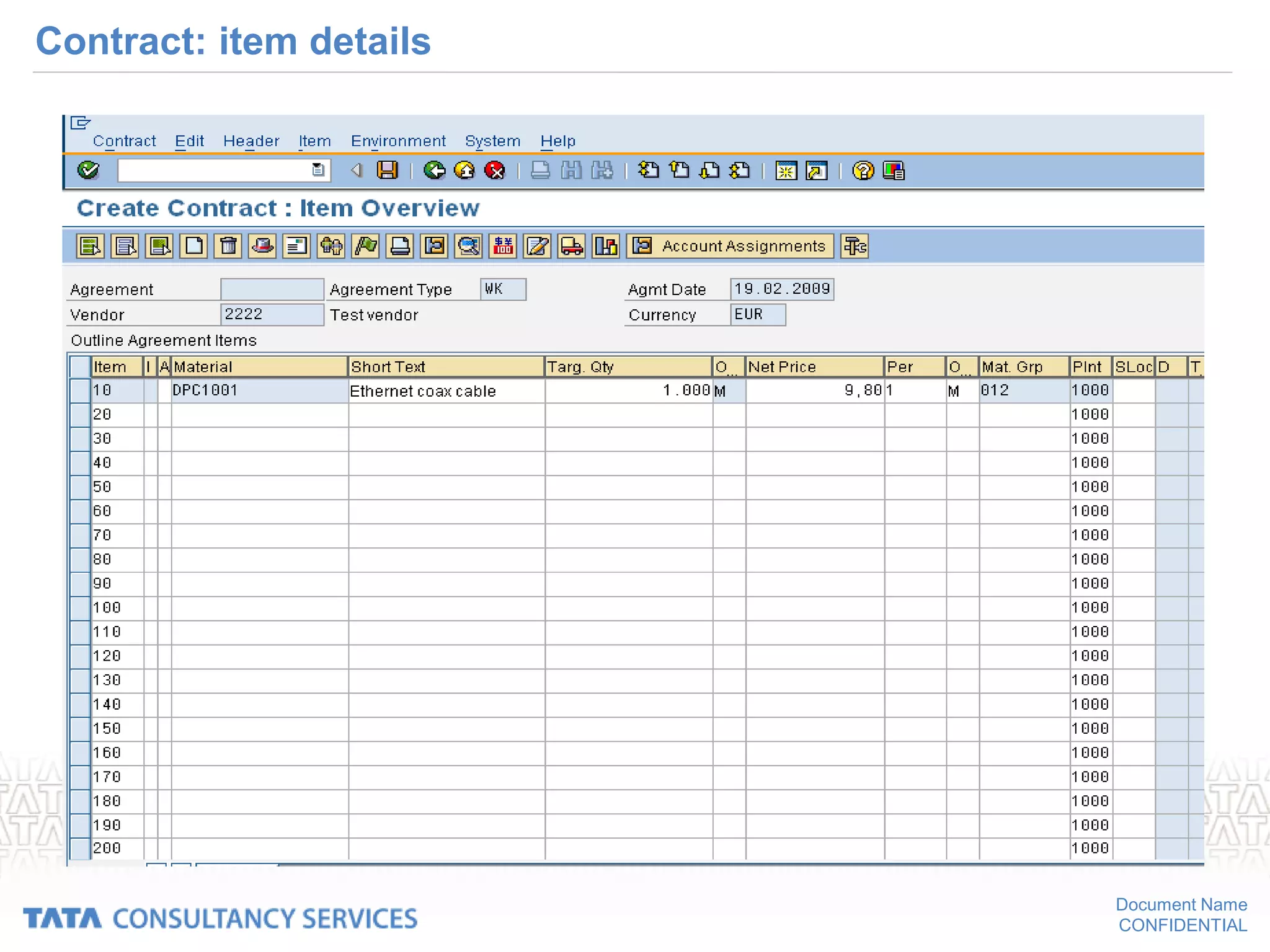
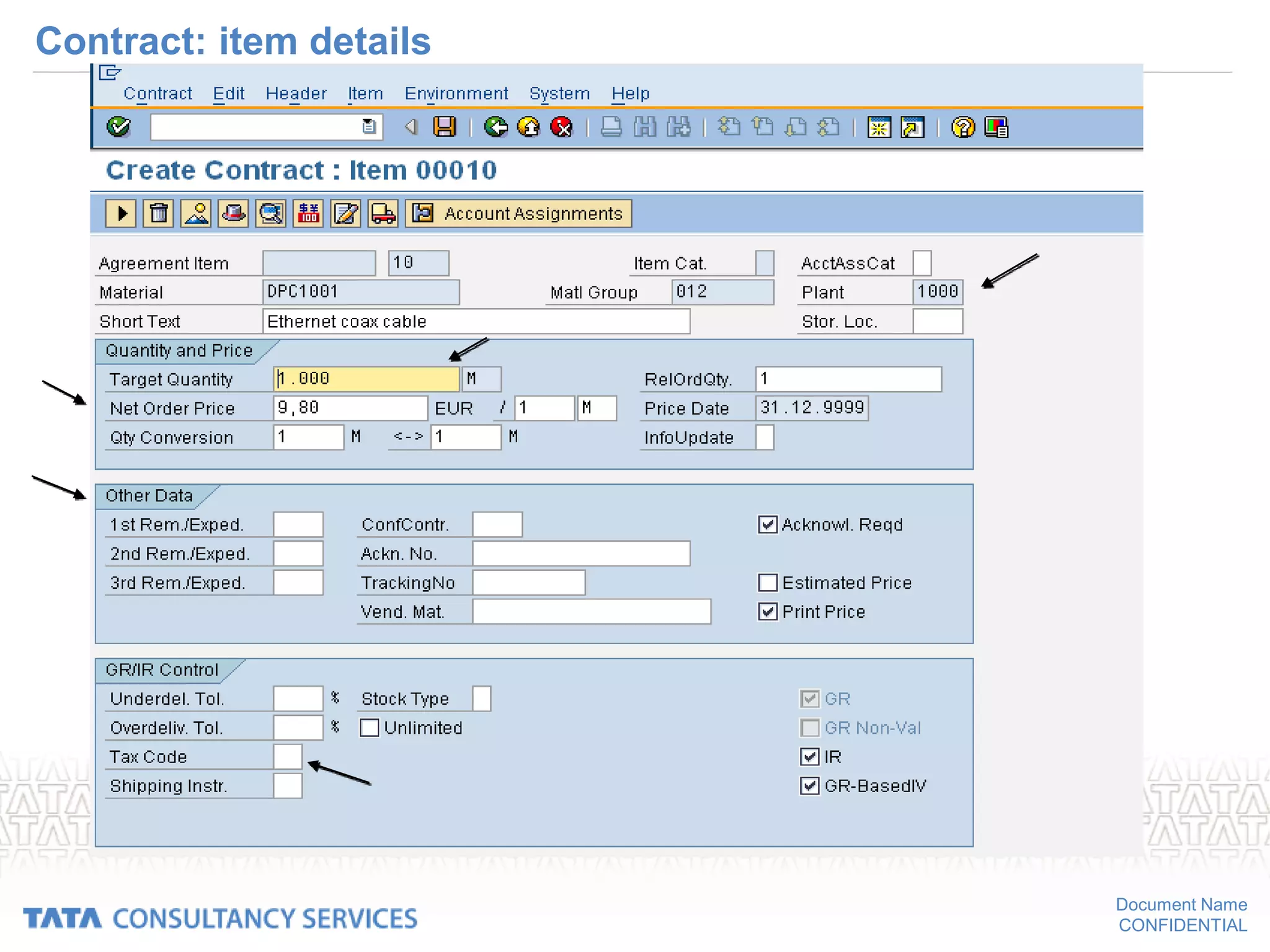
Contract: item details
• Item Details: It contains the information specific to the relevant material or
service. For example, the material/service information and item conditions.
Other important item details are:
• Material / service
• Quantity
• Net price
• Item conditions such as discount & delivery costs
• Tax codes
• Plant
• Reminder details
• Delivery address
Item details also provides information on the statistics of goods delivery of the
contract.
Document Name
CONFIDENTIAL
Contract: item details
Document Name
CONFIDENTIAL
Contract: item details
Document Name
CONFIDENTIAL
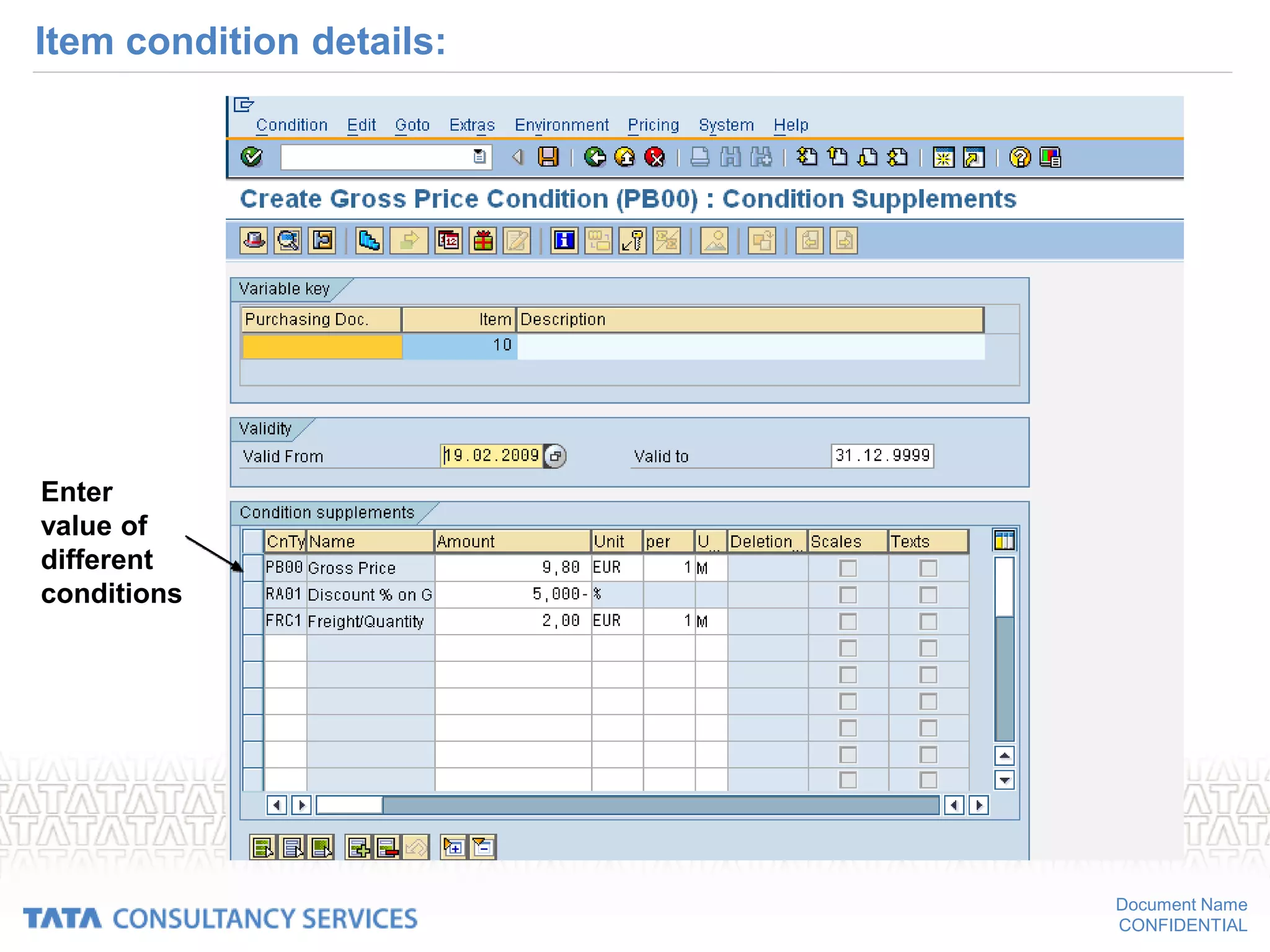
Item condition details:
Enter
value of
different
conditions
Document Name
CONFIDENTIAL
Texts in contract
• Texts in contract
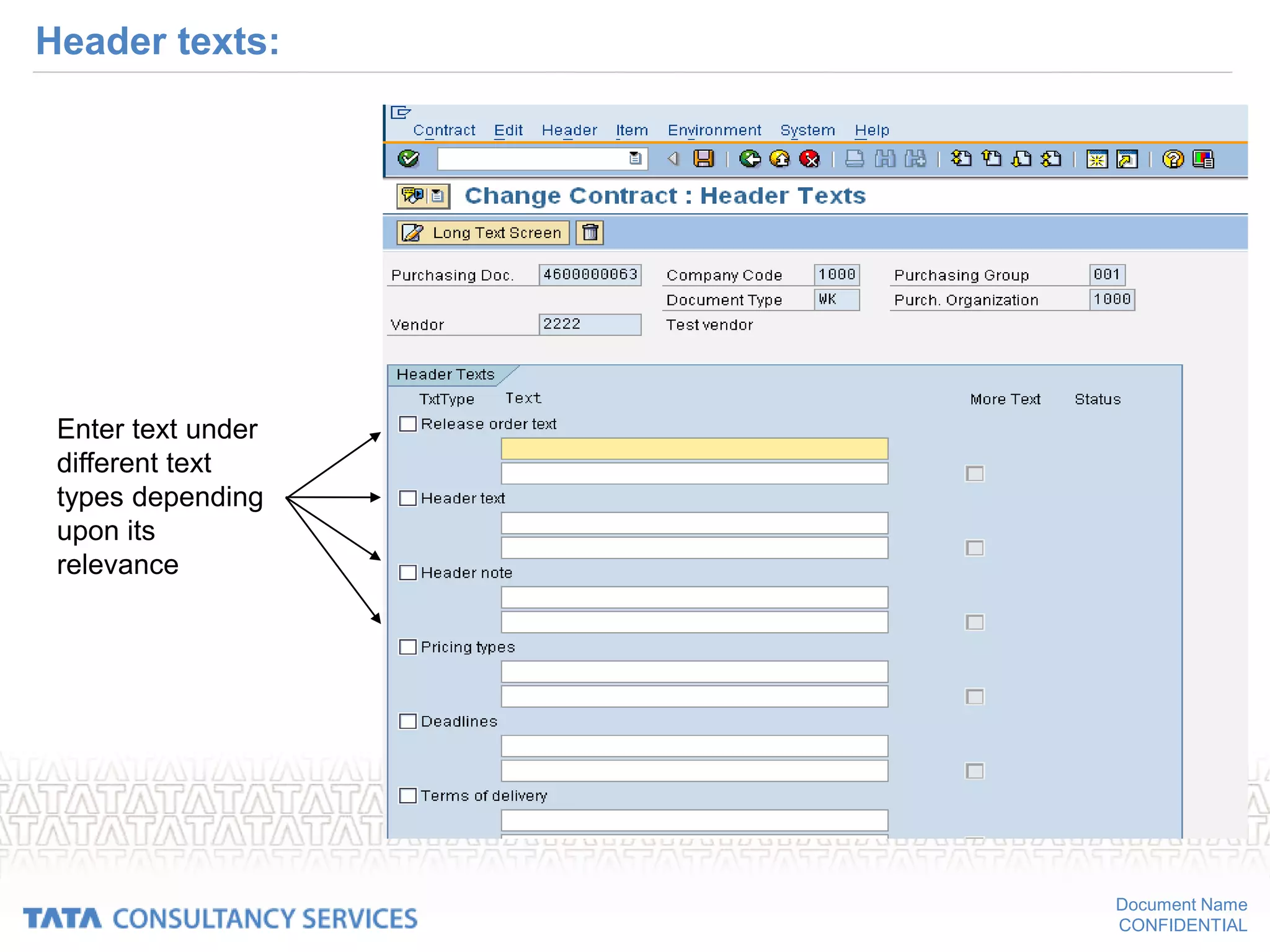
– Header texts
The texts entered in header details holds for the whole document.
– Item texts
The texts entered in item details holds only for the respective material or
service.
These texts can be entered under different text types as per the relevance
of the information.
– You can create your own text types
Document Name
CONFIDENTIAL
Header texts:
Enter text under
different text
types depending
upon its
relevance
Document Name
CONFIDENTIAL
Item text:
Enter text under
different text
types depending
upon its
relevance
Document Name
CONFIDENTIAL
Purchase order creation:
Document Name
CONFIDENTIAL
Course Objectives
• Create a new PO
• Make changes to existing PO
• Print PO
• Navigate through purchasing information system
On conclusion of this course, you should be
able to
Document Name
CONFIDENTIAL
Introduction
• Contents
• Creating POs
• Printing of POs
• Printing Remainders
• Changing or cancelling POs
• Purchasing information
Document Name
CONFIDENTIAL
Purchase order
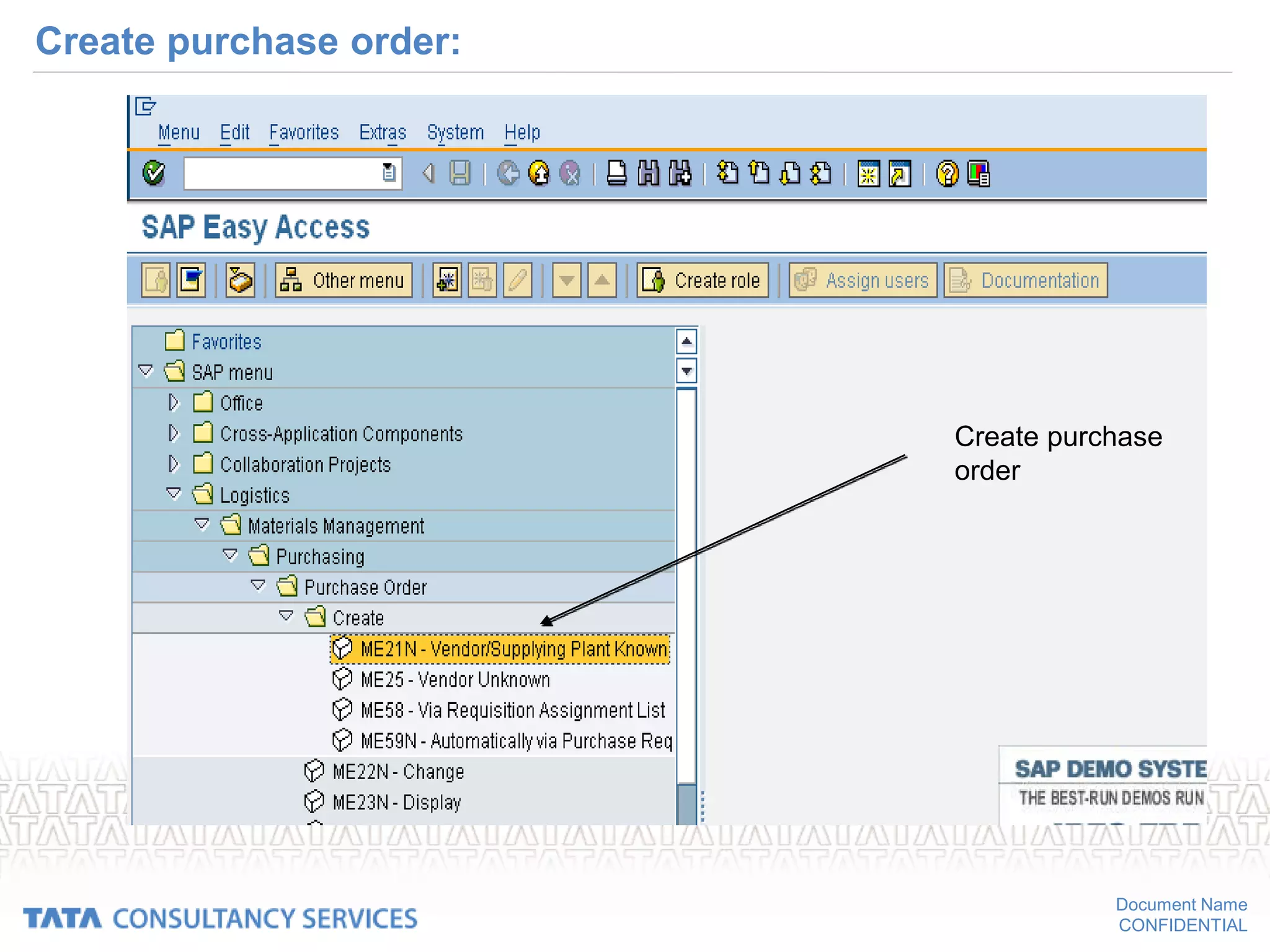
• Path for creation of purchase order:
• SAP MENU  LOGISTICS MATERIALS MANAGEMENT 
PURCHASING PURCHASE ORDER  CREATE  VENDOR /
SUPPLYING PLANT KNOWN
Document Name
CONFIDENTIAL
Create purchase order:
Create purchase
order
Document Name
CONFIDENTIAL
Purchase order
• Definition
– Formal request or instruction from a purchasing organization to a vendor
or a plant to supply or provide a certain quantity of goods or services at
or by a certain point in time.
• Structure
– Header
– items
– Additional data
Document Name
CONFIDENTIAL
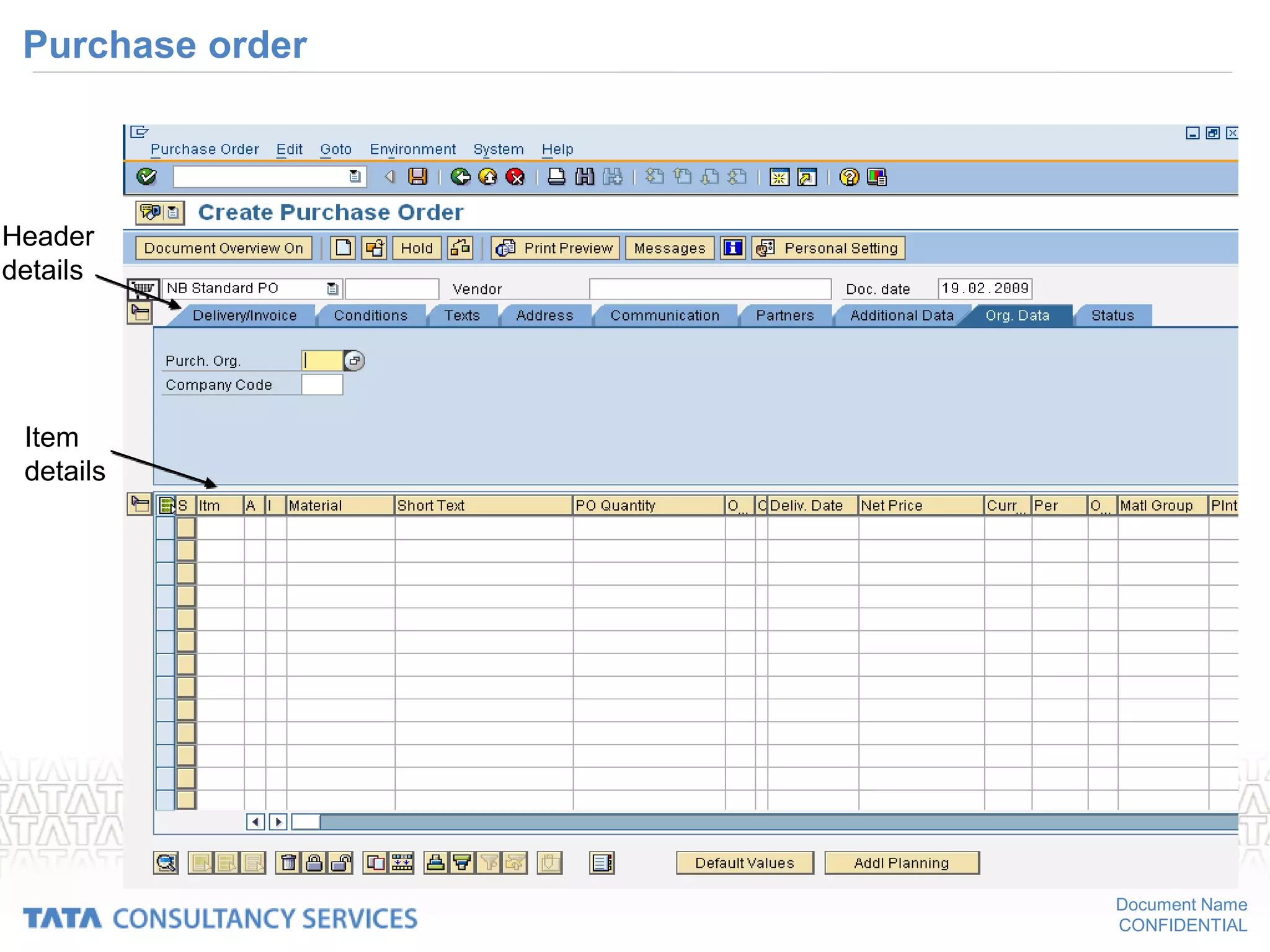
Purchase order
Header
details
Item
details
Document Name
CONFIDENTIAL
Create PO - Manually
• Manually creating a PO
– With reference to PR
• Select the PR
• Select the items from PR
• Copy the items in to PO
• Enter the vendor
• Enter the prices and pricing conditions
• Requirement tracking number
• Update the info record if required
The Purchase order created.
Document Name
CONFIDENTIAL
Create PO w.r.t purchase requisition
Enter purchase
requisition no
& item no
Document Name
CONFIDENTIAL
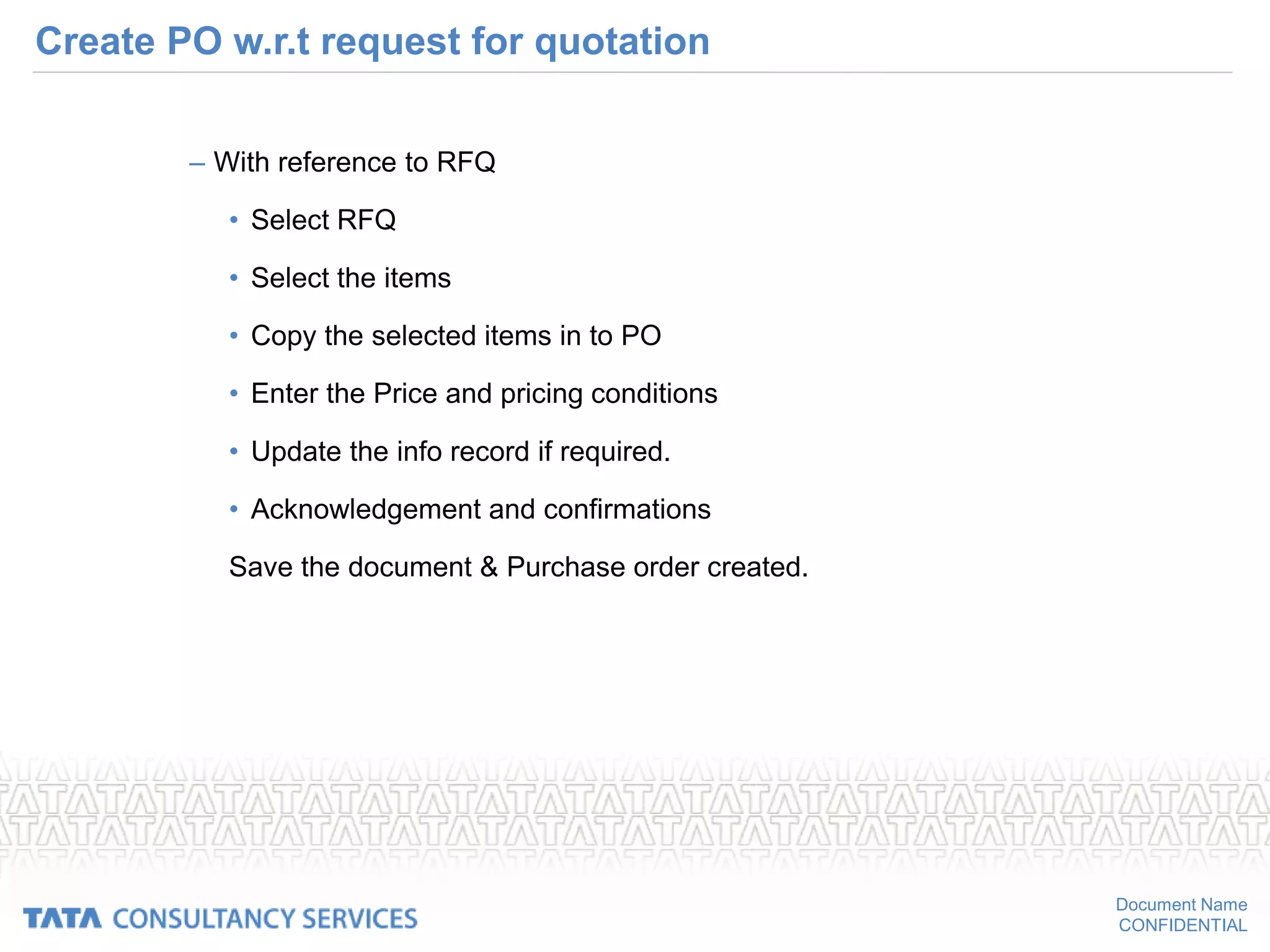
Create PO w.r.t request for quotation
– With reference to RFQ
• Select RFQ
• Select the items
• Copy the selected items in to PO
• Enter the Price and pricing conditions
• Update the info record if required.
• Acknowledgement and confirmations
Save the document & Purchase order created.
Document Name
CONFIDENTIAL
Create PO w.r.t request for quotation
Enter the
RFQ no &
the item no
Document Name
CONFIDENTIAL
Create PO w.r.t a contract
– With reference to contract
• Select contract
• Select the items
• Copy the selected items in to PO
• The price & relevant conditions will get copied to the purchase order
from the contract.
• Enter the quantity to be ordered.
• Enter the delivery date.
Save the document & Purchase order created
Document Name
CONFIDENTIAL
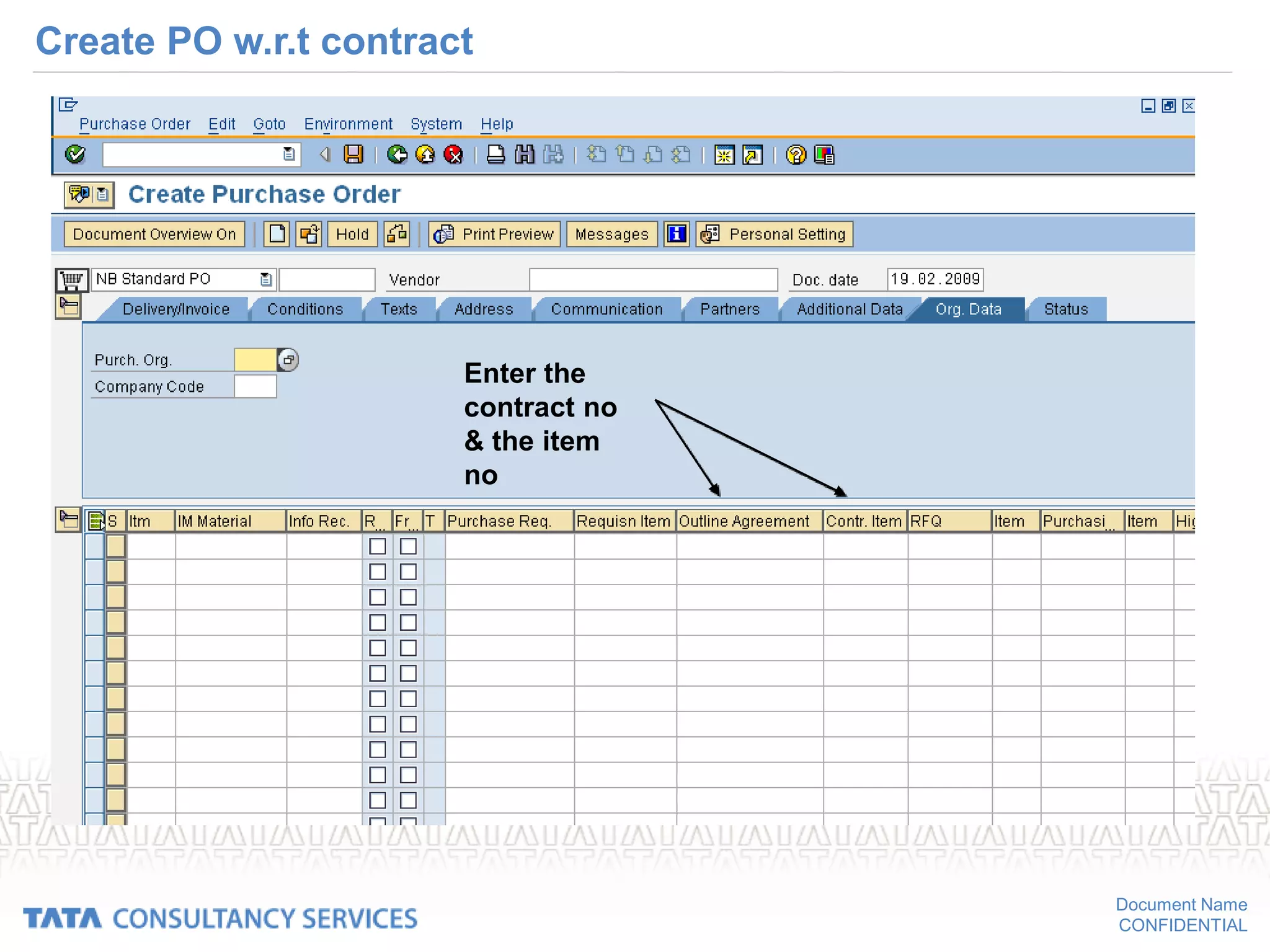
Create PO w.r.t contract
Enter the
contract no
& the item
no
Document Name
CONFIDENTIAL
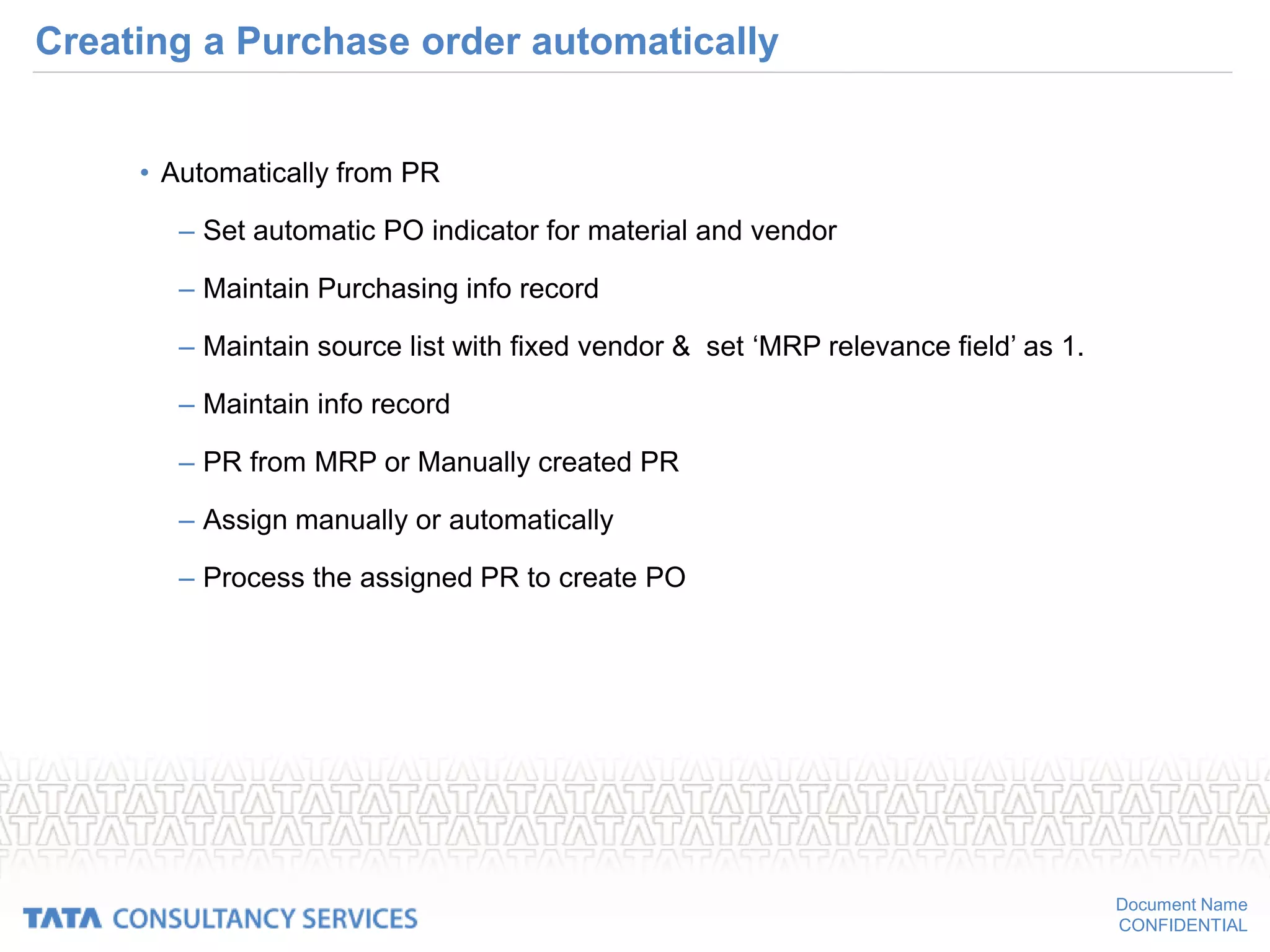
Creating a Purchase order automatically
• Automatically from PR
– Set automatic PO indicator for material and vendor
– Maintain Purchasing info record
– Maintain source list with fixed vendor & set ‘MRP relevance field’ as 1.
– Maintain info record
– PR from MRP or Manually created PR
– Assign manually or automatically
– Process the assigned PR to create PO
Document Name
CONFIDENTIAL
Setting automatic PO in material master:
Flag auto
PO
Document Name
CONFIDENTIAL
Set automatic PO in vendor master:
Set automatic
PO
Document Name
CONFIDENTIAL
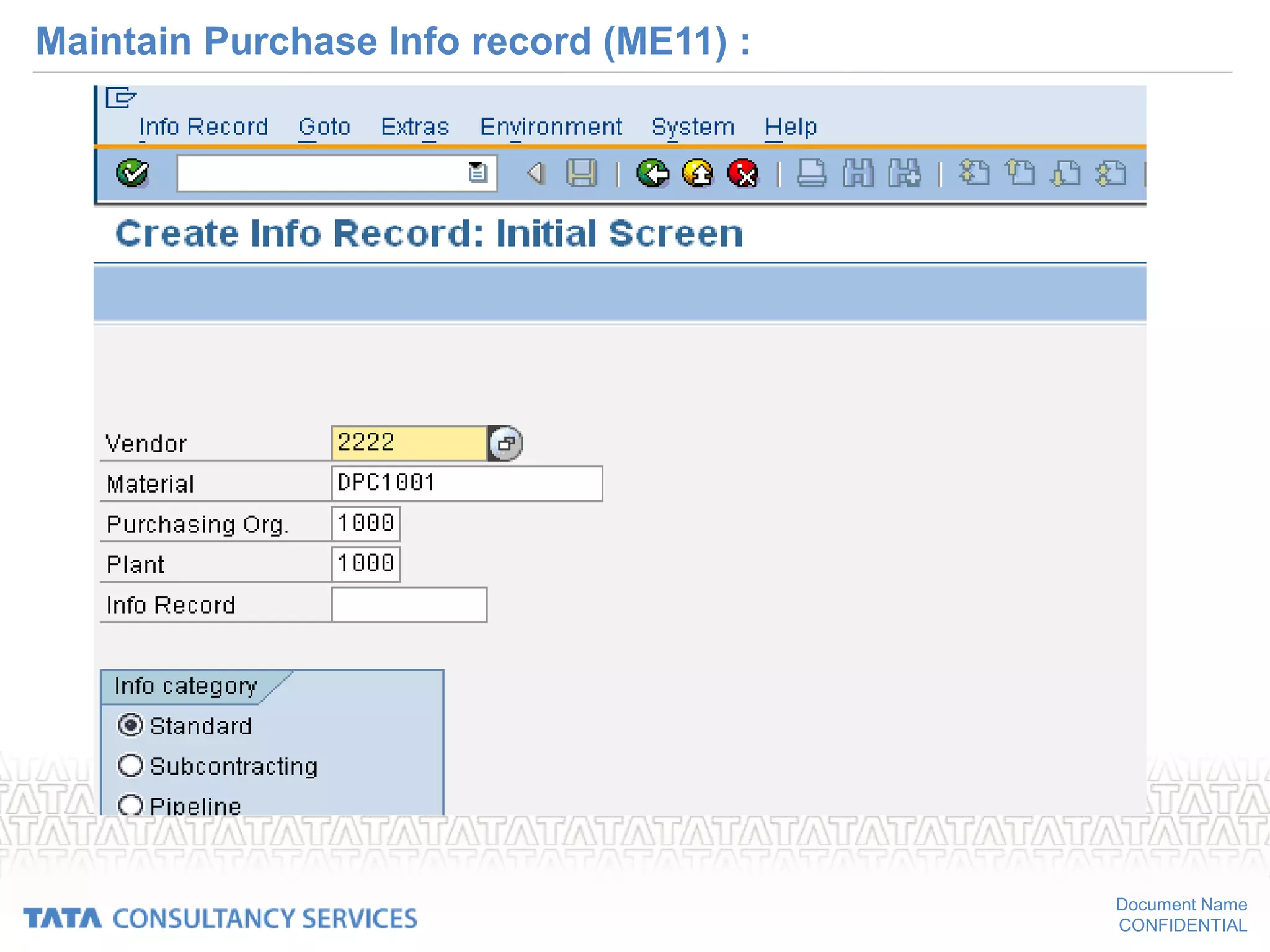
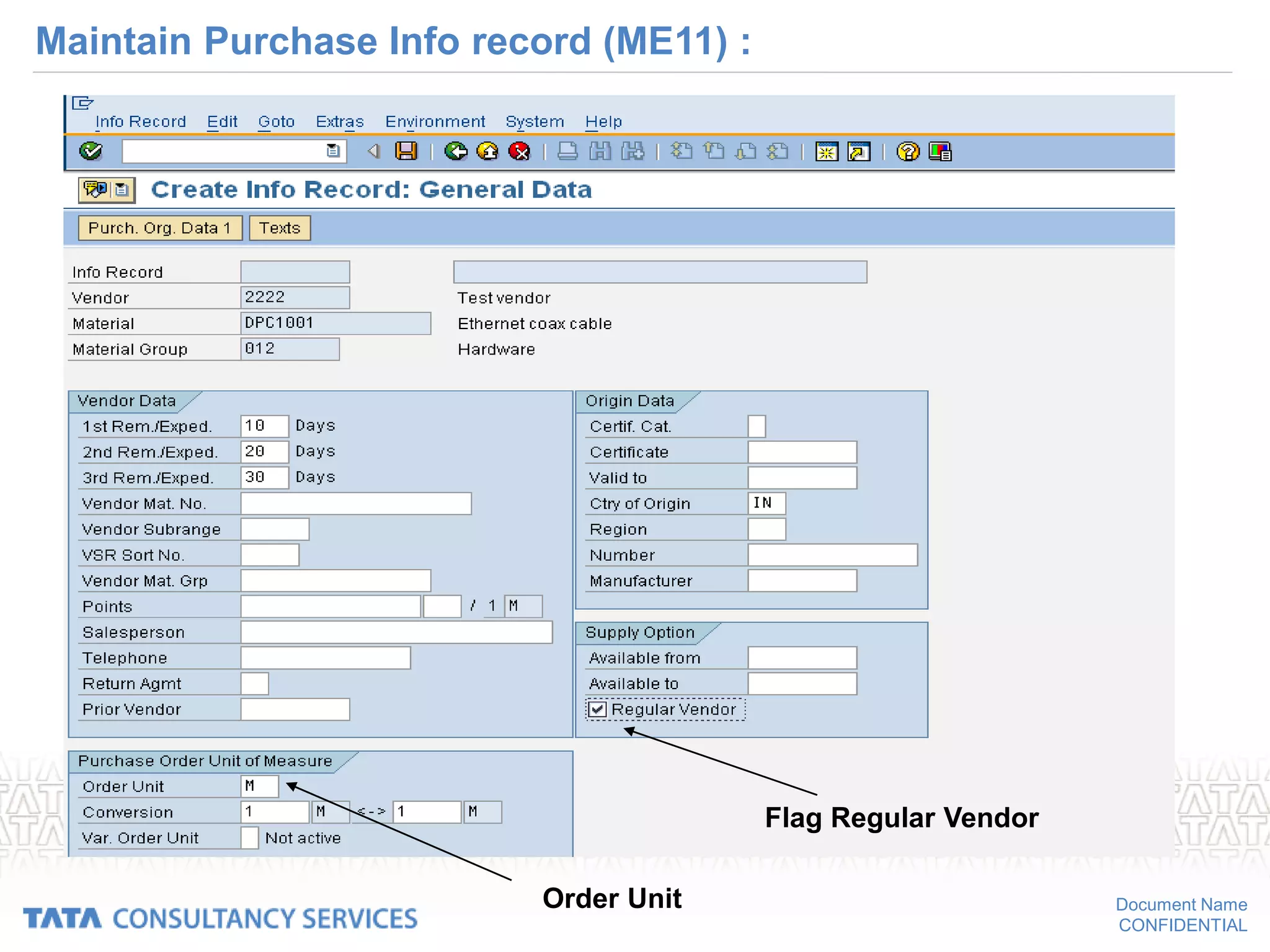
Maintain Purchase Info record (ME11) :
Document Name
CONFIDENTIAL
Maintain Purchase Info record (ME11) :
Flag Regular Vendor
Order Unit
Document Name
CONFIDENTIAL
Maintain Purchase Info record (ME11) :
Tax code
Net Price
Document Name
CONFIDENTIAL
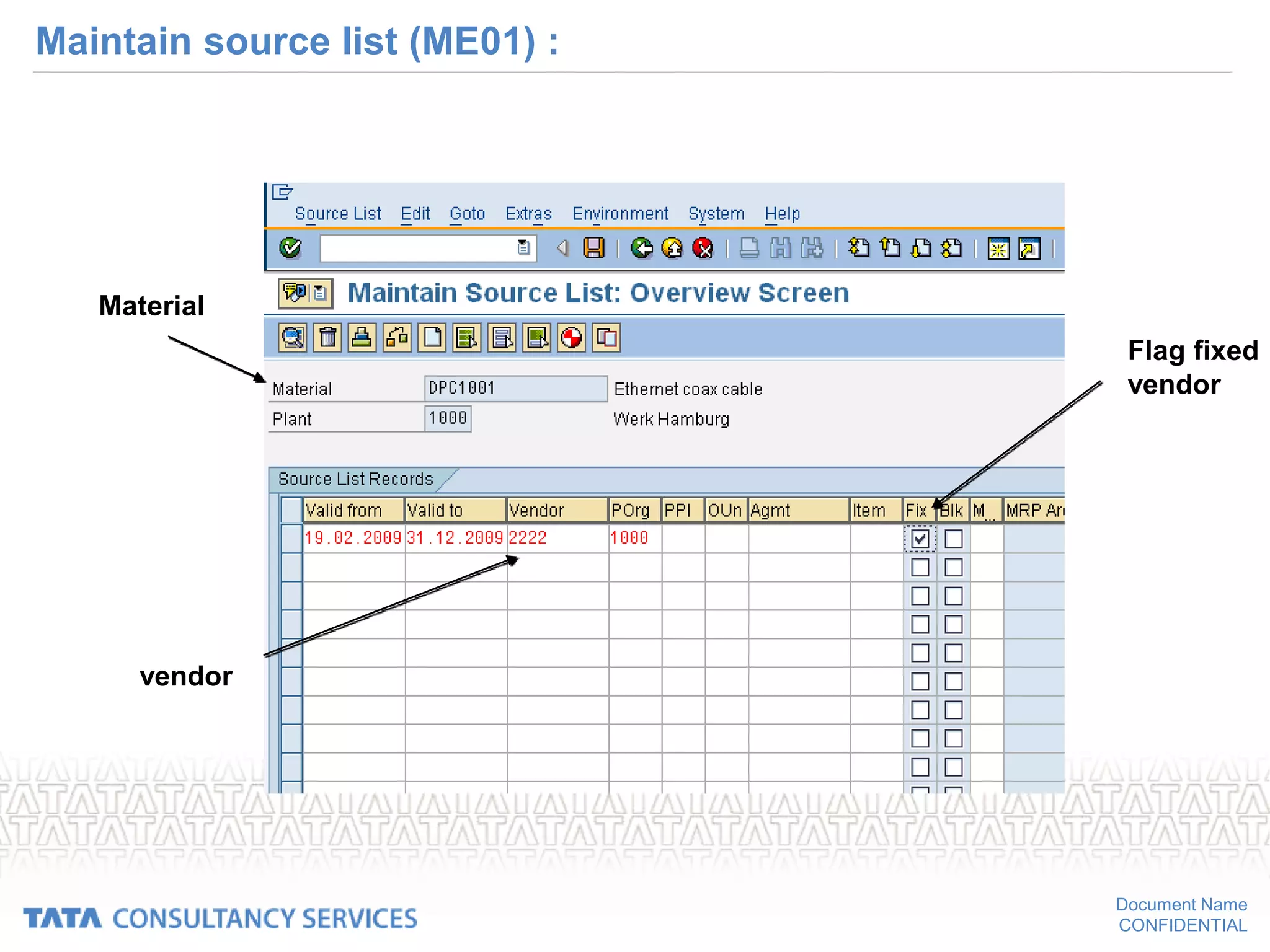
Maintain source list (ME01) :
Material
Plant
Document Name
CONFIDENTIAL
Maintain source list (ME01) :
Material
vendor
Flag fixed
vendor
Document Name
CONFIDENTIAL
Display Purchase requisition (source assigned)
Document Name
CONFIDENTIAL
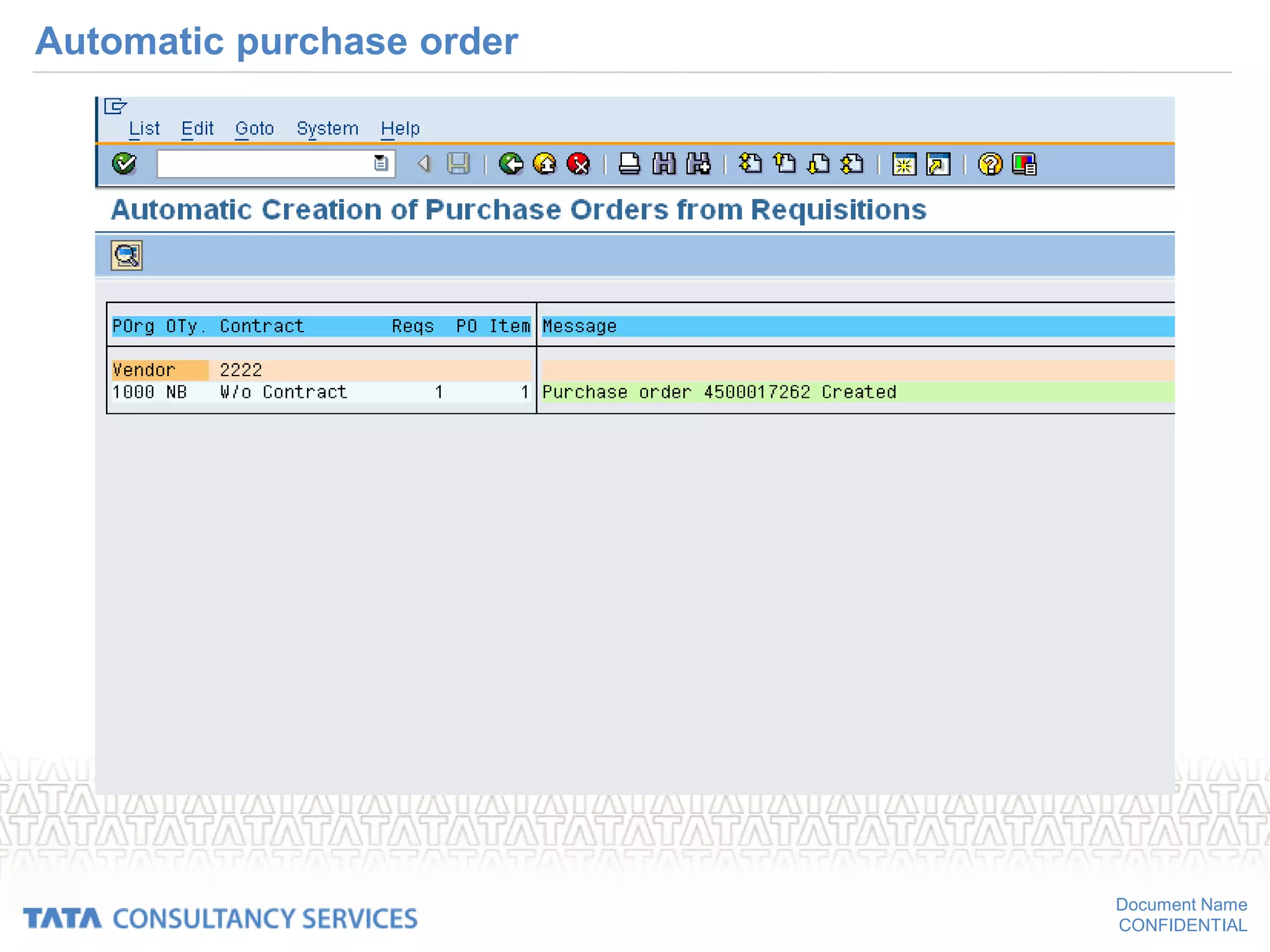
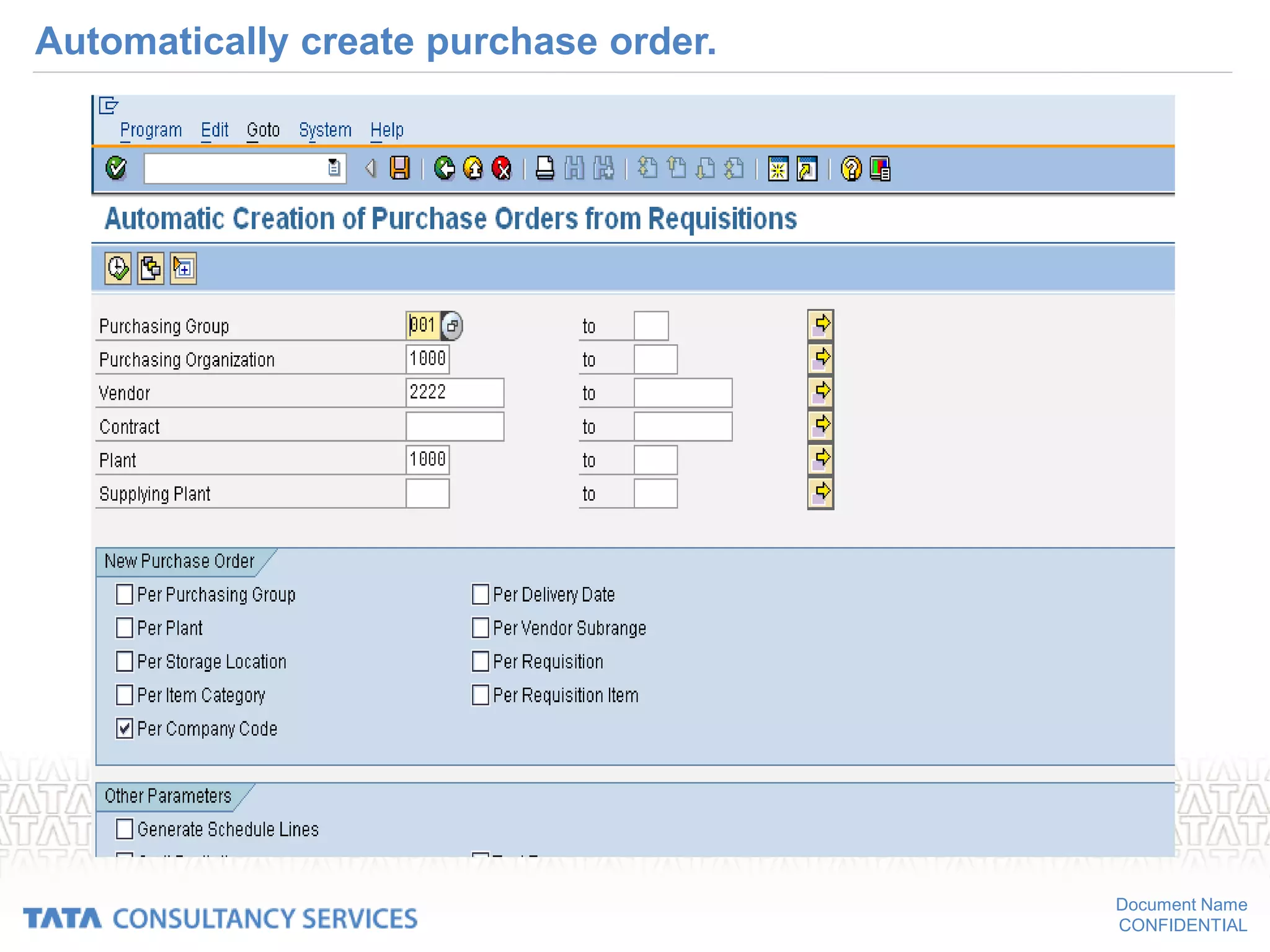
Automatically creating purchase order:
• Path for automatically converting purchase requisition to
purchase order:
• SAP MENU LOGISTICS MATERIALS
MANAGEMENTPURCHASING PURCHASE
ORDERCREATEAUTOMATICALLY VIA PURCHASE REQUISITION
Document Name
CONFIDENTIAL
Automatically create purchase order.
Document Name
CONFIDENTIAL
Automatic purchase order
Document Name
CONFIDENTIAL
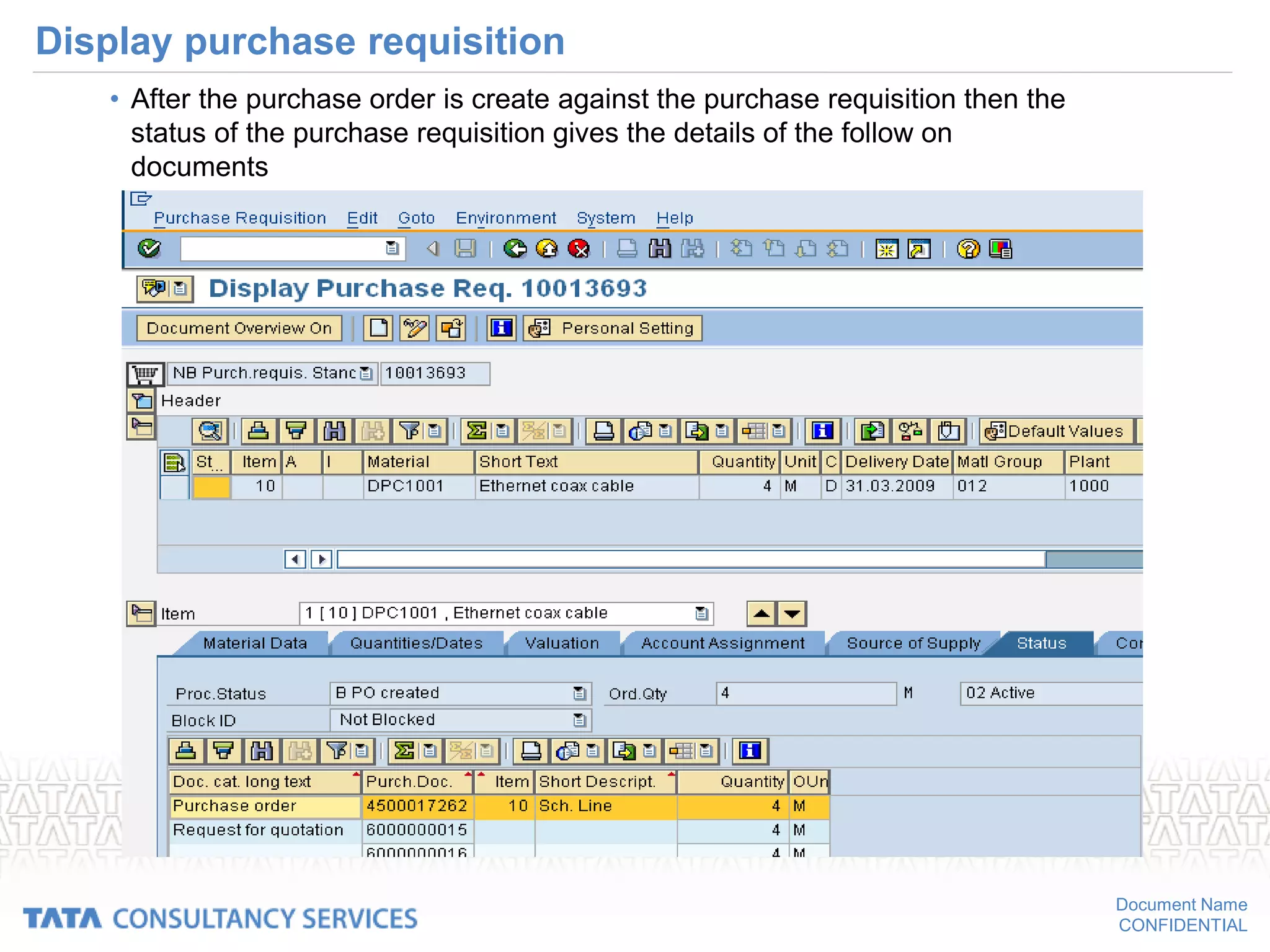
Display purchase requisition
• After the purchase order is create against the purchase requisition then the
status of the purchase requisition gives the details of the follow on
documents
Document Name
CONFIDENTIAL
Creating a PO (contd…)
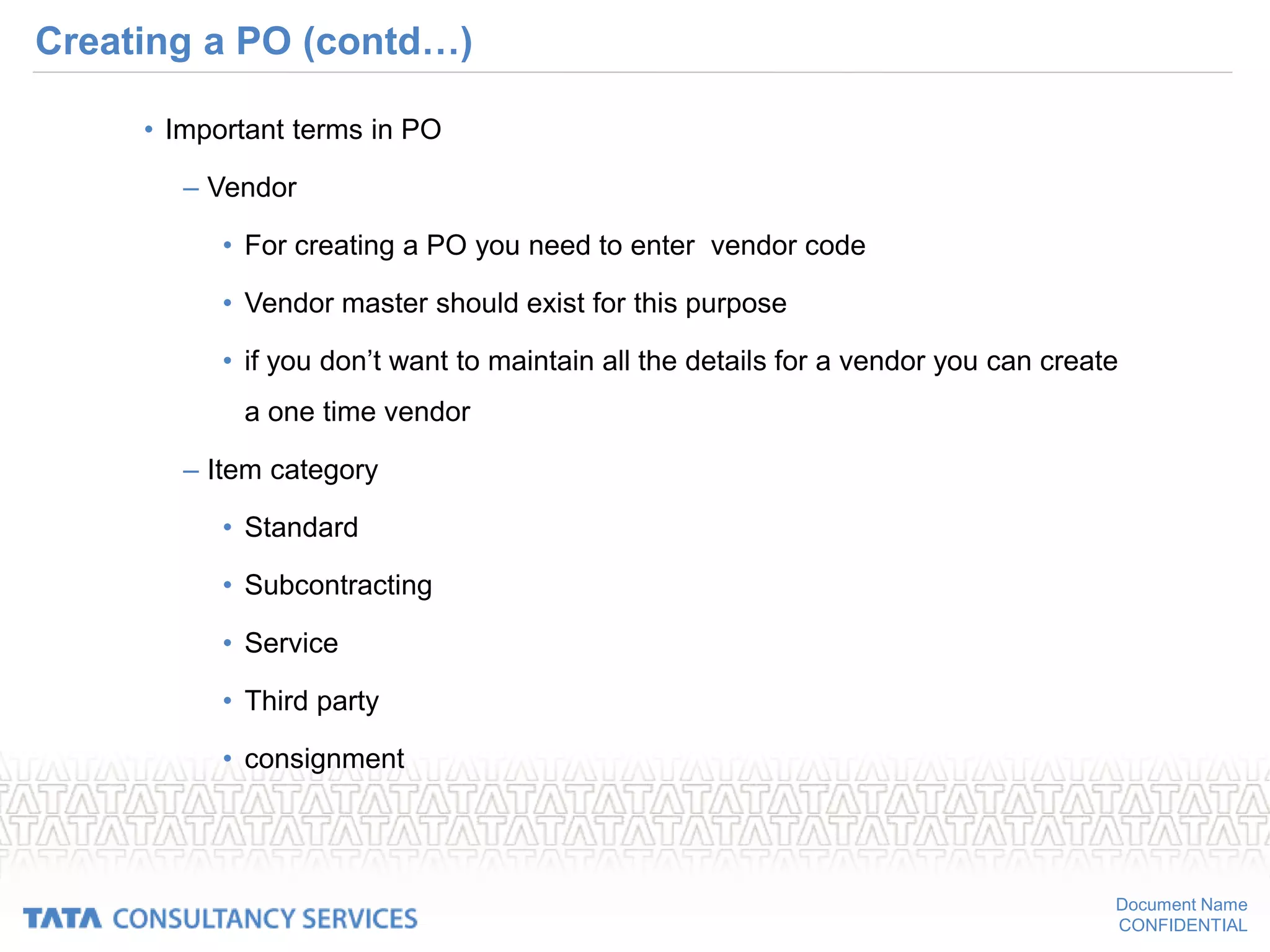
• Important terms in PO
– Vendor
• For creating a PO you need to enter vendor code
• Vendor master should exist for this purpose
• if you don’t want to maintain all the details for a vendor you can create
a one time vendor
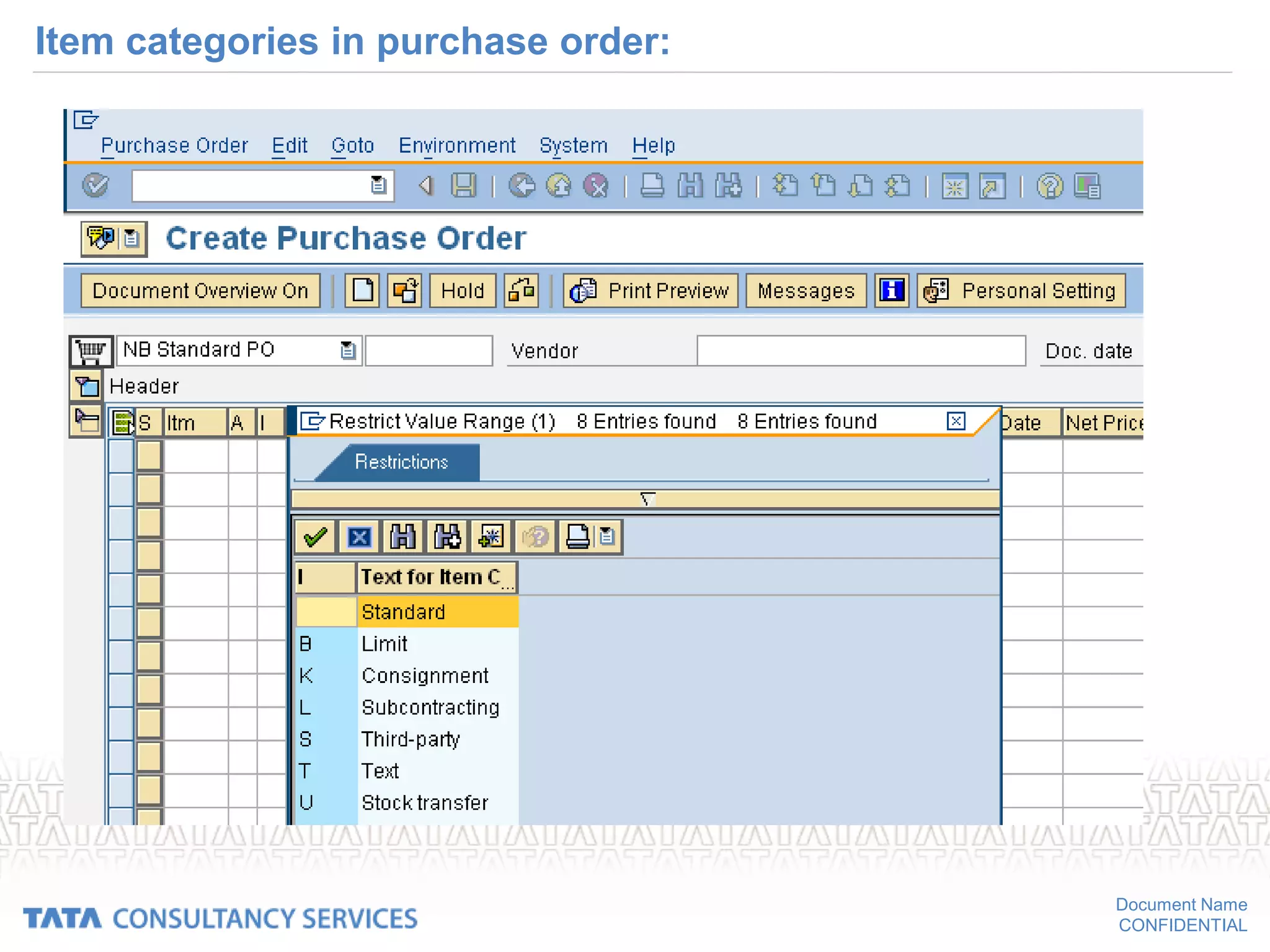
– Item category
• Standard
• Subcontracting
• Service
• Third party
• consignment
Document Name
CONFIDENTIAL
Item categories in purchase order:
Document Name
CONFIDENTIAL
Create PO (Contd…)
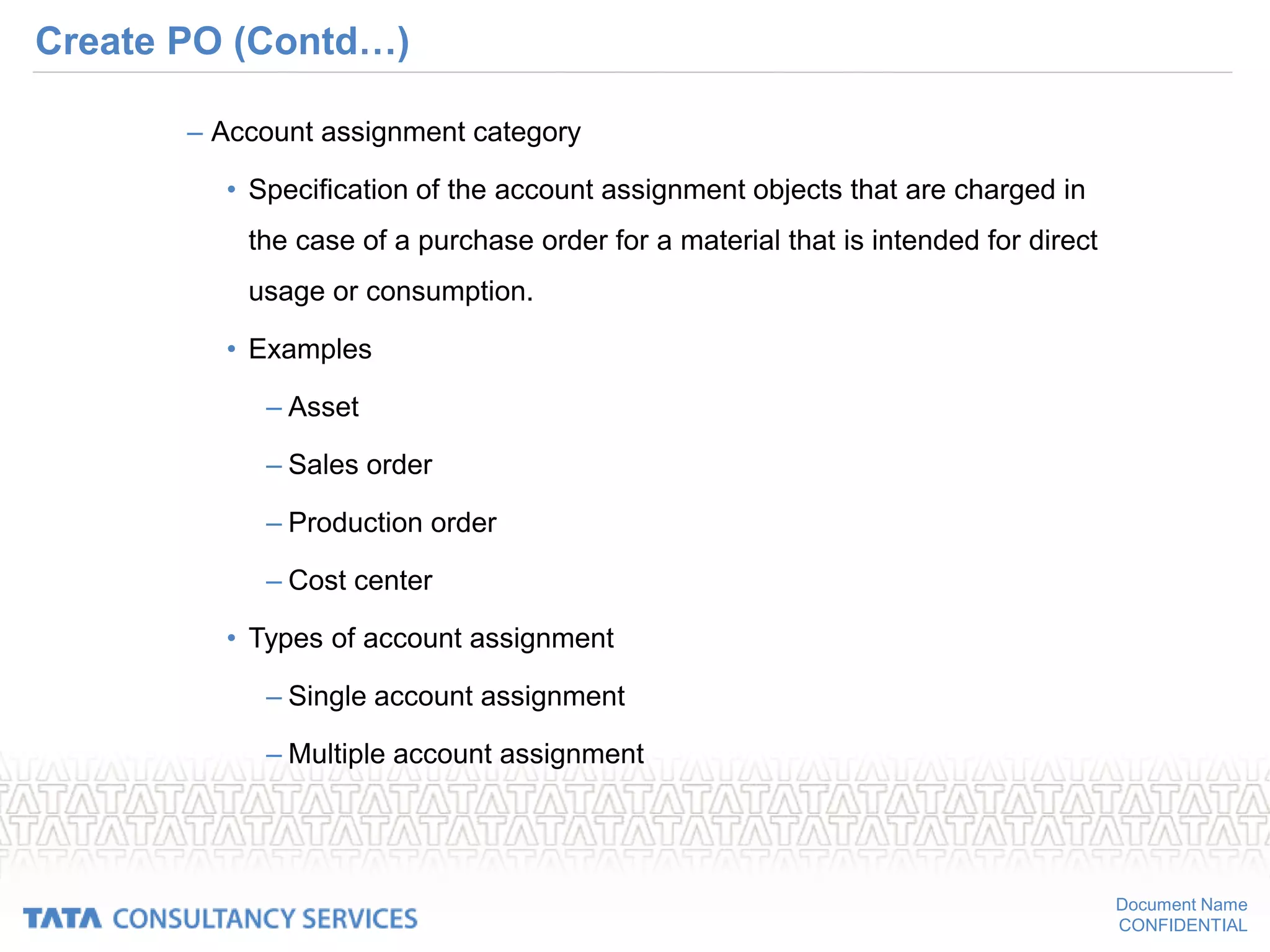
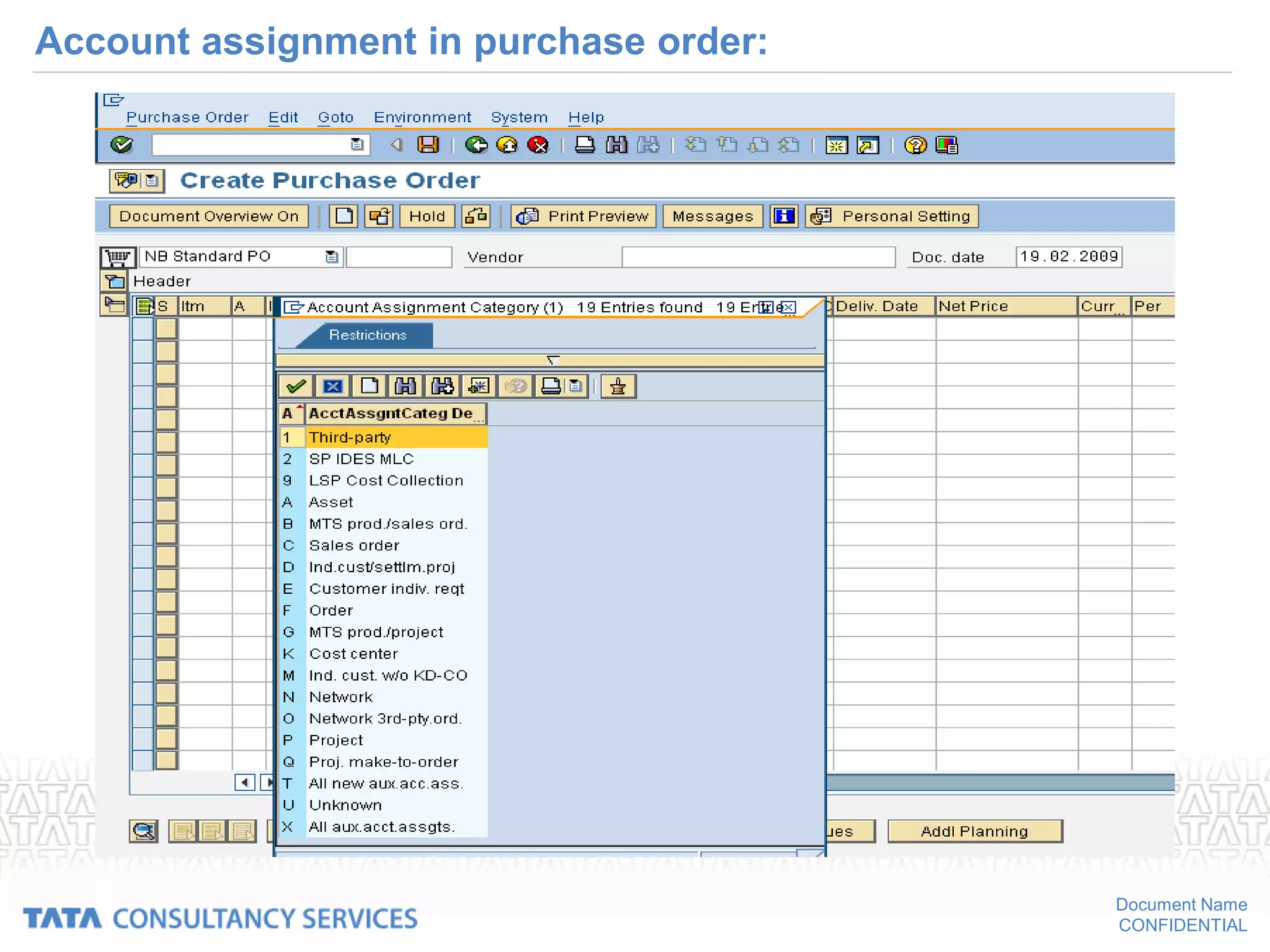
– Account assignment category
• Specification of the account assignment objects that are charged in
the case of a purchase order for a material that is intended for direct
usage or consumption.
• Examples
– Asset
– Sales order
– Production order
– Cost center
• Types of account assignment
– Single account assignment
– Multiple account assignment
Document Name
CONFIDENTIAL
Account assignment in purchase order:
Document Name
CONFIDENTIAL
Create PO (contd…)
– Delivery date
• Date format
– Day format
– Week format
– Month format
• Delivery date entered here is only expected delivery date
• You can also specify a statistical delivery date
Document Name
CONFIDENTIAL
Delivery date in purchase order:
Document Name
CONFIDENTIAL
Create PO (contd…)
– Units of measure in PO
– The order unit
» This is the unit you specify in connection with the order quantity.
– The order price unit
» This is the unit that applies in connection with the net price and
which is taken as the basis for invoice verification.
» If the order price unit does not correspond to the order unit, and
if no conversion factor is specified in the system, you must
enter a conversion factor on the item detail screen.
Document Name
CONFIDENTIAL
Create PO (Contd…)
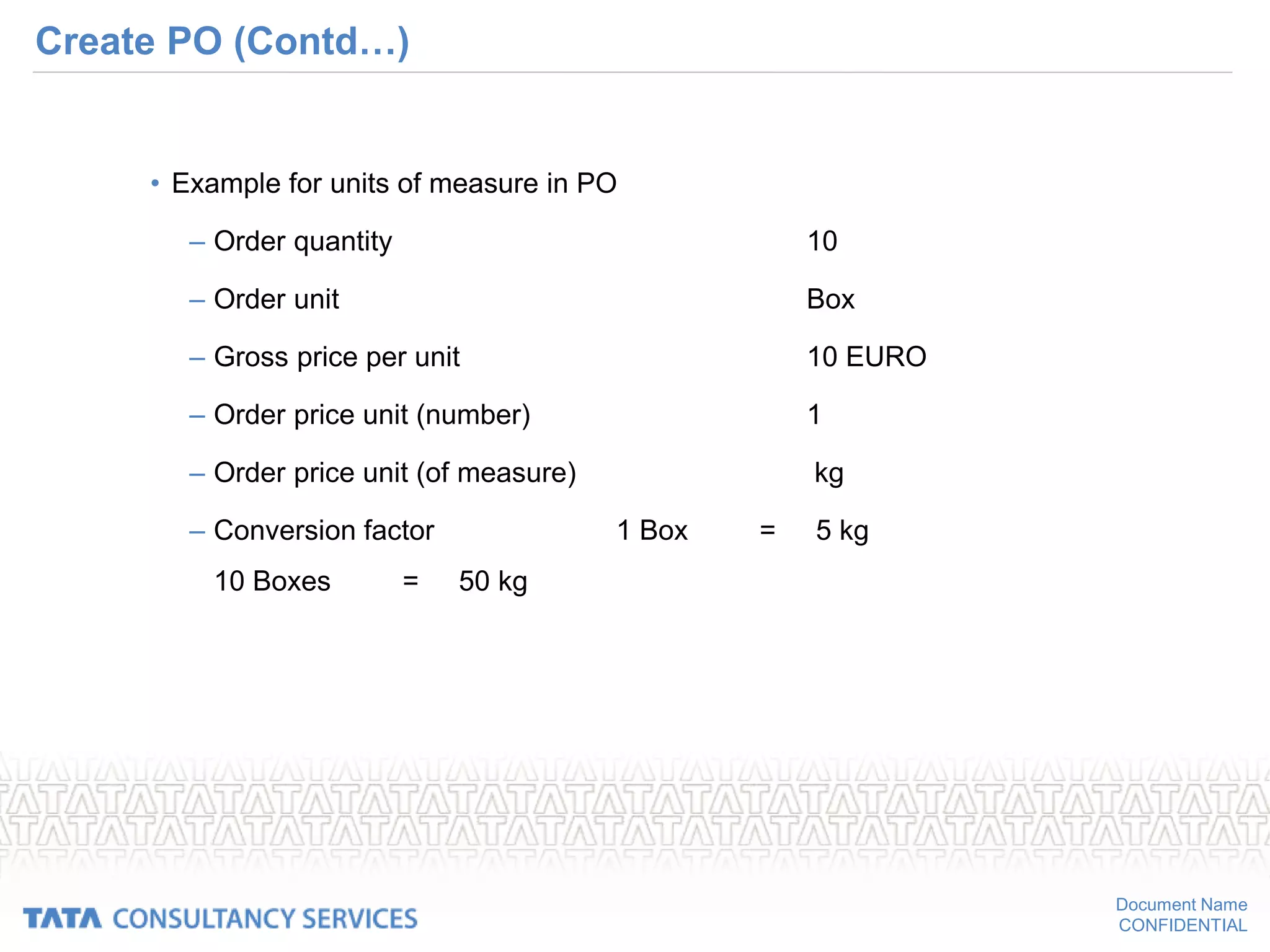
• Example for units of measure in PO
– Order quantity 10
– Order unit Box
– Gross price per unit 10 EURO
– Order price unit (number) 1
– Order price unit (of measure) kg
– Conversion factor 1 Box = 5 kg
10 Boxes = 50 kg
Document Name
CONFIDENTIAL
Order unit in purchase order:
Document Name
CONFIDENTIAL
Create PO (Contd…)
– Conditions
• This component enables you to store pricing stipulations agreed with
the vendor
• Examples are applicable discounts or surcharges, or stipulations
regarding the payment of freight costs in the system.
• There are three kinds of price in Purchasing:
– Gross price
» Price without taking any possible discounts and surcharges into
account
Document Name
CONFIDENTIAL
Create PO (Contd…)
– Net price
» Price taking any applicable discounts and surcharges into
account
– Effective price
» Net price after deduction of cash discount, with allowance for
any miscellaneous provisions, delivery costs, and non-
deductible taxes.
Document Name
CONFIDENTIAL
Conditions:
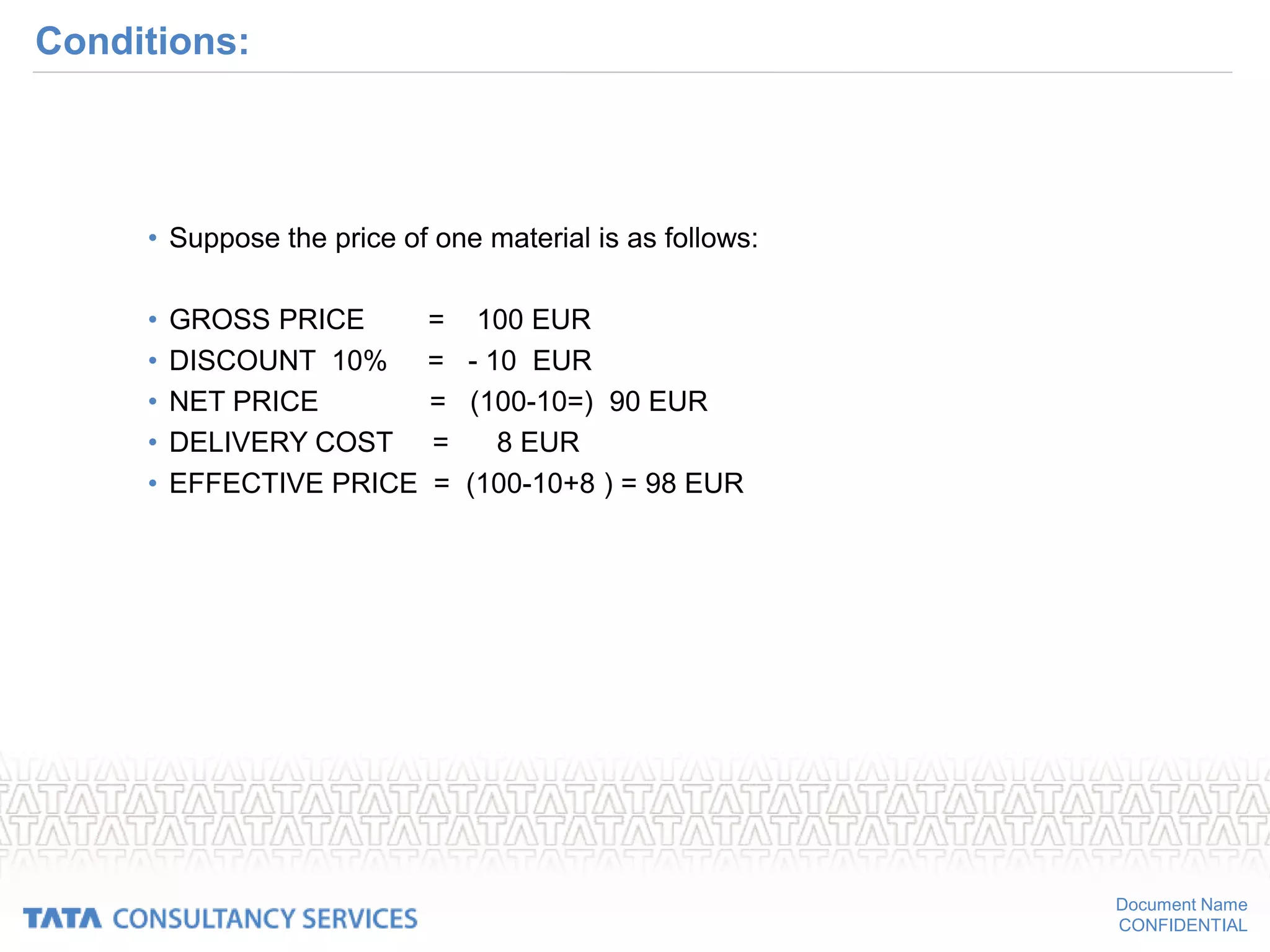
• Suppose the price of one material is as follows:
• GROSS PRICE = 100 EUR
• DISCOUNT 10% = - 10 EUR
• NET PRICE = (100-10=) 90 EUR
• DELIVERY COST = 8 EUR
• EFFECTIVE PRICE = (100-10+8 ) = 98 EUR
Document Name
CONFIDENTIAL
Calculation of net price & effective price:
Document Name
CONFIDENTIAL
Create PO (Contd…)
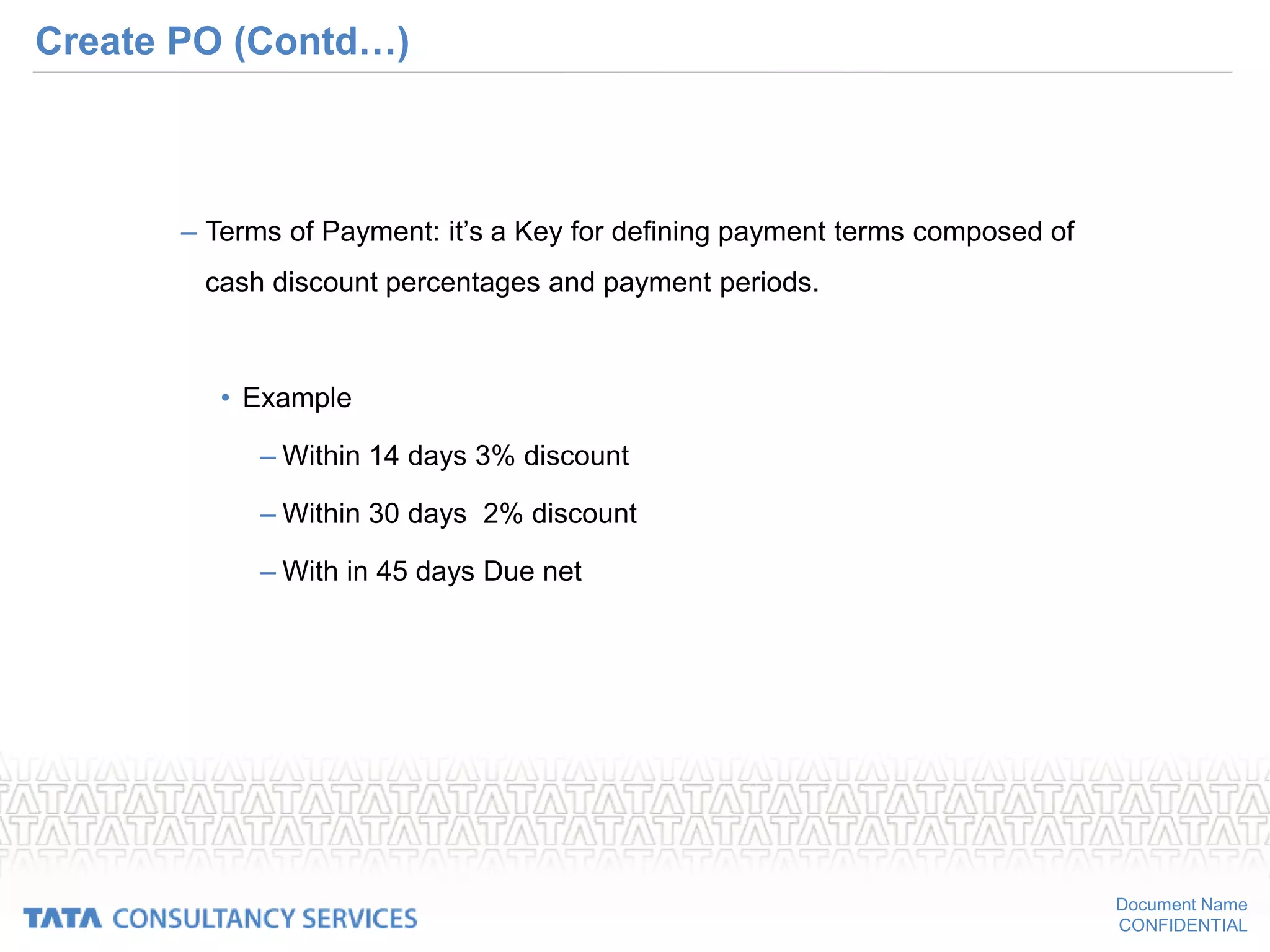
– Terms of Payment: it’s a Key for defining payment terms composed of
cash discount percentages and payment periods.
• Example
– Within 14 days 3% discount
– Within 30 days 2% discount
– With in 45 days Due net
Document Name
CONFIDENTIAL
Payment terms
Document Name
CONFIDENTIAL
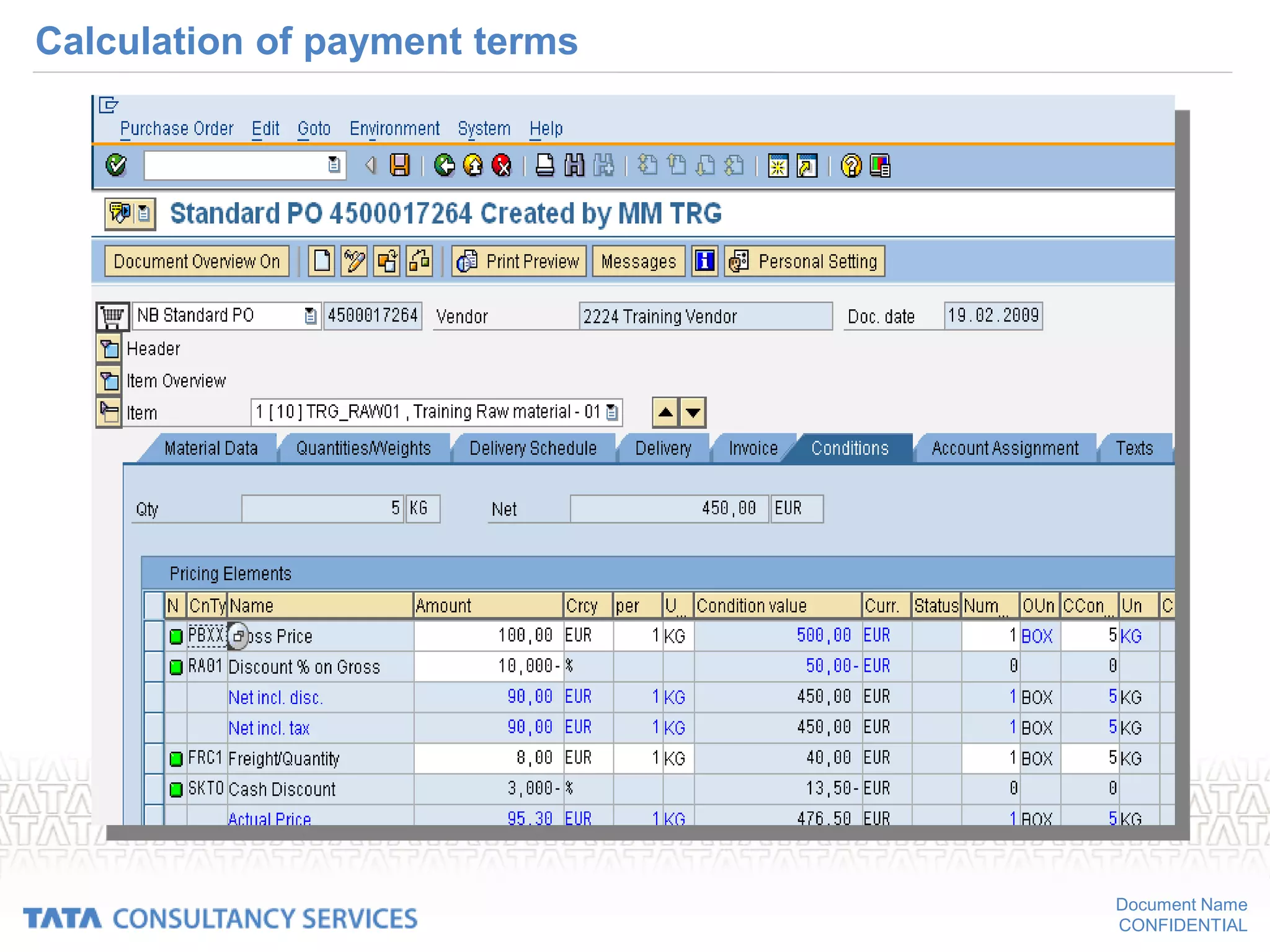
Calculation of payment terms
Document Name
CONFIDENTIAL
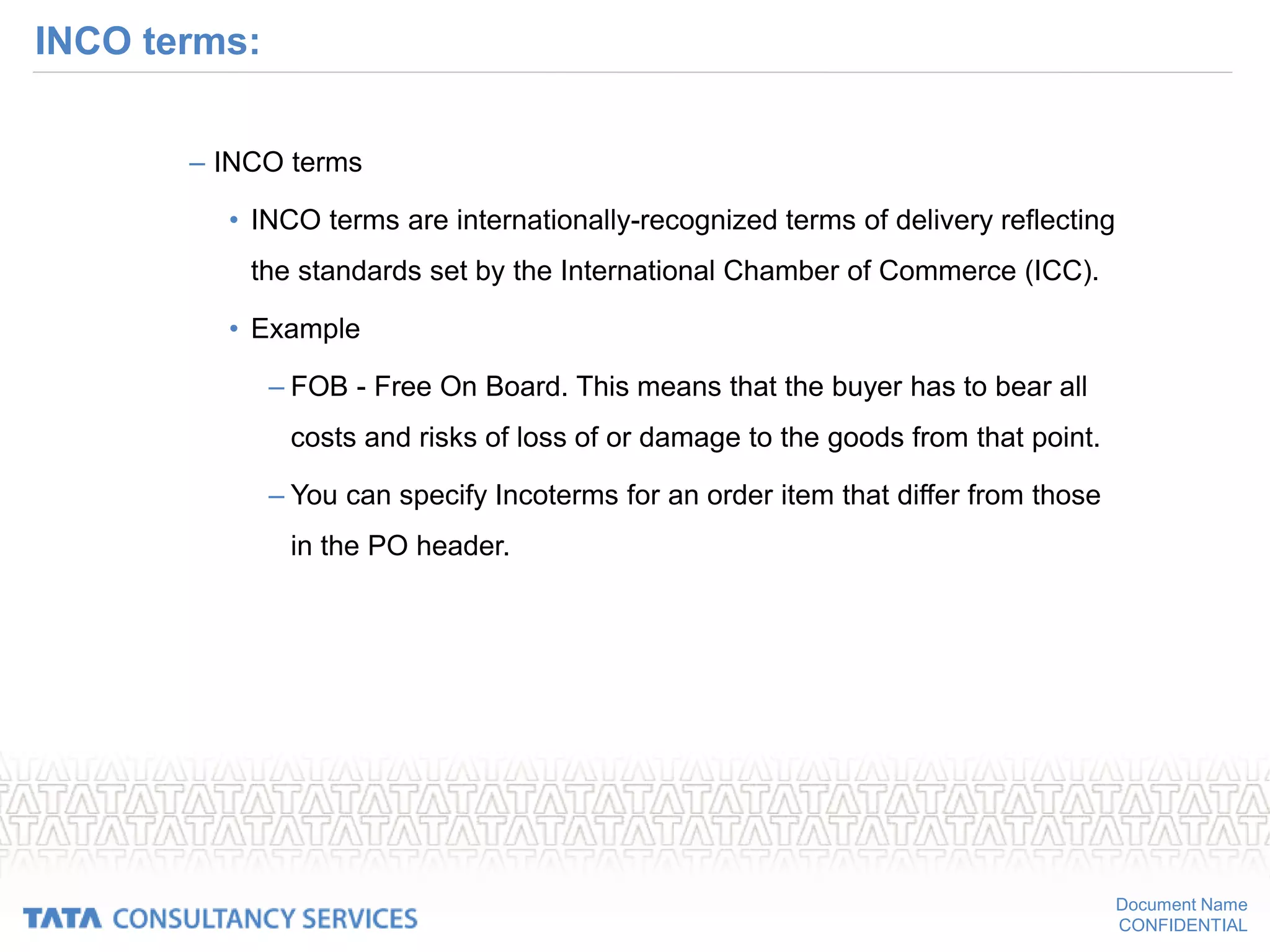
INCO terms:
– INCO terms
• INCO terms are internationally-recognized terms of delivery reflecting
the standards set by the International Chamber of Commerce (ICC).
• Example
– FOB - Free On Board. This means that the buyer has to bear all
costs and risks of loss of or damage to the goods from that point.
– You can specify Incoterms for an order item that differ from those
in the PO header.
Document Name
CONFIDENTIAL
INCO terms
Document Name
CONFIDENTIAL
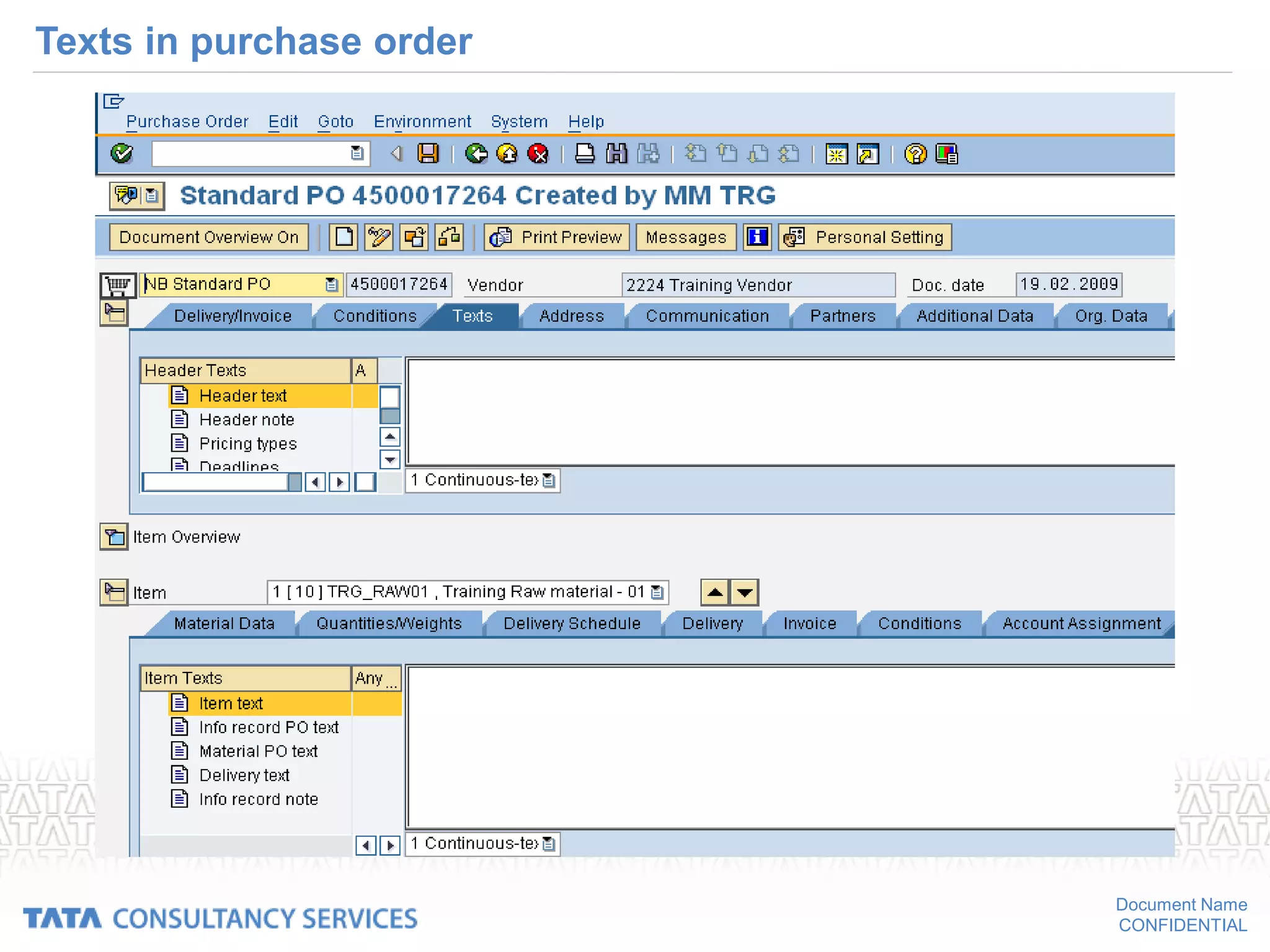
Purchase order texts:
• Purchase order text can be of two types
Header text
• Header text holds true for whole document
Item text
• Item text holds only for the respective material item.
Document Name
CONFIDENTIAL
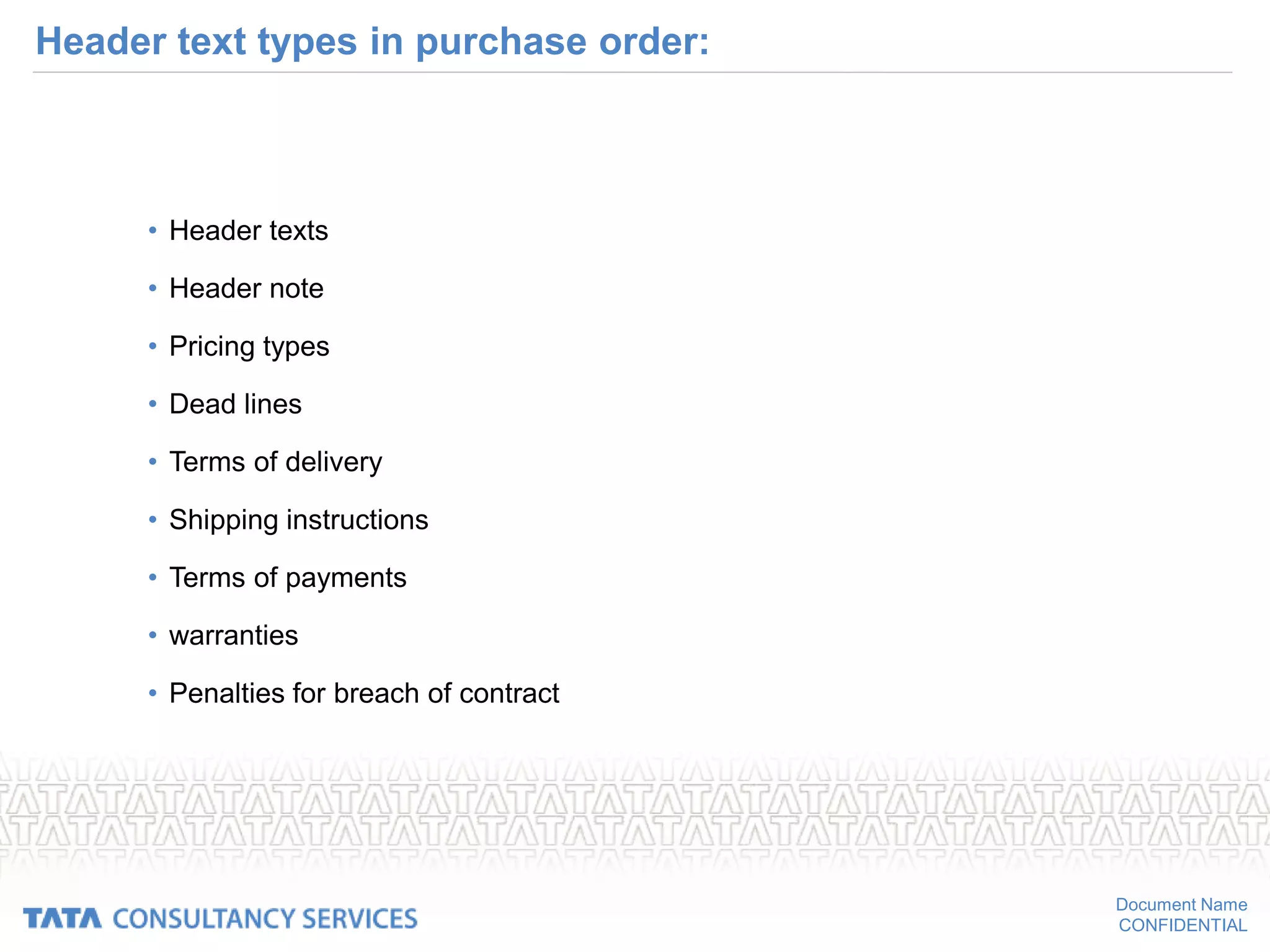
Header text types in purchase order:
• Header texts
• Header note
• Pricing types
• Dead lines
• Terms of delivery
• Shipping instructions
• Terms of payments
• warranties
• Penalties for breach of contract
Document Name
CONFIDENTIAL
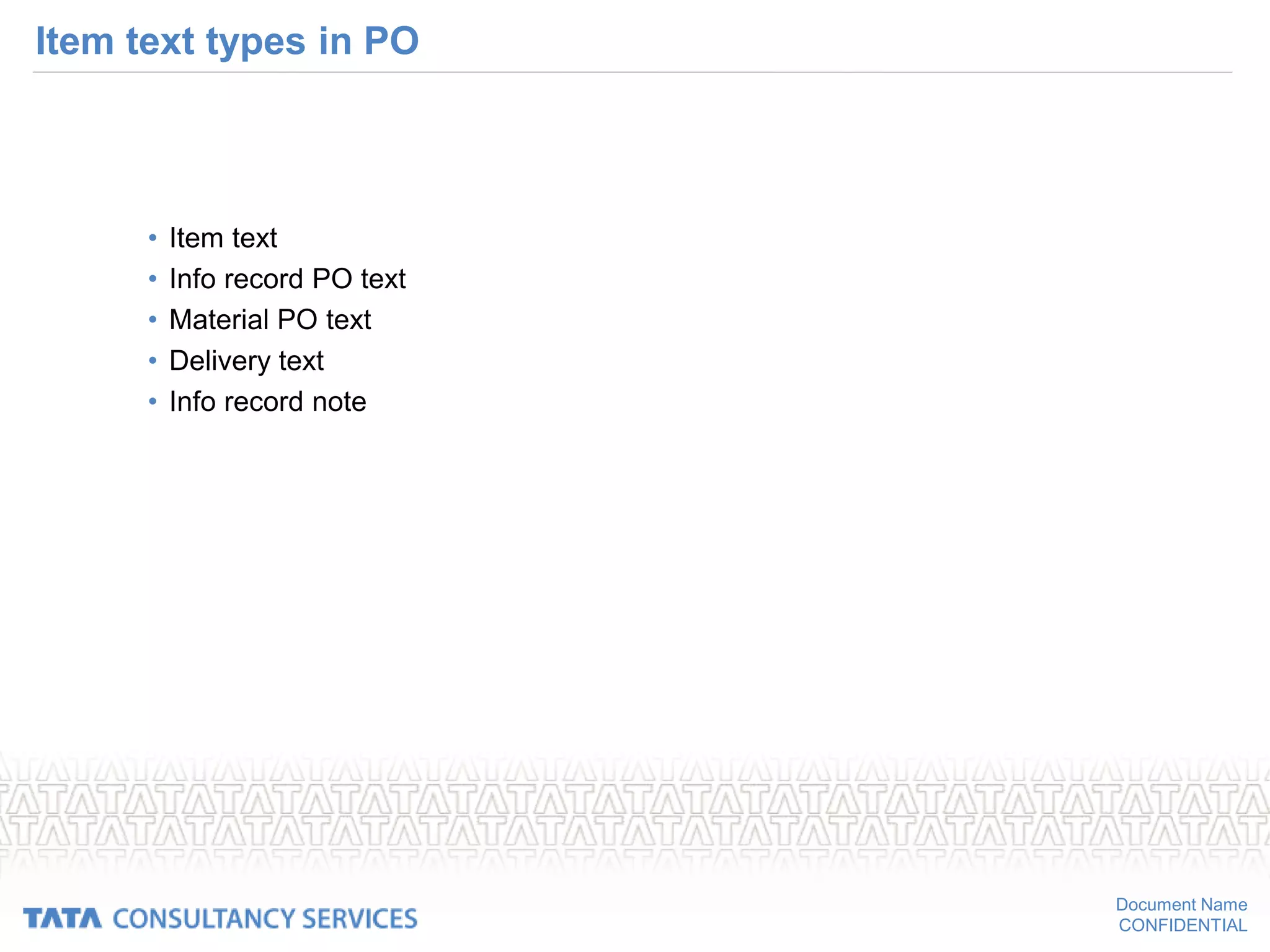
Item text types in PO
• Item text
• Info record PO text
• Material PO text
• Delivery text
• Info record note
Document Name
CONFIDENTIAL
Texts in purchase order
Document Name
CONFIDENTIAL
Confirmations
• Purpose
– This component can be used, if you wish to have your vendor provide
you with various kinds of confirmation regarding delivery dates and
quantities
– It enables you to base your materials planning and control activities on
more up-to-date data than that contained in purchase orders.
• Confirmation control key
• Shipping notification
• Order acknowledgement
Document Name
CONFIDENTIAL
Confirmation control key
Document Name
CONFIDENTIAL
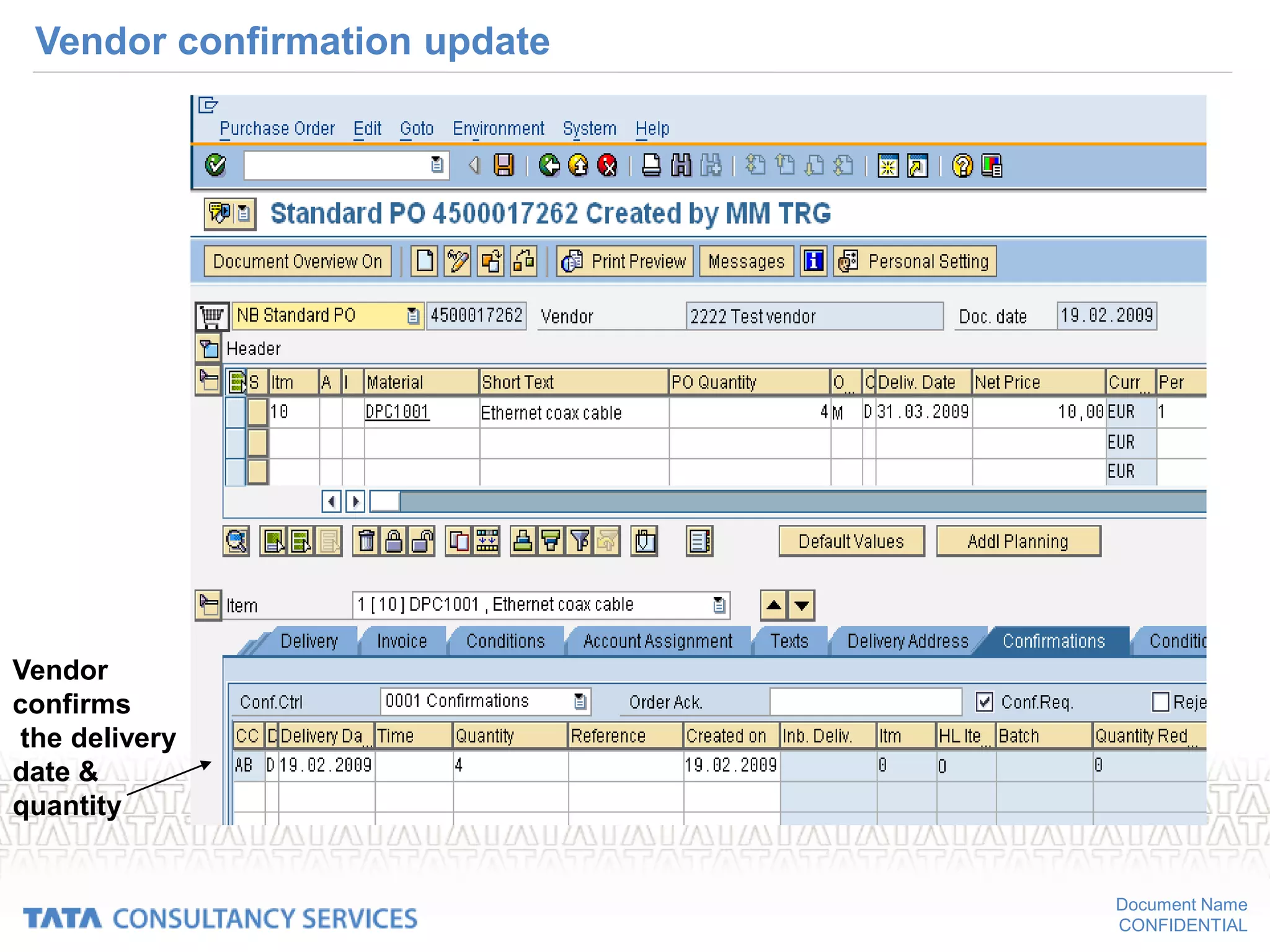
Vendor confirmation update
Vendor
confirms
the delivery
date &
quantity
Document Name
CONFIDENTIAL
Shipping notification
• Shipping Notification
• Definition
– A vendor’s confirmation to a purchasing organization of the delivery date
for a certain quantity of ordered materials
– It can be for the date of performance of ordered services also.
• Structure
– Against the shipping notification of vendor you create an inbound delivery
where the shipping doc no ,date of delivery & confirmed quantity entered
besides other shipping details
Document Name
CONFIDENTIAL
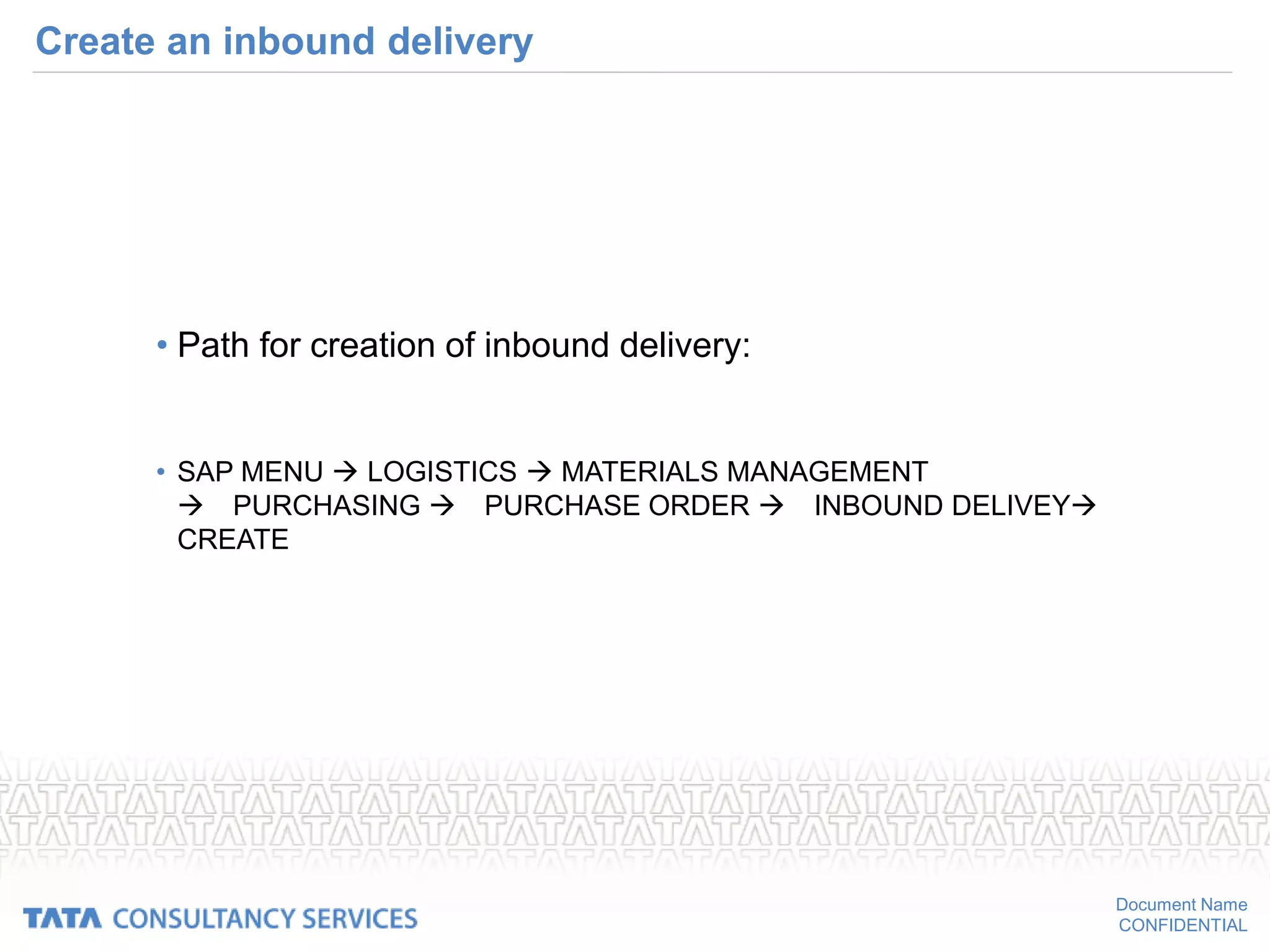
Create an inbound delivery
• Path for creation of inbound delivery:
• SAP MENU  LOGISTICS  MATERIALS MANAGEMENT
PURCHASING PURCHASE ORDER INBOUND DELIVEY
CREATE
Document Name
CONFIDENTIAL
Create inbound delivery
Enter PO no,
delivery date
& shipping doc no
Document Name
CONFIDENTIAL
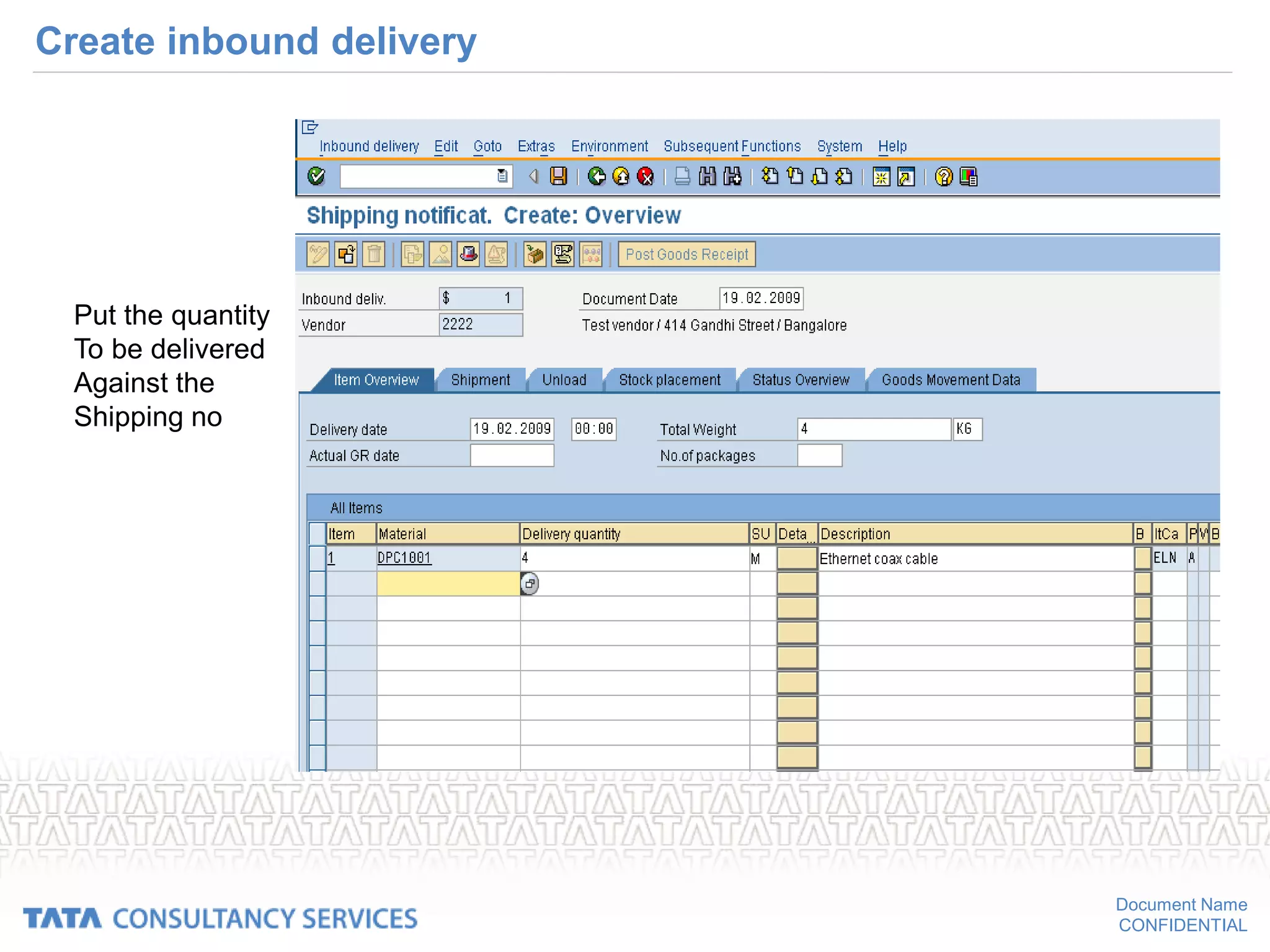
Create inbound delivery
Put the quantity
To be delivered
Against the
Shipping no
Document Name
CONFIDENTIAL
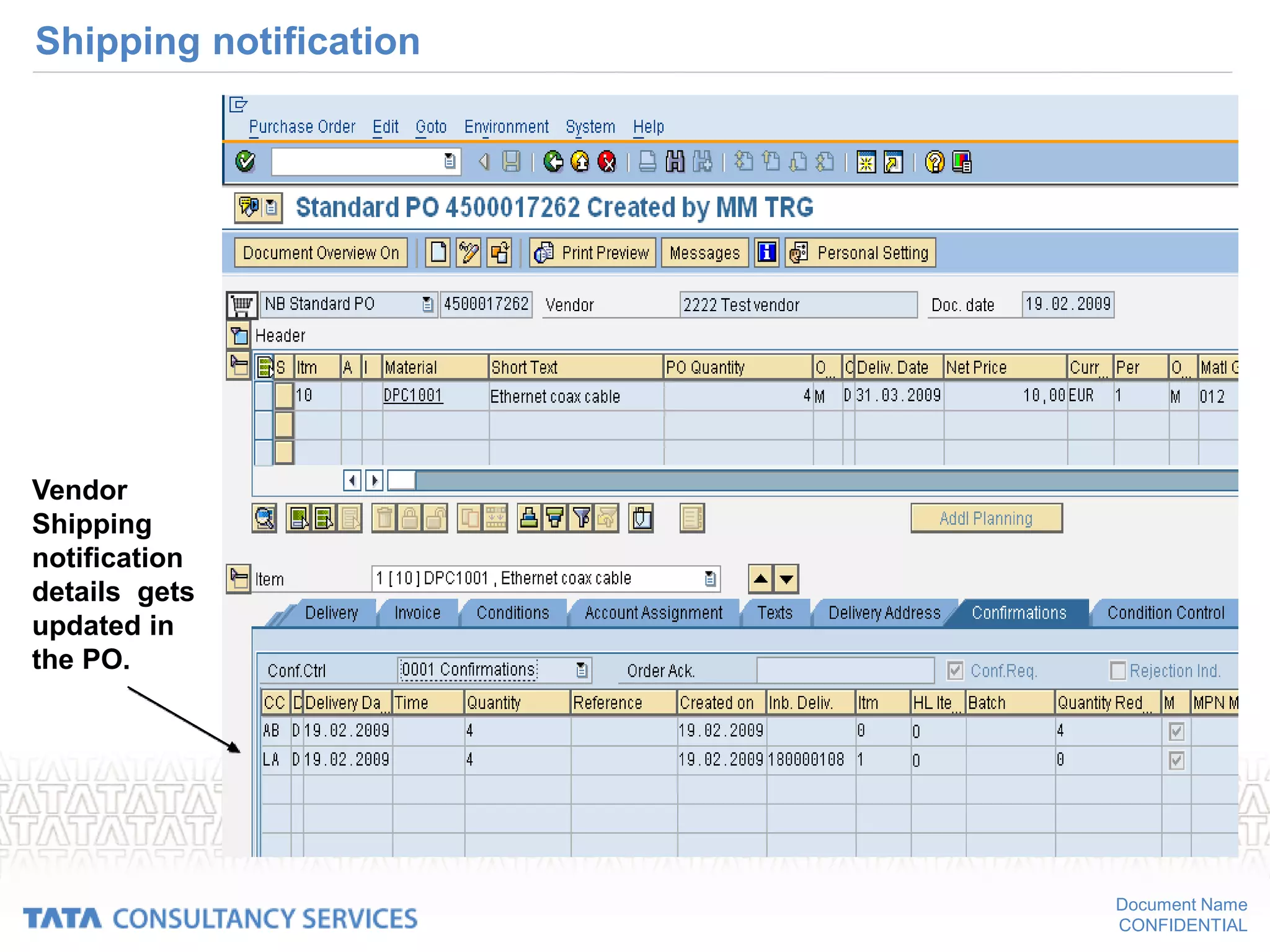
Shipping notification
Vendor
Shipping
notification
details gets
updated in
the PO.
Document Name
CONFIDENTIAL
Goods receipt updates PO history
• When you do the goods receipt against a purchase order it updates the
status of purchase order in the PO history.
• When you do goods receipt against a inbound delivery ,it will update the
status of inbound delivery besides updating PO history. So this gives the
updated status of an inbound delivery
Document Name
CONFIDENTIAL
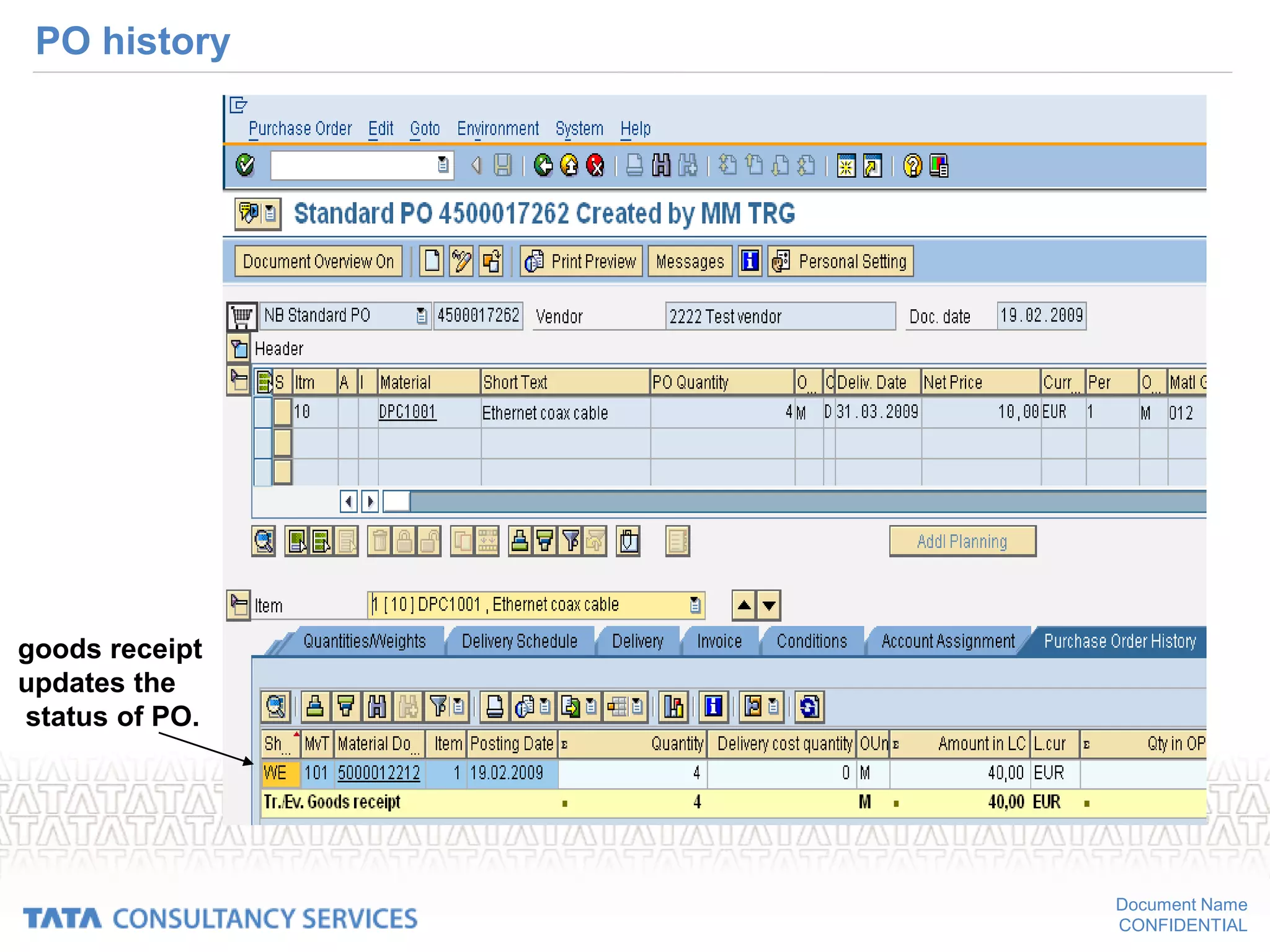
PO history
goods receipt
updates the
status of PO.
Document Name
CONFIDENTIAL
Status of inbound delivery in PO
Goods receipt updates
the status of each
inbound delivery
Document Name
CONFIDENTIAL
Printing the remainders
• Types of expediting letters
– Remainders
• A negative number of days means that a reminder is to be issued to
the vendor n days prior to the delivery date
– Urging letters
• A positive number of days means that a letter or message urging
delivery is to be issued n days after the due date.
Document Name
CONFIDENTIAL
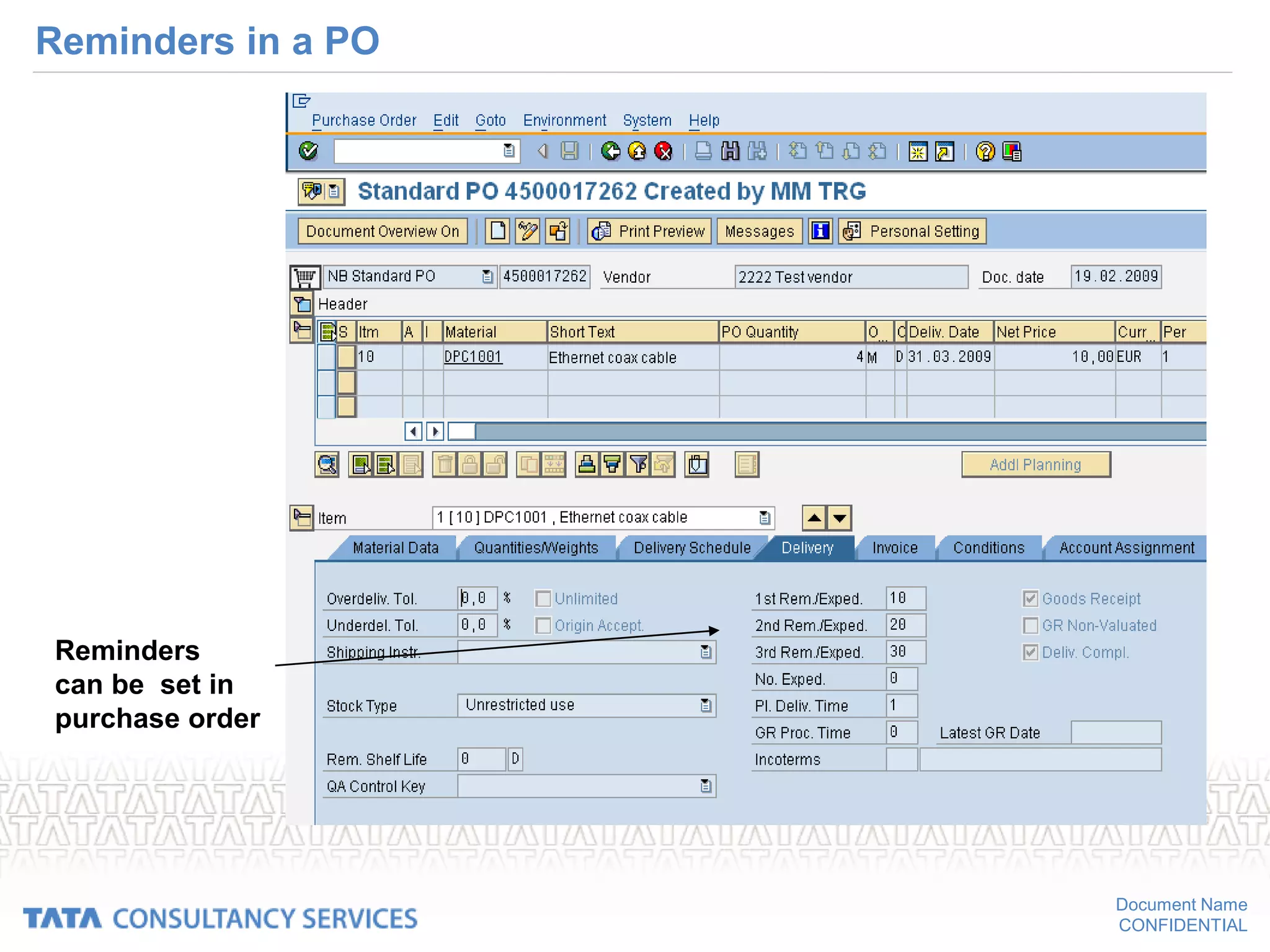
Reminders in a PO
Reminders
can be set in
purchase order
Document Name
CONFIDENTIAL
Changing and blocking POs
– If you change a PO after it has been sent to the vendor, a change
document is generated that can be sent to the vendor.
• This tells the vendor what you have changed.
– If the goods have already been delivered, then the changes you can
make to the PO are limited.
• For example, you cannot change the quantity to one that is less than
the quantity delivered.
– If the invoice has been received or the goods have been paid for, and
your intended change affects the price, the change will be ineffective.
• You can display the PO history for an item to determine whether
deliveries have been received or the item has been invoiced.
Document Name
CONFIDENTIAL
Printing a PO
• Menu path
– Purchase order -> Header -> Messages
• Data required
– Output type
– Medium
– Communication method
• Select the printer
– Further Data
• Repeat output
• Change output
Document Name
CONFIDENTIAL
Message in PO:
The message
types can be
Entered here.
Document Name
CONFIDENTIAL
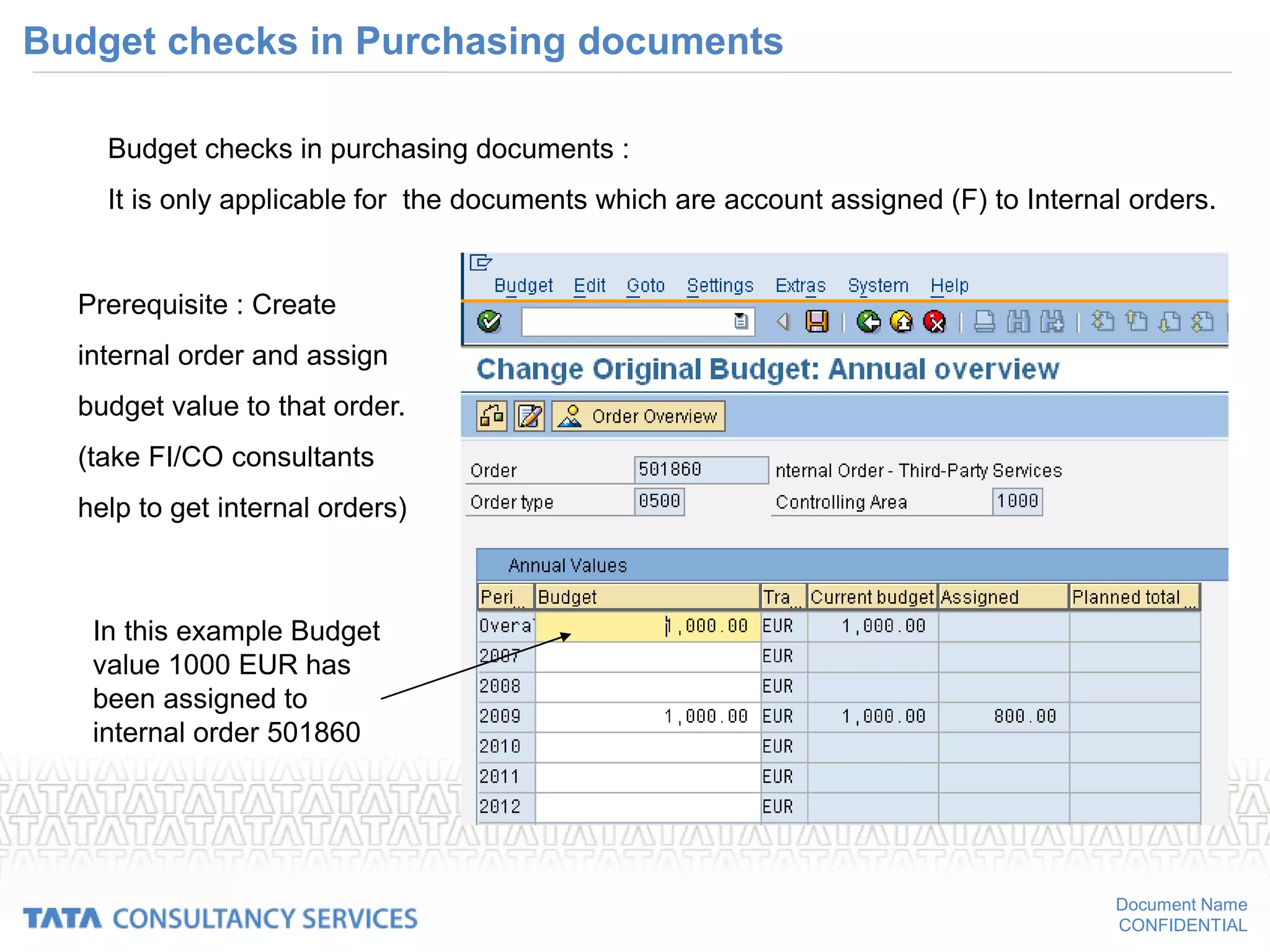
Budget checks in Purchasing documents
Budget checks in purchasing documents :
It is only applicable for the documents which are account assigned (F) to Internal orders.
Prerequisite : Create
internal order and assign
budget value to that order.
(take FI/CO consultants
help to get internal orders)
In this example Budget
value 1000 EUR has
been assigned to
internal order 501860
Document Name
CONFIDENTIAL
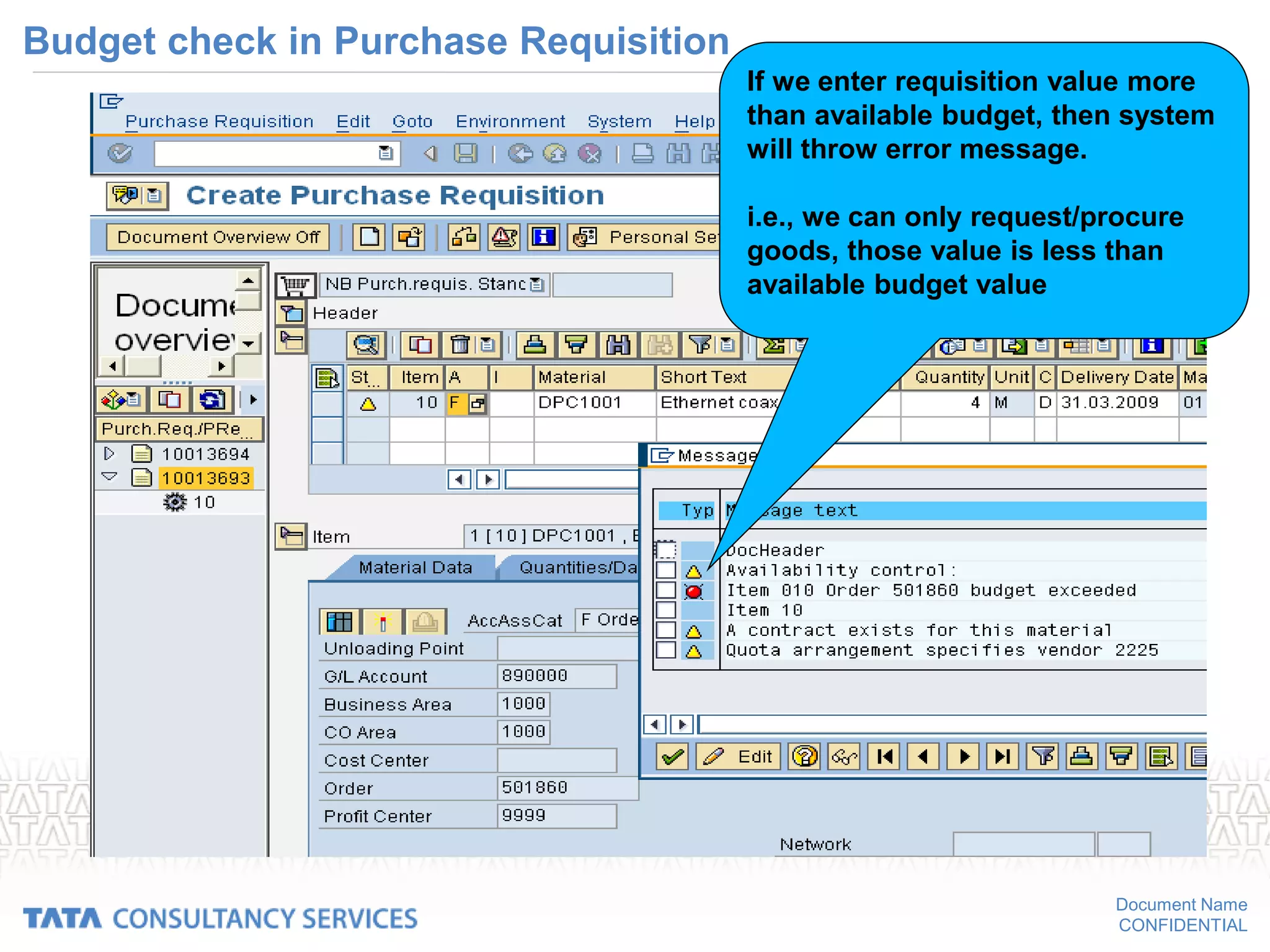
Budget check in Purchase Requisition
If we enter requisition value more
than available budget, then system
will throw error message.
i.e., we can only request/procure
goods, those value is less than
available budget value
Document Name
CONFIDENTIAL
Budget check in Purchase Order
If we enter order value more than
available budget, then system
will throw error message.
i.e., we can only request/procure
goods, those value is less than
available budget value
Document Name
CONFIDENTIAL
Scheduling Agreement
A scheduling agreement is a longer-term arrangement with the vendor covering the supply of
materials subject to predetermined conditions. The conditions are valid for a predefined period and
predefined total purchase quantity.
Scheduling agreement have several advantages:
– Using scheduling agreement enables user to reduce processing times and the amount of paperwork within the
enterprise. A delivery schedule issued against a scheduling agreement can replace a large number of standard
purchase orders or contract release orders.
Scheduling agreement delivery schedule lines do not constitute an independent document but are part of the
scheduling agreement. Procurement via scheduling agreement thus enables to reduce the volume of document
used.
– Volumes of stock on hand can be reduced to a minimum through application of the Just-in-Time (JIT) principle,
involving the specification of exact delivery time-spots.
– The vendors’ lead times are reduced. It is not necessary to deliver the entire quantity covered by the scheduling
agreement at once; instead, a series of smaller quantities can be delivered in accordance with the delivery
schedule lines. In this case, the vendors can receive due notification of such required quantities and delivery
dates and times well in advance.
Document Name
CONFIDENTIAL
Creation of Scheduling Agreement without Release Documentation
“Create Scheduling Agreement :
Initial Screen” screen,
Document Name
CONFIDENTIAL
Creation of Scheduling Agreement without Release Documentation cont..
“Create Scheduling Agreement : Header
Data” screen
“Create Scheduling Agreement :
Item Overview” screen
Document Name
CONFIDENTIAL
Creation of Scheduling Agreement without Release Documentation cont..
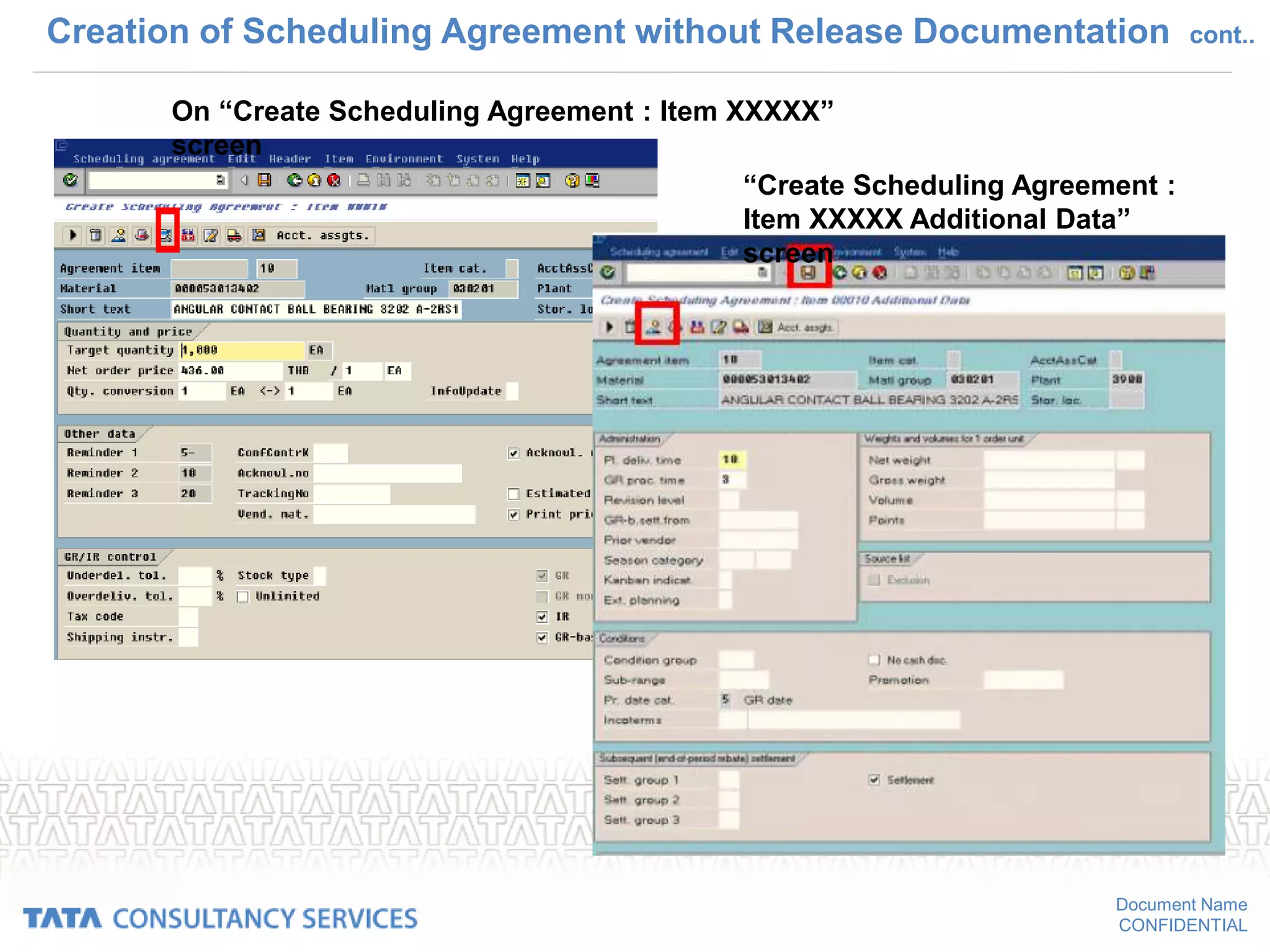
On “Create Scheduling Agreement : Item XXXXX”
screen
“Create Scheduling Agreement :
Item XXXXX Additional Data”
screen
Document Name
CONFIDENTIAL
Creation of Schedule Line cont..
Transaction ME38
Document Name
CONFIDENTIAL
Subcontracting Process – Overview
– Subcontracting
• Is a Process in which part of the manufacturing activities such as
assembling, machining etc., are assigned to the subcontractor, by
providing components
• Item category 'L' should be used for all purchasing documents. (RFQ,
Contract, PR and PO).
• Subcontract orders are created with item category 'L', and component
details. The price mentioned in PO is only subcontracting charges.
Document Name
CONFIDENTIAL
Subcontracting Process – Purchase Order
Create PO with item
category 'L' and enter
component details in
item detail 'Material
Data' tab
If BOM (Bill of material)
is available for
Finished goods, by
exploding BOM in PO,
component details can
be adopted
Enter subcontract
charge in the price field
Document Name
CONFIDENTIAL
Subcontracting Process – Purchase Order
Component to
be provided to
the vendor
details in
Purchase order
Document Name
CONFIDENTIAL
Purchasing information
• List displays
– List of POs for a vendor or for a range of vendors
• This gives the details of the purchase order like still to be delivered,
still to be invoiced etc.
– List of POs for a material or for a range of materials
– List of POs for a account assignment
– List of POs for a requirement tracking number
• Reporting
– General analyses
– Order value analyses
– Subcontracting stocks per vendor
Document Name
CONFIDENTIAL
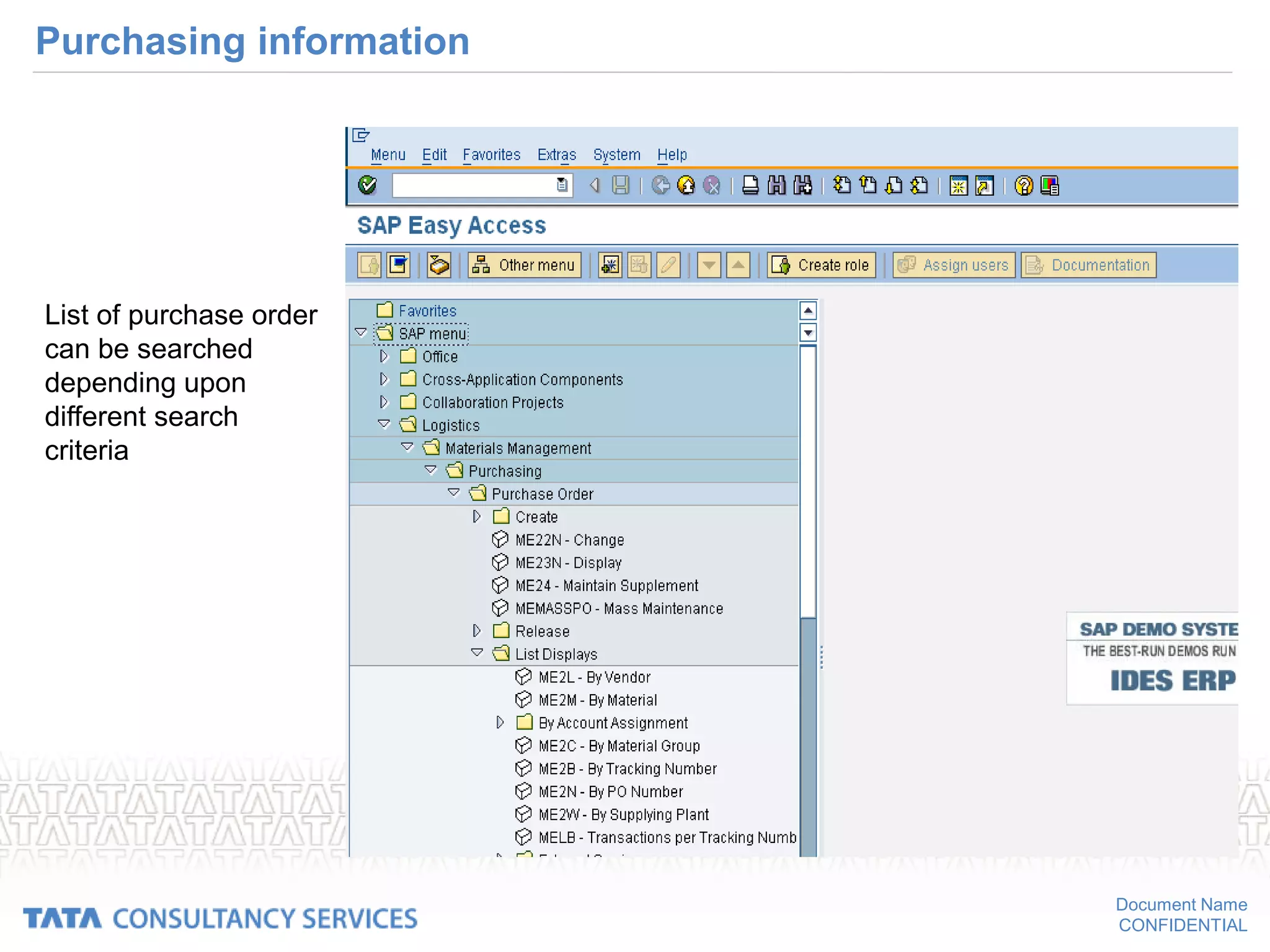
Purchasing information
List of purchase order
can be searched
depending upon
different search
criteria
Document Name
CONFIDENTIAL
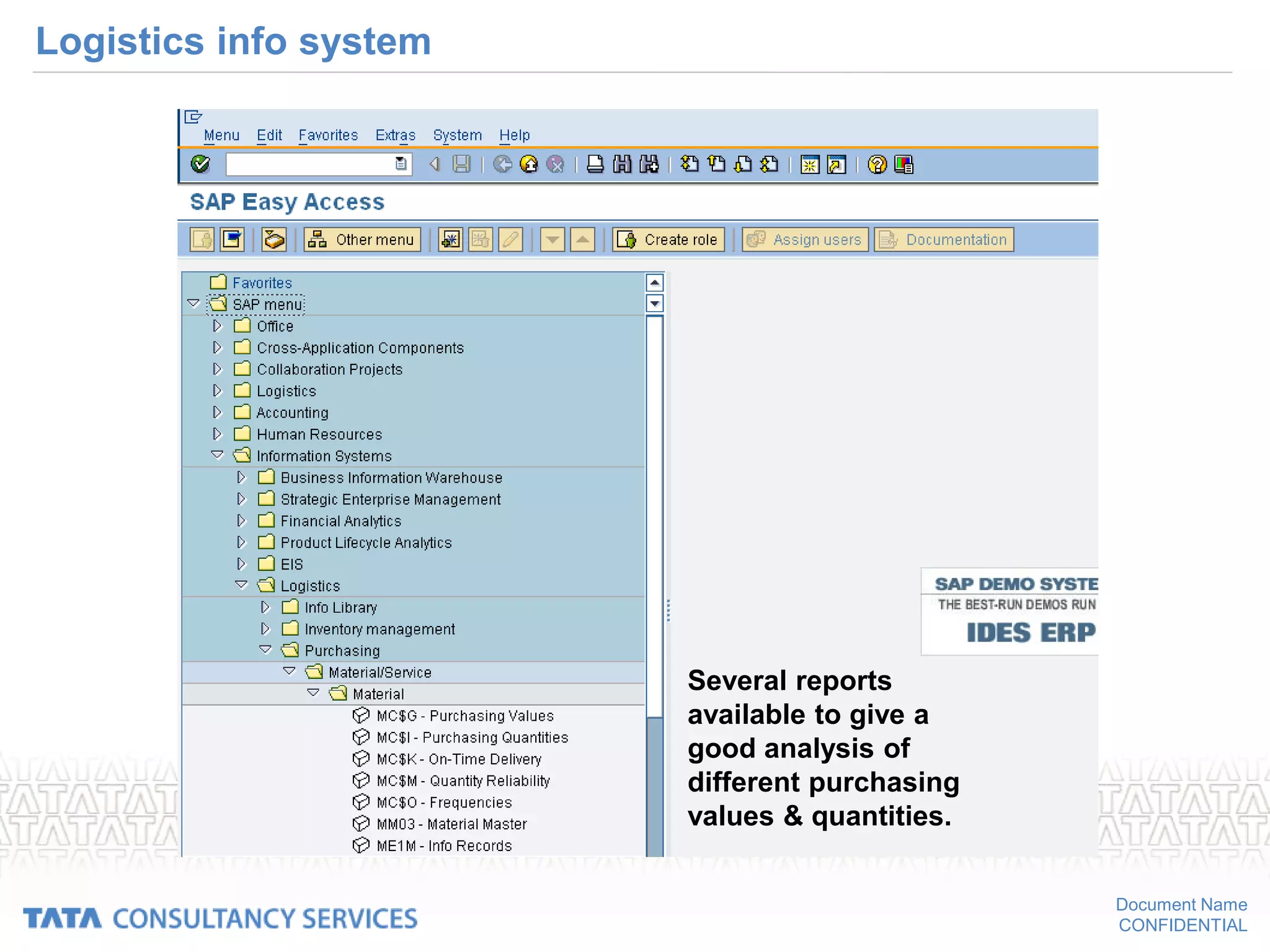
Logistics info system
• Material
– Purchasing values
– Purchasing quantities
– On time delivery
– Qty reliability
– Frequencies
• Vendor
• Material group
• Purchasing group
Document Name
CONFIDENTIAL
Logistics info system
Several reports
available to give a
good analysis of
different purchasing
values & quantities.
Document Name
CONFIDENTIAL
SIM Files For Reference
• Creating a Purchase Requisition
• Creating a Contract
• Creating a Purchase Order
• Doing Price Comparison
• Creating Source List
• Creating Service Entry Sheet
- 155 -
Document Name
CONFIDENTIAL
Next Session
• Inventory Management
- 156 -

Procurement Process _gb.ppt

  • 1.
    CONFIDENTIAL Version 2008 SAP MMTraining Material- Level 2
  • 2.
  • 3.
  • 4.
  • 5.
    Document Name CONFIDENTIAL Course Objectives •Understand the concepts in SAP - Purchasing component • Create, change PR • Create, change, compare RFQ • Create, change Purchase Order • Create, change outline agreements On conclusion of this course you should be able to
  • 6.
    Document Name CONFIDENTIAL Introduction Contents • Purchasingoverview • Purchase Requisitions • Request for Quotations • Purchase Order • Outline Agreements
  • 7.
    Document Name CONFIDENTIAL Purchasing -overview • The Purchasing component has the following tasks:  external procurement of materials and services  determination of possible sources of supply for a requirement identified by the materials planning and control system  determination of possible sources of supply for a requirement arising directly within a user department  monitoring of deliveries and payments to vendors
  • 8.
    Document Name CONFIDENTIAL Purchasing -integration with other modules • Integration – Controlling (CO) • Purchase orders for materials intended for direct consumption • They can be directly assigned to a cost center or a production order. – Financial Accounting (FI) • Vendor master is maintained by both accounting and purchasing departments. • Through PO account assignment, Purchasing can also specify which G/L accounts are to be charged in the financial accounting system.
  • 9.
    Document Name CONFIDENTIAL Purchasing -integration with other modules – Sales and Distribution (SD) • Within the framework of materials planning and control, a requirement that has arisen in the Sales area can be passed on to Purchasing. • When a requisition is created, it can be directly assigned to a sales order.
  • 10.
    Document Name CONFIDENTIAL Process flowin purchasing • Determination of Requirements – Materials requirements are identified either in the user departments or via materials planning and control. – It includes both MRP proper and the demand-based approach to inventory control. – The regular checking of stock levels of materials defined by master records, use of the order-point method, and forecasting on the basis of past usage are important aspects of the demand management. – You can enter purchase requisitions yourself, or they can be generated automatically by the materials planning and control system.
  • 11.
    Document Name CONFIDENTIAL Process flowin purchasing • Source Determination – The Purchasing component helps in identifying potential sources of supply based on past orders and existing longer-term purchase agreements. – This speeds the process of creating requests for quotation (RFQ) • Vendor Selection and Comparison of Quotations – The system is capable of simulating pricing scenarios, allowing you to compare a number of different quotations. – Rejection letters can be sent automatically.
  • 12.
    Document Name CONFIDENTIAL Process flowin purchasing • Purchase Order Processing – The Purchasing system adopts information from the requisition and the quotation to help you create a purchase order. – You can generate Pos yourself or have the system generate them automatically. – Vendor scheduling agreements and contracts are also supported. • Purchase Order Follow-Up – The system checks the reminder periods you have specified – System automatically prints reminders or expediters at the predefined intervals. – It provides you with an up-to-date status of all purchase requisitions, quotations, and purchase orders.
  • 13.
    Document Name CONFIDENTIAL Process flowin purchasing • Goods Receiving and Inventory Management – Goods Receiving personnel can confirm the receipt of goods simply by entering the Po number. – By specifying permissible tolerances, buyers can limit over- and under deliveries of ordered goods. • Invoice Verification • The system supports the checking and matching of invoices. • Invoice verification can be based on purchase orders or GR documents or directly to a vendor without any document reference.
  • 14.
    Document Name CONFIDENTIAL Std. Menuoptions in Purchasing • Create – Use this option to create a purchasing document . – Enter the required information and save the document . – The document is then stored under a unique number. • Change – Use this option to change a purchasing document . – You need the document number in order to access the document.
  • 15.
    Document Name CONFIDENTIAL Std. Menuoptions in Purchasing • Display – Use this option to display a purchasing document . – You cannot change or add any information to the document that is displayed . – You need the document number in order to access the document. • List displays/reporting – You can use these options to generate reports analyzing purchasing documents – Example • List of all purchase orders for Vendor ABC
  • 16.
    Document Name CONFIDENTIAL Std. Menuoptions in Purchasing • Follow-on functions – This option allows you to perform tasks related to (following on from) but not included in the purchasing functionality. – Example • Entering a goods receipt or an invoice in the system. • Messages – This option enables you to print or transmit documents in message form – Example • Transmission via fax, Printouts etc
  • 17.
  • 18.
  • 19.
    Document Name CONFIDENTIAL Purchasing Documents •Definition – A purchasing document is an instrument used by Purchasing to procure materials or services. – Purchasing documents are two types o Internal (Purchase requisitions) o External (Request for quotations, Purchase orders & outline agreements) • Purchase Requisition (PR) – The requisition will contain the materials or services to be procured, a required date of delivery and quantity. – It is a document that is internal to the company, therefore it is treated separately with in purchasing.
  • 20.
    Document Name CONFIDENTIAL Purchasing Documents •Types of External purchasing documents • Request for quotation (RFQ) / Quotation – RFQ is an invitation extended to a vendor by a purchasing department to submit a quotation or bid for the supply of materials or performance of services. – Quotation is the vendor’s response against RFQ to purchasing department. It is an offer given by a vendor regarding supply of materials or performance of services, subject to specified conditions. – Quotation contains a vendor's prices and conditions. – It is the basis for vendor selection. • Note : In SAP, RFQ & Quotations are a single document.
  • 21.
    Document Name CONFIDENTIAL Purchasing Documents •Purchase order (PO) – The buying entity’s request or instruction to a vendor (external supplier) to supply certain materials or perform certain services with duly agreed terms and conditions for a confirmed delivery date. – It formalizes a purchase transaction.
  • 22.
    Document Name CONFIDENTIAL Purchasing Documents •Outline Agreements – Outline agreement is a long term agreement between a purchasing department and a vendor regarding supply of materials / performance of services within a certain period according to predefined terms & conditions. – In SAP, outline agreements are subdivided into two types. o Purchasing contract - It is a type of outline agreement against which release orders (purchase orders) can be issued for agreed materials / services as and when required during that period. o Scheduling agreement - It is a type of outline agreement against which materials / services are procured on predetermined delivery schedules (specifying purchasing quantities, delivery dates) over a predefined period.
  • 23.
    Document Name CONFIDENTIAL Purchasing documents •Structure – Each purchasing document is subdivided into two main areas: • The header – The header contains information relevant to the whole document . – Example, information about the vendor and the document number is contained in the document header • The individual items . – The items specify the materials or services to be procured . – Example, The material description and the order quantity are specified in each item.
  • 24.
  • 25.
    Document Name CONFIDENTIAL Purchasing documents –The additional data • It provides extra information about the item, and has no direct connection with the item procurement data. • Example, – account assignment data – PO history for an item, which contains information on already recorded goods and invoice receipts relating to the item.
  • 26.
  • 27.
    Document Name CONFIDENTIAL Purchasing documents •Classification of Purchasing Documents – Purchasing documents are differentiated in the SAP system via the document type . – Example, relevant number range depends on document types – Document types are defined for RFQs, purchase orders, and contracts • Numbering of purchasing documents – Each document is assigned a unique number . – This number can be assigned internally or externally , depending on the policy . – Internal number assignment means that the system assigns the number. – External number assignment means that the person creating the document must supply it. – Alphanumeric assignment is only possible in the latter case.
  • 28.
  • 29.
  • 30.
    Document Name CONFIDENTIAL Purchase requisition •Purchase requisition can be created in the following path: SAP MENU LOGISTICS MATERIALS MANAGEMENT PURCHASING  PURCHASE REQUISITION  CREATE
  • 31.
  • 32.
    Document Name CONFIDENTIAL Purchase requisitions •Definition – A purchase requisition is a request or instruction to Purchasing to procure a certain quantity of a material so that it is available at a certain point in time. – It is an internal document. • Requisitions can be created in the following ways: – Directly: Someone from the requesting department enters a purchase requisition manually. – Indirectly: The purchase requisition is created via MRP, production orders, networks, sales order etc. • Purchase requisitions can be subjected to a release procedure.
  • 33.
  • 34.
    Document Name CONFIDENTIAL Purchase requisitions- integration • Requisitions can be created indirectly in the following ways: – via materials planning and control • The component Consumption-Based Planning suggests materials that need to be ordered on the basis of past consumption or usage figures and existing stock levels. • The order quantity and the delivery date are determined automatically. • Materials planning and control can stipulate that a purchase requisition is to be resubmitted to the purchasing department if it has not been processed after a predefined period of time.
  • 35.
    Document Name CONFIDENTIAL Purchase requisitions- integration • Requisitions are generated automatically from production orders if – They contain an external processing operation (e.g. subcontracting work) – A precondition is that the control key for the operation allows or prescribes external processing. – they contain non-stock components
  • 36.
    Document Name CONFIDENTIAL Purchase requisitions •Item category: It’s a Key which determines how the procurement of a material or service item is controlled. Depending upon the item category chosen in the document the procurement type will be different. • Procurement types – Standard – Subcontracting • Components to be provided can be entered. – Consignment – Third party – Stock transfer – External service • Service specifications can be entered
  • 37.
  • 38.
    Document Name CONFIDENTIAL Manual creationof PR • Things to remember – Item category – Account assignment category – Purchasing organization – Purchasing group – Requirement tracking number – Delivery date – Item with or with out material master record – Required quantity
  • 39.
  • 40.
  • 41.
    Document Name CONFIDENTIAL • Pathfor creation of request for quotation: • SAP MENU  LOGISTICS  MATERIALS MANAGEMENT PURCHASING  RFQ/QUOTATION  REQUEST FOR QUOTATION  CREATE
  • 42.
    Document Name CONFIDENTIAL Creating RequestFor Quotation • Automatically from PR • Manually – With reference to PR – With out reference to PR • Delivery address – Address of the company asking for quotation, by default it is the address of E+L. But it can be changed. • vendor address – Just enter the codes of the vendor, System will take other details from vendor master. • Quotation dead line • Delivery date
  • 43.
    Document Name CONFIDENTIAL RFQ (contd…) •Printing RFQ • Send the Printed RFQ to the vendors • Receive the quotation from the vendor • Maintain the quotation – Enter the net price quoted by the vendor – Enter the pricing conditions – Terms of payment – Update the info record if required
  • 44.
  • 45.
    Document Name CONFIDENTIAL Create RFQw.r.t purchase requisition Enter the PR . The relevant data’s will get copied from PR to RFQ.
  • 46.
  • 47.
    Document Name CONFIDENTIAL Create Requestfor quotation: • Collective number: If the RFQs of a particular procurement process have been assigned to a collective number, it is then possible to list and process all the individual RFQs/inquiries that are grouped under this number. • You have created 20 RFQs/inquiries for the procurement of a material and have filed them under the collective number “COL001". So collective number helps in following ways: • In respect of which RFQs have quotations been received? • What is the net price of each quotation? You can obtain this information by listing all individual RFQs entered under the collective number “COL001”
  • 48.
    Document Name CONFIDENTIAL Select thePR and click on Adopt + details
  • 49.
  • 50.
  • 51.
    Document Name CONFIDENTIAL Enter thevendor code ( system will take the vendor address from vendor master)
  • 52.
    Document Name CONFIDENTIAL Maintain quotation •Path to maintain quotation • SAP MENU LOGISTICS MATERIALS MANAGEMENT PURCHASING RFQ/QUOTATION QUOTATIONMAINTAIN
  • 53.
  • 54.
  • 55.
    Document Name CONFIDENTIAL Maintain quotation •Discounts, freight cost & any other additional planned costs can be entered in the quotation which gives an opportunity to compare the actual landed cost of material considering all pricing factors • Besides entering the different kind of prices, the validity period of these price can also be entered.
  • 56.
    Document Name CONFIDENTIAL Maintaining differentcondition types in a quotation To enter Conditions, Select the line item & go to Menu bar → Item → Conditions
  • 57.
    Document Name CONFIDENTIAL Maintaining differentcondition types in a quotation Maintain the condition types
  • 58.
    Document Name CONFIDENTIAL Quotation pricecomparison • The path for price comparison of quotations • SAP MENU  LOGISTICS  MATERIALS MANAGEMENT PURCHASING  RFQ/QUOTATION QUOTATION  PRICE COMPARISON
  • 59.
  • 60.
    Document Name CONFIDENTIAL Quotations –Price Comparison • Compare the quotations – Maintain the collective number in the RFQs – Quotations can be compared based on price – Discounts and delivery costs can be included – Comparison can be based on effective price also – System compares and gives the ranking list • Percentage basis for comparing quotations – Mean value equals 100% – Maximum value equals 100% – Minimum value equals 100%
  • 61.
  • 62.
  • 63.
  • 64.
    Document Name CONFIDENTIAL Outline agreementswith the vendor • To set-up longer-term purchasing arrangements with vendors regarding the supply of materials or the performance of services. • Outline agreements can be subjected to a release (approval or clearance) procedure. • Outline agreement types – contract – Scheduling agreement
  • 65.
    Document Name CONFIDENTIAL Contract • Contract:A contract is a type of outline purchase agreement against which release orders (releases) can be issued for agreed materials or services as and when required during a certain overall time-frame. Contracts can take the following forms: • Quantity contracts: Use this type of contract if the total quantity to be ordered during the validity period of the contract is known in advance. The contract is regarded as fulfilled when release orders totaling a given quantity have been issued. • Value contracts: Use this type of contract if the total value of all release orders issued against the contract is not to exceed a certain predefined value. The contract is regarded as fulfilled when release orders totaling a given value have been issued.
  • 66.
    Document Name CONFIDENTIAL Contract: Headerdetails • Header Details: It contains information relating to the entire agreement. For example, the vendor information and header conditions are in the document header Other important header details are: • Vendor • Vendor address • Document type : It determines if the contract will be a quantity contract or value contract • Purchase organization • Purchasing group • Validity period • Payment terms • Header conditions: suppose any discount or any surcharge is applicable to the whole contract, then those conditions can be maintained in header conditions.
  • 67.
  • 68.
  • 69.
    Document Name CONFIDENTIAL Contract: itemdetails • Item Details: It contains the information specific to the relevant material or service. For example, the material/service information and item conditions. Other important item details are: • Material / service • Quantity • Net price • Item conditions such as discount & delivery costs • Tax codes • Plant • Reminder details • Delivery address Item details also provides information on the statistics of goods delivery of the contract.
  • 70.
  • 71.
  • 72.
    Document Name CONFIDENTIAL Item conditiondetails: Enter value of different conditions
  • 73.
    Document Name CONFIDENTIAL Texts incontract • Texts in contract – Header texts The texts entered in header details holds for the whole document. – Item texts The texts entered in item details holds only for the respective material or service. These texts can be entered under different text types as per the relevance of the information. – You can create your own text types
  • 74.
    Document Name CONFIDENTIAL Header texts: Entertext under different text types depending upon its relevance
  • 75.
    Document Name CONFIDENTIAL Item text: Entertext under different text types depending upon its relevance
  • 76.
  • 77.
    Document Name CONFIDENTIAL Course Objectives •Create a new PO • Make changes to existing PO • Print PO • Navigate through purchasing information system On conclusion of this course, you should be able to
  • 78.
    Document Name CONFIDENTIAL Introduction • Contents •Creating POs • Printing of POs • Printing Remainders • Changing or cancelling POs • Purchasing information
  • 79.
    Document Name CONFIDENTIAL Purchase order •Path for creation of purchase order: • SAP MENU  LOGISTICS MATERIALS MANAGEMENT  PURCHASING PURCHASE ORDER  CREATE  VENDOR / SUPPLYING PLANT KNOWN
  • 80.
    Document Name CONFIDENTIAL Create purchaseorder: Create purchase order
  • 81.
    Document Name CONFIDENTIAL Purchase order •Definition – Formal request or instruction from a purchasing organization to a vendor or a plant to supply or provide a certain quantity of goods or services at or by a certain point in time. • Structure – Header – items – Additional data
  • 82.
  • 83.
    Document Name CONFIDENTIAL Create PO- Manually • Manually creating a PO – With reference to PR • Select the PR • Select the items from PR • Copy the items in to PO • Enter the vendor • Enter the prices and pricing conditions • Requirement tracking number • Update the info record if required The Purchase order created.
  • 84.
    Document Name CONFIDENTIAL Create POw.r.t purchase requisition Enter purchase requisition no & item no
  • 85.
    Document Name CONFIDENTIAL Create POw.r.t request for quotation – With reference to RFQ • Select RFQ • Select the items • Copy the selected items in to PO • Enter the Price and pricing conditions • Update the info record if required. • Acknowledgement and confirmations Save the document & Purchase order created.
  • 86.
    Document Name CONFIDENTIAL Create POw.r.t request for quotation Enter the RFQ no & the item no
  • 87.
    Document Name CONFIDENTIAL Create POw.r.t a contract – With reference to contract • Select contract • Select the items • Copy the selected items in to PO • The price & relevant conditions will get copied to the purchase order from the contract. • Enter the quantity to be ordered. • Enter the delivery date. Save the document & Purchase order created
  • 88.
    Document Name CONFIDENTIAL Create POw.r.t contract Enter the contract no & the item no
  • 89.
    Document Name CONFIDENTIAL Creating aPurchase order automatically • Automatically from PR – Set automatic PO indicator for material and vendor – Maintain Purchasing info record – Maintain source list with fixed vendor & set ‘MRP relevance field’ as 1. – Maintain info record – PR from MRP or Manually created PR – Assign manually or automatically – Process the assigned PR to create PO
  • 90.
    Document Name CONFIDENTIAL Setting automaticPO in material master: Flag auto PO
  • 91.
    Document Name CONFIDENTIAL Set automaticPO in vendor master: Set automatic PO
  • 92.
  • 93.
    Document Name CONFIDENTIAL Maintain PurchaseInfo record (ME11) : Flag Regular Vendor Order Unit
  • 94.
    Document Name CONFIDENTIAL Maintain PurchaseInfo record (ME11) : Tax code Net Price
  • 95.
    Document Name CONFIDENTIAL Maintain sourcelist (ME01) : Material Plant
  • 96.
    Document Name CONFIDENTIAL Maintain sourcelist (ME01) : Material vendor Flag fixed vendor
  • 97.
    Document Name CONFIDENTIAL Display Purchaserequisition (source assigned)
  • 98.
    Document Name CONFIDENTIAL Automatically creatingpurchase order: • Path for automatically converting purchase requisition to purchase order: • SAP MENU LOGISTICS MATERIALS MANAGEMENTPURCHASING PURCHASE ORDERCREATEAUTOMATICALLY VIA PURCHASE REQUISITION
  • 99.
  • 100.
  • 101.
    Document Name CONFIDENTIAL Display purchaserequisition • After the purchase order is create against the purchase requisition then the status of the purchase requisition gives the details of the follow on documents
  • 102.
    Document Name CONFIDENTIAL Creating aPO (contd…) • Important terms in PO – Vendor • For creating a PO you need to enter vendor code • Vendor master should exist for this purpose • if you don’t want to maintain all the details for a vendor you can create a one time vendor – Item category • Standard • Subcontracting • Service • Third party • consignment
  • 103.
  • 104.
    Document Name CONFIDENTIAL Create PO(Contd…) – Account assignment category • Specification of the account assignment objects that are charged in the case of a purchase order for a material that is intended for direct usage or consumption. • Examples – Asset – Sales order – Production order – Cost center • Types of account assignment – Single account assignment – Multiple account assignment
  • 105.
  • 106.
    Document Name CONFIDENTIAL Create PO(contd…) – Delivery date • Date format – Day format – Week format – Month format • Delivery date entered here is only expected delivery date • You can also specify a statistical delivery date
  • 107.
  • 108.
    Document Name CONFIDENTIAL Create PO(contd…) – Units of measure in PO – The order unit » This is the unit you specify in connection with the order quantity. – The order price unit » This is the unit that applies in connection with the net price and which is taken as the basis for invoice verification. » If the order price unit does not correspond to the order unit, and if no conversion factor is specified in the system, you must enter a conversion factor on the item detail screen.
  • 109.
    Document Name CONFIDENTIAL Create PO(Contd…) • Example for units of measure in PO – Order quantity 10 – Order unit Box – Gross price per unit 10 EURO – Order price unit (number) 1 – Order price unit (of measure) kg – Conversion factor 1 Box = 5 kg 10 Boxes = 50 kg
  • 110.
  • 111.
    Document Name CONFIDENTIAL Create PO(Contd…) – Conditions • This component enables you to store pricing stipulations agreed with the vendor • Examples are applicable discounts or surcharges, or stipulations regarding the payment of freight costs in the system. • There are three kinds of price in Purchasing: – Gross price » Price without taking any possible discounts and surcharges into account
  • 112.
    Document Name CONFIDENTIAL Create PO(Contd…) – Net price » Price taking any applicable discounts and surcharges into account – Effective price » Net price after deduction of cash discount, with allowance for any miscellaneous provisions, delivery costs, and non- deductible taxes.
  • 113.
    Document Name CONFIDENTIAL Conditions: • Supposethe price of one material is as follows: • GROSS PRICE = 100 EUR • DISCOUNT 10% = - 10 EUR • NET PRICE = (100-10=) 90 EUR • DELIVERY COST = 8 EUR • EFFECTIVE PRICE = (100-10+8 ) = 98 EUR
  • 114.
    Document Name CONFIDENTIAL Calculation ofnet price & effective price:
  • 115.
    Document Name CONFIDENTIAL Create PO(Contd…) – Terms of Payment: it’s a Key for defining payment terms composed of cash discount percentages and payment periods. • Example – Within 14 days 3% discount – Within 30 days 2% discount – With in 45 days Due net
  • 116.
  • 117.
  • 118.
    Document Name CONFIDENTIAL INCO terms: –INCO terms • INCO terms are internationally-recognized terms of delivery reflecting the standards set by the International Chamber of Commerce (ICC). • Example – FOB - Free On Board. This means that the buyer has to bear all costs and risks of loss of or damage to the goods from that point. – You can specify Incoterms for an order item that differ from those in the PO header.
  • 119.
  • 120.
    Document Name CONFIDENTIAL Purchase ordertexts: • Purchase order text can be of two types Header text • Header text holds true for whole document Item text • Item text holds only for the respective material item.
  • 121.
    Document Name CONFIDENTIAL Header texttypes in purchase order: • Header texts • Header note • Pricing types • Dead lines • Terms of delivery • Shipping instructions • Terms of payments • warranties • Penalties for breach of contract
  • 122.
    Document Name CONFIDENTIAL Item texttypes in PO • Item text • Info record PO text • Material PO text • Delivery text • Info record note
  • 123.
  • 124.
    Document Name CONFIDENTIAL Confirmations • Purpose –This component can be used, if you wish to have your vendor provide you with various kinds of confirmation regarding delivery dates and quantities – It enables you to base your materials planning and control activities on more up-to-date data than that contained in purchase orders. • Confirmation control key • Shipping notification • Order acknowledgement
  • 125.
  • 126.
    Document Name CONFIDENTIAL Vendor confirmationupdate Vendor confirms the delivery date & quantity
  • 127.
    Document Name CONFIDENTIAL Shipping notification •Shipping Notification • Definition – A vendor’s confirmation to a purchasing organization of the delivery date for a certain quantity of ordered materials – It can be for the date of performance of ordered services also. • Structure – Against the shipping notification of vendor you create an inbound delivery where the shipping doc no ,date of delivery & confirmed quantity entered besides other shipping details
  • 128.
    Document Name CONFIDENTIAL Create aninbound delivery • Path for creation of inbound delivery: • SAP MENU  LOGISTICS  MATERIALS MANAGEMENT PURCHASING PURCHASE ORDER INBOUND DELIVEY CREATE
  • 129.
    Document Name CONFIDENTIAL Create inbounddelivery Enter PO no, delivery date & shipping doc no
  • 130.
    Document Name CONFIDENTIAL Create inbounddelivery Put the quantity To be delivered Against the Shipping no
  • 131.
  • 132.
    Document Name CONFIDENTIAL Goods receiptupdates PO history • When you do the goods receipt against a purchase order it updates the status of purchase order in the PO history. • When you do goods receipt against a inbound delivery ,it will update the status of inbound delivery besides updating PO history. So this gives the updated status of an inbound delivery
  • 133.
    Document Name CONFIDENTIAL PO history goodsreceipt updates the status of PO.
  • 134.
    Document Name CONFIDENTIAL Status ofinbound delivery in PO Goods receipt updates the status of each inbound delivery
  • 135.
    Document Name CONFIDENTIAL Printing theremainders • Types of expediting letters – Remainders • A negative number of days means that a reminder is to be issued to the vendor n days prior to the delivery date – Urging letters • A positive number of days means that a letter or message urging delivery is to be issued n days after the due date.
  • 136.
    Document Name CONFIDENTIAL Reminders ina PO Reminders can be set in purchase order
  • 137.
    Document Name CONFIDENTIAL Changing andblocking POs – If you change a PO after it has been sent to the vendor, a change document is generated that can be sent to the vendor. • This tells the vendor what you have changed. – If the goods have already been delivered, then the changes you can make to the PO are limited. • For example, you cannot change the quantity to one that is less than the quantity delivered. – If the invoice has been received or the goods have been paid for, and your intended change affects the price, the change will be ineffective. • You can display the PO history for an item to determine whether deliveries have been received or the item has been invoiced.
  • 138.
    Document Name CONFIDENTIAL Printing aPO • Menu path – Purchase order -> Header -> Messages • Data required – Output type – Medium – Communication method • Select the printer – Further Data • Repeat output • Change output
  • 139.
    Document Name CONFIDENTIAL Message inPO: The message types can be Entered here.
  • 140.
    Document Name CONFIDENTIAL Budget checksin Purchasing documents Budget checks in purchasing documents : It is only applicable for the documents which are account assigned (F) to Internal orders. Prerequisite : Create internal order and assign budget value to that order. (take FI/CO consultants help to get internal orders) In this example Budget value 1000 EUR has been assigned to internal order 501860
  • 141.
    Document Name CONFIDENTIAL Budget checkin Purchase Requisition If we enter requisition value more than available budget, then system will throw error message. i.e., we can only request/procure goods, those value is less than available budget value
  • 142.
    Document Name CONFIDENTIAL Budget checkin Purchase Order If we enter order value more than available budget, then system will throw error message. i.e., we can only request/procure goods, those value is less than available budget value
  • 143.
    Document Name CONFIDENTIAL Scheduling Agreement Ascheduling agreement is a longer-term arrangement with the vendor covering the supply of materials subject to predetermined conditions. The conditions are valid for a predefined period and predefined total purchase quantity. Scheduling agreement have several advantages: – Using scheduling agreement enables user to reduce processing times and the amount of paperwork within the enterprise. A delivery schedule issued against a scheduling agreement can replace a large number of standard purchase orders or contract release orders. Scheduling agreement delivery schedule lines do not constitute an independent document but are part of the scheduling agreement. Procurement via scheduling agreement thus enables to reduce the volume of document used. – Volumes of stock on hand can be reduced to a minimum through application of the Just-in-Time (JIT) principle, involving the specification of exact delivery time-spots. – The vendors’ lead times are reduced. It is not necessary to deliver the entire quantity covered by the scheduling agreement at once; instead, a series of smaller quantities can be delivered in accordance with the delivery schedule lines. In this case, the vendors can receive due notification of such required quantities and delivery dates and times well in advance.
  • 144.
    Document Name CONFIDENTIAL Creation ofScheduling Agreement without Release Documentation “Create Scheduling Agreement : Initial Screen” screen,
  • 145.
    Document Name CONFIDENTIAL Creation ofScheduling Agreement without Release Documentation cont.. “Create Scheduling Agreement : Header Data” screen “Create Scheduling Agreement : Item Overview” screen
  • 146.
    Document Name CONFIDENTIAL Creation ofScheduling Agreement without Release Documentation cont.. On “Create Scheduling Agreement : Item XXXXX” screen “Create Scheduling Agreement : Item XXXXX Additional Data” screen
  • 147.
    Document Name CONFIDENTIAL Creation ofSchedule Line cont.. Transaction ME38
  • 148.
    Document Name CONFIDENTIAL Subcontracting Process– Overview – Subcontracting • Is a Process in which part of the manufacturing activities such as assembling, machining etc., are assigned to the subcontractor, by providing components • Item category 'L' should be used for all purchasing documents. (RFQ, Contract, PR and PO). • Subcontract orders are created with item category 'L', and component details. The price mentioned in PO is only subcontracting charges.
  • 149.
    Document Name CONFIDENTIAL Subcontracting Process– Purchase Order Create PO with item category 'L' and enter component details in item detail 'Material Data' tab If BOM (Bill of material) is available for Finished goods, by exploding BOM in PO, component details can be adopted Enter subcontract charge in the price field
  • 150.
    Document Name CONFIDENTIAL Subcontracting Process– Purchase Order Component to be provided to the vendor details in Purchase order
  • 151.
    Document Name CONFIDENTIAL Purchasing information •List displays – List of POs for a vendor or for a range of vendors • This gives the details of the purchase order like still to be delivered, still to be invoiced etc. – List of POs for a material or for a range of materials – List of POs for a account assignment – List of POs for a requirement tracking number • Reporting – General analyses – Order value analyses – Subcontracting stocks per vendor
  • 152.
    Document Name CONFIDENTIAL Purchasing information Listof purchase order can be searched depending upon different search criteria
  • 153.
    Document Name CONFIDENTIAL Logistics infosystem • Material – Purchasing values – Purchasing quantities – On time delivery – Qty reliability – Frequencies • Vendor • Material group • Purchasing group
  • 154.
    Document Name CONFIDENTIAL Logistics infosystem Several reports available to give a good analysis of different purchasing values & quantities.
  • 155.
    Document Name CONFIDENTIAL SIM FilesFor Reference • Creating a Purchase Requisition • Creating a Contract • Creating a Purchase Order • Doing Price Comparison • Creating Source List • Creating Service Entry Sheet - 155 -
  • 156.
    Document Name CONFIDENTIAL Next Session •Inventory Management - 156 -

Editor's Notes

  • #78 Enter objectives that you can measure. Examples are: “demonstrate, list, describe, perform, create.” Do not use terms that you cannot measure, such as “understand, know, comprehend.”