
Advanced Application Deployment with PuppetJohn Coggeshall
About MeCTO, Individual Digital, Inc. (Startup)Author of ext/tidy, PHP 5 Unleashed, Zend Ent. PHP PatternsTwitter: @coogle
What’s Puppet?Puppet is …A deployment toolClient/ServerDeclarativeResource basedPuppet is not.. But can leverageAntMake
What makes Puppet cool?Centralized, Scalable configuration management for server farmsAbstracted from underlying OS (to a point)Configurations can be stored in a VCS (i.e. Subversion) for historical tracking of changesAutomated configuration of individual machines based on configurationAuditing of configuration of individual machines
It’s about knowingPuppet helps bridge the gap between system administration and development teamsDevelopers: Virtual machines managed by local PuppetNeed new extension? Update Puppet configurationsSystem Admins: System changes are tracked through commits, can be reviewed easilySame Puppet system used as locallyResult: Consistent platforms throughout with minimal pain
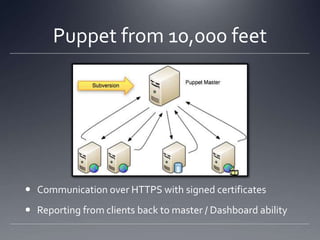
Puppet from 10,000 feetCommunication over HTTPS with signed certificatesReporting from clients back to master / Dashboard ability
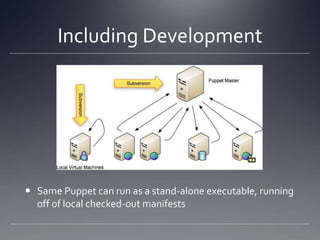
Including Development Same Puppet can run as a stand-alone executable, running off of local checked-out manifests
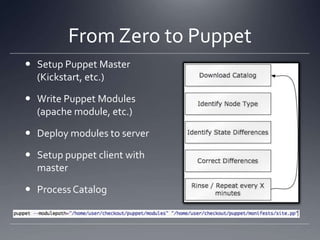
From Zero to PuppetSetup Puppet Master (Kickstart, etc.)Write Puppet Modules (apache module, etc.)Deploy modules to serverSetup puppet client with masterProcess Catalog
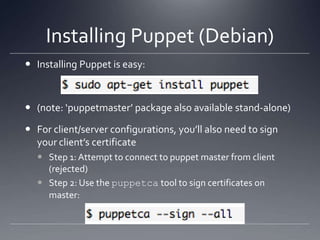
Installing Puppet (Debian)Installing Puppet is easy: (note: ‘puppetmaster’ package also available stand-alone)For client/server configurations, you’ll also need to sign your client’s certificateStep 1: Attempt to connect to puppet master from client (rejected)Step 2: Use the puppetca tool to sign certificates on master:
About CertificatesCertificates are very important to puppet, it’s basically the way authentication is performedPuppet does support the ability to auto-sign certificates of new clientsNot Recommended – potentially this would allow anyone to sign-in to your puppet master and potentially acquire configuration files, etc. - a big security risk
Things you need to knowNodes – A machine being configured, identified generally by its hostnameModules – A collection of classes and files all related to each otherClass – A collection of resources related to each otherResources – Things like software packages, files, users, etc.Defines – A function-like construct for resources
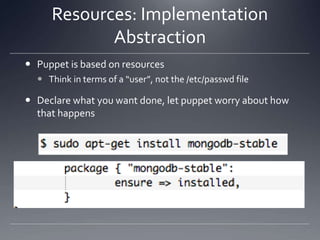
Resources: Implementation AbstractionPuppet is based on resourcesThink in terms of a “user”, not the /etc/passwd fileDeclare what you want done, let puppet worry about how that happens
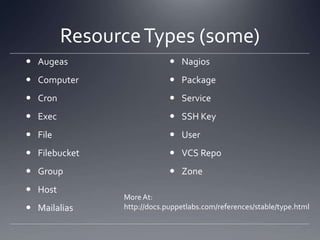
Resource Types (some)AugeasComputerCronExecFileFilebucketGroupHostMailaliasNagiosPackageServiceSSH KeyUserVCS RepoZoneMore At:http://docs.puppetlabs.com/references/stable/type.html
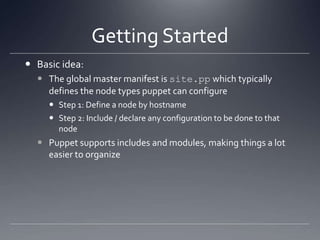
Getting StartedBasic idea:The global master manifest is site.pp which typically defines the node types puppet can configureStep 1: Define a node by hostnameStep 2: Include / declare any configuration to be done to that nodePuppet supports includes and modules, making things a lot easier to organize
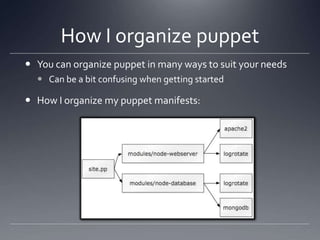
How I organize puppetYou can organize puppet in many ways to suit your needsCan be a bit confusing when getting startedHow I organize my puppet manifests:
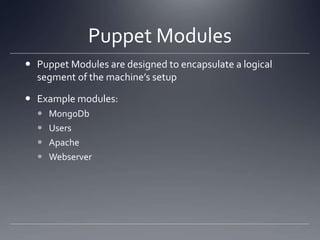
Puppet ModulesPuppet Modules are designed to encapsulate a logical segment of the machine’s setupExample modules:MongoDbUsersApacheWebserver
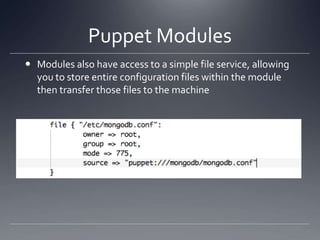
Puppet ModulesModules also have access to a simple file service, allowing you to store entire configuration files within the module then transfer those files to the machine
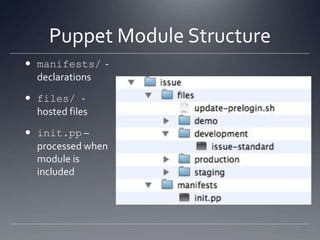
Puppet Module Structuremanifests/  - declarationsfiles/ - hosted filesinit.pp –processed when module is included
How I organize puppet modulesPuppet modules have a simple “class” structureI typically create one or more of the following classes for each module:Module::installModule::configModule::serviceThen, include these modules in the proper order with the base module’s classEvery “package” should be a module to avoid dependency problems
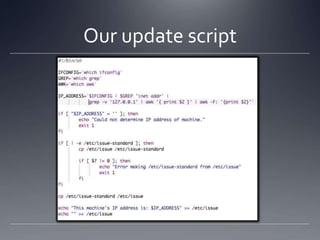
Example: Custom login messageTask: Update the /etc/issue-standard file so it always displays the IP address of the machine when you connect to itUseful for VMs, inconsequential to deployed boxesWhile we’re at it, put a scary warning up at loginWhat we need to do:Create a /etc/issue-standard we want to useCreate a update-prelogin.sh script to determine IP address and update /etc/issue as necessaryInstall new standard, as well as pre-login script
Our update script
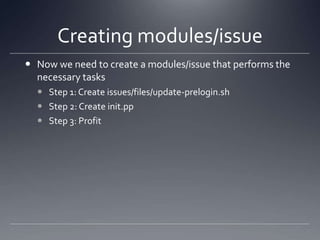
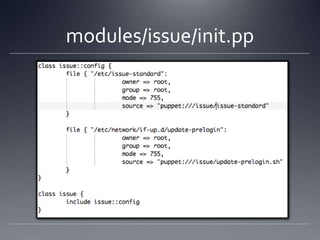
Creating modules/issueNow we need to create a modules/issue that performs the necessary tasksStep 1: Create issues/files/update-prelogin.shStep 2: Create init.ppStep 3: Profit
modules/issue/init.pp
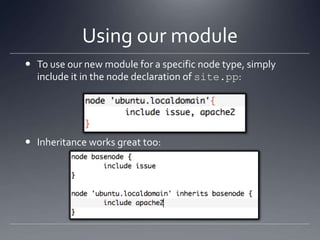
Using our moduleTo use our new module for a specific node type, simply include it in the node declaration of site.pp:Inheritance works great too:
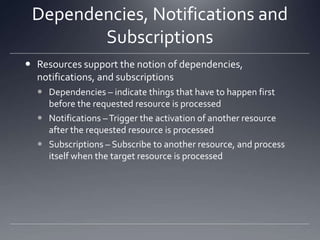
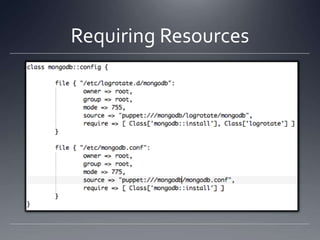
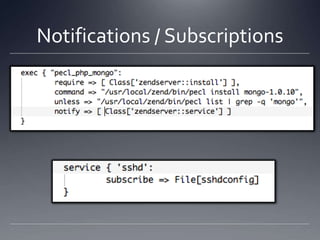
Dependencies, Notifications and SubscriptionsResources support the notion of dependencies, notifications, and subscriptionsDependencies – indicate things that have to happen first before the requested resource is processedNotifications – Trigger the activation of another resource after the requested resource is processedSubscriptions – Subscribe to another resource, and process itself when the target resource is processed
Requiring Resources
Notifications / Subscriptions
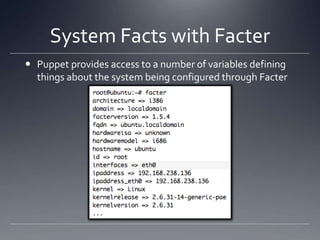
System Facts with FacterPuppet provides access to a number of variables defining things about the system being configured through Facter
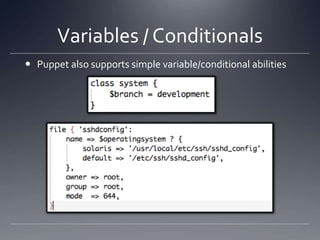
Variables / ConditionalsPuppet also supports simple variable/conditional abilities
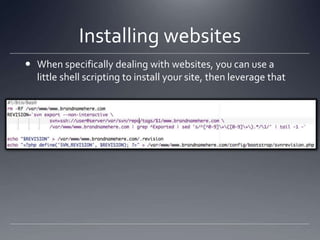
Installing websitesWhen specifically dealing with websites, you can use a little shell scripting to install your site, then leverage that
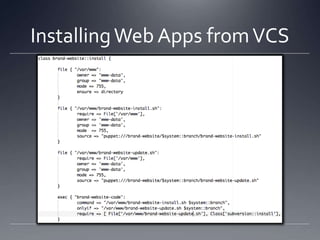
Installing Web Apps from VCS
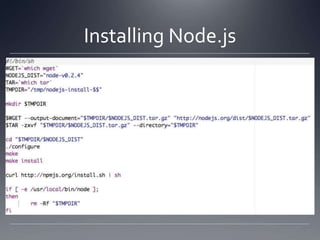
From Source..Like web sites, you can use similar techniques of copying/running shell scripts for compiling softwareEasier to get going, but best answer would be to create custom packages in both cases
Installing Node.js
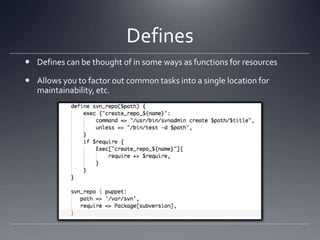
DefinesDefines can be thought of in some ways as functions for resourcesAllows you to factor out common tasks into a single location for maintainability, etc.
Summary and Thank you!This is by no means a complete dissertation, merely an introduction to an advanced deployment techniqueFurther reading:http://docs.puppetlabs.com/guides/language_guide.htmlhttp://docs.puppetlabs.com/references/stable/type.htmlhttp://projects.puppetlabs.com/projects/puppet/wiki/Puppet_PatternsThese slides will be available on SlideShare.netFeedback Welcome: http://joind.in/2908

Puppet

  • 1.
    Advanced Application Deploymentwith PuppetJohn Coggeshall
  • 2.
    About MeCTO, IndividualDigital, Inc. (Startup)Author of ext/tidy, PHP 5 Unleashed, Zend Ent. PHP PatternsTwitter: @coogle
  • 3.
    What’s Puppet?Puppet is…A deployment toolClient/ServerDeclarativeResource basedPuppet is not.. But can leverageAntMake
  • 4.
    What makes Puppetcool?Centralized, Scalable configuration management for server farmsAbstracted from underlying OS (to a point)Configurations can be stored in a VCS (i.e. Subversion) for historical tracking of changesAutomated configuration of individual machines based on configurationAuditing of configuration of individual machines
  • 5.
    It’s about knowingPuppethelps bridge the gap between system administration and development teamsDevelopers: Virtual machines managed by local PuppetNeed new extension? Update Puppet configurationsSystem Admins: System changes are tracked through commits, can be reviewed easilySame Puppet system used as locallyResult: Consistent platforms throughout with minimal pain
  • 6.
    Puppet from 10,000feetCommunication over HTTPS with signed certificatesReporting from clients back to master / Dashboard ability
  • 7.
    Including Development SamePuppet can run as a stand-alone executable, running off of local checked-out manifests
  • 8.
    From Zero toPuppetSetup Puppet Master (Kickstart, etc.)Write Puppet Modules (apache module, etc.)Deploy modules to serverSetup puppet client with masterProcess Catalog
  • 9.
    Installing Puppet (Debian)InstallingPuppet is easy: (note: ‘puppetmaster’ package also available stand-alone)For client/server configurations, you’ll also need to sign your client’s certificateStep 1: Attempt to connect to puppet master from client (rejected)Step 2: Use the puppetca tool to sign certificates on master:
  • 10.
    About CertificatesCertificates arevery important to puppet, it’s basically the way authentication is performedPuppet does support the ability to auto-sign certificates of new clientsNot Recommended – potentially this would allow anyone to sign-in to your puppet master and potentially acquire configuration files, etc. - a big security risk
  • 11.
    Things you needto knowNodes – A machine being configured, identified generally by its hostnameModules – A collection of classes and files all related to each otherClass – A collection of resources related to each otherResources – Things like software packages, files, users, etc.Defines – A function-like construct for resources
  • 12.
    Resources: Implementation AbstractionPuppetis based on resourcesThink in terms of a “user”, not the /etc/passwd fileDeclare what you want done, let puppet worry about how that happens
  • 13.
    Resource Types (some)AugeasComputerCronExecFileFilebucketGroupHostMailaliasNagiosPackageServiceSSHKeyUserVCS RepoZoneMore At:http://docs.puppetlabs.com/references/stable/type.html
  • 14.
    Getting StartedBasic idea:Theglobal master manifest is site.pp which typically defines the node types puppet can configureStep 1: Define a node by hostnameStep 2: Include / declare any configuration to be done to that nodePuppet supports includes and modules, making things a lot easier to organize
  • 15.
    How I organizepuppetYou can organize puppet in many ways to suit your needsCan be a bit confusing when getting startedHow I organize my puppet manifests:
  • 16.
    Puppet ModulesPuppet Modulesare designed to encapsulate a logical segment of the machine’s setupExample modules:MongoDbUsersApacheWebserver
  • 17.
    Puppet ModulesModules alsohave access to a simple file service, allowing you to store entire configuration files within the module then transfer those files to the machine
  • 18.
    Puppet Module Structuremanifests/ - declarationsfiles/ - hosted filesinit.pp –processed when module is included
  • 19.
    How I organizepuppet modulesPuppet modules have a simple “class” structureI typically create one or more of the following classes for each module:Module::installModule::configModule::serviceThen, include these modules in the proper order with the base module’s classEvery “package” should be a module to avoid dependency problems
  • 20.
    Example: Custom loginmessageTask: Update the /etc/issue-standard file so it always displays the IP address of the machine when you connect to itUseful for VMs, inconsequential to deployed boxesWhile we’re at it, put a scary warning up at loginWhat we need to do:Create a /etc/issue-standard we want to useCreate a update-prelogin.sh script to determine IP address and update /etc/issue as necessaryInstall new standard, as well as pre-login script
  • 21.
  • 22.
    Creating modules/issueNow weneed to create a modules/issue that performs the necessary tasksStep 1: Create issues/files/update-prelogin.shStep 2: Create init.ppStep 3: Profit
  • 23.
  • 24.
    Using our moduleTouse our new module for a specific node type, simply include it in the node declaration of site.pp:Inheritance works great too:
  • 25.
    Dependencies, Notifications andSubscriptionsResources support the notion of dependencies, notifications, and subscriptionsDependencies – indicate things that have to happen first before the requested resource is processedNotifications – Trigger the activation of another resource after the requested resource is processedSubscriptions – Subscribe to another resource, and process itself when the target resource is processed
  • 26.
  • 27.
  • 28.
    System Facts withFacterPuppet provides access to a number of variables defining things about the system being configured through Facter
  • 29.
    Variables / ConditionalsPuppetalso supports simple variable/conditional abilities
  • 30.
    Installing websitesWhen specificallydealing with websites, you can use a little shell scripting to install your site, then leverage that
  • 31.
  • 32.
    From Source..Like websites, you can use similar techniques of copying/running shell scripts for compiling softwareEasier to get going, but best answer would be to create custom packages in both cases
  • 33.
  • 34.
    DefinesDefines can bethought of in some ways as functions for resourcesAllows you to factor out common tasks into a single location for maintainability, etc.
  • 35.
    Summary and Thankyou!This is by no means a complete dissertation, merely an introduction to an advanced deployment techniqueFurther reading:http://docs.puppetlabs.com/guides/language_guide.htmlhttp://docs.puppetlabs.com/references/stable/type.htmlhttp://projects.puppetlabs.com/projects/puppet/wiki/Puppet_PatternsThese slides will be available on SlideShare.netFeedback Welcome: http://joind.in/2908