Virtualization for Developers
John Coggeshall
@coogle
http://www.coggeshall.org/
Welcome
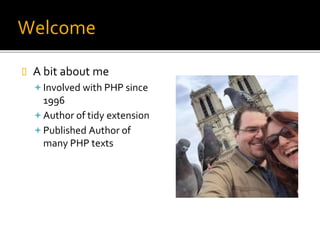
 A bit about me
Involved with PHP since
1996
Author of tidy extension
Published Author of
many PHP texts
What we’re going to be talking about
today
 Virtualization for you, the developer
 Creating fully encapsulated development environments
▪ Fully Version Controlled
 Available locally using free tools or deploy to EC2 as
necessary
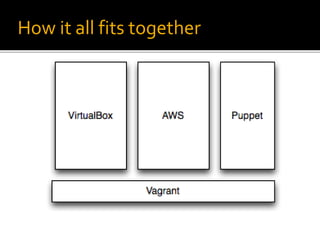
 The technologies we are going to discuss
 Vagrant – Bootstrap virtual machines, manage box settings,
etc.
 VirtualBox – Provides the actual VM environment for
machine
 Puppet – Provisions box, installs and manages various
software, code, etc. (also supports others such as Chef, shell
scripts, etc.)
How it all fits together
Why Virtualization?
 There are a lot of reasons to use VMs for
development
Keep your host machine clean / easily recover from
corruption
Keep separate projects from stepping on each other
Super easy developer on-boarding
 There are even more reasons to use Vagrant &
Puppet
Much easier management of the stack, versions, etc.
Allows seamless deployment to various environments
for testing
Getting Started
 To get started, you’re going to need to
download two pieces of software
Vagrant - http://www.vagrantup.com/
VirtualBox - https://www.virtualbox.org/
 There are builds available for all major
platforms
The steps to building your VM
 Step 1: Download the tools
 Step 2: Define your VM parameters
 Step 3: Build your puppet manifests
 Step 4: Prosper
Defining your VM Parameters
 Every repository should have a Vagrantfile in the root
directory that defines the VM itself
 Ruby based, but no Ruby knowledge required
 Defines a few key aspects of your initial VM
configuration
 Base VM type used (various available)
 Network configuration for VM in relation to host machine
 Provisioning tooling used (i.e. puppet)
 VM resource limits (memory, etc)
 Different configurations can be defined for different
environments, and propagated throughout the
process
Defining your Puppet Manifests
 Once the VM has been defined vagrant can
boot it up as a headless VM (no display) using
VirtualBox automatically and configure it as
necessary
 Once booted, it can then provision the box by
installing software packages, shared paths
with hosts, etc. as necessary through the use
of provisioning tools like puppet
 Next step is defining your puppet manifests
That’s it!
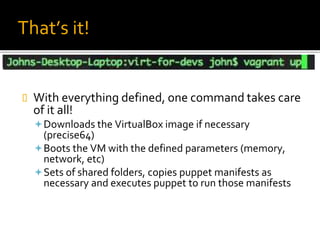
 With everything defined, one command takes care
of it all!
Downloads the VirtualBox image if necessary
(precise64)
Boots the VM with the defined parameters (memory,
network, etc)
Sets of shared folders, copies puppet manifests as
necessary and executes puppet to run those manifests
Important Vagrant commands
 vagrant up – Brings up the virtual machine
 vagrant halt – Halts the VM (poweroff)
 vagrant destroy – Destroys the VM entirely
 vagrant provision – Run puppet provisioning
again
 vagrant ssh – automagically log into the VM
via SSH
Deploying to AWS
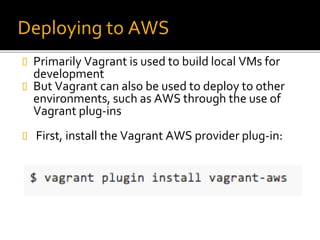
 Primarily Vagrant is used to build local VMs for
development
 But Vagrant can also be used to deploy to other
environments, such as AWS through the use of
Vagrant plug-ins
 First, install the Vagrant AWS provider plug-in:
Deploying to AWS
 Next, you will need to add a new environment
to your Vagrantfile to setup the necessary
configuration values for AWS such as
Key/Secret, AMI type, etc.
 Note: To do provisioning using puppet, you
may need to bootstrap the AMI on boot to
install the puppet tooling
 To boot, simply add the --provider option to
vagrant up
Other cool tricks
 A single Vagrantfile can define multiple VMs
(multi-machine environments) useful for all
sorts of things:
A web server and database server
API client and server
Etc.
 Vagrant can do more than just VirtualBox as
well, through providers can also provide
VMWare VMs, etc.
Other cool tricks
 Vagrantfile configuration files can be created
at various levels, and will be merged together
to define/override settings
Box itself (precise64)
Home directory (~/.vagrant.d)
Project directory
Thank you! Questions?
 Thank you for coming!
 Questions?
 Further Reading:
http://docs.vagrantup.com/v2/
http://puppetlabs.com/
http://www.github.com/coogle/skeleton

Virtualization for Developers

  • 1.
    Virtualization for Developers JohnCoggeshall @coogle http://www.coggeshall.org/
  • 2.
    Welcome  A bitabout me Involved with PHP since 1996 Author of tidy extension Published Author of many PHP texts
  • 3.
    What we’re goingto be talking about today  Virtualization for you, the developer  Creating fully encapsulated development environments ▪ Fully Version Controlled  Available locally using free tools or deploy to EC2 as necessary  The technologies we are going to discuss  Vagrant – Bootstrap virtual machines, manage box settings, etc.  VirtualBox – Provides the actual VM environment for machine  Puppet – Provisions box, installs and manages various software, code, etc. (also supports others such as Chef, shell scripts, etc.)
  • 4.
    How it allfits together
  • 5.
    Why Virtualization?  Thereare a lot of reasons to use VMs for development Keep your host machine clean / easily recover from corruption Keep separate projects from stepping on each other Super easy developer on-boarding  There are even more reasons to use Vagrant & Puppet Much easier management of the stack, versions, etc. Allows seamless deployment to various environments for testing
  • 6.
    Getting Started  Toget started, you’re going to need to download two pieces of software Vagrant - http://www.vagrantup.com/ VirtualBox - https://www.virtualbox.org/  There are builds available for all major platforms
  • 7.
    The steps tobuilding your VM  Step 1: Download the tools  Step 2: Define your VM parameters  Step 3: Build your puppet manifests  Step 4: Prosper
  • 8.
    Defining your VMParameters  Every repository should have a Vagrantfile in the root directory that defines the VM itself  Ruby based, but no Ruby knowledge required  Defines a few key aspects of your initial VM configuration  Base VM type used (various available)  Network configuration for VM in relation to host machine  Provisioning tooling used (i.e. puppet)  VM resource limits (memory, etc)  Different configurations can be defined for different environments, and propagated throughout the process
  • 9.
    Defining your PuppetManifests  Once the VM has been defined vagrant can boot it up as a headless VM (no display) using VirtualBox automatically and configure it as necessary  Once booted, it can then provision the box by installing software packages, shared paths with hosts, etc. as necessary through the use of provisioning tools like puppet  Next step is defining your puppet manifests
  • 10.
    That’s it!  Witheverything defined, one command takes care of it all! Downloads the VirtualBox image if necessary (precise64) Boots the VM with the defined parameters (memory, network, etc) Sets of shared folders, copies puppet manifests as necessary and executes puppet to run those manifests
  • 11.
    Important Vagrant commands vagrant up – Brings up the virtual machine  vagrant halt – Halts the VM (poweroff)  vagrant destroy – Destroys the VM entirely  vagrant provision – Run puppet provisioning again  vagrant ssh – automagically log into the VM via SSH
  • 12.
    Deploying to AWS Primarily Vagrant is used to build local VMs for development  But Vagrant can also be used to deploy to other environments, such as AWS through the use of Vagrant plug-ins  First, install the Vagrant AWS provider plug-in:
  • 13.
    Deploying to AWS Next, you will need to add a new environment to your Vagrantfile to setup the necessary configuration values for AWS such as Key/Secret, AMI type, etc.  Note: To do provisioning using puppet, you may need to bootstrap the AMI on boot to install the puppet tooling  To boot, simply add the --provider option to vagrant up
  • 14.
    Other cool tricks A single Vagrantfile can define multiple VMs (multi-machine environments) useful for all sorts of things: A web server and database server API client and server Etc.  Vagrant can do more than just VirtualBox as well, through providers can also provide VMWare VMs, etc.
  • 15.
    Other cool tricks Vagrantfile configuration files can be created at various levels, and will be merged together to define/override settings Box itself (precise64) Home directory (~/.vagrant.d) Project directory
  • 16.
    Thank you! Questions? Thank you for coming!  Questions?  Further Reading: http://docs.vagrantup.com/v2/ http://puppetlabs.com/ http://www.github.com/coogle/skeleton