Puppet Configuration Management
Afroz Hussain
Agenda
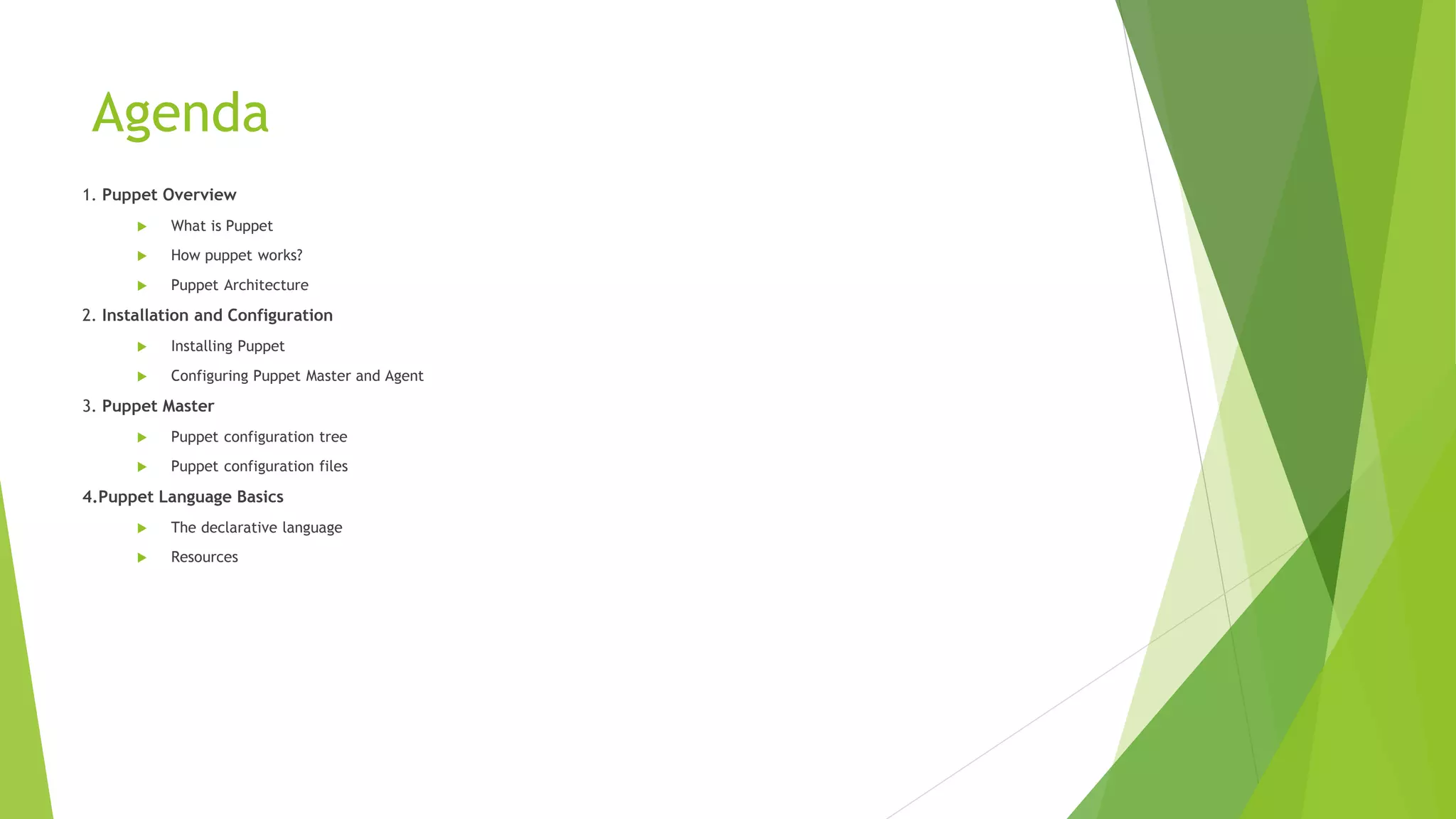
1. Puppet Overview
 What is Puppet
 How puppet works?
 Puppet Architecture
2. Installation and Configuration
 Installing Puppet
 Configuring Puppet Master and Agent
3. Puppet Master
 Puppet configuration tree
 Puppet configuration files
4.Puppet Language Basics
 The declarative language
 Resources
Agenda (Cont..)
5. Puppet Language Advanced
 Facter
 Variables
 Conditional statement
 Templates
 Resource relationship
Agenda (Cont..)
3. Provisioning Hosts with Puppet
 Configuring Nodes
 Versioning Modules
 Creating Modules for NTP
 Puppet Forge
 Extending puppet with custom facts, types and providers
 Mcollective
 Troubleshooting and Best Practices.
Puppet Overview
What is Puppet ?
 Puppet is a configuration management system that allows you to define the
state of your IT infrastructure, then automatically enforces the correct state.
 Puppet automates tasks that system admins often do manually, freeing up
time and mental space so system admins can work on the projects that
deliver greater business value.
 Puppet automates every step of the software delivery process: from
provisioning of physical and virtual machines to orchestration and reporting.
 Puppet ensures consistency, reliability and stability. It also facilitates closer
collaboration between system admins and developers, enabling more efficient
delivery of cleaner, better-designed code.
Puppet Overview
How puppet works?
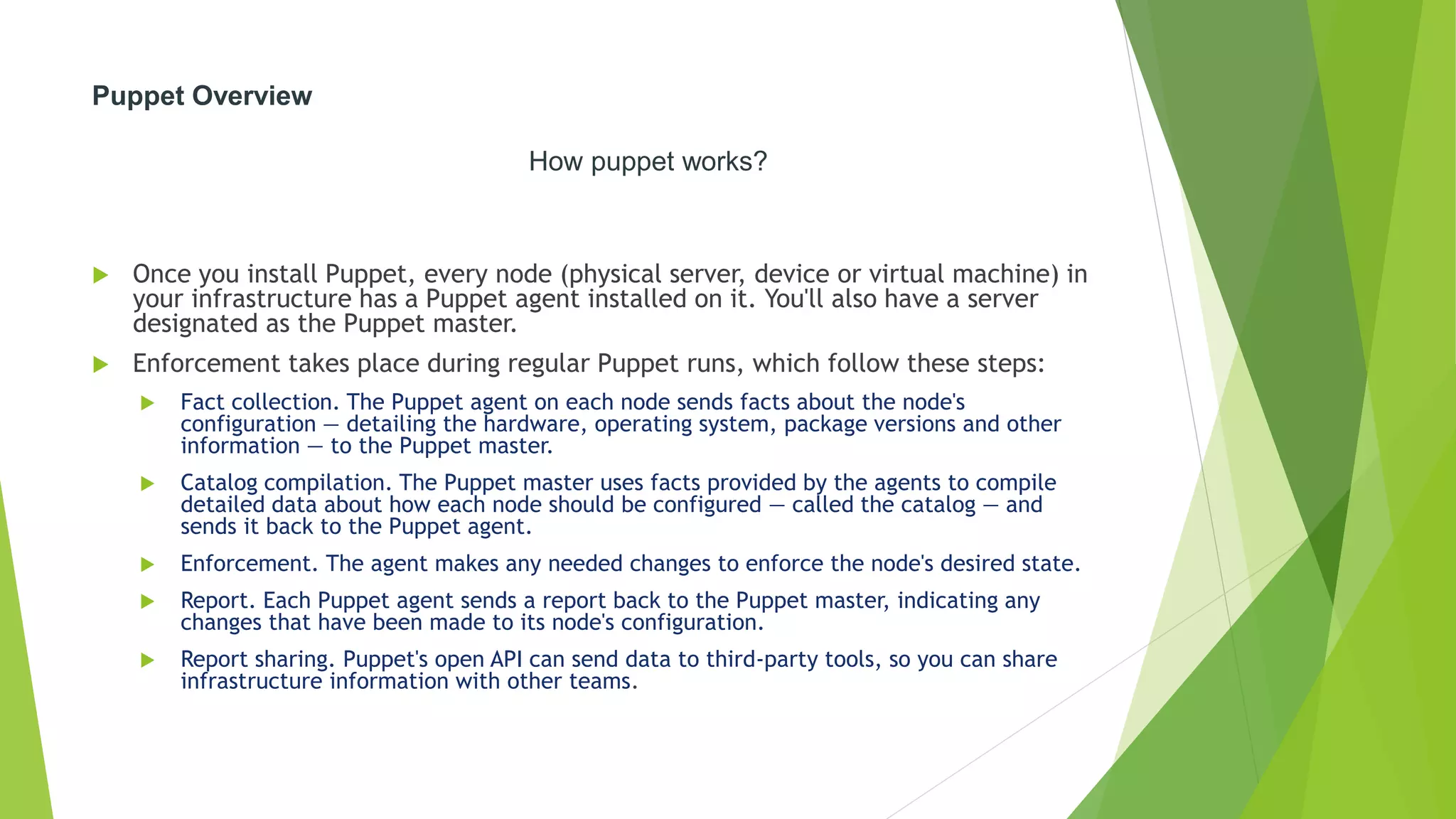
 Once you install Puppet, every node (physical server, device or virtual machine) in
your infrastructure has a Puppet agent installed on it. You'll also have a server
designated as the Puppet master.
 Enforcement takes place during regular Puppet runs, which follow these steps:
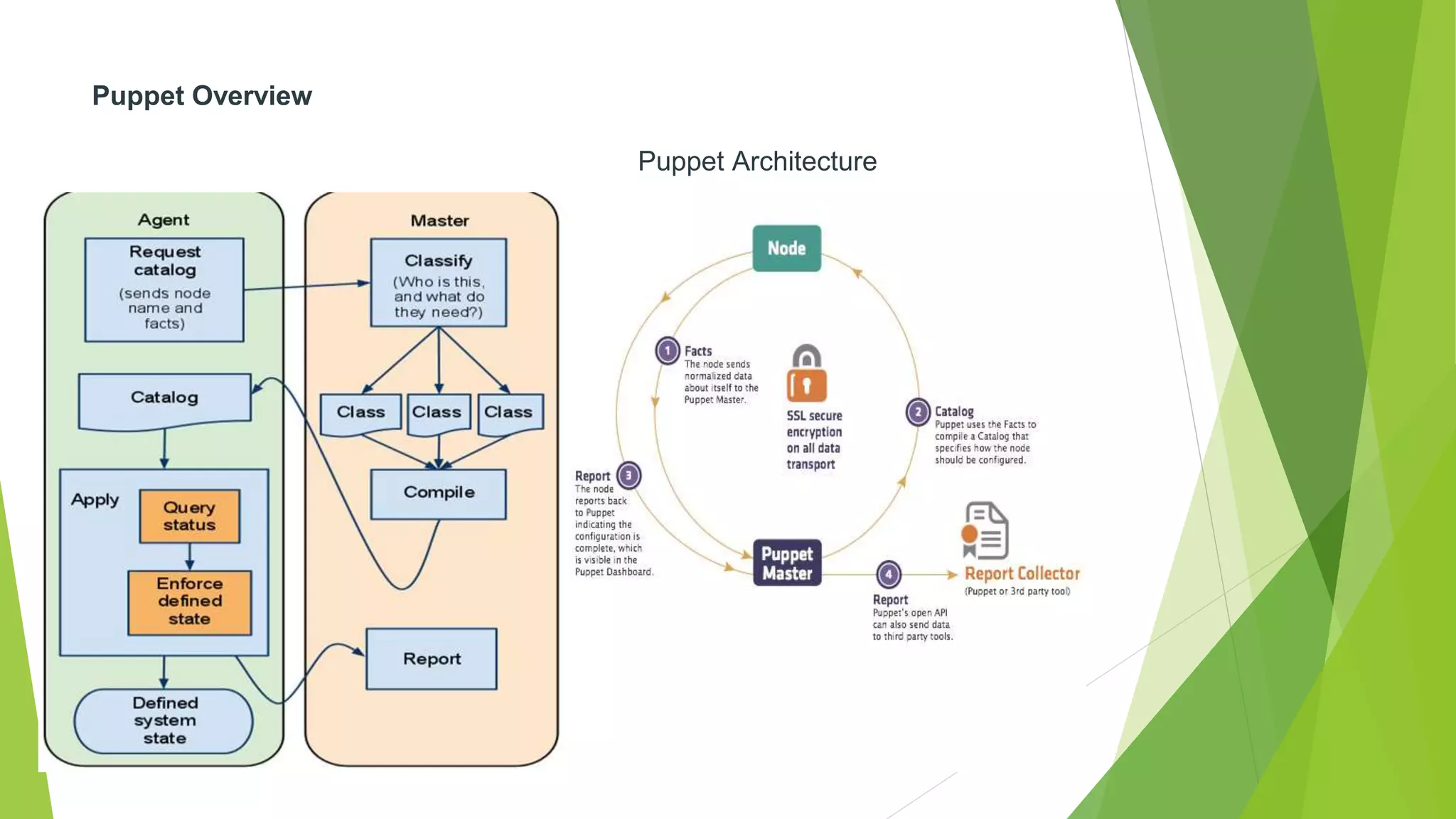
 Fact collection. The Puppet agent on each node sends facts about the node's
configuration — detailing the hardware, operating system, package versions and other
information — to the Puppet master.
 Catalog compilation. The Puppet master uses facts provided by the agents to compile
detailed data about how each node should be configured — called the catalog — and
sends it back to the Puppet agent.
 Enforcement. The agent makes any needed changes to enforce the node's desired state.
 Report. Each Puppet agent sends a report back to the Puppet master, indicating any
changes that have been made to its node's configuration.
 Report sharing. Puppet's open API can send data to third-party tools, so you can share
infrastructure information with other teams.
Puppet Overview
Puppet Architecture
Puppet Overview
Puppet Architecture
 Configuration Language:
 “Puppet’s configuration language has always been focused on the best combination of simplicity and power, and my
goal was always to have it be more like a configuration file than a programming language,” wrote Luke Kanies, founder
and CEO of Puppet Lab.
 It supports DSL (domain specific language).
 Transaction
 Once the catalog is entirely constructed, it is passed on to the Transaction
 Transaction runs on the client, which pulls the Catalog down via HTTP
 The transaction performs a relatively straightforward task: walk the graph
the order specified by the various relationships, and make sure each resource is in sync.
 Resource Abstraction Layer
 the work is actually done by the Resource Abstraction Layer (RAL),
 The RAL was the first component created in Puppet, it most clearly
defines what the user can do.
 The job of the RAL is to define what it means to be a resource and how
resources can get work done on the system
Installation and Configuration
Installation
 Step 1: Enable the Puppet Labs Package Repository
 $ sudo rpm -ivh http://yum.puppetlabs.com/el/6.4/products/x86_64/puppetlabs-release-6-7.noarch.rpm
 After installing the repos, open your /etc/yum.repos.d/puppetlabs.repo file for editing. Locate the
[puppetlabs-devel] stanza, and change the value of the enabled key from 0 to 1:
 Step 2: Install Puppet on the Puppet Master Server
 On your puppet master node, run sudo yum install puppet-server
 $ sudo puppet resource package puppet-server ensure=latest
 You’ll need to restart the puppet master web server after upgrading.
 Step 3: Install Puppet on Agent Nodes
 On your other nodes, run sudo yum install puppet
 $ sudo puppet resource package puppet ensure=latest
 You’ll need to restart the puppet service after upgrading.
Installation and Configuration
Configure Puppet Master Server
Installation and Configuration
Configure Puppet Agent
Puppetmaster
Puppet Configuration tree
 Puppet.conf
 General puppet master settings
 Auth.conf
 General ACL which control http access
 Filesever.conf
 it isn’t necessary- Puppet automatically serves files from the files directory of
modules, and most users find this sufficient.
 Manifests directory
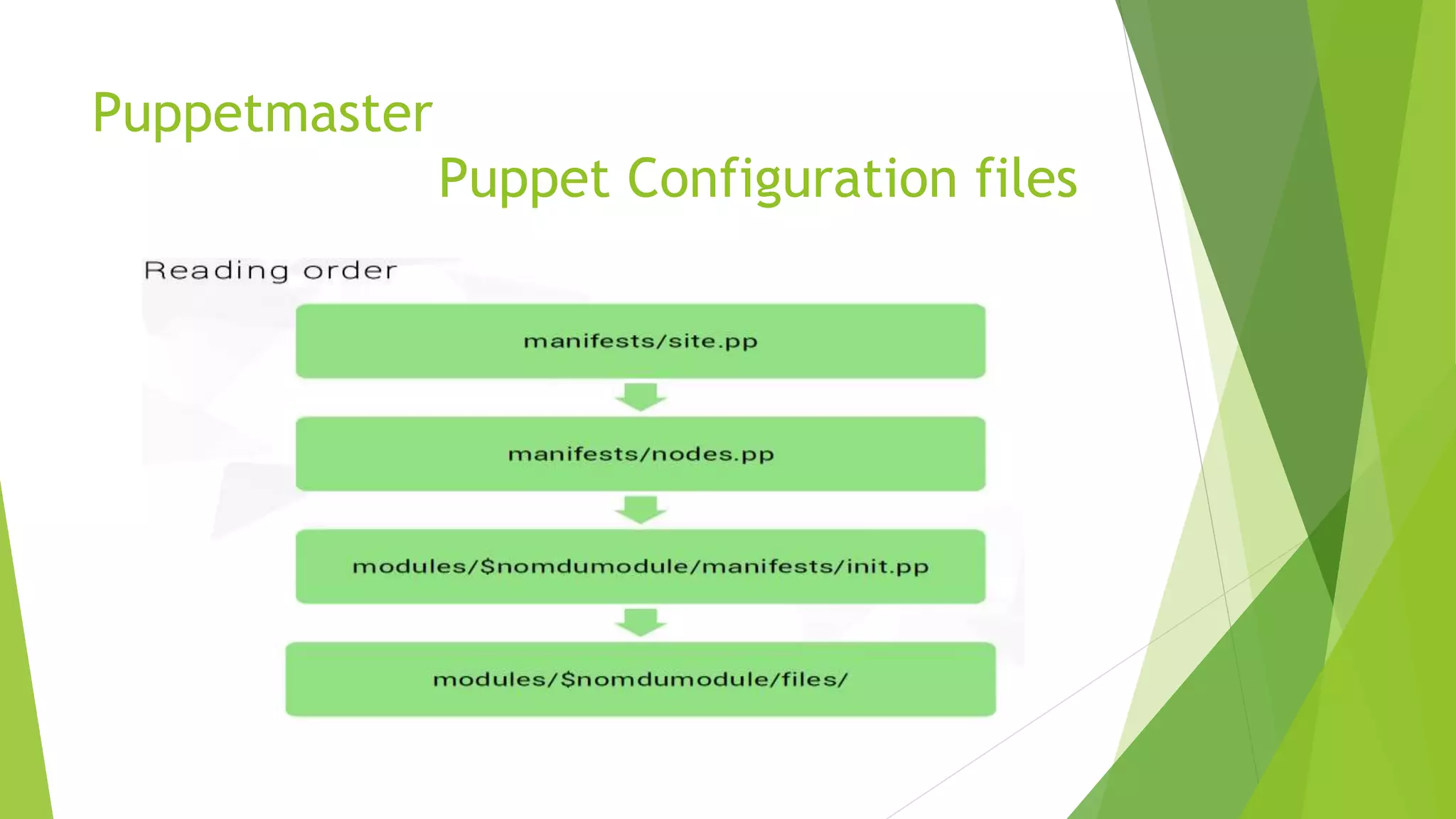
 Site.pp: global default conf
 Nodes.pp: manage nodes
 Modules: contains all modules
Puppetmaster
Puppet Configuration files
Puppet language basics
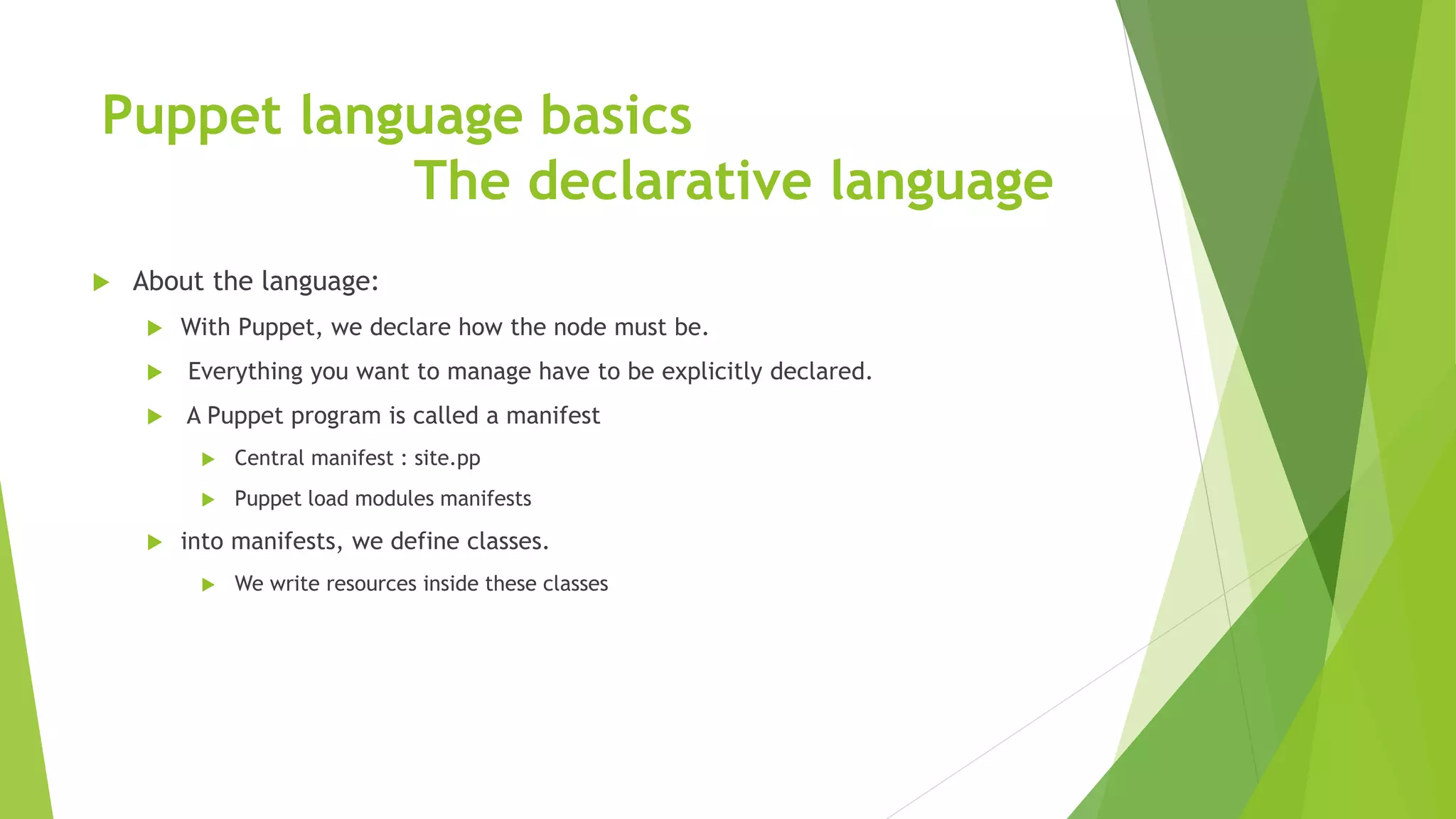
The declarative language
 About the language:
 With Puppet, we declare how the node must be.
 Everything you want to manage have to be explicitly declared.
 A Puppet program is called a manifest
 Central manifest : site.pp
 Puppet load modules manifests
 into manifests, we define classes.
 We write resources inside these classes
Puppet language basics
The declarative language
 The declarative language
 The fundamental unit of modeling
 Like a “function”
 Inside, a series of attributes and their values
 Resources types and attributes are predefined by Puppet
 List of available resources
 http://docs.puppetlabs.com/references/stable/type.html
 Skeleton
 Ressource-name { ‘title’ : attribute = value }
Puppet language basics
Resources
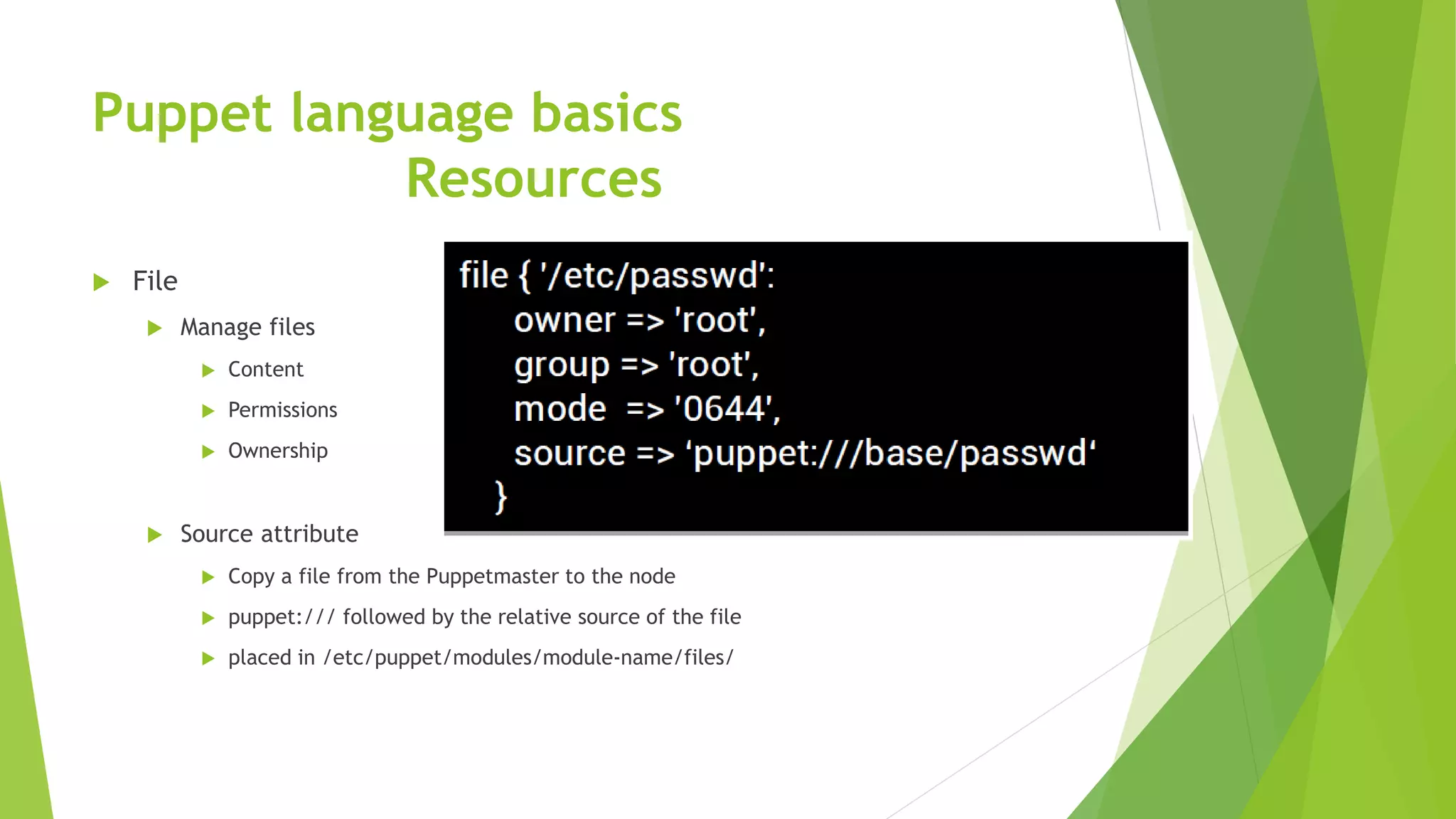
 File
 Manage files
 Content
 Permissions
 Ownership
 Source attribute
 Copy a file from the Puppetmaster to the node
 puppet:/// followed by the relative source of the file
 placed in /etc/puppet/modules/module-name/files/
Puppet language basics
Resources
 Package
 Manage packages
 Wide provider support
 APT
 Aptitude
 YUM
 And more..
 Install, upgrade, uninstall packages
 The last or defined package version
Puppet language basics
Resources
 Service
 Manage services
 Start, stop, restart, start on boot (enable) services
Puppet language advanced
Facter
 The system profiler
 Software used by Puppet
 Installed on nodes
 Collect various data, "facts",on node
 Many facts already defined by Facter
 Possibility to create your own facts
Puppet language advanced
Variables
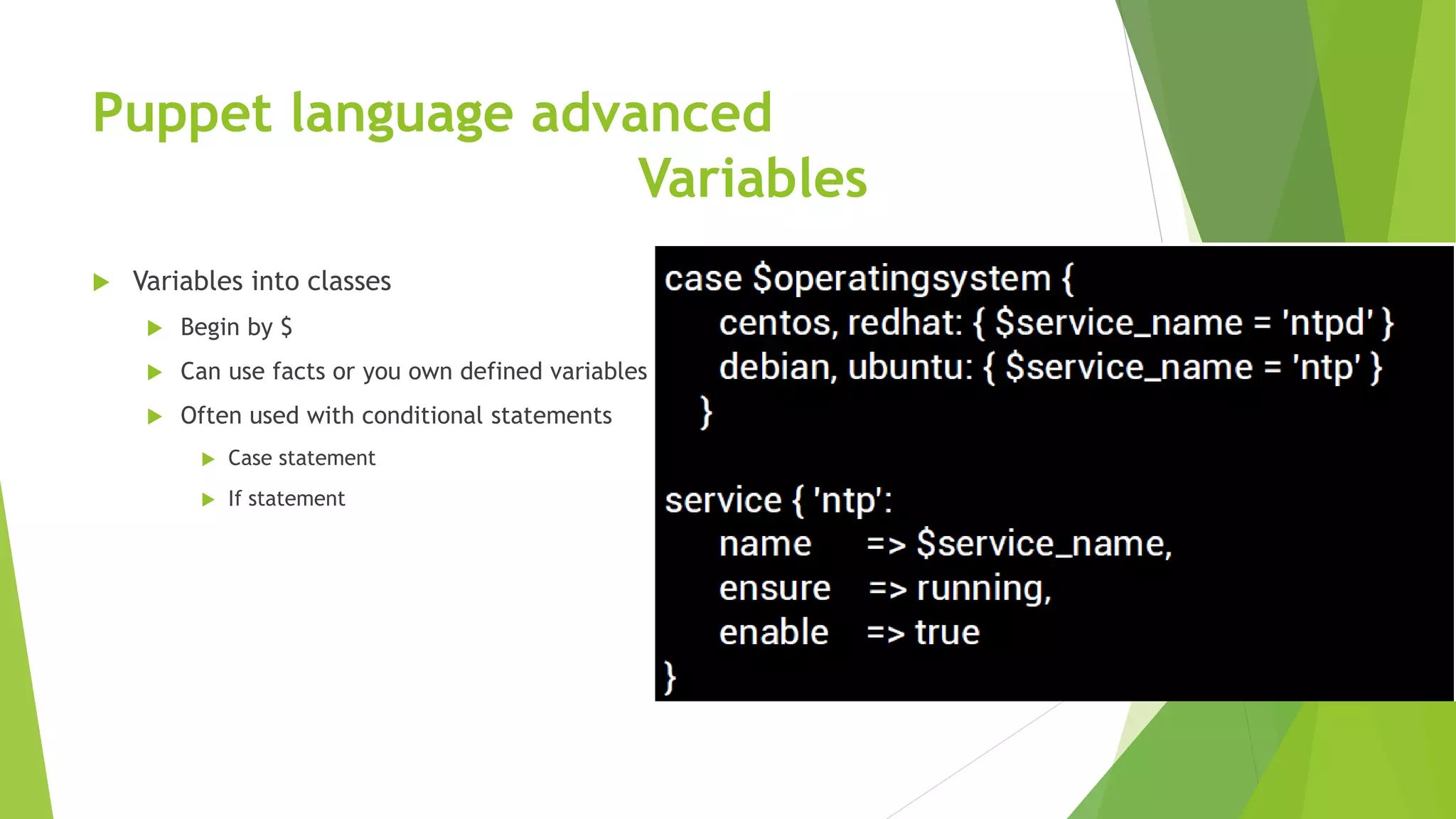
 Variables into classes
 Begin by $
 Can use facts or you own defined variables
 Often used with conditional statements
 Case statement
 If statement
Puppet language advanced
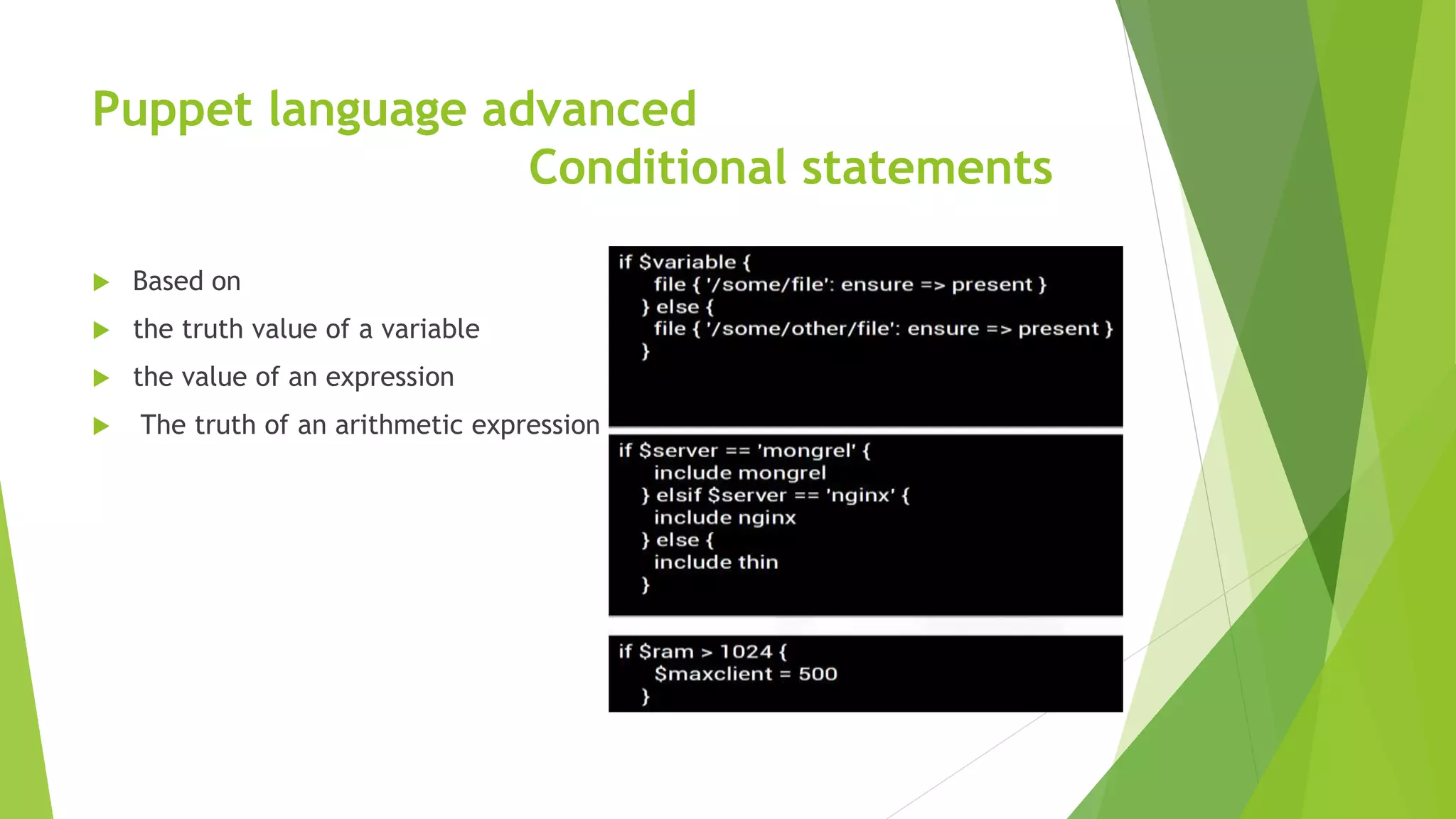
Conditional statements
 Based on
 the truth value of a variable
 the value of an expression
 The truth of an arithmetic expression
Puppet language advanced
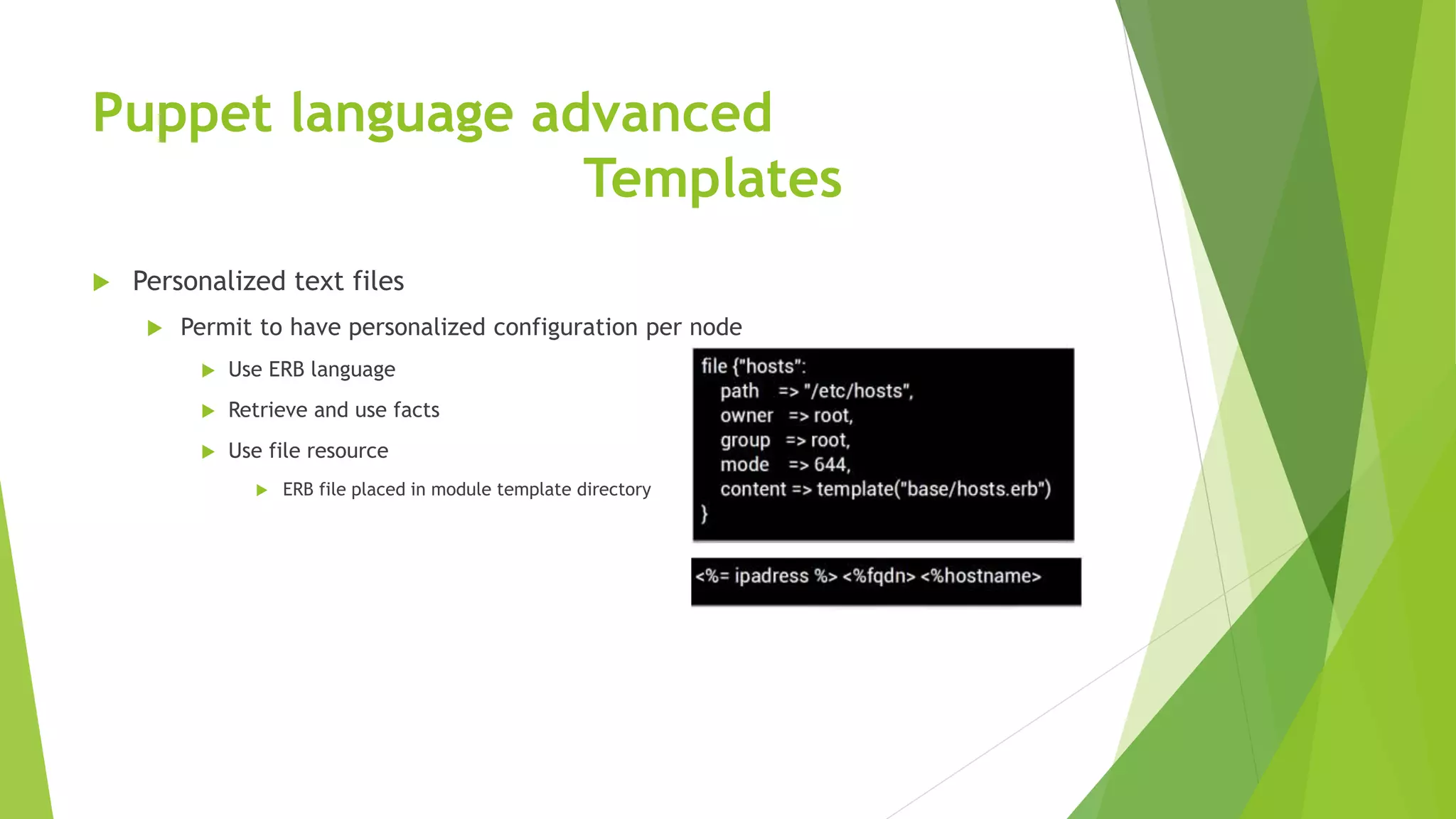
Templates
 Personalized text files
 Permit to have personalized configuration per node
 Use ERB language
 Retrieve and use facts
 Use file resource
 ERB file placed in module template directory
Puppet language advanced
Resources relationship
 Relationship meta-parameters
 Before
 Resource is applied before the target resource
 require
 Resource is applied after the target resource
 notify
 Like before + The target resource will refresh if the notifying resource changes
 subscribe
 Like require + The subscribing resource will refresh if thetarget resource changes.
Puppet language advanced
Resources relationship
 Ordering relationship
 These two examples are mutually-exclusive
Puppet language advanced
Resources relationship
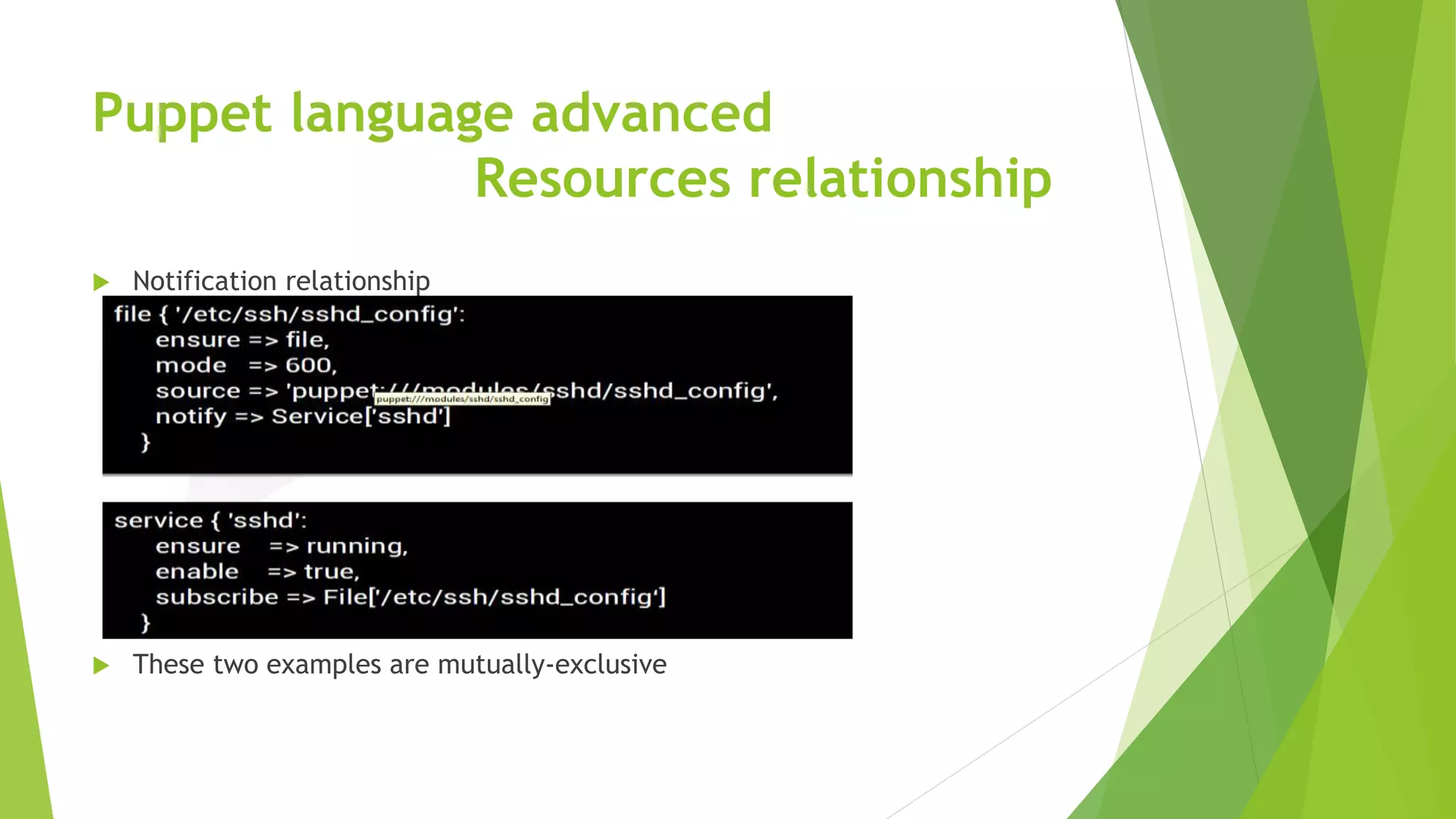
 Notification relationship
 These two examples are mutually-exclusive
Puppet language advanced
Resources relationship
 Chaining and refreshing
 Ordering resources
 The resource on the left is applied before the resource on the right.
 ->
 Refreshing
 Kind of trigger
 Restart a service after a file update
 ~>
Modules
ssh
 class sshd {
package { 'openssh-server':
ensure => latest
}
service { 'ssh':
subscribe => File[sshdconfig],
require => Package['openssh-server'],
}
file { 'sshdconfig':
name => '/etc/ssh/sshd_config',
owner => root,
group => root,
mode => 644,
source => 'puppet:///sshd/sshd_config',
require => Package['openssh-server'],
}
}
Modules
ssh using templates
 class sshd {
port = "22",
keyregenerationinterval = "3600",
syslogfacility = "AUTHPRIV",
loglevel = "info",
package { 'openssh-server':
ensure => latest
}
service { 'ssh':
subscribe => File[sshdconfig],
require => Package['openssh-server'],
}
file { 'sshdconfig':
name => '/etc/ssh/sshd_config',
owner => root,
group => root,
mode => 644,
content => template("sshd/sshd_config.erb"),
require => Package['openssh-server'],
}
}
Modules
template for ssh
 sshd_config.erb
 Port <%= port %>
Protocol 2
HostKey /etc/ssh/ssh_host_rsa_key
HostKey /etc/ssh/ssh_host_dsa_key
UsePrivilegeSeparation yes
KeyRegenerationInterval <%= keyregenerationinterval %>
ServerKeyBits 768
SyslogFacility <%= syslogfacility %>
LogLevel <%= loglevel %>
………
Module
NTPClass ntp {
$ntp1=“1.2.3.4”
package { "ntp":
ensure => latest,
}
file { '/etc/ntp.conf':
owner => root,
group => root,
mode => 644,
content => template("ntp/ntp.conf.erb"),
require => Package["ntp"],
}
service { "ntpd":
name => $operatingsystem ? {
/OracleLinux|RedHat|OEL|CentOS/ => "ntpd",
"SLES" => "ntp“
},
enable => true,
ensure => $ntpd,
require => Package["ntp"],
subscribe => File["/etc/ntp.conf"],
Modules:
template for NTP
ntp.conf.erb
server <%= ntp1 %>
<% if ntp2 != nil %>
server <%= ntp2 %>
<% end %>

Puppet_training

  • 1.
  • 2.
    Agenda 1. Puppet Overview What is Puppet  How puppet works?  Puppet Architecture 2. Installation and Configuration  Installing Puppet  Configuring Puppet Master and Agent 3. Puppet Master  Puppet configuration tree  Puppet configuration files 4.Puppet Language Basics  The declarative language  Resources
  • 3.
    Agenda (Cont..) 5. PuppetLanguage Advanced  Facter  Variables  Conditional statement  Templates  Resource relationship
  • 4.
    Agenda (Cont..) 3. ProvisioningHosts with Puppet  Configuring Nodes  Versioning Modules  Creating Modules for NTP  Puppet Forge  Extending puppet with custom facts, types and providers  Mcollective  Troubleshooting and Best Practices.
  • 5.
    Puppet Overview What isPuppet ?  Puppet is a configuration management system that allows you to define the state of your IT infrastructure, then automatically enforces the correct state.  Puppet automates tasks that system admins often do manually, freeing up time and mental space so system admins can work on the projects that deliver greater business value.  Puppet automates every step of the software delivery process: from provisioning of physical and virtual machines to orchestration and reporting.  Puppet ensures consistency, reliability and stability. It also facilitates closer collaboration between system admins and developers, enabling more efficient delivery of cleaner, better-designed code.
  • 6.
    Puppet Overview How puppetworks?  Once you install Puppet, every node (physical server, device or virtual machine) in your infrastructure has a Puppet agent installed on it. You'll also have a server designated as the Puppet master.  Enforcement takes place during regular Puppet runs, which follow these steps:  Fact collection. The Puppet agent on each node sends facts about the node's configuration — detailing the hardware, operating system, package versions and other information — to the Puppet master.  Catalog compilation. The Puppet master uses facts provided by the agents to compile detailed data about how each node should be configured — called the catalog — and sends it back to the Puppet agent.  Enforcement. The agent makes any needed changes to enforce the node's desired state.  Report. Each Puppet agent sends a report back to the Puppet master, indicating any changes that have been made to its node's configuration.  Report sharing. Puppet's open API can send data to third-party tools, so you can share infrastructure information with other teams.
  • 7.
  • 8.
    Puppet Overview Puppet Architecture Configuration Language:  “Puppet’s configuration language has always been focused on the best combination of simplicity and power, and my goal was always to have it be more like a configuration file than a programming language,” wrote Luke Kanies, founder and CEO of Puppet Lab.  It supports DSL (domain specific language).  Transaction  Once the catalog is entirely constructed, it is passed on to the Transaction  Transaction runs on the client, which pulls the Catalog down via HTTP  The transaction performs a relatively straightforward task: walk the graph the order specified by the various relationships, and make sure each resource is in sync.  Resource Abstraction Layer  the work is actually done by the Resource Abstraction Layer (RAL),  The RAL was the first component created in Puppet, it most clearly defines what the user can do.  The job of the RAL is to define what it means to be a resource and how resources can get work done on the system
  • 9.
    Installation and Configuration Installation Step 1: Enable the Puppet Labs Package Repository  $ sudo rpm -ivh http://yum.puppetlabs.com/el/6.4/products/x86_64/puppetlabs-release-6-7.noarch.rpm  After installing the repos, open your /etc/yum.repos.d/puppetlabs.repo file for editing. Locate the [puppetlabs-devel] stanza, and change the value of the enabled key from 0 to 1:  Step 2: Install Puppet on the Puppet Master Server  On your puppet master node, run sudo yum install puppet-server  $ sudo puppet resource package puppet-server ensure=latest  You’ll need to restart the puppet master web server after upgrading.  Step 3: Install Puppet on Agent Nodes  On your other nodes, run sudo yum install puppet  $ sudo puppet resource package puppet ensure=latest  You’ll need to restart the puppet service after upgrading.
  • 10.
  • 11.
  • 12.
    Puppetmaster Puppet Configuration tree Puppet.conf  General puppet master settings  Auth.conf  General ACL which control http access  Filesever.conf  it isn’t necessary- Puppet automatically serves files from the files directory of modules, and most users find this sufficient.  Manifests directory  Site.pp: global default conf  Nodes.pp: manage nodes  Modules: contains all modules
  • 13.
  • 14.
    Puppet language basics Thedeclarative language  About the language:  With Puppet, we declare how the node must be.  Everything you want to manage have to be explicitly declared.  A Puppet program is called a manifest  Central manifest : site.pp  Puppet load modules manifests  into manifests, we define classes.  We write resources inside these classes
  • 15.
    Puppet language basics Thedeclarative language  The declarative language  The fundamental unit of modeling  Like a “function”  Inside, a series of attributes and their values  Resources types and attributes are predefined by Puppet  List of available resources  http://docs.puppetlabs.com/references/stable/type.html  Skeleton  Ressource-name { ‘title’ : attribute = value }
  • 16.
    Puppet language basics Resources File  Manage files  Content  Permissions  Ownership  Source attribute  Copy a file from the Puppetmaster to the node  puppet:/// followed by the relative source of the file  placed in /etc/puppet/modules/module-name/files/
  • 17.
    Puppet language basics Resources Package  Manage packages  Wide provider support  APT  Aptitude  YUM  And more..  Install, upgrade, uninstall packages  The last or defined package version
  • 18.
    Puppet language basics Resources Service  Manage services  Start, stop, restart, start on boot (enable) services
  • 19.
    Puppet language advanced Facter The system profiler  Software used by Puppet  Installed on nodes  Collect various data, "facts",on node  Many facts already defined by Facter  Possibility to create your own facts
  • 20.
    Puppet language advanced Variables Variables into classes  Begin by $  Can use facts or you own defined variables  Often used with conditional statements  Case statement  If statement
  • 21.
    Puppet language advanced Conditionalstatements  Based on  the truth value of a variable  the value of an expression  The truth of an arithmetic expression
  • 22.
    Puppet language advanced Templates Personalized text files  Permit to have personalized configuration per node  Use ERB language  Retrieve and use facts  Use file resource  ERB file placed in module template directory
  • 23.
    Puppet language advanced Resourcesrelationship  Relationship meta-parameters  Before  Resource is applied before the target resource  require  Resource is applied after the target resource  notify  Like before + The target resource will refresh if the notifying resource changes  subscribe  Like require + The subscribing resource will refresh if thetarget resource changes.
  • 24.
    Puppet language advanced Resourcesrelationship  Ordering relationship  These two examples are mutually-exclusive
  • 25.
    Puppet language advanced Resourcesrelationship  Notification relationship  These two examples are mutually-exclusive
  • 26.
    Puppet language advanced Resourcesrelationship  Chaining and refreshing  Ordering resources  The resource on the left is applied before the resource on the right.  ->  Refreshing  Kind of trigger  Restart a service after a file update  ~>
  • 27.
    Modules ssh  class sshd{ package { 'openssh-server': ensure => latest } service { 'ssh': subscribe => File[sshdconfig], require => Package['openssh-server'], } file { 'sshdconfig': name => '/etc/ssh/sshd_config', owner => root, group => root, mode => 644, source => 'puppet:///sshd/sshd_config', require => Package['openssh-server'], } }
  • 28.
    Modules ssh using templates class sshd { port = "22", keyregenerationinterval = "3600", syslogfacility = "AUTHPRIV", loglevel = "info", package { 'openssh-server': ensure => latest } service { 'ssh': subscribe => File[sshdconfig], require => Package['openssh-server'], } file { 'sshdconfig': name => '/etc/ssh/sshd_config', owner => root, group => root, mode => 644, content => template("sshd/sshd_config.erb"), require => Package['openssh-server'], } }
  • 29.
    Modules template for ssh sshd_config.erb  Port <%= port %> Protocol 2 HostKey /etc/ssh/ssh_host_rsa_key HostKey /etc/ssh/ssh_host_dsa_key UsePrivilegeSeparation yes KeyRegenerationInterval <%= keyregenerationinterval %> ServerKeyBits 768 SyslogFacility <%= syslogfacility %> LogLevel <%= loglevel %> ………
  • 30.
    Module NTPClass ntp { $ntp1=“1.2.3.4” package{ "ntp": ensure => latest, } file { '/etc/ntp.conf': owner => root, group => root, mode => 644, content => template("ntp/ntp.conf.erb"), require => Package["ntp"], } service { "ntpd": name => $operatingsystem ? { /OracleLinux|RedHat|OEL|CentOS/ => "ntpd", "SLES" => "ntp“ }, enable => true, ensure => $ntpd, require => Package["ntp"], subscribe => File["/etc/ntp.conf"],
  • 31.
    Modules: template for NTP ntp.conf.erb server<%= ntp1 %> <% if ntp2 != nil %> server <%= ntp2 %> <% end %>