Design of everyday things Summary so far: many so-called human errors are actually errors in design human factors became important as human performance limitations reached when handling complex machinery  You will soon know these important concepts for designing everyday things perceived affordances causality visible constraints mapping transfer effects idioms & population stereotypes conceptual models individual differences why design is hard Slide deck by Saul Greenberg.  Permission is granted to use this for non-commercial purposes as long as general credit to Saul Greenberg is clearly maintained.  Warning: some material in this deck is used from other sources without permission. Credit to the original source is given if it is known.
Perceived Affordance The perceived properties of the object that suggest how one could use it Many concepts in this section are adapted from Don Norman’s book: The Design of Everyday Things  chairs are for sitting table for placing things on knobs are for turning buttons are for pressing slots are for inserting handles are for turning computer for… switch for toggling
Perceived Affordances Product design perceived affordances:  design invites people to take possible actions actual affordances:  the actual actionable properties of the product Problems occur when these are not the same,  people’s perceptions are not what the  designer expects  In-depth discussion available at www.jnd.org/dn.mss/affordances-and-design.html
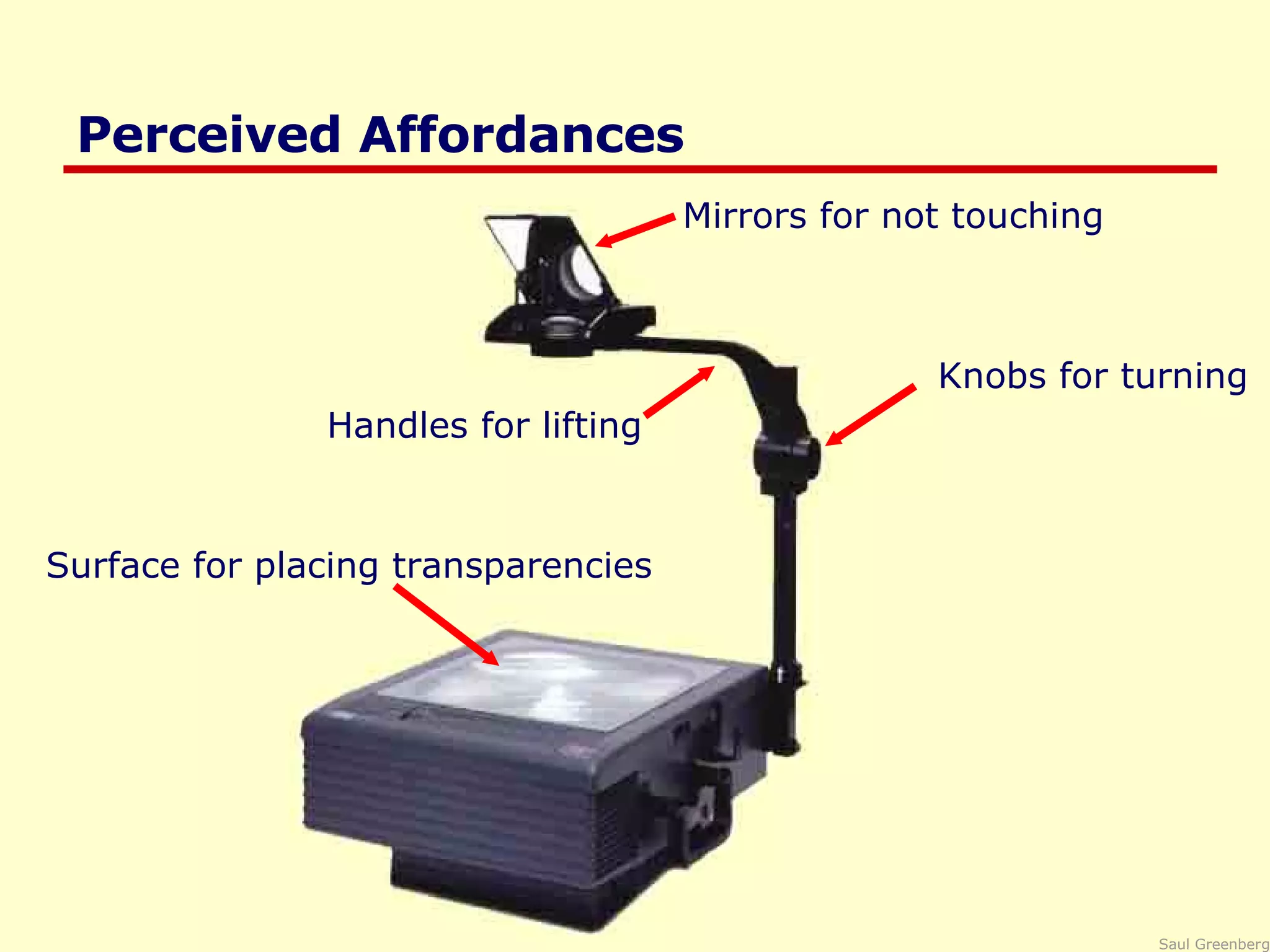
Perceived Affordances Handles for lifting Mirrors for not touching Knobs for turning Surface for placing transparencies
Perceived Affordance Problems Handles for lifting bends frame, focus distorted Mirrors for not touching people don’t reposition image Surface for placing transparencies which way is up? Knobs for turning focus or image position? w hat about this?
Perceived Affordances GUI design perception only through visuals designer creates appropriate visual affordances via familiar idioms metaphors
Perceived Affordances sliders for sliding dials for turning music console for controlling music
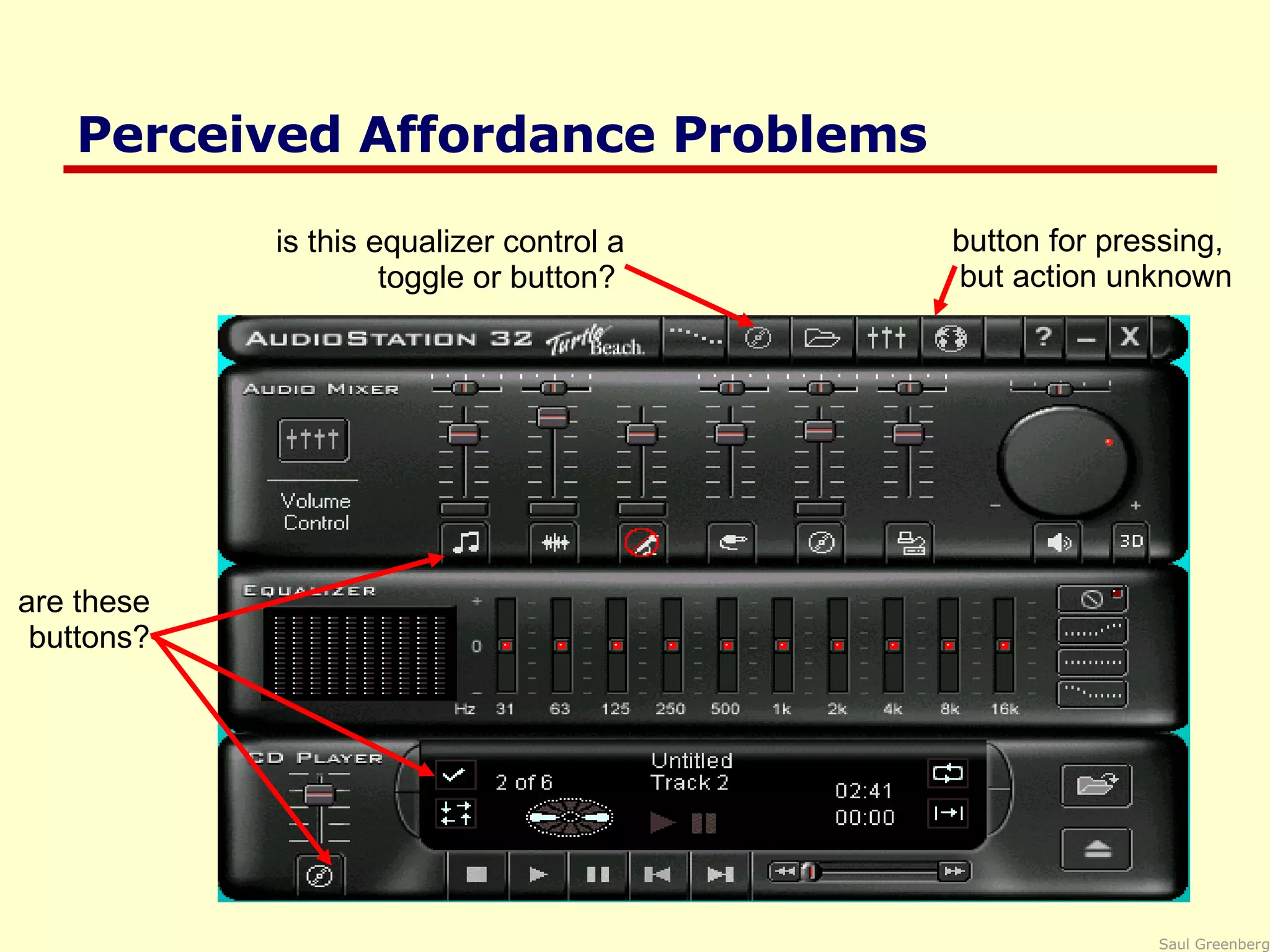
Perceived Affordance Problems are these buttons? is this equalizer control a toggle or button?  button for pressing,  but action unknown
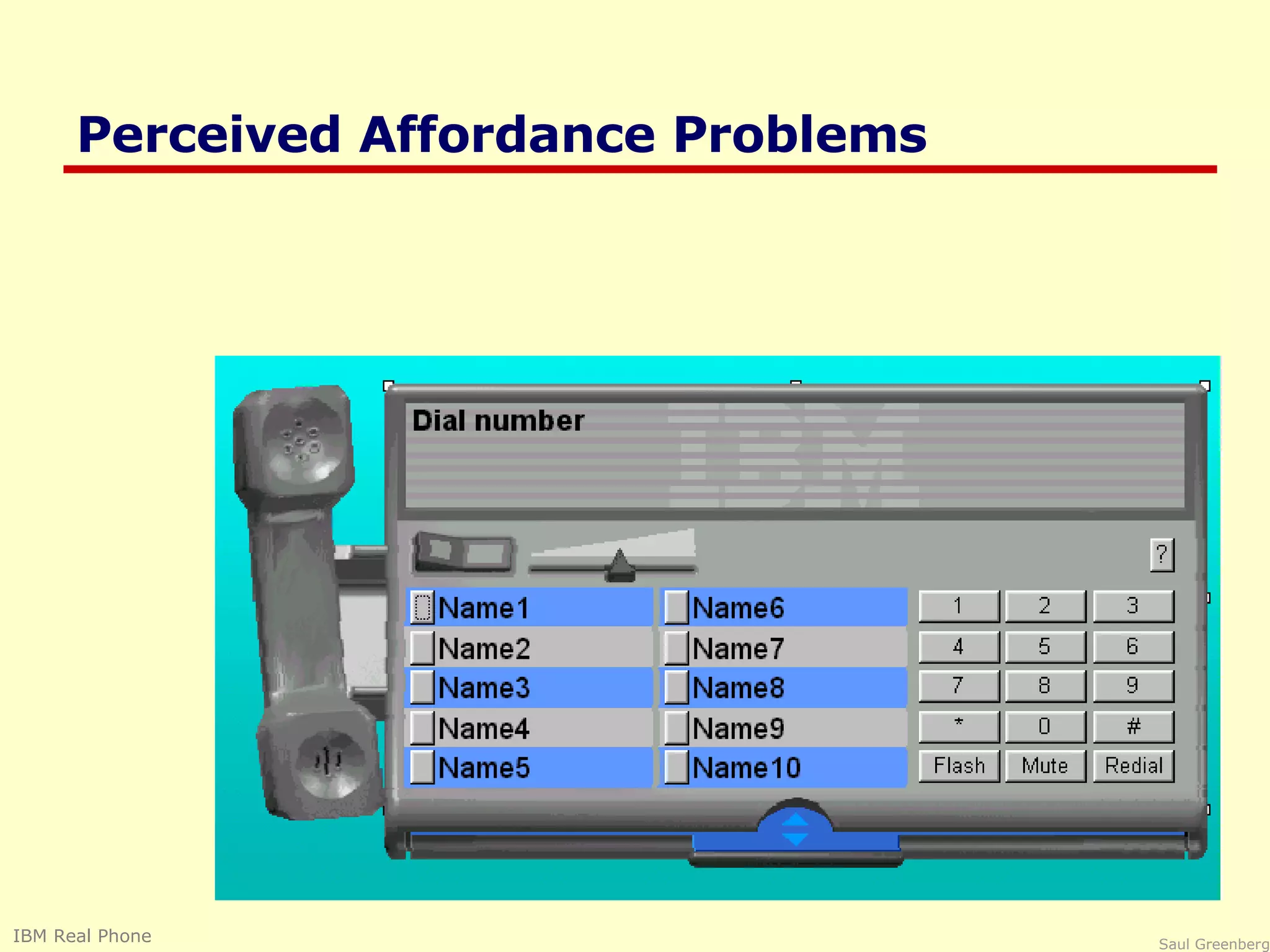
Perceived Affordance Problems A button is for pressing, but what does it do? Is this a graphic or a control? text is for editing, but it doesn’t do it. Visual affordances for window controls are missing! IBM Real Phone
Perceived Affordance Problems IBM Real Phone
Perceived Affordance Problems Handles are for lifting,  but these are for scrolling! Complex things may need explaining but  simple things should not when simple things need labels & instructions, then design has failed AudioRack 32, a multimedia applicaiton
Visible Constraints Limitations of the actions possible perceived from object’s appearance provides people with a range of usage possibilities Push or pull? Which side? Can only push, side to push clearly visible
Which side do you use for cutting? Photograph courtesy of www.baddesigns.com
Visible constraints: Entering a Date The more constraints, the less opportunity for error particularly important for managing user input Controls constructed in Visual Basic


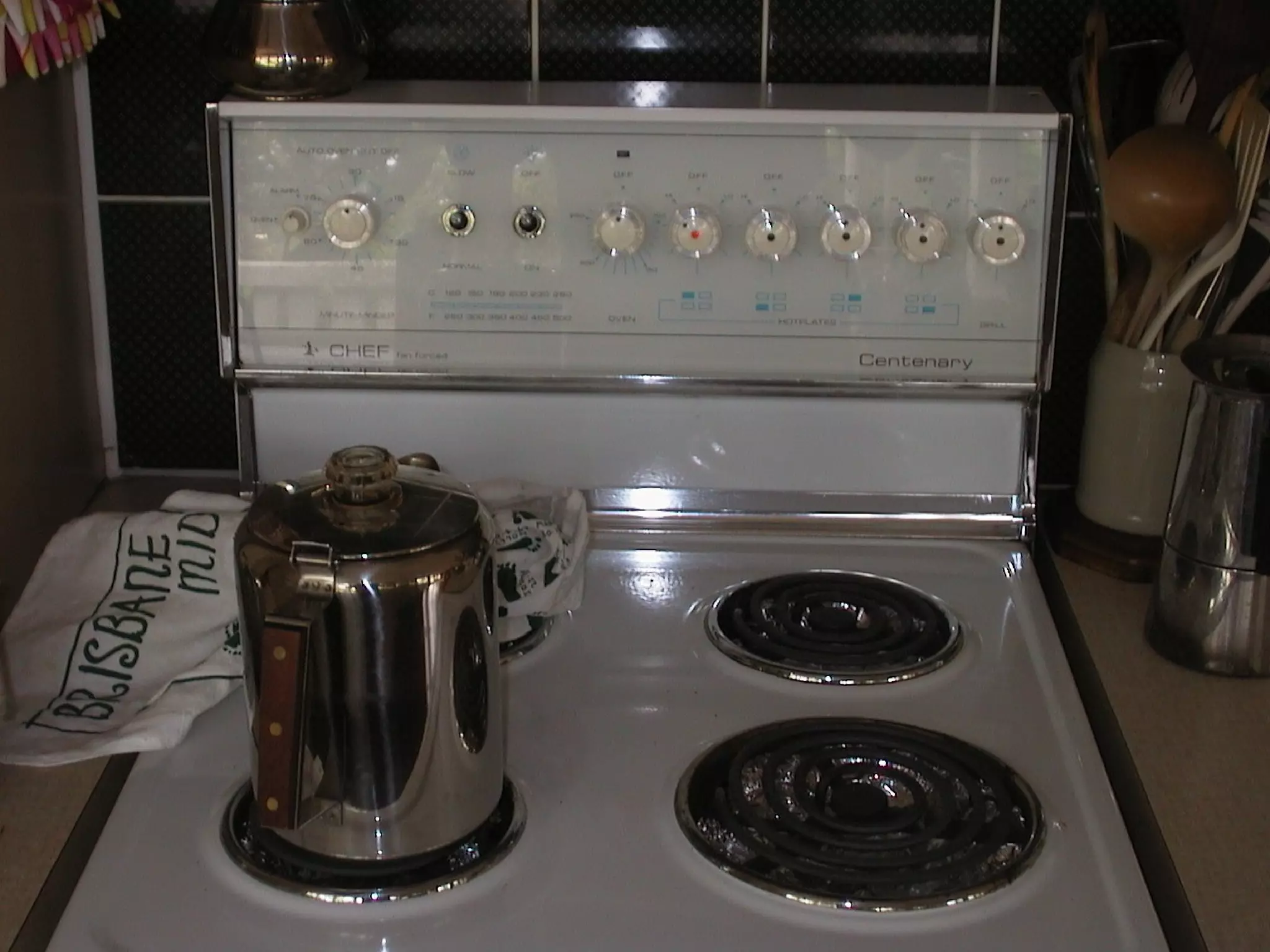
Mapping The set of possible relations between objects Control-display compatibility the natural relationship between controls and displays e.g., visual mapping of stove controls to elements back right front left back left front right 24 possibilities, requires:  -visible labels + memory arbitrary back front front back 2 possibilities per side  =4 total possibilities paired full mapping
Mapping Control-display compatibility mimic diagrams for feedback / control imitates physical layout
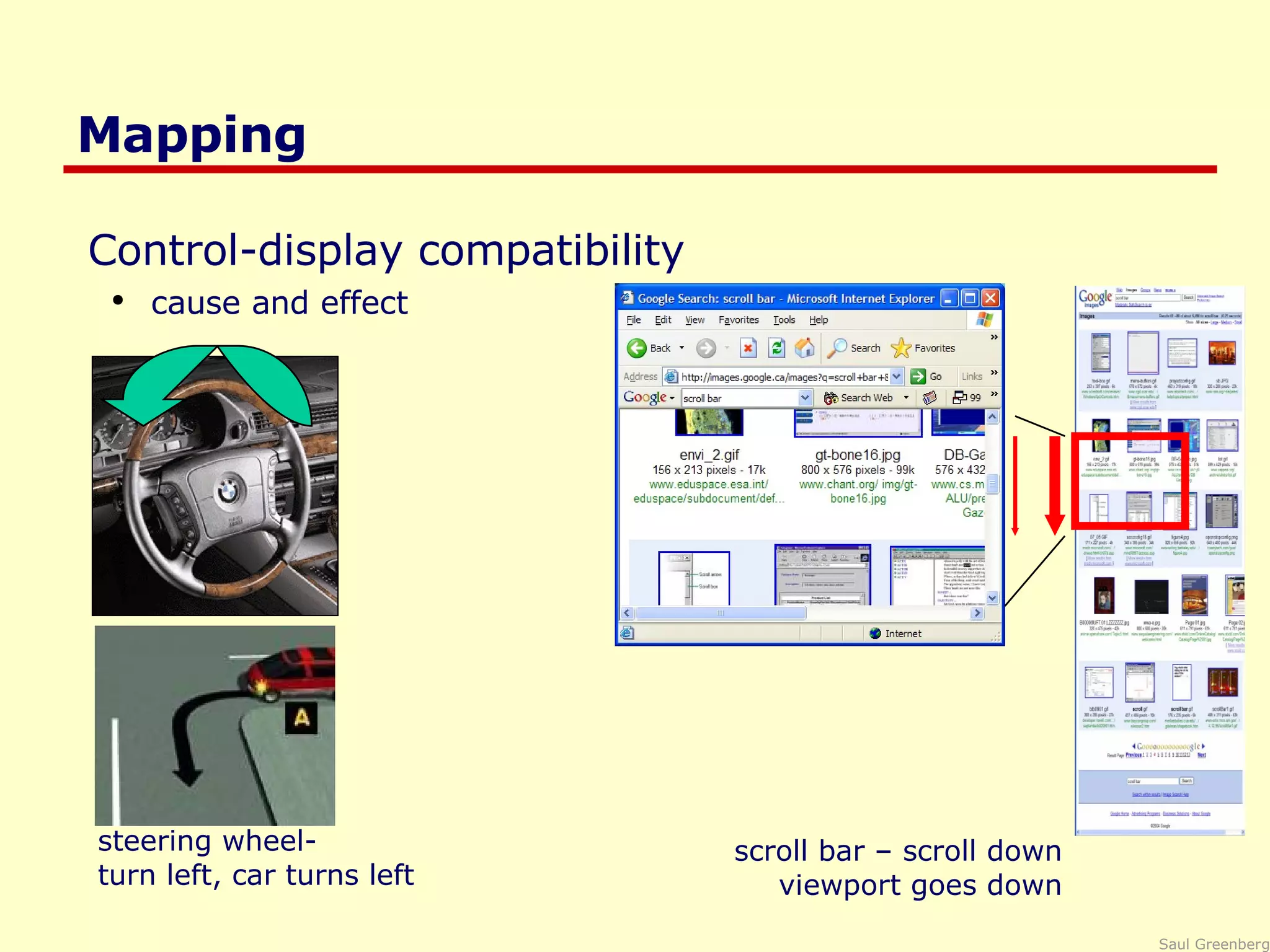
Mapping Control-display compatibility cause and effect  steering wheel- turn left, car turns left scroll bar – scroll down viewport goes down
Mapping Palette controls and active objects Only controls that can operate on a picture are fully visible Selected picture Others are grayed out
Mapping Action feedback Depressed button indicates current mapped item Cursor re-enforces selection of current item Microsoft Paint
Mapping Problems Photograph courtesy of www.baddesigns.com Quick, open the top drawer Move cabinet Mapping: suggests it   should open the drawer but doesn’t Affordance:  handle is for pulling
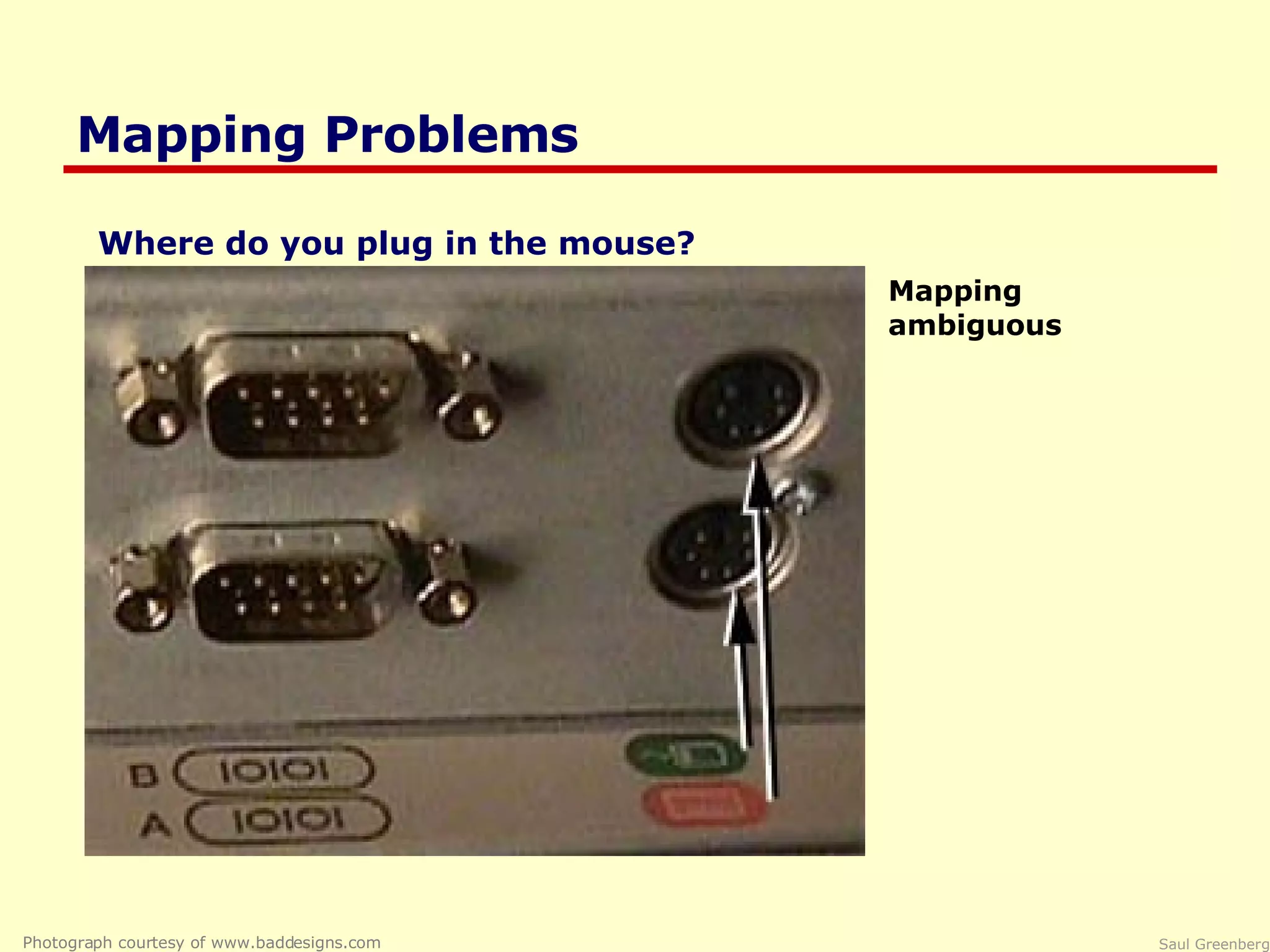
Mapping Problems Photograph courtesy of www.baddesigns.com Mapping ambiguous Where do you plug in the mouse?
Causality the thing that happens right after an action is assumed by people to be caused by that action interpretation of “feedback” false causality incorrect effect invoking unfamiliar function just as computer hangs causes “superstitious” behaviors invisible effect command with no apparent result often re-entered repeatedly e.g., mouse click to raise menu on unresponsive system
Causality Problems Effects visible only after Exec button is pressed Ok does nothing! awkward to find appropriate color level   LViewPro
Transfer Effects People transfer their learning/expectations of similar objects to the current objects positive transfer: previous learning's also apply to new situation negative transfer: previous learning's conflict with the new situation
 
Transfer Effect Problems Photograph courtesy of www.baddesigns.com A Restaurant in Santa Barbara
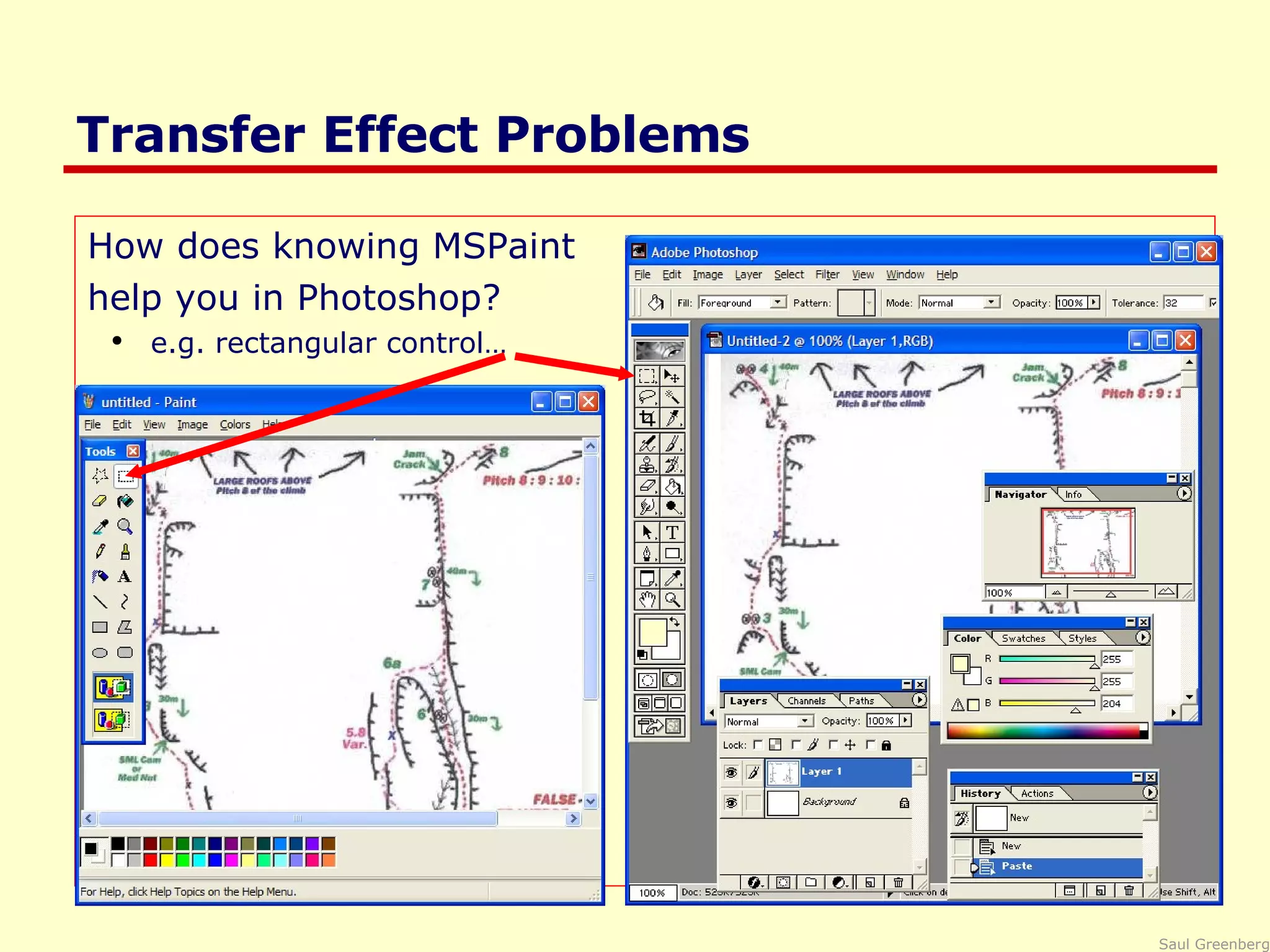
Transfer Effect Problems How does knowing MSPaint help you in Photoshop? e.g. rectangular control…
Idioms and Population Stereotypes Interface idioms:  ‘ standard’ interface features we learnt, use and remember Idioms may define arbitrary behaviours red means danger green means safe Population stereotypes: Idioms vary in different cultures Light switches America: down is off Britain:  down is on Faucets America: anti-clockwise on Britain: anti-clockwise off
Idioms and Population Stereotypes Ignoring/changing idioms? home handyman light switches installed upside down  calculators vs. phone number pads which did computer keypads follow and why? Difficulty of changing stereotypes Qwerty keyboard: designed to prevent jamming of keyboard Dvorak keyboard (’30s): provably faster to use Images from www.atarimagazines.com/v5n11/dvorakkeyboard.html
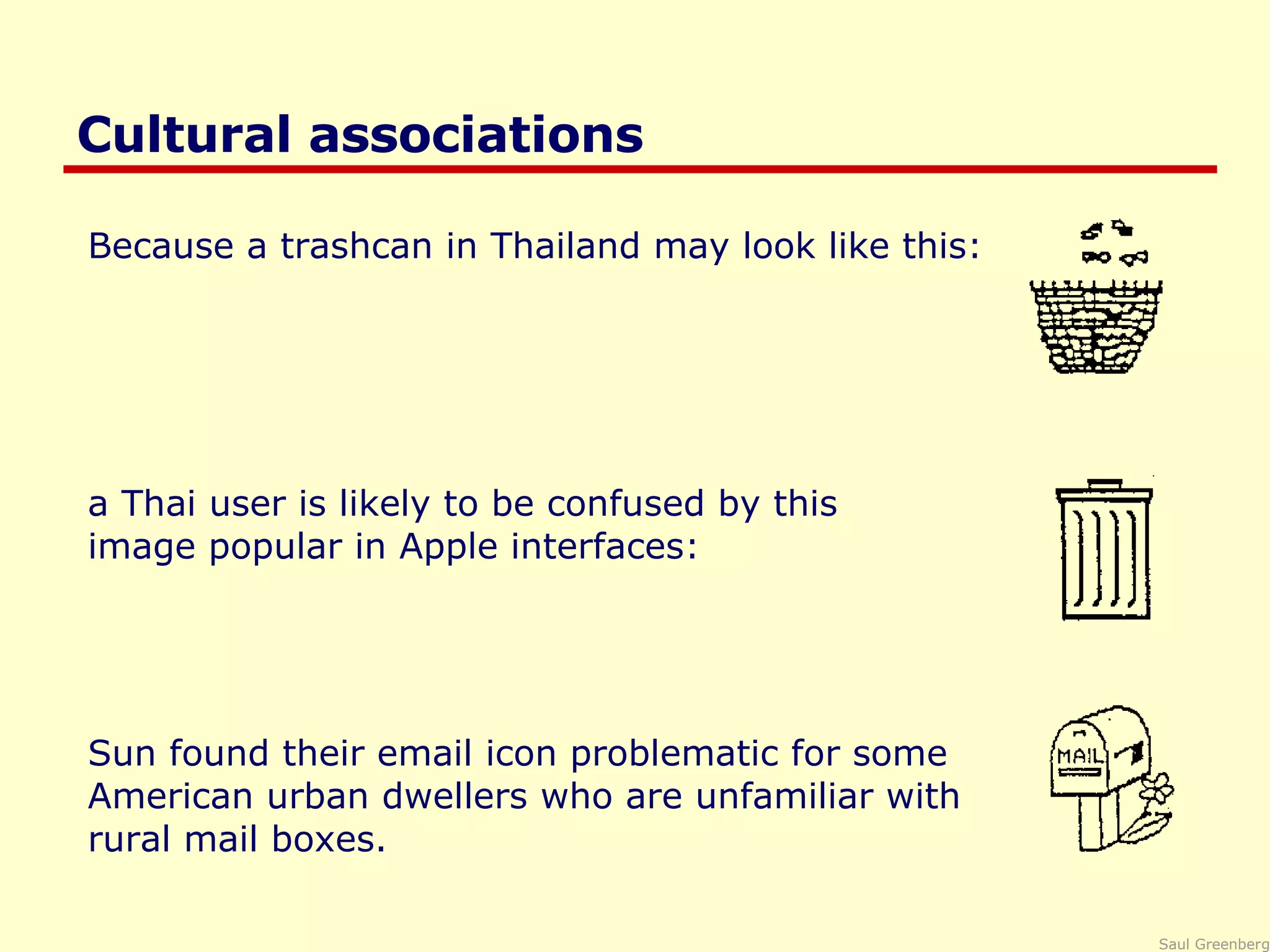
Cultural associations Because a trashcan in Thailand may look like this: a Thai user is likely to be confused by this  image popular in Apple interfaces: Sun found their email icon problematic for some  American urban dwellers who are unfamiliar with  rural mail boxes.
Cultural associations A Mac user finds a Windows system only somewhat familiar Apple MacPaint and Microsoft Paint
Conceptual model People have “mental models” of how things work, built from  affordances causality constraints mapping positive transfer population stereotypes/cultural standards instructions interactions models allow people to mentally simulate operation of device  models may be wrong particularly if above attributes are misleading
Donald Norman Design of Everyday Things, Basic Books
Good example: Scissors affordances:  holes for something to be inserted constraints:  big hole for several fingers, small hole for thumb mapping:  between holes and fingers suggested and constrained by appearance positive transfer and cultural idioms learnt when young constant mechanism conceptual model:  implications clear of how the operating parts work
Bad example: Digital watch affordances:  four push buttons to push, but not clear what they will do constraints and mapping unknown no visible relation between buttons, possible actions and end result transfer of training  little relation to analog watches cultural idiom somewhat standardized core controls and functions but still highly variable  conceptual model: must be learnt
Designing a good conceptual model communicate model through visual image visible affordances, mappings, and constraints visible causality of interactions cultural idioms, transfer instructions augments visuals all work together to remind a person of what can be done and how to do it
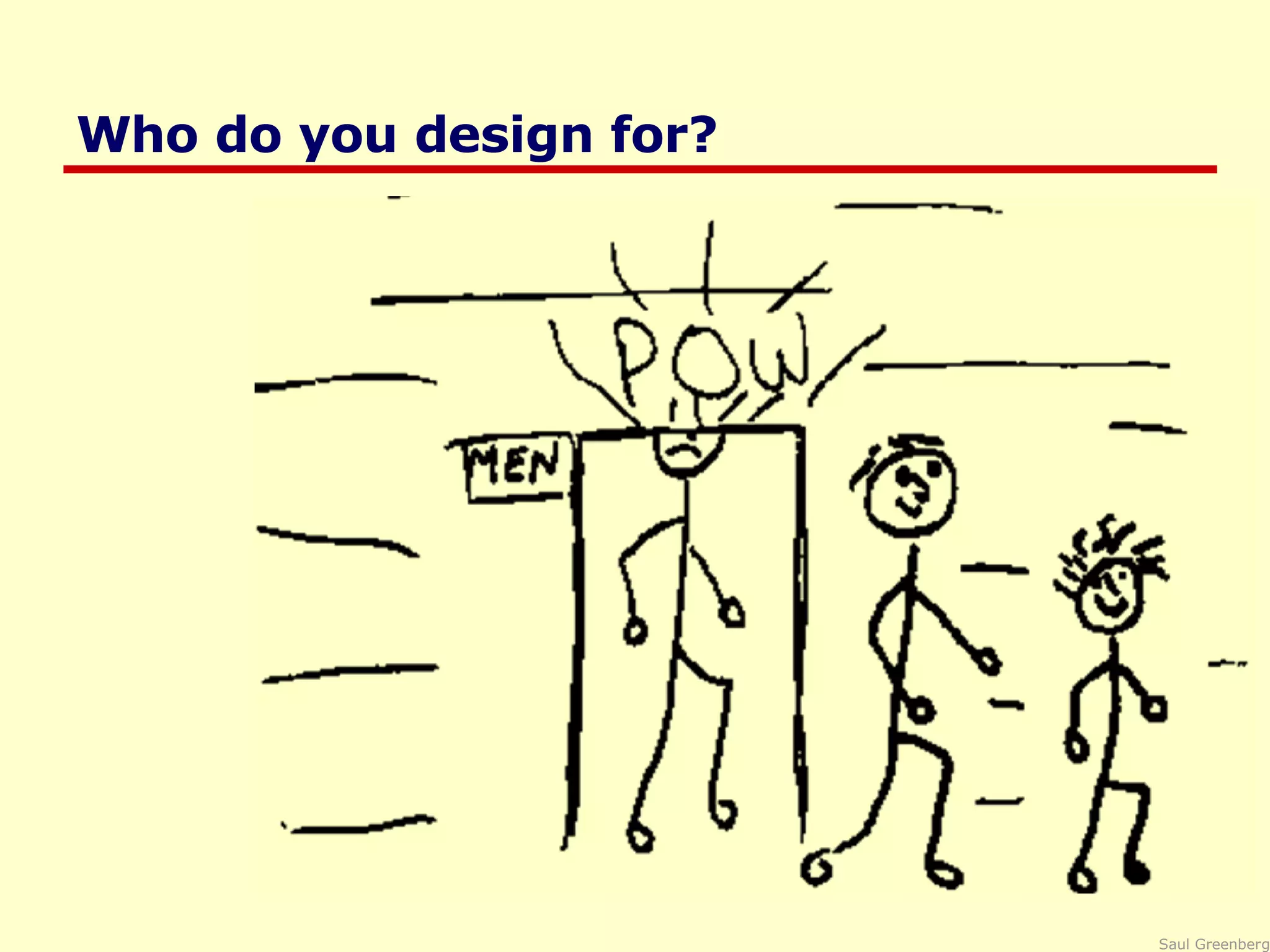
Who do you design for?
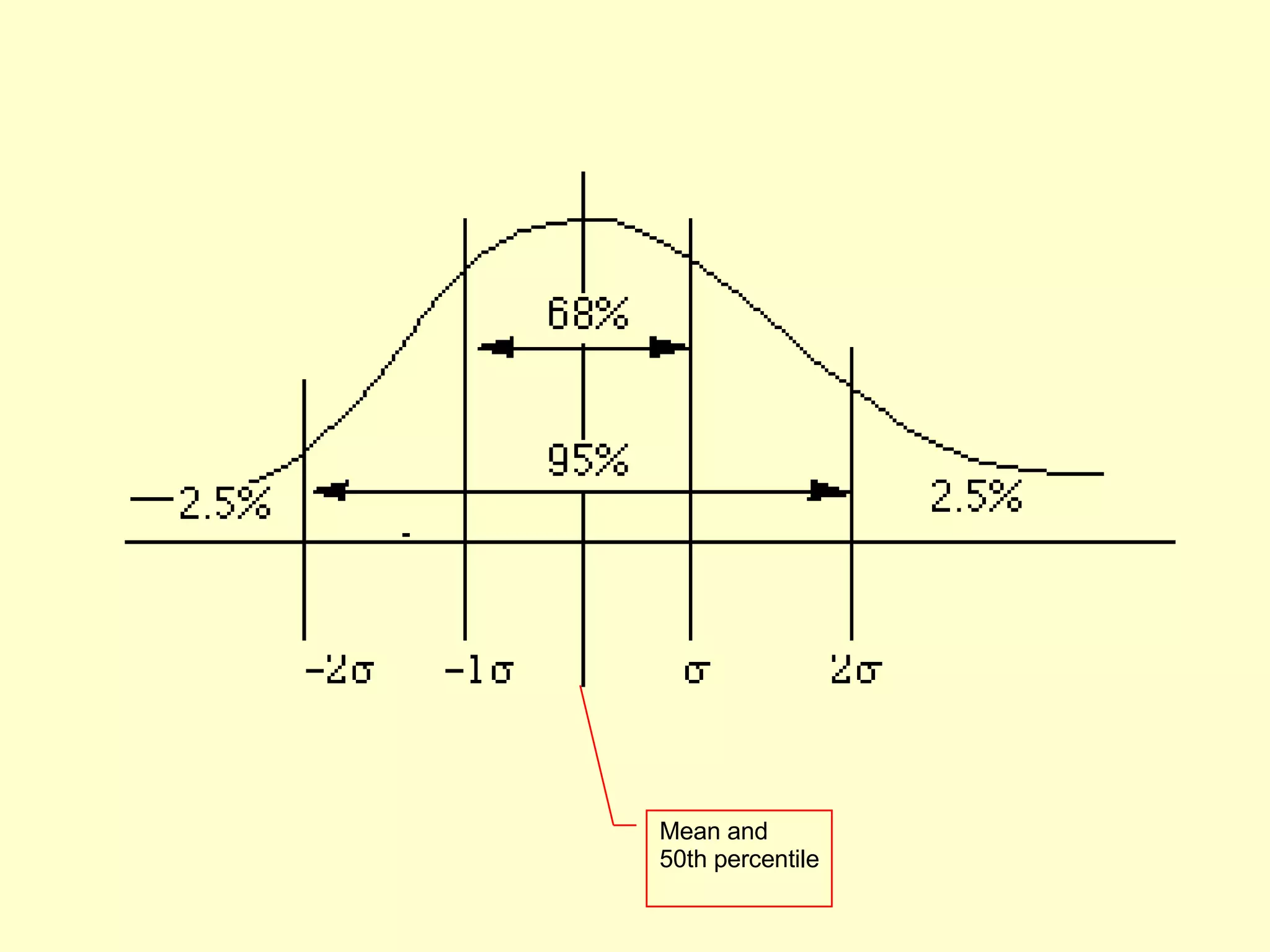
Who do you design for?  People are different It is rarely possible to accommodate all people perfectly design often a compromise ceiling height:  8‘ but tallest man: 8' 11"! Rule of thumb: cater to 95% of audience (5th or 95th percentile) but means 5% of population may be (seriously!) compromised designing for the average a mistake may exclude half the audience Examples: cars and height: headroom, seat size computers and visibility:  font size, line thickness, color for color-blind people?
Mean and 50th percentile
Proverbs on individual differences You do  not  necessarily represent a good average user of equipment or systems you design Do not expect others to think and behave as you do, or as you might like them to. People vary in thought and behaviour just as they do physically
Who do you design for? novices walk up and use systems interface affords restricted set of tasks introductory tutorials to more complex uses casual standard idioms recognition (visual affordances) over recall reference guides interface affords basic task structure intermediate   advanced idioms complex controls reminders and tips interface affords advanced tasks expert shortcuts for power use interface affords full task + task customization most shrink- wrapped systems most kiosk + internet systems custom software
Why design is hard Over the last century the number of things to control has increased dramatically car radio: AM, FM1, FM2, 5 pre-sets, station selection, balance, fader, bass, treble, distance, mono/stereo, dolby, tape eject, fast forward and reverse, etc (while driving at night!) display is increasingly artificial  red lights in car indicate problems vs flames for fire feedback more complex, subtle, and less natural is your digital watch alarm on and set correctly? errors increasing serious and/or costly airplane crashes, losing days of work...
Why design is hard Marketplace pressures adding functionality (complexity) now easy and cheap  computers adding controls/feedback expensive  physical buttons on calculator, microwave oven widgets consume screen real estate design usually requires several iterations before success product pulled if not immediately successful
Why design is hard People consider cost and appearance over design bad design not always visible people tend to blame themselves when errors occur “ I was never very good with machines” “ I knew I should have read the manual!” “ Look at what I did! Do I feel stupid!” eg the new wave of cheap telephones: accidentally hangs up when button hit with chin bad audio feedback cheap pushbuttons—mis-dials common trendy designs that are uncomfortable to hold hangs up when dropped functionality that can’t be accessed (redial, mute, hold)
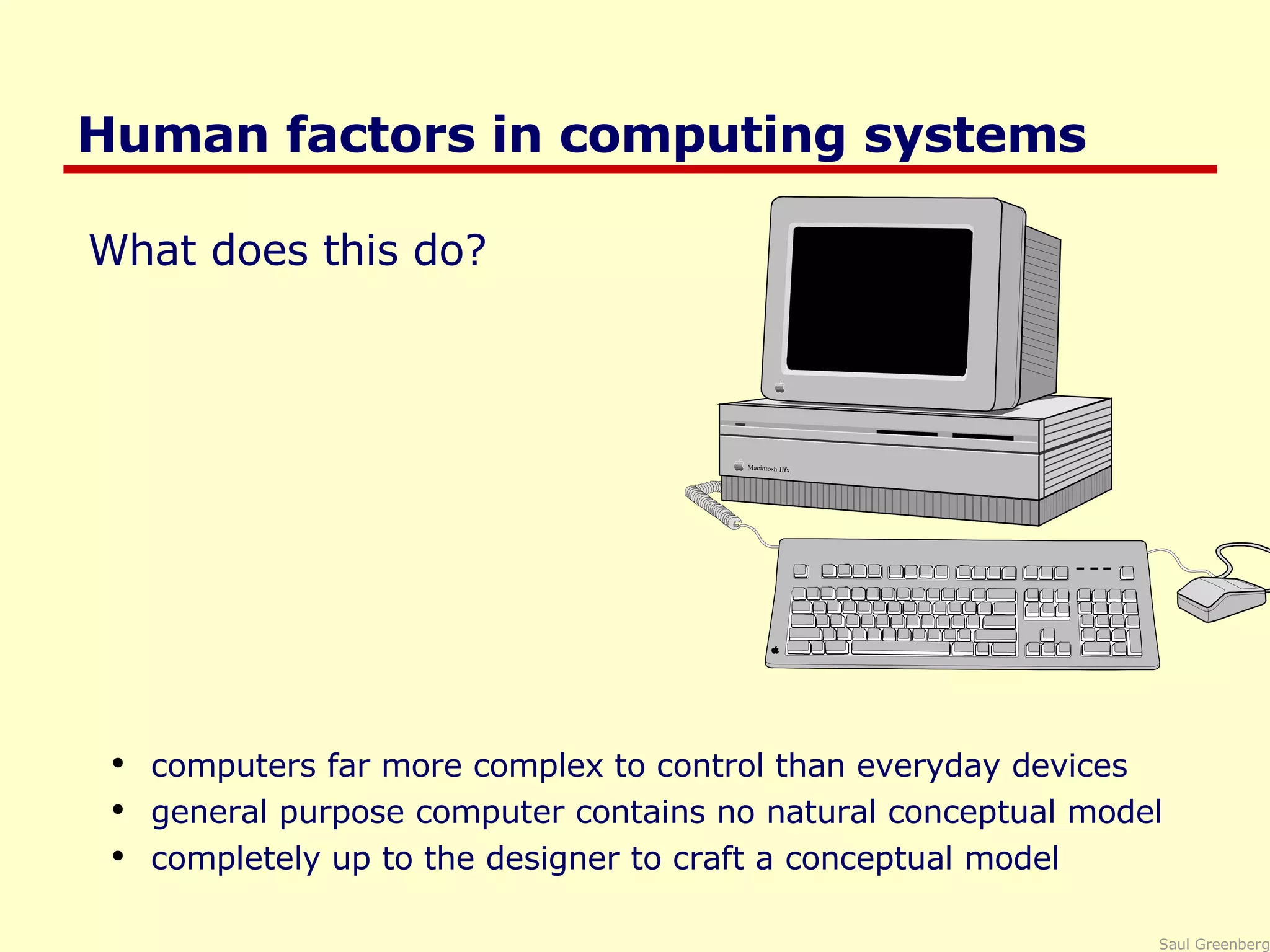
Human factors in computing systems What does this do? computers far more complex to control than everyday devices general purpose computer contains no natural conceptual model completely up to the designer to craft a conceptual model
What you now know Many human errors are actually errors in design don’t blame the user! Designers help by providing a good conceptual model affordances causality constraints mapping positive transfer population stereotypes and idioms Design to accommodate individual differences decide on the range of users Design is difficult for reasons that go beyond design
Articulate: who users are their key tasks User and task descriptions Goals: Methods: Products: Brainstorm designs Task centered system design Participatory design User-centered design Evaluate tasks Psychology of everyday  things User involvement Representation & metaphors low fidelity prototyping methods Throw-away paper prototypes Participatory interaction Task scenario walk- through Refined designs Graphical screen design Interface guidelines Style  guides high fidelity prototyping methods Testable prototypes Usability testing Heuristic evaluation Completed designs Alpha/beta systems  or  complete specification Field testing Interface Design and Usability Engineering

Psychology

  • 1.
    Design of everydaythings Summary so far: many so-called human errors are actually errors in design human factors became important as human performance limitations reached when handling complex machinery You will soon know these important concepts for designing everyday things perceived affordances causality visible constraints mapping transfer effects idioms & population stereotypes conceptual models individual differences why design is hard Slide deck by Saul Greenberg. Permission is granted to use this for non-commercial purposes as long as general credit to Saul Greenberg is clearly maintained. Warning: some material in this deck is used from other sources without permission. Credit to the original source is given if it is known.
  • 2.
    Perceived Affordance Theperceived properties of the object that suggest how one could use it Many concepts in this section are adapted from Don Norman’s book: The Design of Everyday Things chairs are for sitting table for placing things on knobs are for turning buttons are for pressing slots are for inserting handles are for turning computer for… switch for toggling
  • 3.
    Perceived Affordances Productdesign perceived affordances: design invites people to take possible actions actual affordances: the actual actionable properties of the product Problems occur when these are not the same, people’s perceptions are not what the designer expects In-depth discussion available at www.jnd.org/dn.mss/affordances-and-design.html
  • 4.
    Perceived Affordances Handlesfor lifting Mirrors for not touching Knobs for turning Surface for placing transparencies
  • 5.
    Perceived Affordance ProblemsHandles for lifting bends frame, focus distorted Mirrors for not touching people don’t reposition image Surface for placing transparencies which way is up? Knobs for turning focus or image position? w hat about this?
  • 6.
    Perceived Affordances GUIdesign perception only through visuals designer creates appropriate visual affordances via familiar idioms metaphors
  • 7.
    Perceived Affordances slidersfor sliding dials for turning music console for controlling music
  • 8.
    Perceived Affordance Problemsare these buttons? is this equalizer control a toggle or button? button for pressing, but action unknown
  • 9.
    Perceived Affordance ProblemsA button is for pressing, but what does it do? Is this a graphic or a control? text is for editing, but it doesn’t do it. Visual affordances for window controls are missing! IBM Real Phone
  • 10.
  • 11.
    Perceived Affordance ProblemsHandles are for lifting, but these are for scrolling! Complex things may need explaining but simple things should not when simple things need labels & instructions, then design has failed AudioRack 32, a multimedia applicaiton
  • 12.
    Visible Constraints Limitationsof the actions possible perceived from object’s appearance provides people with a range of usage possibilities Push or pull? Which side? Can only push, side to push clearly visible
  • 13.
    Which side doyou use for cutting? Photograph courtesy of www.baddesigns.com
  • 14.
    Visible constraints: Enteringa Date The more constraints, the less opportunity for error particularly important for managing user input Controls constructed in Visual Basic
  • 15.
  • 16.
  • 17.
  • 18.
    Mapping The setof possible relations between objects Control-display compatibility the natural relationship between controls and displays e.g., visual mapping of stove controls to elements back right front left back left front right 24 possibilities, requires: -visible labels + memory arbitrary back front front back 2 possibilities per side =4 total possibilities paired full mapping
  • 19.
    Mapping Control-display compatibilitymimic diagrams for feedback / control imitates physical layout
  • 20.
    Mapping Control-display compatibilitycause and effect steering wheel- turn left, car turns left scroll bar – scroll down viewport goes down
  • 21.
    Mapping Palette controlsand active objects Only controls that can operate on a picture are fully visible Selected picture Others are grayed out
  • 22.
    Mapping Action feedbackDepressed button indicates current mapped item Cursor re-enforces selection of current item Microsoft Paint
  • 23.
    Mapping Problems Photographcourtesy of www.baddesigns.com Quick, open the top drawer Move cabinet Mapping: suggests it should open the drawer but doesn’t Affordance: handle is for pulling
  • 24.
    Mapping Problems Photographcourtesy of www.baddesigns.com Mapping ambiguous Where do you plug in the mouse?
  • 25.
    Causality the thingthat happens right after an action is assumed by people to be caused by that action interpretation of “feedback” false causality incorrect effect invoking unfamiliar function just as computer hangs causes “superstitious” behaviors invisible effect command with no apparent result often re-entered repeatedly e.g., mouse click to raise menu on unresponsive system
  • 26.
    Causality Problems Effectsvisible only after Exec button is pressed Ok does nothing! awkward to find appropriate color level LViewPro
  • 27.
    Transfer Effects Peopletransfer their learning/expectations of similar objects to the current objects positive transfer: previous learning's also apply to new situation negative transfer: previous learning's conflict with the new situation
  • 28.
  • 29.
    Transfer Effect ProblemsPhotograph courtesy of www.baddesigns.com A Restaurant in Santa Barbara
  • 30.
    Transfer Effect ProblemsHow does knowing MSPaint help you in Photoshop? e.g. rectangular control…
  • 31.
    Idioms and PopulationStereotypes Interface idioms: ‘ standard’ interface features we learnt, use and remember Idioms may define arbitrary behaviours red means danger green means safe Population stereotypes: Idioms vary in different cultures Light switches America: down is off Britain: down is on Faucets America: anti-clockwise on Britain: anti-clockwise off
  • 32.
    Idioms and PopulationStereotypes Ignoring/changing idioms? home handyman light switches installed upside down calculators vs. phone number pads which did computer keypads follow and why? Difficulty of changing stereotypes Qwerty keyboard: designed to prevent jamming of keyboard Dvorak keyboard (’30s): provably faster to use Images from www.atarimagazines.com/v5n11/dvorakkeyboard.html
  • 33.
    Cultural associations Becausea trashcan in Thailand may look like this: a Thai user is likely to be confused by this image popular in Apple interfaces: Sun found their email icon problematic for some American urban dwellers who are unfamiliar with rural mail boxes.
  • 34.
    Cultural associations AMac user finds a Windows system only somewhat familiar Apple MacPaint and Microsoft Paint
  • 35.
    Conceptual model Peoplehave “mental models” of how things work, built from affordances causality constraints mapping positive transfer population stereotypes/cultural standards instructions interactions models allow people to mentally simulate operation of device models may be wrong particularly if above attributes are misleading
  • 36.
    Donald Norman Designof Everyday Things, Basic Books
  • 37.
    Donald Norman Designof Everyday Things, Basic Books
  • 38.
    Good example: Scissorsaffordances: holes for something to be inserted constraints: big hole for several fingers, small hole for thumb mapping: between holes and fingers suggested and constrained by appearance positive transfer and cultural idioms learnt when young constant mechanism conceptual model: implications clear of how the operating parts work
  • 39.
    Bad example: Digitalwatch affordances: four push buttons to push, but not clear what they will do constraints and mapping unknown no visible relation between buttons, possible actions and end result transfer of training little relation to analog watches cultural idiom somewhat standardized core controls and functions but still highly variable conceptual model: must be learnt
  • 40.
    Designing a goodconceptual model communicate model through visual image visible affordances, mappings, and constraints visible causality of interactions cultural idioms, transfer instructions augments visuals all work together to remind a person of what can be done and how to do it
  • 41.
    Who do youdesign for?
  • 42.
    Who do youdesign for?
  • 43.
    Who do youdesign for? People are different It is rarely possible to accommodate all people perfectly design often a compromise ceiling height: 8‘ but tallest man: 8' 11"! Rule of thumb: cater to 95% of audience (5th or 95th percentile) but means 5% of population may be (seriously!) compromised designing for the average a mistake may exclude half the audience Examples: cars and height: headroom, seat size computers and visibility: font size, line thickness, color for color-blind people?
  • 44.
    Mean and 50thpercentile
  • 45.
    Proverbs on individualdifferences You do not necessarily represent a good average user of equipment or systems you design Do not expect others to think and behave as you do, or as you might like them to. People vary in thought and behaviour just as they do physically
  • 46.
    Who do youdesign for? novices walk up and use systems interface affords restricted set of tasks introductory tutorials to more complex uses casual standard idioms recognition (visual affordances) over recall reference guides interface affords basic task structure intermediate advanced idioms complex controls reminders and tips interface affords advanced tasks expert shortcuts for power use interface affords full task + task customization most shrink- wrapped systems most kiosk + internet systems custom software
  • 47.
    Why design ishard Over the last century the number of things to control has increased dramatically car radio: AM, FM1, FM2, 5 pre-sets, station selection, balance, fader, bass, treble, distance, mono/stereo, dolby, tape eject, fast forward and reverse, etc (while driving at night!) display is increasingly artificial red lights in car indicate problems vs flames for fire feedback more complex, subtle, and less natural is your digital watch alarm on and set correctly? errors increasing serious and/or costly airplane crashes, losing days of work...
  • 48.
    Why design ishard Marketplace pressures adding functionality (complexity) now easy and cheap computers adding controls/feedback expensive physical buttons on calculator, microwave oven widgets consume screen real estate design usually requires several iterations before success product pulled if not immediately successful
  • 49.
    Why design ishard People consider cost and appearance over design bad design not always visible people tend to blame themselves when errors occur “ I was never very good with machines” “ I knew I should have read the manual!” “ Look at what I did! Do I feel stupid!” eg the new wave of cheap telephones: accidentally hangs up when button hit with chin bad audio feedback cheap pushbuttons—mis-dials common trendy designs that are uncomfortable to hold hangs up when dropped functionality that can’t be accessed (redial, mute, hold)
  • 50.
    Human factors incomputing systems What does this do? computers far more complex to control than everyday devices general purpose computer contains no natural conceptual model completely up to the designer to craft a conceptual model
  • 51.
    What you nowknow Many human errors are actually errors in design don’t blame the user! Designers help by providing a good conceptual model affordances causality constraints mapping positive transfer population stereotypes and idioms Design to accommodate individual differences decide on the range of users Design is difficult for reasons that go beyond design
  • 52.
    Articulate: who usersare their key tasks User and task descriptions Goals: Methods: Products: Brainstorm designs Task centered system design Participatory design User-centered design Evaluate tasks Psychology of everyday things User involvement Representation & metaphors low fidelity prototyping methods Throw-away paper prototypes Participatory interaction Task scenario walk- through Refined designs Graphical screen design Interface guidelines Style guides high fidelity prototyping methods Testable prototypes Usability testing Heuristic evaluation Completed designs Alpha/beta systems or complete specification Field testing Interface Design and Usability Engineering