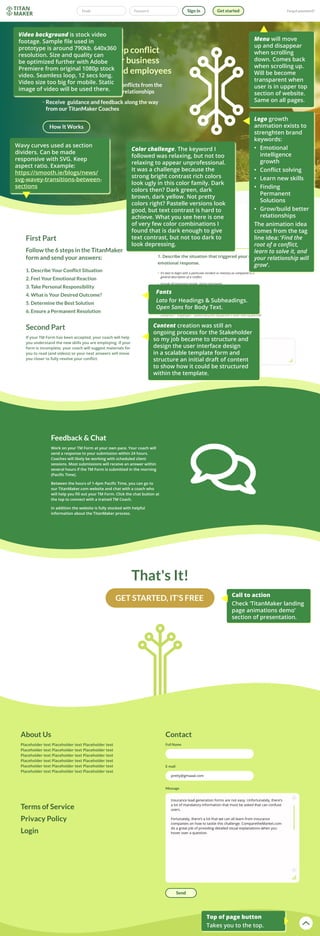
Menu will move
up and disappear
when scrolling
down. Comes back
when scrolling up.
Will be become
transparent when
user is in upper top
section of website.
Same on all pages.
Wavy curves used as section
dividers. Can be made
responsive with SVG. Keep
aspect ratio. Example:
https://smooth.ie/blogs/news/
svg-wavey-transitions-between-
sections
Color challenge. The keyword I
followed was relaxing, but not too
relaxing to appear unprofessional.
It was a challenge because the
strong bright contrast rich colors
look ugly in this color family. Dark
colors then? Dark green, dark
brown, dark yellow. Not pretty
colors right? Pastelle versions look
good, but text contrast is hard to
achieve. What you see here is one
of very few color combinations I
found that is dark enough to give
text contrast, but not too dark to
look depressing.
Video background is stock video
footage. Sample file used in
prototype is around 790kb. 640x360
resolution. Size and quality can
be optimized further with Adobe
Premiere from original 1080p stock
video. Seamless loop, 12 secs long.
Video size too big for mobile. Static
image of video will be used there.
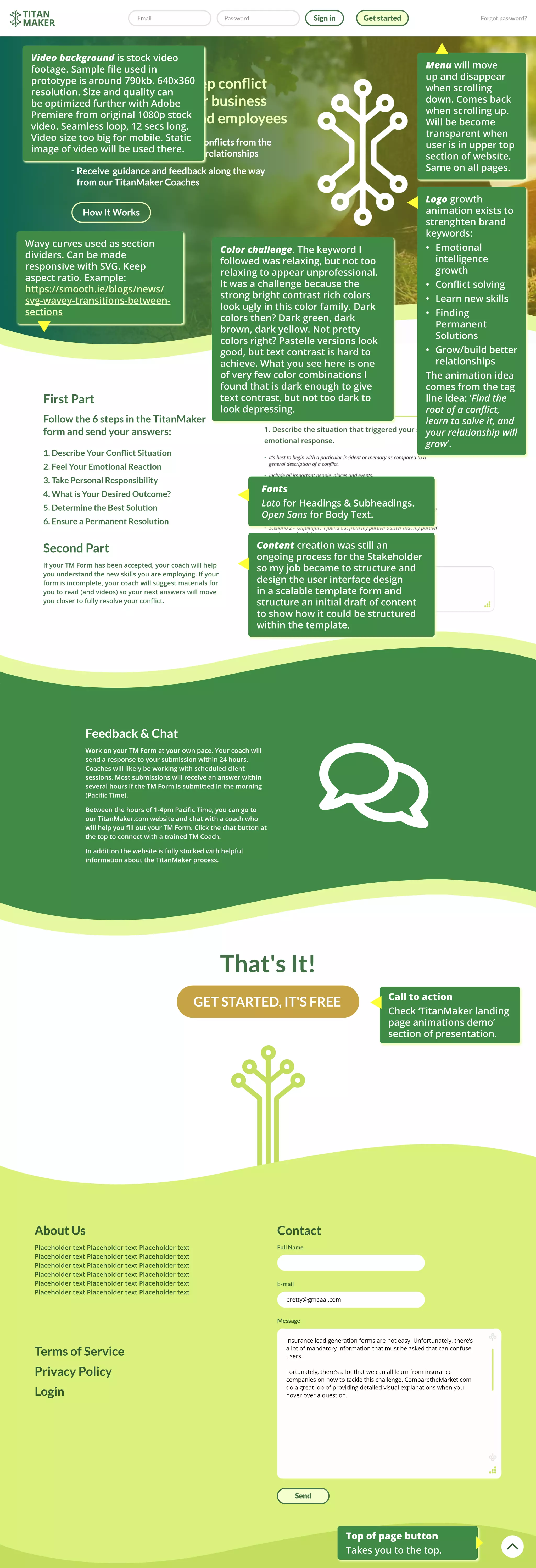
Logo growth
animation exists to
strenghten brand
keywords:
•	 Emotional
intelligence
growth
•	 Conflict solving
•	 Learn new skills
•	 Finding
Permanent
Solutions
•	 Grow/build better
relationships
The animation idea
comes from the tag
line idea: ‘Find the
root of a conflict,
learn to solve it, and
your relationship will
grow’.
Fonts
Lato for Headings & Subheadings.
Open Sans for Body Text.
Content creation was still an
ongoing process for the Stakeholder
so my job became to structure and
design the user interface design
in a scalable template form and
structure an initial draft of content
to show how it could be structured
within the template.
Top of page button
Takes you to the top.
Call to action
Check ‘TitanMaker landing
page animations demo’
section of presentation.
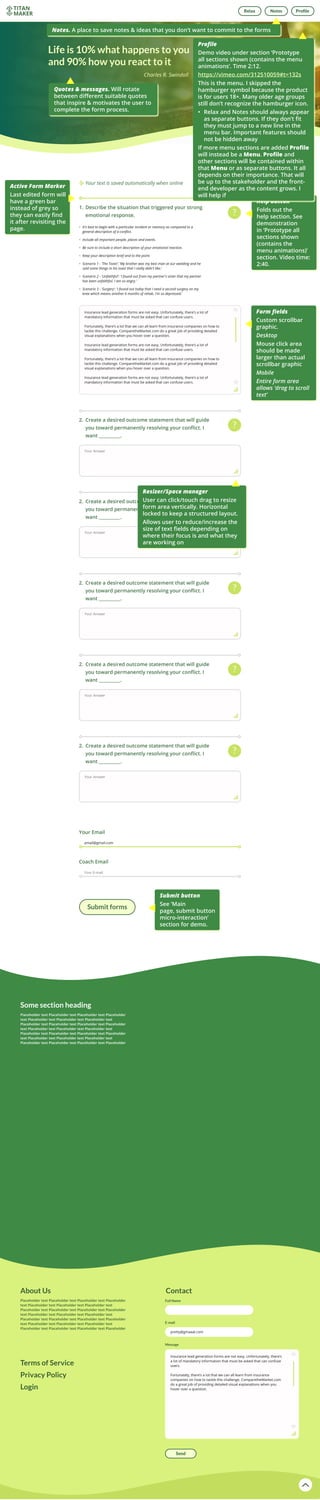
Help button
Folds out the
help section. See
demonstration
in ‘Prototype all
sections shown
(contains the
menu animations)’
section. Video time:
2:40.
Active Form Marker
Last edited form will
have a green bar
instead of grey so
they can easily find
it after revisiting the
page.
Form fields
Custom scrollbar
graphic.
Desktop
Mouse click area
should be made
larger than actual
scrollbar graphic
Mobile
Entire form area
allows ‘drag to scroll
text’
Submit button
See ‘Main
page, submit button
micro-interaction’
section for demo.
Quotes & messages. Will rotate
between different suitable quotes
that inspire & motivates the user to
complete the form process.
Resizer/Space manager
User can click/touch drag to resize
form area vertically. Horizontal
locked to keep a structured layout.
Allows user to reduce/increase the
size of text fields depending on
where their focus is and what they
are working on
Notes. A place to save notes & ideas that you don’t want to commit to the forms
Profile
Demo video under section ‘Prototype
all sections shown (contains the menu
animations’. Time 2:12.
https://vimeo.com/312510059#t=132s
This is the menu. I skipped the
hamburger symbol because the product
is for users 18+. Many older age groups
still don’t recognize the hamburger icon.
•	 Relax and Notes should always appear
as separate buttons. If they don’t fit
they must jump to a new line in the
menu bar. Important features should
not be hidden away
If more menu sections are added Profile
will instead be a Menu. Profile and
other sections will be contained within
that Menu or as separate buttons. It all
depends on their importance. That will
be up to the stakeholder and the front-
end developer as the content grows. I
will help if

Tech details 2

  • 1.
    Menu will move upand disappear when scrolling down. Comes back when scrolling up. Will be become transparent when user is in upper top section of website. Same on all pages. Wavy curves used as section dividers. Can be made responsive with SVG. Keep aspect ratio. Example: https://smooth.ie/blogs/news/ svg-wavey-transitions-between- sections Color challenge. The keyword I followed was relaxing, but not too relaxing to appear unprofessional. It was a challenge because the strong bright contrast rich colors look ugly in this color family. Dark colors then? Dark green, dark brown, dark yellow. Not pretty colors right? Pastelle versions look good, but text contrast is hard to achieve. What you see here is one of very few color combinations I found that is dark enough to give text contrast, but not too dark to look depressing. Video background is stock video footage. Sample file used in prototype is around 790kb. 640x360 resolution. Size and quality can be optimized further with Adobe Premiere from original 1080p stock video. Seamless loop, 12 secs long. Video size too big for mobile. Static image of video will be used there. Logo growth animation exists to strenghten brand keywords: • Emotional intelligence growth • Conflict solving • Learn new skills • Finding Permanent Solutions • Grow/build better relationships The animation idea comes from the tag line idea: ‘Find the root of a conflict, learn to solve it, and your relationship will grow’. Fonts Lato for Headings & Subheadings. Open Sans for Body Text. Content creation was still an ongoing process for the Stakeholder so my job became to structure and design the user interface design in a scalable template form and structure an initial draft of content to show how it could be structured within the template. Top of page button Takes you to the top. Call to action Check ‘TitanMaker landing page animations demo’ section of presentation.
  • 2.
    Help button Folds outthe help section. See demonstration in ‘Prototype all sections shown (contains the menu animations)’ section. Video time: 2:40. Active Form Marker Last edited form will have a green bar instead of grey so they can easily find it after revisiting the page. Form fields Custom scrollbar graphic. Desktop Mouse click area should be made larger than actual scrollbar graphic Mobile Entire form area allows ‘drag to scroll text’ Submit button See ‘Main page, submit button micro-interaction’ section for demo. Quotes & messages. Will rotate between different suitable quotes that inspire & motivates the user to complete the form process. Resizer/Space manager User can click/touch drag to resize form area vertically. Horizontal locked to keep a structured layout. Allows user to reduce/increase the size of text fields depending on where their focus is and what they are working on Notes. A place to save notes & ideas that you don’t want to commit to the forms Profile Demo video under section ‘Prototype all sections shown (contains the menu animations’. Time 2:12. https://vimeo.com/312510059#t=132s This is the menu. I skipped the hamburger symbol because the product is for users 18+. Many older age groups still don’t recognize the hamburger icon. • Relax and Notes should always appear as separate buttons. If they don’t fit they must jump to a new line in the menu bar. Important features should not be hidden away If more menu sections are added Profile will instead be a Menu. Profile and other sections will be contained within that Menu or as separate buttons. It all depends on their importance. That will be up to the stakeholder and the front- end developer as the content grows. I will help if