Build an application with MongoDB
Part 1: Creating a REST API using the ME(a)N stack
Chad Tindel
Senior Solution Architect
@ctindel
2
What is all this stuff?
3
• Introduction to the MEAN Stack
• What is a REST API?
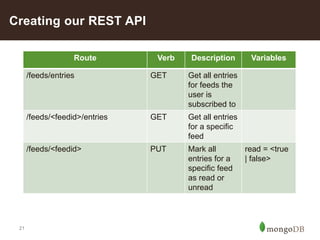
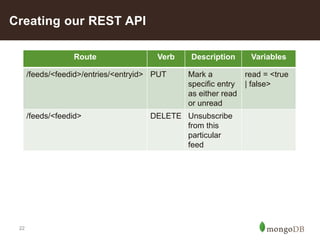
• Creating our REST API
• Defining our Data Model
• Real-life authentication using Stormpath
• Javascript Quirks
• WRITE YOUR TESTS FIRST
• Let’s look at some application code
Agenda
4
This webinar will move fast
5
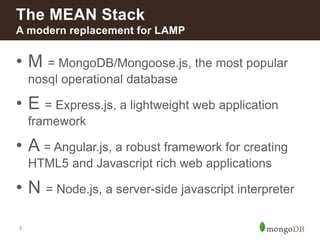
• M = MongoDB/Mongoose.js, the most popular
nosql operational database
• E = Express.js, a lightweight web application
framework
• A = Angular.js, a robust framework for creating
HTML5 and Javascript rich web applications
• N = Node.js, a server-side javascript interpreter
The MEAN Stack
A modern replacement for LAMP
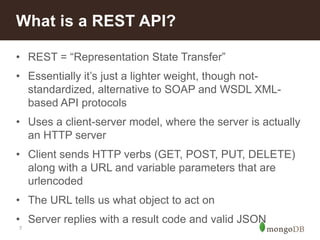
What is a REST API?
7
• REST = “Representation State Transfer”
• Essentially it’s just a lighter weight, though not-
standardized, alternative to SOAP and WSDL XML-
based API protocols
• Uses a client-server model, where the server is actually
an HTTP server
• Client sends HTTP verbs (GET, POST, PUT, DELETE)
along with a URL and variable parameters that are
urlencoded
• The URL tells us what object to act on
• Server replies with a result code and valid JSON
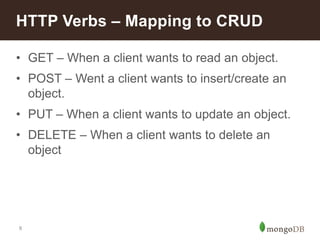
What is a REST API?
8
• GET – When a client wants to read an object.
• POST – Went a client wants to insert/create an
object.
• PUT – When a client wants to update an object.
• DELETE – When a client wants to delete an
object
HTTP Verbs – Mapping to CRUD
9
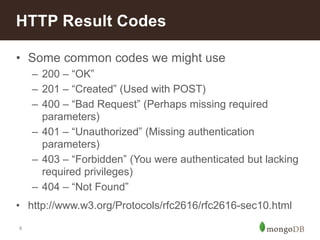
• Some common codes we might use
– 200 – “OK”
– 201 – “Created” (Used with POST)
– 400 – “Bad Request” (Perhaps missing required
parameters)
– 401 – “Unauthorized” (Missing authentication
parameters)
– 403 – “Forbidden” (You were authenticated but lacking
required privileges)
– 404 – “Not Found”
• http://www.w3.org/Protocols/rfc2616/rfc2616-sec10.html
HTTP Result Codes
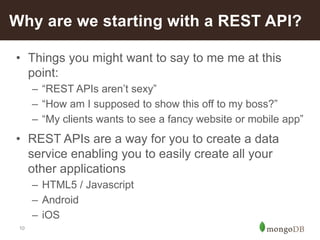
10
• Things you might want to say to me me at this
point:
– “REST APIs aren’t sexy”
– “How am I supposed to show this off to my boss?”
– “My clients wants to see a fancy website or mobile app”
• REST APIs are a way for you to create a data
service enabling you to easily create all your
other applications
– HTML5 / Javascript
– Android
– iOS
Why are we starting with a REST API?
11
• Because all the VC Money is in creating apps that
are So-Lo-Mo-Co, lots of new startups don’t even
have a web interface, such as:
– Uber
– WhatsApp
– Postmates
– Wash.io
• Creating a REST API also allows other
companies/applications to easily plug-in to your
application as well, turning your application into a
platform and making it more powerful
New companies don’t have an HTML Interface
Creating our REST API
13
• We’ll be building an RSS Aggregation application, similar
to our dearly departed Google Reader
• Our application today will have two components
– The REST API
– The Feed Grabber
• Since the point of today’s talk is to learn about creating a
REST API and not the intricacies of RSS feeds, we won’t
be discussing the feed grabber
Let’s build an application!
14
• We’ll need to define data models for and store the
following data:
– Users
– RSS Feeds
– Feed Entries
– User Feed Subscriptions
– Which feed entries a user has already read
• We’ll need to allow users to:
– Create an account
– Subscribe/unsubscribe to feeds
– Read feed entries
– Mark feeds/entries as read or unread
Let’s build an application!
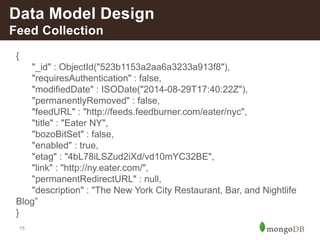
Data Models
15
{
"_id" : ObjectId("523b1153a2aa6a3233a913f8"),
"requiresAuthentication" : false,
"modifiedDate" : ISODate("2014-08-29T17:40:22Z"),
"permanentlyRemoved" : false,
"feedURL" : "http://feeds.feedburner.com/eater/nyc",
"title" : "Eater NY",
"bozoBitSet" : false,
"enabled" : true,
"etag" : "4bL78iLSZud2iXd/vd10mYC32BE",
"link" : "http://ny.eater.com/",
"permanentRedirectURL" : null,
"description" : "The New York City Restaurant, Bar, and Nightlife
Blog”
}
Data Model Design
Feed Collection
16
{
"_id" : ObjectId("523b1153a2aa6a3233a91412"),
"description" : "Buzzfeed asked a bunch of people…”,
"title" : "Cronut Mania: Buzzfeed asked a bunch of people...",
"summary" : "Buzzfeed asked a bunch of people that were…”,
"content" : [
{
"base" : "http://ny.eater.com/",
"type" : "text/html",
"value" : ”LOTS OF HTML HERE",
"language" : "en"
}
],
"entryID" : "tag:ny.eater.com,2013://4.560508",
"publishedDate" : ISODate("2013-09-17T20:45:20Z"),
"link" : "http://ny.eater.com/archives/2013/09/cronut_mania_41.php",
"feedID" : ObjectId("523b1153a2aa6a3233a913f8")
}
Data Model Design
Feed Entry Collection
17
{
"_id" : ObjectId("54ad6c3ae764de42070b27b1"),
"active" : true,
"email" : "testuser1@example.com",
"firstName" : "Test",
"lastName" : "User1",
"sp_api_key_id" : "6YQB0A8VXM0X8RVDPPLRHBI7J",
"sp_api_key_secret" : "veBw/YFx56Dl0bbiVEpvbjF”,
"lastLogin" : ISODate("2015-01-07T17:26:18.996Z"),
"created" : ISODate("2015-01-07T17:26:18.995Z"),
"subs" : [ ObjectId("523b1153a2aa6a3233a913f8"),
ObjectId("54b563c3a50a190b50f4d63b")],
}
Data Model Design
User Collection
18
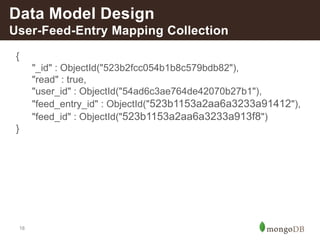
{
"_id" : ObjectId("523b2fcc054b1b8c579bdb82"),
"read" : true,
"user_id" : ObjectId("54ad6c3ae764de42070b27b1"),
"feed_entry_id" : ObjectId("523b1153a2aa6a3233a91412"),
"feed_id" : ObjectId("523b1153a2aa6a3233a913f8")
}
Data Model Design
User-Feed-Entry Mapping Collection
19
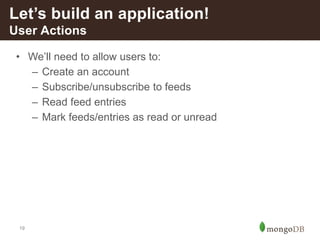
• We’ll need to allow users to:
– Create an account
– Subscribe/unsubscribe to feeds
– Read feed entries
– Mark feeds/entries as read or unread
Let’s build an application!
User Actions
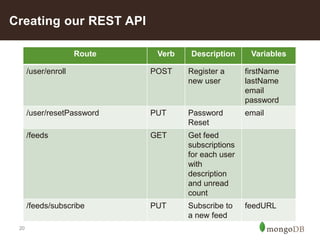
20
Creating our REST API
Route Verb Description Variables
/user/enroll POST Register a
new user
firstName
lastName
email
password
/user/resetPassword PUT Password
Reset
email
/feeds GET Get feed
subscriptions
for each user
with
description
and unread
count
/feeds/subscribe PUT Subscribe to
a new feed
feedURL
21
Creating our REST API
Route Verb Description Variables
/feeds/entries GET Get all entries
for feeds the
user is
subscribed to
/feeds/<feedid>/entries GET Get all entries
for a specific
feed
/feeds/<feedid> PUT Mark all
entries for a
specific feed
as read or
unread
read = <true
| false>
22
Creating our REST API
Route Verb Description Variables
/feeds/<feedid>/entries/<entryid> PUT Mark a
specific entry
as either read
or unread
read = <true
| false>
/feeds/<feedid> DELETE Unsubscribe
from this
particular
feed
Real Life Authentication with
Stormpath
24
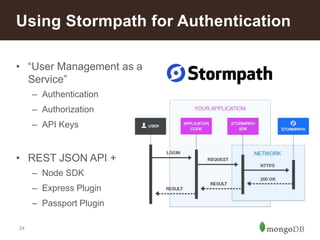
Using Stormpath for Authentication
• “User Management as a
Service”
– Authentication
– Authorization
– API Keys
• REST JSON API +
– Node SDK
– Express Plugin
– Passport Plugin
25
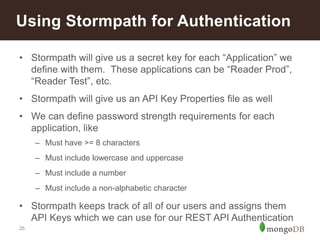
Using Stormpath for Authentication
• Stormpath will give us a secret key for each “Application” we
define with them. These applications can be “Reader Prod”,
“Reader Test”, etc.
• Stormpath will give us an API Key Properties file as well
• We can define password strength requirements for each
application, like
– Must have >= 8 characters
– Must include lowercase and uppercase
– Must include a number
– Must include a non-alphabetic character
• Stormpath keeps track of all of our users and assigns them
API Keys which we can use for our REST API Authentication
Javascript / Node.js Overview
27
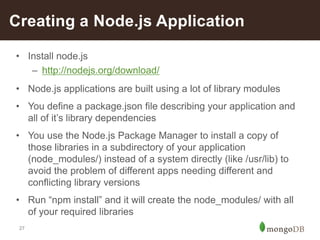
Creating a Node.js Application
• Install node.js
– http://nodejs.org/download/
• Node.js applications are built using a lot of library modules
• You define a package.json file describing your application and
all of it’s library dependencies
• You use the Node.js Package Manager to install a copy of
those libraries in a subdirectory of your application
(node_modules/) instead of a system directly (like /usr/lib) to
avoid the problem of different apps needing different and
conflicting library versions
• Run “npm install” and it will create the node_modules/ with all
of your required libraries
28
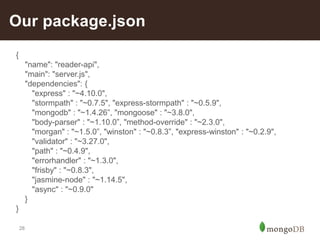
Our package.json
{
"name": "reader-api",
"main": "server.js",
"dependencies": {
"express" : "~4.10.0",
"stormpath" : "~0.7.5", "express-stormpath" : "~0.5.9",
"mongodb" : "~1.4.26”, "mongoose" : "~3.8.0",
"body-parser" : "~1.10.0”, "method-override" : "~2.3.0",
"morgan" : "~1.5.0”, "winston" : "~0.8.3”, "express-winston" : "~0.2.9",
"validator" : "~3.27.0",
"path" : "~0.4.9",
"errorhandler" : "~1.3.0",
"frisby" : "~0.8.3",
"jasmine-node" : "~1.14.5",
"async" : "~0.9.0"
}
}
29
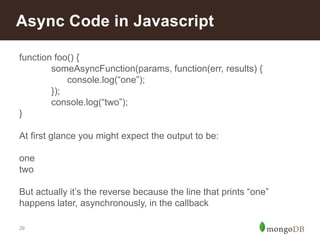
Async Code in Javascript
function foo() {
someAsyncFunction(params, function(err, results) {
console.log(“one”);
});
console.log(“two”);
}
At first glance you might expect the output to be:
one
two
But actually it’s the reverse because the line that prints “one”
happens later, asynchronously, in the callback
30
Async Library
https://github.com/caolan/async
actionArray = [
function one(cb) {
someAsyncFunction(params, function(err, results) {
if (err) {
cb(new Error(“There was an error”));
}
console.log(“one”);
cb(null);
});
},
function two(cb) {
console.log(“two”);
cb(null);
}]
]
Async.series(actionArray);
Write your tests first
32
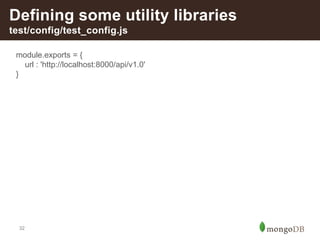
Defining some utility libraries
test/config/test_config.js
module.exports = {
url : 'http://localhost:8000/api/v1.0'
}
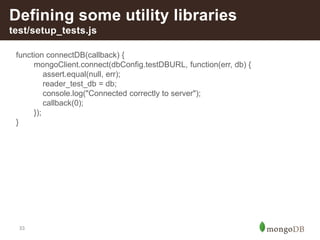
33
Defining some utility libraries
test/setup_tests.js
function connectDB(callback) {
mongoClient.connect(dbConfig.testDBURL, function(err, db) {
assert.equal(null, err);
reader_test_db = db;
console.log("Connected correctly to server");
callback(0);
});
}
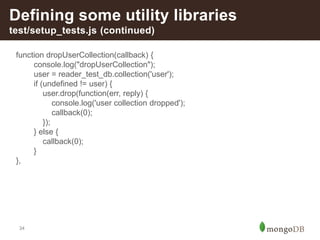
34
Defining some utility libraries
test/setup_tests.js (continued)
function dropUserCollection(callback) {
console.log("dropUserCollection");
user = reader_test_db.collection('user');
if (undefined != user) {
user.drop(function(err, reply) {
console.log('user collection dropped');
callback(0);
});
} else {
callback(0);
}
},
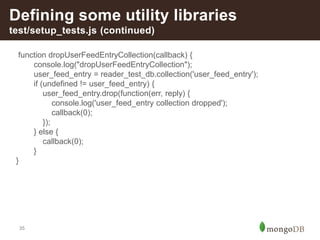
35
Defining some utility libraries
test/setup_tests.js (continued)
function dropUserFeedEntryCollection(callback) {
console.log("dropUserFeedEntryCollection");
user_feed_entry = reader_test_db.collection('user_feed_entry');
if (undefined != user_feed_entry) {
user_feed_entry.drop(function(err, reply) {
console.log('user_feed_entry collection dropped');
callback(0);
});
} else {
callback(0);
}
}
36
Defining some utility libraries
test/setup_tests.js (continued)
function getApplication(callback) {
console.log("getApplication");
client.getApplications({name: SP_APP_NAME}, function(err, applications) {
console.log(applications);
if (err) {
log("Error in getApplications");
throw err;
}
app = applications.items[0];
callback(0);
});
},
37
Defining some utility libraries
test/setup_tests.js (continued)
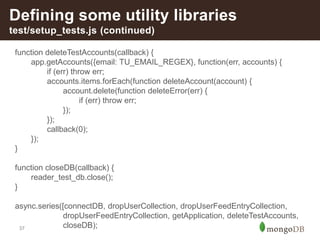
function deleteTestAccounts(callback) {
app.getAccounts({email: TU_EMAIL_REGEX}, function(err, accounts) {
if (err) throw err;
accounts.items.forEach(function deleteAccount(account) {
account.delete(function deleteError(err) {
if (err) throw err;
});
});
callback(0);
});
}
function closeDB(callback) {
reader_test_db.close();
}
async.series([connectDB, dropUserCollection, dropUserFeedEntryCollection,
dropUserFeedEntryCollection, getApplication, deleteTestAccounts,
closeDB);
38
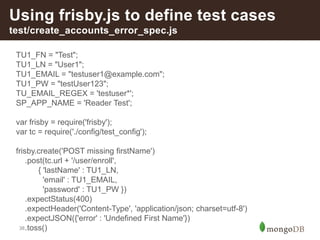
Using frisby.js to define test cases
test/create_accounts_error_spec.js
TU1_FN = "Test";
TU1_LN = "User1";
TU1_EMAIL = "testuser1@example.com";
TU1_PW = "testUser123";
TU_EMAIL_REGEX = 'testuser*';
SP_APP_NAME = 'Reader Test';
var frisby = require('frisby');
var tc = require('./config/test_config');
frisby.create('POST missing firstName')
.post(tc.url + '/user/enroll',
{ 'lastName' : TU1_LN,
'email' : TU1_EMAIL,
'password' : TU1_PW })
.expectStatus(400)
.expectHeader('Content-Type', 'application/json; charset=utf-8')
.expectJSON({'error' : 'Undefined First Name'})
.toss()
39
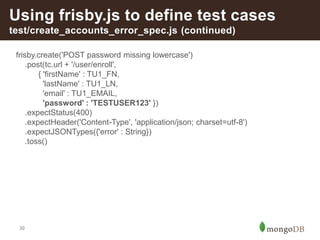
Using frisby.js to define test cases
test/create_accounts_error_spec.js (continued)
frisby.create('POST password missing lowercase')
.post(tc.url + '/user/enroll',
{ 'firstName' : TU1_FN,
'lastName' : TU1_LN,
'email' : TU1_EMAIL,
'password' : 'TESTUSER123' })
.expectStatus(400)
.expectHeader('Content-Type', 'application/json; charset=utf-8')
.expectJSONTypes({'error' : String})
.toss()
40
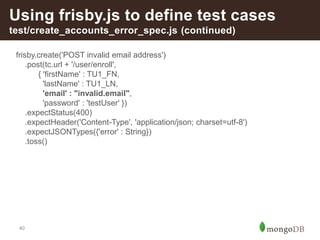
Using frisby.js to define test cases
test/create_accounts_error_spec.js (continued)
frisby.create('POST invalid email address')
.post(tc.url + '/user/enroll',
{ 'firstName' : TU1_FN,
'lastName' : TU1_LN,
'email' : "invalid.email",
'password' : 'testUser' })
.expectStatus(400)
.expectHeader('Content-Type', 'application/json; charset=utf-8')
.expectJSONTypes({'error' : String})
.toss()
41
Using frisby.js to define test cases
test/create_accounts_spec.js
TEST_USERS = [{'fn' : 'Test', 'ln' : 'User1',
'email' : 'testuser1@example.com', 'pwd' : 'testUser123'},
{'fn' : 'Test', 'ln' : 'User2',
'email' : 'testuser2@example.com', 'pwd' : 'testUser123'},
{'fn' : 'Test', 'ln' : 'User3',
'email' : 'testuser3@example.com', 'pwd' : 'testUser123'}]
SP_APP_NAME = 'Reader Test';
var frisby = require('frisby');
var tc = require('./config/test_config');
42
Using frisby.js to define test cases
test/create_accounts_spec.js (continued)
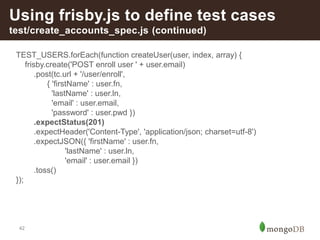
TEST_USERS.forEach(function createUser(user, index, array) {
frisby.create('POST enroll user ' + user.email)
.post(tc.url + '/user/enroll',
{ 'firstName' : user.fn,
'lastName' : user.ln,
'email' : user.email,
'password' : user.pwd })
.expectStatus(201)
.expectHeader('Content-Type', 'application/json; charset=utf-8')
.expectJSON({ 'firstName' : user.fn,
'lastName' : user.ln,
'email' : user.email })
.toss()
});
43
Using frisby.js to define test cases
test/create_accounts_spec.js (continued)
frisby.create('POST enroll duplicate user ')
.post(tc.url + '/user/enroll',
{ 'firstName' : TEST_USERS[0].fn,
'lastName' : TEST_USERS[0].ln,
'email' : TEST_USERS[0].email,
'password' : TEST_USERS[0].pwd })
.expectStatus(400)
.expectHeader('Content-Type', 'application/json; charset=utf-8')
.expectJSON({'error' : 'Account with that email already exists. Please choose
another email.'})
.toss()
44
Using frisby.js to define test cases
Need to create /tmp/readerTestCreds.js
We want to dynamically create a file that looks like this for us to use in defining
test cases that require us to authenticate a user:
TEST_USERS =
[{ "_id":"54ad6c3ae764de42070b27b1",
"email":"testuser1@example.com",
"firstName":"Test",
"lastName":"User1",
"sp_api_key_id":”<API KEY ID>",
"sp_api_key_secret":”<API KEY SECRET>”
},
{ "_id":"54ad6c3be764de42070b27b2”,
"email":"testuser2@example.com",
"firstName":"Test",
"lastName":"User2”,
"sp_api_key_id":”<API KEY ID>",
"sp_api_key_secret":”<API KEY SECRET>”
}];
module.exports = TEST_USERS;
45
Using frisby.js to define test cases
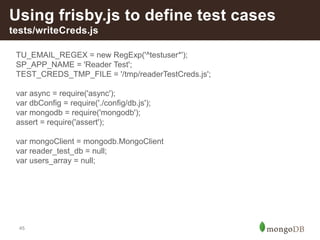
tests/writeCreds.js
TU_EMAIL_REGEX = new RegExp('^testuser*');
SP_APP_NAME = 'Reader Test';
TEST_CREDS_TMP_FILE = '/tmp/readerTestCreds.js';
var async = require('async');
var dbConfig = require('./config/db.js');
var mongodb = require('mongodb');
assert = require('assert');
var mongoClient = mongodb.MongoClient
var reader_test_db = null;
var users_array = null;
46
Using frisby.js to define test cases
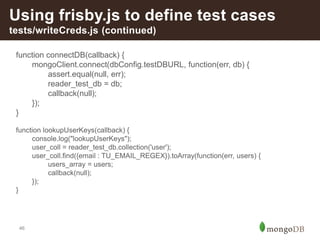
tests/writeCreds.js (continued)
function connectDB(callback) {
mongoClient.connect(dbConfig.testDBURL, function(err, db) {
assert.equal(null, err);
reader_test_db = db;
callback(null);
});
}
function lookupUserKeys(callback) {
console.log("lookupUserKeys");
user_coll = reader_test_db.collection('user');
user_coll.find({email : TU_EMAIL_REGEX}).toArray(function(err, users) {
users_array = users;
callback(null);
});
}
47
Using frisby.js to define test cases
tests/writeCreds.js (continued)
function writeCreds(callback) {
var fs = require('fs');
fs.writeFileSync(TEST_CREDS_TMP_FILE, 'TEST_USERS = ');
fs.appendFileSync(TEST_CREDS_TMP_FILE, JSON.stringify(users_array));
fs.appendFileSync(TEST_CREDS_TMP_FILE, '; module.exports = TEST_USERS;');
callback(0);
}
function closeDB(callback) {
reader_test_db.close();
}
async.series([connectDB, lookupUserKeys, writeCreds, closeDB]);
48
Using frisby.js to define test cases
tests/feed_spec.js
TEST_USERS = require('/tmp/readerTestCreds.js');
var frisby = require('frisby');
var tc = require('./config/test_config');
var async = require('async');
var dbConfig = require('./config/db.js');
var dilbertFeedURL = 'http://feeds.feedburner.com/DilbertDailyStrip';
var nycEaterFeedURL = 'http://feeds.feedburner.com/eater/nyc';
function addEmptyFeedListTest(callback) {
var user = TEST_USERS[0];
frisby.create('GET empty feed list for user ' + user.email)
.get(tc.url + '/feeds')
.auth(user.sp_api_key_id, user.sp_api_key_secret)
.expectStatus(200)
.expectHeader('Content-Type', 'application/json; charset=utf-8')
.expectJSON({feeds : []})
.toss()
callback(null);
}
49
Using frisby.js to define test cases
tests/feed_spec.js
function subOneFeed(callback) {
var user = TEST_USERS[0];
frisby.create('PUT Add feed sub for user ' + user.email)
.put(tc.url + '/feeds/subscribe',
{'feedURL' : dilbertFeedURL})
.auth(user.sp_api_key_id, user.sp_api_key_secret)
.expectStatus(201)
.expectHeader('Content-Type', 'application/json; charset=utf-8')
.expectJSONLength('user.subs', 1)
.toss()
callback(null);
}
50
Using frisby.js to define test cases
tests/feed_spec.js
function subDuplicateFeed(callback) {
var user = TEST_USERS[0];
frisby.create('PUT Add duplicate feed sub for user ' + user.email)
.put(tc.url + '/feeds/subscribe',
{'feedURL' : dilbertFeedURL})
.auth(user.sp_api_key_id, user.sp_api_key_secret)
.expectStatus(201)
.expectHeader('Content-Type', 'application/json; charset=utf-8')
.expectJSONLength('user.subs', 1)
.toss()
callback(null);
}
51
Using frisby.js to define test cases
tests/feed_spec.js
function subSecondFeed(callback) {
var user = TEST_USERS[0];
frisby.create('PUT Add second feed sub for user ' + user.email)
.put(tc.url + '/feeds/subscribe',
{'feedURL' : nycEaterFeedURL})
.auth(user.sp_api_key_id, user.sp_api_key_secret)
.expectStatus(201)
.expectHeader('Content-Type', 'application/json; charset=utf-8')
.expectJSONLength('user.subs', 2)
.toss()
callback(null);
}
52
Using frisby.js to define test cases
tests/feed_spec.js
function subOneFeedSecondUser(callback) {
var user = TEST_USERS[1];
frisby.create('PUT Add one feed sub for second user ' + user.email)
.put(tc.url + '/feeds/subscribe',
{'feedURL' : nycEaterFeedURL})
.auth(user.sp_api_key_id, user.sp_api_key_secret)
.expectStatus(201)
.expectHeader('Content-Type', 'application/json; charset=utf-8')
.expectJSONLength('user.subs', 1)
.toss()
callback(null);
}
async.series([addEmptyFeedListTest, subOneFeed, subDuplicateFeed,
subSecondFeed, subOneFeedSecondUser]);
Can we FINALLY build our REST
API code?
54
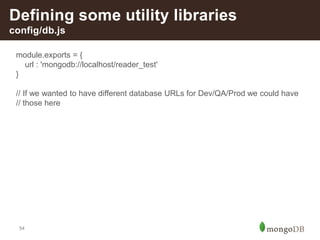
Defining some utility libraries
config/db.js
module.exports = {
url : 'mongodb://localhost/reader_test'
}
// If we wanted to have different database URLs for Dev/QA/Prod we could have
// those here
55
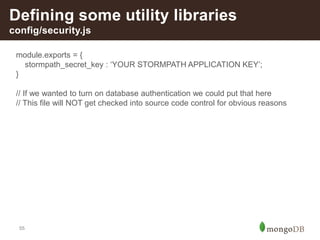
Defining some utility libraries
config/security.js
module.exports = {
stormpath_secret_key : ‘YOUR STORMPATH APPLICATION KEY’;
}
// If we wanted to turn on database authentication we could put that here
// This file will NOT get checked into source code control for obvious reasons
56
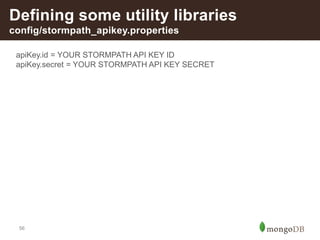
Defining some utility libraries
config/stormpath_apikey.properties
apiKey.id = YOUR STORMPATH API KEY ID
apiKey.secret = YOUR STORMPATH API KEY SECRET
57
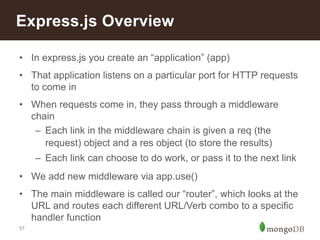
Express.js Overview
• In express.js you create an “application” (app)
• That application listens on a particular port for HTTP requests
to come in
• When requests come in, they pass through a middleware
chain
– Each link in the middleware chain is given a req (the
request) object and a res object (to store the results)
– Each link can choose to do work, or pass it to the next link
• We add new middleware via app.use()
• The main middleware is called our “router”, which looks at the
URL and routes each different URL/Verb combo to a specific
handler function
58
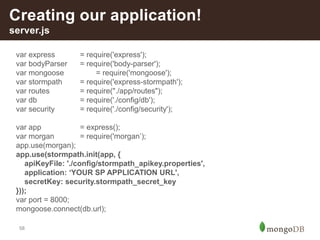
Creating our application!
server.js
var express = require('express');
var bodyParser = require('body-parser');
var mongoose = require('mongoose');
var stormpath = require('express-stormpath');
var routes = require("./app/routes");
var db = require('./config/db');
var security = require('./config/security');
var app = express();
var morgan = require('morgan’);
app.use(morgan);
app.use(stormpath.init(app, {
apiKeyFile: './config/stormpath_apikey.properties',
application: ‘YOUR SP APPLICATION URL',
secretKey: security.stormpath_secret_key
}));
var port = 8000;
mongoose.connect(db.url);
59
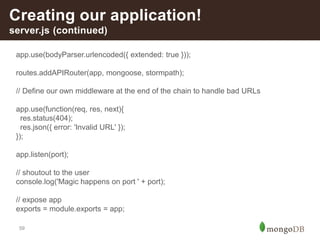
Creating our application!
server.js (continued)
app.use(bodyParser.urlencoded({ extended: true }));
routes.addAPIRouter(app, mongoose, stormpath);
// Define our own middleware at the end of the chain to handle bad URLs
app.use(function(req, res, next){
res.status(404);
res.json({ error: 'Invalid URL' });
});
app.listen(port);
// shoutout to the user
console.log('Magic happens on port ' + port);
// expose app
exports = module.exports = app;
60
Defining our Mongoose Data Models
app/routes.js
var userSchema = new mongoose.Schema({
active: Boolean,
email: { type: String, trim: true, lowercase: true },
firstName: { type: String, trim: true },
lastName: { type: String, trim: true },
sp_api_key_id: { type: String, trim: true },
sp_api_key_secret: { type: String, trim: true },
subs: { type: [mongoose.Schema.Types.ObjectId], default: [] },
created: { type: Date, default: Date.now },
lastLogin: { type: Date, default: Date.now },
},
{ collection: 'user' }
);
userSchema.index({email : 1}, {unique:true});
userSchema.index({sp_api_key_id : 1}, {unique:true});
var UserModel = mongoose.model( 'User', userSchema );
61
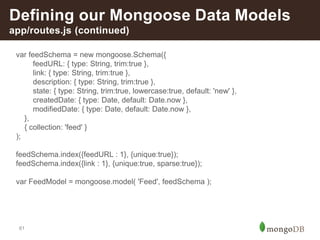
Defining our Mongoose Data Models
app/routes.js (continued)
var feedSchema = new mongoose.Schema({
feedURL: { type: String, trim:true },
link: { type: String, trim:true },
description: { type: String, trim:true },
state: { type: String, trim:true, lowercase:true, default: 'new' },
createdDate: { type: Date, default: Date.now },
modifiedDate: { type: Date, default: Date.now },
},
{ collection: 'feed' }
);
feedSchema.index({feedURL : 1}, {unique:true});
feedSchema.index({link : 1}, {unique:true, sparse:true});
var FeedModel = mongoose.model( 'Feed', feedSchema );
62
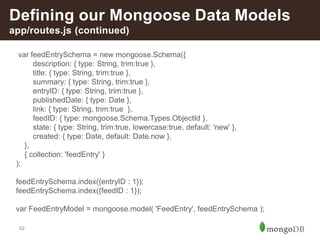
Defining our Mongoose Data Models
app/routes.js (continued)
var feedEntrySchema = new mongoose.Schema({
description: { type: String, trim:true },
title: { type: String, trim:true },
summary: { type: String, trim:true },
entryID: { type: String, trim:true },
publishedDate: { type: Date },
link: { type: String, trim:true },
feedID: { type: mongoose.Schema.Types.ObjectId },
state: { type: String, trim:true, lowercase:true, default: 'new' },
created: { type: Date, default: Date.now },
},
{ collection: 'feedEntry' }
);
feedEntrySchema.index({entryID : 1});
feedEntrySchema.index({feedID : 1});
var FeedEntryModel = mongoose.model( 'FeedEntry', feedEntrySchema );
63
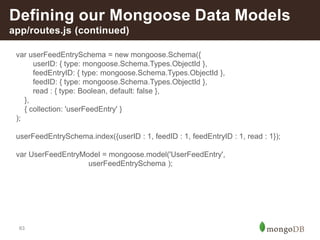
Defining our Mongoose Data Models
app/routes.js (continued)
var userFeedEntrySchema = new mongoose.Schema({
userID: { type: mongoose.Schema.Types.ObjectId },
feedEntryID: { type: mongoose.Schema.Types.ObjectId },
feedID: { type: mongoose.Schema.Types.ObjectId },
read : { type: Boolean, default: false },
},
{ collection: 'userFeedEntry' }
);
userFeedEntrySchema.index({userID : 1, feedID : 1, feedEntryID : 1, read : 1});
var UserFeedEntryModel = mongoose.model('UserFeedEntry',
userFeedEntrySchema );
64
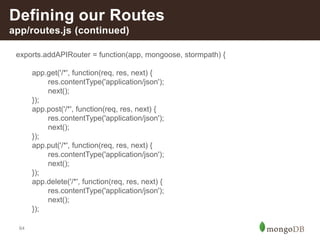
Defining our Routes
app/routes.js (continued)
exports.addAPIRouter = function(app, mongoose, stormpath) {
app.get('/*', function(req, res, next) {
res.contentType('application/json');
next();
});
app.post('/*', function(req, res, next) {
res.contentType('application/json');
next();
});
app.put('/*', function(req, res, next) {
res.contentType('application/json');
next();
});
app.delete('/*', function(req, res, next) {
res.contentType('application/json');
next();
});
65
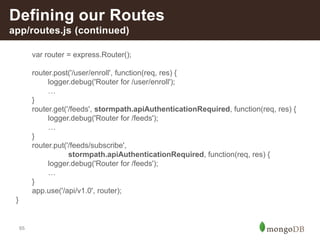
Defining our Routes
app/routes.js (continued)
var router = express.Router();
router.post('/user/enroll', function(req, res) {
logger.debug('Router for /user/enroll');
…
}
router.get('/feeds', stormpath.apiAuthenticationRequired, function(req, res) {
logger.debug('Router for /feeds');
…
}
router.put('/feeds/subscribe',
stormpath.apiAuthenticationRequired, function(req, res) {
logger.debug('Router for /feeds');
…
}
app.use('/api/v1.0', router);
}
66
Looking at our router code
Let’s go look at some real router code at:
https://github.com/ctindel/reader/blob/master/api/v1.0/app/routes.js
67
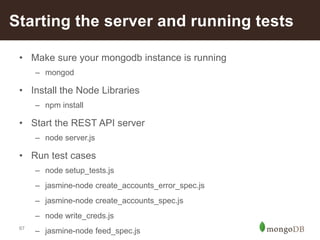
Starting the server and running tests
• Make sure your mongodb instance is running
– mongod
• Install the Node Libraries
– npm install
• Start the REST API server
– node server.js
• Run test cases
– node setup_tests.js
– jasmine-node create_accounts_error_spec.js
– jasmine-node create_accounts_spec.js
– node write_creds.js
– jasmine-node feed_spec.js
68
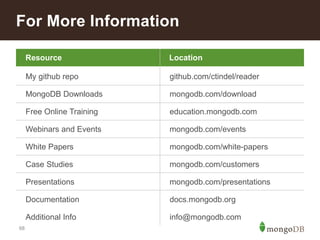
For More Information
Resource Location
My github repo github.com/ctindel/reader
MongoDB Downloads mongodb.com/download
Free Online Training education.mongodb.com
Webinars and Events mongodb.com/events
White Papers mongodb.com/white-papers
Case Studies mongodb.com/customers
Presentations mongodb.com/presentations
Documentation docs.mongodb.org
Additional Info info@mongodb.com
Resource Location
Building Your First App with MongoDB

Building Your First App with MongoDB

  • 1.
    Build an applicationwith MongoDB Part 1: Creating a REST API using the ME(a)N stack Chad Tindel Senior Solution Architect @ctindel
  • 2.
    2 What is allthis stuff?
  • 3.
    3 • Introduction tothe MEAN Stack • What is a REST API? • Creating our REST API • Defining our Data Model • Real-life authentication using Stormpath • Javascript Quirks • WRITE YOUR TESTS FIRST • Let’s look at some application code Agenda
  • 4.
  • 5.
    5 • M =MongoDB/Mongoose.js, the most popular nosql operational database • E = Express.js, a lightweight web application framework • A = Angular.js, a robust framework for creating HTML5 and Javascript rich web applications • N = Node.js, a server-side javascript interpreter The MEAN Stack A modern replacement for LAMP
  • 6.
    What is aREST API?
  • 7.
    7 • REST =“Representation State Transfer” • Essentially it’s just a lighter weight, though not- standardized, alternative to SOAP and WSDL XML- based API protocols • Uses a client-server model, where the server is actually an HTTP server • Client sends HTTP verbs (GET, POST, PUT, DELETE) along with a URL and variable parameters that are urlencoded • The URL tells us what object to act on • Server replies with a result code and valid JSON What is a REST API?
  • 8.
    8 • GET –When a client wants to read an object. • POST – Went a client wants to insert/create an object. • PUT – When a client wants to update an object. • DELETE – When a client wants to delete an object HTTP Verbs – Mapping to CRUD
  • 9.
    9 • Some commoncodes we might use – 200 – “OK” – 201 – “Created” (Used with POST) – 400 – “Bad Request” (Perhaps missing required parameters) – 401 – “Unauthorized” (Missing authentication parameters) – 403 – “Forbidden” (You were authenticated but lacking required privileges) – 404 – “Not Found” • http://www.w3.org/Protocols/rfc2616/rfc2616-sec10.html HTTP Result Codes
  • 10.
    10 • Things youmight want to say to me me at this point: – “REST APIs aren’t sexy” – “How am I supposed to show this off to my boss?” – “My clients wants to see a fancy website or mobile app” • REST APIs are a way for you to create a data service enabling you to easily create all your other applications – HTML5 / Javascript – Android – iOS Why are we starting with a REST API?
  • 11.
    11 • Because allthe VC Money is in creating apps that are So-Lo-Mo-Co, lots of new startups don’t even have a web interface, such as: – Uber – WhatsApp – Postmates – Wash.io • Creating a REST API also allows other companies/applications to easily plug-in to your application as well, turning your application into a platform and making it more powerful New companies don’t have an HTML Interface
  • 12.
  • 13.
    13 • We’ll bebuilding an RSS Aggregation application, similar to our dearly departed Google Reader • Our application today will have two components – The REST API – The Feed Grabber • Since the point of today’s talk is to learn about creating a REST API and not the intricacies of RSS feeds, we won’t be discussing the feed grabber Let’s build an application!
  • 14.
    14 • We’ll needto define data models for and store the following data: – Users – RSS Feeds – Feed Entries – User Feed Subscriptions – Which feed entries a user has already read • We’ll need to allow users to: – Create an account – Subscribe/unsubscribe to feeds – Read feed entries – Mark feeds/entries as read or unread Let’s build an application! Data Models
  • 15.
    15 { "_id" : ObjectId("523b1153a2aa6a3233a913f8"), "requiresAuthentication": false, "modifiedDate" : ISODate("2014-08-29T17:40:22Z"), "permanentlyRemoved" : false, "feedURL" : "http://feeds.feedburner.com/eater/nyc", "title" : "Eater NY", "bozoBitSet" : false, "enabled" : true, "etag" : "4bL78iLSZud2iXd/vd10mYC32BE", "link" : "http://ny.eater.com/", "permanentRedirectURL" : null, "description" : "The New York City Restaurant, Bar, and Nightlife Blog” } Data Model Design Feed Collection
  • 16.
    16 { "_id" : ObjectId("523b1153a2aa6a3233a91412"), "description": "Buzzfeed asked a bunch of people…”, "title" : "Cronut Mania: Buzzfeed asked a bunch of people...", "summary" : "Buzzfeed asked a bunch of people that were…”, "content" : [ { "base" : "http://ny.eater.com/", "type" : "text/html", "value" : ”LOTS OF HTML HERE", "language" : "en" } ], "entryID" : "tag:ny.eater.com,2013://4.560508", "publishedDate" : ISODate("2013-09-17T20:45:20Z"), "link" : "http://ny.eater.com/archives/2013/09/cronut_mania_41.php", "feedID" : ObjectId("523b1153a2aa6a3233a913f8") } Data Model Design Feed Entry Collection
  • 17.
    17 { "_id" : ObjectId("54ad6c3ae764de42070b27b1"), "active": true, "email" : "testuser1@example.com", "firstName" : "Test", "lastName" : "User1", "sp_api_key_id" : "6YQB0A8VXM0X8RVDPPLRHBI7J", "sp_api_key_secret" : "veBw/YFx56Dl0bbiVEpvbjF”, "lastLogin" : ISODate("2015-01-07T17:26:18.996Z"), "created" : ISODate("2015-01-07T17:26:18.995Z"), "subs" : [ ObjectId("523b1153a2aa6a3233a913f8"), ObjectId("54b563c3a50a190b50f4d63b")], } Data Model Design User Collection
  • 18.
    18 { "_id" : ObjectId("523b2fcc054b1b8c579bdb82"), "read": true, "user_id" : ObjectId("54ad6c3ae764de42070b27b1"), "feed_entry_id" : ObjectId("523b1153a2aa6a3233a91412"), "feed_id" : ObjectId("523b1153a2aa6a3233a913f8") } Data Model Design User-Feed-Entry Mapping Collection
  • 19.
    19 • We’ll needto allow users to: – Create an account – Subscribe/unsubscribe to feeds – Read feed entries – Mark feeds/entries as read or unread Let’s build an application! User Actions
  • 20.
    20 Creating our RESTAPI Route Verb Description Variables /user/enroll POST Register a new user firstName lastName email password /user/resetPassword PUT Password Reset email /feeds GET Get feed subscriptions for each user with description and unread count /feeds/subscribe PUT Subscribe to a new feed feedURL
  • 21.
    21 Creating our RESTAPI Route Verb Description Variables /feeds/entries GET Get all entries for feeds the user is subscribed to /feeds/<feedid>/entries GET Get all entries for a specific feed /feeds/<feedid> PUT Mark all entries for a specific feed as read or unread read = <true | false>
  • 22.
    22 Creating our RESTAPI Route Verb Description Variables /feeds/<feedid>/entries/<entryid> PUT Mark a specific entry as either read or unread read = <true | false> /feeds/<feedid> DELETE Unsubscribe from this particular feed
  • 23.
  • 24.
    24 Using Stormpath forAuthentication • “User Management as a Service” – Authentication – Authorization – API Keys • REST JSON API + – Node SDK – Express Plugin – Passport Plugin
  • 25.
    25 Using Stormpath forAuthentication • Stormpath will give us a secret key for each “Application” we define with them. These applications can be “Reader Prod”, “Reader Test”, etc. • Stormpath will give us an API Key Properties file as well • We can define password strength requirements for each application, like – Must have >= 8 characters – Must include lowercase and uppercase – Must include a number – Must include a non-alphabetic character • Stormpath keeps track of all of our users and assigns them API Keys which we can use for our REST API Authentication
  • 26.
  • 27.
    27 Creating a Node.jsApplication • Install node.js – http://nodejs.org/download/ • Node.js applications are built using a lot of library modules • You define a package.json file describing your application and all of it’s library dependencies • You use the Node.js Package Manager to install a copy of those libraries in a subdirectory of your application (node_modules/) instead of a system directly (like /usr/lib) to avoid the problem of different apps needing different and conflicting library versions • Run “npm install” and it will create the node_modules/ with all of your required libraries
  • 28.
    28 Our package.json { "name": "reader-api", "main":"server.js", "dependencies": { "express" : "~4.10.0", "stormpath" : "~0.7.5", "express-stormpath" : "~0.5.9", "mongodb" : "~1.4.26”, "mongoose" : "~3.8.0", "body-parser" : "~1.10.0”, "method-override" : "~2.3.0", "morgan" : "~1.5.0”, "winston" : "~0.8.3”, "express-winston" : "~0.2.9", "validator" : "~3.27.0", "path" : "~0.4.9", "errorhandler" : "~1.3.0", "frisby" : "~0.8.3", "jasmine-node" : "~1.14.5", "async" : "~0.9.0" } }
  • 29.
    29 Async Code inJavascript function foo() { someAsyncFunction(params, function(err, results) { console.log(“one”); }); console.log(“two”); } At first glance you might expect the output to be: one two But actually it’s the reverse because the line that prints “one” happens later, asynchronously, in the callback
  • 30.
    30 Async Library https://github.com/caolan/async actionArray =[ function one(cb) { someAsyncFunction(params, function(err, results) { if (err) { cb(new Error(“There was an error”)); } console.log(“one”); cb(null); }); }, function two(cb) { console.log(“two”); cb(null); }] ] Async.series(actionArray);
  • 31.
  • 32.
    32 Defining some utilitylibraries test/config/test_config.js module.exports = { url : 'http://localhost:8000/api/v1.0' }
  • 33.
    33 Defining some utilitylibraries test/setup_tests.js function connectDB(callback) { mongoClient.connect(dbConfig.testDBURL, function(err, db) { assert.equal(null, err); reader_test_db = db; console.log("Connected correctly to server"); callback(0); }); }
  • 34.
    34 Defining some utilitylibraries test/setup_tests.js (continued) function dropUserCollection(callback) { console.log("dropUserCollection"); user = reader_test_db.collection('user'); if (undefined != user) { user.drop(function(err, reply) { console.log('user collection dropped'); callback(0); }); } else { callback(0); } },
  • 35.
    35 Defining some utilitylibraries test/setup_tests.js (continued) function dropUserFeedEntryCollection(callback) { console.log("dropUserFeedEntryCollection"); user_feed_entry = reader_test_db.collection('user_feed_entry'); if (undefined != user_feed_entry) { user_feed_entry.drop(function(err, reply) { console.log('user_feed_entry collection dropped'); callback(0); }); } else { callback(0); } }
  • 36.
    36 Defining some utilitylibraries test/setup_tests.js (continued) function getApplication(callback) { console.log("getApplication"); client.getApplications({name: SP_APP_NAME}, function(err, applications) { console.log(applications); if (err) { log("Error in getApplications"); throw err; } app = applications.items[0]; callback(0); }); },
  • 37.
    37 Defining some utilitylibraries test/setup_tests.js (continued) function deleteTestAccounts(callback) { app.getAccounts({email: TU_EMAIL_REGEX}, function(err, accounts) { if (err) throw err; accounts.items.forEach(function deleteAccount(account) { account.delete(function deleteError(err) { if (err) throw err; }); }); callback(0); }); } function closeDB(callback) { reader_test_db.close(); } async.series([connectDB, dropUserCollection, dropUserFeedEntryCollection, dropUserFeedEntryCollection, getApplication, deleteTestAccounts, closeDB);
  • 38.
    38 Using frisby.js todefine test cases test/create_accounts_error_spec.js TU1_FN = "Test"; TU1_LN = "User1"; TU1_EMAIL = "testuser1@example.com"; TU1_PW = "testUser123"; TU_EMAIL_REGEX = 'testuser*'; SP_APP_NAME = 'Reader Test'; var frisby = require('frisby'); var tc = require('./config/test_config'); frisby.create('POST missing firstName') .post(tc.url + '/user/enroll', { 'lastName' : TU1_LN, 'email' : TU1_EMAIL, 'password' : TU1_PW }) .expectStatus(400) .expectHeader('Content-Type', 'application/json; charset=utf-8') .expectJSON({'error' : 'Undefined First Name'}) .toss()
  • 39.
    39 Using frisby.js todefine test cases test/create_accounts_error_spec.js (continued) frisby.create('POST password missing lowercase') .post(tc.url + '/user/enroll', { 'firstName' : TU1_FN, 'lastName' : TU1_LN, 'email' : TU1_EMAIL, 'password' : 'TESTUSER123' }) .expectStatus(400) .expectHeader('Content-Type', 'application/json; charset=utf-8') .expectJSONTypes({'error' : String}) .toss()
  • 40.
    40 Using frisby.js todefine test cases test/create_accounts_error_spec.js (continued) frisby.create('POST invalid email address') .post(tc.url + '/user/enroll', { 'firstName' : TU1_FN, 'lastName' : TU1_LN, 'email' : "invalid.email", 'password' : 'testUser' }) .expectStatus(400) .expectHeader('Content-Type', 'application/json; charset=utf-8') .expectJSONTypes({'error' : String}) .toss()
  • 41.
    41 Using frisby.js todefine test cases test/create_accounts_spec.js TEST_USERS = [{'fn' : 'Test', 'ln' : 'User1', 'email' : 'testuser1@example.com', 'pwd' : 'testUser123'}, {'fn' : 'Test', 'ln' : 'User2', 'email' : 'testuser2@example.com', 'pwd' : 'testUser123'}, {'fn' : 'Test', 'ln' : 'User3', 'email' : 'testuser3@example.com', 'pwd' : 'testUser123'}] SP_APP_NAME = 'Reader Test'; var frisby = require('frisby'); var tc = require('./config/test_config');
  • 42.
    42 Using frisby.js todefine test cases test/create_accounts_spec.js (continued) TEST_USERS.forEach(function createUser(user, index, array) { frisby.create('POST enroll user ' + user.email) .post(tc.url + '/user/enroll', { 'firstName' : user.fn, 'lastName' : user.ln, 'email' : user.email, 'password' : user.pwd }) .expectStatus(201) .expectHeader('Content-Type', 'application/json; charset=utf-8') .expectJSON({ 'firstName' : user.fn, 'lastName' : user.ln, 'email' : user.email }) .toss() });
  • 43.
    43 Using frisby.js todefine test cases test/create_accounts_spec.js (continued) frisby.create('POST enroll duplicate user ') .post(tc.url + '/user/enroll', { 'firstName' : TEST_USERS[0].fn, 'lastName' : TEST_USERS[0].ln, 'email' : TEST_USERS[0].email, 'password' : TEST_USERS[0].pwd }) .expectStatus(400) .expectHeader('Content-Type', 'application/json; charset=utf-8') .expectJSON({'error' : 'Account with that email already exists. Please choose another email.'}) .toss()
  • 44.
    44 Using frisby.js todefine test cases Need to create /tmp/readerTestCreds.js We want to dynamically create a file that looks like this for us to use in defining test cases that require us to authenticate a user: TEST_USERS = [{ "_id":"54ad6c3ae764de42070b27b1", "email":"testuser1@example.com", "firstName":"Test", "lastName":"User1", "sp_api_key_id":”<API KEY ID>", "sp_api_key_secret":”<API KEY SECRET>” }, { "_id":"54ad6c3be764de42070b27b2”, "email":"testuser2@example.com", "firstName":"Test", "lastName":"User2”, "sp_api_key_id":”<API KEY ID>", "sp_api_key_secret":”<API KEY SECRET>” }]; module.exports = TEST_USERS;
  • 45.
    45 Using frisby.js todefine test cases tests/writeCreds.js TU_EMAIL_REGEX = new RegExp('^testuser*'); SP_APP_NAME = 'Reader Test'; TEST_CREDS_TMP_FILE = '/tmp/readerTestCreds.js'; var async = require('async'); var dbConfig = require('./config/db.js'); var mongodb = require('mongodb'); assert = require('assert'); var mongoClient = mongodb.MongoClient var reader_test_db = null; var users_array = null;
  • 46.
    46 Using frisby.js todefine test cases tests/writeCreds.js (continued) function connectDB(callback) { mongoClient.connect(dbConfig.testDBURL, function(err, db) { assert.equal(null, err); reader_test_db = db; callback(null); }); } function lookupUserKeys(callback) { console.log("lookupUserKeys"); user_coll = reader_test_db.collection('user'); user_coll.find({email : TU_EMAIL_REGEX}).toArray(function(err, users) { users_array = users; callback(null); }); }
  • 47.
    47 Using frisby.js todefine test cases tests/writeCreds.js (continued) function writeCreds(callback) { var fs = require('fs'); fs.writeFileSync(TEST_CREDS_TMP_FILE, 'TEST_USERS = '); fs.appendFileSync(TEST_CREDS_TMP_FILE, JSON.stringify(users_array)); fs.appendFileSync(TEST_CREDS_TMP_FILE, '; module.exports = TEST_USERS;'); callback(0); } function closeDB(callback) { reader_test_db.close(); } async.series([connectDB, lookupUserKeys, writeCreds, closeDB]);
  • 48.
    48 Using frisby.js todefine test cases tests/feed_spec.js TEST_USERS = require('/tmp/readerTestCreds.js'); var frisby = require('frisby'); var tc = require('./config/test_config'); var async = require('async'); var dbConfig = require('./config/db.js'); var dilbertFeedURL = 'http://feeds.feedburner.com/DilbertDailyStrip'; var nycEaterFeedURL = 'http://feeds.feedburner.com/eater/nyc'; function addEmptyFeedListTest(callback) { var user = TEST_USERS[0]; frisby.create('GET empty feed list for user ' + user.email) .get(tc.url + '/feeds') .auth(user.sp_api_key_id, user.sp_api_key_secret) .expectStatus(200) .expectHeader('Content-Type', 'application/json; charset=utf-8') .expectJSON({feeds : []}) .toss() callback(null); }
  • 49.
    49 Using frisby.js todefine test cases tests/feed_spec.js function subOneFeed(callback) { var user = TEST_USERS[0]; frisby.create('PUT Add feed sub for user ' + user.email) .put(tc.url + '/feeds/subscribe', {'feedURL' : dilbertFeedURL}) .auth(user.sp_api_key_id, user.sp_api_key_secret) .expectStatus(201) .expectHeader('Content-Type', 'application/json; charset=utf-8') .expectJSONLength('user.subs', 1) .toss() callback(null); }
  • 50.
    50 Using frisby.js todefine test cases tests/feed_spec.js function subDuplicateFeed(callback) { var user = TEST_USERS[0]; frisby.create('PUT Add duplicate feed sub for user ' + user.email) .put(tc.url + '/feeds/subscribe', {'feedURL' : dilbertFeedURL}) .auth(user.sp_api_key_id, user.sp_api_key_secret) .expectStatus(201) .expectHeader('Content-Type', 'application/json; charset=utf-8') .expectJSONLength('user.subs', 1) .toss() callback(null); }
  • 51.
    51 Using frisby.js todefine test cases tests/feed_spec.js function subSecondFeed(callback) { var user = TEST_USERS[0]; frisby.create('PUT Add second feed sub for user ' + user.email) .put(tc.url + '/feeds/subscribe', {'feedURL' : nycEaterFeedURL}) .auth(user.sp_api_key_id, user.sp_api_key_secret) .expectStatus(201) .expectHeader('Content-Type', 'application/json; charset=utf-8') .expectJSONLength('user.subs', 2) .toss() callback(null); }
  • 52.
    52 Using frisby.js todefine test cases tests/feed_spec.js function subOneFeedSecondUser(callback) { var user = TEST_USERS[1]; frisby.create('PUT Add one feed sub for second user ' + user.email) .put(tc.url + '/feeds/subscribe', {'feedURL' : nycEaterFeedURL}) .auth(user.sp_api_key_id, user.sp_api_key_secret) .expectStatus(201) .expectHeader('Content-Type', 'application/json; charset=utf-8') .expectJSONLength('user.subs', 1) .toss() callback(null); } async.series([addEmptyFeedListTest, subOneFeed, subDuplicateFeed, subSecondFeed, subOneFeedSecondUser]);
  • 53.
    Can we FINALLYbuild our REST API code?
  • 54.
    54 Defining some utilitylibraries config/db.js module.exports = { url : 'mongodb://localhost/reader_test' } // If we wanted to have different database URLs for Dev/QA/Prod we could have // those here
  • 55.
    55 Defining some utilitylibraries config/security.js module.exports = { stormpath_secret_key : ‘YOUR STORMPATH APPLICATION KEY’; } // If we wanted to turn on database authentication we could put that here // This file will NOT get checked into source code control for obvious reasons
  • 56.
    56 Defining some utilitylibraries config/stormpath_apikey.properties apiKey.id = YOUR STORMPATH API KEY ID apiKey.secret = YOUR STORMPATH API KEY SECRET
  • 57.
    57 Express.js Overview • Inexpress.js you create an “application” (app) • That application listens on a particular port for HTTP requests to come in • When requests come in, they pass through a middleware chain – Each link in the middleware chain is given a req (the request) object and a res object (to store the results) – Each link can choose to do work, or pass it to the next link • We add new middleware via app.use() • The main middleware is called our “router”, which looks at the URL and routes each different URL/Verb combo to a specific handler function
  • 58.
    58 Creating our application! server.js varexpress = require('express'); var bodyParser = require('body-parser'); var mongoose = require('mongoose'); var stormpath = require('express-stormpath'); var routes = require("./app/routes"); var db = require('./config/db'); var security = require('./config/security'); var app = express(); var morgan = require('morgan’); app.use(morgan); app.use(stormpath.init(app, { apiKeyFile: './config/stormpath_apikey.properties', application: ‘YOUR SP APPLICATION URL', secretKey: security.stormpath_secret_key })); var port = 8000; mongoose.connect(db.url);
  • 59.
    59 Creating our application! server.js(continued) app.use(bodyParser.urlencoded({ extended: true })); routes.addAPIRouter(app, mongoose, stormpath); // Define our own middleware at the end of the chain to handle bad URLs app.use(function(req, res, next){ res.status(404); res.json({ error: 'Invalid URL' }); }); app.listen(port); // shoutout to the user console.log('Magic happens on port ' + port); // expose app exports = module.exports = app;
  • 60.
    60 Defining our MongooseData Models app/routes.js var userSchema = new mongoose.Schema({ active: Boolean, email: { type: String, trim: true, lowercase: true }, firstName: { type: String, trim: true }, lastName: { type: String, trim: true }, sp_api_key_id: { type: String, trim: true }, sp_api_key_secret: { type: String, trim: true }, subs: { type: [mongoose.Schema.Types.ObjectId], default: [] }, created: { type: Date, default: Date.now }, lastLogin: { type: Date, default: Date.now }, }, { collection: 'user' } ); userSchema.index({email : 1}, {unique:true}); userSchema.index({sp_api_key_id : 1}, {unique:true}); var UserModel = mongoose.model( 'User', userSchema );
  • 61.
    61 Defining our MongooseData Models app/routes.js (continued) var feedSchema = new mongoose.Schema({ feedURL: { type: String, trim:true }, link: { type: String, trim:true }, description: { type: String, trim:true }, state: { type: String, trim:true, lowercase:true, default: 'new' }, createdDate: { type: Date, default: Date.now }, modifiedDate: { type: Date, default: Date.now }, }, { collection: 'feed' } ); feedSchema.index({feedURL : 1}, {unique:true}); feedSchema.index({link : 1}, {unique:true, sparse:true}); var FeedModel = mongoose.model( 'Feed', feedSchema );
  • 62.
    62 Defining our MongooseData Models app/routes.js (continued) var feedEntrySchema = new mongoose.Schema({ description: { type: String, trim:true }, title: { type: String, trim:true }, summary: { type: String, trim:true }, entryID: { type: String, trim:true }, publishedDate: { type: Date }, link: { type: String, trim:true }, feedID: { type: mongoose.Schema.Types.ObjectId }, state: { type: String, trim:true, lowercase:true, default: 'new' }, created: { type: Date, default: Date.now }, }, { collection: 'feedEntry' } ); feedEntrySchema.index({entryID : 1}); feedEntrySchema.index({feedID : 1}); var FeedEntryModel = mongoose.model( 'FeedEntry', feedEntrySchema );
  • 63.
    63 Defining our MongooseData Models app/routes.js (continued) var userFeedEntrySchema = new mongoose.Schema({ userID: { type: mongoose.Schema.Types.ObjectId }, feedEntryID: { type: mongoose.Schema.Types.ObjectId }, feedID: { type: mongoose.Schema.Types.ObjectId }, read : { type: Boolean, default: false }, }, { collection: 'userFeedEntry' } ); userFeedEntrySchema.index({userID : 1, feedID : 1, feedEntryID : 1, read : 1}); var UserFeedEntryModel = mongoose.model('UserFeedEntry', userFeedEntrySchema );
  • 64.
    64 Defining our Routes app/routes.js(continued) exports.addAPIRouter = function(app, mongoose, stormpath) { app.get('/*', function(req, res, next) { res.contentType('application/json'); next(); }); app.post('/*', function(req, res, next) { res.contentType('application/json'); next(); }); app.put('/*', function(req, res, next) { res.contentType('application/json'); next(); }); app.delete('/*', function(req, res, next) { res.contentType('application/json'); next(); });
  • 65.
    65 Defining our Routes app/routes.js(continued) var router = express.Router(); router.post('/user/enroll', function(req, res) { logger.debug('Router for /user/enroll'); … } router.get('/feeds', stormpath.apiAuthenticationRequired, function(req, res) { logger.debug('Router for /feeds'); … } router.put('/feeds/subscribe', stormpath.apiAuthenticationRequired, function(req, res) { logger.debug('Router for /feeds'); … } app.use('/api/v1.0', router); }
  • 66.
    66 Looking at ourrouter code Let’s go look at some real router code at: https://github.com/ctindel/reader/blob/master/api/v1.0/app/routes.js
  • 67.
    67 Starting the serverand running tests • Make sure your mongodb instance is running – mongod • Install the Node Libraries – npm install • Start the REST API server – node server.js • Run test cases – node setup_tests.js – jasmine-node create_accounts_error_spec.js – jasmine-node create_accounts_spec.js – node write_creds.js – jasmine-node feed_spec.js
  • 68.
    68 For More Information ResourceLocation My github repo github.com/ctindel/reader MongoDB Downloads mongodb.com/download Free Online Training education.mongodb.com Webinars and Events mongodb.com/events White Papers mongodb.com/white-papers Case Studies mongodb.com/customers Presentations mongodb.com/presentations Documentation docs.mongodb.org Additional Info info@mongodb.com Resource Location

Editor's Notes

  • #3 If you’ve never done javascript, never used MongoDB, or never built a REST API it is easy to get overwhelmed when faced with the task of pulling it all together. Especially because there isn’t a website that shows you how to do everything. We’ll attempt to break it down into manageable chunks so that each is easy to understand when we pull it all together later in code. This isn’t going to be a detailed discussion of Schema Design, Javascript programming, MongoDB Deployment Technologies. We have in-depth webinars on MongoDB topics that have already been recorded and that will be scheduled in the future.
  • #5 This webinar will be code and example intensive, but people at all skill levels will have something to learn here.
  • #6 Today we won’t be using angular as we aren’t building an HTML user interface. We’re building a REST API which has no user interface but could be used to build any kind of interface like a website, or an Android application or an iOS application.
  • #8 The fact that the server replies with JSON (Javascript Object Notation) makes the MEAN stack particularly well-suited to this task as all the components are in Javascript and MongoDB uses JSON notation to hold its data. We’ll explain what JSON looks like when we start defining our Data Models later in the presentation
  • #13 Before we dive in, it’s important to review that Javascript code is designed to be asynchronous. So any function which does blocking I/O like reading from a socket or querying a database will take a callback function as the last parameter, and then continue with the control flow, only returning to that callback function once the blocking operation completed.
  • #16 MongoDB has a traditional hierarchical structure similar to an RDBMS. Our nomenclature is Database->Collection->Document->Key/Value Field Sometimes we embed objects and arrays of objects directly, and sometimes we use a normalized model with mapping tables
  • #18 This is what JSON looks like (Javascript Object Notation) and is how data is modeled and stored in MongoDB MongoDB has a traditional hierarchical structure similar to an RDBMS. Our nomenclature is Database->Collection->Document->Key/Value Field
  • #19 MongoDB has a traditional hierarchical structure similar to an RDBMS. Our nomenclature is Database->Collection->Document->Key/Value Field
  • #24 , and then continue with the control flow, only returning to that callback function once the blocking operation completed.
  • #30 Before we dive in, it’s important to review that Javascript code is designed to be asynchronous. So any function which does blocking I/O like reading from a socket or querying a database will take a callback function as the last parameter, and then continue with the control flow, only returning to that callback function once the blocking operation completed.
  • #31 This library is so important to how we do things that it’s worth calling out specially
  • #32 Before we dive in, it’s important to review that Javascript code is designed to be asynchronous. So any function which does blocking I/O like reading from a socket or querying a database will take a callback function as the last parameter, and then continue with the control flow, only returning to that callback function once the blocking operation completed.
  • #45 Dynamically creating code on the fly is basically how viruses work. Remember kids, always use your power for good and not for evil.
  • #49 Note the use of .auth here finally
  • #65 If you’ll remember our test cases are expecting a return payload with the content type set to “application/json” This code will do it for all requests automatically
  • #66 If you’ll remember our test cases are expecting a return payload with the content type set to “application/json” This code will do it for all requests automatically Note that our first route doesn’t require authentication but our second two routes do. That’s all it takes to use stormpath!
  • #67 If you’ll remember our test cases are expecting a return payload with the content type set to “application/json” This code will do it for all requests automatically Note that our first route doesn’t require authentication but our second two routes do. That’s all it takes to use stormpath!