PROJECT CONTROL SYSTEM
M. Kashif Humayun Khan
PCS Modules
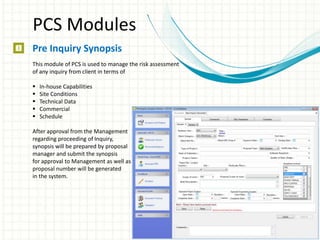
Pre Inquiry Synopsis
This module of PCS is used to manage the risk assessment
of any inquiry from client in terms of
 In-house Capabilities
 Site Conditions
 Technical Data
 Commercial
 Schedule
After approval from the Management
regarding proceeding of Inquiry,
synopsis will be prepared by proposal
manager and submit the synopsis
for approval to Management as well as
proposal number will be generated
in the system.
PCS Modules
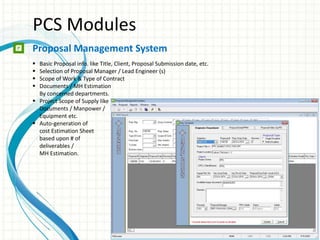
Proposal Management System
 Basic Proposal info. like Title, Client, Proposal Submission date, etc.
 Selection of Proposal Manager / Lead Engineer (s)
 Scope of Work & Type of Contract
 Documents / MH Estimation
By concerned departments.
 Project Scope of Supply like
Documents / Manpower /
Equipment etc.
 Auto-generation of
cost Estimation Sheet
based upon # of
deliverables /
MH Estimation.
PCS Modules
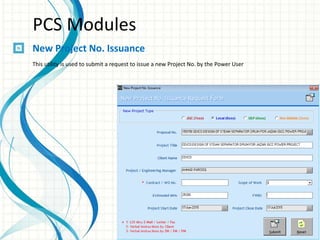
New Project No. Issuance
This utility is used to submit a request to issue a new Project No. by the Power User
PCS Modules
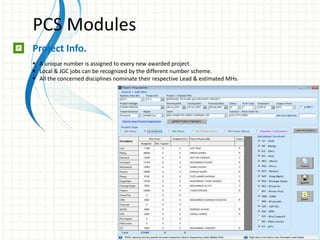
Project Info.
 A unique number is assigned to every new awarded project.
 Local & JGC jobs can be recognized by the different number scheme.
 All the concerned disciplines nominate their respective Lead & estimated MHs.
PCS Modules
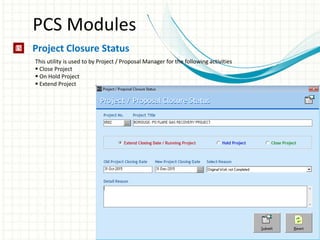
Project Closure Status
This utility is used to by Project / Proposal Manager for the following activities
 Close Project
 On Hold Project
 Extend Project
PCS Modules
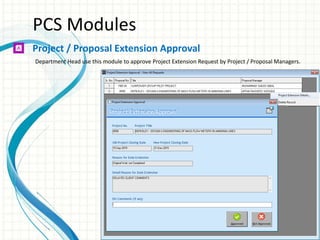
Project / Proposal Extension Approval
Department Head use this module to approve Project Extension Request by Project / Proposal Managers.
PCS Modules
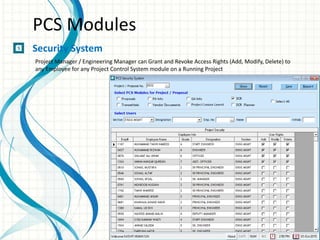
Security System
Project Manager / Engineering Manager can Grant and Revoke Access Rights (Add, Modify, Delete) to
any Employee for any Project Control System module on a Running Project
PCS Modules
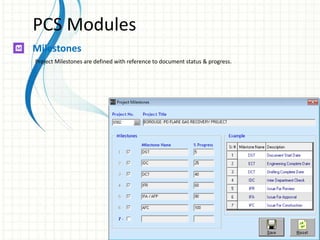
Milestones
Project Milestones are defined with reference to document status & progress.
PCS Modules
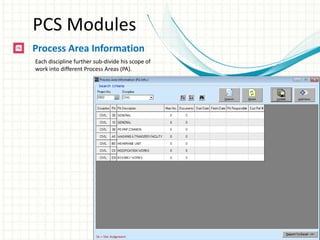
Process Area Information
Each discipline further sub-divide his scope of
work into different Process Areas (PA).
PCS Modules
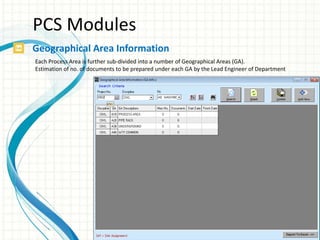
Geographical Area Information
Each Process Area is further sub-divided into a number of Geographical Areas (GA).
Estimation of no. of documents to be prepared under each GA by the Lead Engineer of Department
PCS Modules
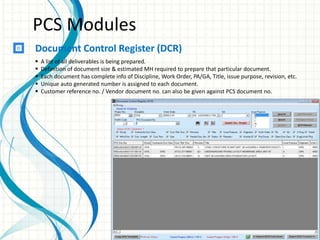
Document Control Register (DCR)
 A list of all deliverables is being prepared.
 Definition of document size & estimated MH required to prepare that particular document.
 Each document has complete info of Discipline, Work Order, PA/GA, Title, issue purpose, revision, etc.
 Unique auto generated number is assigned to each document.
 Customer reference no. / Vendor document no. can also be given against PCS document no.
PCS Modules
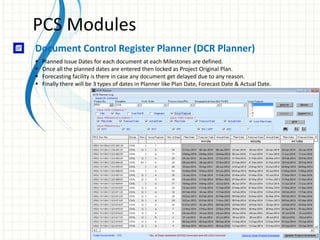
Document Control Register Planner (DCR Planner)
 Planned Issue Dates for each document at each Milestones are defined.
 Once all the planned dates are entered then locked as Project Original Plan.
 Forecasting facility is there in case any document get delayed due to any reason.
 Finally there will be 3 types of dates in Planner like Plan Date, Forecast Date & Actual Date.
PCS Modules
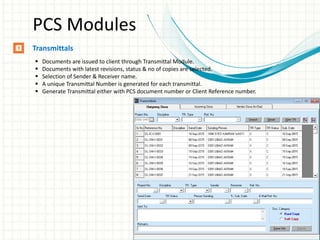
Transmittals
 Documents are issued to client through Transmittal Module.
 Documents with latest revisions, status & no of copies are selected.
 Selection of Sender & Receiver name.
 A unique Transmittal Number is generated for each transmittal.
 Generate Transmittal either with PCS document number or Client Reference number.
PCS Modules
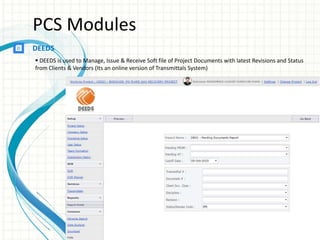
DEEDS
 DEEDS is used to Manage, Issue & Receive Soft file of Project Documents with latest Revisions and Status
from Clients & Vendors (Its an online version of Transmittals System)
PCS Modules
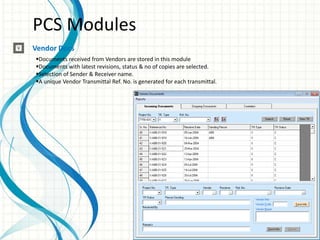
Vendor Docs
Documents received from Vendors are stored in this module
Documents with latest revisions, status & no of copies are selected.
Selection of Sender & Receiver name.
A unique Vendor Transmittal Ref. No. is generated for each transmittal.
PCS Modules
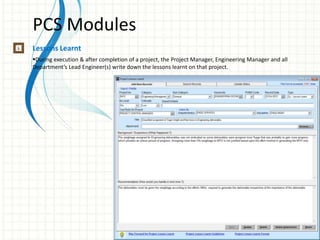
Lessons Learnt
During execution & after completion of a project, the Project Manager, Engineering Manager and all
Department’s Lead Engineer(s) write down the lessons learnt on that project.
PCS Modules
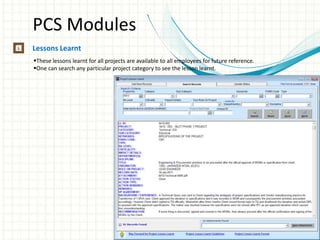
Lessons Learnt
These lessons learnt for all projects are available to all employees for future reference.
One can search any particular project category to see the lesson learnt.
PCS Modules
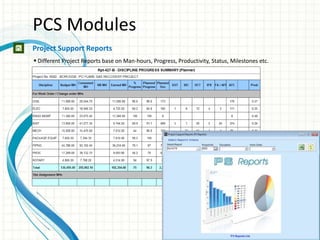
Project Support Reports
 Different Project Reports base on Man-hours, Progress, Productivity, Status, Milestones etc.
PCS Modules
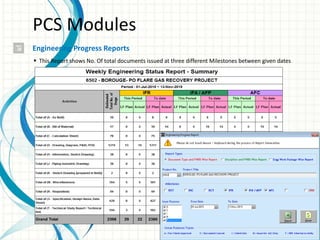
Engineering Progress Reports
 This Report shows No. Of total documents issued at three different Milestones between given dates
PCS Modules
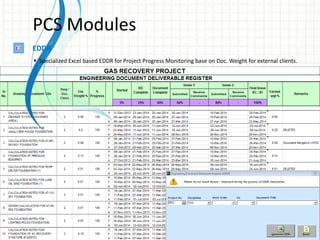
EDDR
 Specialized Excel based EDDR for Project Progress Monitoring base on Doc. Weight for external clients.
PCS Modules
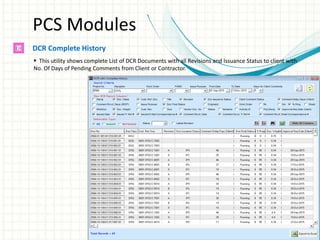
DCR Complete History
 This utility shows complete List of DCR Documents with all Revisions and Issuance Status to client with
No. Of Days of Pending Comments from Client or Contractor.
PCS Modules
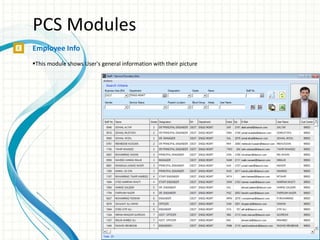
Employee Info
This module shows User's general information with their picture
PCS Modules
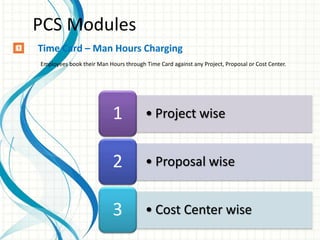
• Project wise1
• Proposal wise2
• Cost Center wise3
Time Card – Man Hours Charging
Employees book their Man Hours through Time Card against any Project, Proposal or Cost Center.
PCS Modules
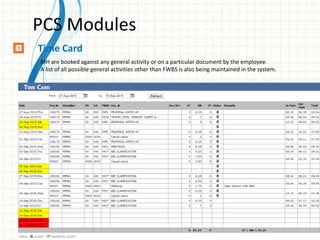
Time Card
MH are booked against any general activity or on a particular document by the employee.
A list of all possible general activities other than FWBS is also being maintained in the system.
PCS Modules
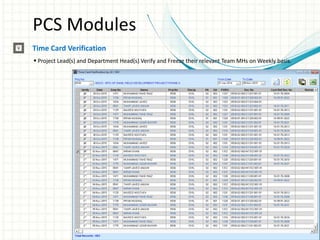
Time Card Verification
 Project Lead(s) and Department Head(s) Verify and Freeze their relevant Team MHs on Weekly basis.
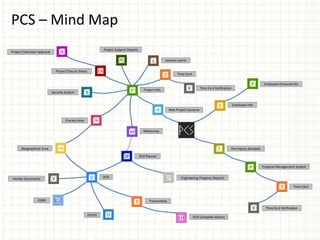
PCS – Mind Map
Project Info
DCR
DCR Planner
Milestones
Process Area
Project Support Reports
Transmittals
Lessons Learnt
Geographical Area
Employee Info
Project Closure Status
Engineering Progress Reports
Security System
DEEDS
DCR Complete History
Project Extension Approval
EDDR
Employee Personal Info
Pre Inquiry Synopsis
Proposal Management System
Time Card
Time Card
New Project Issuance
Time Ca d Verification
Vendor Documents
PCS – Workflow
THANKS

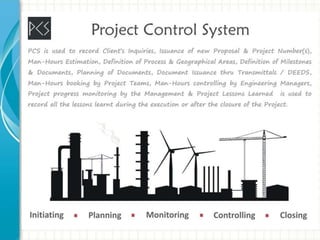
Project Control System

  • 1.
    PROJECT CONTROL SYSTEM M.Kashif Humayun Khan
  • 3.
    PCS Modules Pre InquirySynopsis This module of PCS is used to manage the risk assessment of any inquiry from client in terms of  In-house Capabilities  Site Conditions  Technical Data  Commercial  Schedule After approval from the Management regarding proceeding of Inquiry, synopsis will be prepared by proposal manager and submit the synopsis for approval to Management as well as proposal number will be generated in the system.
  • 4.
    PCS Modules Proposal ManagementSystem  Basic Proposal info. like Title, Client, Proposal Submission date, etc.  Selection of Proposal Manager / Lead Engineer (s)  Scope of Work & Type of Contract  Documents / MH Estimation By concerned departments.  Project Scope of Supply like Documents / Manpower / Equipment etc.  Auto-generation of cost Estimation Sheet based upon # of deliverables / MH Estimation.
  • 5.
    PCS Modules New ProjectNo. Issuance This utility is used to submit a request to issue a new Project No. by the Power User
  • 6.
    PCS Modules Project Info. A unique number is assigned to every new awarded project.  Local & JGC jobs can be recognized by the different number scheme.  All the concerned disciplines nominate their respective Lead & estimated MHs.
  • 7.
    PCS Modules Project ClosureStatus This utility is used to by Project / Proposal Manager for the following activities  Close Project  On Hold Project  Extend Project
  • 8.
    PCS Modules Project /Proposal Extension Approval Department Head use this module to approve Project Extension Request by Project / Proposal Managers.
  • 9.
    PCS Modules Security System ProjectManager / Engineering Manager can Grant and Revoke Access Rights (Add, Modify, Delete) to any Employee for any Project Control System module on a Running Project
  • 10.
    PCS Modules Milestones Project Milestonesare defined with reference to document status & progress.
  • 11.
    PCS Modules Process AreaInformation Each discipline further sub-divide his scope of work into different Process Areas (PA).
  • 12.
    PCS Modules Geographical AreaInformation Each Process Area is further sub-divided into a number of Geographical Areas (GA). Estimation of no. of documents to be prepared under each GA by the Lead Engineer of Department
  • 13.
    PCS Modules Document ControlRegister (DCR)  A list of all deliverables is being prepared.  Definition of document size & estimated MH required to prepare that particular document.  Each document has complete info of Discipline, Work Order, PA/GA, Title, issue purpose, revision, etc.  Unique auto generated number is assigned to each document.  Customer reference no. / Vendor document no. can also be given against PCS document no.
  • 14.
    PCS Modules Document ControlRegister Planner (DCR Planner)  Planned Issue Dates for each document at each Milestones are defined.  Once all the planned dates are entered then locked as Project Original Plan.  Forecasting facility is there in case any document get delayed due to any reason.  Finally there will be 3 types of dates in Planner like Plan Date, Forecast Date & Actual Date.
  • 15.
    PCS Modules Transmittals  Documentsare issued to client through Transmittal Module.  Documents with latest revisions, status & no of copies are selected.  Selection of Sender & Receiver name.  A unique Transmittal Number is generated for each transmittal.  Generate Transmittal either with PCS document number or Client Reference number.
  • 16.
    PCS Modules DEEDS  DEEDSis used to Manage, Issue & Receive Soft file of Project Documents with latest Revisions and Status from Clients & Vendors (Its an online version of Transmittals System)
  • 17.
    PCS Modules Vendor Docs Documentsreceived from Vendors are stored in this module Documents with latest revisions, status & no of copies are selected. Selection of Sender & Receiver name. A unique Vendor Transmittal Ref. No. is generated for each transmittal.
  • 18.
    PCS Modules Lessons Learnt Duringexecution & after completion of a project, the Project Manager, Engineering Manager and all Department’s Lead Engineer(s) write down the lessons learnt on that project.
  • 19.
    PCS Modules Lessons Learnt Theselessons learnt for all projects are available to all employees for future reference. One can search any particular project category to see the lesson learnt.
  • 20.
    PCS Modules Project SupportReports  Different Project Reports base on Man-hours, Progress, Productivity, Status, Milestones etc.
  • 21.
    PCS Modules Engineering ProgressReports  This Report shows No. Of total documents issued at three different Milestones between given dates
  • 22.
    PCS Modules EDDR  SpecializedExcel based EDDR for Project Progress Monitoring base on Doc. Weight for external clients.
  • 23.
    PCS Modules DCR CompleteHistory  This utility shows complete List of DCR Documents with all Revisions and Issuance Status to client with No. Of Days of Pending Comments from Client or Contractor.
  • 24.
    PCS Modules Employee Info Thismodule shows User's general information with their picture
  • 25.
    PCS Modules • Projectwise1 • Proposal wise2 • Cost Center wise3 Time Card – Man Hours Charging Employees book their Man Hours through Time Card against any Project, Proposal or Cost Center.
  • 26.
    PCS Modules Time Card MHare booked against any general activity or on a particular document by the employee. A list of all possible general activities other than FWBS is also being maintained in the system.
  • 27.
    PCS Modules Time CardVerification  Project Lead(s) and Department Head(s) Verify and Freeze their relevant Team MHs on Weekly basis.
  • 28.
    PCS – MindMap Project Info DCR DCR Planner Milestones Process Area Project Support Reports Transmittals Lessons Learnt Geographical Area Employee Info Project Closure Status Engineering Progress Reports Security System DEEDS DCR Complete History Project Extension Approval EDDR Employee Personal Info Pre Inquiry Synopsis Proposal Management System Time Card Time Card New Project Issuance Time Ca d Verification Time Ca d Verification Vendor Documents
  • 29.
  • 30.

Editor's Notes

  • #2 This template can be used as a starter file for presenting training materials in a group setting. Sections Right-click on a slide to add sections. Sections can help to organize your slides or facilitate collaboration between multiple authors. Notes Use the Notes section for delivery notes or to provide additional details for the audience. View these notes in Presentation View during your presentation. Keep in mind the font size (important for accessibility, visibility, videotaping, and online production) Coordinated colors Pay particular attention to the graphs, charts, and text boxes. Consider that attendees will print in black and white or grayscale. Run a test print to make sure your colors work when printed in pure black and white and grayscale. Graphics, tables, and graphs Keep it simple: If possible, use consistent, non-distracting styles and colors. Label all graphs and tables.
  • #3 Give a brief overview of the presentation. Describe the major focus of the presentation and why it is important. Introduce each of the major topics. To provide a road map for the audience, you can repeat this Overview slide throughout the presentation, highlighting the particular topic you will discuss next.
  • #4 This is another option for an Overview slides using transitions.
  • #8 This is another option for an Overview slides using transitions.
  • #12 This is another option for an Overview slides using transitions.
  • #16 This is another option for an Overview slides using transitions.
  • #20 This is another option for an Overview slides using transitions.
  • #24 This is another option for an Overview slides using transitions.
  • #28 This is another option for an Overview slides using transitions.
  • #29 This is another option for an Overview slides using transitions.
  • #30 This is another option for an Overview slides using transitions.
  • #31 Microsoft Confidential