http://cs.harvard.edu/malan/scratch/
index.phpFA2014
Mrs. Hauer
Palmyra Area High School 1
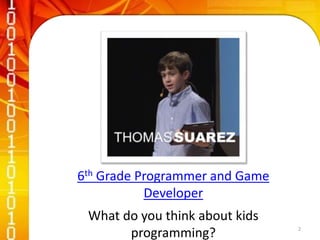
6th Grade Programmer and Game
Developer
What do you think about kids
programming? 2
At the end of this lesson, students will be
able to:
• Understand Why We Use Programming Languages
• Identify Basic Scratch Programming Elements
• Use Scratch to create a Holiday Greeting Card
Note-taking Sheet
3
• The ability to talk to a computer in a language it can
understand
• The computer will read your programming code and
execute your instructions
• The code must be correct and unambiguous
4
5
6
Why do we have programming languages?
A way of thinking
A way of effectively expressing instructions
What is a language for?
Tell the hardware what you want it to do
Not necessary to make physical hardware changes
7
• Statements
• Boolean
Expression
• Conditions
• Loops
• Variables
• Threads
• Events
• Sprite
8
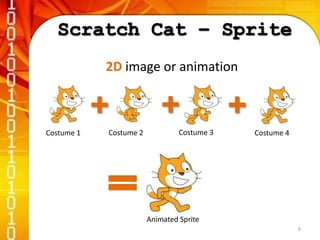
2D image or animation
Costume 1 Costume 2 Costume 3 Costume 4
Animated Sprite
9
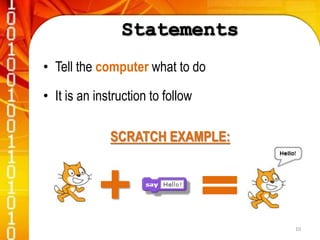
• Tell the computer what to do
• It is an instruction to follow
SCRATCH EXAMPLE:
10
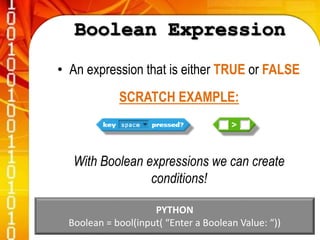
• An expression that is either TRUE or FALSE
SCRATCH EXAMPLE:
With Boolean expressions we can create
conditions!
PYTHON
Boolean = bool(input( “Enter a Boolean Value: “)) 11
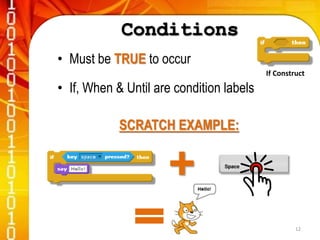
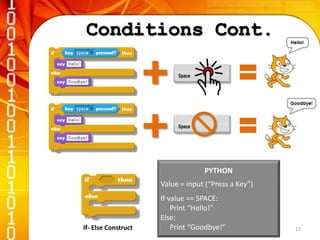
• Must be TRUE to occur
• If, When & Until are condition labels
SCRATCH EXAMPLE:
If Construct
12
If- Else Construct
PYTHON
Value = input (“Press a Key”)
If value == SPACE:
Print “Hello!”
Else:
Print “Goodbye!” 13
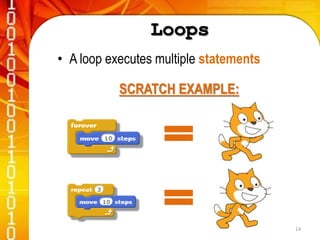
• A loop executes multiple statements
SCRATCH EXAMPLE:
14
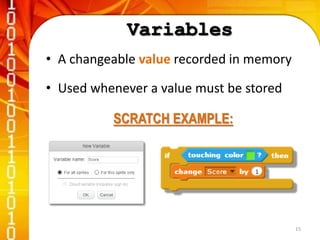
• A changeable value recorded in memory
• Used whenever a value must be stored
SCRATCH EXAMPLE:
15
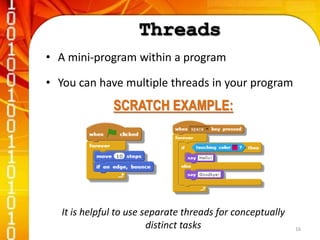
• A mini-program within a program
• You can have multiple threads in your program
SCRATCH EXAMPLE:
It is helpful to use separate threads for conceptually
distinct tasks 16
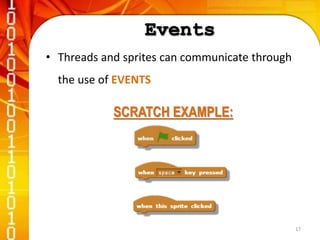
• Threads and sprites can communicate through
the use of EVENTS
SCRATCH EXAMPLE:
17
Essential Questions
Why do we use Programming
Languages?
What are some of the basic Scratch
programming elements?
18

Programming with Scratch

  • 1.
  • 2.
    6th Grade Programmerand Game Developer What do you think about kids programming? 2
  • 3.
    At the endof this lesson, students will be able to: • Understand Why We Use Programming Languages • Identify Basic Scratch Programming Elements • Use Scratch to create a Holiday Greeting Card Note-taking Sheet 3
  • 4.
    • The abilityto talk to a computer in a language it can understand • The computer will read your programming code and execute your instructions • The code must be correct and unambiguous 4
  • 5.
  • 6.
  • 7.
    Why do wehave programming languages? A way of thinking A way of effectively expressing instructions What is a language for? Tell the hardware what you want it to do Not necessary to make physical hardware changes 7
  • 8.
    • Statements • Boolean Expression •Conditions • Loops • Variables • Threads • Events • Sprite 8
  • 9.
    2D image oranimation Costume 1 Costume 2 Costume 3 Costume 4 Animated Sprite 9
  • 10.
    • Tell thecomputer what to do • It is an instruction to follow SCRATCH EXAMPLE: 10
  • 11.
    • An expressionthat is either TRUE or FALSE SCRATCH EXAMPLE: With Boolean expressions we can create conditions! PYTHON Boolean = bool(input( “Enter a Boolean Value: “)) 11
  • 12.
    • Must beTRUE to occur • If, When & Until are condition labels SCRATCH EXAMPLE: If Construct 12
  • 13.
    If- Else Construct PYTHON Value= input (“Press a Key”) If value == SPACE: Print “Hello!” Else: Print “Goodbye!” 13
  • 14.
    • A loopexecutes multiple statements SCRATCH EXAMPLE: 14
  • 15.
    • A changeablevalue recorded in memory • Used whenever a value must be stored SCRATCH EXAMPLE: 15
  • 16.
    • A mini-programwithin a program • You can have multiple threads in your program SCRATCH EXAMPLE: It is helpful to use separate threads for conceptually distinct tasks 16
  • 17.
    • Threads andsprites can communicate through the use of EVENTS SCRATCH EXAMPLE: 17
  • 18.
    Essential Questions Why dowe use Programming Languages? What are some of the basic Scratch programming elements? 18