Programming Fundamentals
LECTURE # 1
SEMESTER 1(FALL
2021)
Reference Book
 Download Link for book:
 https://faculty.ksu.edu.sa/sites/default/files/ObjectOrientedProgramminginC4thEdition.pd
f
 For Tool
 https://sourceforge.net/projects/orwelldevcpp/
Assessment Instruments with Weights
 Mid Term 25 marks
 Final Term 50 marks
 Sessionals 25 marks
 Assignments 5 marks
 Quizzes 10 marks
 Presentation/Project Viva 10 marks
Course Goals
 Understands fundamentals of programming such as variables, conditional and
iterative execution methods.
 The main aim of this course is to introduce the fundamental concepts
necessary for designing, using, and implementing programming languages and
its applications.
 Students are able to write computer program to solve specified problems.
Today’s Outline
 Introduction to programming fundamentals and problem Solving
 What is Problem Solving
 What is Program
 Algorithm and pseudo code
 Flowchart
 Types of Programming Languages
 Von Neuman Architecture
Problem Solving
● Problem?...obstacle, difficulty…needs to be solved
● P.solving is process of finding a best solution for it.
● P.solving is a skill that can be developed
● we solve different problems every day…..easy and difficult(more time and attention)
● different strategies, techniques and tools are used to solve a problem
● computers are used as tools to solve complex problems by developing programs
● program contain diffrent instructions for computer
● Programmer writes instructions and computer executes these to solve prob..
● A good problem solver can be a good programmer
Program
Set of instructions that tells a computer what to do is called a program
● Computer works according to given instructions in the program
● Computer programs are written in programming languages
● A person who develops a program is called a programmer
● Programmer uses programming languages or tools to write a program
Algorithms and pseudocode
➔ An algorithm is a step-by-step procedure to solve a problem
➔ algorithm makes problem simpler and easier
➔ It is better to write an algorithm before writing an actual computer program
➔ properties
◆ given problem should be broken down into simple+meaningful steps
◆ Steps should be numbered sequentially
◆ Steps should be descriptive and written in simple english
➔ Pseudo code
◆ algorithms are written in a language that is similar to simple english called psuedo code
Example of an algorithm
 Baking a Cake:
 Preheat the oven
 Gather the ingredients
 Measure out the ingredients
 Mix together the ingredients to make the batter
 Grease a pan
 Pour the batter into the pan
 Put the pan in the oven
 Set a timer
 When the timer goes off, take the pan out of the oven
 Enjoy!
More Examples
 Make tea.
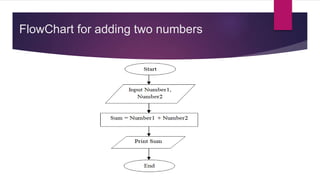
 Add two numbers.
 Take two number inputs
 Add numbers using the + operator
 Display the result
 Find sum of Two Natural Numbers
FlowChart for adding two numbers
Another Example
 A user of a computer program could be asked to enter in 3 random numbers. The program could then
follow a set of specific steps in order to arrange the numbers from smallest to largest.
 Ask the user to enter 3 numbers.
 Look at the numbers in the order that the user entered them.
 Is the first number larger than the second number?
 If so, swap the 2 numbers.
 Otherwise, do nothing.
 Is the second number larger than the third number?
 If so, swap the second and third number.
 Otherwise do nothing.
 Repeat steps 2-4 until correct order is achieved
 Return new sequence to user
Programming Languages
➔ A set of words, symbols and codes used to write programs is called programming language.
➔ different programming languages are used for different programs
➔ Types
◆ Low-Level Languages
◆ High-Level Languages
Low-Level Languages
● Near to computer hardware and far from human languages
● Computer can understand these languages easily
● Writing programs in low level languages requires a deep knowledge of hardware
● Types
■ Machine Language
■ Assembly Language
Machine Language
➔ Instructions are written in binary form
➔ Only language which is directly understood by the computer
➔ Machine language is difficult to understand by humans.
➔ Writing and modifying program takes a lot of time
➔ First generation language
Assembly Language
➔ One step higher than machine language
➔ symbols are used instead of binary code….Mnemonics(sub for subtrctn)
➔ Mostly used for writing system software
➔ Second generation language

Pf lec 01 intro

  • 1.
    Programming Fundamentals LECTURE #1 SEMESTER 1(FALL 2021)
  • 2.
    Reference Book  DownloadLink for book:  https://faculty.ksu.edu.sa/sites/default/files/ObjectOrientedProgramminginC4thEdition.pd f  For Tool  https://sourceforge.net/projects/orwelldevcpp/
  • 3.
    Assessment Instruments withWeights  Mid Term 25 marks  Final Term 50 marks  Sessionals 25 marks  Assignments 5 marks  Quizzes 10 marks  Presentation/Project Viva 10 marks
  • 4.
    Course Goals  Understandsfundamentals of programming such as variables, conditional and iterative execution methods.  The main aim of this course is to introduce the fundamental concepts necessary for designing, using, and implementing programming languages and its applications.  Students are able to write computer program to solve specified problems.
  • 5.
    Today’s Outline  Introductionto programming fundamentals and problem Solving  What is Problem Solving  What is Program  Algorithm and pseudo code  Flowchart  Types of Programming Languages  Von Neuman Architecture
  • 6.
    Problem Solving ● Problem?...obstacle,difficulty…needs to be solved ● P.solving is process of finding a best solution for it. ● P.solving is a skill that can be developed ● we solve different problems every day…..easy and difficult(more time and attention) ● different strategies, techniques and tools are used to solve a problem ● computers are used as tools to solve complex problems by developing programs ● program contain diffrent instructions for computer ● Programmer writes instructions and computer executes these to solve prob.. ● A good problem solver can be a good programmer
  • 7.
    Program Set of instructionsthat tells a computer what to do is called a program ● Computer works according to given instructions in the program ● Computer programs are written in programming languages ● A person who develops a program is called a programmer ● Programmer uses programming languages or tools to write a program
  • 8.
    Algorithms and pseudocode ➔An algorithm is a step-by-step procedure to solve a problem ➔ algorithm makes problem simpler and easier ➔ It is better to write an algorithm before writing an actual computer program ➔ properties ◆ given problem should be broken down into simple+meaningful steps ◆ Steps should be numbered sequentially ◆ Steps should be descriptive and written in simple english ➔ Pseudo code ◆ algorithms are written in a language that is similar to simple english called psuedo code
  • 9.
    Example of analgorithm  Baking a Cake:  Preheat the oven  Gather the ingredients  Measure out the ingredients  Mix together the ingredients to make the batter  Grease a pan  Pour the batter into the pan  Put the pan in the oven  Set a timer  When the timer goes off, take the pan out of the oven  Enjoy!
  • 10.
    More Examples  Maketea.  Add two numbers.  Take two number inputs  Add numbers using the + operator  Display the result  Find sum of Two Natural Numbers
  • 11.
  • 12.
    Another Example  Auser of a computer program could be asked to enter in 3 random numbers. The program could then follow a set of specific steps in order to arrange the numbers from smallest to largest.  Ask the user to enter 3 numbers.  Look at the numbers in the order that the user entered them.  Is the first number larger than the second number?  If so, swap the 2 numbers.  Otherwise, do nothing.  Is the second number larger than the third number?  If so, swap the second and third number.  Otherwise do nothing.  Repeat steps 2-4 until correct order is achieved  Return new sequence to user
  • 13.
    Programming Languages ➔ Aset of words, symbols and codes used to write programs is called programming language. ➔ different programming languages are used for different programs ➔ Types ◆ Low-Level Languages ◆ High-Level Languages
  • 14.
    Low-Level Languages ● Nearto computer hardware and far from human languages ● Computer can understand these languages easily ● Writing programs in low level languages requires a deep knowledge of hardware ● Types ■ Machine Language ■ Assembly Language
  • 15.
    Machine Language ➔ Instructionsare written in binary form ➔ Only language which is directly understood by the computer ➔ Machine language is difficult to understand by humans. ➔ Writing and modifying program takes a lot of time ➔ First generation language
  • 16.
    Assembly Language ➔ Onestep higher than machine language ➔ symbols are used instead of binary code….Mnemonics(sub for subtrctn) ➔ Mostly used for writing system software ➔ Second generation language